Department of Computer Engineering
Chapter 3: Top Level View of Computer
Function and Interconnection
Computer Architecture
and Organization
2
Top Level View of Computer System
Computer Architecture and Organization
At a top level, a computer consists of CPU (central processing
unit), memory, and I/O components, with one or more modules of
each type
These components are interconnected in some fashion to achieve
the basic function of the computer, which is to execute programs
Thus, at a top level, we can describe a computer system by:
 Describing the external behavior of each component—that is,
the data and control signals that it exchanges with other
components
 Describing the interconnection structure and the controls
required to manage the use of the interconnection structure
3
Hardwired Program Concept
Computer Architecture and Organization
Small set of logic Components can combined in various way to store
binary data and perform arithmetic logical operation on that data
For hardwired program, logical components need to be configured or
rewired for each particular computation
 In hardwired program, the system accepts data and produces results
 Hardwired systems are inflexible
· Solution , Use Software Programming techniques
4
Software Program Concept
Computer Architecture and Organization
Program is a sequence of instructions to a computer to accomplish
various tasks
For each instruction, an arithmetic or logical operation is done
For each operation, a different set of control signals is needed, thus
Construct a general-purpose configuration of arithmetic and logic
functions, this set of hardware will perform various functions on
data depending on control signals applied to the hardware
With general-purpose hardware, the system accepts data and control
signals and produces results
5
Software Program Concept
Computer Architecture and Organization
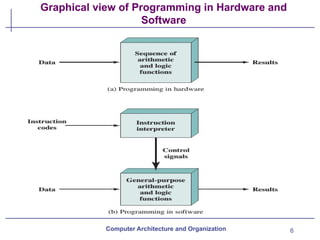
 Lets add the general purpose hardware segment that can accept a
code and generate control signals
Thus, instead of rewiring the hardware for each new program, the
programmer merely needs to supply a new set of control signals.
 Program is now much easier. In stead of rewiring the hardware for
each new program, all we need to do is provide a new sequence of
code.
This sequence of code or instruction is called software
.
.
6
Graphical view of Programming in Hardware and
Software
Computer Architecture and Organization
7
Function of Control Unit
For each operation a unique code is provided to control unit of the
processor
 E.g. ADD, MOVE
A hardware segment accepts the code and issues the control signals
for various modules in the computer
Computer Architecture and Organization
8
Computer components
Virtually all contemporary computer designs are based on concepts
developed by John von Neumann at the Institute for Advanced
Studies, Princeton.
 Such a design is referred to as the von Neumann architecture and is
based on three key concepts
· Data and Instruction are stored in a single read-write memory
· The content of this memory are addressable by location without
regard to the type of data contained there
· Execution occurs in a sequential fashion from one instruction to the
next (unless explicitly modified)
Computer Architecture and Organization
9
Computer Components
The two major components of the system: an instruction interpreter
(control unit) and a module of general-purpose arithmetic and logic
unit constitute the Central Processing Unit(CPU).
Data and instructions need to get into the system and results out
Input/output
Main memory used to store instruction and data temporarily
Data, Instruction and Control Signals need a pathway in order to
communicate various components
System Bus
Computer Architecture and Organization
10
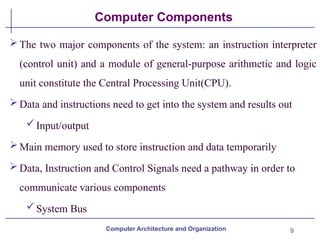
Computer Components: Top Level View Diagram
Computer Architecture and Organization
11
Computer Components
The CPU exchanges data with memory, for this purpose, it
typically makes use of two internal (to the CPU) registers
 A memory address register (MAR), which specifies the
address in memory for the next read or write, and a
 memory buffer register (MBR), which contains the data to be
written into memory or receives the data read from memory
 The CPU exchanges data with I/O, for this purpose there is two
registers
 I/O address register (I/OAR), specifies a particular I/O device.
Computer Architecture and Organization
12
Computer Components
An I/O buffer (I/OBR) register is used for the exchange of data
between an I/O module and the CPU
A memory module consists of a set of locations, defined by
sequentially numbered addresses.
 Each location contains a binary number that can be interpreted as
either an instruction or data
 An I/O module transfers data from external devices to CPU and
memory, and vice versa
 It contains internal buffers for temporarily holding these data until
they can be sent on.
Computer Architecture and Organization
13
Computer Functions
 The basic function performed by a computer is execution of a
program, which consists of a set of instructions stored in memory.
 The processor does the actual work by executing instructions specified
in the program
 Instruction processing consists of two steps:
 Fetch Cycle, the processor reads instructions from memory one at
time and
 Execute Cycle, processor execute each instruction
 Program execution consists of repeating the process of instruction
fetch and instruction execution
Computer Architecture and Organization
14
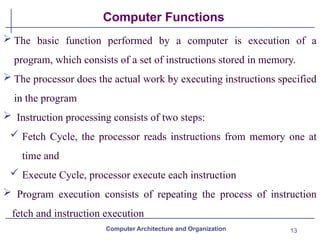
Instruction cycle
The processing required for a single instruction is called an
instruction cycle
 It Consists of two steps , thus are Fetch Cycle and Execute Cycle
Computer Architecture and Organization
15
Fetch cycle
In a typical processor, a register called the program counter (PC)
holds the address of the instruction to be fetched next
At the beginning of each instruction cycle, the processor fetches an
instruction from memory location pointed by PC
 The fetched instruction is loaded into a register in the processor
known as the instruction register (IR)
Processor always increments the PC after each instruction fetch
Computer Architecture and Organization
16
Execute cycle
The instruction contains bits that specify the action the processor is
to take.
The processor interprets the instruction and performs the required
action. In general, these actions fall into four categories
 Processor-memory: Data may be transferred from processor to
memory or from memory to processor.
 Processor-I/O: Data may be transferred to or from a peripheral
device by transferring between the processor and an I/O
module.
 Data processing: The processor may perform some arithmetic or
Computer Architecture and Organization
17
Execute cycle
logic operation on data.
Control: An instruction may specify that the sequence of
memory execution be altered.
 An instruction’s execution may involve a combination of the
above actions.
Computer Architecture and Organization
18
Instruction Format
 In computer organization, instruction formats refer to the way
instructions are encoded and represented in machine language for
execution
 The instruction formats are a sequence of bits (0 and 1). These bits,
when grouped, are known as fields
Each field of the machine provides specific information to the CPU
related to the operation and location of the data
 It can be of variable lengths with multiple numbers of addresses.
These address fields in the instruction format vary as per the
organization of the registers in the CPU
Computer Architecture and Organization
19
Instruction Format
There are several types of instruction formats, including zero, one,
two, and three-address instructions
The most common fields in the instruction format are:
The operation field , specifies the operation to be performed
such as arithmetic and logical operation.
Address field, which contains the location of the operand, i.e.,
register or memory location.
Mode field, which specifies how operand is to be founded.
Computer Architecture and Organization
20
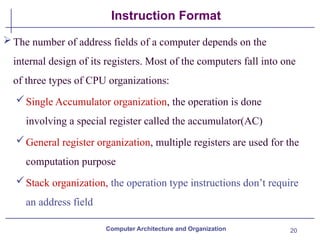
Instruction Format
The number of address fields of a computer depends on the
internal design of its registers. Most of the computers fall into one
of three types of CPU organizations:
Single Accumulator organization, the operation is done
involving a special register called the accumulator(AC)
General register organization, multiple registers are used for the
computation purpose
Stack organization, the operation type instructions don’t require
an address field
Computer Architecture and Organization
21
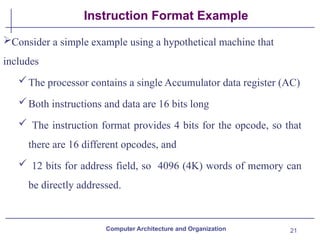
Instruction Format Example
Consider a simple example using a hypothetical machine that
includes
The processor contains a single Accumulator data register (AC)
Both instructions and data are 16 bits long
 The instruction format provides 4 bits for the opcode, so that
there are 16 different opcodes, and
 12 bits for address field, so 4096 (4K) words of memory can
be directly addressed.
Computer Architecture and Organization
22
Example of a hypothetical Simple Machine Instruction format
Computer Architecture and Organization
23
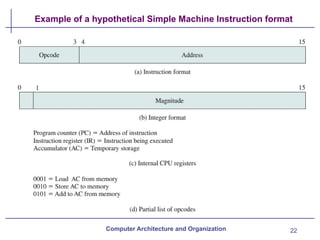
Example of Program Execution
Computer Architecture and Organization
24
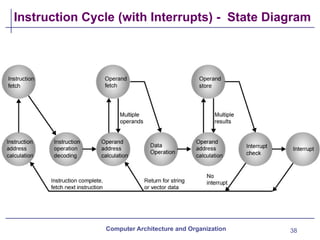
Instruction Cycle State Diagram
Computer Architecture and Organization
25
Instruction Cycle States
Computer Architecture and Organization
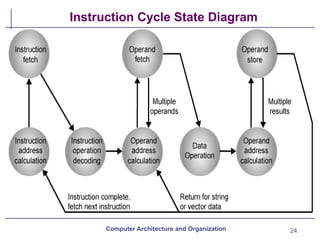
Instruction address calculation (iac): Determine the address of the next
instruction to be executed
Instruction fetch (if): Read instruction from its memory location into
the processor.
Instruction operation decoding (iod): Analyze instruction to determine
type of operation to be performed and operand(s) to be used.
 Operand address calculation (oac): If the operation involves reference
to an operand in memory or available via I/O, then determine the
address of the operand.
26
Instruction Cycle States
Computer Architecture and Organization
Operand fetch (of): Fetch the operand from memory or read it in from
I/O.
Data operation (do): Perform the operation indicated in the instruction.
 Operand store (os): Write the result into memory or out to I/O.
For example, the PDP-11 instruction ADD A,B results in the
following sequence of states:
iac, if, iod, oac, of, oac, of, do, oac, os.
27
Interrupts
Computer Architecture and Organization
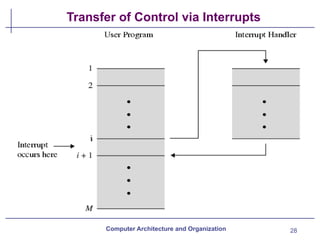
An interrupt in computer architecture is a signal that requests
the processor to suspend its current execution and service the
occurred interrupt
 To service the interrupt the processor executes the
corresponding interrupt service routine (ISR)
 After the execution of the interrupt service routine, the
processor resumes the execution of the suspended program.
 Interrupts can be of two types of hardware interrupts and
software interrupts.
28
Transfer of Control via Interrupts
Computer Architecture and Organization
29
Interrupts
Computer Architecture and Organization
Common Class of Interrupts:
· Program: Generated by some condition that occurs as a result of an
instruction execution
o Arithmetic overflow, division by zero,
· Timer
o Generated by internal processor timer
· I/O
o Generated by I/O controller
· Hardware failure
o Generated by a failure such as power failure or memory parity
error.
30
Interrupt Cycle
Computer Architecture and Organization
Interrupts are provided primarily as a way to improve processing
efficiency.
A normal instruction cycle starts with the instruction fetch and
execute.
But, to accommodate the occurrence of the interrupts while normal
processing of the instructions, the interrupt cycle is added to the
normal instruction cycle
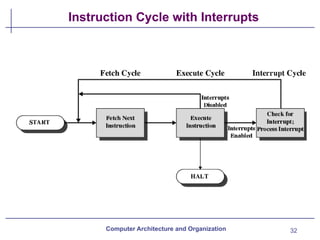
In interrupt cycle, Processor checks for interrupt Indicated by an
interrupt signal
31
Interrupt Cycle
Computer Architecture and Organization
If no interrupt, fetch next instruction
If interrupt pending:
Suspend execution of current program being executed and
saves its context such as content of PC & any other data
relevant to the processor activity.
Set PC to the starting address of interrupt handler routine
Execute interrupt handler routine, when it becomes completed
the processor can resume execution of the user program at the
point of interruption
32
Instruction Cycle with Interrupts
Computer Architecture and Organization
33
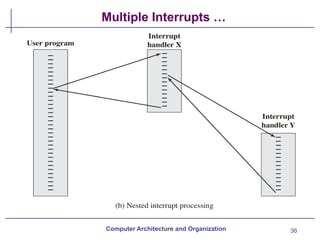
Multiple Interrupts
Computer Architecture and Organization
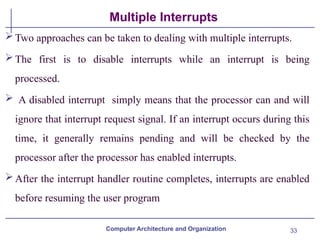
Two approaches can be taken to dealing with multiple interrupts.
The first is to disable interrupts while an interrupt is being
processed.
 A disabled interrupt simply means that the processor can and will
ignore that interrupt request signal. If an interrupt occurs during this
time, it generally remains pending and will be checked by the
processor after the processor has enabled interrupts.
After the interrupt handler routine completes, interrupts are enabled
before resuming the user program
34
Multiple Interrupts
Computer Architecture and Organization
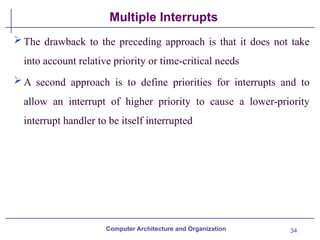
The drawback to the preceding approach is that it does not take
into account relative priority or time-critical needs
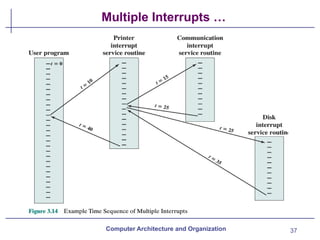
A second approach is to define priorities for interrupts and to
allow an interrupt of higher priority to cause a lower-priority
interrupt handler to be itself interrupted
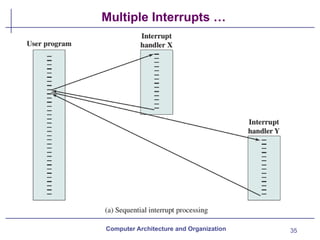
35
Multiple Interrupts …
Computer Architecture and Organization
36
Multiple Interrupts …
Computer Architecture and Organization
37
Multiple Interrupts …
Computer Architecture and Organization
38
Instruction Cycle (with Interrupts) - State Diagram
Computer Architecture and Organization
39
Computer Component Interconnection
A computer consists of a set of components or modules of three basic
types ( processor, memory, I/O) that communicate with each other.
 A computer is a network of basic modules. Thus, there must be paths
for connecting the modules.
 The collection of paths connecting the various modules is called the
interconnection structure
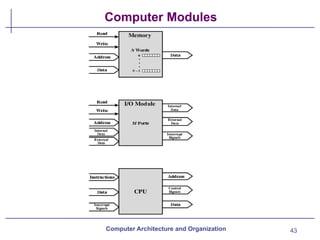
Memory: Typically, a memory module will consist of N words of
equal length, each word is assigned a unique numerical address (0,
1, . . . ,N – 1).
Computer Architecture and Organization
40
Computer Component Interconnection
A word of data can be read from or written into the memory
The nature of the operation is indicated by read and write control
signals
The location for the operation is specified by an address
 I/O module: I/O functionally is similar to memory, there are two
operations, read and write. Further,
An I/O module may control more than one external device. We can
refer to each of the interfaces to an external device as a port and give
each a unique address (e.g., 0, 1, . . . ,M– 1).
Computer Architecture and Organization
41
Computer Component Interconnection
In addition, there are external data paths for the input and output of
data with an external device.
Finally, an I/O module may be able to send interrupt signals to the
processor.
Processor: The processor reads in instructions and data, writes out
data after processing, and uses control signals to control the overall
operation of the system.
It also receives interrupt signals.
Computer Architecture and Organization
42
Computer Component Interconnection
The interconnection structure must support the following types
of transfers:
Memory to processor: The processor reads an instruction or a
unit of data from memory.
Processor to memory: The processor writes a unit of data to
memory.
 I/O to processor: The processor reads data from an I/O device
via an I/O module.
Processor to I/O: The processor sends data to the I/O device.
I/O to or from memory: For these two cases, an I/O module is
allowed to exchange data directly with memory, without going
through the processor, using direct memory access (DMA).
Computer Architecture and Organization
43
Computer Modules
Computer Architecture and Organization
44
Bus Interconnection
A bus is a communication pathway connecting two or more
devices.
 A bus is a common pathway through which information flows from
one computer component to another
A key characteristic of a bus is that, it is a shared transmission
medium
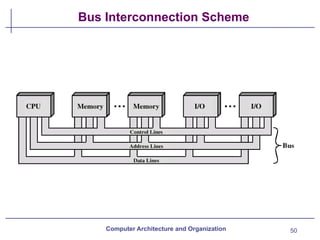
A bus consists of multiple communication pathways, or lines.
 Each line is capable of transmitting signals representing binary 1
and binary 0
 For example, an 8-bit unit of data can be transmitted over eight bus
lines.
Computer Architecture and Organization
45
System Bus
A bus that connects major computer components (processor,
memory, I/O) is called a system bus
Consist typically 50 to hundreds of separate lines
Each line assigned a particular meaning or function
on any bus the lines can be grouped into three functional groups:
 Data, address and control lines
In addition, there may be a power distribution lines that supply
power to the attached modules
Computer Architecture and Organization
46
Data Lines
The data lines provide a path for moving data among system
modules.
These lines, collectively, are called the data bus
The data bus may consist of 32, 64, 128, or even more separate
lines, the number of lines being referred to as the width of the data
bus
Because each line can carry only 1 bit at a time, the number of
lines determines how many bits can be transferred at a time
Width is a key determinant of performance
If data bus is 32 bit and each instruction is 64 bit the processor
must access the memory twice during each instruction cycle
Computer Architecture and Organization
47
Address Lines
The address lines are used to designate the source or destination of
the data on the data bus
For example, if the processor wishes to read a word (8, 16, or 32
bits) of data from memory, it puts the address of the desired word on
the address
The width of the address bus determines the maximum possible
memory capacity of the system.
e.g. 8080 has 16 bit address bus giving 64k address space
Also used to address I/o ports
higher-order bits used to select a particular module
Lower-order bits select I/O port within the module
Computer Architecture and Organization
48
Control Lines
Used to control the access to and the use of the data and address
lines. Because the data and address lines are shared by all
components
Control signals transmit both command and timing information
among system modules.
Timing signals indicate the validity of data and address information
Command signals specify operations to be performed
 Typical control lines include:
Memory write: Causes data on the bus to be written into the
addressed location
Memory read: Causes data from the addressed location to be
placed on the bus
Computer Architecture and Organization
49
Control lines
 I/O write: causes data on the bus to be output to the addressed I/O port
 I/O read: causes data from the addressed I/O port to be placed on the bus
 Transfer ACK: indicates that data have been accepted from or placed on
the bus
 Bus request: indicates that a module needs to gain control of the bus
 Bus grant: indicates that a requesting module has been granted control of
the bus
 Interrupt request: indicates that an interrupt is pending
 Interrupt ACK: acknowledges that the pending interrupt has been
recognized
 Clock: is used to synchronize operations
 Reset: initializes all modules.
Computer Architecture and Organization
50
Bus Interconnection Scheme
Computer Architecture and Organization
51
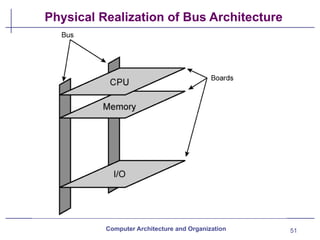
Physical Realization of Bus Architecture
Computer Architecture and Organization
52
Single Bus Problems
 If a great number of devices are connected to the bus, performance will suffer.
The cases are:
 The bus length becomes greater and leads to greater propagation delay
 The bus may become a bottleneck as the aggregate data transfer demand
approaches the capacity of the bus
 bus bottleneck solved by increasing the data rate that the bus can carry and by
using wider buses, but data rates generated by attached devices
 Therefore to overcome the specified problems most computer uses multiple
buses, generally laid out in a hierarchy
 In a typical traditional multiple bus structure:
 There is a local bus that connects the processor to a cache memory and that may
support one or more local devices
Computer Architecture and Organization
53
Traditional Multiple Bus structure
 The cache memory controller connects the cache not only to this local bus, but to
a system bus to which are attached all of the main memory modules
 The use of a cache structure insulates the processor from a requirement to access
main memory frequently thus, main memory can be moved off of the local bus
onto a system bus
 In this way, I/O transfers to and from the main memory across the system bus do
not interfere with the processor’s activity
 It is possible to connect I/O controllers directly onto the system bus but, A more
efficient solution is to make use of one or more expansion buses for this purpose
 An expansion bus interface buffers data transfers between the system bus and the
I/O controllers on the expansion bus
Computer Architecture and Organization
54
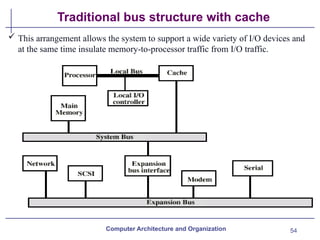
Traditional bus structure with cache
Computer Architecture and Organization
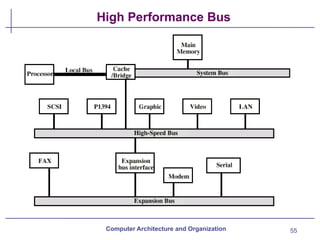
 This arrangement allows the system to support a wide variety of I/O devices and
at the same time insulate memory-to-processor traffic from I/O traffic.
55
High Performance Bus
Computer Architecture and Organization
56
Bus Types
Computer Architecture and Organization
Dedicated Bus:A dedicated bus line is permanently assigned either
to one function or to a physical subset of computer components.
Has separate data & address lines
Common on many buses
 The Advantages of Dedicated Bus is high throughput, because
there is less bus contention whereas it’s disadvantage is the
increased size and cost of the system.
 However, dedicated bus is not essential because address and data
information may be transmitted over the same set of lines using an
Address Valid control line
57
Bus Types
Computer Architecture and Organization
 Mutiplexed Bus: A bus used as both address and data bus through
time multiplexing technique
The Advantages of multiplexed bus is use of fewer lines, which
saves space and, usually, cost.
Where as it’s disadvantages is more complex circuitry is needed
within each module and also causes a potential reduction in
performance
58
Bus Arbitration
In all but the simplest systems, more than one module may need
control of the bus
For example, an I/O module may need to read or write directly to
memory, without sending the data to the processor
some method of arbitration is needed because only one unit at a
time can successfully transmit over the bus
The various methods can be roughly classified as being either
centralized or distributed
Computer Architecture and Organization
59
Centralised and Distributed bus Arbitration
In a centralized scheme, a single hardware device, referred to as a bus
controller or arbiter, is responsible for allocating time on the bus
 The device may be a separate module or part of the processor
 In a distributed scheme, there is no central controller. Rather, each
module contains access control logic and the modules act together to
share the bus
 With both methods of arbitration, the purpose is to designate one
device, either the processor or an I/O module, as master
The master may then initiate a data transfer (e.g., read or write) with
some other device,
Computer Architecture and Organization
Department of Computer Engineering
End of Chapter 3
Computer Architecture
and Organization
introduction to computer architecture Chapter_03.pptx

  • 1.
    Department of ComputerEngineering Chapter 3: Top Level View of Computer Function and Interconnection Computer Architecture and Organization
  • 2.
    2 Top Level Viewof Computer System Computer Architecture and Organization At a top level, a computer consists of CPU (central processing unit), memory, and I/O components, with one or more modules of each type These components are interconnected in some fashion to achieve the basic function of the computer, which is to execute programs Thus, at a top level, we can describe a computer system by:  Describing the external behavior of each component—that is, the data and control signals that it exchanges with other components  Describing the interconnection structure and the controls required to manage the use of the interconnection structure
  • 3.
    3 Hardwired Program Concept ComputerArchitecture and Organization Small set of logic Components can combined in various way to store binary data and perform arithmetic logical operation on that data For hardwired program, logical components need to be configured or rewired for each particular computation  In hardwired program, the system accepts data and produces results  Hardwired systems are inflexible · Solution , Use Software Programming techniques
  • 4.
    4 Software Program Concept ComputerArchitecture and Organization Program is a sequence of instructions to a computer to accomplish various tasks For each instruction, an arithmetic or logical operation is done For each operation, a different set of control signals is needed, thus Construct a general-purpose configuration of arithmetic and logic functions, this set of hardware will perform various functions on data depending on control signals applied to the hardware With general-purpose hardware, the system accepts data and control signals and produces results
  • 5.
    5 Software Program Concept ComputerArchitecture and Organization  Lets add the general purpose hardware segment that can accept a code and generate control signals Thus, instead of rewiring the hardware for each new program, the programmer merely needs to supply a new set of control signals.  Program is now much easier. In stead of rewiring the hardware for each new program, all we need to do is provide a new sequence of code. This sequence of code or instruction is called software . .
  • 6.
    6 Graphical view ofProgramming in Hardware and Software Computer Architecture and Organization
  • 7.
    7 Function of ControlUnit For each operation a unique code is provided to control unit of the processor  E.g. ADD, MOVE A hardware segment accepts the code and issues the control signals for various modules in the computer Computer Architecture and Organization
  • 8.
    8 Computer components Virtually allcontemporary computer designs are based on concepts developed by John von Neumann at the Institute for Advanced Studies, Princeton.  Such a design is referred to as the von Neumann architecture and is based on three key concepts · Data and Instruction are stored in a single read-write memory · The content of this memory are addressable by location without regard to the type of data contained there · Execution occurs in a sequential fashion from one instruction to the next (unless explicitly modified) Computer Architecture and Organization
  • 9.
    9 Computer Components The twomajor components of the system: an instruction interpreter (control unit) and a module of general-purpose arithmetic and logic unit constitute the Central Processing Unit(CPU). Data and instructions need to get into the system and results out Input/output Main memory used to store instruction and data temporarily Data, Instruction and Control Signals need a pathway in order to communicate various components System Bus Computer Architecture and Organization
  • 10.
    10 Computer Components: TopLevel View Diagram Computer Architecture and Organization
  • 11.
    11 Computer Components The CPUexchanges data with memory, for this purpose, it typically makes use of two internal (to the CPU) registers  A memory address register (MAR), which specifies the address in memory for the next read or write, and a  memory buffer register (MBR), which contains the data to be written into memory or receives the data read from memory  The CPU exchanges data with I/O, for this purpose there is two registers  I/O address register (I/OAR), specifies a particular I/O device. Computer Architecture and Organization
  • 12.
    12 Computer Components An I/Obuffer (I/OBR) register is used for the exchange of data between an I/O module and the CPU A memory module consists of a set of locations, defined by sequentially numbered addresses.  Each location contains a binary number that can be interpreted as either an instruction or data  An I/O module transfers data from external devices to CPU and memory, and vice versa  It contains internal buffers for temporarily holding these data until they can be sent on. Computer Architecture and Organization
  • 13.
    13 Computer Functions  Thebasic function performed by a computer is execution of a program, which consists of a set of instructions stored in memory.  The processor does the actual work by executing instructions specified in the program  Instruction processing consists of two steps:  Fetch Cycle, the processor reads instructions from memory one at time and  Execute Cycle, processor execute each instruction  Program execution consists of repeating the process of instruction fetch and instruction execution Computer Architecture and Organization
  • 14.
    14 Instruction cycle The processingrequired for a single instruction is called an instruction cycle  It Consists of two steps , thus are Fetch Cycle and Execute Cycle Computer Architecture and Organization
  • 15.
    15 Fetch cycle In atypical processor, a register called the program counter (PC) holds the address of the instruction to be fetched next At the beginning of each instruction cycle, the processor fetches an instruction from memory location pointed by PC  The fetched instruction is loaded into a register in the processor known as the instruction register (IR) Processor always increments the PC after each instruction fetch Computer Architecture and Organization
  • 16.
    16 Execute cycle The instructioncontains bits that specify the action the processor is to take. The processor interprets the instruction and performs the required action. In general, these actions fall into four categories  Processor-memory: Data may be transferred from processor to memory or from memory to processor.  Processor-I/O: Data may be transferred to or from a peripheral device by transferring between the processor and an I/O module.  Data processing: The processor may perform some arithmetic or Computer Architecture and Organization
  • 17.
    17 Execute cycle logic operationon data. Control: An instruction may specify that the sequence of memory execution be altered.  An instruction’s execution may involve a combination of the above actions. Computer Architecture and Organization
  • 18.
    18 Instruction Format  Incomputer organization, instruction formats refer to the way instructions are encoded and represented in machine language for execution  The instruction formats are a sequence of bits (0 and 1). These bits, when grouped, are known as fields Each field of the machine provides specific information to the CPU related to the operation and location of the data  It can be of variable lengths with multiple numbers of addresses. These address fields in the instruction format vary as per the organization of the registers in the CPU Computer Architecture and Organization
  • 19.
    19 Instruction Format There areseveral types of instruction formats, including zero, one, two, and three-address instructions The most common fields in the instruction format are: The operation field , specifies the operation to be performed such as arithmetic and logical operation. Address field, which contains the location of the operand, i.e., register or memory location. Mode field, which specifies how operand is to be founded. Computer Architecture and Organization
  • 20.
    20 Instruction Format The numberof address fields of a computer depends on the internal design of its registers. Most of the computers fall into one of three types of CPU organizations: Single Accumulator organization, the operation is done involving a special register called the accumulator(AC) General register organization, multiple registers are used for the computation purpose Stack organization, the operation type instructions don’t require an address field Computer Architecture and Organization
  • 21.
    21 Instruction Format Example Considera simple example using a hypothetical machine that includes The processor contains a single Accumulator data register (AC) Both instructions and data are 16 bits long  The instruction format provides 4 bits for the opcode, so that there are 16 different opcodes, and  12 bits for address field, so 4096 (4K) words of memory can be directly addressed. Computer Architecture and Organization
  • 22.
    22 Example of ahypothetical Simple Machine Instruction format Computer Architecture and Organization
  • 23.
    23 Example of ProgramExecution Computer Architecture and Organization
  • 24.
    24 Instruction Cycle StateDiagram Computer Architecture and Organization
  • 25.
    25 Instruction Cycle States ComputerArchitecture and Organization Instruction address calculation (iac): Determine the address of the next instruction to be executed Instruction fetch (if): Read instruction from its memory location into the processor. Instruction operation decoding (iod): Analyze instruction to determine type of operation to be performed and operand(s) to be used.  Operand address calculation (oac): If the operation involves reference to an operand in memory or available via I/O, then determine the address of the operand.
  • 26.
    26 Instruction Cycle States ComputerArchitecture and Organization Operand fetch (of): Fetch the operand from memory or read it in from I/O. Data operation (do): Perform the operation indicated in the instruction.  Operand store (os): Write the result into memory or out to I/O. For example, the PDP-11 instruction ADD A,B results in the following sequence of states: iac, if, iod, oac, of, oac, of, do, oac, os.
  • 27.
    27 Interrupts Computer Architecture andOrganization An interrupt in computer architecture is a signal that requests the processor to suspend its current execution and service the occurred interrupt  To service the interrupt the processor executes the corresponding interrupt service routine (ISR)  After the execution of the interrupt service routine, the processor resumes the execution of the suspended program.  Interrupts can be of two types of hardware interrupts and software interrupts.
  • 28.
    28 Transfer of Controlvia Interrupts Computer Architecture and Organization
  • 29.
    29 Interrupts Computer Architecture andOrganization Common Class of Interrupts: · Program: Generated by some condition that occurs as a result of an instruction execution o Arithmetic overflow, division by zero, · Timer o Generated by internal processor timer · I/O o Generated by I/O controller · Hardware failure o Generated by a failure such as power failure or memory parity error.
  • 30.
    30 Interrupt Cycle Computer Architectureand Organization Interrupts are provided primarily as a way to improve processing efficiency. A normal instruction cycle starts with the instruction fetch and execute. But, to accommodate the occurrence of the interrupts while normal processing of the instructions, the interrupt cycle is added to the normal instruction cycle In interrupt cycle, Processor checks for interrupt Indicated by an interrupt signal
  • 31.
    31 Interrupt Cycle Computer Architectureand Organization If no interrupt, fetch next instruction If interrupt pending: Suspend execution of current program being executed and saves its context such as content of PC & any other data relevant to the processor activity. Set PC to the starting address of interrupt handler routine Execute interrupt handler routine, when it becomes completed the processor can resume execution of the user program at the point of interruption
  • 32.
    32 Instruction Cycle withInterrupts Computer Architecture and Organization
  • 33.
    33 Multiple Interrupts Computer Architectureand Organization Two approaches can be taken to dealing with multiple interrupts. The first is to disable interrupts while an interrupt is being processed.  A disabled interrupt simply means that the processor can and will ignore that interrupt request signal. If an interrupt occurs during this time, it generally remains pending and will be checked by the processor after the processor has enabled interrupts. After the interrupt handler routine completes, interrupts are enabled before resuming the user program
  • 34.
    34 Multiple Interrupts Computer Architectureand Organization The drawback to the preceding approach is that it does not take into account relative priority or time-critical needs A second approach is to define priorities for interrupts and to allow an interrupt of higher priority to cause a lower-priority interrupt handler to be itself interrupted
  • 35.
    35 Multiple Interrupts … ComputerArchitecture and Organization
  • 36.
    36 Multiple Interrupts … ComputerArchitecture and Organization
  • 37.
    37 Multiple Interrupts … ComputerArchitecture and Organization
  • 38.
    38 Instruction Cycle (withInterrupts) - State Diagram Computer Architecture and Organization
  • 39.
    39 Computer Component Interconnection Acomputer consists of a set of components or modules of three basic types ( processor, memory, I/O) that communicate with each other.  A computer is a network of basic modules. Thus, there must be paths for connecting the modules.  The collection of paths connecting the various modules is called the interconnection structure Memory: Typically, a memory module will consist of N words of equal length, each word is assigned a unique numerical address (0, 1, . . . ,N – 1). Computer Architecture and Organization
  • 40.
    40 Computer Component Interconnection Aword of data can be read from or written into the memory The nature of the operation is indicated by read and write control signals The location for the operation is specified by an address  I/O module: I/O functionally is similar to memory, there are two operations, read and write. Further, An I/O module may control more than one external device. We can refer to each of the interfaces to an external device as a port and give each a unique address (e.g., 0, 1, . . . ,M– 1). Computer Architecture and Organization
  • 41.
    41 Computer Component Interconnection Inaddition, there are external data paths for the input and output of data with an external device. Finally, an I/O module may be able to send interrupt signals to the processor. Processor: The processor reads in instructions and data, writes out data after processing, and uses control signals to control the overall operation of the system. It also receives interrupt signals. Computer Architecture and Organization
  • 42.
    42 Computer Component Interconnection Theinterconnection structure must support the following types of transfers: Memory to processor: The processor reads an instruction or a unit of data from memory. Processor to memory: The processor writes a unit of data to memory.  I/O to processor: The processor reads data from an I/O device via an I/O module. Processor to I/O: The processor sends data to the I/O device. I/O to or from memory: For these two cases, an I/O module is allowed to exchange data directly with memory, without going through the processor, using direct memory access (DMA). Computer Architecture and Organization
  • 43.
  • 44.
    44 Bus Interconnection A busis a communication pathway connecting two or more devices.  A bus is a common pathway through which information flows from one computer component to another A key characteristic of a bus is that, it is a shared transmission medium A bus consists of multiple communication pathways, or lines.  Each line is capable of transmitting signals representing binary 1 and binary 0  For example, an 8-bit unit of data can be transmitted over eight bus lines. Computer Architecture and Organization
  • 45.
    45 System Bus A busthat connects major computer components (processor, memory, I/O) is called a system bus Consist typically 50 to hundreds of separate lines Each line assigned a particular meaning or function on any bus the lines can be grouped into three functional groups:  Data, address and control lines In addition, there may be a power distribution lines that supply power to the attached modules Computer Architecture and Organization
  • 46.
    46 Data Lines The datalines provide a path for moving data among system modules. These lines, collectively, are called the data bus The data bus may consist of 32, 64, 128, or even more separate lines, the number of lines being referred to as the width of the data bus Because each line can carry only 1 bit at a time, the number of lines determines how many bits can be transferred at a time Width is a key determinant of performance If data bus is 32 bit and each instruction is 64 bit the processor must access the memory twice during each instruction cycle Computer Architecture and Organization
  • 47.
    47 Address Lines The addresslines are used to designate the source or destination of the data on the data bus For example, if the processor wishes to read a word (8, 16, or 32 bits) of data from memory, it puts the address of the desired word on the address The width of the address bus determines the maximum possible memory capacity of the system. e.g. 8080 has 16 bit address bus giving 64k address space Also used to address I/o ports higher-order bits used to select a particular module Lower-order bits select I/O port within the module Computer Architecture and Organization
  • 48.
    48 Control Lines Used tocontrol the access to and the use of the data and address lines. Because the data and address lines are shared by all components Control signals transmit both command and timing information among system modules. Timing signals indicate the validity of data and address information Command signals specify operations to be performed  Typical control lines include: Memory write: Causes data on the bus to be written into the addressed location Memory read: Causes data from the addressed location to be placed on the bus Computer Architecture and Organization
  • 49.
    49 Control lines  I/Owrite: causes data on the bus to be output to the addressed I/O port  I/O read: causes data from the addressed I/O port to be placed on the bus  Transfer ACK: indicates that data have been accepted from or placed on the bus  Bus request: indicates that a module needs to gain control of the bus  Bus grant: indicates that a requesting module has been granted control of the bus  Interrupt request: indicates that an interrupt is pending  Interrupt ACK: acknowledges that the pending interrupt has been recognized  Clock: is used to synchronize operations  Reset: initializes all modules. Computer Architecture and Organization
  • 50.
    50 Bus Interconnection Scheme ComputerArchitecture and Organization
  • 51.
    51 Physical Realization ofBus Architecture Computer Architecture and Organization
  • 52.
    52 Single Bus Problems If a great number of devices are connected to the bus, performance will suffer. The cases are:  The bus length becomes greater and leads to greater propagation delay  The bus may become a bottleneck as the aggregate data transfer demand approaches the capacity of the bus  bus bottleneck solved by increasing the data rate that the bus can carry and by using wider buses, but data rates generated by attached devices  Therefore to overcome the specified problems most computer uses multiple buses, generally laid out in a hierarchy  In a typical traditional multiple bus structure:  There is a local bus that connects the processor to a cache memory and that may support one or more local devices Computer Architecture and Organization
  • 53.
    53 Traditional Multiple Busstructure  The cache memory controller connects the cache not only to this local bus, but to a system bus to which are attached all of the main memory modules  The use of a cache structure insulates the processor from a requirement to access main memory frequently thus, main memory can be moved off of the local bus onto a system bus  In this way, I/O transfers to and from the main memory across the system bus do not interfere with the processor’s activity  It is possible to connect I/O controllers directly onto the system bus but, A more efficient solution is to make use of one or more expansion buses for this purpose  An expansion bus interface buffers data transfers between the system bus and the I/O controllers on the expansion bus Computer Architecture and Organization
  • 54.
    54 Traditional bus structurewith cache Computer Architecture and Organization  This arrangement allows the system to support a wide variety of I/O devices and at the same time insulate memory-to-processor traffic from I/O traffic.
  • 55.
    55 High Performance Bus ComputerArchitecture and Organization
  • 56.
    56 Bus Types Computer Architectureand Organization Dedicated Bus:A dedicated bus line is permanently assigned either to one function or to a physical subset of computer components. Has separate data & address lines Common on many buses  The Advantages of Dedicated Bus is high throughput, because there is less bus contention whereas it’s disadvantage is the increased size and cost of the system.  However, dedicated bus is not essential because address and data information may be transmitted over the same set of lines using an Address Valid control line
  • 57.
    57 Bus Types Computer Architectureand Organization  Mutiplexed Bus: A bus used as both address and data bus through time multiplexing technique The Advantages of multiplexed bus is use of fewer lines, which saves space and, usually, cost. Where as it’s disadvantages is more complex circuitry is needed within each module and also causes a potential reduction in performance
  • 58.
    58 Bus Arbitration In allbut the simplest systems, more than one module may need control of the bus For example, an I/O module may need to read or write directly to memory, without sending the data to the processor some method of arbitration is needed because only one unit at a time can successfully transmit over the bus The various methods can be roughly classified as being either centralized or distributed Computer Architecture and Organization
  • 59.
    59 Centralised and Distributedbus Arbitration In a centralized scheme, a single hardware device, referred to as a bus controller or arbiter, is responsible for allocating time on the bus  The device may be a separate module or part of the processor  In a distributed scheme, there is no central controller. Rather, each module contains access control logic and the modules act together to share the bus  With both methods of arbitration, the purpose is to designate one device, either the processor or an I/O module, as master The master may then initiate a data transfer (e.g., read or write) with some other device, Computer Architecture and Organization
  • 60.
    Department of ComputerEngineering End of Chapter 3 Computer Architecture and Organization