COMPUTER ARCHITECTURE CMP 416
CMP 416 COURSE OUTLINE
Computer and its structures
Digital Logic
Data representation
CPU Basics and Organization
Memory and Data storage
Digital Arithmetic
Processor Architecture and Design features
Performance Measures
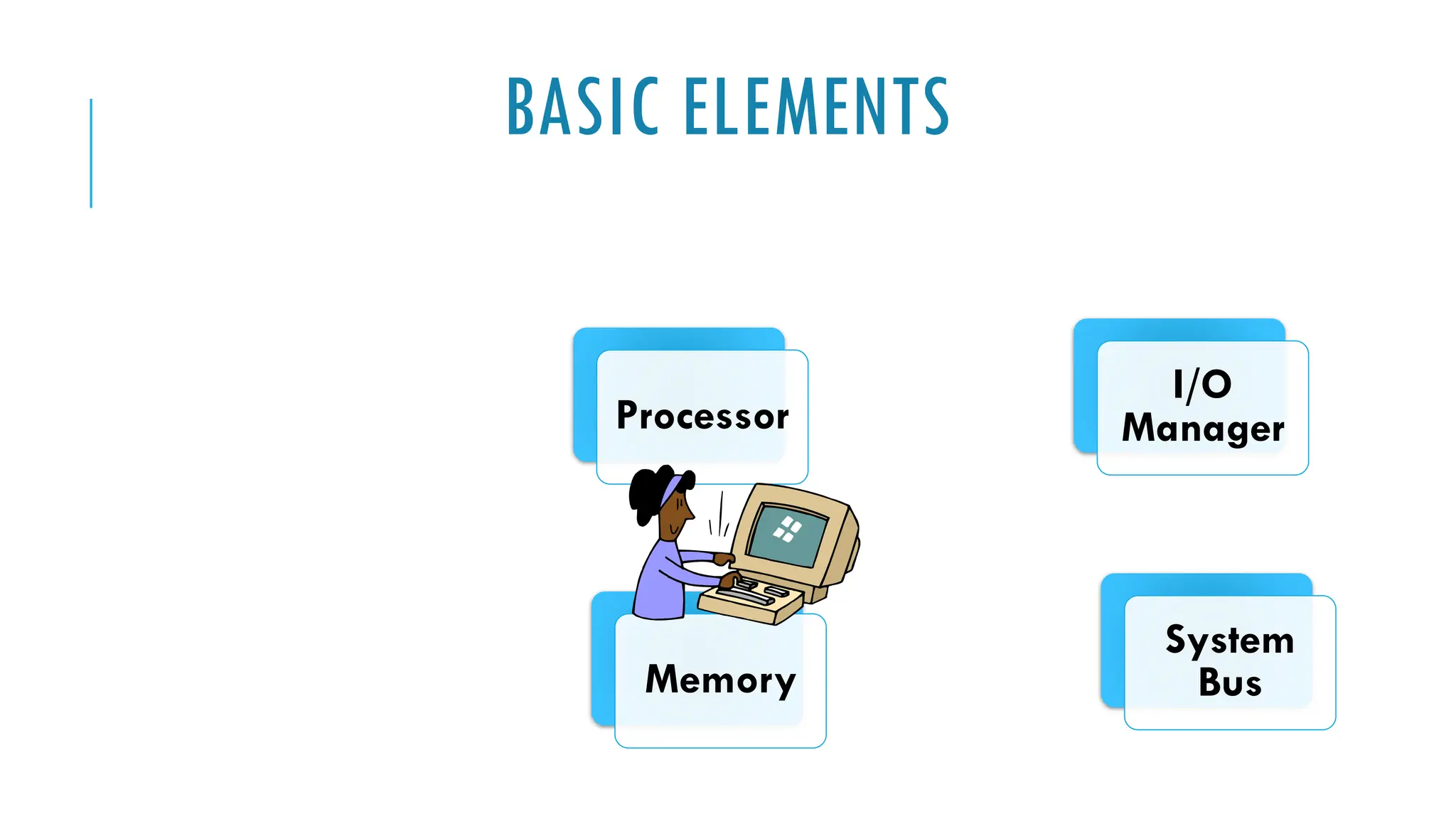
BASIC ELEMENTS
Processor
Memory
I/O
Manager
System
Bus
PROCESSOR
Controls the
operation of the
computer
Performs the data
processing
functions
Referred to as
the Central
Processing Unit
(CPU)
MAIN MEMORY
Volatile
 Contents of the memory is lost
when the computer is shut down
Referred to as real memory or
primary memory
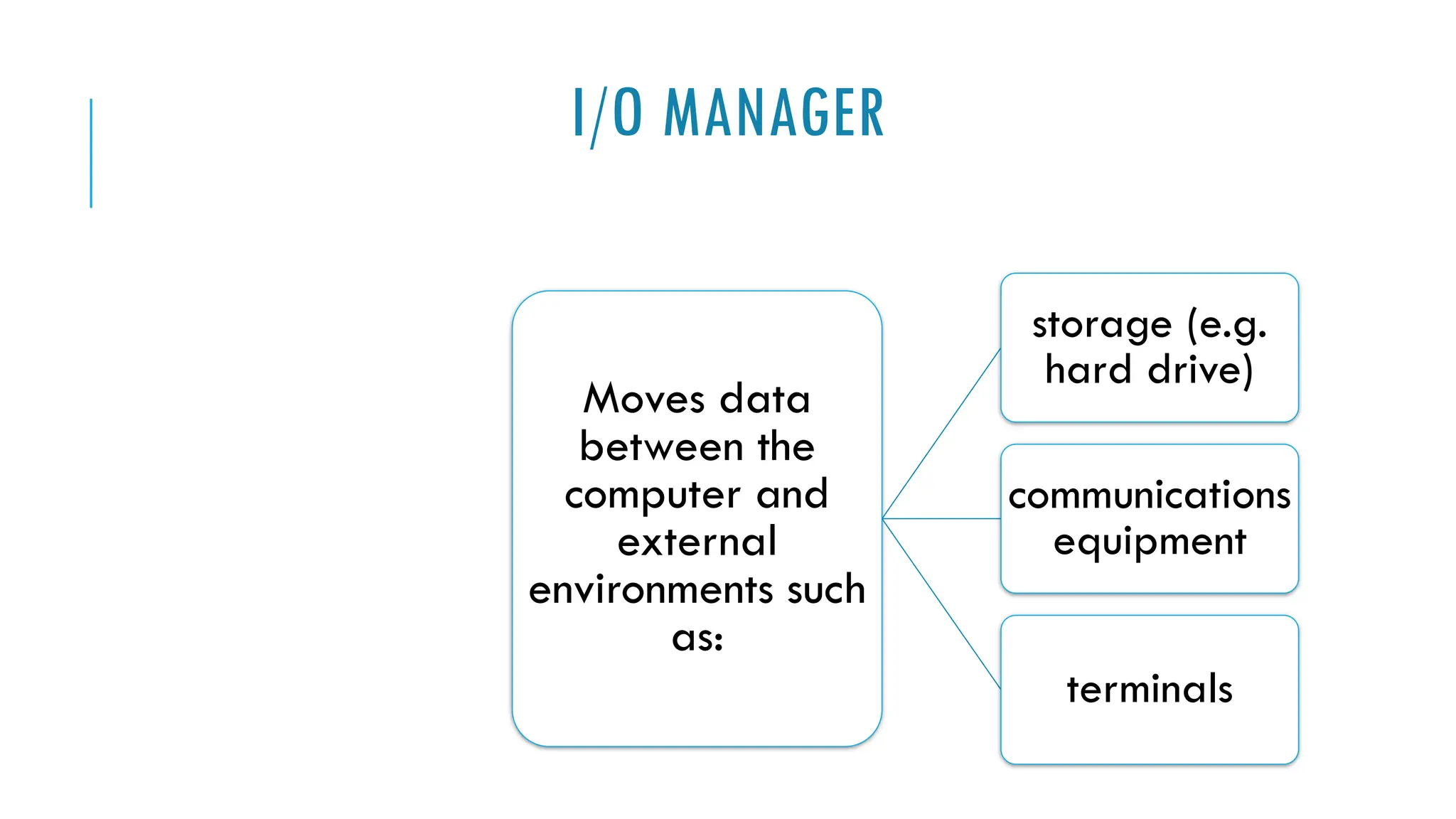
I/O MANAGER
Moves data
between the
computer and
external
environments such
as:
storage (e.g.
hard drive)
communications
equipment
terminals
SYSTEM BUS
 Provides for communication among
 Processors,
 Main memory, and
 Device (I/O) Management
FILE MANAGEMENT
Process or method of organizing, storing, and retrieving files.
 File storage,
 File organization, and
 File retrieval
It is about naming, storing and organising files in a system or software so that it's
easier to locate the files
COMPUTER ORGANISATION AND ARCHITECTURE
Design better programs including systems software such as
 Compilers, operating systems and device drivers.
 Optimize program behaviour
 Evaluate computer system performance
 Understand time, space and price tradeoffs
In a computer system, hardware and many software components are fundamentally
related
Computer organization and architecture helps to understand how hardware and
software interact with each other
STRUCTURE & FUNCTION (1)
Computer
 Complex system=> How can we design/describe it?
Hierarchic system:
 A set of interrelated subsystems, each subsystem hierarchic in structure until some
lowest level of elementary subsystems is reached
At each level of the system, the designer is concerned with structure
and function.
STRUCTURE & FUNCTION (2)
Function is the operation of individual components as part of the
structure.
Structure is the way in which components relate to each other.
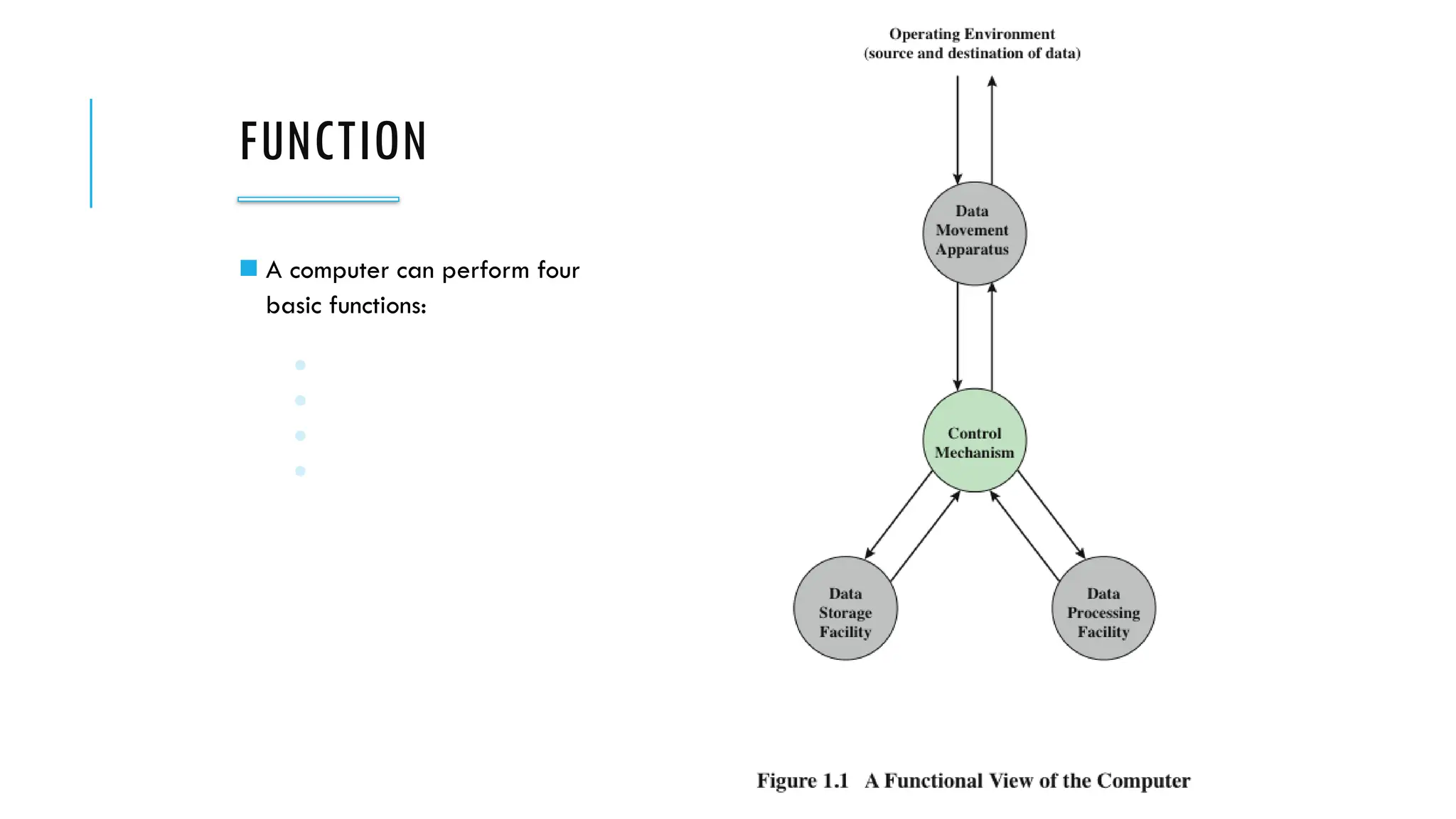
FUNCTION
Basic computer functions
Data processing: broad range of processing requirements
Data storage: short term and long term functions
Data movement: I/O process / Data communication
Control Mechanism: resource management, coordinate the performance of
functional parts, response to instructions
FUNCTION
◼ A computer can perform four
basic functions:
● Data processing
● Data storage
● Data movement
● Control
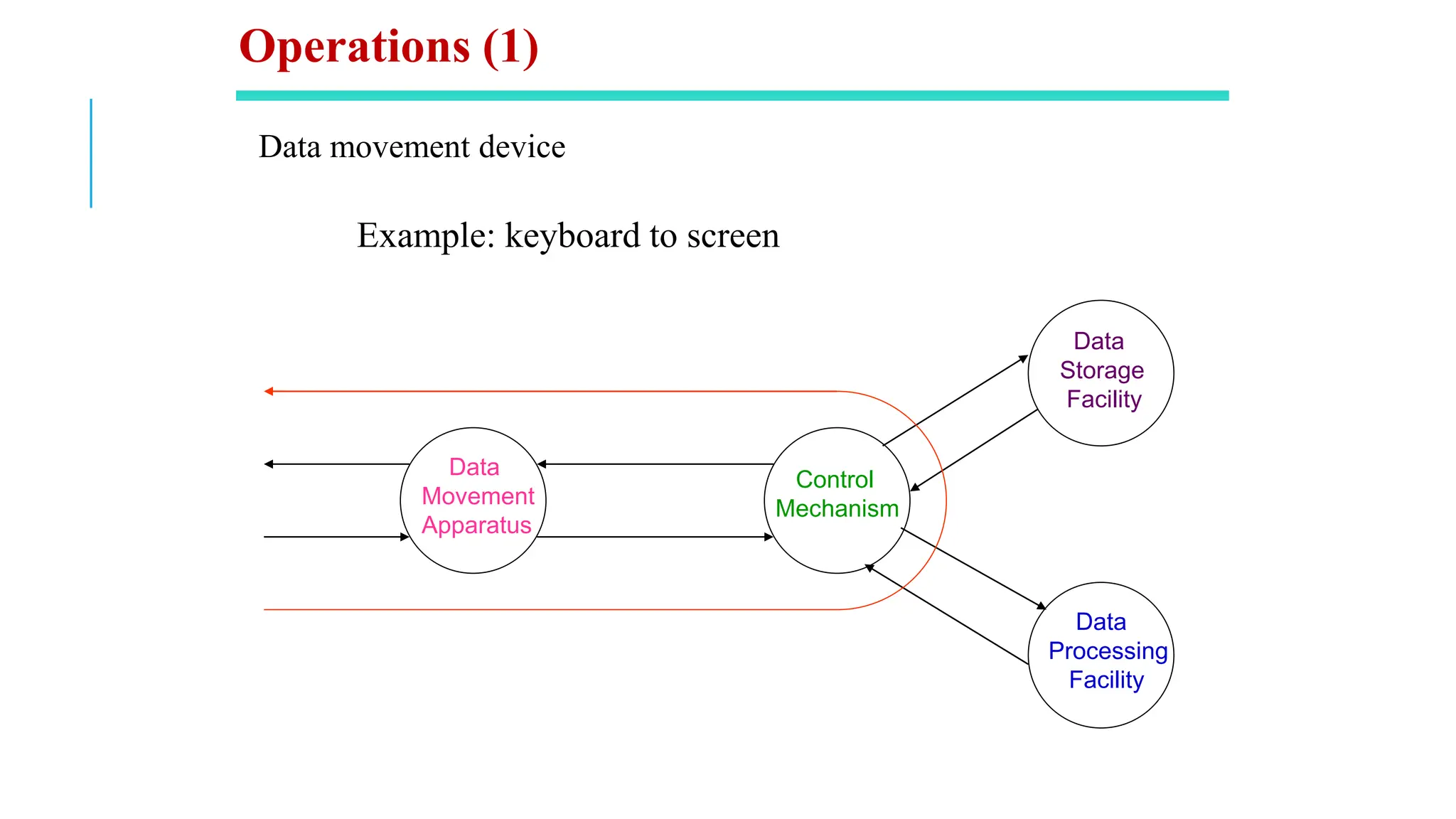
Data movement device
Example: keyboard to screen
Data
Movement
Apparatus
Control
Mechanism
Data
Storage
Facility
Data
Processing
Facility
Operations (1)
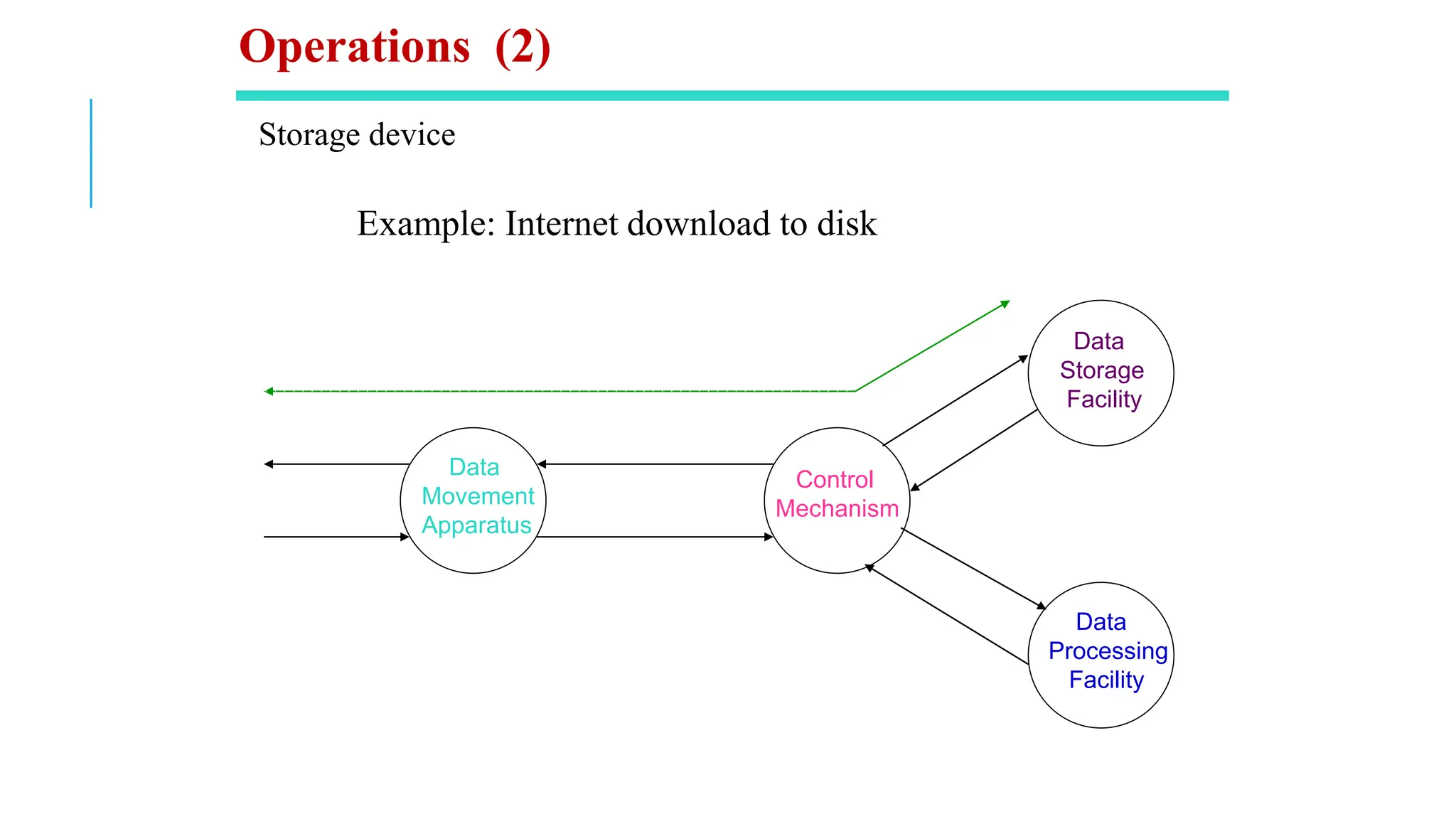
Storage device
Example: Internet download to disk
Data
Movement
Apparatus
Control
Mechanism
Data
Storage
Facility
Data
Processing
Facility
Operations (2)
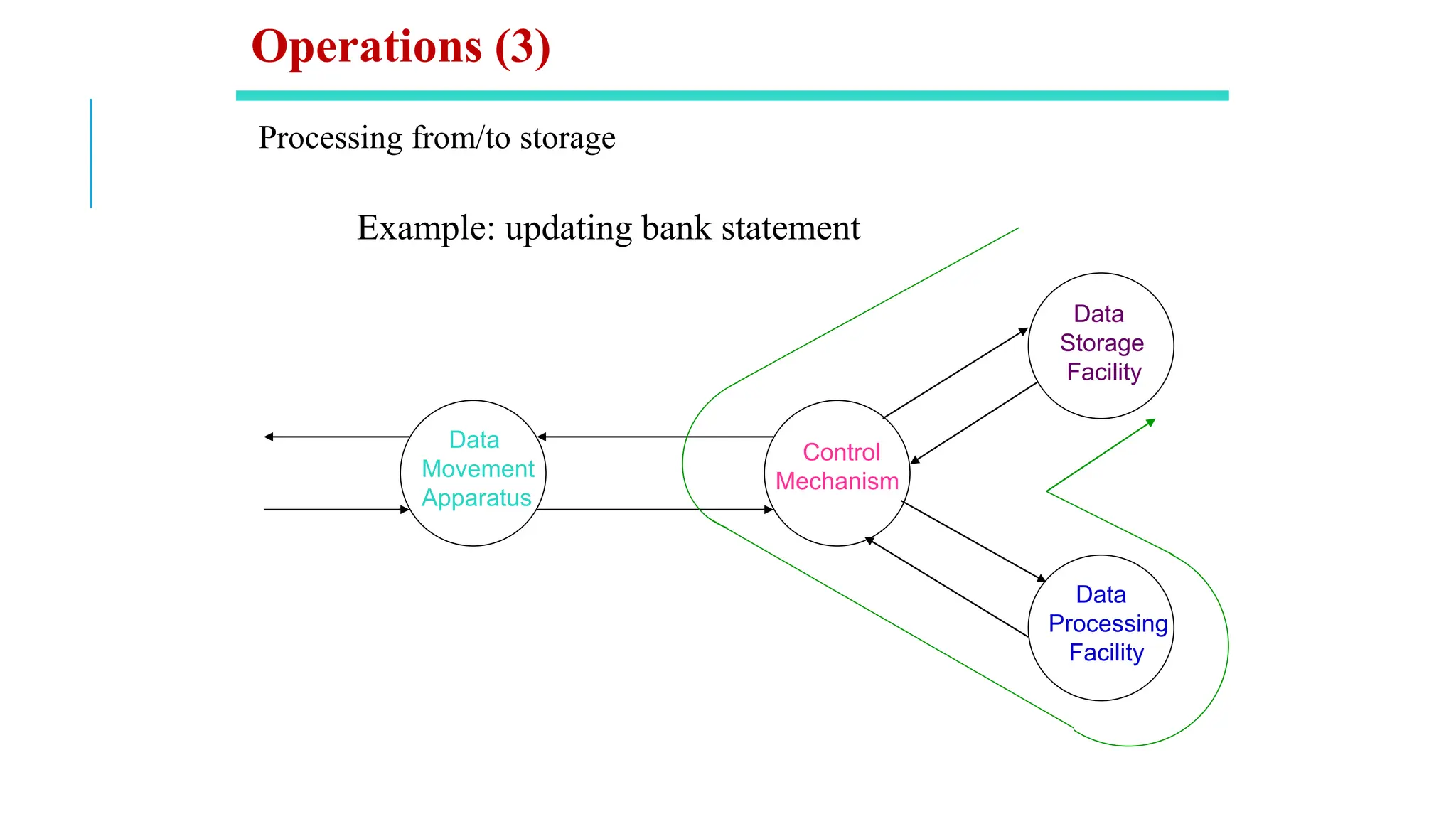
Processing from/to storage
Example: updating bank statement
Data
Movement
Apparatus
Control
Mechanism
Data
Storage
Facility
Data
Processing
Facility
Operations (3)
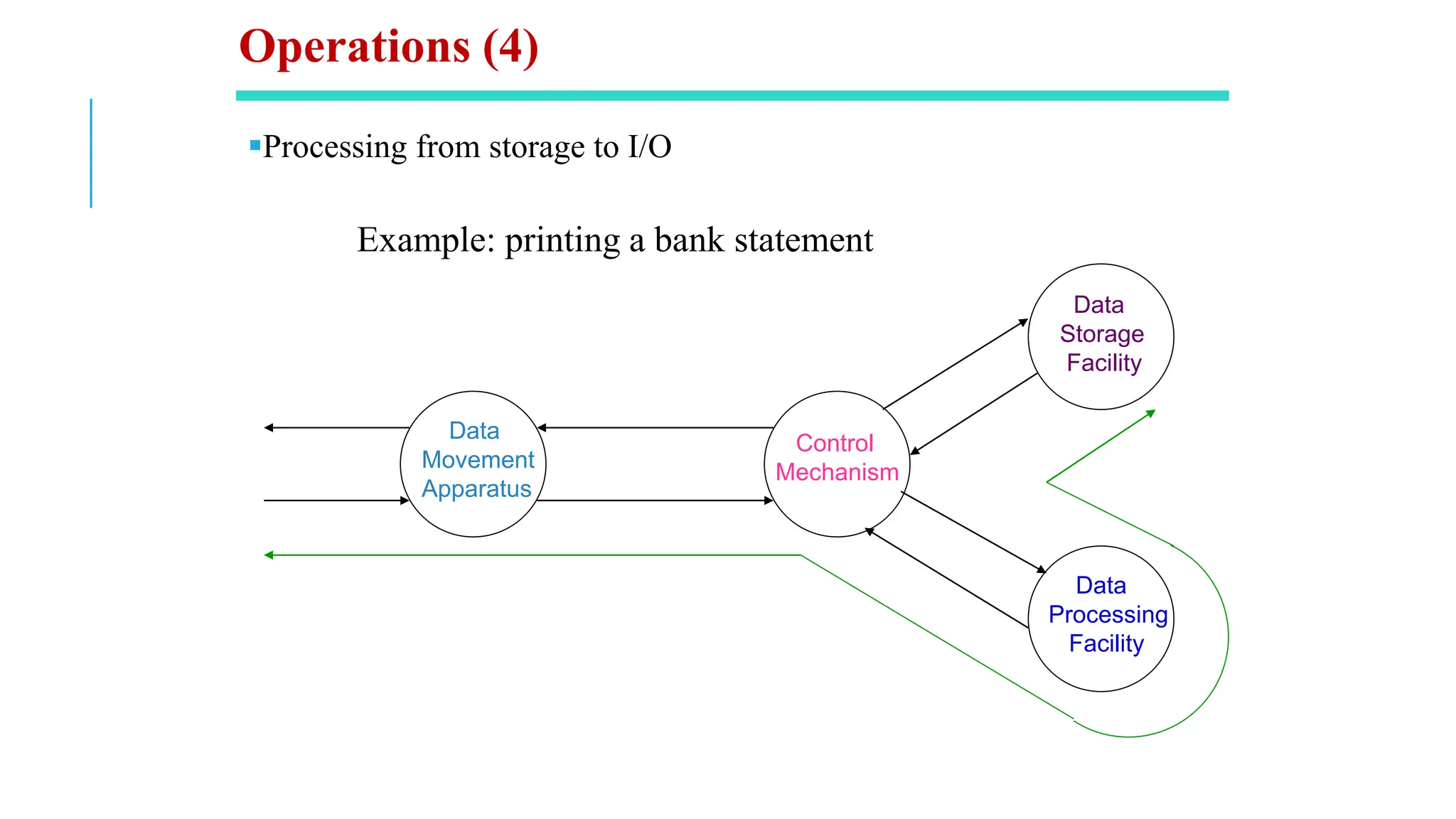
▪Processing from storage to I/O
Example: printing a bank statement
Data
Movement
Apparatus
Control
Mechanism
Data
Storage
Facility
Data
Processing
Facility
Operations (4)
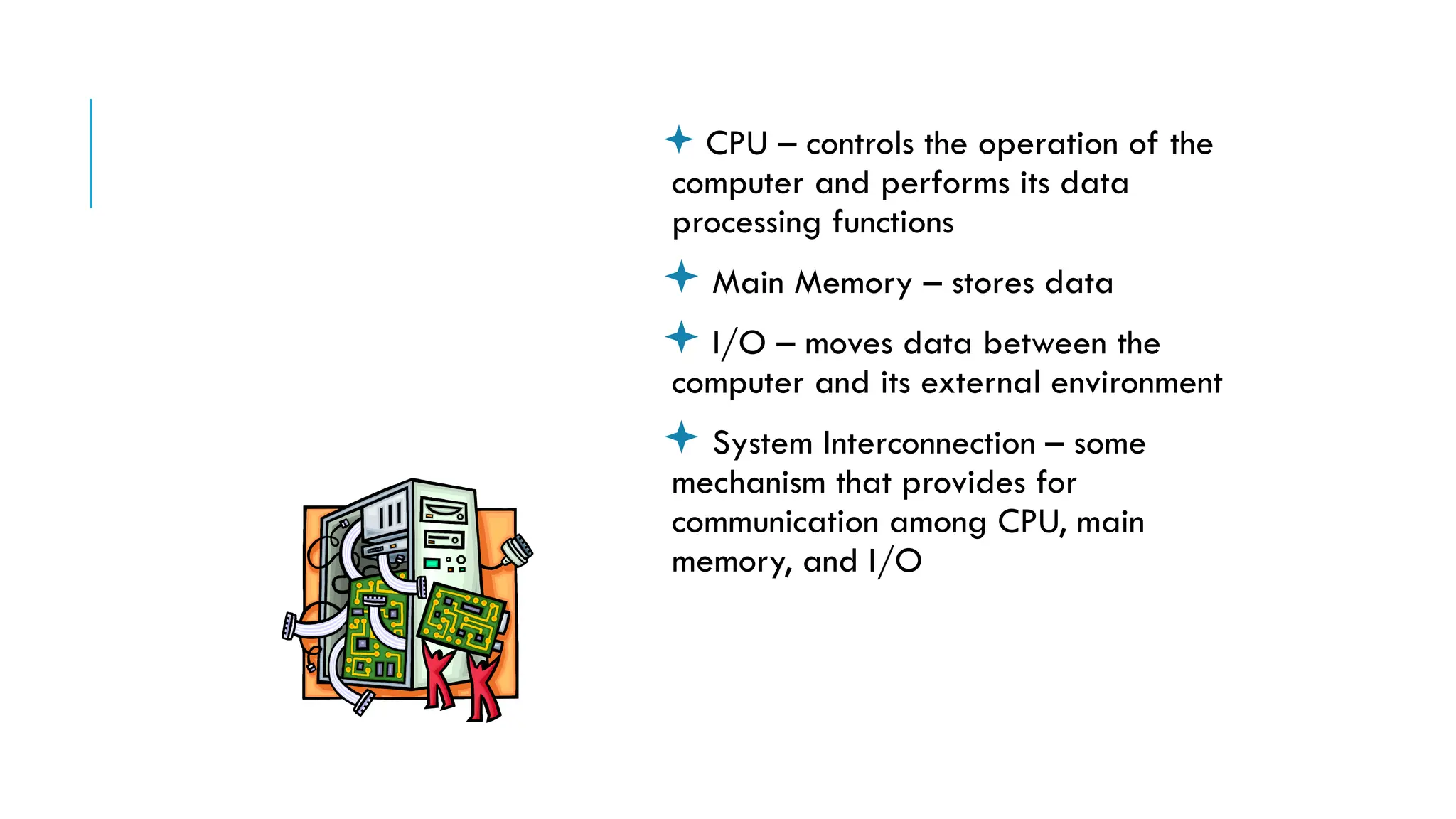
 CPU – controls the operation of the
computer and performs its data
processing functions
 Main Memory – stores data
 I/O – moves data between the
computer and its external environment
 System Interconnection – some
mechanism that provides for
communication among CPU, main
memory, and I/O
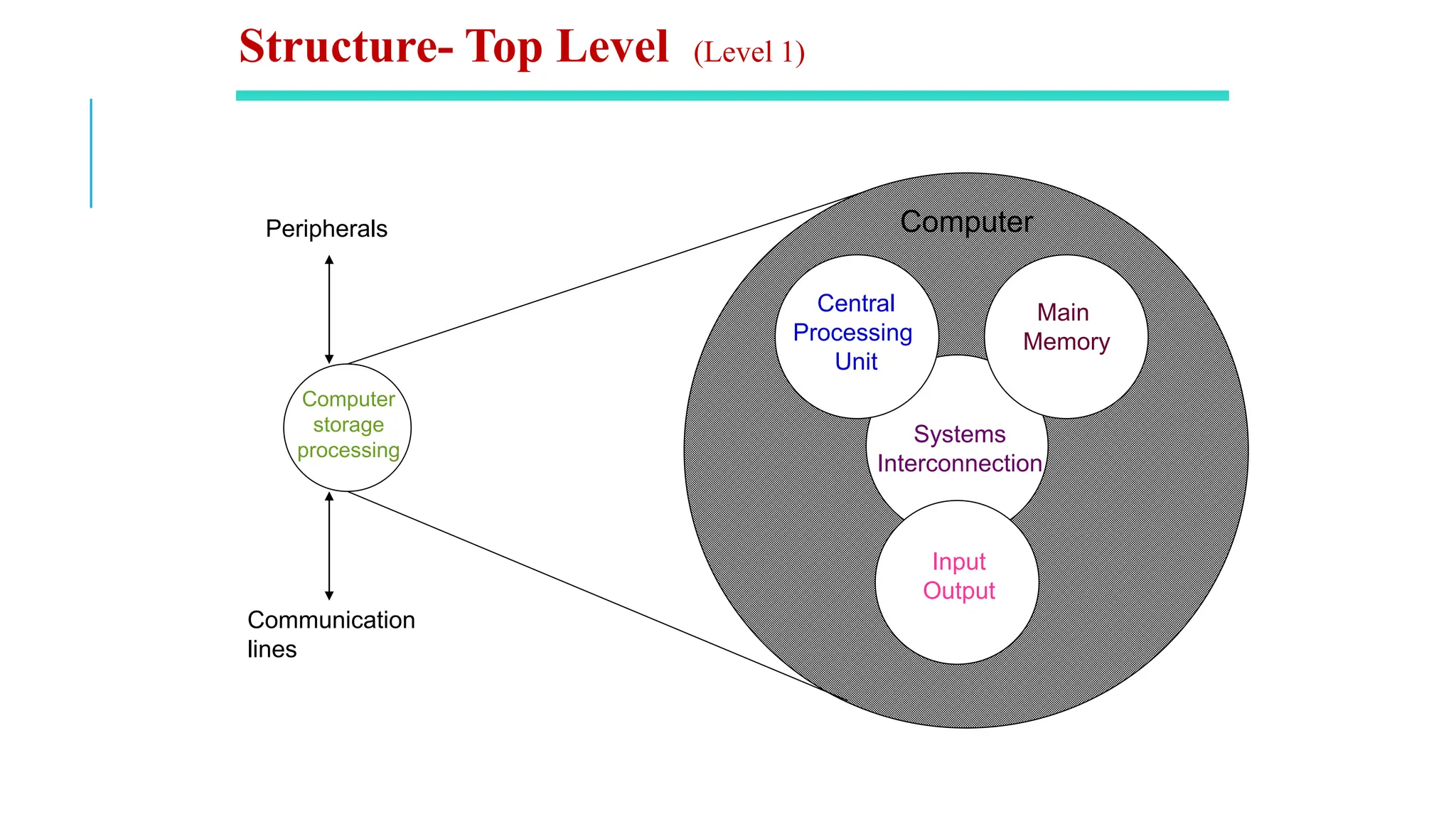
There are four
main structural
components
of the computer:
Computer
storage
processing
Main
Memory
Input
Output
Systems
Interconnection
Peripherals
Communication
lines
Central
Processing
Unit
Computer
Structure- Top Level (Level 1)
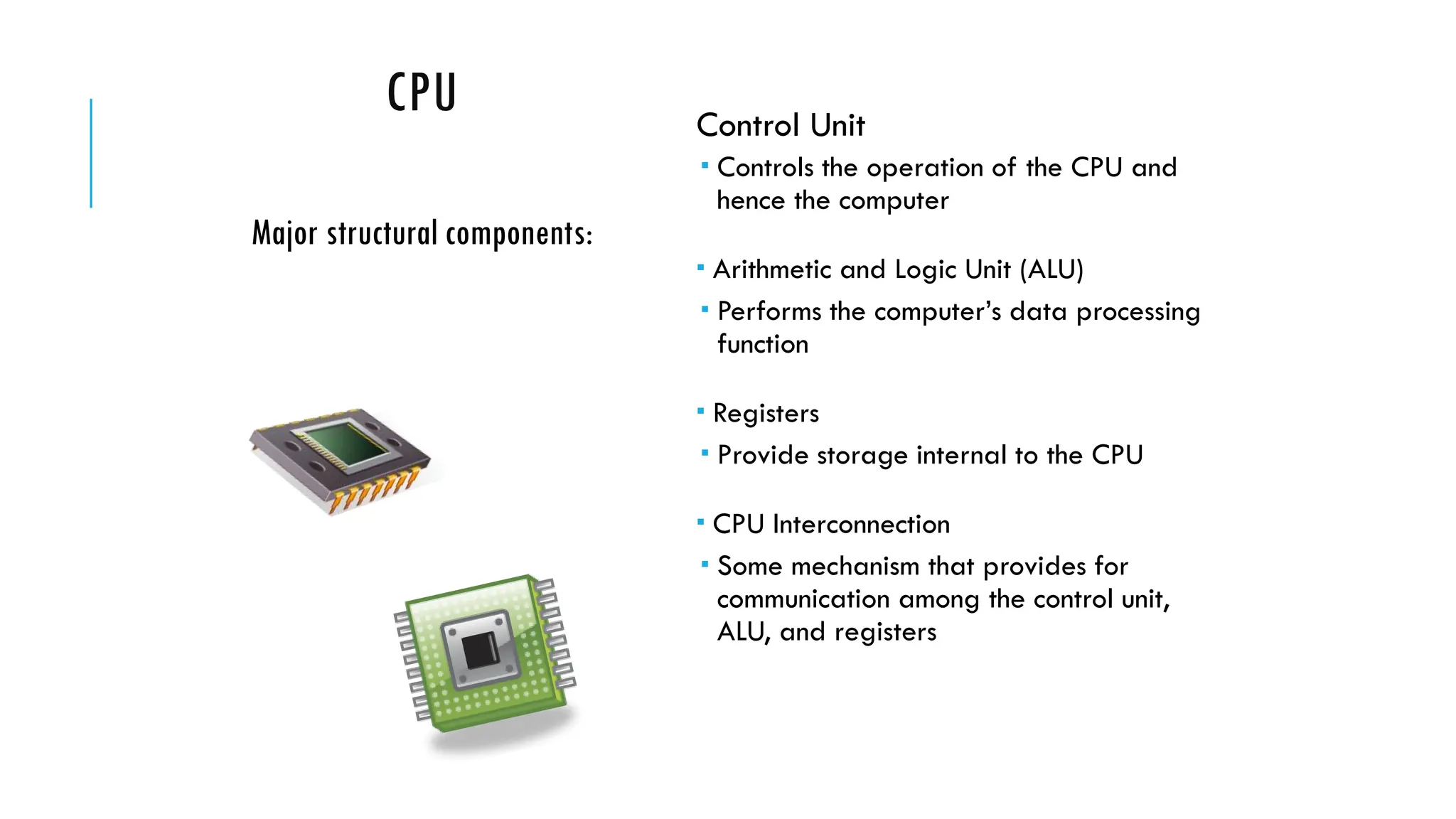
CPU Control Unit
 Controls the operation of the CPU and
hence the computer
 Arithmetic and Logic Unit (ALU)
 Performs the computer’s data processing
function
 Registers
 Provide storage internal to the CPU
 CPU Interconnection
 Some mechanism that provides for
communication among the control unit,
ALU, and registers
Major structural components:
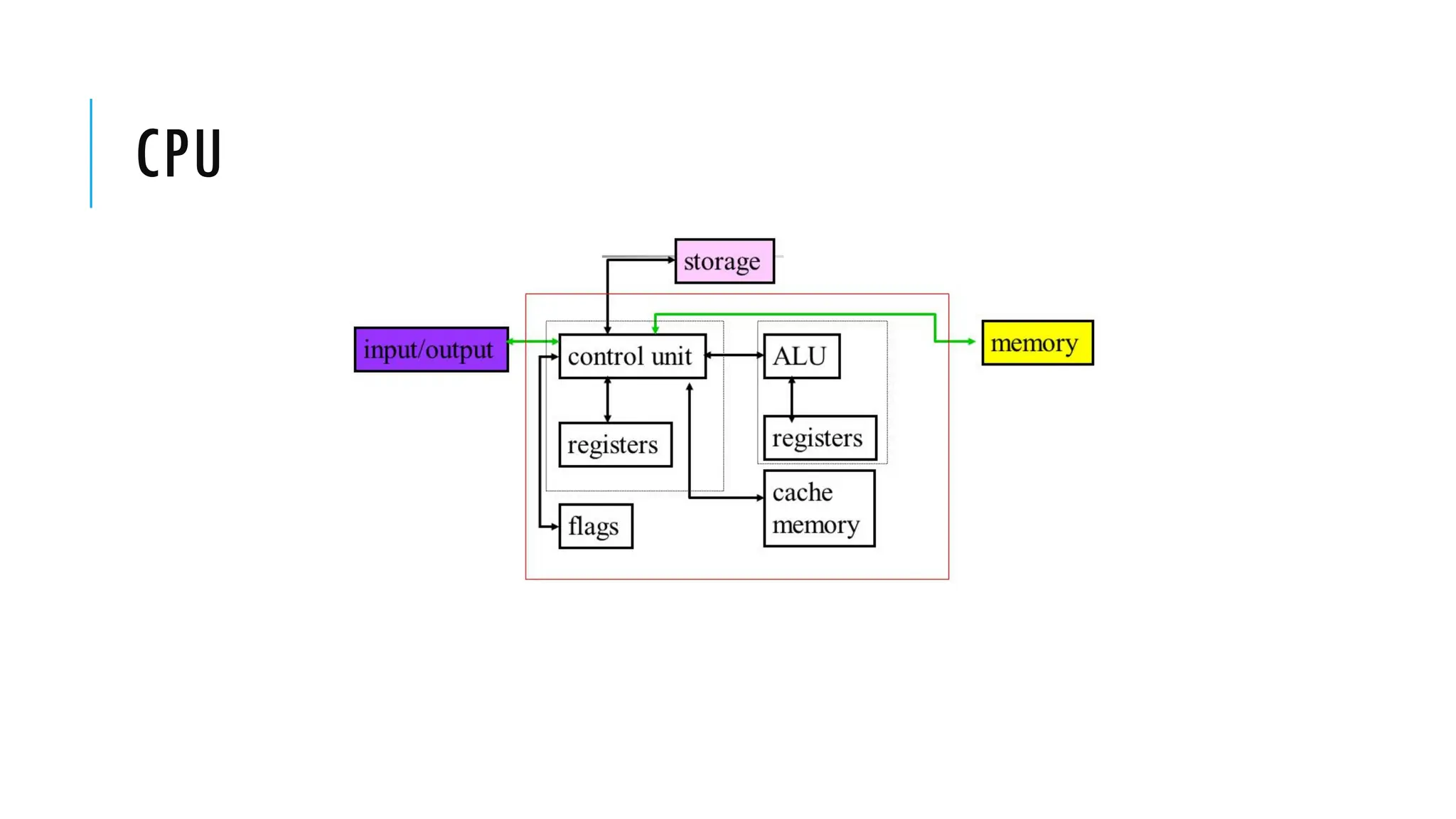
CPU
Computer Arithmetic
and
Logic Unit
Control
Unit
Internal CPU
Interconnection
Registers
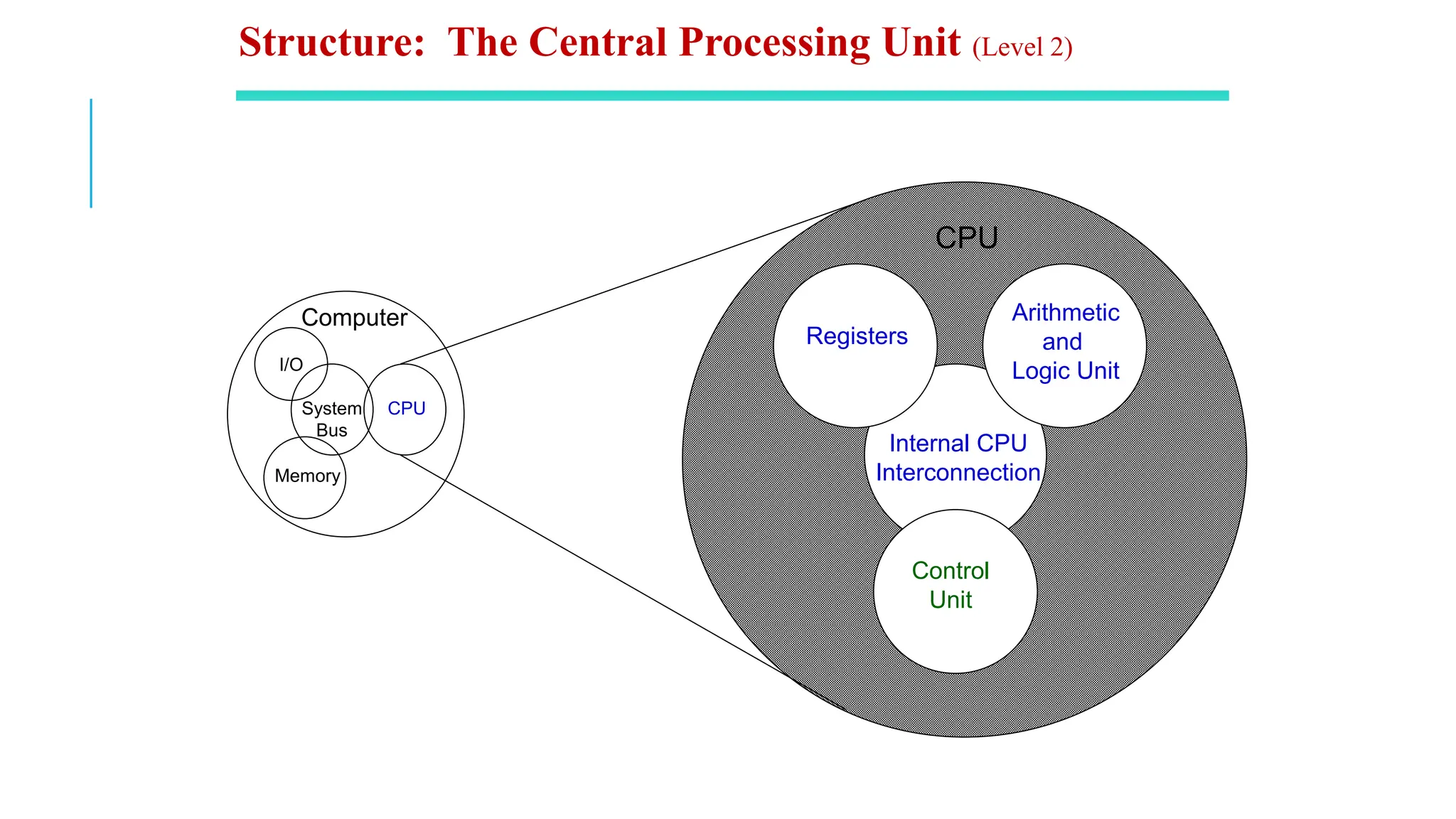
CPU
I/O
Memory
System
Bus
CPU
Structure: The Central Processing Unit (Level 2)
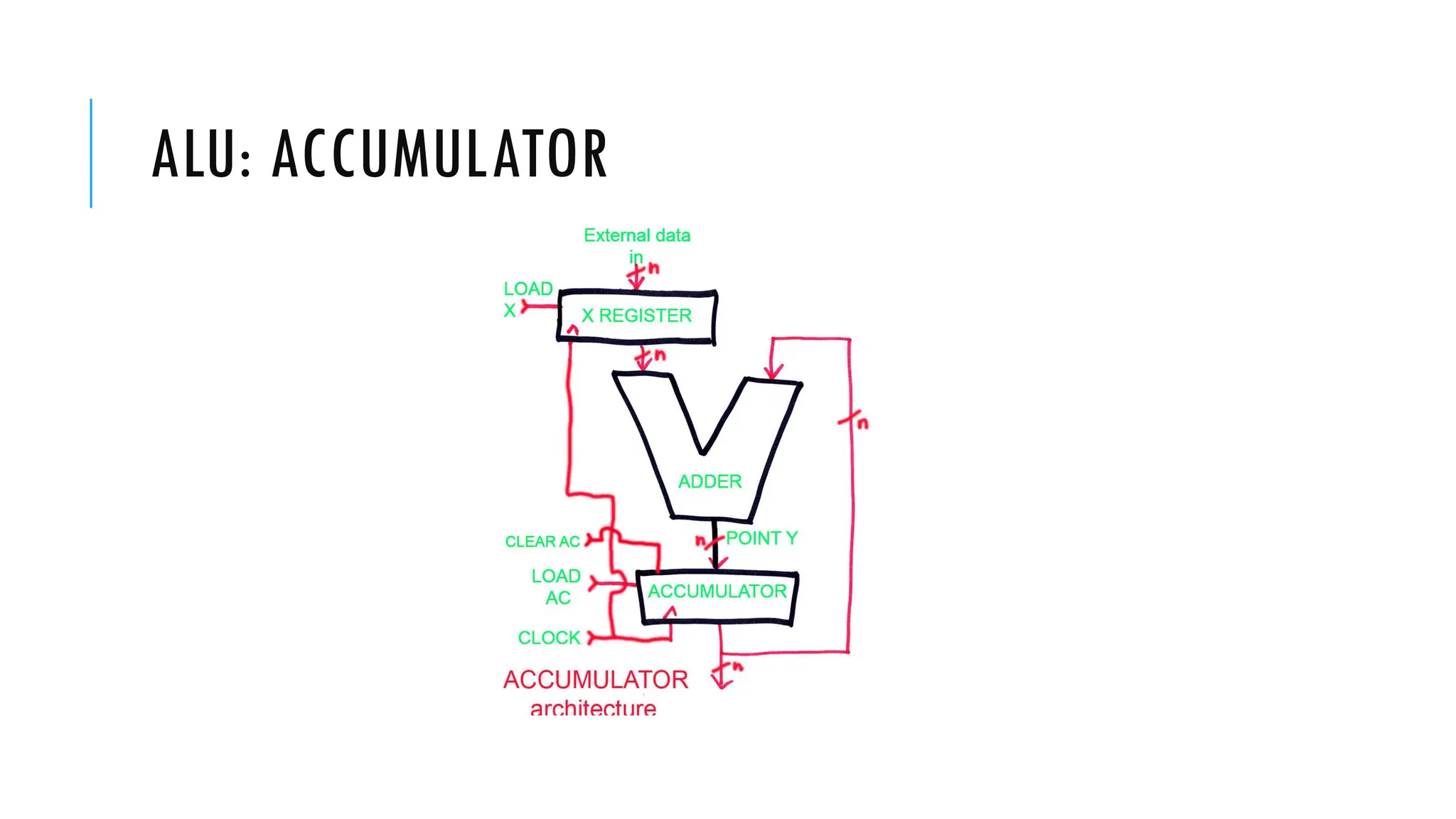
ALU: ACCUMULATOR
CPU
Control
Memory
Control Unit
Registers and
Decoders
Sequencing
Logic
Control
Unit
ALU
Registers
Internal
Bus
Control Unit
Structure: Control Unit (Level 3)
COMPUTER STRUCTURES
The basic design of modern computers are based on Von-Neumann Architecture
which posit that:
 Data and instructions are stored in a single read–write memory.
 The contents of this memory are addressable by location, without regard to the type of data contained
there.
 Execution occurs in a sequential fashion (unless explicitly modified) from one instruction to the next.
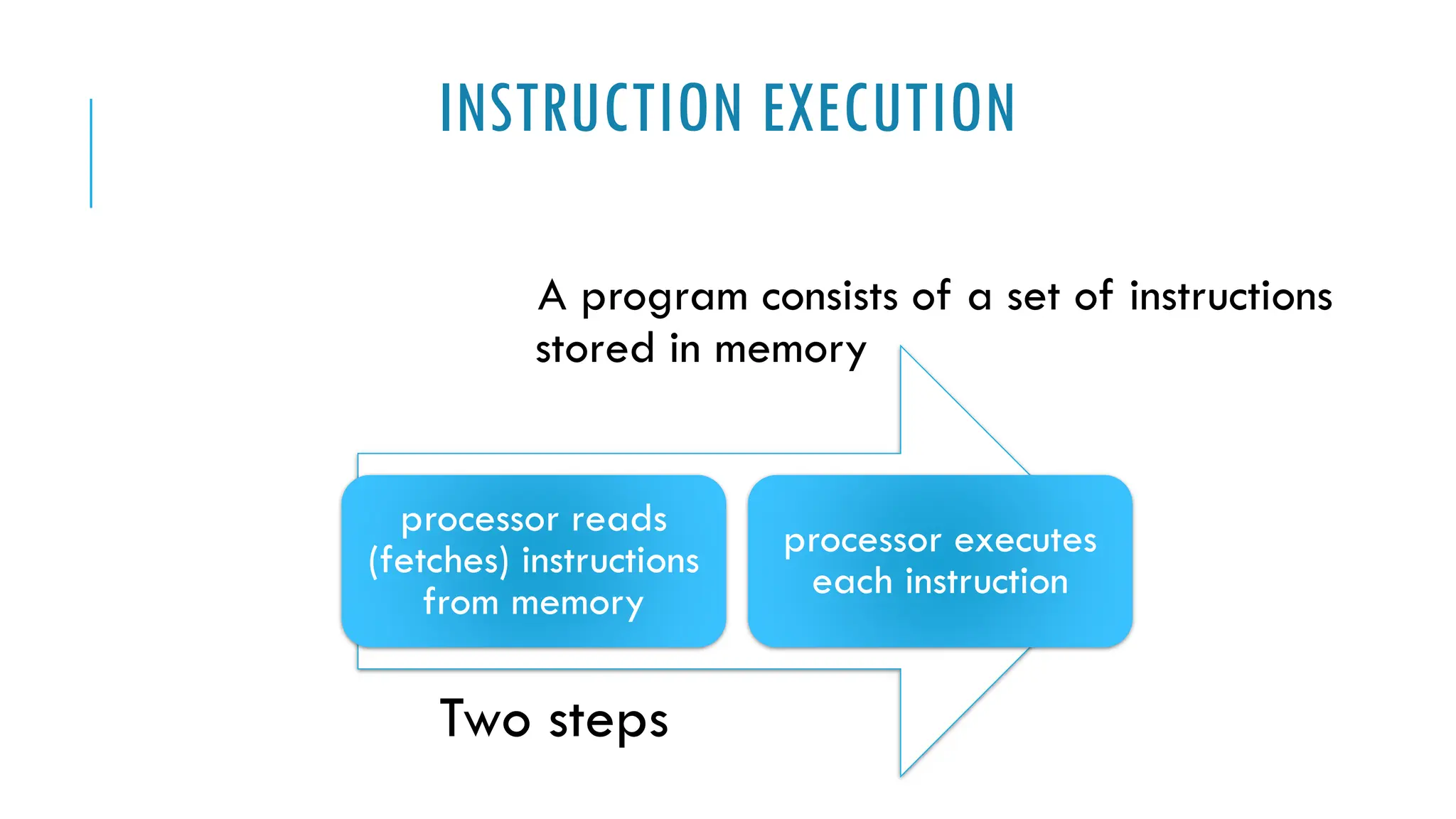
INSTRUCTION EXECUTION
A program consists of a set of instructions
stored in memory
processor reads
(fetches) instructions
from memory
processor executes
each instruction
Two steps
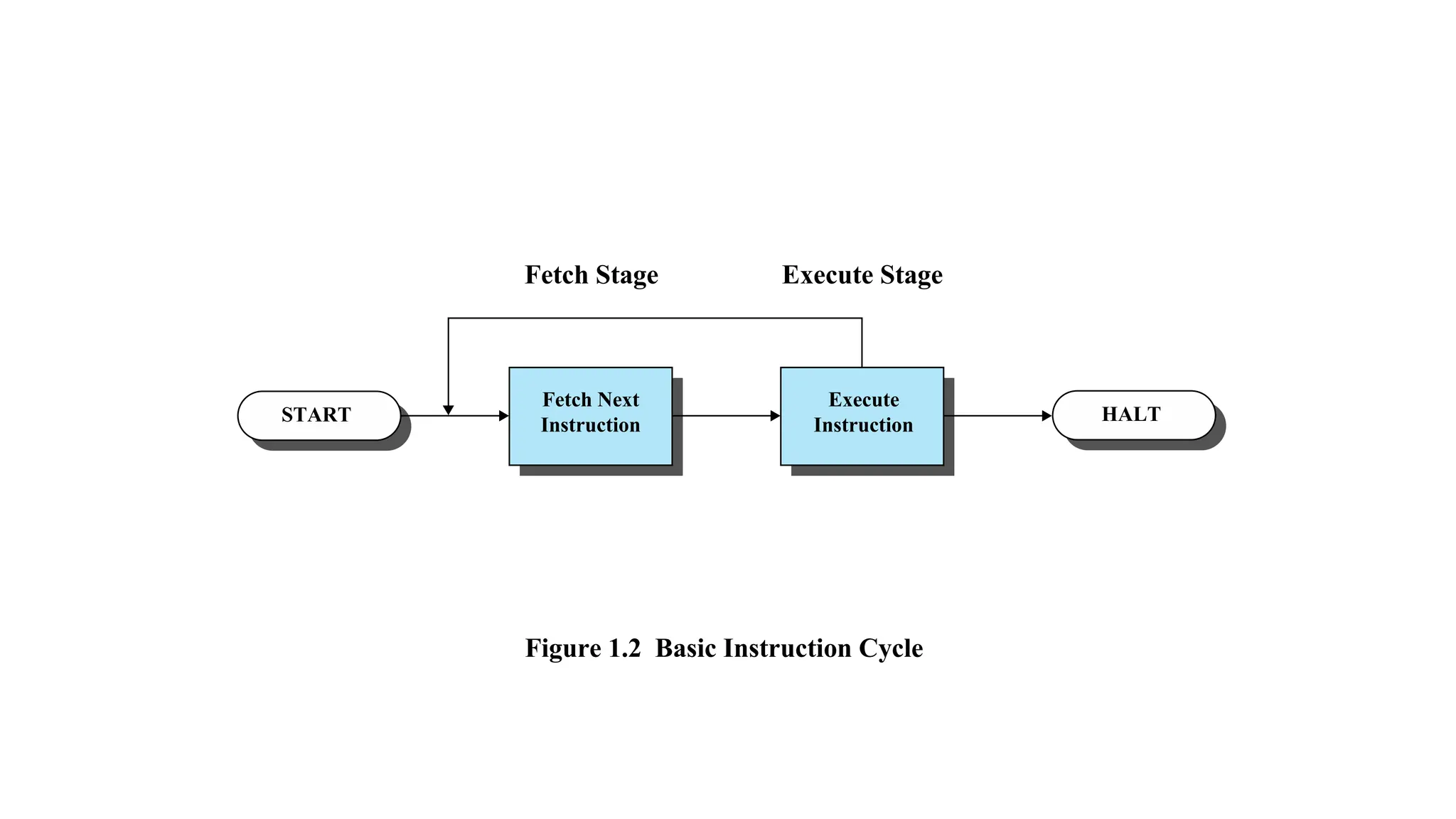
START HALT
Fetch Next
Instruction
Fetch Stage Execute Stage
Execute
Instruction
Figure 1.2 Basic Instruction Cycle
INSTRUCTION FETCH
AND EXECUTE
The processor fetches the instruction from memory
Program counter (PC) holds address of the
instruction to be fetched next
▪PC is incremented after each fetch
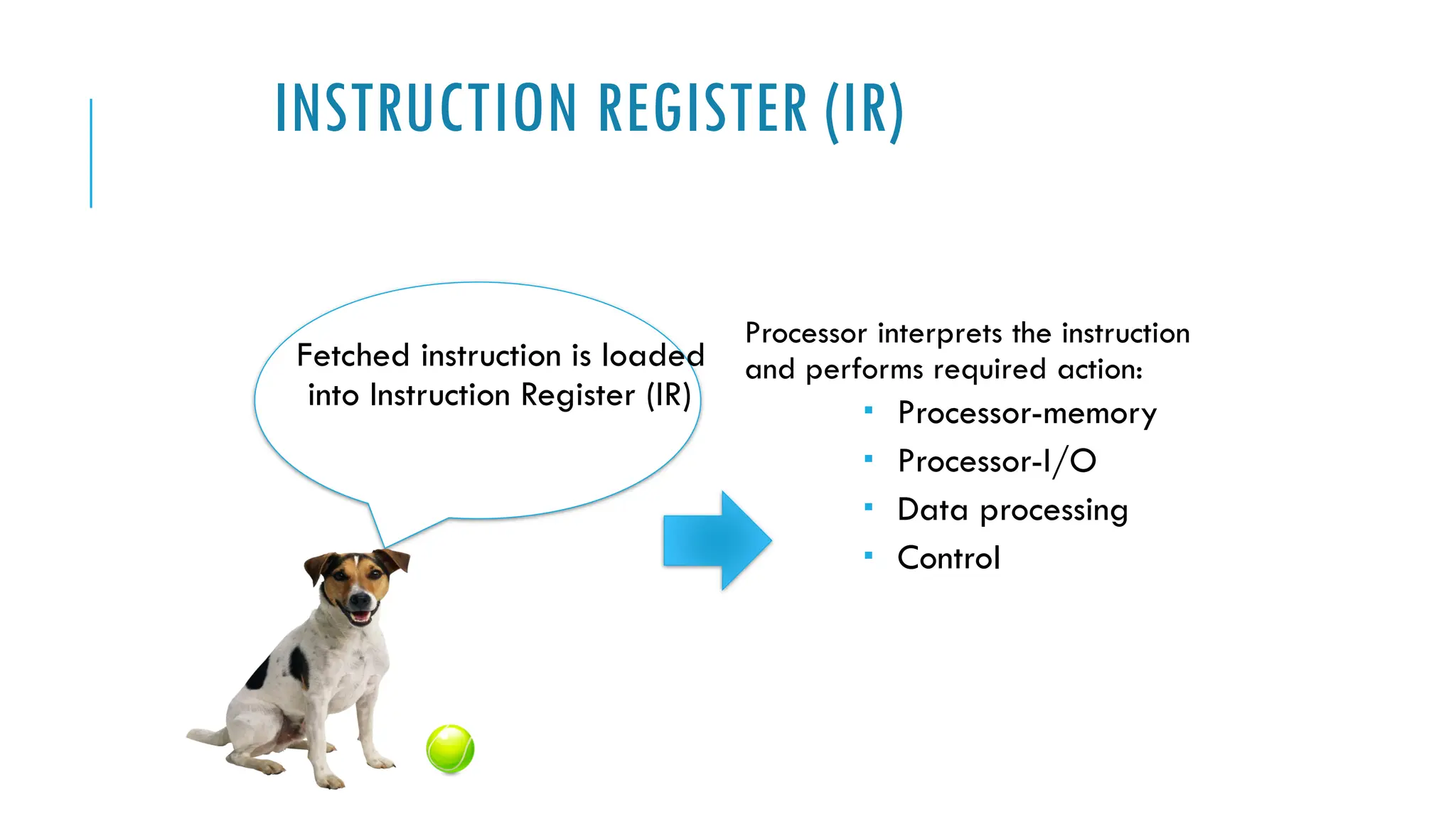
INSTRUCTION REGISTER (IR)
Fetched instruction is loaded
into Instruction Register (IR)
Processor interprets the instruction
and performs required action:
 Processor-memory
 Processor-I/O
 Data processing
 Control
INTERRUPTS
Interrupt the normal sequencing of the processor
Provided to improve processor utilization
 most I/O devices are slower than the processor
 processor must pause to wait for device
 wasteful use of the processor
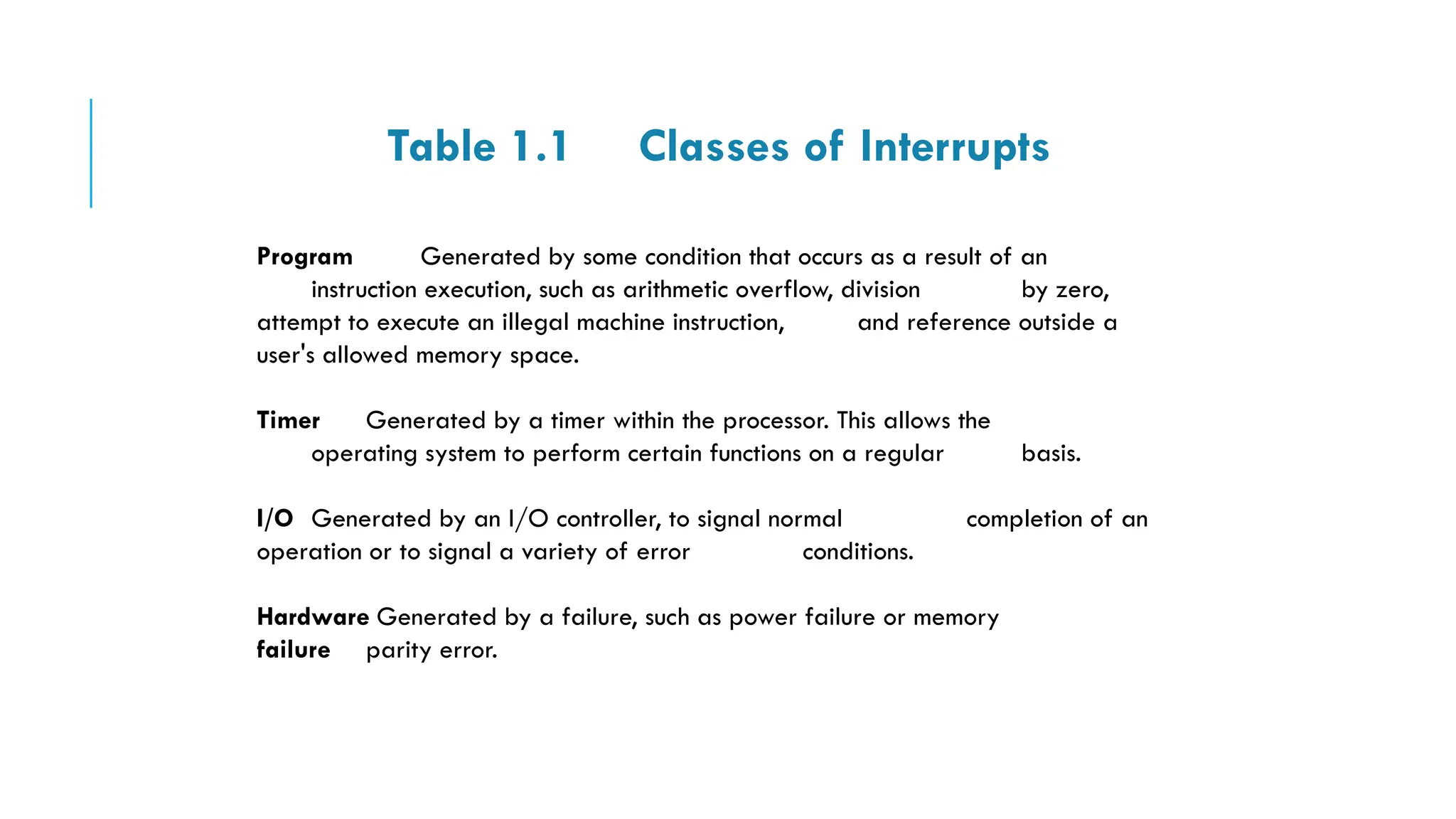
Table 1.1 Classes of Interrupts
Program Generated by some condition that occurs as a result of an
instruction execution, such as arithmetic overflow, division by zero,
attempt to execute an illegal machine instruction, and reference outside a
user's allowed memory space.
Timer Generated by a timer within the processor. This allows the
operating system to perform certain functions on a regular basis.
I/O Generated by an I/O controller, to signal normal completion of an
operation or to signal a variety of error conditions.
Hardware Generated by a failure, such as power failure or memory
failure parity error.
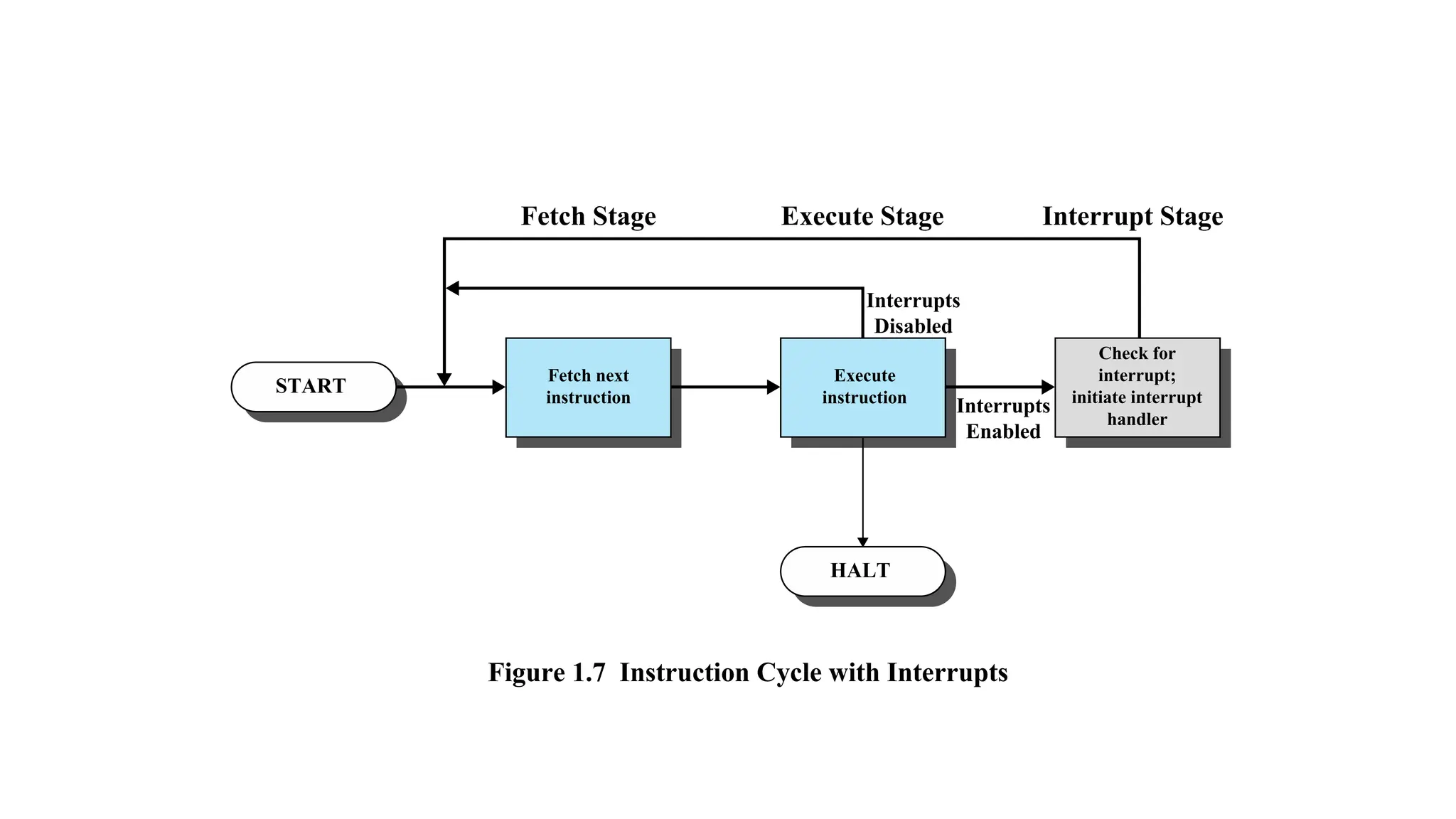
START
HALT
Fetch next
instruction
Fetch Stage Execute Stage Interrupt Stage
Interrupts
Disabled
Interrupts
Enabled
Execute
instruction
Check for
interrupt;
initiate interrupt
handler
Figure 1.7 Instruction Cycle with Interrupts
MEMORY HIERARCHY
Major constraints in memory
▪amount
▪speed
▪expense
Memory must be able to keep up with the processor
Cost of memory must be reasonable in relationship to the other
components
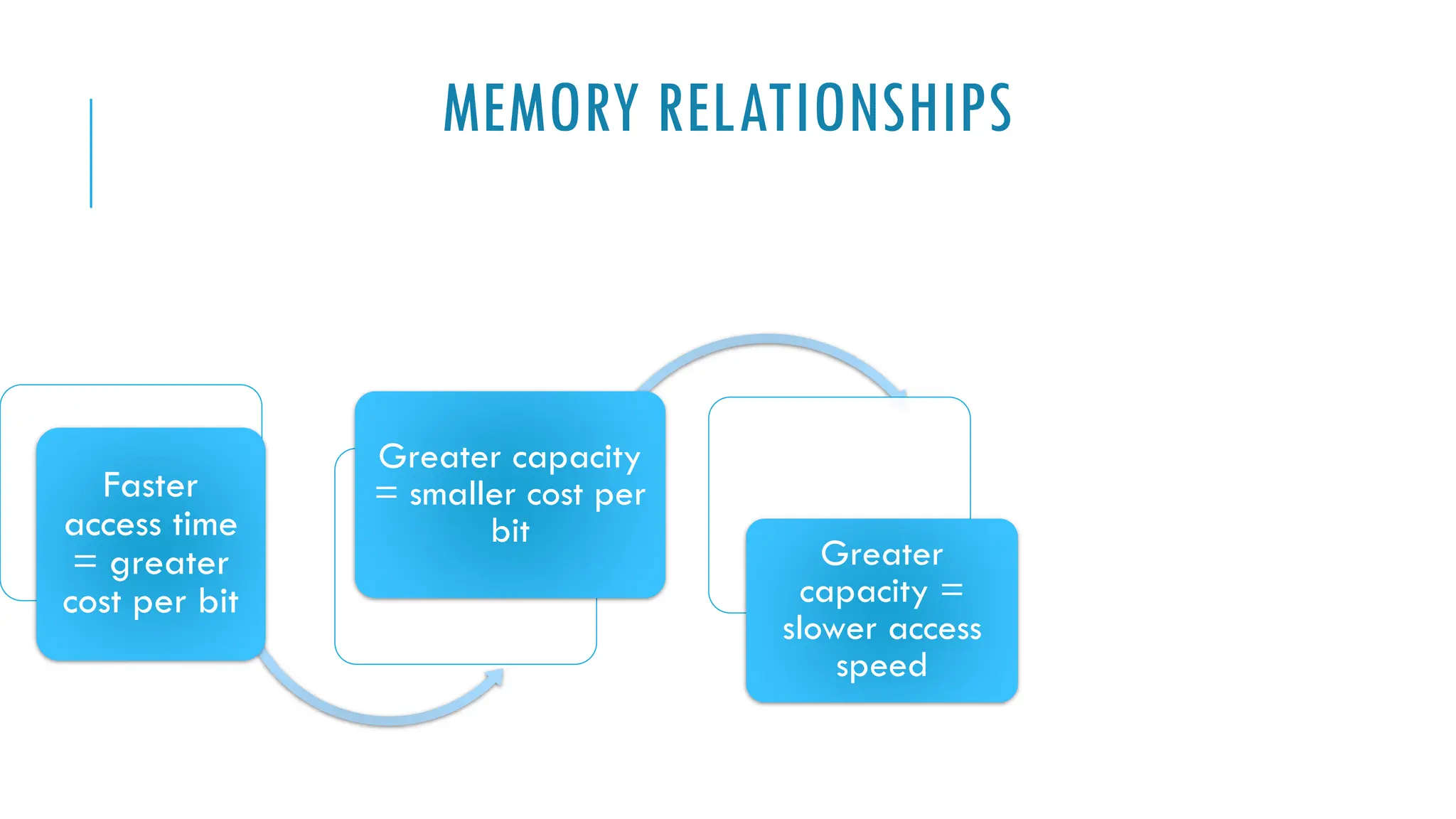
MEMORY RELATIONSHIPS
Faster
access time
= greater
cost per bit
Greater capacity
= smaller cost per
bit
Greater
capacity =
slower access
speed
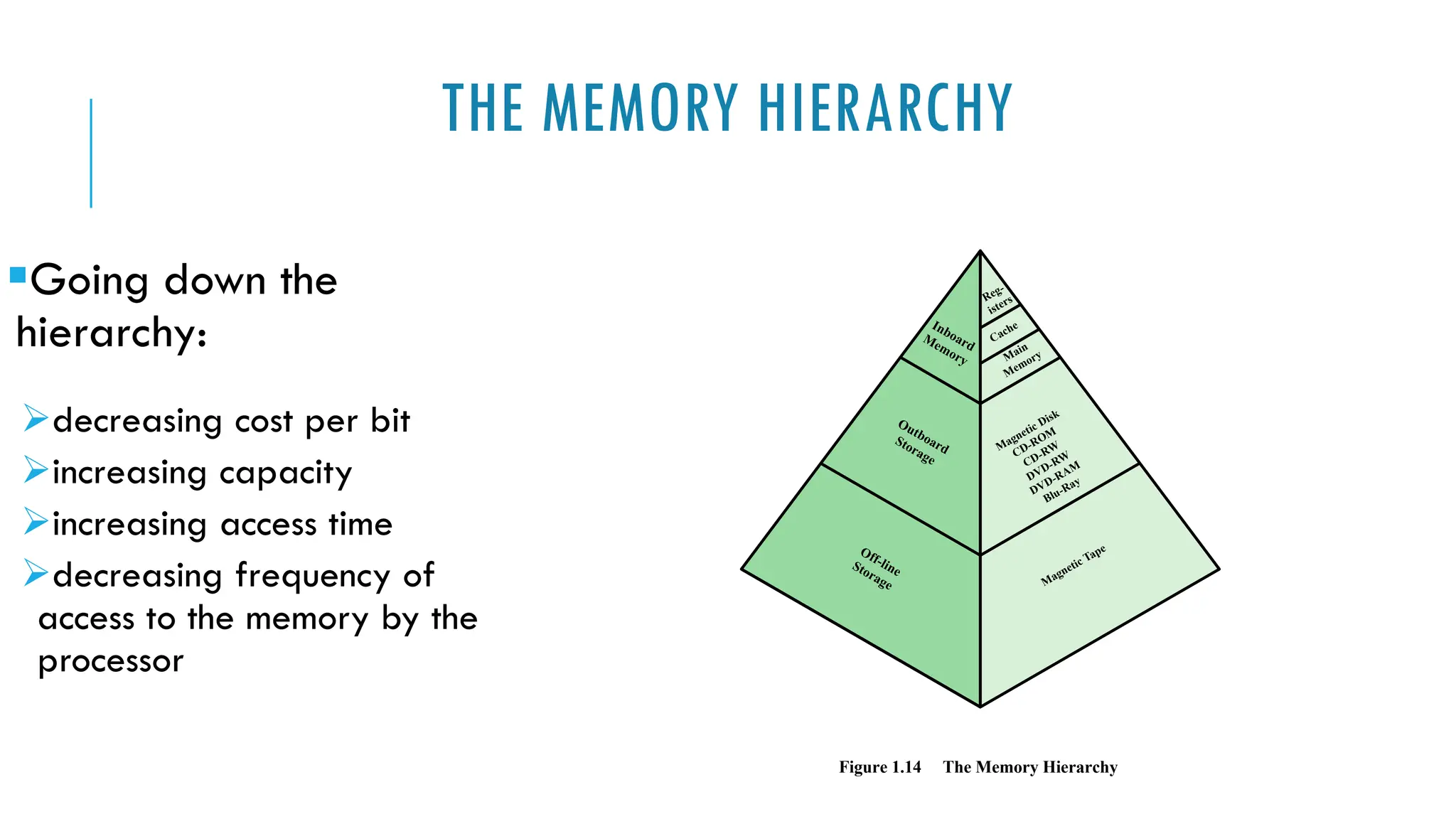
THE MEMORY HIERARCHY
▪Going down the
hierarchy:
➢decreasing cost per bit
➢increasing capacity
➢increasing access time
➢decreasing frequency of
access to the memory by the
processor
Figure 1.14 The Memory Hierarchy
Inboard
Memory
Outboard
Storage
Off-line
Storage
Main
Memory
Magnetic Disk
CD-ROM
CD-RW
DVD-RW
DVD-RAM
Blu-Ray
Magnetic Tape
Cache
Reg-
isters
Secondary
Memory
Also referred to
as auxiliary
memory
• external
• nonvolatile
• used to store
program and data
files
CACHE MEMORY
Invisible to the OS
Interacts with other memory management hardware
Processor must access memory at least once per instruction cycle
Processor execution is limited by memory cycle time
Exploit the principle of locality with a small, fast memory
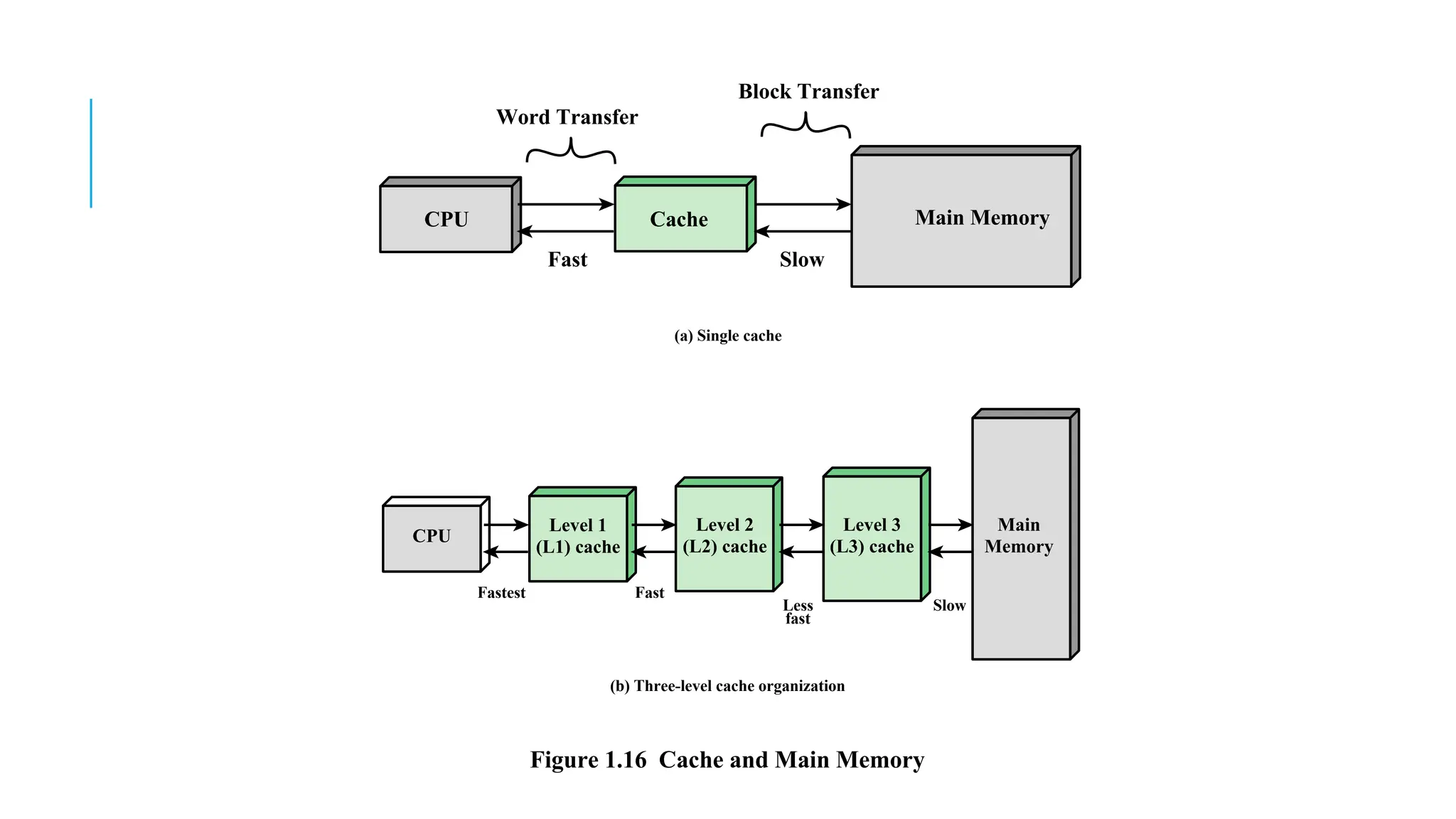
CPU
Word Transfer
Fast
Fastest Fast
Less
fast
Slow
Slow
Block Transfer
Cache Main Memory
Figure 1.16 Cache and Main Memory
(a) Single cache
(b) Three-level cache organization
CPU
Level 1
(L1) cache
Level 2
(L2) cache
Level 3
(L3) cache
Main
Memory
CMP 416-Architecture and system design.pdf

CMP 416-Architecture and system design.pdf

  • 1.
  • 2.
    CMP 416 COURSEOUTLINE Computer and its structures Digital Logic Data representation CPU Basics and Organization Memory and Data storage Digital Arithmetic Processor Architecture and Design features Performance Measures
  • 3.
  • 4.
    PROCESSOR Controls the operation ofthe computer Performs the data processing functions Referred to as the Central Processing Unit (CPU)
  • 5.
    MAIN MEMORY Volatile  Contentsof the memory is lost when the computer is shut down Referred to as real memory or primary memory
  • 6.
    I/O MANAGER Moves data betweenthe computer and external environments such as: storage (e.g. hard drive) communications equipment terminals
  • 7.
    SYSTEM BUS  Providesfor communication among  Processors,  Main memory, and  Device (I/O) Management
  • 8.
    FILE MANAGEMENT Process ormethod of organizing, storing, and retrieving files.  File storage,  File organization, and  File retrieval It is about naming, storing and organising files in a system or software so that it's easier to locate the files
  • 9.
    COMPUTER ORGANISATION ANDARCHITECTURE Design better programs including systems software such as  Compilers, operating systems and device drivers.  Optimize program behaviour  Evaluate computer system performance  Understand time, space and price tradeoffs
  • 10.
    In a computersystem, hardware and many software components are fundamentally related Computer organization and architecture helps to understand how hardware and software interact with each other
  • 11.
    STRUCTURE & FUNCTION(1) Computer  Complex system=> How can we design/describe it? Hierarchic system:  A set of interrelated subsystems, each subsystem hierarchic in structure until some lowest level of elementary subsystems is reached At each level of the system, the designer is concerned with structure and function.
  • 12.
    STRUCTURE & FUNCTION(2) Function is the operation of individual components as part of the structure. Structure is the way in which components relate to each other.
  • 13.
    FUNCTION Basic computer functions Dataprocessing: broad range of processing requirements Data storage: short term and long term functions Data movement: I/O process / Data communication Control Mechanism: resource management, coordinate the performance of functional parts, response to instructions
  • 14.
    FUNCTION ◼ A computercan perform four basic functions: ● Data processing ● Data storage ● Data movement ● Control
  • 15.
    Data movement device Example:keyboard to screen Data Movement Apparatus Control Mechanism Data Storage Facility Data Processing Facility Operations (1)
  • 16.
    Storage device Example: Internetdownload to disk Data Movement Apparatus Control Mechanism Data Storage Facility Data Processing Facility Operations (2)
  • 17.
    Processing from/to storage Example:updating bank statement Data Movement Apparatus Control Mechanism Data Storage Facility Data Processing Facility Operations (3)
  • 18.
    ▪Processing from storageto I/O Example: printing a bank statement Data Movement Apparatus Control Mechanism Data Storage Facility Data Processing Facility Operations (4)
  • 19.
     CPU –controls the operation of the computer and performs its data processing functions  Main Memory – stores data  I/O – moves data between the computer and its external environment  System Interconnection – some mechanism that provides for communication among CPU, main memory, and I/O There are four main structural components of the computer:
  • 20.
  • 21.
    CPU Control Unit Controls the operation of the CPU and hence the computer  Arithmetic and Logic Unit (ALU)  Performs the computer’s data processing function  Registers  Provide storage internal to the CPU  CPU Interconnection  Some mechanism that provides for communication among the control unit, ALU, and registers Major structural components:
  • 22.
  • 23.
    Computer Arithmetic and Logic Unit Control Unit InternalCPU Interconnection Registers CPU I/O Memory System Bus CPU Structure: The Central Processing Unit (Level 2)
  • 24.
  • 25.
  • 26.
    COMPUTER STRUCTURES The basicdesign of modern computers are based on Von-Neumann Architecture which posit that:  Data and instructions are stored in a single read–write memory.  The contents of this memory are addressable by location, without regard to the type of data contained there.  Execution occurs in a sequential fashion (unless explicitly modified) from one instruction to the next.
  • 27.
    INSTRUCTION EXECUTION A programconsists of a set of instructions stored in memory processor reads (fetches) instructions from memory processor executes each instruction Two steps
  • 28.
    START HALT Fetch Next Instruction FetchStage Execute Stage Execute Instruction Figure 1.2 Basic Instruction Cycle
  • 29.
    INSTRUCTION FETCH AND EXECUTE Theprocessor fetches the instruction from memory Program counter (PC) holds address of the instruction to be fetched next ▪PC is incremented after each fetch
  • 30.
    INSTRUCTION REGISTER (IR) Fetchedinstruction is loaded into Instruction Register (IR) Processor interprets the instruction and performs required action:  Processor-memory  Processor-I/O  Data processing  Control
  • 31.
    INTERRUPTS Interrupt the normalsequencing of the processor Provided to improve processor utilization  most I/O devices are slower than the processor  processor must pause to wait for device  wasteful use of the processor
  • 32.
    Table 1.1 Classesof Interrupts Program Generated by some condition that occurs as a result of an instruction execution, such as arithmetic overflow, division by zero, attempt to execute an illegal machine instruction, and reference outside a user's allowed memory space. Timer Generated by a timer within the processor. This allows the operating system to perform certain functions on a regular basis. I/O Generated by an I/O controller, to signal normal completion of an operation or to signal a variety of error conditions. Hardware Generated by a failure, such as power failure or memory failure parity error.
  • 33.
    START HALT Fetch next instruction Fetch StageExecute Stage Interrupt Stage Interrupts Disabled Interrupts Enabled Execute instruction Check for interrupt; initiate interrupt handler Figure 1.7 Instruction Cycle with Interrupts
  • 34.
    MEMORY HIERARCHY Major constraintsin memory ▪amount ▪speed ▪expense Memory must be able to keep up with the processor Cost of memory must be reasonable in relationship to the other components
  • 35.
    MEMORY RELATIONSHIPS Faster access time =greater cost per bit Greater capacity = smaller cost per bit Greater capacity = slower access speed
  • 36.
    THE MEMORY HIERARCHY ▪Goingdown the hierarchy: ➢decreasing cost per bit ➢increasing capacity ➢increasing access time ➢decreasing frequency of access to the memory by the processor Figure 1.14 The Memory Hierarchy Inboard Memory Outboard Storage Off-line Storage Main Memory Magnetic Disk CD-ROM CD-RW DVD-RW DVD-RAM Blu-Ray Magnetic Tape Cache Reg- isters
  • 37.
    Secondary Memory Also referred to asauxiliary memory • external • nonvolatile • used to store program and data files
  • 38.
    CACHE MEMORY Invisible tothe OS Interacts with other memory management hardware Processor must access memory at least once per instruction cycle Processor execution is limited by memory cycle time Exploit the principle of locality with a small, fast memory
  • 39.
    CPU Word Transfer Fast Fastest Fast Less fast Slow Slow BlockTransfer Cache Main Memory Figure 1.16 Cache and Main Memory (a) Single cache (b) Three-level cache organization CPU Level 1 (L1) cache Level 2 (L2) cache Level 3 (L3) cache Main Memory