Introduction to CNC
CNC Machining Vs Conventional
Machining
 CNCs programmed with a design that can be
reproduced exactly.
(https://www.youtube.com/watch?v=jrziv0piQ3U)
 CNCs can produce thousands of identical parts in a
relatively short amount of time, much faster than
conventional machining.
 CNCs can continuously be operated, 24 hours a day,
seven days a week, and will only require a short down
time for maintenance.
 CNCs can easily be updated by changing the
software
 A visual test of every new program allows designers
to ensure that the desired effect is achieved.
 Advanced software allows CNC machines to make
products that cannot be made by hand, even by the
most skilled machinists available.
 Because the machine does the skilled work, the
machine operator does not need to have advanced
training.
 CNCs only require to be supervised by one worker.
NC Applications (Machining)
 Batch and High Volume production
 Repeat and/or Repetitive orders
 Complex part geometries
 Many separate operations on one part
Cost-Benefits of NC
Costs
 High investment cost
 High maintenance effort (costly parts)
 Need for skilled programmers
 High utilization required
Cost-Benefits of NC
Benefits
 Cycle time reduction
 Non-productive time reduction
 Greater accuracy and repeatability
 Lower scrap rates
 Reduced parts inventory and floor space
 Operator skill-level reduced
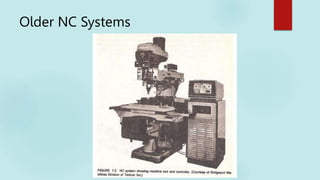
Older NC Systems
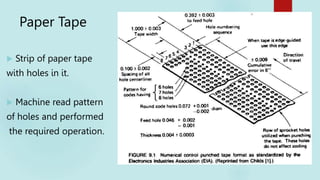
Paper Tape
 Strip of paper tape
with holes in it.
 Machine read pattern
of holes and performed
the required operation.
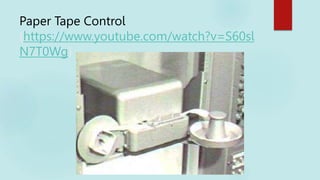
Paper Tape Control
(https://www.youtube.com/watch?v=S60sl
N7T0Wg)
Paper Tape Control
 Disadvantages
Difficult to identify parts of program.
Programs could be quite large.
Stored on large bulky reels.
Fragile, could rip easily
Can you think of another major
disadvantage?
CNC
 Further developments in the computer
allowed it to be used to control the machine
instead of the paper tape.
CNC Advantages Vs NC
 Programs could be stored in computer memory.
 Easier to edit.
 More complex parts could be manufactured.
 Use of 3d geometry.

 Networking/file sharing with other computers.
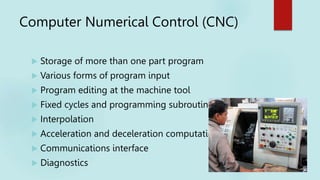
Computer Numerical Control (CNC)
 Storage of more than one part program
 Various forms of program input
 Program editing at the machine tool
 Fixed cycles and programming subroutines
 Interpolation
 Acceleration and deceleration computations
 Communications interface
 Diagnostics
Advantages Of CNC
 Increased productivity after
programming is completed
 Reliability - reduces human error
 Often eliminates need for special jigs
and fixtures
 Reduces location of part features
 Makes possible the machining of
complex shapes requiring simultaneous
3 axis motion
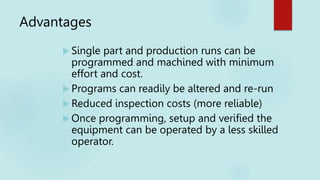
Advantages
 Single part and production runs can be
programmed and machined with minimum
effort and cost.
 Programs can readily be altered and re-run
 Reduced inspection costs (more reliable)
 Once programming, setup and verified the
equipment can be operated by a less skilled
operator.
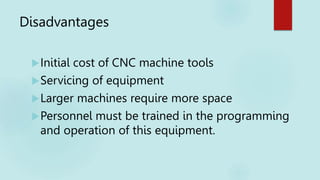
Disadvantages
Initial cost of CNC machine tools
Servicing of equipment
Larger machines require more space
Personnel must be trained in the programming
and operation of this equipment.
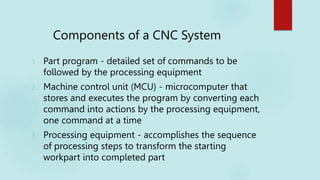
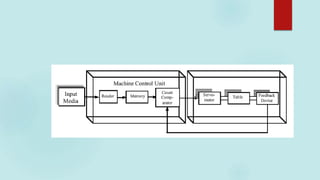
Components of a CNC System
1. Part program - detailed set of commands to be
followed by the processing equipment
2. Machine control unit (MCU) - microcomputer that
stores and executes the program by converting each
command into actions by the processing equipment,
one command at a time
3. Processing equipment - accomplishes the sequence
of processing steps to transform the starting
workpart into completed part
 Direct numerical control (DNC) – control of
multiple machine tools by a single
(mainframe) computer through direct
connection and in real time
 1960s technology
 Two way communication
 Distributed numerical control (DNC) –
network consisting of central computer
connected to machine tool MCUs, which are
CNC
 Present technology
 Two way communication
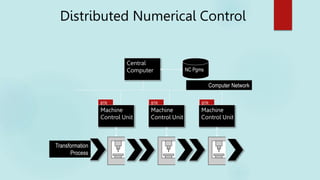
Distributed Numerical Control
Machine
Control Unit
Transformation
Process
Machine
Control Unit
Machine
Control Unit
Central
Computer NC Pgms
BTR BTR BTR
Computer Network
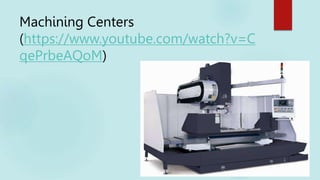
Machining Centers
 A machining center can be defined as a machine
tool capable of:
 Multiple operation and processes in a single set-up
utilizing multiple axis
 Typically has an automatic mechanism to change
tools
 Machine motion is programmable
 Servo motors drive feed mechanisms for tool axis’s
 Positioning feedback is provided by resolvers to the
control system
Machining Centers
 Example - A turning center capable of OD turning, external
treading, cross-hole drilling, engraving, and milling. All in
machining is accomplished in one “set-up.” Machine may
have multiple spindles.
Machining Centers
(https://www.youtube.com/watch?v=C
qePrbeAQoM)
SAMPLE
CNC MACHINES
24
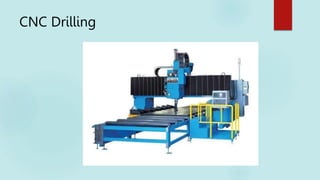
CNC Drilling
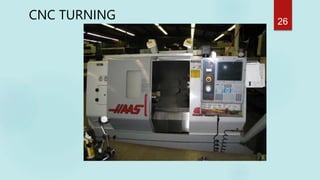
CNC TURNING 26
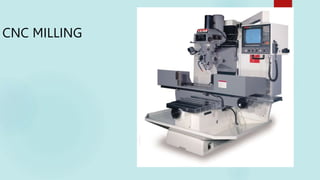
CNC MILLING
27
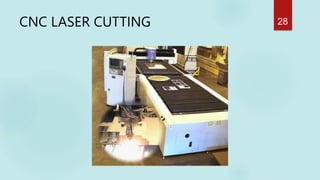
CNC LASER CUTTING 28
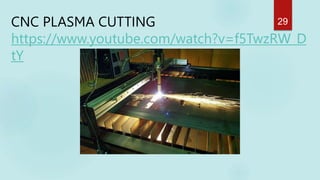
CNC PLASMA CUTTING
https://www.youtube.com/watch?v=f5TwzRW_D
tY
29
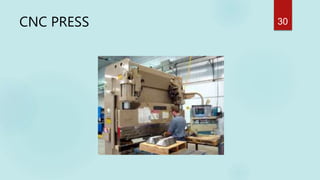
CNC PRESS 30
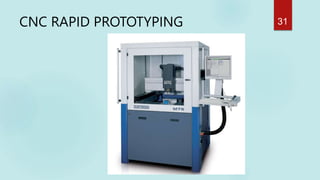
CNC RAPID PROTOTYPING 31
INDUSTRIES MOST AFFECTED by CNC
 Aerospace
 Machinery
 Electrical
 Fabrication
 Automotive
 Instrumentation
 Mold making
32
SAMPLE PRODUCTS
OF
CNC MANUFACTURING
33
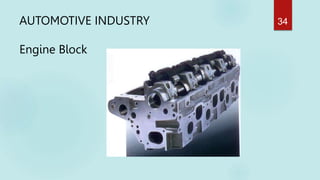
AUTOMOTIVE INDUSTRY
Engine Block
34
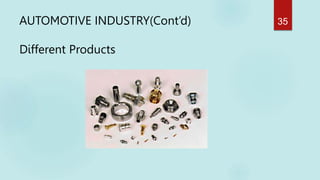
AUTOMOTIVE INDUSTRY(Cont’d)
Different Products
35
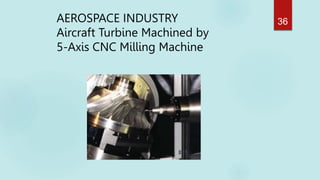
AEROSPACE INDUSTRY
Aircraft Turbine Machined by
5-Axis CNC Milling Machine
36
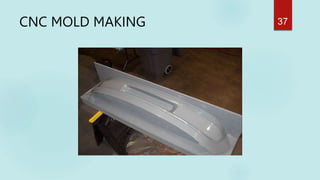
CNC MOLD MAKING 37
ELECTRONIC INDUSTRY 38
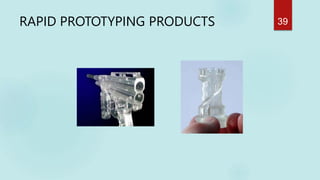
RAPID PROTOTYPING PRODUCTS 39
Good! Let’s know more about CNC!
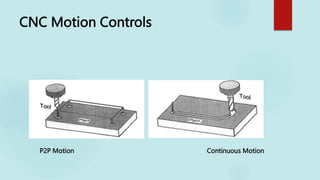
CNC Motion Controls
P2P Motion Continuous Motion
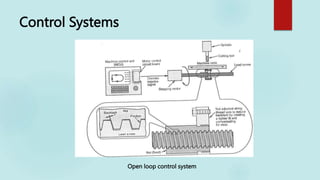
Control Systems
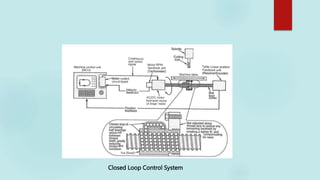
Open loop control system
Closed Loop Control System
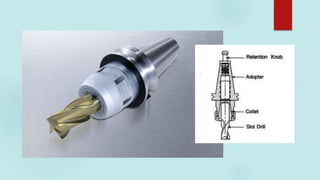
Automatic Tool Changer
 Houses number of tools for use
 Can switch between up to 200 tools stored in a
magazine, drum, or chain
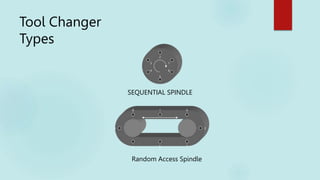
Tool Changer Types
AUTOMATIC (SEQUENTIAL) SPINDLE
TURNS ONE INCREMENT IN ONE DIRECTION FOR EACH TOOL
CHANGE; TOOLS MUST BE PLACED IN THE SPINDLE IN THE ORDER
THEY ARE USED
INDEXABLE (RANDOM ACCESS) SPINDLE
TURNS EITHER DIRECTION TO MAKE A SPECIFIC TOOL ACCESSIBLE;
TOOLS CAN BE PLACED IN ANY ORDER AS LONG AS THE COMPUTER
KNOWS THEIR POSITIONS
Tool Changer
Types
4
1
2
3
5
6
1
2
3
4
5
6
7
8
SEQUENTIAL SPINDLE
Random Access Spindle
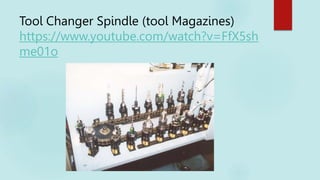
Tool Changer Spindle (tool Magazines)
https://www.youtube.com/watch?v=FfX5sh
me01o
Tool Changer Spindle
Tool changer spindle capable of holding 60 tools
Courtesy of Toth Industries
Automatic Pallet changers
 Mechanism similar to ATC
 Useful to fast loading and unloading of workpieces
 Saves set-up time
https://www.youtube.com/watch?v=JOShWEGKb7g
BASIC REQUIREMENT OF NC
MACHINE CONTROL
a. Preparatory functions: which unit, which interpolator, absolute or
incremental programming, which circular interpolation plane, cutter
compensation, etc.
b. Coordinates: three translational, and three rotational axes.
c. Machining parameters: feed, and speed.
d. Tool control: tool diameter, next tool number, tool change.
e. Cycle functions: drill cycle, ream cycle, bore cycle, mill cycle,
clearance plane.
f. Coolant control: coolant on/off, flood, mist.
g. Miscellaneous control: spindle on/off, tape rewind, spindle rotation
direction, pallet change, clamps control, etc.
h. Interpolators: linear, circular interpolation
Manual NC programming
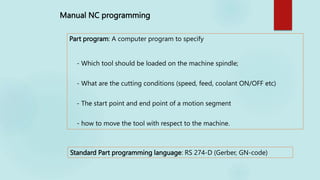
Part program: A computer program to specify
- Which tool should be loaded on the machine spindle;
- What are the cutting conditions (speed, feed, coolant ON/OFF etc)
- The start point and end point of a motion segment
- how to move the tool with respect to the machine.
Standard Part programming language: RS 274-D (Gerber, GN-code)
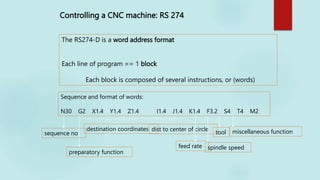
Controlling a CNC machine: RS 274
The RS274-D is a word address format
Each line of program == 1 block
Each block is composed of several instructions, or (words)
Sequence and format of words:
N30 G2 X1.4 Y1.4 Z1.4 I1.4 J1.4 K1.4 F3.2 S4 T4 M2
sequence no
preparatory function
destination coordinates dist to center of circle
feed rate spindle speed
tool miscellaneous function
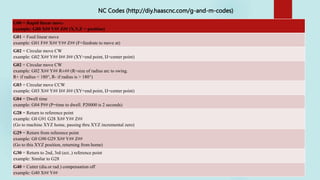
G00 = Rapid linear move
example: G00 X## Y## Z## (X,Y,Z = position)
G01 = Feed linear move
example: G01 F## X## Y## Z## (F=feedrate to move at)
G02 = Circular move CW
example: G02 X## Y## I## J## (XY=end point, IJ=center point)
G02 = Circular move CW
example: G02 X## Y## R±## (R=size of radius arc to swing.
R+ if radius < 180°, R- if radius is > 180°)
G03 = Circular move CCW
example: G03 X## Y## I## J## (XY=end point, IJ=center point)
G04 = Dwell time
example: G04 P## (P=time to dwell. P20000 is 2 seconds)
G28 = Return to reference point
example: G0 G91 G28 X## Y## Z##
(Go to machine XYZ home, passing thru XYZ incremental zero)
G29 = Return from reference point
example: G0 G90 G29 X## Y## Z##
(Go to this XYZ position, returning from home)
G30 = Return to 2nd, 3rd (ect..) reference point
example: Similar to G28
G40 = Cutter (dia.or rad.) compensation off
example: G40 X## Y##
NC Codes (http://diy.haascnc.com/g-and-m-codes)
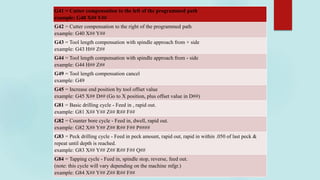
G41 = Cutter compensation to the left of the programmed path
example: G40 X## Y##
G42 = Cutter compensation to the right of the programmed path
example: G40 X## Y##
G43 = Tool length compensation with spindle approach from + side
example: G43 H## Z##
G44 = Tool length compensation with spindle approach from - side
example: G44 H## Z##
G49 = Tool length compensation cancel
example: G49
G45 = Increase end position by tool offset value
example: G45 X## D## (Go to X position, plus offset value in D##)
G81 = Basic drilling cycle - Feed in , rapid out.
example: G81 X## Y## Z## R## F##
G82 = Counter bore cycle - Feed in, dwell, rapid out.
example: G82 X## Y## Z## R## F## P####
G83 = Peck drilling cycle - Feed in peck amount, rapid out, rapid in within .050 of last peck &
repeat until depth is reached.
example: G83 X## Y## Z## R## F## Q##
G84 = Tapping cycle - Feed in, spindle stop, reverse, feed out.
(note: this cycle will vary depending on the machine mfgr.)
example: G84 X## Y## Z## R## F##
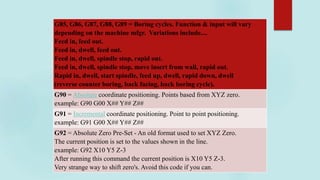
G85, G86, G87, G88, G89 = Boring cycles. Function & input will vary
depending on the machine mfgr. Variations include....
Feed in, feed out.
Feed in, dwell, feed out.
Feed in, dwell, spindle stop, rapid out.
Feed in, dwell, spindle stop, move insert from wall, rapid out.
Rapid in, dwell, start spindle, feed up, dwell, rapid down, dwell
(reverse counter boring, back facing, back boring cycle).
G90 = Absolute coordinate positioning. Points based from XYZ zero.
example: G90 G00 X## Y## Z##
G91 = Incremental coordinate positioning. Point to point positioning.
example: G91 G00 X## Y## Z##
G92 = Absolute Zero Pre-Set - An old format used to set XYZ Zero.
The current position is set to the values shown in the line.
example: G92 X10 Y5 Z-3
After running this command the current position is X10 Y5 Z-3.
Very strange way to shift zero's. Avoid this code if you can.
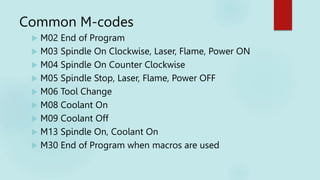
Common M-codes
 M02 End of Program
 M03 Spindle On Clockwise, Laser, Flame, Power ON
 M04 Spindle On Counter Clockwise
 M05 Spindle Stop, Laser, Flame, Power OFF
 M06 Tool Change
 M08 Coolant On
 M09 Coolant Off
 M13 Spindle On, Coolant On
 M30 End of Program when macros are used
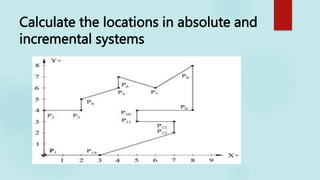
Calculate the locations in absolute and
incremental systems
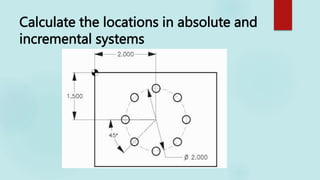
Calculate the locations in absolute and
incremental systems
NC Codes
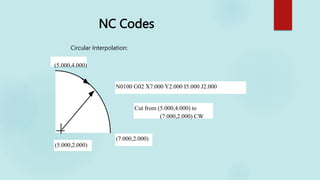
Circular Interpolation:
(5.000,2.000)
(7.000,2.000)
N0100 G02 X7.000 Y2.000 I5.000 J2.000
Cut from (5.000,4.000) to
(7.000,2.000) CW
(5.000,4.000)
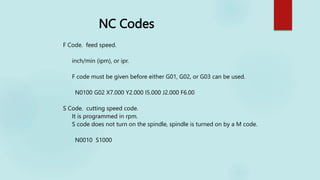
NC Codes
F Code. feed speed.
inch/min (ipm), or ipr.
F code must be given before either G01, G02, or G03 can be used.
N0100 G02 X7.000 Y2.000 I5.000 J2.000 F6.00
S Code. cutting speed code.
It is programmed in rpm.
S code does not turn on the spindle, spindle is turned on by a M code.
N0010 S1000
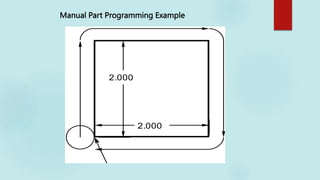
Manual Part Programming Example
2.000
2.000
(6,6)
Any Quetions?

Introduction to CNC machining processes-

  • 1.
  • 2.
    CNC Machining VsConventional Machining  CNCs programmed with a design that can be reproduced exactly. (https://www.youtube.com/watch?v=jrziv0piQ3U)  CNCs can produce thousands of identical parts in a relatively short amount of time, much faster than conventional machining.  CNCs can continuously be operated, 24 hours a day, seven days a week, and will only require a short down time for maintenance.
  • 3.
     CNCs caneasily be updated by changing the software  A visual test of every new program allows designers to ensure that the desired effect is achieved.  Advanced software allows CNC machines to make products that cannot be made by hand, even by the most skilled machinists available.  Because the machine does the skilled work, the machine operator does not need to have advanced training.  CNCs only require to be supervised by one worker.
  • 4.
    NC Applications (Machining) Batch and High Volume production  Repeat and/or Repetitive orders  Complex part geometries  Many separate operations on one part
  • 5.
    Cost-Benefits of NC Costs High investment cost  High maintenance effort (costly parts)  Need for skilled programmers  High utilization required
  • 6.
    Cost-Benefits of NC Benefits Cycle time reduction  Non-productive time reduction  Greater accuracy and repeatability  Lower scrap rates  Reduced parts inventory and floor space  Operator skill-level reduced
  • 7.
  • 8.
    Paper Tape  Stripof paper tape with holes in it.  Machine read pattern of holes and performed the required operation.
  • 9.
  • 10.
    Paper Tape Control Disadvantages Difficult to identify parts of program. Programs could be quite large. Stored on large bulky reels. Fragile, could rip easily Can you think of another major disadvantage?
  • 11.
    CNC  Further developmentsin the computer allowed it to be used to control the machine instead of the paper tape.
  • 12.
    CNC Advantages VsNC  Programs could be stored in computer memory.  Easier to edit.  More complex parts could be manufactured.  Use of 3d geometry.  Networking/file sharing with other computers.
  • 13.
    Computer Numerical Control(CNC)  Storage of more than one part program  Various forms of program input  Program editing at the machine tool  Fixed cycles and programming subroutines  Interpolation  Acceleration and deceleration computations  Communications interface  Diagnostics
  • 14.
    Advantages Of CNC Increased productivity after programming is completed  Reliability - reduces human error  Often eliminates need for special jigs and fixtures  Reduces location of part features  Makes possible the machining of complex shapes requiring simultaneous 3 axis motion
  • 15.
    Advantages  Single partand production runs can be programmed and machined with minimum effort and cost.  Programs can readily be altered and re-run  Reduced inspection costs (more reliable)  Once programming, setup and verified the equipment can be operated by a less skilled operator.
  • 16.
    Disadvantages Initial cost ofCNC machine tools Servicing of equipment Larger machines require more space Personnel must be trained in the programming and operation of this equipment.
  • 17.
    Components of aCNC System 1. Part program - detailed set of commands to be followed by the processing equipment 2. Machine control unit (MCU) - microcomputer that stores and executes the program by converting each command into actions by the processing equipment, one command at a time 3. Processing equipment - accomplishes the sequence of processing steps to transform the starting workpart into completed part
  • 19.
     Direct numericalcontrol (DNC) – control of multiple machine tools by a single (mainframe) computer through direct connection and in real time  1960s technology  Two way communication  Distributed numerical control (DNC) – network consisting of central computer connected to machine tool MCUs, which are CNC  Present technology  Two way communication
  • 20.
    Distributed Numerical Control Machine ControlUnit Transformation Process Machine Control Unit Machine Control Unit Central Computer NC Pgms BTR BTR BTR Computer Network
  • 21.
    Machining Centers  Amachining center can be defined as a machine tool capable of:  Multiple operation and processes in a single set-up utilizing multiple axis  Typically has an automatic mechanism to change tools  Machine motion is programmable  Servo motors drive feed mechanisms for tool axis’s  Positioning feedback is provided by resolvers to the control system
  • 22.
    Machining Centers  Example- A turning center capable of OD turning, external treading, cross-hole drilling, engraving, and milling. All in machining is accomplished in one “set-up.” Machine may have multiple spindles.
  • 23.
  • 24.
  • 25.
  • 26.
  • 27.
  • 28.
  • 29.
  • 30.
  • 31.
  • 32.
    INDUSTRIES MOST AFFECTEDby CNC  Aerospace  Machinery  Electrical  Fabrication  Automotive  Instrumentation  Mold making 32
  • 33.
  • 34.
  • 35.
  • 36.
    AEROSPACE INDUSTRY Aircraft TurbineMachined by 5-Axis CNC Milling Machine 36
  • 37.
  • 38.
  • 39.
  • 40.
    Good! Let’s knowmore about CNC!
  • 41.
    CNC Motion Controls P2PMotion Continuous Motion
  • 42.
  • 43.
  • 45.
    Automatic Tool Changer Houses number of tools for use  Can switch between up to 200 tools stored in a magazine, drum, or chain
  • 46.
    Tool Changer Types AUTOMATIC(SEQUENTIAL) SPINDLE TURNS ONE INCREMENT IN ONE DIRECTION FOR EACH TOOL CHANGE; TOOLS MUST BE PLACED IN THE SPINDLE IN THE ORDER THEY ARE USED INDEXABLE (RANDOM ACCESS) SPINDLE TURNS EITHER DIRECTION TO MAKE A SPECIFIC TOOL ACCESSIBLE; TOOLS CAN BE PLACED IN ANY ORDER AS LONG AS THE COMPUTER KNOWS THEIR POSITIONS
  • 47.
  • 48.
    Tool Changer Spindle(tool Magazines) https://www.youtube.com/watch?v=FfX5sh me01o
  • 49.
    Tool Changer Spindle Toolchanger spindle capable of holding 60 tools Courtesy of Toth Industries
  • 50.
    Automatic Pallet changers Mechanism similar to ATC  Useful to fast loading and unloading of workpieces  Saves set-up time https://www.youtube.com/watch?v=JOShWEGKb7g
  • 51.
    BASIC REQUIREMENT OFNC MACHINE CONTROL a. Preparatory functions: which unit, which interpolator, absolute or incremental programming, which circular interpolation plane, cutter compensation, etc. b. Coordinates: three translational, and three rotational axes. c. Machining parameters: feed, and speed. d. Tool control: tool diameter, next tool number, tool change. e. Cycle functions: drill cycle, ream cycle, bore cycle, mill cycle, clearance plane. f. Coolant control: coolant on/off, flood, mist. g. Miscellaneous control: spindle on/off, tape rewind, spindle rotation direction, pallet change, clamps control, etc. h. Interpolators: linear, circular interpolation
  • 52.
    Manual NC programming Partprogram: A computer program to specify - Which tool should be loaded on the machine spindle; - What are the cutting conditions (speed, feed, coolant ON/OFF etc) - The start point and end point of a motion segment - how to move the tool with respect to the machine. Standard Part programming language: RS 274-D (Gerber, GN-code)
  • 53.
    Controlling a CNCmachine: RS 274 The RS274-D is a word address format Each line of program == 1 block Each block is composed of several instructions, or (words) Sequence and format of words: N30 G2 X1.4 Y1.4 Z1.4 I1.4 J1.4 K1.4 F3.2 S4 T4 M2 sequence no preparatory function destination coordinates dist to center of circle feed rate spindle speed tool miscellaneous function
  • 54.
    G00 = Rapidlinear move example: G00 X## Y## Z## (X,Y,Z = position) G01 = Feed linear move example: G01 F## X## Y## Z## (F=feedrate to move at) G02 = Circular move CW example: G02 X## Y## I## J## (XY=end point, IJ=center point) G02 = Circular move CW example: G02 X## Y## R±## (R=size of radius arc to swing. R+ if radius < 180°, R- if radius is > 180°) G03 = Circular move CCW example: G03 X## Y## I## J## (XY=end point, IJ=center point) G04 = Dwell time example: G04 P## (P=time to dwell. P20000 is 2 seconds) G28 = Return to reference point example: G0 G91 G28 X## Y## Z## (Go to machine XYZ home, passing thru XYZ incremental zero) G29 = Return from reference point example: G0 G90 G29 X## Y## Z## (Go to this XYZ position, returning from home) G30 = Return to 2nd, 3rd (ect..) reference point example: Similar to G28 G40 = Cutter (dia.or rad.) compensation off example: G40 X## Y## NC Codes (http://diy.haascnc.com/g-and-m-codes)
  • 55.
    G41 = Cuttercompensation to the left of the programmed path example: G40 X## Y## G42 = Cutter compensation to the right of the programmed path example: G40 X## Y## G43 = Tool length compensation with spindle approach from + side example: G43 H## Z## G44 = Tool length compensation with spindle approach from - side example: G44 H## Z## G49 = Tool length compensation cancel example: G49 G45 = Increase end position by tool offset value example: G45 X## D## (Go to X position, plus offset value in D##) G81 = Basic drilling cycle - Feed in , rapid out. example: G81 X## Y## Z## R## F## G82 = Counter bore cycle - Feed in, dwell, rapid out. example: G82 X## Y## Z## R## F## P#### G83 = Peck drilling cycle - Feed in peck amount, rapid out, rapid in within .050 of last peck & repeat until depth is reached. example: G83 X## Y## Z## R## F## Q## G84 = Tapping cycle - Feed in, spindle stop, reverse, feed out. (note: this cycle will vary depending on the machine mfgr.) example: G84 X## Y## Z## R## F##
  • 56.
    G85, G86, G87,G88, G89 = Boring cycles. Function & input will vary depending on the machine mfgr. Variations include.... Feed in, feed out. Feed in, dwell, feed out. Feed in, dwell, spindle stop, rapid out. Feed in, dwell, spindle stop, move insert from wall, rapid out. Rapid in, dwell, start spindle, feed up, dwell, rapid down, dwell (reverse counter boring, back facing, back boring cycle). G90 = Absolute coordinate positioning. Points based from XYZ zero. example: G90 G00 X## Y## Z## G91 = Incremental coordinate positioning. Point to point positioning. example: G91 G00 X## Y## Z## G92 = Absolute Zero Pre-Set - An old format used to set XYZ Zero. The current position is set to the values shown in the line. example: G92 X10 Y5 Z-3 After running this command the current position is X10 Y5 Z-3. Very strange way to shift zero's. Avoid this code if you can.
  • 57.
    Common M-codes  M02End of Program  M03 Spindle On Clockwise, Laser, Flame, Power ON  M04 Spindle On Counter Clockwise  M05 Spindle Stop, Laser, Flame, Power OFF  M06 Tool Change  M08 Coolant On  M09 Coolant Off  M13 Spindle On, Coolant On  M30 End of Program when macros are used
  • 58.
    Calculate the locationsin absolute and incremental systems
  • 59.
    Calculate the locationsin absolute and incremental systems
  • 60.
    NC Codes Circular Interpolation: (5.000,2.000) (7.000,2.000) N0100G02 X7.000 Y2.000 I5.000 J2.000 Cut from (5.000,4.000) to (7.000,2.000) CW (5.000,4.000)
  • 61.
    NC Codes F Code.feed speed. inch/min (ipm), or ipr. F code must be given before either G01, G02, or G03 can be used. N0100 G02 X7.000 Y2.000 I5.000 J2.000 F6.00 S Code. cutting speed code. It is programmed in rpm. S code does not turn on the spindle, spindle is turned on by a M code. N0010 S1000
  • 62.
    Manual Part ProgrammingExample 2.000 2.000 (6,6)
  • 63.