Introduction and
refresher
INTRODUCTION TO BASH SCRIPTING
Alex Scriven
Data Scientist
INTRODUCTION TO BASH SCRIPTING
Introduction to the course
This course will cover:
Moving from command-line to a Bash script
Variables and data types in Bash scripting
Control statements
Functions and script automation
INTRODUCTION TO BASH SCRIPTING
Why Bash scripting? (Bash)
Firstly, let's consider why Bash?
Bash stands for 'Bourne Again Shell' (a pun)
Developed in the 80's but a very popular shell today. Default in many Unix systems, Macs
Unix is the internet! (Running ML Models, Data Pipelines)
AWS, Google, Microsoft all have CLI's to their products
INTRODUCTION TO BASH SCRIPTING
Why Bash scripting? (scripting!)
So why Bash scripting?
Ease of execution of shell commands (no need to copy-paste every time!)
Powerful programming constructs
INTRODUCTION TO BASH SCRIPTING
Expected knowledge
You are expected to have some basic knowledge for this course.
Understand what the command-line (terminal, shell) is
Have used basic commands such as cat , grep , sed etc.
If you are rusty, don't worry - we will revise this now!
INTRODUCTION TO BASH SCRIPTING
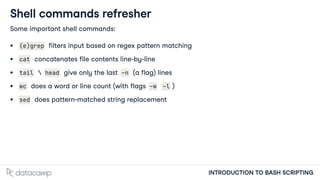
Shell commands refresher
Some important shell commands:
(e)grep filters input based on regex pattern matching
cat concatenates file contents line-by-line
tail  head give only the last -n (a flag) lines
wc does a word or line count (with flags -w -l )
sed does pattern-matched string replacement
INTRODUCTION TO BASH SCRIPTING
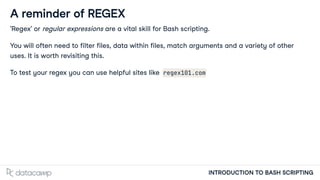
A reminder of REGEX
'Regex' or regular expressions are a vital skill for Bash scripting.
You will often need to filter files, data within files, match arguments and a variety of other
uses. It is worth revisiting this.
To test your regex you can use helpful sites like regex101.com
INTRODUCTION TO BASH SCRIPTING
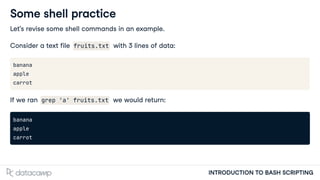
Some shell practice
Let's revise some shell commands in an example.
Consider a text file fruits.txt with 3 lines of data:
banana
apple
carrot
If we ran grep 'a' fruits.txt we would return:
banana
apple
carrot
INTRODUCTION TO BASH SCRIPTING
Some shell practice
But if we ran grep 'p' fruits.txt we would return:
apple
Recall that square parentheses are a matching set such as [eyfv] . Using ^ makes this an
inverse set (not these letters/numbers)
So we could run grep '[pc]' fruits.txt we would return:
apple
carrot
INTRODUCTION TO BASH SCRIPTING
Some shell practice
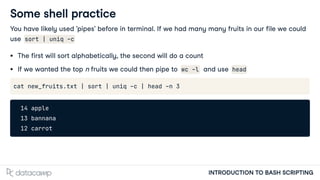
You have likely used 'pipes' before in terminal. If we had many many fruits in our file we could
use sort | uniq -c
The first will sort alphabetically, the second will do a count
If we wanted the top n fruits we could then pipe to wc -l and use head
cat new_fruits.txt | sort | uniq -c | head -n 3
14 apple
13 bannana
12 carrot
Let's practice!
INTRODUCTION TO BASH SCRIPTING
Your first Bash script
INTRODUCTION TO BASH SCRIPTING
Alex Scriven
Data Scientist
INTRODUCTION TO BASH SCRIPTING
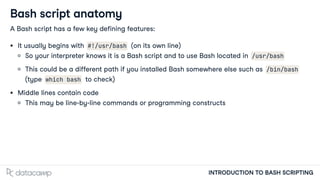
Bash script anatomy
A Bash script has a few key defining features:
It usually begins with #!/usr/bash (on its own line)
So your interpreter knows it is a Bash script and to use Bash located in /usr/bash
This could be a different path if you installed Bash somewhere else such as /bin/bash
(type which bash to check)
Middle lines contain code
This may be line-by-line commands or programming constructs
INTRODUCTION TO BASH SCRIPTING
Bash script anatomy
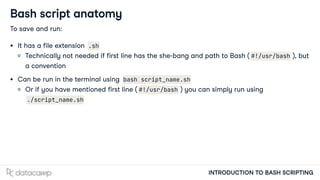
To save and run:
It has a file extension .sh
Technically not needed if first line has the she-bang and path to Bash ( #!/usr/bash ), but
a convention
Can be run in the terminal using bash script_name.sh
Or if you have mentioned first line ( #!/usr/bash ) you can simply run using
./script_name.sh
INTRODUCTION TO BASH SCRIPTING
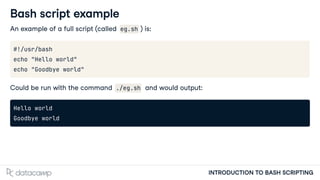
Bash script example
An example of a full script (called eg.sh ) is:
#!/usr/bash
echo "Hello world"
echo "Goodbye world"
Could be run with the command ./eg.sh and would output:
Hello world
Goodbye world
INTRODUCTION TO BASH SCRIPTING
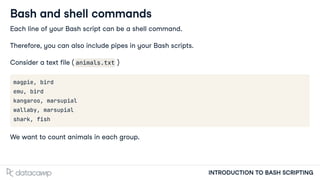
Bash and shell commands
Each line of your Bash script can be a shell command.
Therefore, you can also include pipes in your Bash scripts.
Consider a text file ( animals.txt )
magpie, bird
emu, bird
kangaroo, marsupial
wallaby, marsupial
shark, fish
We want to count animals in each group.
INTRODUCTION TO BASH SCRIPTING
Bash and shell commands
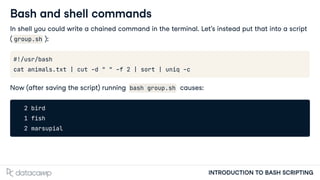
In shell you could write a chained command in the terminal. Let's instead put that into a script
( group.sh ):
#!/usr/bash
cat animals.txt | cut -d " " -f 2 | sort | uniq -c
Now (after saving the script) running bash group.sh causes:
2 bird
1 fish
2 marsupial
Let's practice!
INTRODUCTION TO BASH SCRIPTING
Standard streams &
arguments
INTRODUCTION TO BASH SCRIPTING
Alex Scriven
Data Scientist
INTRODUCTION TO BASH SCRIPTING
STDIN-STDOUT-STDERR
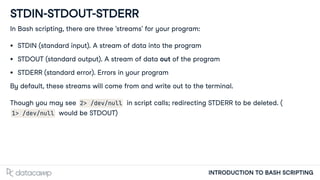
In Bash scripting, there are three 'streams' for your program:
STDIN (standard input). A stream of data into the program
STDOUT (standard output). A stream of data out of the program
STDERR (standard error). Errors in your program
By default, these streams will come from and write out to the terminal.
Though you may see 2> /dev/null in script calls; redirecting STDERR to be deleted. (
1> /dev/null would be STDOUT)
INTRODUCTION TO BASH SCRIPTING
STDIN-STDOUT graphically
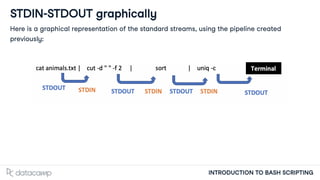
Here is a graphical representation of the standard streams, using the pipeline created
previously:
INTRODUCTION TO BASH SCRIPTING
STDIN example
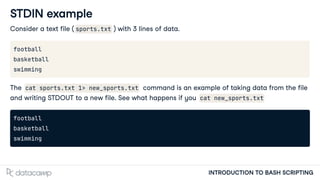
Consider a text file ( sports.txt ) with 3 lines of data.
football
basketball
swimming
The cat sports.txt 1> new_sports.txt command is an example of taking data from the file
and writing STDOUT to a new file. See what happens if you cat new_sports.txt
football
basketball
swimming
INTRODUCTION TO BASH SCRIPTING
STDIN vs ARGV
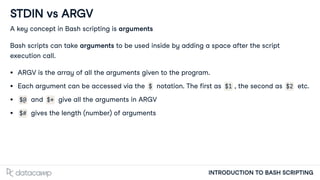
A key concept in Bash scripting is arguments
Bash scripts can take arguments to be used inside by adding a space after the script
execution call.
ARGV is the array of all the arguments given to the program.
Each argument can be accessed via the $ notation. The first as $1 , the second as $2 etc.
$@ and $* give all the arguments in ARGV
$# gives the length (number) of arguments
INTRODUCTION TO BASH SCRIPTING
ARGV example
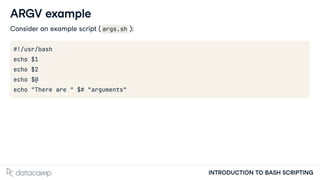
Consider an example script ( args.sh ):
#!/usr/bash
echo $1
echo $2
echo $@
echo "There are " $# "arguments"
INTRODUCTION TO BASH SCRIPTING
Running the ARGV example
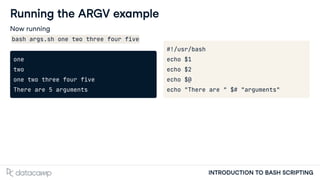
Now running
bash args.sh one two three four five
one
two
one two three four five
There are 5 arguments
#!/usr/bash
echo $1
echo $2
echo $@
echo "There are " $# "arguments"
Let's practice!
INTRODUCTION TO BASH SCRIPTING

introduction to BASH scripting indtroduction and refresher

  • 1.
    Introduction and refresher INTRODUCTION TOBASH SCRIPTING Alex Scriven Data Scientist
  • 2.
    INTRODUCTION TO BASHSCRIPTING Introduction to the course This course will cover: Moving from command-line to a Bash script Variables and data types in Bash scripting Control statements Functions and script automation
  • 3.
    INTRODUCTION TO BASHSCRIPTING Why Bash scripting? (Bash) Firstly, let's consider why Bash? Bash stands for 'Bourne Again Shell' (a pun) Developed in the 80's but a very popular shell today. Default in many Unix systems, Macs Unix is the internet! (Running ML Models, Data Pipelines) AWS, Google, Microsoft all have CLI's to their products
  • 4.
    INTRODUCTION TO BASHSCRIPTING Why Bash scripting? (scripting!) So why Bash scripting? Ease of execution of shell commands (no need to copy-paste every time!) Powerful programming constructs
  • 5.
    INTRODUCTION TO BASHSCRIPTING Expected knowledge You are expected to have some basic knowledge for this course. Understand what the command-line (terminal, shell) is Have used basic commands such as cat , grep , sed etc. If you are rusty, don't worry - we will revise this now!
  • 6.
    INTRODUCTION TO BASHSCRIPTING Shell commands refresher Some important shell commands: (e)grep filters input based on regex pattern matching cat concatenates file contents line-by-line tail head give only the last -n (a flag) lines wc does a word or line count (with flags -w -l ) sed does pattern-matched string replacement
  • 7.
    INTRODUCTION TO BASHSCRIPTING A reminder of REGEX 'Regex' or regular expressions are a vital skill for Bash scripting. You will often need to filter files, data within files, match arguments and a variety of other uses. It is worth revisiting this. To test your regex you can use helpful sites like regex101.com
  • 8.
    INTRODUCTION TO BASHSCRIPTING Some shell practice Let's revise some shell commands in an example. Consider a text file fruits.txt with 3 lines of data: banana apple carrot If we ran grep 'a' fruits.txt we would return: banana apple carrot
  • 9.
    INTRODUCTION TO BASHSCRIPTING Some shell practice But if we ran grep 'p' fruits.txt we would return: apple Recall that square parentheses are a matching set such as [eyfv] . Using ^ makes this an inverse set (not these letters/numbers) So we could run grep '[pc]' fruits.txt we would return: apple carrot
  • 10.
    INTRODUCTION TO BASHSCRIPTING Some shell practice You have likely used 'pipes' before in terminal. If we had many many fruits in our file we could use sort | uniq -c The first will sort alphabetically, the second will do a count If we wanted the top n fruits we could then pipe to wc -l and use head cat new_fruits.txt | sort | uniq -c | head -n 3 14 apple 13 bannana 12 carrot
  • 11.
  • 12.
    Your first Bashscript INTRODUCTION TO BASH SCRIPTING Alex Scriven Data Scientist
  • 13.
    INTRODUCTION TO BASHSCRIPTING Bash script anatomy A Bash script has a few key defining features: It usually begins with #!/usr/bash (on its own line) So your interpreter knows it is a Bash script and to use Bash located in /usr/bash This could be a different path if you installed Bash somewhere else such as /bin/bash (type which bash to check) Middle lines contain code This may be line-by-line commands or programming constructs
  • 14.
    INTRODUCTION TO BASHSCRIPTING Bash script anatomy To save and run: It has a file extension .sh Technically not needed if first line has the she-bang and path to Bash ( #!/usr/bash ), but a convention Can be run in the terminal using bash script_name.sh Or if you have mentioned first line ( #!/usr/bash ) you can simply run using ./script_name.sh
  • 15.
    INTRODUCTION TO BASHSCRIPTING Bash script example An example of a full script (called eg.sh ) is: #!/usr/bash echo "Hello world" echo "Goodbye world" Could be run with the command ./eg.sh and would output: Hello world Goodbye world
  • 16.
    INTRODUCTION TO BASHSCRIPTING Bash and shell commands Each line of your Bash script can be a shell command. Therefore, you can also include pipes in your Bash scripts. Consider a text file ( animals.txt ) magpie, bird emu, bird kangaroo, marsupial wallaby, marsupial shark, fish We want to count animals in each group.
  • 17.
    INTRODUCTION TO BASHSCRIPTING Bash and shell commands In shell you could write a chained command in the terminal. Let's instead put that into a script ( group.sh ): #!/usr/bash cat animals.txt | cut -d " " -f 2 | sort | uniq -c Now (after saving the script) running bash group.sh causes: 2 bird 1 fish 2 marsupial
  • 18.
  • 19.
    Standard streams & arguments INTRODUCTIONTO BASH SCRIPTING Alex Scriven Data Scientist
  • 20.
    INTRODUCTION TO BASHSCRIPTING STDIN-STDOUT-STDERR In Bash scripting, there are three 'streams' for your program: STDIN (standard input). A stream of data into the program STDOUT (standard output). A stream of data out of the program STDERR (standard error). Errors in your program By default, these streams will come from and write out to the terminal. Though you may see 2> /dev/null in script calls; redirecting STDERR to be deleted. ( 1> /dev/null would be STDOUT)
  • 21.
    INTRODUCTION TO BASHSCRIPTING STDIN-STDOUT graphically Here is a graphical representation of the standard streams, using the pipeline created previously:
  • 22.
    INTRODUCTION TO BASHSCRIPTING STDIN example Consider a text file ( sports.txt ) with 3 lines of data. football basketball swimming The cat sports.txt 1> new_sports.txt command is an example of taking data from the file and writing STDOUT to a new file. See what happens if you cat new_sports.txt football basketball swimming
  • 23.
    INTRODUCTION TO BASHSCRIPTING STDIN vs ARGV A key concept in Bash scripting is arguments Bash scripts can take arguments to be used inside by adding a space after the script execution call. ARGV is the array of all the arguments given to the program. Each argument can be accessed via the $ notation. The first as $1 , the second as $2 etc. $@ and $* give all the arguments in ARGV $# gives the length (number) of arguments
  • 24.
    INTRODUCTION TO BASHSCRIPTING ARGV example Consider an example script ( args.sh ): #!/usr/bash echo $1 echo $2 echo $@ echo "There are " $# "arguments"
  • 25.
    INTRODUCTION TO BASHSCRIPTING Running the ARGV example Now running bash args.sh one two three four five one two one two three four five There are 5 arguments #!/usr/bash echo $1 echo $2 echo $@ echo "There are " $# "arguments"
  • 26.