-Aniruddha S. Jawanjal
AWSCloudFormation
Cloud Management. Simplified.
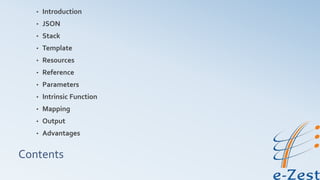
Contents
• Introduction
• JSON
• Stack
• Template
• Resources
• Reference
• Parameters
• Intrinsic Function
• Mapping
• Output
• Advantages
Introduction
• Definition
• Requirement
• Okay… But what it Exactly do?
• JSON, Stack,Template, ….++
JSON
• JavaScript Object Notation
• Data-Interchange Format
• Use convention similar to C-family of languages
• Consists two data types
 Collection of name-value pairs
 Ordered List of values
Stack
• Collection of AWS resources
• Create a stack
• Track the progress of create operation
• List your running stacks
• Itemize the content of stack
• Delete a stack
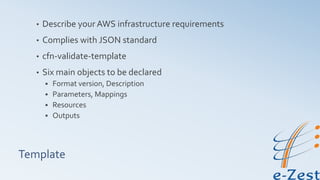
Template
• Describe your AWS infrastructure requirements
• Complies with JSON standard
• cfn-validate-template
• Six main objects to be declared
 Format version, Description
 Parameters, Mappings
 Resources
 Outputs
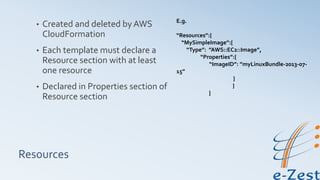
Resources
• Created and deleted by AWS
CloudFormation
• Each template must declare a
Resource section with at least
one resource
• Declared in Properties section of
Resource section
E.g.
“Resources”:{
“MySimpleImage”:{
“Type”: ”AWS::EC2::Image”,
“Properties”:{
“ImageID”: ”myLinuxBundle-2013-07-
15”
}
}
}
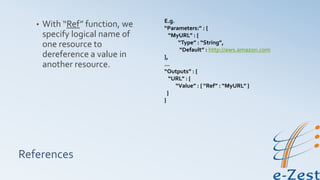
References
• With “Ref” function, we
specify logical name of
one resource to
dereference a value in
another resource.
E.g.
“Parameters:” : {
“MyURL” : {
“Type” : “String”,
“Default” : http://aws.amazon.com
},
…
“Outputs” : {
“URL” : {
“Value” : { “Ref” : “MyURL” }
}
}
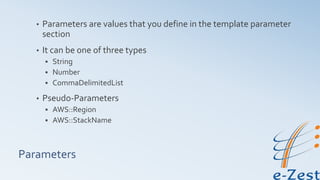
Parameters
• Parameters are values that you define in the template parameter
section
• It can be one of three types
 String
 Number
 CommaDelimitedList
• Pseudo-Parameters
 AWS::Region
 AWS::StackName
Intrinsic Function
• Used to pass values while runtime
• Fn::function-name
• Eg.
 Fn::base64
 Fn::FindInMap
 Fn::GetAtt
Eg.
“Properties” : {
“MyLBDNSName” : {
“Fn::GetAtt” :
[“MyLoadBalancer”,”DNSName”]
}
}
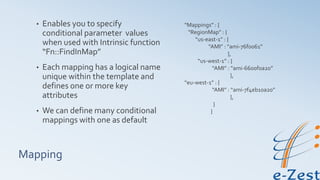
Mapping
• Enables you to specify
conditional parameter values
when used with Intrinsic function
“Fn::FindInMap”
• Each mapping has a logical name
unique within the template and
defines one or more key
attributes
• We can define many conditional
mappings with one as default
“Mappings” : {
“RegionMap” : {
“us-east-1” : {
“AMI” : “ami-76f0061”
},
“us-west-1” : {
“AMI” : “ami-6600f0a20”
},
“eu-west-1” : {
“AMI” : “ami-7f4eb10a20”
},
}
}
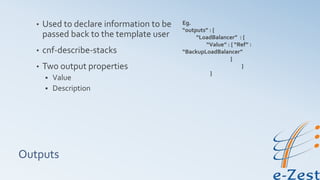
Outputs
• Used to declare information to be
passed back to the template user
• cnf-describe-stacks
• Two output properties
 Value
 Description
Eg.
“outputs” : {
“LoadBalancer” : {
“Value” : { “Ref” :
“BackupLoadBalancer”
}
}
}
Advantages
• No need to reinvent the wheel
• Transparent & Open
• Declarative & flexible
• Customized via parameters
• Integration ready
• No extra charge

Introduction to aws cloud formation

  • 1.
  • 2.
    Contents • Introduction • JSON •Stack • Template • Resources • Reference • Parameters • Intrinsic Function • Mapping • Output • Advantages
  • 3.
    Introduction • Definition • Requirement •Okay… But what it Exactly do? • JSON, Stack,Template, ….++
  • 4.
    JSON • JavaScript ObjectNotation • Data-Interchange Format • Use convention similar to C-family of languages • Consists two data types  Collection of name-value pairs  Ordered List of values
  • 5.
    Stack • Collection ofAWS resources • Create a stack • Track the progress of create operation • List your running stacks • Itemize the content of stack • Delete a stack
  • 6.
    Template • Describe yourAWS infrastructure requirements • Complies with JSON standard • cfn-validate-template • Six main objects to be declared  Format version, Description  Parameters, Mappings  Resources  Outputs
  • 7.
    Resources • Created anddeleted by AWS CloudFormation • Each template must declare a Resource section with at least one resource • Declared in Properties section of Resource section E.g. “Resources”:{ “MySimpleImage”:{ “Type”: ”AWS::EC2::Image”, “Properties”:{ “ImageID”: ”myLinuxBundle-2013-07- 15” } } }
  • 8.
    References • With “Ref”function, we specify logical name of one resource to dereference a value in another resource. E.g. “Parameters:” : { “MyURL” : { “Type” : “String”, “Default” : http://aws.amazon.com }, … “Outputs” : { “URL” : { “Value” : { “Ref” : “MyURL” } } }
  • 9.
    Parameters • Parameters arevalues that you define in the template parameter section • It can be one of three types  String  Number  CommaDelimitedList • Pseudo-Parameters  AWS::Region  AWS::StackName
  • 10.
    Intrinsic Function • Usedto pass values while runtime • Fn::function-name • Eg.  Fn::base64  Fn::FindInMap  Fn::GetAtt Eg. “Properties” : { “MyLBDNSName” : { “Fn::GetAtt” : [“MyLoadBalancer”,”DNSName”] } }
  • 11.
    Mapping • Enables youto specify conditional parameter values when used with Intrinsic function “Fn::FindInMap” • Each mapping has a logical name unique within the template and defines one or more key attributes • We can define many conditional mappings with one as default “Mappings” : { “RegionMap” : { “us-east-1” : { “AMI” : “ami-76f0061” }, “us-west-1” : { “AMI” : “ami-6600f0a20” }, “eu-west-1” : { “AMI” : “ami-7f4eb10a20” }, } }
  • 12.
    Outputs • Used todeclare information to be passed back to the template user • cnf-describe-stacks • Two output properties  Value  Description Eg. “outputs” : { “LoadBalancer” : { “Value” : { “Ref” : “BackupLoadBalancer” } } }
  • 13.
    Advantages • No needto reinvent the wheel • Transparent & Open • Declarative & flexible • Customized via parameters • Integration ready • No extra charge