
Cloud Computing
An Introduction and Overview
Tom Creighton
CTO, Family Search
tc@familysearch.org
Thanks to our Sponsors!
To connect to wireless
1. Choose Uguest in the wireless list
2. Open a browser. This will open a Uof U website
3. Choose Login
Cloud Computing Definitions
• Essential Characteristics
– On-demand self-service
– Broad network access
– Resource pooling
– Rapid elasticity
– Measured service
• Service Models
– Software as a Service
– Platform as a Service
– Infrastructure as a Service
NIST defines five essential
characteristics, three service models,
and four deployment models.
Cloud Computing Definitions
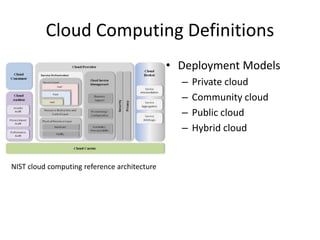
• Deployment Models
– Private cloud
– Community cloud
– Public cloud
– Hybrid cloud
NIST cloud computing reference architecture
Cloud Computing Definitions
ACM CTO Roundtables
What is Cloud Computing?
Cloud computing is about moving
services, computation and/or
data—for cost and business
advantage—off-site to an internal
or external, location-transparent,
centralized facility or contractor.
By making data available in the
cloud, it can be more easily and
ubiquitously accessed, often at
much lower cost, increasing its
value by enabling opportunities
for enhanced collaboration,
integration, and analysis on a
shared common platform.
Three divisions (areas):
• SaaS: WAN-enabled application services
(eg. Google Apps, Salesforce.com,
WebEx.)
• PaaS: Foundational elements to develop
new applications (eg. Coghead, Google
Application Engine.)
• Iaas: Providing computational and
storage infrastructure in a centralized,
location-transparent service (eg.
Amazon.)
Cloud Computing Definitions
• The term "Cloud
Computing" refers to
the on-demand delivery
of IT resources via the
Internet with pay-as-
you-go pricing.
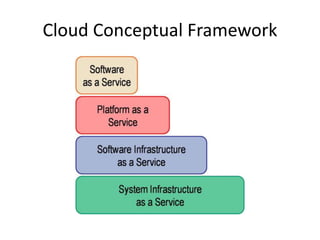
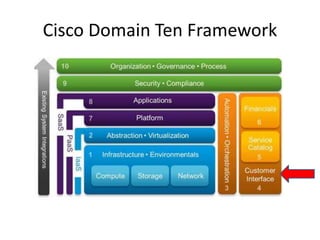
Cloud Conceptual Framework
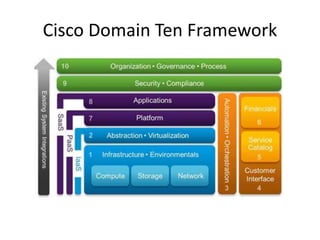
Cisco Domain Ten Framework
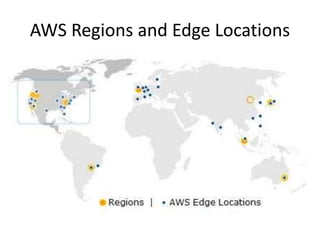
AWS Regions and Edge Locations
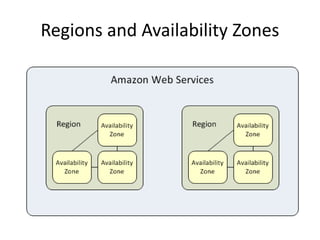
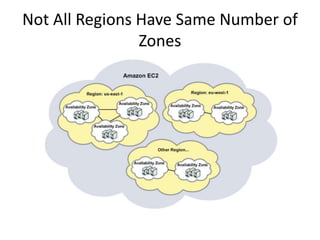
Regions and Availability Zones
Not All Regions Have Same Number of
Zones
Cisco Domain Ten Framework
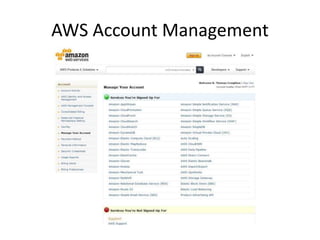
AWS Account Management
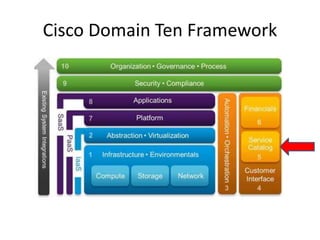
Cisco Domain Ten Framework
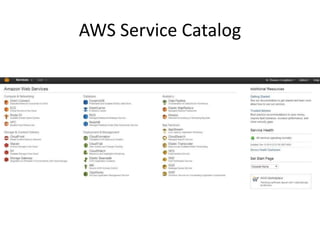
AWS Service Catalog
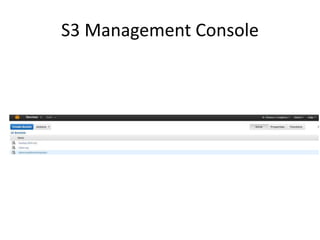
S3 Management Console
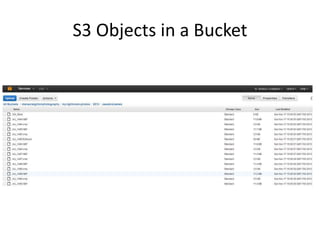
S3 Objects in a Bucket
An Example Cloud Use
Cloudbursting Example
• 1 Trillion pairs to classify
• 500 TB of data
• 10 TB result set
• CPU Bound
– Single core: ~ 1000-1500 classify ops/s
• 11.5 K core-days
Approach
• AWS c1.xlarge spot instances
– 8 core, 24GB RAM
– $0.075 on AWS spot market
– Best CPU/$ ratio
• HP Blades in familysearch.org datacenter
– 8 core, 24 GB RAM
– 300 servers
Issues to Address
• Machine Instability
– Machine death from AWS spot instance volatility
– Hardware failure (1000s of machines – certainty)
• Coordination
– Partitioning the work
– Different server clusters
• Different aws availability zones
• Fs.org datacenter
– Restart failed processes
The Solution
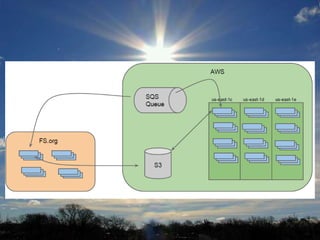
• Single Queue Multiple Reader Pattern
– SQS with visibility timeouts to manage retries
– Dead letter queue for messages failing > threshold
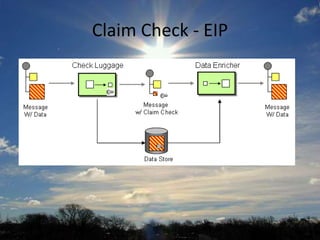
• Claim Check Pattern
– AWS S3 as data store
• Homogeneous, Idempotent work units
– 15-20 minute target completion time
– 0 side effects
– Work may get done multiple times
Claim Check - EIP
Results
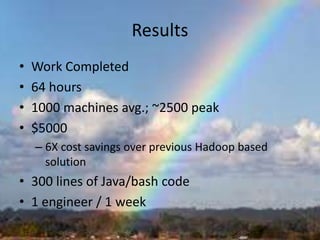
• Work Completed
• 64 hours
• 1000 machines avg.; ~2500 peak
• $5000
– 6X cost savings over previous Hadoop based
solution
• 300 lines of Java/bash code
• 1 engineer / 1 week
Next Steps
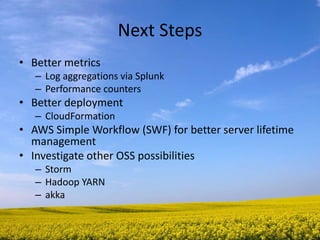
• Better metrics
– Log aggregations via Splunk
– Performance counters
• Better deployment
– CloudFormation
• AWS Simple Workflow (SWF) for better server lifetime
management
• Investigate other OSS possibilities
– Storm
– Hadoop YARN
– akka
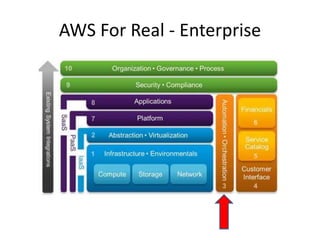
AWS For Real - Enterprise
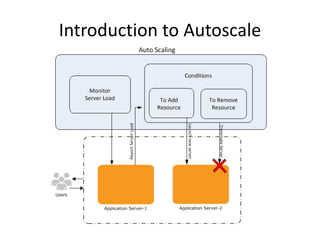
Introduction to Autoscale
Configuration Example
CloudFormation Template - 1
"Resources" : {
"WebServerGroup" : {
"Type" : "AWS::AutoScaling::AutoScalingGroup",
"Properties" : {
"AvailabilityZones" : { "Fn::GetAZs" : ""},
"LaunchConfigurationName" : { "Ref" : "LaunchConfig" },
"MinSize" : "1",
"MaxSize" : "3",
"LoadBalancerNames" : [ { "Ref" : "ElasticLoadBalancer" } ]
}
},
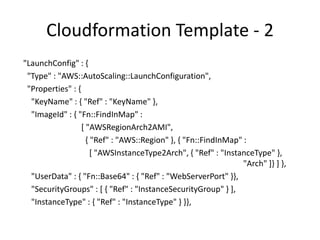
Cloudformation Template - 2
"LaunchConfig" : {
"Type" : "AWS::AutoScaling::LaunchConfiguration",
"Properties" : {
"KeyName" : { "Ref" : "KeyName" },
"ImageId" : { "Fn::FindInMap" :
[ "AWSRegionArch2AMI",
{ "Ref" : "AWS::Region" }, { "Fn::FindInMap" :
[ "AWSInstanceType2Arch", { "Ref" : "InstanceType" },
"Arch" ]} ] },
"UserData" : { "Fn::Base64" : { "Ref" : "WebServerPort" }},
"SecurityGroups" : [ { "Ref" : "InstanceSecurityGroup" } ],
"InstanceType" : { "Ref" : "InstanceType" } }},
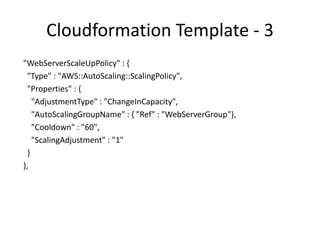
Cloudformation Template - 3
"WebServerScaleUpPolicy" : {
"Type" : "AWS::AutoScaling::ScalingPolicy",
"Properties" : {
"AdjustmentType" : "ChangeInCapacity",
"AutoScalingGroupName" : { "Ref" : "WebServerGroup"},
"Cooldown" : "60",
"ScalingAdjustment" : "1"
}
},
Cloudformation - 4
"WebServerScaleDownPolicy" : {
"Type" : "AWS::AutoScaling::ScalingPolicy",
"Properties" : {
"AdjustmentType" : "ChangeInCapacity",
"AutoScalingGroupName" : { "Ref" : "WebServerGroup" },
"Cooldown" : "60",
"ScalingAdjustment" : "-1" } },
Cloudformation - 5
"CPUAlarmHigh": {
"Type": "AWS::CloudWatch::Alarm",
"Properties": {
"AlarmDescription": "Scale-up if CPU > 90% for 10 minutes",
"MetricName": "CPUUtilization",
"Namespace": "AWS/EC2",
"Statistic": "Average",
"Period": "300",
"EvaluationPeriods": "2",
"Threshold": "90",
"AlarmActions": [ { "Ref": "WebServerScaleUpPolicy" } ],
"Dimensions": [
{
"Name": "AutoScalingGroupName",
"Value": { "Ref": "WebServerGroup" }
} ],
"ComparisonOperator": "GreaterThanThreshold" } },
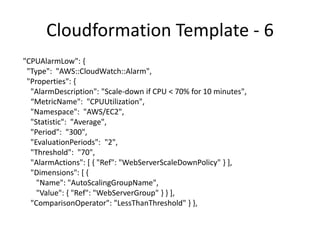
Cloudformation Template - 6
"CPUAlarmLow": {
"Type": "AWS::CloudWatch::Alarm",
"Properties": {
"AlarmDescription": "Scale-down if CPU < 70% for 10 minutes",
“MetricName": "CPUUtilization",
"Namespace": "AWS/EC2",
"Statistic": "Average",
"Period": "300",
"EvaluationPeriods": "2",
"Threshold": "70",
"AlarmActions": [ { "Ref": "WebServerScaleDownPolicy" } ],
"Dimensions": [ {
"Name": "AutoScalingGroupName",
"Value": { "Ref": "WebServerGroup" } } ],
"ComparisonOperator": "LessThanThreshold" } },
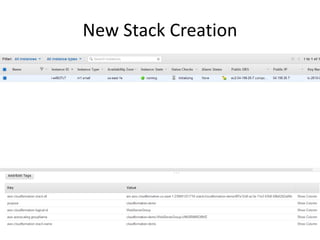
New Stack Creation
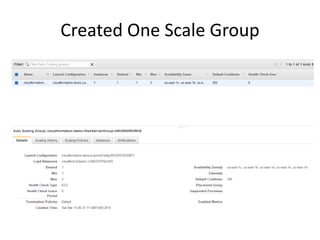
Created One Scale Group
Making it Real
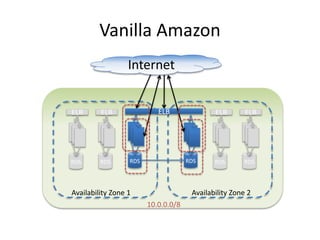
Vanilla Amazon
ELB
Internet
RDS RDS
ELB
Availability Zone 2Availability Zone 1
10.0.0.0/8
ELB
RDS
ELB
RDS
ELB
RDS
ELB
RDS
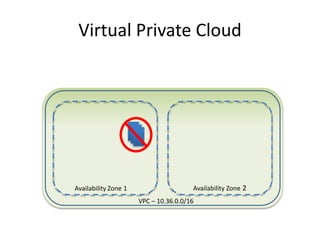
Virtual Private Cloud
Availability Zone 2Availability Zone 1
VPC – 10.36.0.0/16
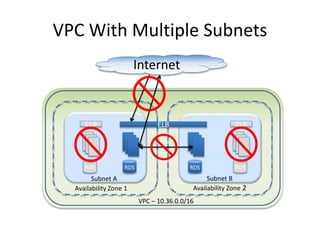
VPC With Multiple Subnets
Availability Zone 2Availability Zone 1
VPC – 10.36.0.0/16
Subnet A Subnet B
RDS RDSRDS
ELB
RDS
ELB
Internet
ELB
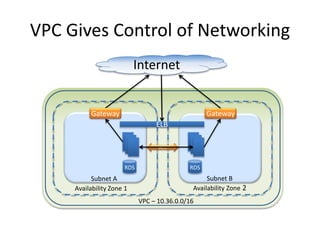
VPC Gives Control of Networking
Availability Zone 2Availability Zone 1
VPC – 10.36.0.0/16
Subnet A Subnet B
RDS RDS
Internet
Gateway Gateway
ACL
ELB
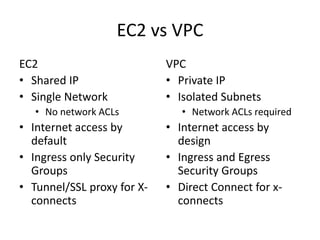
EC2 vs VPC
EC2
• Shared IP
• Single Network
• No network ACLs
• Internet access by
default
• Ingress only Security
Groups
• Tunnel/SSL proxy for X-
connects
VPC
• Private IP
• Isolated Subnets
• Network ACLs required
• Internet access by
design
• Ingress and Egress
Security Groups
• Direct Connect for x-
connects
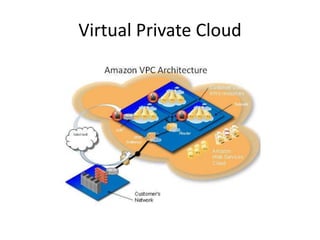
Virtual Private Cloud
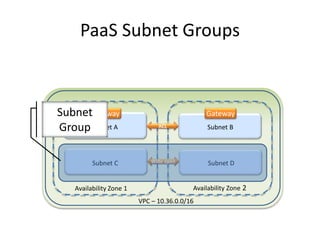
PaaS Subnet Groups
Availability Zone 2Availability Zone 1
VPC – 10.36.0.0/16
Subnet A Subnet B
Gateway Gateway
ACL
Subnet C Subnet DWide open
Subnet
Group
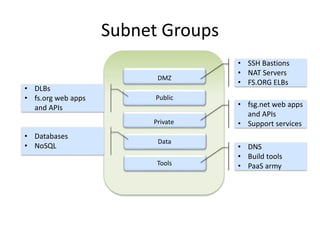
Subnet Groups
DMZ
• SSH Bastions
• NAT Servers
• FS.ORG ELBs
Public
• DLBs
• fs.org web apps
and APIs
Private
• fsg.net web apps
and APIs
• Support services
Data
• Databases
• NoSQL
Tools
• DNS
• Build tools
• PaaS army
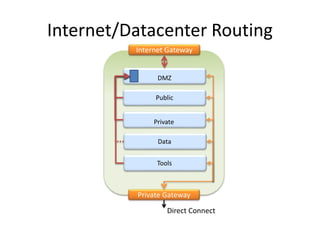
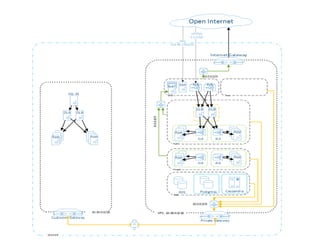
Internet/Datacenter Routing
DMZ
Public
Private
Data
Tools
Internet Gateway
Private Gateway
Direct Connect
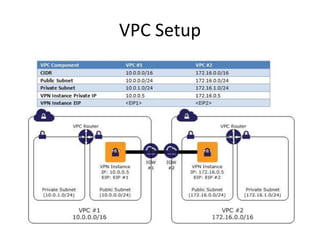
VPC Setup
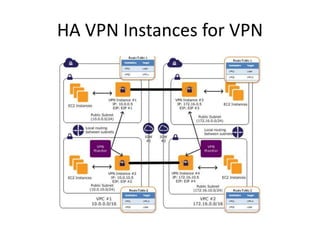
HA VPN Instances for VPN
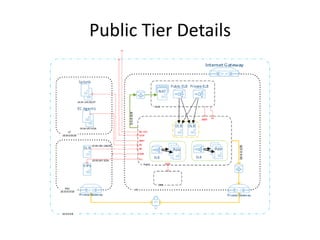
Public Tier Details
Conclusion
• Cloud technology offers new opportunities in
scale and management.
• Properly using these tools is necessary to achieve
business goals.
• CapEx to OpEx is one reason to move to cloud
computing.
• A more important reason is the tremendous
flexibility that the environment offers.
• VPC provides the kinds of governance and
security an enterprise needs to be comfortable
with so much power under the hood.
Utah Codecamp Cloud Computing

Utah Codecamp Cloud Computing

  • 1.
    Cloud Computing An Introductionand Overview Tom Creighton CTO, Family Search tc@familysearch.org
  • 2.
    Thanks to ourSponsors! To connect to wireless 1. Choose Uguest in the wireless list 2. Open a browser. This will open a Uof U website 3. Choose Login
  • 3.
    Cloud Computing Definitions •Essential Characteristics – On-demand self-service – Broad network access – Resource pooling – Rapid elasticity – Measured service • Service Models – Software as a Service – Platform as a Service – Infrastructure as a Service NIST defines five essential characteristics, three service models, and four deployment models.
  • 4.
    Cloud Computing Definitions •Deployment Models – Private cloud – Community cloud – Public cloud – Hybrid cloud NIST cloud computing reference architecture
  • 5.
    Cloud Computing Definitions ACMCTO Roundtables What is Cloud Computing? Cloud computing is about moving services, computation and/or data—for cost and business advantage—off-site to an internal or external, location-transparent, centralized facility or contractor. By making data available in the cloud, it can be more easily and ubiquitously accessed, often at much lower cost, increasing its value by enabling opportunities for enhanced collaboration, integration, and analysis on a shared common platform. Three divisions (areas): • SaaS: WAN-enabled application services (eg. Google Apps, Salesforce.com, WebEx.) • PaaS: Foundational elements to develop new applications (eg. Coghead, Google Application Engine.) • Iaas: Providing computational and storage infrastructure in a centralized, location-transparent service (eg. Amazon.)
  • 6.
    Cloud Computing Definitions •The term "Cloud Computing" refers to the on-demand delivery of IT resources via the Internet with pay-as- you-go pricing.
  • 7.
  • 8.
  • 10.
    AWS Regions andEdge Locations
  • 11.
  • 12.
    Not All RegionsHave Same Number of Zones
  • 13.
  • 14.
  • 15.
  • 16.
  • 17.
  • 18.
    S3 Objects ina Bucket
  • 19.
  • 20.
    Cloudbursting Example • 1Trillion pairs to classify • 500 TB of data • 10 TB result set • CPU Bound – Single core: ~ 1000-1500 classify ops/s • 11.5 K core-days
  • 21.
    Approach • AWS c1.xlargespot instances – 8 core, 24GB RAM – $0.075 on AWS spot market – Best CPU/$ ratio • HP Blades in familysearch.org datacenter – 8 core, 24 GB RAM – 300 servers
  • 22.
    Issues to Address •Machine Instability – Machine death from AWS spot instance volatility – Hardware failure (1000s of machines – certainty) • Coordination – Partitioning the work – Different server clusters • Different aws availability zones • Fs.org datacenter – Restart failed processes
  • 23.
    The Solution • SingleQueue Multiple Reader Pattern – SQS with visibility timeouts to manage retries – Dead letter queue for messages failing > threshold • Claim Check Pattern – AWS S3 as data store • Homogeneous, Idempotent work units – 15-20 minute target completion time – 0 side effects – Work may get done multiple times
  • 24.
  • 26.
    Results • Work Completed •64 hours • 1000 machines avg.; ~2500 peak • $5000 – 6X cost savings over previous Hadoop based solution • 300 lines of Java/bash code • 1 engineer / 1 week
  • 27.
    Next Steps • Bettermetrics – Log aggregations via Splunk – Performance counters • Better deployment – CloudFormation • AWS Simple Workflow (SWF) for better server lifetime management • Investigate other OSS possibilities – Storm – Hadoop YARN – akka
  • 28.
    AWS For Real- Enterprise
  • 29.
  • 30.
  • 31.
    CloudFormation Template -1 "Resources" : { "WebServerGroup" : { "Type" : "AWS::AutoScaling::AutoScalingGroup", "Properties" : { "AvailabilityZones" : { "Fn::GetAZs" : ""}, "LaunchConfigurationName" : { "Ref" : "LaunchConfig" }, "MinSize" : "1", "MaxSize" : "3", "LoadBalancerNames" : [ { "Ref" : "ElasticLoadBalancer" } ] } },
  • 32.
    Cloudformation Template -2 "LaunchConfig" : { "Type" : "AWS::AutoScaling::LaunchConfiguration", "Properties" : { "KeyName" : { "Ref" : "KeyName" }, "ImageId" : { "Fn::FindInMap" : [ "AWSRegionArch2AMI", { "Ref" : "AWS::Region" }, { "Fn::FindInMap" : [ "AWSInstanceType2Arch", { "Ref" : "InstanceType" }, "Arch" ]} ] }, "UserData" : { "Fn::Base64" : { "Ref" : "WebServerPort" }}, "SecurityGroups" : [ { "Ref" : "InstanceSecurityGroup" } ], "InstanceType" : { "Ref" : "InstanceType" } }},
  • 33.
    Cloudformation Template -3 "WebServerScaleUpPolicy" : { "Type" : "AWS::AutoScaling::ScalingPolicy", "Properties" : { "AdjustmentType" : "ChangeInCapacity", "AutoScalingGroupName" : { "Ref" : "WebServerGroup"}, "Cooldown" : "60", "ScalingAdjustment" : "1" } },
  • 34.
    Cloudformation - 4 "WebServerScaleDownPolicy": { "Type" : "AWS::AutoScaling::ScalingPolicy", "Properties" : { "AdjustmentType" : "ChangeInCapacity", "AutoScalingGroupName" : { "Ref" : "WebServerGroup" }, "Cooldown" : "60", "ScalingAdjustment" : "-1" } },
  • 35.
    Cloudformation - 5 "CPUAlarmHigh":{ "Type": "AWS::CloudWatch::Alarm", "Properties": { "AlarmDescription": "Scale-up if CPU > 90% for 10 minutes", "MetricName": "CPUUtilization", "Namespace": "AWS/EC2", "Statistic": "Average", "Period": "300", "EvaluationPeriods": "2", "Threshold": "90", "AlarmActions": [ { "Ref": "WebServerScaleUpPolicy" } ], "Dimensions": [ { "Name": "AutoScalingGroupName", "Value": { "Ref": "WebServerGroup" } } ], "ComparisonOperator": "GreaterThanThreshold" } },
  • 36.
    Cloudformation Template -6 "CPUAlarmLow": { "Type": "AWS::CloudWatch::Alarm", "Properties": { "AlarmDescription": "Scale-down if CPU < 70% for 10 minutes", “MetricName": "CPUUtilization", "Namespace": "AWS/EC2", "Statistic": "Average", "Period": "300", "EvaluationPeriods": "2", "Threshold": "70", "AlarmActions": [ { "Ref": "WebServerScaleDownPolicy" } ], "Dimensions": [ { "Name": "AutoScalingGroupName", "Value": { "Ref": "WebServerGroup" } } ], "ComparisonOperator": "LessThanThreshold" } },
  • 37.
  • 38.
  • 39.
  • 40.
    Vanilla Amazon ELB Internet RDS RDS ELB AvailabilityZone 2Availability Zone 1 10.0.0.0/8 ELB RDS ELB RDS ELB RDS ELB RDS
  • 41.
    Virtual Private Cloud AvailabilityZone 2Availability Zone 1 VPC – 10.36.0.0/16
  • 42.
    VPC With MultipleSubnets Availability Zone 2Availability Zone 1 VPC – 10.36.0.0/16 Subnet A Subnet B RDS RDSRDS ELB RDS ELB Internet ELB
  • 43.
    VPC Gives Controlof Networking Availability Zone 2Availability Zone 1 VPC – 10.36.0.0/16 Subnet A Subnet B RDS RDS Internet Gateway Gateway ACL ELB
  • 44.
    EC2 vs VPC EC2 •Shared IP • Single Network • No network ACLs • Internet access by default • Ingress only Security Groups • Tunnel/SSL proxy for X- connects VPC • Private IP • Isolated Subnets • Network ACLs required • Internet access by design • Ingress and Egress Security Groups • Direct Connect for x- connects
  • 45.
  • 47.
    PaaS Subnet Groups AvailabilityZone 2Availability Zone 1 VPC – 10.36.0.0/16 Subnet A Subnet B Gateway Gateway ACL Subnet C Subnet DWide open Subnet Group
  • 48.
    Subnet Groups DMZ • SSHBastions • NAT Servers • FS.ORG ELBs Public • DLBs • fs.org web apps and APIs Private • fsg.net web apps and APIs • Support services Data • Databases • NoSQL Tools • DNS • Build tools • PaaS army
  • 49.
  • 50.
  • 51.
  • 53.
  • 54.
    Conclusion • Cloud technologyoffers new opportunities in scale and management. • Properly using these tools is necessary to achieve business goals. • CapEx to OpEx is one reason to move to cloud computing. • A more important reason is the tremendous flexibility that the environment offers. • VPC provides the kinds of governance and security an enterprise needs to be comfortable with so much power under the hood.