AWS Certified Solutions Architect - Associate
Week 5 Content Review
January 2023 Accelerator Cohort
© 2022, Amazon Web Services, Inc. or its affiliates. All rights reserved.
Elastic Load Balancer
© 2022, Amazon Web Services, Inc. or its affiliates. All rights reserved.
Elastic Load Balancing
Distribute network traffic to improve the scalability of your applications
Automatically distributes incoming application traffic across multiple targets, such as
Amazon EC2 instances, containers, IP addresses, Lambda functions, and virtual
appliances
© 2022, Amazon Web Services, Inc. or its affiliates. All rights reserved.
Elastic Load Balancing
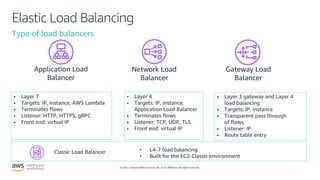
Type of load balancers
• Layer 7
• Targets: IP, instance, AWS Lambda
• Terminates flows
• Listener: HTTP, HTTPS, gRPC
• Front end: virtual IP
• Layer 4
• Targets: IP, instance,
Application Load Balancer
• Terminates flows
• Listener: TCP, UDP, TLS
• Front end: virtual IP
• Layer 3 gateway and Layer 4
load balancing
• Targets: IP, instance
• Transparent pass through
of flows
• Listener: IP
• Route table entry
Application Load
Balancer
Network Load
Balancer
Gateway Load
Balancer
Classic Load Balancer • L4-7 load balancing
• Built for the EC2-Classic environment
© 2022, Amazon Web Services, Inc. or its affiliates. All rights reserved.
Application Load Balancer (ALB)
Auto Scaling
ECS / EKS
AWS Lambda
AWS Certificate
Manager
Amazon Route 53
AWS WAF Amazon Cognito
Application Load Balancer
Clients
HTTP(S)
© 2022, Amazon Web Services, Inc. or its affiliates. All rights reserved.
Network Load Balancer (NLB)
Auto Scaling
ECS / EKS
AWS Certificate
Manager
Amazon Route 53
Clients
PrivateLink
Network
Load
Balancer
IAM
Direct Connect
© 2022, Amazon Web Services, Inc. or its affiliates. All rights reserved.
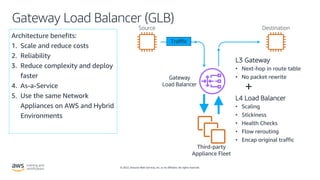
Gateway Load Balancer (GLB)
Architecture benefits:
1. Scale and reduce costs
2. Reliability
3. Reduce complexity and deploy
faster
4. As-a-Service
5. Use the same Network
Appliances on AWS and Hybrid
Environments
Source Destination
Third-party
Appliance Fleet
Traffic
L3 Gateway
• Next-hop in route table
• No packet rewrite
+
L4 Load Balancer
• Scaling
• Stickiness
• Health Checks
• Flow rerouting
• Encap original traffic
Gateway
Load Balancer
© 2022, Amazon Web Services, Inc. or its affiliates. All rights reserved.
Auto Scaling
© 2022, Amazon Web Services, Inc. or its affiliates. All rights reserved.
Auto Scaling
Automatically launch or terminate Amazon EC2 instances
• User-defined policies driven by CloudWatch
• Health status checks
• Schedules
• Manually using set-desired-capacity in the CLI
Scale out to meet demand, scale in to reduce costs.
© 2022, Amazon Web Services, Inc. or its affiliates. All rights reserved.
Auto Scaling
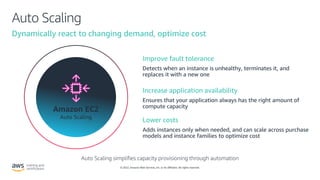
Dynamically react to changing demand, optimize cost
Amazon EC2
Auto Scaling
Improve fault tolerance
Increase application availability
Lower costs
Auto Scaling simplifies capacity provisioning through automation
© 2022, Amazon Web Services, Inc. or its affiliates. All rights reserved.
Auto Scaling
Include Spot, On-Demand, and RIs in a single Auto Scaling Group (ASG)
VPC
m4.large Spot ASG Min: 1 Max: 10
m5.large Spot ASG Min: 1 Max: 10
c4.xlarge O-D ASG Min: 1 Max: 10
Availability
Zone 1
Availability
Zone 2
Availability
Zone 3
ASG’s combines
purchase options,
instance types, and
AZs in a single ASG
© 2022, Amazon Web Services, Inc. or its affiliates. All rights reserved.
AWS CloudFormation
© 2022, Amazon Web Services, Inc. or its affiliates. All rights reserved.
CloudFormation
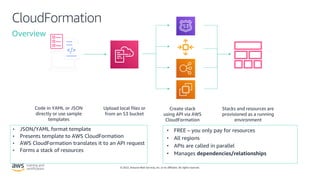
Overview
• JSON/YAML format template
• Presents template to AWS CloudFormation
• AWS CloudFormation translates it to an API request
• Forms a stack of resources
• FREE – you only pay for resources
• All regions
• APIs are called in parallel
• Manages dependencies/relationships
Code in YAML or JSON
directly or use sample
templates
Upload local files or
from an S3 bucket
Create stack
using API via AWS
CloudFormation
Stacks and resources are
provisioned as a running
environment
© 2022, Amazon Web Services, Inc. or its affiliates. All rights reserved.
Infrastructure as code
Template
Stack Stack Stack
Dev
Test
Staging
Prod
Demos
Region
• Single source of truth to deploy the whole stack
• Infrastructure that you can replicate, re-deploy, and
re-purpose
• Control versioning on your infrastructure and your
application together
• Service rolls back to the last good state on failures
• Build your infrastructure and run it through your
CI/CD pipeline
© 2022, Amazon Web Services, Inc. or its affiliates. All rights reserved.
AWS CloudFormation Stack
• A stack is a collection of AWS resources that
you can manage as a single unit, or a
template
• AWS CloudFormation ensures all stack
resources are created or deleted as
appropriate
• You can work with stacks by using the AWS
CloudFormation console, API, or AWS CLI.
• Nested stacks are stacks created as part of
other stacks. You create a nested stack
within another stack by using
the AWS::CloudFormation::Stack resource
© 2022, Amazon Web Services, Inc. or its affiliates. All rights reserved.
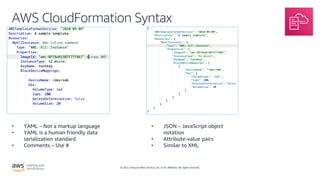
AWS CloudFormation Syntax
• JSON – JavaScript object
notation
• Attribute-value pairs
• Similar to XML
• YAML – Not a markup language
• YAML is a human friendly data
serialization standard
• Comments – Use #
© 2022, Amazon Web Services, Inc. or its affiliates. All rights reserved.
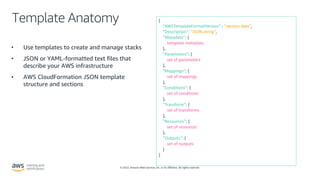
Template Anatomy
• Use templates to create and manage stacks
• JSON or YAML-formatted text files that
describe your AWS infrastructure
• AWS CloudFormation JSON template
structure and sections
{
"AWSTemplateFormatVersion” : "version date”,
"Description”: "JSON string”,
"Metadata”: {
template metadata
},
"Parameters”: {
set of parameters
},
"Mappings”: {
set of mappings
},
"Conditions”: {
set of conditions
},
"Transform”: {
set of transforms
},
"Resources”: {
set of resources
},
"Outputs”: {
set of outputs
}
}
© 2022, Amazon Web Services, Inc. or its affiliates. All rights reserved.
Template Anatomy – Intrinsic Functions
Fn::Base64
Fn::Cidr
Fn::FindInMap
Fn::GetAtt
Fn::GetAZs
Fn::ImportValue
Fn::Join
Fn::Select
Fn::Split
Fn::Sub
Fn::Transform
Ref
Fn::And
Fn::Equals
Fn::If
Fn::Not
Fn::Or
AWS::AccountId
AWS::NotificationARNs
AWS::NoValue
AWS::Partition
AWS::Region
AWS::StackId
AWS::StackName
AWS::URLSuffix
Intrinsic Intrinsic (Conditionals) Pseudo
Note
You can use intrinsic functions only in specific parts of a template. Currently, you can use
intrinsic functions in resource properties, outputs, metadata attributes, and update policy
attributes. You can also use intrinsic functions to conditionally create stack resources.
© 2022, Amazon Web Services, Inc. or its affiliates. All rights reserved.
Stack Updates
• Make changes to a stack's settings or
change its resources by updating
stack
• When you update a stack, you
submit changes to AWS
CloudFormation
• Two methods for updating stacks:
direct update or change sets (you
create and execute)
aws cloudformation update-stack --stack-name mystack --use-previous-template --notification-
arns "arn:aws:sns:us-east-1:12345678912:mytopic" "arn:aws:sns:us-east-1:12345678912:mytopic2"
© 2022, Amazon Web Services, Inc. or its affiliates. All rights reserved.
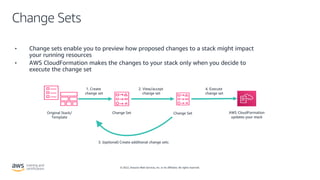
Change Sets
• Change sets enable you to preview how proposed changes to a stack might impact
your running resources
• AWS CloudFormation makes the changes to your stack only when you decide to
execute the change set
Original Stack/
Template
Change Set AWS CloudFormation
updates your stack
Change Set
1. Create
change set
2. View/accept
change set
4. Execute
change set
3. (optional) Create additional change sets
© 2022, Amazon Web Services, Inc. or its affiliates. All rights reserved.
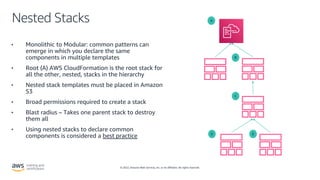
Nested Stacks
• Monolithic to Modular: common patterns can
emerge in which you declare the same
components in multiple templates
• Root (A) AWS CloudFormation is the root stack for
all the other, nested, stacks in the hierarchy
• Nested stack templates must be placed in Amazon
S3
• Broad permissions required to create a stack
• Blast radius – Takes one parent stack to destroy
them all
• Using nested stacks to declare common
components is considered a best practice
A
B
C
E
D
© 2022, Amazon Web Services, Inc. or its affiliates. All rights reserved.
Amazon CloudFront
© 2022, Amazon Web Services, Inc. or its affiliates. All rights reserved.
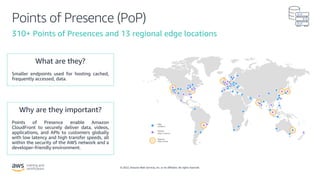
Points of Presence (PoP)
310+ Points of Presences and 13 regional edge locations
Points of Presence enable Amazon
CloudFront to securely deliver data, videos,
applications, and APIs to customers globally
with low latency and high transfer speeds, all
within the security of the AWS network and a
developer-friendly environment.
Smaller endpoints used for hosting cached,
frequently accessed, data.
© 2022, Amazon Web Services, Inc. or its affiliates. All rights reserved.
CloudFront Use Cases
Media Streaming Static web resources Large file download
Whole web site Mobile App (API)
© 2022, Amazon Web Services, Inc. or its affiliates. All rights reserved.
CloudFront building blocks
Distribution
• Default cloudfront.net domain name
• Alt Domain Name (www.example.com)
• TLS certificate, security policy
• WAF Web ACL associationn
• HTTP/2
• IPv6
• Standard logging
© 2022, Amazon Web Services, Inc. or its affiliates. All rights reserved.
CloudFront building blocks
Origin and Origin Group
• Any type of HTTP endpoint can be an origin
• AWS services (S3, ELB…) appears in drop down
• Alternatively type host name for Custom origin
• TCP & TLS configuration
• Timeouts
• Failover with Origin Group
Amazon Simple Storage
Service
Elastic Load Balancing
AWS Elemental
MediaPackage
Amazon API Gateway
© 2022, Amazon Web Services, Inc. or its affiliates. All rights reserved.
CloudFront building blocks
Cache Behavior
• Behavior defined by Path Pattern (including wildcard)
• Origin used for this path
• Allowed Viewer protocol, HTTP Methods
• Policies - Cache, Origin Request, Response headers
• Compression
• Signed URL
• Lambda@Edge
• CloudFront Functions
• Real Time Logs
Thank you!
© 2022, Amazon Web Services, Inc. or its affiliates. All rights reserved.

saa3_wk5.pdf

  • 1.
    AWS Certified SolutionsArchitect - Associate Week 5 Content Review January 2023 Accelerator Cohort
  • 2.
    © 2022, AmazonWeb Services, Inc. or its affiliates. All rights reserved. Elastic Load Balancer
  • 3.
    © 2022, AmazonWeb Services, Inc. or its affiliates. All rights reserved. Elastic Load Balancing Distribute network traffic to improve the scalability of your applications Automatically distributes incoming application traffic across multiple targets, such as Amazon EC2 instances, containers, IP addresses, Lambda functions, and virtual appliances
  • 4.
    © 2022, AmazonWeb Services, Inc. or its affiliates. All rights reserved. Elastic Load Balancing Type of load balancers • Layer 7 • Targets: IP, instance, AWS Lambda • Terminates flows • Listener: HTTP, HTTPS, gRPC • Front end: virtual IP • Layer 4 • Targets: IP, instance, Application Load Balancer • Terminates flows • Listener: TCP, UDP, TLS • Front end: virtual IP • Layer 3 gateway and Layer 4 load balancing • Targets: IP, instance • Transparent pass through of flows • Listener: IP • Route table entry Application Load Balancer Network Load Balancer Gateway Load Balancer Classic Load Balancer • L4-7 load balancing • Built for the EC2-Classic environment
  • 5.
    © 2022, AmazonWeb Services, Inc. or its affiliates. All rights reserved. Application Load Balancer (ALB) Auto Scaling ECS / EKS AWS Lambda AWS Certificate Manager Amazon Route 53 AWS WAF Amazon Cognito Application Load Balancer Clients HTTP(S)
  • 6.
    © 2022, AmazonWeb Services, Inc. or its affiliates. All rights reserved. Network Load Balancer (NLB) Auto Scaling ECS / EKS AWS Certificate Manager Amazon Route 53 Clients PrivateLink Network Load Balancer IAM Direct Connect
  • 7.
    © 2022, AmazonWeb Services, Inc. or its affiliates. All rights reserved. Gateway Load Balancer (GLB) Architecture benefits: 1. Scale and reduce costs 2. Reliability 3. Reduce complexity and deploy faster 4. As-a-Service 5. Use the same Network Appliances on AWS and Hybrid Environments Source Destination Third-party Appliance Fleet Traffic L3 Gateway • Next-hop in route table • No packet rewrite + L4 Load Balancer • Scaling • Stickiness • Health Checks • Flow rerouting • Encap original traffic Gateway Load Balancer
  • 8.
    © 2022, AmazonWeb Services, Inc. or its affiliates. All rights reserved. Auto Scaling
  • 9.
    © 2022, AmazonWeb Services, Inc. or its affiliates. All rights reserved. Auto Scaling Automatically launch or terminate Amazon EC2 instances • User-defined policies driven by CloudWatch • Health status checks • Schedules • Manually using set-desired-capacity in the CLI Scale out to meet demand, scale in to reduce costs.
  • 10.
    © 2022, AmazonWeb Services, Inc. or its affiliates. All rights reserved. Auto Scaling Dynamically react to changing demand, optimize cost Amazon EC2 Auto Scaling Improve fault tolerance Increase application availability Lower costs Auto Scaling simplifies capacity provisioning through automation
  • 11.
    © 2022, AmazonWeb Services, Inc. or its affiliates. All rights reserved. Auto Scaling Include Spot, On-Demand, and RIs in a single Auto Scaling Group (ASG) VPC m4.large Spot ASG Min: 1 Max: 10 m5.large Spot ASG Min: 1 Max: 10 c4.xlarge O-D ASG Min: 1 Max: 10 Availability Zone 1 Availability Zone 2 Availability Zone 3 ASG’s combines purchase options, instance types, and AZs in a single ASG
  • 12.
    © 2022, AmazonWeb Services, Inc. or its affiliates. All rights reserved. AWS CloudFormation
  • 13.
    © 2022, AmazonWeb Services, Inc. or its affiliates. All rights reserved. CloudFormation Overview • JSON/YAML format template • Presents template to AWS CloudFormation • AWS CloudFormation translates it to an API request • Forms a stack of resources • FREE – you only pay for resources • All regions • APIs are called in parallel • Manages dependencies/relationships Code in YAML or JSON directly or use sample templates Upload local files or from an S3 bucket Create stack using API via AWS CloudFormation Stacks and resources are provisioned as a running environment
  • 14.
    © 2022, AmazonWeb Services, Inc. or its affiliates. All rights reserved. Infrastructure as code Template Stack Stack Stack Dev Test Staging Prod Demos Region • Single source of truth to deploy the whole stack • Infrastructure that you can replicate, re-deploy, and re-purpose • Control versioning on your infrastructure and your application together • Service rolls back to the last good state on failures • Build your infrastructure and run it through your CI/CD pipeline
  • 15.
    © 2022, AmazonWeb Services, Inc. or its affiliates. All rights reserved. AWS CloudFormation Stack • A stack is a collection of AWS resources that you can manage as a single unit, or a template • AWS CloudFormation ensures all stack resources are created or deleted as appropriate • You can work with stacks by using the AWS CloudFormation console, API, or AWS CLI. • Nested stacks are stacks created as part of other stacks. You create a nested stack within another stack by using the AWS::CloudFormation::Stack resource
  • 16.
    © 2022, AmazonWeb Services, Inc. or its affiliates. All rights reserved. AWS CloudFormation Syntax • JSON – JavaScript object notation • Attribute-value pairs • Similar to XML • YAML – Not a markup language • YAML is a human friendly data serialization standard • Comments – Use #
  • 17.
    © 2022, AmazonWeb Services, Inc. or its affiliates. All rights reserved. Template Anatomy • Use templates to create and manage stacks • JSON or YAML-formatted text files that describe your AWS infrastructure • AWS CloudFormation JSON template structure and sections { "AWSTemplateFormatVersion” : "version date”, "Description”: "JSON string”, "Metadata”: { template metadata }, "Parameters”: { set of parameters }, "Mappings”: { set of mappings }, "Conditions”: { set of conditions }, "Transform”: { set of transforms }, "Resources”: { set of resources }, "Outputs”: { set of outputs } }
  • 18.
    © 2022, AmazonWeb Services, Inc. or its affiliates. All rights reserved. Template Anatomy – Intrinsic Functions Fn::Base64 Fn::Cidr Fn::FindInMap Fn::GetAtt Fn::GetAZs Fn::ImportValue Fn::Join Fn::Select Fn::Split Fn::Sub Fn::Transform Ref Fn::And Fn::Equals Fn::If Fn::Not Fn::Or AWS::AccountId AWS::NotificationARNs AWS::NoValue AWS::Partition AWS::Region AWS::StackId AWS::StackName AWS::URLSuffix Intrinsic Intrinsic (Conditionals) Pseudo Note You can use intrinsic functions only in specific parts of a template. Currently, you can use intrinsic functions in resource properties, outputs, metadata attributes, and update policy attributes. You can also use intrinsic functions to conditionally create stack resources.
  • 19.
    © 2022, AmazonWeb Services, Inc. or its affiliates. All rights reserved. Stack Updates • Make changes to a stack's settings or change its resources by updating stack • When you update a stack, you submit changes to AWS CloudFormation • Two methods for updating stacks: direct update or change sets (you create and execute) aws cloudformation update-stack --stack-name mystack --use-previous-template --notification- arns "arn:aws:sns:us-east-1:12345678912:mytopic" "arn:aws:sns:us-east-1:12345678912:mytopic2"
  • 20.
    © 2022, AmazonWeb Services, Inc. or its affiliates. All rights reserved. Change Sets • Change sets enable you to preview how proposed changes to a stack might impact your running resources • AWS CloudFormation makes the changes to your stack only when you decide to execute the change set Original Stack/ Template Change Set AWS CloudFormation updates your stack Change Set 1. Create change set 2. View/accept change set 4. Execute change set 3. (optional) Create additional change sets
  • 21.
    © 2022, AmazonWeb Services, Inc. or its affiliates. All rights reserved. Nested Stacks • Monolithic to Modular: common patterns can emerge in which you declare the same components in multiple templates • Root (A) AWS CloudFormation is the root stack for all the other, nested, stacks in the hierarchy • Nested stack templates must be placed in Amazon S3 • Broad permissions required to create a stack • Blast radius – Takes one parent stack to destroy them all • Using nested stacks to declare common components is considered a best practice A B C E D
  • 22.
    © 2022, AmazonWeb Services, Inc. or its affiliates. All rights reserved. Amazon CloudFront
  • 23.
    © 2022, AmazonWeb Services, Inc. or its affiliates. All rights reserved. Points of Presence (PoP) 310+ Points of Presences and 13 regional edge locations Points of Presence enable Amazon CloudFront to securely deliver data, videos, applications, and APIs to customers globally with low latency and high transfer speeds, all within the security of the AWS network and a developer-friendly environment. Smaller endpoints used for hosting cached, frequently accessed, data.
  • 24.
    © 2022, AmazonWeb Services, Inc. or its affiliates. All rights reserved. CloudFront Use Cases Media Streaming Static web resources Large file download Whole web site Mobile App (API)
  • 25.
    © 2022, AmazonWeb Services, Inc. or its affiliates. All rights reserved. CloudFront building blocks Distribution • Default cloudfront.net domain name • Alt Domain Name (www.example.com) • TLS certificate, security policy • WAF Web ACL associationn • HTTP/2 • IPv6 • Standard logging
  • 26.
    © 2022, AmazonWeb Services, Inc. or its affiliates. All rights reserved. CloudFront building blocks Origin and Origin Group • Any type of HTTP endpoint can be an origin • AWS services (S3, ELB…) appears in drop down • Alternatively type host name for Custom origin • TCP & TLS configuration • Timeouts • Failover with Origin Group Amazon Simple Storage Service Elastic Load Balancing AWS Elemental MediaPackage Amazon API Gateway
  • 27.
    © 2022, AmazonWeb Services, Inc. or its affiliates. All rights reserved. CloudFront building blocks Cache Behavior • Behavior defined by Path Pattern (including wildcard) • Origin used for this path • Allowed Viewer protocol, HTTP Methods • Policies - Cache, Origin Request, Response headers • Compression • Signed URL • Lambda@Edge • CloudFront Functions • Real Time Logs
  • 28.
    Thank you! © 2022,Amazon Web Services, Inc. or its affiliates. All rights reserved.