Introduction to Python
Data Types
Vijaya Lakshmi A
Assistant
Professor
Department of CSE
Session
Objectives
2 v 1.2
• Learning python data
types
Session
Outcomes
3 v 1.2
• At the end of this session, participants will be
able to
– Explain Python data types
4 v 1.2
Agend
a
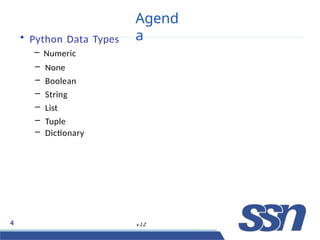
• Python Data Types
– Numeric
– None
– Boolean
– String
– List
– Tuple
– Dictionary
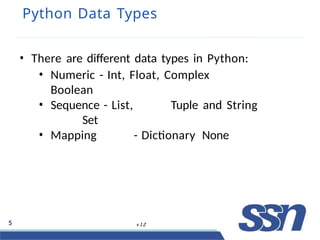
Python Data Types
5 v 1.2
• There are different data types in Python:
• Numeric - Int, Float, Complex
Boolean
• Sequence - List, Tuple and String
Set
• Mapping - Dictionary None
17 v 1.2
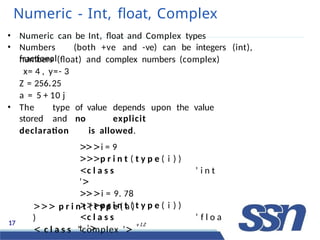
Numeric - Int, float, Complex
• Numeric can be Int, float and Complex types
• Numbers (both +ve and -ve) can be integers (int),
fractional
numbers (float) and complex numbers (complex)
x= 4 , y=- 3
Z = 256.25
a = 5 + 10 j
• The type of value depends upon the value
stored and no explicit
declaration is allowed.
>>>i = 9
>>>p r i n t ( t y p e ( i ) )
<c l a s s ’ i n t
’>
>>>i = 9. 78
>>>p r i n t ( t y p e ( i ) )
<c l a s s ’ f l o a
t ’>
>>> p r i n t ( t y p e ( a )
)
< c l a s s ’ complex ’>
o
Int and Float
7 v 1.2
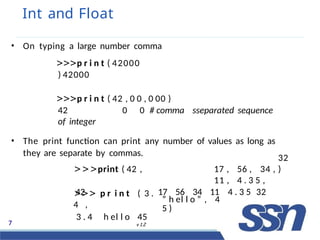
• On typing a large number comma
>>>p r i n t ( 42000
) 42000
32
)
>>>p r i n t ( 42 , 0 0 , 0 00 )
42 0 0 # comma sseparated sequence
of integer
• The print function can print any number of values as long as
they are separate by commas.
>>>print ( 42 , 17 , 56 , 34 ,
11 , 4 . 3 5 ,
42 17 56 34 11 4 . 3 5 32
>>> p r o
i n ti
(t o
3 .
4h
,
3 . 4 h el l o 45
o b
20
2 2
” h el l o ” , 4
5 )
Complex Numbers
8 v 1.2
>>> a= 5+ 10 j
>>> t y p e ( a )
<c l a s s ’ complex ’
>
>>> b= 6
>>> compl ex ( b )
( 6 + 0 j )
None
9 v 1.2
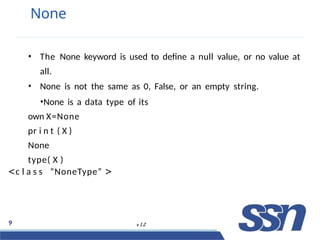
• The None keyword is used to define a null value, or no value at
all.
• None is not the same as 0, False, or an empty string.
•None is a data type of its
own X=None
pr i n t ( X )
None
type( X )
<c l a s s ”NoneType” >
21 v 1.2
Boolean
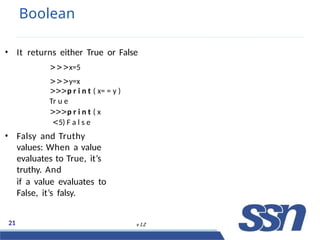
• It returns either True or False
>>>x=5
>>>y=x
>>>p r i n t ( x= = y )
Tr u e
>>>p r i n t ( x
<5) F a l s e
• Falsy and Truthy
values: When a value
evaluates to True, it’s
truthy. And
if a value evaluates to
False, it’s falsy.
22 v 1.2
Boolean
Statements Return Value
print(bool(False)) False
print(bool(”text”)) True
print(bool(” ”)) False
print(bool(’ ’)) True
print(bool(0)) False
print(bool( )) False
print(bool(3)) True
print(bool(None)) False
23 v 1.2
String
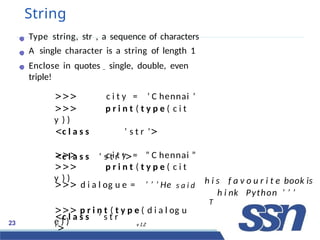
Type string, str , a sequence of characters
A single character is a string of length 1
Enclose in quotes single, double, even
triple!
>>> c i t y = ’ C hennai ’
>>> p r i n t ( t y p e ( c i t
y ) )
<c l a s s ’ s t r ’>
>>> c i t y = ” C hennai ”
>>> p r i n t ( t y p e ( c i t
y ) )
<c l a s s ’ s t r ’>
>>> d i a l og u e = ’ ’ ’ He s a i d
>>> p r i n t ( t y p e ( d i a l og u
e ) )
h i s f a v o u r i t e book is
h i nk Python ’ ’ ’
2
6
T,
<c l a s s ’ s t r
’>
String
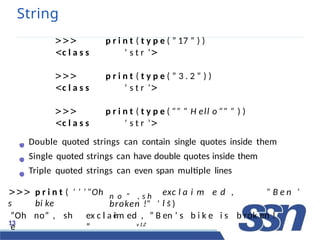
>>> p r i n t ( t y p e ( ” 17 ” ) )
<c l a s s ’ s t r ’>
>>> p r i n t ( t y p e ( ” 3 . 2 ” ) )
<c l a s s ’ s t r ’>
>>> p r i n t ( t y p e ( ”” ” H ell o ”” ” ) )
<c l a s s ’ s t r ’>
Double quoted strings can contain single quotes inside them
Single quoted strings can have double quotes inside them
Triple quoted strings can even span multiple lines
13 v 1.2
broken !” ’ ’ ’ )
”Oh no” , sh
e
ex c l a im ed , ” B en ’ s b i k e i s b rok en !
”
r
no
ou c
”t i o
,P
sy
ht
h o
en
>>> p r i n t ( ’ ’ ’ ”Oh exc l aN
io
me m b
ee
d2 6 ,
, ” B e2n8 ’
s bi ke i s
Operations on Strings
14 v 1.2
Concatenate with + or neighbors
>>>x= ’ a
’
>>> word
>>> word
’ Helpa ’
= ’ Help ’ + x
s u b s c r i p t i n g of s t r i n g
s
>>>p r i n t ( word [ 2 ] )
>>>l
s l i c e :
>>>p r i n t ( word [ 0 : 2 ] )
>>> ’ he ’
>>>p r i n t ( word [ − 1 ])
>>>a
>>>p r i n t ( l en ( word ) )
>>> 5
List
15 v 1.2
• List is an ordered collection of values which can be of mixed type.
• Consist of items separated by commas enclosed within [ ].
• Values stored can be accessed using indexes
• Index of first element is 0 and last element is n-1 (n=length)
>>> f a c t o r s = [ 1 , 2 , 3 , 4 , 5 ]
>>> p r i n t ( t y p e ( f a c t o r s ) )
< c l a s s ’ l i s t ’>
>>> name= [” J oe” , ” Sam” , ” H a l e” ]
>>> p r i n t ( t y p e ( name) )
< c l a s s ’ l i s t ’>
>>> p r i n t ( name)
[ ’ Joe ’ , ’Sam ’ , ’ Hale ’ ]
>>> mix ed = [I n
3t
,d
Tu
rue , ’t
y ell ow ’ , 3e
. 5e r
]2 6 ,
>>> p r i n t ( mix ed )
[ 3 , T rue , ’ y ell ow ’ , 3 . 5 ]
Tuple
16 v 1.2
• Tuple is similar to list and consist of items separated by
commas enclosed within ( ) .
• List is mutable but Tuple is immutable.
>>> f a c t o r s = ( 1 , 2 , 3 , 4 , 5 )
>>> t y p e ( f a c t o r s )
< c l a s s ’ t u p l e’>
>>> name= ( ” J oe” , ” Sam” , ” H a l e” )
>>>p r i n t ( t y p e ( name) )
< c l a s s ’ t u p l e’>
>>> p r i n t ( name)
( ’ Joe ’ , ’Sam ’ , ’ Hale ’ )
>>> mixed =(3 , True , ’ yello wN ’ m, b3e .256 , )2 0 2 2
>>> print ( mixed ) ( 3 , True , ’ ye l low ’ ,
3.5)
>>> type ( mixed )
< c l ass ’ tuple ’>
Dictionary
Unordered collection of name-value pair or key-value pair and are
enclosed within { }.
Keys are strings and value can be any data type.
Specify the key in square braces [ ] to access any value.
person = { "name": "Alice", "age": 30, "city": "New
York"}
print(person["name"]) # Output: Alice
person["age"] = 31 #Modify
17 v 1.2
29 v 1.2
Summar
y
• Python Data Types
– Numeric
– None
– Boolean
– String
– List
– Tuple
– Dictionary
30 v 1.2
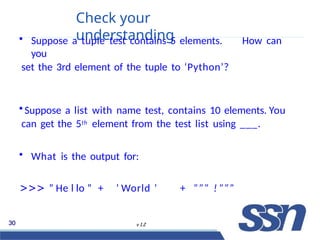
Check your
understanding
• Suppose a tuple test contains 5 elements. How can
you
set the 3rd element of the tuple to ‘Python’?
•Suppose a list with name test, contains 10 elements. You
can get the 5th element from the test list using ___.
• What is the output for:
>>> ” He l lo ” + ’ World ’ + ””” ! ”””
31
Think Python 2nd Edition by Allen B. Downey.

Introduction ,numeric Data types,python Data types.pptx

  • 1.
    Introduction to Python DataTypes Vijaya Lakshmi A Assistant Professor Department of CSE
  • 2.
    Session Objectives 2 v 1.2 •Learning python data types
  • 3.
    Session Outcomes 3 v 1.2 •At the end of this session, participants will be able to – Explain Python data types
  • 4.
    4 v 1.2 Agend a •Python Data Types – Numeric – None – Boolean – String – List – Tuple – Dictionary
  • 5.
    Python Data Types 5v 1.2 • There are different data types in Python: • Numeric - Int, Float, Complex Boolean • Sequence - List, Tuple and String Set • Mapping - Dictionary None
  • 6.
    17 v 1.2 Numeric- Int, float, Complex • Numeric can be Int, float and Complex types • Numbers (both +ve and -ve) can be integers (int), fractional numbers (float) and complex numbers (complex) x= 4 , y=- 3 Z = 256.25 a = 5 + 10 j • The type of value depends upon the value stored and no explicit declaration is allowed. >>>i = 9 >>>p r i n t ( t y p e ( i ) ) <c l a s s ’ i n t ’> >>>i = 9. 78 >>>p r i n t ( t y p e ( i ) ) <c l a s s ’ f l o a t ’> >>> p r i n t ( t y p e ( a ) ) < c l a s s ’ complex ’> o
  • 7.
    Int and Float 7v 1.2 • On typing a large number comma >>>p r i n t ( 42000 ) 42000 32 ) >>>p r i n t ( 42 , 0 0 , 0 00 ) 42 0 0 # comma sseparated sequence of integer • The print function can print any number of values as long as they are separate by commas. >>>print ( 42 , 17 , 56 , 34 , 11 , 4 . 3 5 , 42 17 56 34 11 4 . 3 5 32 >>> p r o i n ti (t o 3 . 4h , 3 . 4 h el l o 45 o b 20 2 2 ” h el l o ” , 4 5 )
  • 8.
    Complex Numbers 8 v1.2 >>> a= 5+ 10 j >>> t y p e ( a ) <c l a s s ’ complex ’ > >>> b= 6 >>> compl ex ( b ) ( 6 + 0 j )
  • 9.
    None 9 v 1.2 •The None keyword is used to define a null value, or no value at all. • None is not the same as 0, False, or an empty string. •None is a data type of its own X=None pr i n t ( X ) None type( X ) <c l a s s ”NoneType” >
  • 10.
    21 v 1.2 Boolean •It returns either True or False >>>x=5 >>>y=x >>>p r i n t ( x= = y ) Tr u e >>>p r i n t ( x <5) F a l s e • Falsy and Truthy values: When a value evaluates to True, it’s truthy. And if a value evaluates to False, it’s falsy.
  • 11.
    22 v 1.2 Boolean StatementsReturn Value print(bool(False)) False print(bool(”text”)) True print(bool(” ”)) False print(bool(’ ’)) True print(bool(0)) False print(bool( )) False print(bool(3)) True print(bool(None)) False
  • 12.
    23 v 1.2 String Typestring, str , a sequence of characters A single character is a string of length 1 Enclose in quotes single, double, even triple! >>> c i t y = ’ C hennai ’ >>> p r i n t ( t y p e ( c i t y ) ) <c l a s s ’ s t r ’> >>> c i t y = ” C hennai ” >>> p r i n t ( t y p e ( c i t y ) ) <c l a s s ’ s t r ’> >>> d i a l og u e = ’ ’ ’ He s a i d >>> p r i n t ( t y p e ( d i a l og u e ) ) h i s f a v o u r i t e book is h i nk Python ’ ’ ’ 2 6 T, <c l a s s ’ s t r ’>
  • 13.
    String >>> p ri n t ( t y p e ( ” 17 ” ) ) <c l a s s ’ s t r ’> >>> p r i n t ( t y p e ( ” 3 . 2 ” ) ) <c l a s s ’ s t r ’> >>> p r i n t ( t y p e ( ”” ” H ell o ”” ” ) ) <c l a s s ’ s t r ’> Double quoted strings can contain single quotes inside them Single quoted strings can have double quotes inside them Triple quoted strings can even span multiple lines 13 v 1.2 broken !” ’ ’ ’ ) ”Oh no” , sh e ex c l a im ed , ” B en ’ s b i k e i s b rok en ! ” r no ou c ”t i o ,P sy ht h o en >>> p r i n t ( ’ ’ ’ ”Oh exc l aN io me m b ee d2 6 , , ” B e2n8 ’ s bi ke i s
  • 14.
    Operations on Strings 14v 1.2 Concatenate with + or neighbors >>>x= ’ a ’ >>> word >>> word ’ Helpa ’ = ’ Help ’ + x s u b s c r i p t i n g of s t r i n g s >>>p r i n t ( word [ 2 ] ) >>>l s l i c e : >>>p r i n t ( word [ 0 : 2 ] ) >>> ’ he ’ >>>p r i n t ( word [ − 1 ]) >>>a >>>p r i n t ( l en ( word ) ) >>> 5
  • 15.
    List 15 v 1.2 •List is an ordered collection of values which can be of mixed type. • Consist of items separated by commas enclosed within [ ]. • Values stored can be accessed using indexes • Index of first element is 0 and last element is n-1 (n=length) >>> f a c t o r s = [ 1 , 2 , 3 , 4 , 5 ] >>> p r i n t ( t y p e ( f a c t o r s ) ) < c l a s s ’ l i s t ’> >>> name= [” J oe” , ” Sam” , ” H a l e” ] >>> p r i n t ( t y p e ( name) ) < c l a s s ’ l i s t ’> >>> p r i n t ( name) [ ’ Joe ’ , ’Sam ’ , ’ Hale ’ ] >>> mix ed = [I n 3t ,d Tu rue , ’t y ell ow ’ , 3e . 5e r ]2 6 , >>> p r i n t ( mix ed ) [ 3 , T rue , ’ y ell ow ’ , 3 . 5 ]
  • 16.
    Tuple 16 v 1.2 •Tuple is similar to list and consist of items separated by commas enclosed within ( ) . • List is mutable but Tuple is immutable. >>> f a c t o r s = ( 1 , 2 , 3 , 4 , 5 ) >>> t y p e ( f a c t o r s ) < c l a s s ’ t u p l e’> >>> name= ( ” J oe” , ” Sam” , ” H a l e” ) >>>p r i n t ( t y p e ( name) ) < c l a s s ’ t u p l e’> >>> p r i n t ( name) ( ’ Joe ’ , ’Sam ’ , ’ Hale ’ ) >>> mixed =(3 , True , ’ yello wN ’ m, b3e .256 , )2 0 2 2 >>> print ( mixed ) ( 3 , True , ’ ye l low ’ , 3.5) >>> type ( mixed ) < c l ass ’ tuple ’>
  • 17.
    Dictionary Unordered collection ofname-value pair or key-value pair and are enclosed within { }. Keys are strings and value can be any data type. Specify the key in square braces [ ] to access any value. person = { "name": "Alice", "age": 30, "city": "New York"} print(person["name"]) # Output: Alice person["age"] = 31 #Modify 17 v 1.2
  • 18.
    29 v 1.2 Summar y •Python Data Types – Numeric – None – Boolean – String – List – Tuple – Dictionary
  • 19.
    30 v 1.2 Checkyour understanding • Suppose a tuple test contains 5 elements. How can you set the 3rd element of the tuple to ‘Python’? •Suppose a list with name test, contains 10 elements. You can get the 5th element from the test list using ___. • What is the output for: >>> ” He l lo ” + ’ World ’ + ””” ! ”””
  • 20.
    31 Think Python 2ndEdition by Allen B. Downey.