LEARNING OUTCOMES :
 DA
T
A TYPES
 OPERA
TORS
 MUTABLE AND IMMUTABLE TYPES
 EXPRESSION
DATA TYPES
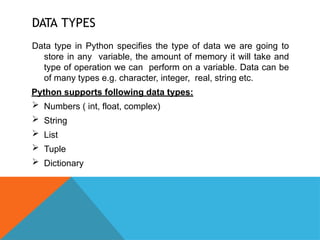
Data type in Python specifies the type of data we are going to
store in any variable, the amount of memory it will take and
type of operation we can perform on a variable. Data can be
of many types e.g. character, integer, real, string etc.
Python supports following data types:
 Numbers ( int, float, complex)
 String
 List
 Tuple
 Dictionary
NUMBERS
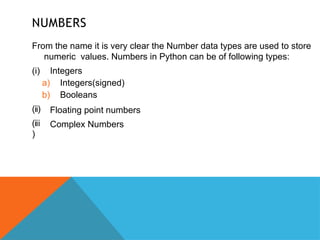
From the name it is very clear the Number data types are used to store
numeric values. Numbers in Python can be of following types:
(ii)
(iii
)
(i) Integers
a) Integers(signed)
b) Booleans
Floating point numbers
Complex Numbers
INTEGERS
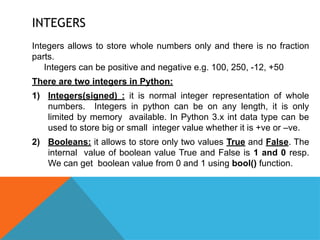
Integers allows to store whole numbers only and there is no fraction
parts.
Integers can be positive and negative e.g. 100, 250, -12, +50
There are two integers in Python:
1) Integers(signed) : it is normal integer representation of whole
numbers. Integers in python can be on any length, it is only
limited by memory available. In Python 3.x int data type can be
used to store big or small integer value whether it is +ve or –ve.
2) Booleans: it allows to store only two values True and False. The
internal value of boolean value True and False is 1 and 0 resp.
We can get boolean value from 0 and 1 using bool() function.
INTEGERS
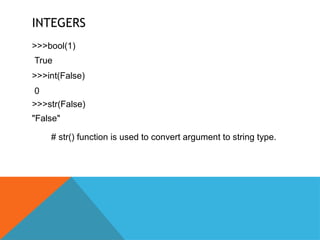
>>>bool(1)
True
>>>int(False)
0
>>>str(False)
"False"
# str() function is used to convert argument to string type.
FLOATING POINT NUMBERS
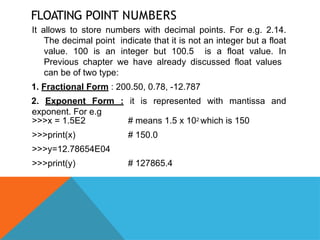
It allows to store numbers with decimal points. For e.g. 2.14.
The decimal point indicate that it is not an integer but a float
value. 100 is an integer but 100.5 is a float value. In
Previous chapter we have already discussed float values
can be of two type:
1. Fractional Form : 200.50, 0.78, -12.787
2. Exponent Form : it is represented with mantissa and
exponent. For e.g
# means 1.5 x 10² which is 150
# 150.0
>>>x = 1.5E2
>>>print(x)
>>>y=12.78654E04
>>>print(y) # 127865.4
FLOATING POINT NUMBERS
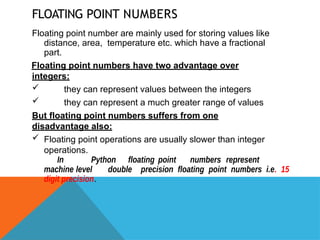
Floating point number are mainly used for storing values like
distance, area, temperature etc. which have a fractional
part.
Floating point numbers have two advantage over
integers:
 they can represent values between the integers
 they can represent a much greater range of values
But floating point numbers suffers from one
disadvantage also:
 Floating point operations are usually slower than integer
operations.
In Python floating point numbers represent
machine level double precision floating point numbers i.e. 15
digit precision.
COMPLEX NUMBERS
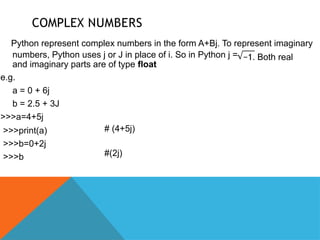
Python represent complex numbers in the form A+Bj. To represent imaginary
−1. Both real
numbers, Python uses j or J in place of i. So in Python j =
and imaginary parts are of type float
e.g.
a = 0 + 6j
b = 2.5 + 3J
>>>a=4+5j
>>>print(a)
>>>b=0+2j
>>>b
# (4+5j)
#(2j)
COMPLEX NUMBERS
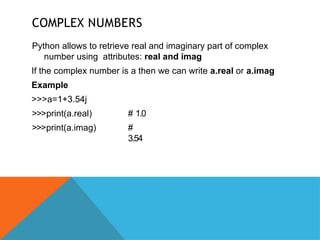
Python allows to retrieve real and imaginary part of complex
number using attributes: real and imag
If the complex number is a then we can write a.real or a.imag
Example
>>>a=1+3.54j
>>>print(a.real)
>>>print(a.imag)
# 1.0
#
3.54
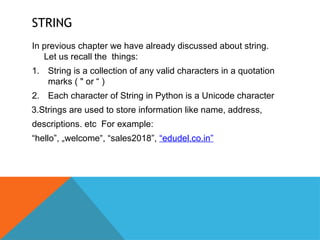
STRING
In previous chapter we have already discussed about string.
Let us recall the things:
1. String is a collection of any valid characters in a quotation
marks ( " or “ )
2. Each character of String in Python is a Unicode character
3.Strings are used to store information like name, address,
descriptions. etc For example:
“hello”, „welcome , “sales2018”,
‟ “edudel.co.in”
STRING
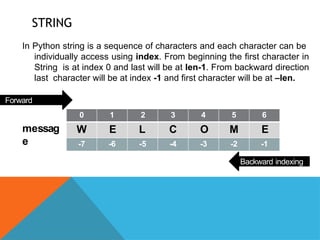
In Python string is a sequence of characters and each character can be
individually access using index. From beginning the first character in
String is at index 0 and last will be at len-1. From backward direction
last character will be at index -1 and first character will be at –len.
0 1 2 3 4 5 6
W E L C O M E
-7 -6 -5 -4 -3 -2 -1
Forward
indexing
messag
e
Backward indexing
STRING
To access individual character of String (Slicing). we can use
the syntax:
StringName[index position]
>>>stream=“Science”
>>>print(stream[0])
S
>>>print(stream[3])
e
>>>print(stream[-1])
e
STRING
What will be the output:
>>>stream=“Science”
>>>print(stream[5])
>>>print(stream[-4])
>>>print(stream[-len(stream)])
>>>print(stream[8])
#Output 1
#Output 2
#Output 3
#Output 4
STRING
We cannot change the individual letters of string by assignment
because string in python is immutable and hence if we try to
do this, Python will raise an error “object does not support
Item assignment”
>>>name=“Ronaldo”
>>>name[1]="i‟ # error
However we can assign string to another string. For e.g
>>>name=“Ronaldo”
>>>name=“Bekham” # no error
LISTS AND
TUPLES
Lists and Tuples are compound data types i.e. they allows to store
multiple values under one name of different data types.
The main difference between Lists and Tuples is List can be
changed/modified i.e. mutable type whereas Tuples cannot be
changes or modified i.e. immutable type.
Let us take this with example:
Lists: A list in python represents a list of comma-separated values of
any data type between square brackets.
[10,20,30,40,50]
["a , e , o , i , u ]
‟ ‟ ‟ ‟ ‟ ‟ ‟ ‟ ‟
[“GSV”,1822055,97.5]
EXAMPLES -
LIST
>>> family=["Mom","Dad","Sis","Bro"]
>>> family
['Mom', 'Dad', 'Sis', 'Bro']
>>> print(family)
['Mom', 'Dad', 'Sis', 'Bro']
>>> Employee=["E001","Anuj",70000,2019]
>>> Employee
['E001', 'Anuj', 70000, 2019]
>>> print(Employee)
['E001', 'Anuj', 70000, 2019]
EXAMPLES -
LIST
The values stored inList are internally numbered from 0 onwards. i.e. first
element will be at position 0 and second will be at 1 and so on.
>>> Employee=["E001","Anuj",70000,2019]
>>> print(Employee[1])
Anuj
>>> Employee[2]=75000
>>> print(Employee)
['E001', 'Anuj',75000, 2019]
Y
ou can check the number of items in list using len() function
>>> print(len(Employee))
4
TUPLES
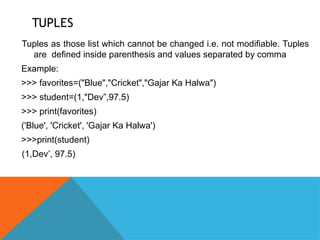
Tuples as those list which cannot be changed i.e. not modifiable. Tuples
are defined inside parenthesis and values separated by comma
Example:
>>> favorites=("Blue","Cricket","Gajar Ka Halwa")
>>> student=(1,"Dev”,97.5)
>>> print(favorites)
('Blue', 'Cricket', 'Gajar Ka Halwa')
>>>print(student)
(1,Dev’, 97.5)
TUPLES
Like List, Tuples values are also internally numbered from 0 and so on.
>>> print(favorites[1])
Cricket
>>> print(student[2])
97.5
>>> student[2]=99
>>> student[2]=99
#
Error, tuple does not
support assignment i.e.
immutable
DICTIONARY
Dictionary is another feature of Python. It is an unordered set of comma separated
key:value pairs. Dictionary Items are defined in Curly Brackets { }
Keys defined in Dictionary cannot be same i.e. no two keys can be same.
>>> student={'Roll':1,'Name':"Jagga",'Per':91.5}
>>>print(student)
>>> print(student['Per'])
91.5
>>> val={1:100,2:300,4:900}
>>> print(val[1])
100
# Key name canbe string /
numeric
Dictionary is mutable. i.e. We can modify dictionary elements.
>>>val[2]=1000
>>>print(val) # {1: 100, 2: 1000, 4: 900}
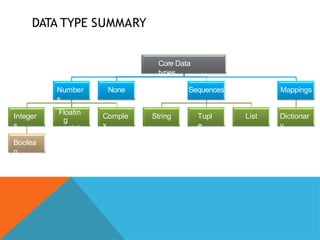
DATA TYPE SUMMARY
Core Data
types
Number
s
Integer
s
Boolea
n
Floatin
g
point
Comple
x
None Sequences
String Tupl
e
List
Mappings
Dictionar
y
MUTABLE AND IMMUTABLE TYPES
Python data object can be broadlycategorized into two types – mutable and
immutable types. In simple words changeable/modifiable and non-modifiable
types.
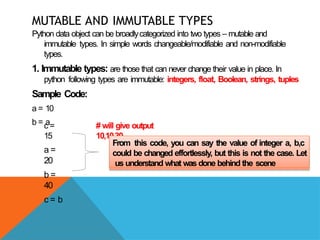
1. Immutable types: are those that can never change their value in place. In
python following types are immutable: integers, float, Boolean, strings, tuples
Sample Code:
a = 10
b = a
c =
15
a =
20
b =
40
c = b
# will give output
10,10,30
From this code, you can say the value of integer a, b,c
could be changed effortlessly, but this is not the case. Let
us understand what was done behind the scene
IMMUTABLE TYPES
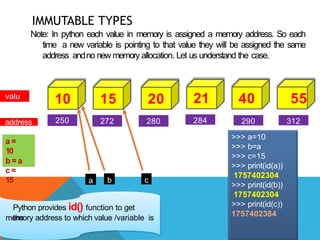
Note: In python each value in memory is assigned a memory address. So each
time a new variable is pointing to that value they will be assigned the same
address andno new memory allocation. Let us understand the case.
10 15 20 21 40 55
valu
e
address 250 272 280 284 290 312
a =
10
b = a
c =
15 a b c
>>> a=10
>>> b=a
>>> c=15
>>> print(id(a))
1757402304
>>> print(id(b))
1757402304
>>> print(id(c))
1757402384
Python provides id() function to get
the
memory address to which value /variable is
IMMUTABLE TYPES
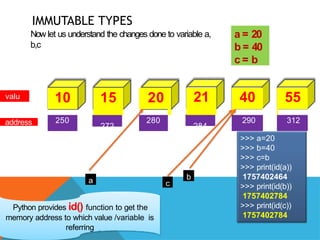
Now let us understand the changes done to variable a,
b,c
valu
e
address
10 15 20 21 40 55
250
272
280
284
290 312
a = 20
b = 40
c = b
a b
c
>>> a=20
>>> b=40
>>> c=b
>>> print(id(a))
1757402464
>>> print(id(b))
1757402784
>>> print(id(c))
1757402784
Python provides id() function to get the
memory address to which value /variable is
referring
IMMUTABLE TYPES
From the previous code it is clear that variable names are stored
references to a value-object. Each time we change the value the
variable s reference memory address changes. So it will not store
‟
new value in same memory location that s why
‟ Integer, float,
Booleans, strings and tuples are immutable.
Variables (of certain type) are NOT LIKE storage containers i.e.
with fixed memory address where value changes every time.
Hence they are immutable
MUTABLE TYPE
Mutable means in samememory address, new value can be stored as and when
it is required. Python provides following mutable types:
1. Lists
2. Dictionaries
3. Sets
Examples: (using List)
>>>
employee=["E001","Rama","Sales",67000]
>>> print(id(employee))
71593896
>>> employee[3]=75000
>>> print(id(employee))
71593896
>>>
See, even if we
change the value,
its reference
memory address
has remained
same
VARIABLE INTERNALS
Python is an object oriented language. So every thing in python is
an object. An object is any identifiable entity that have some
characteristics/properties and behavior. Like integer values are
object – they hold whole numbers only(characteristics) and they
support all arithmetic operations (behavior).
Every python object has three key attributes associated with
it:
1. type of object
2. value of an object
3. id of an object
TYPE OF AN
OBJECT
type of an object determines the operations that can be performed on the object.
Built – in function type() returns the type of an object
Example:
>>> a=100
>>> type(a)
<class 'int'>
>>> type(100)
<class 'int'>
>>> name="Jaques"
>>> type(name)
<class 'str'>
VALUE OF AN
OBJECT
The data items stored in the object is a value of object. The value stored in
an object is a literals. We can using print() to get the value of an object
Example:
>>> a=100
>>> print(a)
100
>>> name="Kallis"
>>> print(name)
Kallis
>>>
ID OF AN
OBJECT
It is the memory address of any object. Although id is dependent upon the
system where it is installed but in most cases it returns the memory
location of the object. Built in function id() returns the id of an object
Example:
>>> a=5
>>> id(5)
1911018608
>>> print(id(a))
1911018608
>>>
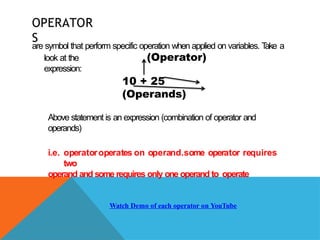
OPERATOR
S
are symbol that perform specific operation when applied on variables. T
ake a
look at the
expression:
(Operator)
10 + 25
(Operands)
Above statement is an expression (combination of operator and
operands)
i.e. operatoroperates on operand.some operator requires
two
operand and some requires only one operand to operate
Watch Demo of each operator on YouTube
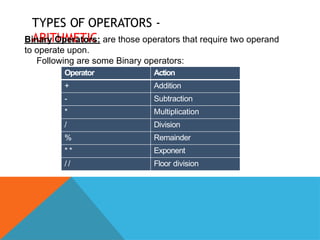
TYPES OF OPERATORS -
ARITHMETIC
Binary Operators: are those operators that require two operand
to operate upon.
Following are some Binary operators:
Operator Action
+ Addition
- Subtraction
* Multiplication
/ Division
% Remainder
* * Exponent
/ / Floor division
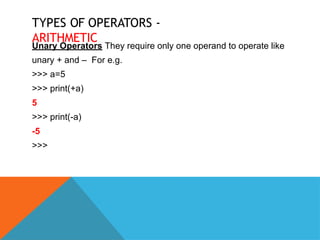
TYPES OF OPERATORS -
ARITHMETIC
Unary Operators They require only one operand to operate like
unary + and – For e.g.
>>> a=5
>>> print(+a)
5
>>> print(-a)
-5
>>>
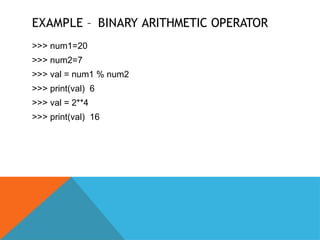
EXAMPLE – BINARY ARITHMETIC OPERATOR
>>> num1=20
>>> num2=7
>>> val = num1 % num2
>>> print(val) 6
>>> val = 2**4
>>> print(val) 16
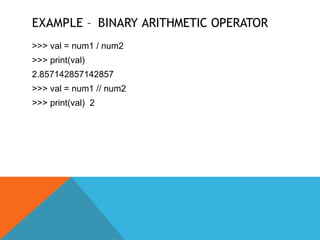
EXAMPLE – BINARY ARITHMETIC OPERATOR
>>> val = num1 / num2
>>> print(val)
2.857142857142857
>>> val = num1 // num2
>>> print(val) 2
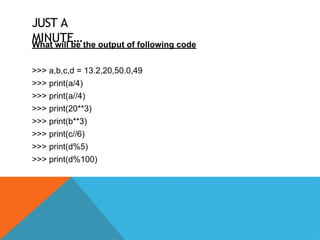
JUST A
MINUTE…
What will be the output of following code
>>> a,b,c,d = 13.2,20,50.0,49
>>> print(a/4)
>>> print(a//4)
>>> print(20**3)
>>> print(b**3)
>>> print(c//6)
>>> print(d%5)
>>> print(d%100)
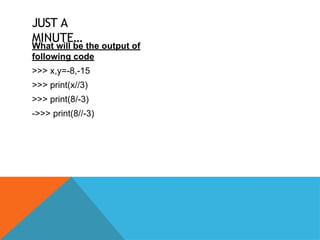
JUST A
MINUTE…
What will be the output of
following code
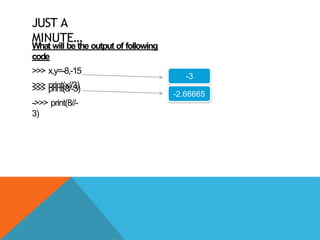
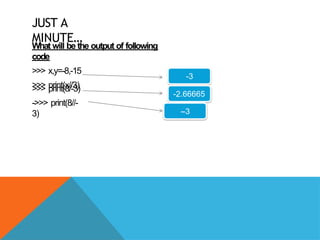
>>> x,y=-8,-15
>>> print(x//3)
>>> print(8/-3)
->>> print(8//-3)
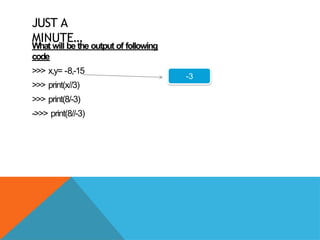
JUST A
MINUTE…
What will be the output of following
code
>>> x,y= -8,-15
>>> print(x//3)
>>> print(8/-3)
->>> print(8//-3)
-3
JUST A
MINUTE…
What will be the output of following
code
>>> x,y=-8,-15
>>> print(x//3)
>>> print(8/-3)
->>> print(8//-
3)
-3
-2.66665
JUST A
MINUTE…
What will be the output of following
code
>>> x,y=-8,-15
>>> print(x//3)
>>> print(8/-3)
->>> print(8//-
3)
-3
-2.66665
--3
JUST A
MINUTE…
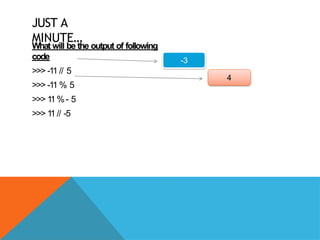
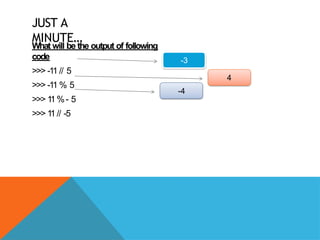
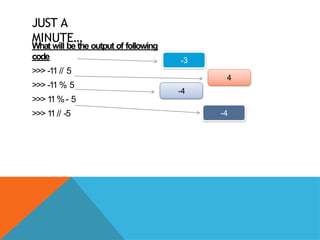
What will be the output of following code
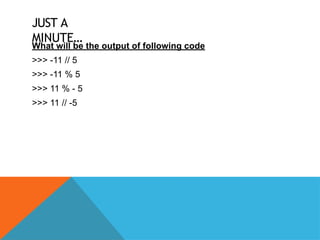
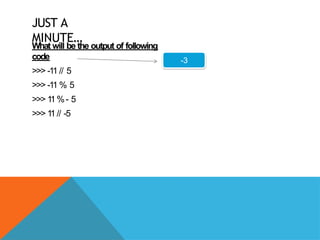
>>> -11 // 5
>>> -11 % 5
>>> 11 % - 5
>>> 11 // -5
JUST A
MINUTE…
What will be the output of following
code
>>> -11 // 5
>>> -11 % 5
>>> 1
1%- 5
>>> 1
1// -5
-3
JUST A
MINUTE…
What will be the output of following
code
>>> -11 // 5
>>> -11 % 5
>>> 1
1%- 5
>>> 1
1// -5
-3
4
JUST A
MINUTE…
What will be the output of following
code
>>> -11 // 5
>>> -11 % 5
>>> 1
1%- 5
>>> 1
1// -5
-3
4
-4
JUST A
MINUTE…
What will be the output of following
code
>>> -11 // 5
>>> -11 % 5
>>> 1
1%- 5
>>> 1
1// -5
-3
4
-4
-4
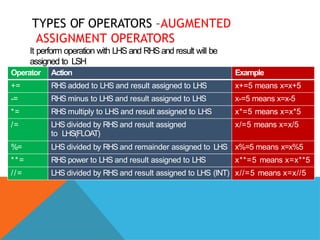
TYPES OF OPERATORS –AUGMENTED
ASSIGNMENT OPERATORS
It perform operation with LHS and RHS and result will be
assigned to LSH
Operator Action Example
+= RHS added to LHS and result assigned to LHS x+=5 means x=x+5
-= RHS minus to LHS and result assigned to LHS x-=5 means x=x-5
*= RHS multiply to LHS and result assigned to LHS x*=5 means x=x*5
/= LHS divided by RHS and result assigned
to LHS(FLOAT)
x/=5 means x=x/5
%= LHS divided by RHS and remainder assigned to LHS x%=5 means x=x%5
**= RHS power to LHS and result assigned to LHS x**=5 means x=x**5
//= LHS divided by RHS and result assigned to LHS (INT) x//=5 means x=x//5
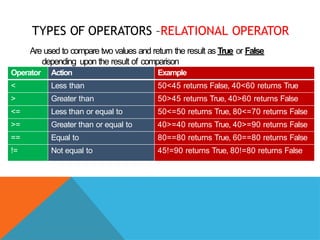
TYPES OF OPERATORS –RELATIONAL OPERATOR
Are used to compare two values and return the result as True or False
depending upon the result of comparison
Operator Action Example
< Less than 50<45 returns False, 40<60 returns True
> Greater than 50>45 returns True, 40>60 returns False
<= Less than or equal to 50<=50 returns True, 80<=70 returns False
>= Greater than or equal to 40>=40 returns True, 40>=90 returns False
== Equal to 80==80 returns True, 60==80 returns False
!= Not equal to 45!=90 returns True, 80!=80 returns False
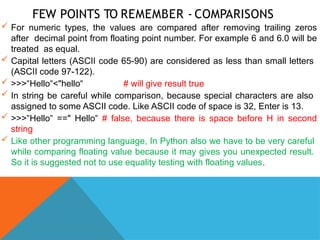
FEW POINTS TO REMEMBER - COMPARISONS
 For numeric types, the values are compared after removing trailing zeros
after decimal point from floating point number. For example 6 and 6.0 will be
treated as equal.
 Capital letters (ASCII code 65-90) are considered as less than small letters
(ASCII code 97-122).
 >>> Hello <
‟ ‟ "hello‟ # will give result true
 In string be careful while comparison, because special characters are also
assigned to some ASCII code. Like ASCII code of space is 32, Enter is 13.
 >>> Hello ==
‟ ‟ " Hello‟ # false, because there is space before H in second
string
 Like other programming language, In Python also we have to be very careful
while comparing floating value because it may gives you unexpected result.
So it is suggested not to use equality testing with floating values.
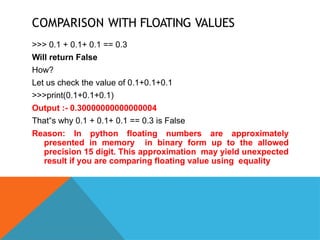
COMPARISON WITH FLOATING VALUES
>>> 0.1 + 0.1+ 0.1 == 0.3
Will return False
How?
Let us check the value of 0.1+0.1+0.1
>>>print(0.1+0.1+0.1)
Output :- 0.30000000000000004
That s why 0.1 + 0.1+ 0.1 == 0.3 is False
‟
Reason: In python floating numbers are approximately
presented in memory in binary form up to the allowed
precision 15 digit. This approximation may yield unexpected
result if you are comparing floating value using equality
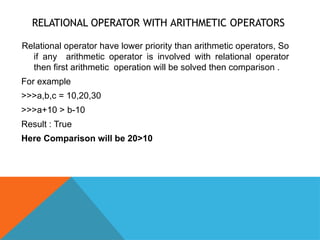
RELATIONAL OPERATOR WITH ARITHMETIC OPERATORS
Relational operator have lower priority than arithmetic operators, So
if any arithmetic operator is involved with relational operator
then first arithmetic operation will be solved then comparison .
For example
>>>a,b,c = 10,20,30
>>>a+10 > b-10
Result : True
Here Comparison will be 20>10
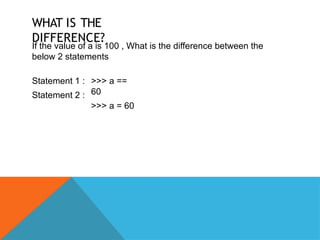
WHAT IS THE
DIFFERENCE?
If the value of a is 100 , What is the difference between the
below 2 statements
Statement 1 :
Statement 2 :
>>> a ==
60
>>> a = 60
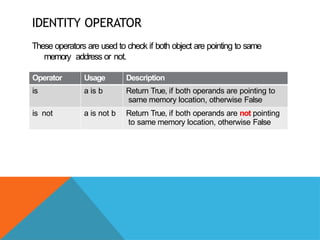
IDENTITY OPERATOR
These operators are used to check if both object are pointing to same
memory address or not.
Operator Usage Description
is a is b Return True, if both operands are pointing to
same memory location, otherwise False
is not a is not b Return True, if both operands are not pointing
to same memory location, otherwise False
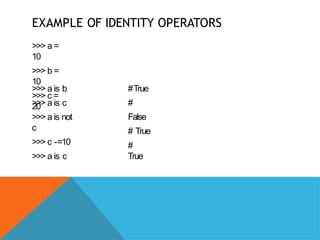
EXAMPLE OF IDENTITY OPERATORS
>>> a =
10
>>> b =
10
>>> c =
20
>>> a is b
>>> a is c
>>> a is not
c
>>> c -=10
>>> a is c
#True
#
False
# True
#
True
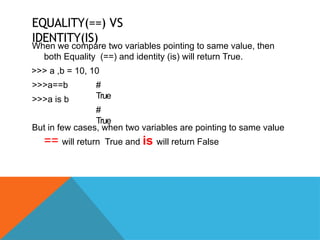
EQUALITY(==) VS
IDENTITY(IS)
When we compare two variables pointing to same value, then
both Equality (==) and identity (is) will return True.
>>> a ,b = 10, 10
>>>a==b
>>>a is b
#
True
#
True
But in few cases, when two variables are pointing to same value
== will return True and is will return False
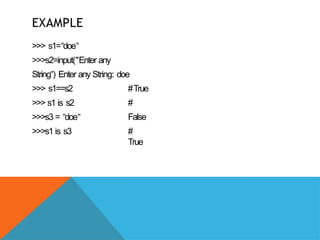
EXAMPLE
>>> s1=“doe‟
>>>s2=input("Enter any
String ) Enter
‟ any String: doe
#True
#
False
>>> s1==s2
>>> s1 is s2
>>>s3 = “doe‟
>>>s1 is s3 #
True
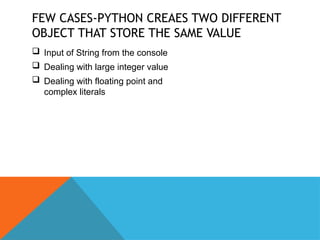
FEW CASES-PYTHON CREAES TWO DIFFERENT
OBJECT THAT STORE THE SAME VALUE
 Input of String from the console
 Dealing with large integer value
 Dealing with floating point and
complex literals
LOGICAL VALUE – ASSOCIATION WITH OTHER TYPE
In python everyvalue is associated with Boolean value True or False.Let
us See which valuesare True and False
False values True values
None
All other values
are considered as
true
False
Zero (0)
Empty Sequence “ “, [], (), {}
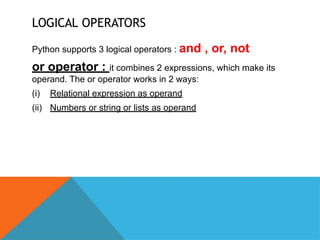
LOGICAL OPERATORS
Python supports 3 logical operators : and , or, not
or operator : it combines 2 expressions, which make its
operand. The or operator works in 2 ways:
(i) Relational expression as operand
(ii) Numbers or string or lists as operand
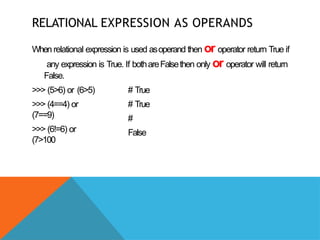
RELATIONAL EXPRESSION AS OPERANDS
When relational expression is used asoperand then or operator return True if
any expression is True. If bothareFalsethen only or operator will return
False.
>>> (5>6) or (6>5)
>>> (4==4) or
(7==9)
>>> (6!=6) or
(7>100
# True
# True
#
False
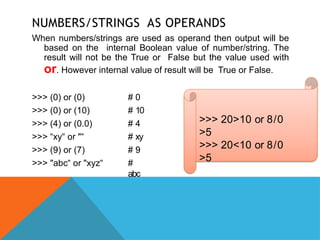
NUMBERS/STRINGS AS OPERANDS
When numbers/strings are used as operand then output will be
based on the internal Boolean value of number/string. The
result will not be the True or False but the value used with
or. However internal value of result will be True or False.
>>> (0) or (0)
>>> (0) or (10)
>>> (4) or (0.0)
>>> “xy or
‟ "‟
>>> (9) or (7)
>>> "abc or
‟ "xyz‟
# 0
# 10
# 4
# xy
# 9
#
abc
>>> 20>10 or 8/0
>5
>>> 20<10 or 8/0
>5
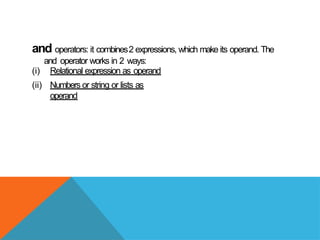
and operators: it combines2 expressions, which make its operand. The
and operator works in 2 ways:
(i) Relational expression as operand
(ii) Numbers or string or lists as
operand
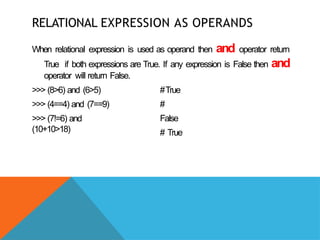
RELATIONAL EXPRESSION AS OPERANDS
When relational expression is used as operand then and operator return
True if both expressions are True. If any expression is False then and
operator will return False.
>>> (8>6) and (6>5)
>>> (4==4) and (7==9)
>>> (7!=6) and
(10+10>18)
#True
#
False
# True
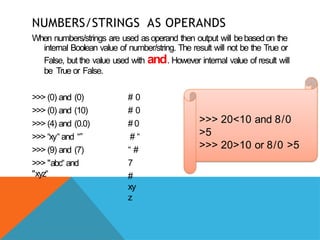
NUMBERS/STRINGS AS OPERANDS
When numbers/strings are used asoperand then output will bebasedon the
internal Boolean value of number/string. The result will not be the True or
False, but the value used with and. However internal value of result will
be True or False.
>>> (0) and (0)
>>> (0) and (10)
>>> (4) and (0.0)
>>> “xy‟ and “”
>>> (9) and (7)
>>> "abc‟ and
"xyz‟
# 0
# 0
# 0
# “
“ #
7
#
xy
z
>>> 20<10 and 8/0
>5
>>> 20>10 or 8/0 >5
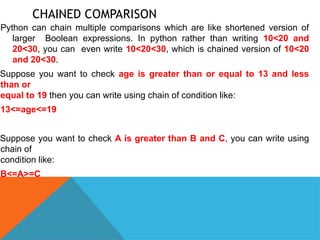
CHAINED COMPARISON
Python can chain multiple comparisons which are like shortened version of
larger Boolean expressions. In python rather than writing 10<20 and
20<30, you can even write 10<20<30, which is chained version of 10<20
and 20<30.
Suppose you want to check age is greater than or equal to 13 and less
than or
equal to 19 then you can write using chain of condition like:
13<=age<=19
Suppose you want to check A is greater than B and C, you can write using
chain of
condition like:
B<=A>=C
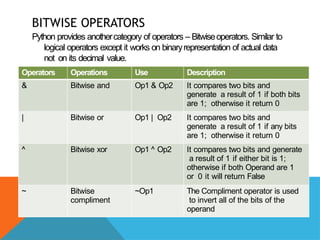
BITWISE OPERATORS
Python provides anothercategory of operators – Bitwiseoperators. Similar to
logical operators except it works on binaryrepresentation of actual data
not on its decimal value.
Operators Operations Use Description
& Bitwise and Op1 & Op2 It compares two bits and
generate a result of 1 if both bits
are 1; otherwise it return 0
| Bitwise or Op1 | Op2 It compares two bits and
generate a result of 1 if any bits
are 1; otherwise it return 0
^ Bitwise xor Op1 ^ Op2 It compares two bits and generate
a result of 1 if either bit is 1;
otherwise if both Operand are 1
or 0 it will return False
~ Bitwise
compliment
~Op1 The Compliment operator is used
to invert all of the bits of the
operand
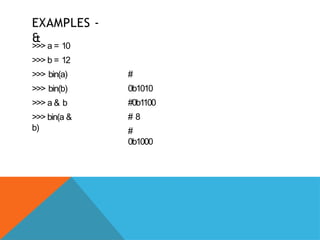
EXAMPLES -
&
>>> a = 10
>>> b = 12
>>> bin(a)
>>> bin(b)
>>> a & b
>>> bin(a &
b)
#
0b1010
#0b1100
# 8
#
0b1000
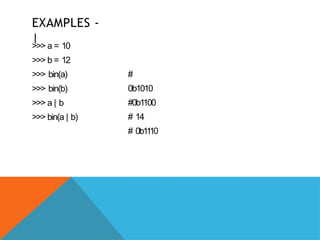
EXAMPLES -
|
>>> a = 10
>>> b = 12
>>> bin(a)
>>> bin(b)
>>> a | b
>>> bin(a | b)
#
0b1010
#0b1100
# 14
# 0b11
10
EXAMPLES -
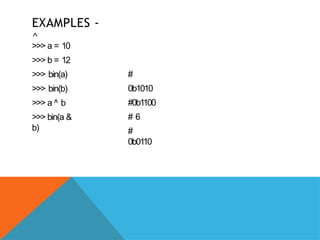
^
>>> a = 10
>>> b = 12
>>> bin(a)
>>> bin(b)
>>> a ^ b
>>> bin(a &
b)
#
0b1010
#0b1100
# 6
#
0b0110
EXAMPLES -
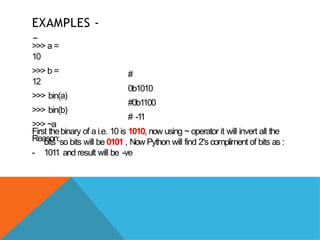
~
>>> a =
10
>>> b =
12
>>> bin(a)
>>> bin(b)
>>> ~a
Reason:
-
#
0b1010
#0b1100
# -1
1
First thebinary of a i.e. 10 is 1010, now using ~ operator it will invert all the
bits so bits will be 0101 , Now Python will find 2s
‟ compliment of bits as :
1011 and result will be -ve
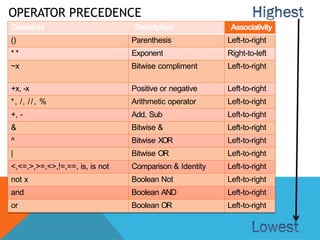
OPERATOR PRECEDENCE
Operators Description Associativity
() Parenthesis Left-to-right
* * Exponent Right-to-left
~x Bitwise compliment Left-to-right
+x, -x Positive or negative Left-to-right
*, /, //, % Arithmetic operator Left-to-right
+, - Add, Sub Left-to-right
& Bitwise & Left-to-right
^ Bitwise XOR Left-to-right
| Bitwise OR Left-to-right
<,<=,>,>=,<>,!=,==, is, is not Comparison & Identity Left-to-right
not x Boolean Not Left-to-right
and Boolean AND Left-to-right
or Boolean OR Left-to-right
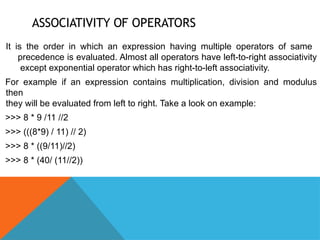
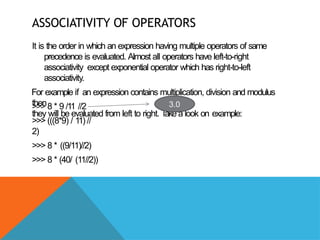
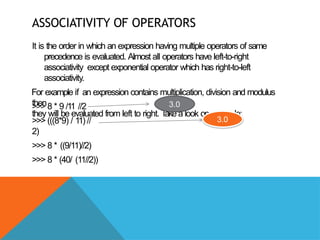
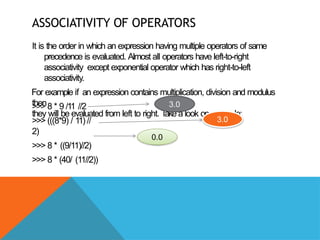
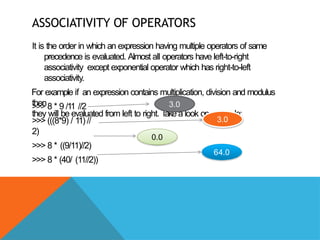
ASSOCIATIVITY OF OPERATORS
It is the order in which an expression having multiple operators of same
precedence is evaluated. Almost all operators have left-to-right associativity
except exponential operator which has right-to-left associativity.
For example if an expression contains multiplication, division and modulus
then
they will be evaluated from left to right. Take a look on example:
>>> 8 * 9 /11 //2
>>> (((8*9) / 11) // 2)
>>> 8 * ((9/11)//2)
>>> 8 * (40/ (11//2))
ASSOCIATIVITY OF OPERATORS
It is the order in which an expression having multiple operators of same
precedence is evaluated. Almost all operators have left-to-right
associativity except exponential operator which has right-to-left
associativity.
For example if an expression contains multiplication, division and modulus
then
they will be evaluated from left to right. T
ake a look on example:
>>> 8 * 9 /11 //2
>>> (((8*9) / 11) //
2)
>>> 8 * ((9/11)//2)
>>> 8 * (40/ (11//2))
3.0
ASSOCIATIVITY OF OPERATORS
It is the order in which an expression having multiple operators of same
precedence is evaluated. Almost all operators have left-to-right
associativity except exponential operator which has right-to-left
associativity.
For example if an expression contains multiplication, division and modulus
then
they will be evaluated from left to right. T
ake a look on example:
>>> 8 * 9 /11 //2
>>> (((8*9) / 11) //
2)
>>> 8 * ((9/11)//2)
>>> 8 * (40/ (11//2))
3.0
3.0
ASSOCIATIVITY OF OPERATORS
It is the order in which an expression having multiple operators of same
precedence is evaluated. Almost all operators have left-to-right
associativity except exponential operator which has right-to-left
associativity.
For example if an expression contains multiplication, division and modulus
then
they will be evaluated from left to right. T
ake a look on example:
>>> 8 * 9 /11 //2
>>> (((8*9) / 11) //
2)
>>> 8 * ((9/11)//2)
>>> 8 * (40/ (11//2))
3.0
3.0
0.0
ASSOCIATIVITY OF OPERATORS
It is the order in which an expression having multiple operators of same
precedence is evaluated. Almost all operators have left-to-right
associativity except exponential operator which has right-to-left
associativity.
For example if an expression contains multiplication, division and modulus
then
they will be evaluated from left to right. T
ake a look on example:
>>> 8 * 9 /11 //2
>>> (((8*9) / 11) //
2)
>>> 8 * ((9/11)//2)
>>> 8 * (40/ (11//2))
3.0
3.0
0.0
64.0
ASSOCIATIVITY OF OPERATORS
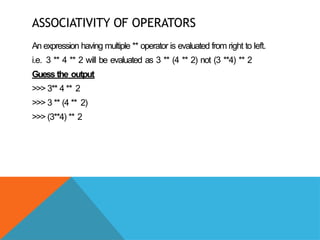
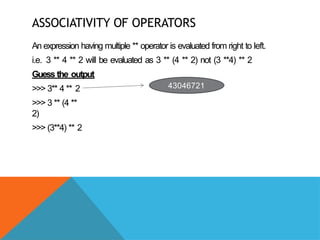
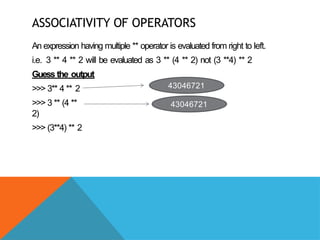
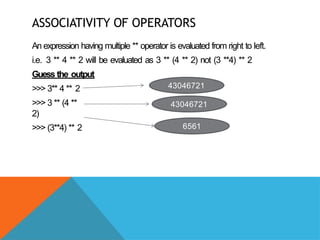
An expression having multiple ** operator is evaluated from right to left.
i.e. 3 ** 4 ** 2 will be evaluated as 3 ** (4 ** 2) not (3 **4) ** 2
Guess the output
>>> 3** 4 ** 2
>>> 3 ** (4 ** 2)
>>> (3**4) ** 2
ASSOCIATIVITY OF OPERATORS
An expression having multiple ** operator is evaluated from right to left.
i.e. 3 ** 4 ** 2 will be evaluated as 3 ** (4 ** 2) not (3 **4) ** 2
Guess the output
>>> 3** 4 ** 2
>>> 3 ** (4 **
2)
>>> (3**4) ** 2
43046721
ASSOCIATIVITY OF OPERATORS
An expression having multiple ** operator is evaluated from right to left.
i.e. 3 ** 4 ** 2 will be evaluated as 3 ** (4 ** 2) not (3 **4) ** 2
Guess the output
>>> 3** 4 ** 2
>>> 3 ** (4 **
2)
>>> (3**4) ** 2
43046721
43046721
ASSOCIATIVITY OF OPERATORS
An expression having multiple ** operator is evaluated from right to left.
i.e. 3 ** 4 ** 2 will be evaluated as 3 ** (4 ** 2) not (3 **4) ** 2
Guess the output
>>> 3** 4 ** 2
>>> 3 ** (4 **
2)
>>> (3**4) ** 2
43046721
43046721
6561
EXPRESSION
We have already discussed on expression that is a
combination of operators, literals and variables (operand).
The expression in Python can be of any type:
1) Arithmetic expressions
2) String expressions
3) Relational expressions
4) Logical expressions
5) Compound expressions
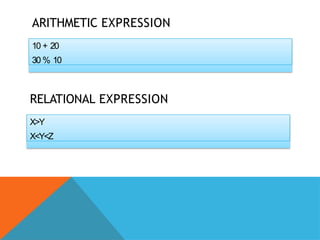
ARITHMETIC EXPRESSION
10 + 20
30 % 10
RELATIONAL EXPRESSION
X>Y
X<Y<Z
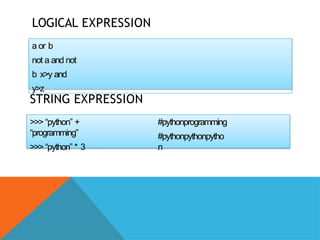
LOGICAL EXPRESSION
a or b
not a and not
b x>y and
y>z
STRING EXPRESSION
>>> “python” +
“programming”
>>> “python” * 3
#pythonprogramming
#pythonpythonpytho
n
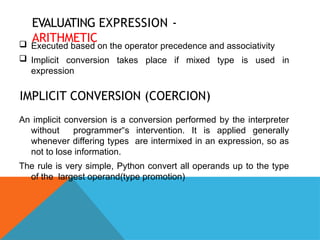
EVALUATING EXPRESSION -
ARITHMETIC
 Executed based on the operator precedence and associativity
 Implicit conversion takes place if mixed type is used in
expression
IMPLICIT CONVERSION (COERCION)
An implicit conversion is a conversion performed by the interpreter
without programmer s intervention. It is applied generally
‟
whenever differing types are intermixed in an expression, so as
not to lose information.
The rule is very simple, Python convert all operands up to the type
of the largest operand(type promotion)
IMPLICIT CONVERSION (COERCION)
If both arguments are standard numeric types, the following
coercions are applied:
 If either argument is a complex number, the other is converted
to complex
 Otherwise, if either a argument is a floating number, the other
is converted to floating point
 No conversion if both operand are integers
EXAMPLE –
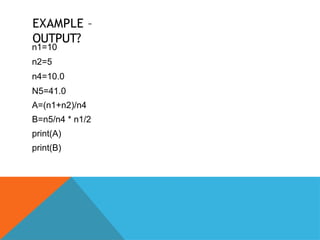
OUTPUT?
n1=10
n2=5
n4=10.0
N5=41.0
A=(n1+n2)/n4
B=n5/n4 * n1/2
print(A)
print(B)
EXAMPLE –
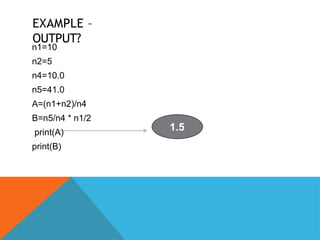
OUTPUT?
n1=10
n2=5
n4=10.0
n5=41.0
A=(n1+n2)/n4
B=n5/n4 * n1/2
print(A)
print(B)
1.5
EXAMPLE –
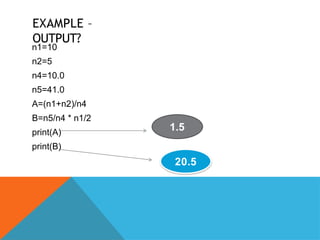
OUTPUT?
n1=10
n2=5
n4=10.0
n5=41.0
A=(n1+n2)/n4
B=n5/n4 * n1/2
print(A)
print(B)
1.5
20.5
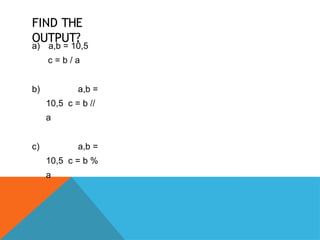
FIND THE
OUTPUT?
a) a,b = 10,5
c = b / a
b) a,b =
10,5 c = b //
a
c) a,b =
10,5 c = b %
a
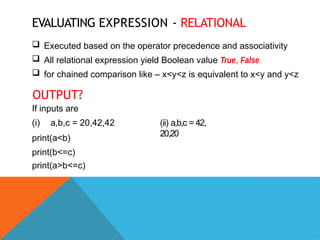
EVALUATING EXPRESSION - RELATIONAL
 Executed based on the operator precedence and associativity
 All relational expression yield Boolean value True, False
 for chained comparison like – x<y<z is equivalent to x<y and y<z
OUTPUT?
If inputs are
(i) a,b,c = 20,42,42
print(a<b)
print(b<=c)
print(a>b<=c)
(ii) a,b,c = 42,
20,20
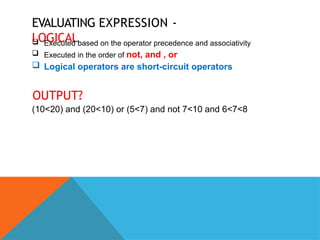
EVALUATING EXPRESSION -
LOGICAL
 Executed based on the operator precedence and associativity
 Executed in the order of not, and , or
 Logical operators are short-circuit operators
OUTPUT?
(10<20) and (20<10) or (5<7) and not 7<10 and 6<7<8
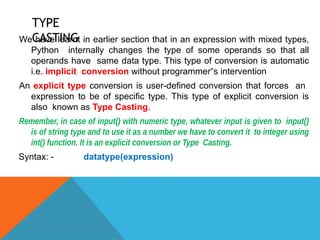
TYPE
CASTING
We have learnt in earlier section that in an expression with mixed types,
Python internally changes the type of some operands so that all
operands have same data type. This type of conversion is automatic
i.e. implicit conversion without programmer s intervention
‟
An explicit type conversion is user-defined conversion that forces an
expression to be of specific type. This type of explicit conversion is
also known as Type Casting.
Remember, in case of input() with numeric type, whatever input is given to input()
is of string type and to use it as a number we have to convert it to integer using
int() function. It is an explicit conversion or Type Casting.
Syntax: - datatype(expression)
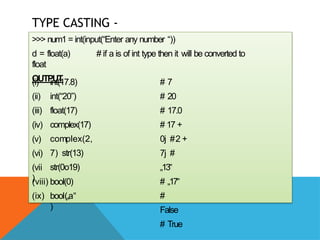
TYPE CASTING -
EXAMPLES
>>> num1 = int(input(“Enter any number “))
d = float(a) # if a is of int type then it will be converted to
float
OUTPUT
(i)
(ii)
(iii)
(iv)
(v)
(vi)
(vii
)
int(17.8)
int(“20”)
float(17)
complex(17)
complex(2,
7) str(13)
str(0o19)
(viii) bool(0)
(ix) bool(„a‟
)
# 7
# 20
# 17.0
# 17 +
0j #2 +
7j #
„13‟
# „17‟
#
False
# True
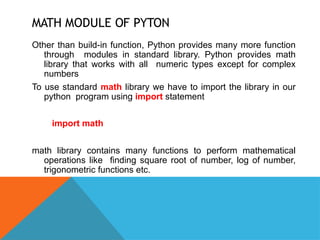
MATH MODULE OF PYTON
Other than build-in function, Python provides many more function
through modules in standard library. Python provides math
library that works with all numeric types except for complex
numbers
To use standard math library we have to import the library in our
python program using import statement
import math
math library contains many functions to perform mathematical
operations like finding square root of number, log of number,
trigonometric functions etc.
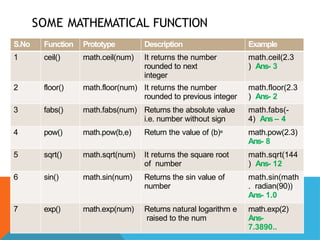
SOME MATHEMATICAL FUNCTION
S.No Function Prototype Description Example
1 ceil() math.ceil(num) It returns the number
rounded to next
integer
math.ceil(2.3
) Ans- 3
2 floor() math.floor(num) It returns the number
rounded to previous integer
math.floor(2.3
) Ans- 2
3 fabs() math.fabs(num) Returns the absolute value
i.e. number without sign
math.fabs(-
4) Ans – 4
4 pow() math.pow(b,e) Return the value of (b)e math.pow(2.3)
Ans- 8
5 sqrt() math.sqrt(num) It returns the square root
of number
math.sqrt(144
) Ans- 12
6 sin() math.sin(num) Returns the sin value of
number
math.sin(math
. radian(90))
Ans- 1.0
7 exp() math.exp(num) Returns natural logarithm e
raised to the num
math.exp(2)
Ans-
7.3890..
SOME MATHEMATICAL FUNCTION
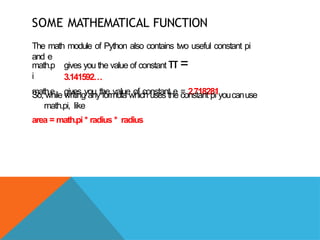
The math module of Python also contains two useful constant pi
and e
math.p
i
math.e
gives you the value of constant π=
3.141592…
gives you the value of constant e = 2.718281
So, while writing any formula which uses the constant pi youcanuse
math.pi, like
area = math.pi * radius * radius
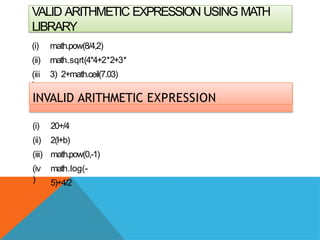
VALID ARITHMETIC EXPRESSION USING MATH
LIBRARY
(i)
(ii)
(iii
)
math.pow(8/4,2)
math.sqrt(4*4+2*2+3*
3) 2+math.ceil(7.03)
INVALID ARITHMETIC EXPRESSION
(i)
(ii)
(iii)
(iv
)
20+/4
2(l+b)
math.pow(0,-1)
math.log(-
5)+4/2
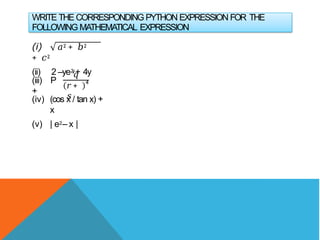
WRITE THE CORRESPONDING PYTHON EXPRESSION FOR THE
FOLLOWING MATHEMATICAL EXPRESSION
(i) 𝑎2 + 𝑏2
+ 𝑐2
(ii) 2 –ye2
y+ 4y
(iii) P
+
𝑞
𝑟+
𝑠
4
(iv) (cos x / tan x) +
x
(v) | e2– x |
JUST A
MINUTE…
(i)
(ii)
(iii)
(iv
)
What aredata types? What are python built-in
datatypes Which data type of pythonhandles
Numbers?
Why Boolean considered a subtype of
integer? Identify the datatypes of the values:
5, 5j, 10.6, „100,
‟ “100”, 2+4j, [10,20,30],
(“a”,”b”,”c”), {1:100,2:200}
(v)What is the difference between mutable and immutable datatype?
Give name of one data type belonging to each category
(vi)What is the difference in output of the following ?
print(len(str(19//4)))
print(len(str(19/4))
JUST A
MINUTE…
(vii) What will be the output producedby
these? 12/4 14//14 14%4 14.0/4
14.0//4
14.0%
4
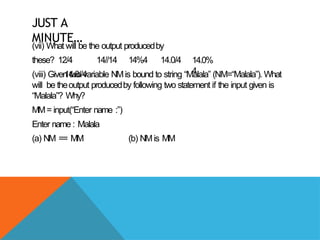
(viii) Given two variable NMis bound to string “Malala” (NM=“Malala”). What
will be theoutput producedby following two statement if the input given is
“Malala”? Why?
MM= input(“Enter name :”)
Enter name : Malala
(a) NM == MM (b) NMis MM
JUST A
MINUTE…
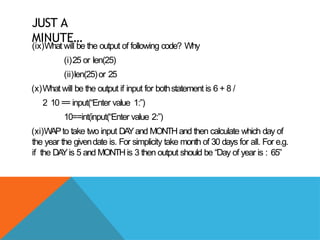
(ix)What will be the output of following code? Why
(i)25 or len(25)
(ii)len(25)or 25
(x)What will be the output if input for bothstatement is 6 + 8 /
2 10 == input(“Enter value 1:”)
10==int(input(“Enter value 2:”)
(xi)WAPto take two input DA
Yand MONTHand then calculate which day of
the year the givendate is. For simplicity take month of 30 days for all. For e.g.
if the DA
Yis 5 and MONTHis 3 then output should be “Day of year is : 65”

009 Data Handling class 11 -converted.pptx

  • 1.
    LEARNING OUTCOMES : DA T A TYPES  OPERA TORS  MUTABLE AND IMMUTABLE TYPES  EXPRESSION
  • 2.
    DATA TYPES Data typein Python specifies the type of data we are going to store in any variable, the amount of memory it will take and type of operation we can perform on a variable. Data can be of many types e.g. character, integer, real, string etc. Python supports following data types:  Numbers ( int, float, complex)  String  List  Tuple  Dictionary
  • 3.
    NUMBERS From the nameit is very clear the Number data types are used to store numeric values. Numbers in Python can be of following types: (ii) (iii ) (i) Integers a) Integers(signed) b) Booleans Floating point numbers Complex Numbers
  • 4.
    INTEGERS Integers allows tostore whole numbers only and there is no fraction parts. Integers can be positive and negative e.g. 100, 250, -12, +50 There are two integers in Python: 1) Integers(signed) : it is normal integer representation of whole numbers. Integers in python can be on any length, it is only limited by memory available. In Python 3.x int data type can be used to store big or small integer value whether it is +ve or –ve. 2) Booleans: it allows to store only two values True and False. The internal value of boolean value True and False is 1 and 0 resp. We can get boolean value from 0 and 1 using bool() function.
  • 5.
  • 6.
    FLOATING POINT NUMBERS Itallows to store numbers with decimal points. For e.g. 2.14. The decimal point indicate that it is not an integer but a float value. 100 is an integer but 100.5 is a float value. In Previous chapter we have already discussed float values can be of two type: 1. Fractional Form : 200.50, 0.78, -12.787 2. Exponent Form : it is represented with mantissa and exponent. For e.g # means 1.5 x 10² which is 150 # 150.0 >>>x = 1.5E2 >>>print(x) >>>y=12.78654E04 >>>print(y) # 127865.4
  • 7.
    FLOATING POINT NUMBERS Floatingpoint number are mainly used for storing values like distance, area, temperature etc. which have a fractional part. Floating point numbers have two advantage over integers:  they can represent values between the integers  they can represent a much greater range of values But floating point numbers suffers from one disadvantage also:  Floating point operations are usually slower than integer operations. In Python floating point numbers represent machine level double precision floating point numbers i.e. 15 digit precision.
  • 8.
    COMPLEX NUMBERS Python representcomplex numbers in the form A+Bj. To represent imaginary −1. Both real numbers, Python uses j or J in place of i. So in Python j = and imaginary parts are of type float e.g. a = 0 + 6j b = 2.5 + 3J >>>a=4+5j >>>print(a) >>>b=0+2j >>>b # (4+5j) #(2j)
  • 9.
    COMPLEX NUMBERS Python allowsto retrieve real and imaginary part of complex number using attributes: real and imag If the complex number is a then we can write a.real or a.imag Example >>>a=1+3.54j >>>print(a.real) >>>print(a.imag) # 1.0 # 3.54
  • 10.
    STRING In previous chapterwe have already discussed about string. Let us recall the things: 1. String is a collection of any valid characters in a quotation marks ( " or “ ) 2. Each character of String in Python is a Unicode character 3.Strings are used to store information like name, address, descriptions. etc For example: “hello”, „welcome , “sales2018”, ‟ “edudel.co.in”
  • 11.
    STRING In Python stringis a sequence of characters and each character can be individually access using index. From beginning the first character in String is at index 0 and last will be at len-1. From backward direction last character will be at index -1 and first character will be at –len. 0 1 2 3 4 5 6 W E L C O M E -7 -6 -5 -4 -3 -2 -1 Forward indexing messag e Backward indexing
  • 12.
    STRING To access individualcharacter of String (Slicing). we can use the syntax: StringName[index position] >>>stream=“Science” >>>print(stream[0]) S >>>print(stream[3]) e >>>print(stream[-1]) e
  • 13.
    STRING What will bethe output: >>>stream=“Science” >>>print(stream[5]) >>>print(stream[-4]) >>>print(stream[-len(stream)]) >>>print(stream[8]) #Output 1 #Output 2 #Output 3 #Output 4
  • 14.
    STRING We cannot changethe individual letters of string by assignment because string in python is immutable and hence if we try to do this, Python will raise an error “object does not support Item assignment” >>>name=“Ronaldo” >>>name[1]="i‟ # error However we can assign string to another string. For e.g >>>name=“Ronaldo” >>>name=“Bekham” # no error
  • 15.
    LISTS AND TUPLES Lists andTuples are compound data types i.e. they allows to store multiple values under one name of different data types. The main difference between Lists and Tuples is List can be changed/modified i.e. mutable type whereas Tuples cannot be changes or modified i.e. immutable type. Let us take this with example: Lists: A list in python represents a list of comma-separated values of any data type between square brackets. [10,20,30,40,50] ["a , e , o , i , u ] ‟ ‟ ‟ ‟ ‟ ‟ ‟ ‟ ‟ [“GSV”,1822055,97.5]
  • 16.
    EXAMPLES - LIST >>> family=["Mom","Dad","Sis","Bro"] >>>family ['Mom', 'Dad', 'Sis', 'Bro'] >>> print(family) ['Mom', 'Dad', 'Sis', 'Bro'] >>> Employee=["E001","Anuj",70000,2019] >>> Employee ['E001', 'Anuj', 70000, 2019] >>> print(Employee) ['E001', 'Anuj', 70000, 2019]
  • 17.
    EXAMPLES - LIST The valuesstored inList are internally numbered from 0 onwards. i.e. first element will be at position 0 and second will be at 1 and so on. >>> Employee=["E001","Anuj",70000,2019] >>> print(Employee[1]) Anuj >>> Employee[2]=75000 >>> print(Employee) ['E001', 'Anuj',75000, 2019] Y ou can check the number of items in list using len() function >>> print(len(Employee)) 4
  • 18.
    TUPLES Tuples as thoselist which cannot be changed i.e. not modifiable. Tuples are defined inside parenthesis and values separated by comma Example: >>> favorites=("Blue","Cricket","Gajar Ka Halwa") >>> student=(1,"Dev”,97.5) >>> print(favorites) ('Blue', 'Cricket', 'Gajar Ka Halwa') >>>print(student) (1,Dev’, 97.5)
  • 19.
    TUPLES Like List, Tuplesvalues are also internally numbered from 0 and so on. >>> print(favorites[1]) Cricket >>> print(student[2]) 97.5 >>> student[2]=99 >>> student[2]=99 # Error, tuple does not support assignment i.e. immutable
  • 20.
    DICTIONARY Dictionary is anotherfeature of Python. It is an unordered set of comma separated key:value pairs. Dictionary Items are defined in Curly Brackets { } Keys defined in Dictionary cannot be same i.e. no two keys can be same. >>> student={'Roll':1,'Name':"Jagga",'Per':91.5} >>>print(student) >>> print(student['Per']) 91.5 >>> val={1:100,2:300,4:900} >>> print(val[1]) 100 # Key name canbe string / numeric Dictionary is mutable. i.e. We can modify dictionary elements. >>>val[2]=1000 >>>print(val) # {1: 100, 2: 1000, 4: 900}
  • 21.
    DATA TYPE SUMMARY CoreData types Number s Integer s Boolea n Floatin g point Comple x None Sequences String Tupl e List Mappings Dictionar y
  • 22.
    MUTABLE AND IMMUTABLETYPES Python data object can be broadlycategorized into two types – mutable and immutable types. In simple words changeable/modifiable and non-modifiable types. 1. Immutable types: are those that can never change their value in place. In python following types are immutable: integers, float, Boolean, strings, tuples Sample Code: a = 10 b = a c = 15 a = 20 b = 40 c = b # will give output 10,10,30 From this code, you can say the value of integer a, b,c could be changed effortlessly, but this is not the case. Let us understand what was done behind the scene
  • 23.
    IMMUTABLE TYPES Note: Inpython each value in memory is assigned a memory address. So each time a new variable is pointing to that value they will be assigned the same address andno new memory allocation. Let us understand the case. 10 15 20 21 40 55 valu e address 250 272 280 284 290 312 a = 10 b = a c = 15 a b c >>> a=10 >>> b=a >>> c=15 >>> print(id(a)) 1757402304 >>> print(id(b)) 1757402304 >>> print(id(c)) 1757402384 Python provides id() function to get the memory address to which value /variable is
  • 24.
    IMMUTABLE TYPES Now letus understand the changes done to variable a, b,c valu e address 10 15 20 21 40 55 250 272 280 284 290 312 a = 20 b = 40 c = b a b c >>> a=20 >>> b=40 >>> c=b >>> print(id(a)) 1757402464 >>> print(id(b)) 1757402784 >>> print(id(c)) 1757402784 Python provides id() function to get the memory address to which value /variable is referring
  • 25.
    IMMUTABLE TYPES From theprevious code it is clear that variable names are stored references to a value-object. Each time we change the value the variable s reference memory address changes. So it will not store ‟ new value in same memory location that s why ‟ Integer, float, Booleans, strings and tuples are immutable. Variables (of certain type) are NOT LIKE storage containers i.e. with fixed memory address where value changes every time. Hence they are immutable
  • 26.
    MUTABLE TYPE Mutable meansin samememory address, new value can be stored as and when it is required. Python provides following mutable types: 1. Lists 2. Dictionaries 3. Sets Examples: (using List) >>> employee=["E001","Rama","Sales",67000] >>> print(id(employee)) 71593896 >>> employee[3]=75000 >>> print(id(employee)) 71593896 >>> See, even if we change the value, its reference memory address has remained same
  • 27.
    VARIABLE INTERNALS Python isan object oriented language. So every thing in python is an object. An object is any identifiable entity that have some characteristics/properties and behavior. Like integer values are object – they hold whole numbers only(characteristics) and they support all arithmetic operations (behavior). Every python object has three key attributes associated with it: 1. type of object 2. value of an object 3. id of an object
  • 28.
    TYPE OF AN OBJECT typeof an object determines the operations that can be performed on the object. Built – in function type() returns the type of an object Example: >>> a=100 >>> type(a) <class 'int'> >>> type(100) <class 'int'> >>> name="Jaques" >>> type(name) <class 'str'>
  • 29.
    VALUE OF AN OBJECT Thedata items stored in the object is a value of object. The value stored in an object is a literals. We can using print() to get the value of an object Example: >>> a=100 >>> print(a) 100 >>> name="Kallis" >>> print(name) Kallis >>>
  • 30.
    ID OF AN OBJECT Itis the memory address of any object. Although id is dependent upon the system where it is installed but in most cases it returns the memory location of the object. Built in function id() returns the id of an object Example: >>> a=5 >>> id(5) 1911018608 >>> print(id(a)) 1911018608 >>>
  • 31.
    OPERATOR S are symbol thatperform specific operation when applied on variables. T ake a look at the expression: (Operator) 10 + 25 (Operands) Above statement is an expression (combination of operator and operands) i.e. operatoroperates on operand.some operator requires two operand and some requires only one operand to operate Watch Demo of each operator on YouTube
  • 32.
    TYPES OF OPERATORS- ARITHMETIC Binary Operators: are those operators that require two operand to operate upon. Following are some Binary operators: Operator Action + Addition - Subtraction * Multiplication / Division % Remainder * * Exponent / / Floor division
  • 33.
    TYPES OF OPERATORS- ARITHMETIC Unary Operators They require only one operand to operate like unary + and – For e.g. >>> a=5 >>> print(+a) 5 >>> print(-a) -5 >>>
  • 34.
    EXAMPLE – BINARYARITHMETIC OPERATOR >>> num1=20 >>> num2=7 >>> val = num1 % num2 >>> print(val) 6 >>> val = 2**4 >>> print(val) 16
  • 35.
    EXAMPLE – BINARYARITHMETIC OPERATOR >>> val = num1 / num2 >>> print(val) 2.857142857142857 >>> val = num1 // num2 >>> print(val) 2
  • 36.
    JUST A MINUTE… What willbe the output of following code >>> a,b,c,d = 13.2,20,50.0,49 >>> print(a/4) >>> print(a//4) >>> print(20**3) >>> print(b**3) >>> print(c//6) >>> print(d%5) >>> print(d%100)
  • 37.
    JUST A MINUTE… What willbe the output of following code >>> x,y=-8,-15 >>> print(x//3) >>> print(8/-3) ->>> print(8//-3)
  • 38.
    JUST A MINUTE… What willbe the output of following code >>> x,y= -8,-15 >>> print(x//3) >>> print(8/-3) ->>> print(8//-3) -3
  • 39.
    JUST A MINUTE… What willbe the output of following code >>> x,y=-8,-15 >>> print(x//3) >>> print(8/-3) ->>> print(8//- 3) -3 -2.66665
  • 40.
    JUST A MINUTE… What willbe the output of following code >>> x,y=-8,-15 >>> print(x//3) >>> print(8/-3) ->>> print(8//- 3) -3 -2.66665 --3
  • 41.
    JUST A MINUTE… What willbe the output of following code >>> -11 // 5 >>> -11 % 5 >>> 11 % - 5 >>> 11 // -5
  • 42.
    JUST A MINUTE… What willbe the output of following code >>> -11 // 5 >>> -11 % 5 >>> 1 1%- 5 >>> 1 1// -5 -3
  • 43.
    JUST A MINUTE… What willbe the output of following code >>> -11 // 5 >>> -11 % 5 >>> 1 1%- 5 >>> 1 1// -5 -3 4
  • 44.
    JUST A MINUTE… What willbe the output of following code >>> -11 // 5 >>> -11 % 5 >>> 1 1%- 5 >>> 1 1// -5 -3 4 -4
  • 45.
    JUST A MINUTE… What willbe the output of following code >>> -11 // 5 >>> -11 % 5 >>> 1 1%- 5 >>> 1 1// -5 -3 4 -4 -4
  • 46.
    TYPES OF OPERATORS–AUGMENTED ASSIGNMENT OPERATORS It perform operation with LHS and RHS and result will be assigned to LSH Operator Action Example += RHS added to LHS and result assigned to LHS x+=5 means x=x+5 -= RHS minus to LHS and result assigned to LHS x-=5 means x=x-5 *= RHS multiply to LHS and result assigned to LHS x*=5 means x=x*5 /= LHS divided by RHS and result assigned to LHS(FLOAT) x/=5 means x=x/5 %= LHS divided by RHS and remainder assigned to LHS x%=5 means x=x%5 **= RHS power to LHS and result assigned to LHS x**=5 means x=x**5 //= LHS divided by RHS and result assigned to LHS (INT) x//=5 means x=x//5
  • 47.
    TYPES OF OPERATORS–RELATIONAL OPERATOR Are used to compare two values and return the result as True or False depending upon the result of comparison Operator Action Example < Less than 50<45 returns False, 40<60 returns True > Greater than 50>45 returns True, 40>60 returns False <= Less than or equal to 50<=50 returns True, 80<=70 returns False >= Greater than or equal to 40>=40 returns True, 40>=90 returns False == Equal to 80==80 returns True, 60==80 returns False != Not equal to 45!=90 returns True, 80!=80 returns False
  • 48.
    FEW POINTS TOREMEMBER - COMPARISONS  For numeric types, the values are compared after removing trailing zeros after decimal point from floating point number. For example 6 and 6.0 will be treated as equal.  Capital letters (ASCII code 65-90) are considered as less than small letters (ASCII code 97-122).  >>> Hello < ‟ ‟ "hello‟ # will give result true  In string be careful while comparison, because special characters are also assigned to some ASCII code. Like ASCII code of space is 32, Enter is 13.  >>> Hello == ‟ ‟ " Hello‟ # false, because there is space before H in second string  Like other programming language, In Python also we have to be very careful while comparing floating value because it may gives you unexpected result. So it is suggested not to use equality testing with floating values.
  • 49.
    COMPARISON WITH FLOATINGVALUES >>> 0.1 + 0.1+ 0.1 == 0.3 Will return False How? Let us check the value of 0.1+0.1+0.1 >>>print(0.1+0.1+0.1) Output :- 0.30000000000000004 That s why 0.1 + 0.1+ 0.1 == 0.3 is False ‟ Reason: In python floating numbers are approximately presented in memory in binary form up to the allowed precision 15 digit. This approximation may yield unexpected result if you are comparing floating value using equality
  • 50.
    RELATIONAL OPERATOR WITHARITHMETIC OPERATORS Relational operator have lower priority than arithmetic operators, So if any arithmetic operator is involved with relational operator then first arithmetic operation will be solved then comparison . For example >>>a,b,c = 10,20,30 >>>a+10 > b-10 Result : True Here Comparison will be 20>10
  • 51.
    WHAT IS THE DIFFERENCE? Ifthe value of a is 100 , What is the difference between the below 2 statements Statement 1 : Statement 2 : >>> a == 60 >>> a = 60
  • 52.
    IDENTITY OPERATOR These operatorsare used to check if both object are pointing to same memory address or not. Operator Usage Description is a is b Return True, if both operands are pointing to same memory location, otherwise False is not a is not b Return True, if both operands are not pointing to same memory location, otherwise False
  • 53.
    EXAMPLE OF IDENTITYOPERATORS >>> a = 10 >>> b = 10 >>> c = 20 >>> a is b >>> a is c >>> a is not c >>> c -=10 >>> a is c #True # False # True # True
  • 54.
    EQUALITY(==) VS IDENTITY(IS) When wecompare two variables pointing to same value, then both Equality (==) and identity (is) will return True. >>> a ,b = 10, 10 >>>a==b >>>a is b # True # True But in few cases, when two variables are pointing to same value == will return True and is will return False
  • 55.
    EXAMPLE >>> s1=“doe‟ >>>s2=input("Enter any String) Enter ‟ any String: doe #True # False >>> s1==s2 >>> s1 is s2 >>>s3 = “doe‟ >>>s1 is s3 # True
  • 56.
    FEW CASES-PYTHON CREAESTWO DIFFERENT OBJECT THAT STORE THE SAME VALUE  Input of String from the console  Dealing with large integer value  Dealing with floating point and complex literals
  • 57.
    LOGICAL VALUE –ASSOCIATION WITH OTHER TYPE In python everyvalue is associated with Boolean value True or False.Let us See which valuesare True and False False values True values None All other values are considered as true False Zero (0) Empty Sequence “ “, [], (), {}
  • 58.
    LOGICAL OPERATORS Python supports3 logical operators : and , or, not or operator : it combines 2 expressions, which make its operand. The or operator works in 2 ways: (i) Relational expression as operand (ii) Numbers or string or lists as operand
  • 59.
    RELATIONAL EXPRESSION ASOPERANDS When relational expression is used asoperand then or operator return True if any expression is True. If bothareFalsethen only or operator will return False. >>> (5>6) or (6>5) >>> (4==4) or (7==9) >>> (6!=6) or (7>100 # True # True # False
  • 60.
    NUMBERS/STRINGS AS OPERANDS Whennumbers/strings are used as operand then output will be based on the internal Boolean value of number/string. The result will not be the True or False but the value used with or. However internal value of result will be True or False. >>> (0) or (0) >>> (0) or (10) >>> (4) or (0.0) >>> “xy or ‟ "‟ >>> (9) or (7) >>> "abc or ‟ "xyz‟ # 0 # 10 # 4 # xy # 9 # abc >>> 20>10 or 8/0 >5 >>> 20<10 or 8/0 >5
  • 61.
    and operators: itcombines2 expressions, which make its operand. The and operator works in 2 ways: (i) Relational expression as operand (ii) Numbers or string or lists as operand
  • 62.
    RELATIONAL EXPRESSION ASOPERANDS When relational expression is used as operand then and operator return True if both expressions are True. If any expression is False then and operator will return False. >>> (8>6) and (6>5) >>> (4==4) and (7==9) >>> (7!=6) and (10+10>18) #True # False # True
  • 63.
    NUMBERS/STRINGS AS OPERANDS Whennumbers/strings are used asoperand then output will bebasedon the internal Boolean value of number/string. The result will not be the True or False, but the value used with and. However internal value of result will be True or False. >>> (0) and (0) >>> (0) and (10) >>> (4) and (0.0) >>> “xy‟ and “” >>> (9) and (7) >>> "abc‟ and "xyz‟ # 0 # 0 # 0 # “ “ # 7 # xy z >>> 20<10 and 8/0 >5 >>> 20>10 or 8/0 >5
  • 64.
    CHAINED COMPARISON Python canchain multiple comparisons which are like shortened version of larger Boolean expressions. In python rather than writing 10<20 and 20<30, you can even write 10<20<30, which is chained version of 10<20 and 20<30. Suppose you want to check age is greater than or equal to 13 and less than or equal to 19 then you can write using chain of condition like: 13<=age<=19 Suppose you want to check A is greater than B and C, you can write using chain of condition like: B<=A>=C
  • 65.
    BITWISE OPERATORS Python providesanothercategory of operators – Bitwiseoperators. Similar to logical operators except it works on binaryrepresentation of actual data not on its decimal value. Operators Operations Use Description & Bitwise and Op1 & Op2 It compares two bits and generate a result of 1 if both bits are 1; otherwise it return 0 | Bitwise or Op1 | Op2 It compares two bits and generate a result of 1 if any bits are 1; otherwise it return 0 ^ Bitwise xor Op1 ^ Op2 It compares two bits and generate a result of 1 if either bit is 1; otherwise if both Operand are 1 or 0 it will return False ~ Bitwise compliment ~Op1 The Compliment operator is used to invert all of the bits of the operand
  • 66.
    EXAMPLES - & >>> a= 10 >>> b = 12 >>> bin(a) >>> bin(b) >>> a & b >>> bin(a & b) # 0b1010 #0b1100 # 8 # 0b1000
  • 67.
    EXAMPLES - | >>> a= 10 >>> b = 12 >>> bin(a) >>> bin(b) >>> a | b >>> bin(a | b) # 0b1010 #0b1100 # 14 # 0b11 10
  • 68.
    EXAMPLES - ^ >>> a= 10 >>> b = 12 >>> bin(a) >>> bin(b) >>> a ^ b >>> bin(a & b) # 0b1010 #0b1100 # 6 # 0b0110
  • 69.
    EXAMPLES - ~ >>> a= 10 >>> b = 12 >>> bin(a) >>> bin(b) >>> ~a Reason: - # 0b1010 #0b1100 # -1 1 First thebinary of a i.e. 10 is 1010, now using ~ operator it will invert all the bits so bits will be 0101 , Now Python will find 2s ‟ compliment of bits as : 1011 and result will be -ve
  • 70.
    OPERATOR PRECEDENCE Operators DescriptionAssociativity () Parenthesis Left-to-right * * Exponent Right-to-left ~x Bitwise compliment Left-to-right +x, -x Positive or negative Left-to-right *, /, //, % Arithmetic operator Left-to-right +, - Add, Sub Left-to-right & Bitwise & Left-to-right ^ Bitwise XOR Left-to-right | Bitwise OR Left-to-right <,<=,>,>=,<>,!=,==, is, is not Comparison & Identity Left-to-right not x Boolean Not Left-to-right and Boolean AND Left-to-right or Boolean OR Left-to-right
  • 71.
    ASSOCIATIVITY OF OPERATORS Itis the order in which an expression having multiple operators of same precedence is evaluated. Almost all operators have left-to-right associativity except exponential operator which has right-to-left associativity. For example if an expression contains multiplication, division and modulus then they will be evaluated from left to right. Take a look on example: >>> 8 * 9 /11 //2 >>> (((8*9) / 11) // 2) >>> 8 * ((9/11)//2) >>> 8 * (40/ (11//2))
  • 72.
    ASSOCIATIVITY OF OPERATORS Itis the order in which an expression having multiple operators of same precedence is evaluated. Almost all operators have left-to-right associativity except exponential operator which has right-to-left associativity. For example if an expression contains multiplication, division and modulus then they will be evaluated from left to right. T ake a look on example: >>> 8 * 9 /11 //2 >>> (((8*9) / 11) // 2) >>> 8 * ((9/11)//2) >>> 8 * (40/ (11//2)) 3.0
  • 73.
    ASSOCIATIVITY OF OPERATORS Itis the order in which an expression having multiple operators of same precedence is evaluated. Almost all operators have left-to-right associativity except exponential operator which has right-to-left associativity. For example if an expression contains multiplication, division and modulus then they will be evaluated from left to right. T ake a look on example: >>> 8 * 9 /11 //2 >>> (((8*9) / 11) // 2) >>> 8 * ((9/11)//2) >>> 8 * (40/ (11//2)) 3.0 3.0
  • 74.
    ASSOCIATIVITY OF OPERATORS Itis the order in which an expression having multiple operators of same precedence is evaluated. Almost all operators have left-to-right associativity except exponential operator which has right-to-left associativity. For example if an expression contains multiplication, division and modulus then they will be evaluated from left to right. T ake a look on example: >>> 8 * 9 /11 //2 >>> (((8*9) / 11) // 2) >>> 8 * ((9/11)//2) >>> 8 * (40/ (11//2)) 3.0 3.0 0.0
  • 75.
    ASSOCIATIVITY OF OPERATORS Itis the order in which an expression having multiple operators of same precedence is evaluated. Almost all operators have left-to-right associativity except exponential operator which has right-to-left associativity. For example if an expression contains multiplication, division and modulus then they will be evaluated from left to right. T ake a look on example: >>> 8 * 9 /11 //2 >>> (((8*9) / 11) // 2) >>> 8 * ((9/11)//2) >>> 8 * (40/ (11//2)) 3.0 3.0 0.0 64.0
  • 76.
    ASSOCIATIVITY OF OPERATORS Anexpression having multiple ** operator is evaluated from right to left. i.e. 3 ** 4 ** 2 will be evaluated as 3 ** (4 ** 2) not (3 **4) ** 2 Guess the output >>> 3** 4 ** 2 >>> 3 ** (4 ** 2) >>> (3**4) ** 2
  • 77.
    ASSOCIATIVITY OF OPERATORS Anexpression having multiple ** operator is evaluated from right to left. i.e. 3 ** 4 ** 2 will be evaluated as 3 ** (4 ** 2) not (3 **4) ** 2 Guess the output >>> 3** 4 ** 2 >>> 3 ** (4 ** 2) >>> (3**4) ** 2 43046721
  • 78.
    ASSOCIATIVITY OF OPERATORS Anexpression having multiple ** operator is evaluated from right to left. i.e. 3 ** 4 ** 2 will be evaluated as 3 ** (4 ** 2) not (3 **4) ** 2 Guess the output >>> 3** 4 ** 2 >>> 3 ** (4 ** 2) >>> (3**4) ** 2 43046721 43046721
  • 79.
    ASSOCIATIVITY OF OPERATORS Anexpression having multiple ** operator is evaluated from right to left. i.e. 3 ** 4 ** 2 will be evaluated as 3 ** (4 ** 2) not (3 **4) ** 2 Guess the output >>> 3** 4 ** 2 >>> 3 ** (4 ** 2) >>> (3**4) ** 2 43046721 43046721 6561
  • 80.
    EXPRESSION We have alreadydiscussed on expression that is a combination of operators, literals and variables (operand). The expression in Python can be of any type: 1) Arithmetic expressions 2) String expressions 3) Relational expressions 4) Logical expressions 5) Compound expressions
  • 81.
    ARITHMETIC EXPRESSION 10 +20 30 % 10 RELATIONAL EXPRESSION X>Y X<Y<Z
  • 82.
    LOGICAL EXPRESSION a orb not a and not b x>y and y>z STRING EXPRESSION >>> “python” + “programming” >>> “python” * 3 #pythonprogramming #pythonpythonpytho n
  • 83.
    EVALUATING EXPRESSION - ARITHMETIC Executed based on the operator precedence and associativity  Implicit conversion takes place if mixed type is used in expression IMPLICIT CONVERSION (COERCION) An implicit conversion is a conversion performed by the interpreter without programmer s intervention. It is applied generally ‟ whenever differing types are intermixed in an expression, so as not to lose information. The rule is very simple, Python convert all operands up to the type of the largest operand(type promotion)
  • 84.
    IMPLICIT CONVERSION (COERCION) Ifboth arguments are standard numeric types, the following coercions are applied:  If either argument is a complex number, the other is converted to complex  Otherwise, if either a argument is a floating number, the other is converted to floating point  No conversion if both operand are integers
  • 85.
  • 86.
  • 87.
  • 88.
    FIND THE OUTPUT? a) a,b= 10,5 c = b / a b) a,b = 10,5 c = b // a c) a,b = 10,5 c = b % a
  • 89.
    EVALUATING EXPRESSION -RELATIONAL  Executed based on the operator precedence and associativity  All relational expression yield Boolean value True, False  for chained comparison like – x<y<z is equivalent to x<y and y<z OUTPUT? If inputs are (i) a,b,c = 20,42,42 print(a<b) print(b<=c) print(a>b<=c) (ii) a,b,c = 42, 20,20
  • 90.
    EVALUATING EXPRESSION - LOGICAL Executed based on the operator precedence and associativity  Executed in the order of not, and , or  Logical operators are short-circuit operators OUTPUT? (10<20) and (20<10) or (5<7) and not 7<10 and 6<7<8
  • 91.
    TYPE CASTING We have learntin earlier section that in an expression with mixed types, Python internally changes the type of some operands so that all operands have same data type. This type of conversion is automatic i.e. implicit conversion without programmer s intervention ‟ An explicit type conversion is user-defined conversion that forces an expression to be of specific type. This type of explicit conversion is also known as Type Casting. Remember, in case of input() with numeric type, whatever input is given to input() is of string type and to use it as a number we have to convert it to integer using int() function. It is an explicit conversion or Type Casting. Syntax: - datatype(expression)
  • 92.
    TYPE CASTING - EXAMPLES >>>num1 = int(input(“Enter any number “)) d = float(a) # if a is of int type then it will be converted to float OUTPUT (i) (ii) (iii) (iv) (v) (vi) (vii ) int(17.8) int(“20”) float(17) complex(17) complex(2, 7) str(13) str(0o19) (viii) bool(0) (ix) bool(„a‟ ) # 7 # 20 # 17.0 # 17 + 0j #2 + 7j # „13‟ # „17‟ # False # True
  • 93.
    MATH MODULE OFPYTON Other than build-in function, Python provides many more function through modules in standard library. Python provides math library that works with all numeric types except for complex numbers To use standard math library we have to import the library in our python program using import statement import math math library contains many functions to perform mathematical operations like finding square root of number, log of number, trigonometric functions etc.
  • 94.
    SOME MATHEMATICAL FUNCTION S.NoFunction Prototype Description Example 1 ceil() math.ceil(num) It returns the number rounded to next integer math.ceil(2.3 ) Ans- 3 2 floor() math.floor(num) It returns the number rounded to previous integer math.floor(2.3 ) Ans- 2 3 fabs() math.fabs(num) Returns the absolute value i.e. number without sign math.fabs(- 4) Ans – 4 4 pow() math.pow(b,e) Return the value of (b)e math.pow(2.3) Ans- 8 5 sqrt() math.sqrt(num) It returns the square root of number math.sqrt(144 ) Ans- 12 6 sin() math.sin(num) Returns the sin value of number math.sin(math . radian(90)) Ans- 1.0 7 exp() math.exp(num) Returns natural logarithm e raised to the num math.exp(2) Ans- 7.3890..
  • 95.
    SOME MATHEMATICAL FUNCTION Themath module of Python also contains two useful constant pi and e math.p i math.e gives you the value of constant π= 3.141592… gives you the value of constant e = 2.718281 So, while writing any formula which uses the constant pi youcanuse math.pi, like area = math.pi * radius * radius
  • 96.
    VALID ARITHMETIC EXPRESSIONUSING MATH LIBRARY (i) (ii) (iii ) math.pow(8/4,2) math.sqrt(4*4+2*2+3* 3) 2+math.ceil(7.03) INVALID ARITHMETIC EXPRESSION (i) (ii) (iii) (iv ) 20+/4 2(l+b) math.pow(0,-1) math.log(- 5)+4/2
  • 97.
    WRITE THE CORRESPONDINGPYTHON EXPRESSION FOR THE FOLLOWING MATHEMATICAL EXPRESSION (i) 𝑎2 + 𝑏2 + 𝑐2 (ii) 2 –ye2 y+ 4y (iii) P + 𝑞 𝑟+ 𝑠 4 (iv) (cos x / tan x) + x (v) | e2– x |
  • 98.
    JUST A MINUTE… (i) (ii) (iii) (iv ) What aredatatypes? What are python built-in datatypes Which data type of pythonhandles Numbers? Why Boolean considered a subtype of integer? Identify the datatypes of the values: 5, 5j, 10.6, „100, ‟ “100”, 2+4j, [10,20,30], (“a”,”b”,”c”), {1:100,2:200} (v)What is the difference between mutable and immutable datatype? Give name of one data type belonging to each category (vi)What is the difference in output of the following ? print(len(str(19//4))) print(len(str(19/4))
  • 99.
    JUST A MINUTE… (vii) Whatwill be the output producedby these? 12/4 14//14 14%4 14.0/4 14.0//4 14.0% 4 (viii) Given two variable NMis bound to string “Malala” (NM=“Malala”). What will be theoutput producedby following two statement if the input given is “Malala”? Why? MM= input(“Enter name :”) Enter name : Malala (a) NM == MM (b) NMis MM
  • 100.
    JUST A MINUTE… (ix)What willbe the output of following code? Why (i)25 or len(25) (ii)len(25)or 25 (x)What will be the output if input for bothstatement is 6 + 8 / 2 10 == input(“Enter value 1:”) 10==int(input(“Enter value 2:”) (xi)WAPto take two input DA Yand MONTHand then calculate which day of the year the givendate is. For simplicity take month of 30 days for all. For e.g. if the DA Yis 5 and MONTHis 3 then output should be “Day of year is : 65”