and the Oracle
Platform -
Database,
WebLogic
& the Cloud
Intro to Docker Containers
AMIS Oracle OpenWorld 2017 Review – October 20171
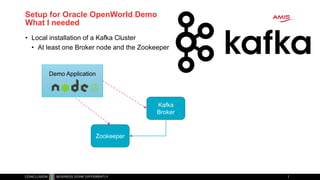
Setup for Oracle OpenWorld Demo
What I needed
• Local installation of a Kafka Cluster
• At least one Broker node and the Zookeeper
Kafka
Broker
Zookeeper
Demo Application
Setup for Oracle OpenWorld Demo
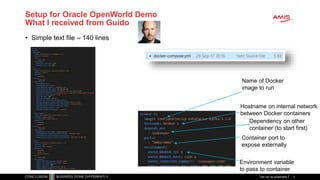
What I received from Guido
• Simple text file – 140 lines
Titel van de presentatie 3
Name of Docker
image to run
Hostname on internal network
between Docker containers
Environment variable
to pass to container
Dependency on other
container (to start first)
Container port to
expose externally
Setup for Oracle OpenWorld Demo
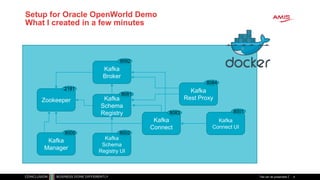
What I created in a few minutes
Titel van de presentatie 4
Kafka
Broker
Zookeeper
Kafka
Rest ProxyKafka
Schema
Registry
Kafka
Connect
Kafka
Connect UI
Kafka
Schema
Registry UI
Kafka
Manager
9092
2181
9000
8084
80018083
8081
8002
Some Quick Conclusions
• Docker provides a great way to
• Build environments (application & platform)
(from simple, text based build files & public images)
• Share & Ship these environments
(either through build files or through ready-to-run images)
• Run environments making efficient use of physical resources
(that can be complex and have complex interdependencies)
• And Guido is a very nice guy
• And also:
• [Docker] Containers are pivotal in cloud native environments,
microservices architecture, DevOps and CD
• Any IT professional should know her or his way around containers
Titel van de presentatie 5
Overview of today’s session
• Docker Container – what and why?
• Build, ship, run & operate
• Use in development, training, testing, delivery and production & operations
• Running custom containers on Oracle Container Cloud
• Microservices and the application platform of tomorrow
• Introducing Kubernetes and the upcoming Oracle Container Engine Cloud
• Building Containers with Oracle platform from Oracle GitHub repo
• Oracle Container Registry with prebaked images for Oracle platform
• Going forward…
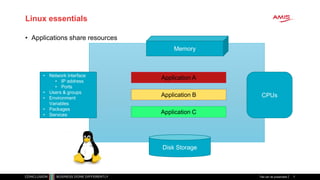
Linux essentials
• Applications share resources
Titel van de presentatie 7
Disk Storage
Memory
CPUs
Application A
Application B
Application C
• Network interface
• IP address
• Ports
• Users & groups
• Environment
Variables
• Packages
• Services
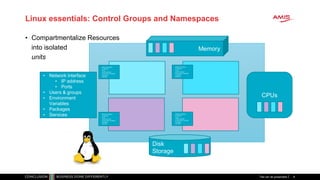
Linux essentials: Control Groups and Namespaces
• Compartmentalize Resources
into isolated
units
Titel van de presentatie 8
Disk
Storage
Memory
CPUs
• Network interface
• IP address
• Ports
• Users & groups
• Environment
Variables
• Packages
• Services
Network interface
IP address
Ports
Users & groups
Environment Variables
Packages
Services
Network interface
IP address
Ports
Users & groups
Environment Variables
Packages
Services
Network interface
IP address
Ports
Users & groups
Environment Variables
Packages
Services
Network interface
IP address
Ports
Users & groups
Environment Variables
Packages
Services
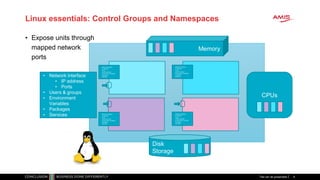
Linux essentials: Control Groups and Namespaces
• Expose units through
mapped network
ports
Titel van de presentatie 9
Disk
Storage
Memory
CPUs
• Network interface
• IP address
• Ports
• Users & groups
• Environment
Variables
• Packages
• Services
Network interface
IP address
Ports
Users & groups
Environment Variables
Packages
Services
Network interface
IP address
Ports
Users & groups
Environment Variables
Packages
Services
Network interface
IP address
Ports
Users & groups
Environment Variables
Packages
Services
Network interface
IP address
Ports
Users & groups
Environment Variables
Packages
Services
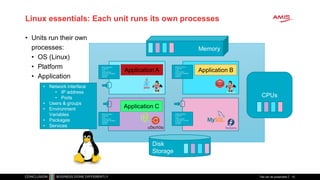
Linux essentials: Each unit runs its own processes
• Units run their own
processes:
• OS (Linux)
• Platform
• Application
Titel van de presentatie 10
Disk
Storage
Memory
CPUs
• Network interface
• IP address
• Ports
• Users & groups
• Environment
Variables
• Packages
• Services
Network interface
IP address
Ports
Users & groups
Environment Variables
Packages
Services
Network interface
IP address
Ports
Users & groups
Environment Variables
Packages
Services
Network interface
IP address
Ports
Users & groups
Environment Variables
Packages
Services
Network interface
IP address
Ports
Users & groups
Environment Variables
Packages
Services
Application A Application B
Application C
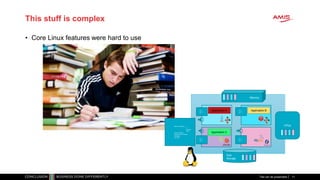
This stuff is complex
• Core Linux features were hard to use
Titel van de presentatie 11
Disk
Storage
Memory
CPUs• Network interface
• IP
address
• Ports
• Users & groups
• Environment Variables
• Packages
• Services
Network interface
IP address
Ports
Users & groups
Environment Variables
Packages
Services
Network interface
IP address
Ports
Users & groups
Environment Variables
Packages
Services
Network interface
IP address
Ports
Users & groups
Environment Variables
Packages
Services
Network interface
IP address
Ports
Users & groups
Environment Variables
Packages
Services
Application A Application B
Application C
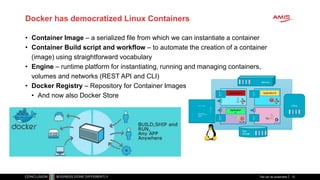
Docker has democratized Linux Containers
• Container Image – a serialized file from which we can instantiate a container
• Container Build script and workflow – to automate the creation of a container
(image) using straightforward vocabulary
• Engine – runtime platform for instantiating, running and managing containers,
volumes and networks (REST API and CLI)
• Docker Registry – Repository for Container Images
• And now also Docker Store
Titel van de presentatie 12
Disk
Storage
Memory
CPUs• Network interface
• IP
add
res
s
• Por
ts
• Users & groups
• Environment Variables
• Packages
• Services
Network
interface
IP address
Ports
Users & groups
Environment
Variables
Packages
Services
Network
interface
IP address
Ports
Users & groups
Environment
Variables
Packages
Services
Network
interface
IP address
Ports
Users & groups
Environment
Variables
Packages
Services
Network
interface
IP address
Ports
Users & groups
Environment
Variables
Packages
Services
Application A Application B
Application
C
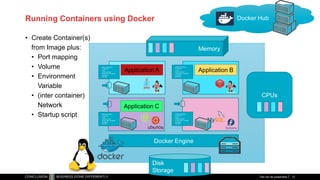
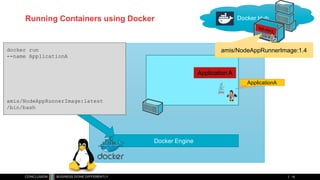
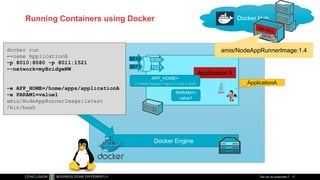
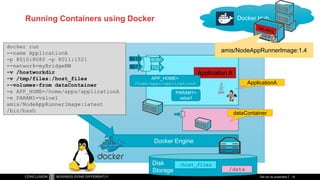
Running Containers using Docker
• Create Container(s)
from Image plus:
• Port mapping
• Volume
• Environment
Variable
• (inter container)
Network
• Startup script
Titel van de presentatie 13
Disk
Storage
Memory
CPUs
Network interface
IP address
Ports
Users & groups
Environment Variables
Packages
Services
Network interface
IP address
Ports
Users & groups
Environment Variables
Packages
Services
Network interface
IP address
Ports
Users & groups
Environment Variables
Packages
Services
Network interface
IP address
Ports
Users & groups
Environment Variables
Packages
Services
Application A Application B
Application C
Docker Hub
Docker Engine
Running Containers using Docker on Windows
• Docker is a Linux mechanism
• In order to run on a Windows server,
we use a Linux VM
• VirtualBox
• Hyper-V
• …
• Docker Toolbox
• It is possible to run the Docker Engine inside a Docker Container
• Docker Container inside Docker Container [inside VM]
Disk
Storage
Memory
CPUs• Network interface
• IP
add
res
s
• Por
ts
• Users & groups
• Environment Variables
• Packages
• Services
Network
interface
IP address
Ports
Users & groups
Environment
Variables
Packages
Services
Network
interface
IP address
Ports
Users & groups
Environment
Variables
Packages
Services
Network
interface
IP address
Ports
Users & groups
Environment
Variables
Packages
Services
Network
interface
IP address
Ports
Users & groups
Environment
Variables
Packages
Services
Application A Application B
Application
C
Run container
image on
Docker host
Running Docker
Containers
Titel van de presentatie15
Running Containers using Docker
16
Application A
Docker Hub
Docker Engine
docker run
--name ApplicationA
amis/NodeAppRunnerImage:latest
/bin/bash
amis/NodeAppRunnerImage:1.4
ApplicationA
Running Containers using Docker
Titel van de presentatie 17
Application A
Docker Hub
Docker Engine
docker run
--name ApplicationA
-p 8010:8080 -p 8011:1521
--network=myBridgeNW
-e APP_HOME=/home/apps/applicationA
-e PARAM1=value1
amis/NodeAppRunnerImage:latest
/bin/bash
amis/NodeAppRunnerImage:1.4
8010
8011
8080
1521
ApplicationA
APP_HOME=
/home/apps/applicationA
PARAM1=
value1
Running Containers using Docker
Titel van de presentatie 18
Disk
Storage
/host_files
/data
Application A
Docker Hub
Docker Engine
docker run
--name ApplicationA
-p 8010:8080 -p 8011:1521
--network=myBridgeNW
-v /hostworkdir
-v /tmp/files:/host_files
--volumes-from dataContainer
-e APP_HOME=/home/apps/applicationA
-e PARAM1=value1
amis/NodeAppRunnerImage:latest
/bin/bash
amis/NodeAppRunnerImage:1.4
8010
8011
8080
1521
dataContainer
ApplicationA
APP_HOME=
/home/apps/applicationA
PARAM1=
value1
Containers are ephemeral (*
Titel van de presentatie 19
(* Candidate for IT word of the year 2017
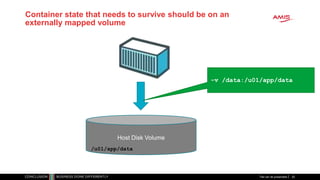
Container state that needs to survive should be on an
externally mapped volume
Titel van de presentatie 20
Host Disk Volume
-v /data:/u01/app/data
/u01/app/data
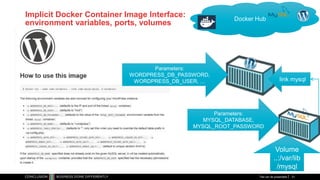
Implicit Docker Container Image Interface:
environment variables, ports, volumes
Titel van de presentatie 21
Docker Hub
link mysql
Parameters:
WORDPRESS_DB_PASSWORD,
WORDPRESS_DB_USER, …
Volume
..:/var/lib
/mysql
Parameters:
MYSQL_DATABASE,
MYSQL_ROOT_PASSWORD
Running and Managing Containers
• Start | Pause | Stop | Delete | Export | Import containers
• Save | Load Images
• List containers | images | networks | …
• Inspect container
• Run multiple instances of an image
• Execute into running container
• Attach to (standard input | output | error stream of)
running container
• Get Container Logs
• Create Network
• Connect container to network
• Experimental feature: Snapshot (CRIU)
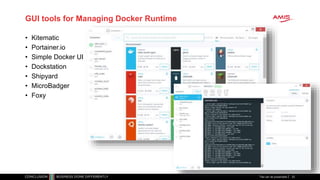
GUI tools for Managing Docker Runtime
• Kitematic
• Portainer.io
• Simple Docker UI
• Dockstation
• Shipyard
• MicroBadger
• Foxy
Titel van de presentatie 23
Create a
runnable Docker
Container image
Building Docker
Container Images
Titel van de presentatie24
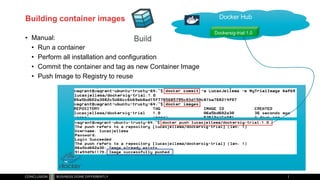
Building container images
• Manual:
• Run a container
• Perform all installation and configuration
• Commit the container and tag as new Container Image
• Push Image to Registry to reuse
Docker Hub
Dockersig-trial:1.0
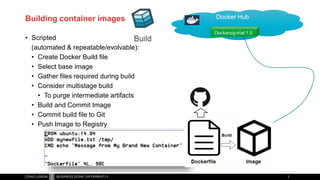
Building container images
• Scripted
(automated & repeatable/evolvable):
• Create Docker Build file
• Select base image
• Gather files required during build
• Consider multistage build
• To purge intermediate artifacts
• Build and Commit Image
• Commit build file to Git
• Push Image to Registry
Docker Hub
Dockersig-trial:1.0
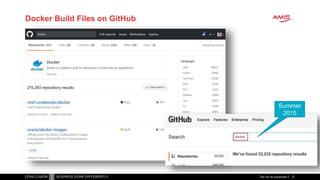
Docker Build Files on GitHub
Titel van de presentatie 27
Summer
2015
Distribute
Docker
Container
images using
Container
Registry and
more
Shipping Docker
Container Images
Titel van de presentatie28
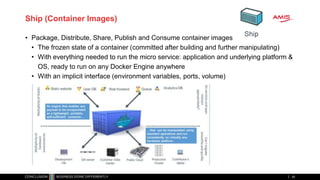
Ship (Container Images)
• Package, Distribute, Share, Publish and Consume container images
• The frozen state of a container (committed after building and further manipulating)
• With everything needed to run the micro service: application and underlying platform &
OS, ready to run on any Docker Engine anywhere
• With an implicit interface (environment variables, ports, volume)
29
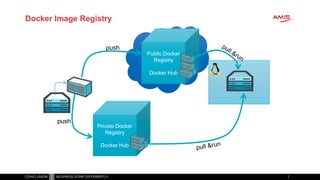
Public Docker
Registry
Docker Hub
Docker Image Registry
30
push
Private Docker
Registry
Docker Hub
push
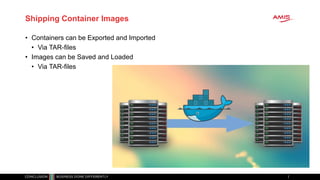
Shipping Container Images
• Containers can be Exported and Imported
• Via TAR-files
• Images can be Saved and Loaded
• Via TAR-files
Leveraging
Containers on
the Oracle
workfloor
Container Use
Cases for Oracle
Professionals
Titel van de presentatie32
Container Use Cases for Oracle professionals
• Play – try out technology
• Quickly, easily, cleanly
• Complex, multi-node configurations
• Leverage huge number of resources available out in the open
• Prepare and Share (running) environments for
• Playing, Training, Testing, Beta-testing,
• Deploy and Run application on generic cloud infrastructure
• Especially ephemeral (stateless) and dynamically scalable
• Streamlined CD across Development, Test and Production
• Prepare for Cloud (consolidate, lift & shift workloads)
• Analysis & What If Scenarios
• Clone an environment, spin up, investigate, tear down & quit
• Automated Testing
• Against rich dataset with minimum set up and tear down
• Microservices – implement, deploy and run
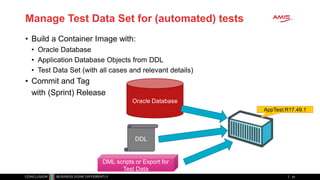
Manage Test Data Set for (automated) tests
• Build a Container Image with:
• Oracle Database
• Application Database Objects from DDL
• Test Data Set (with all cases and relevant details)
• Commit and Tag
with (Sprint) Release
34
Oracle Database
DDL
DML scripts or Export for
Test Data
AppTest:R17.49.1
Run (Automated) Test
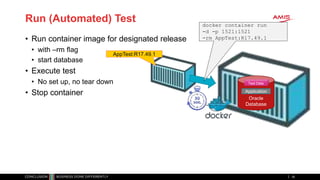
• Run container image for designated release
• with –rm flag
• start database
• Execute test
• No set up, no tear down
• Stop container
35
AppTest:R17.49.1
Oracle
Database
Test Data
Application
docker container run
-d -p 1521:1521
-rm AppTest:R17.49.1
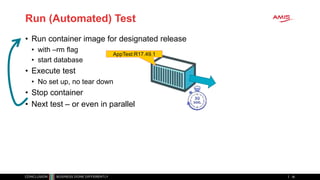
Run (Automated) Test
• Run container image for designated release
• with –rm flag
• start database
• Execute test
• No set up, no tear down
• Stop container
• Next test – or even in parallel
36
AppTest:R17.49.1
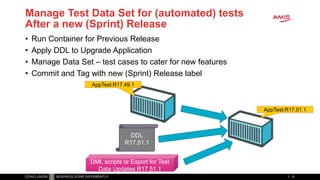
Manage Test Data Set for (automated) tests
After a new (Sprint) Release
• Run Container for Previous Release
• Apply DDL to Upgrade Application
• Manage Data Set – test cases to cater for new features
• Commit and Tag with new (Sprint) Release label
37
DDL
R17.51.1
DML scripts or Export for Test
Data Updates R17.51.1
AppTest:R17.51.1
AppTest:R17.49.1
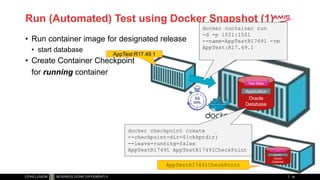
Run (Automated) Test using Docker Snapshot (1)
• Run container image for designated release
• start database
• Create Container Checkpoint
for running container
38
AppTest:R17.49.1
Oracle
Database
Test Data
Application
docker container run
-d -p 1521:1521
--name=AppTestR17491 -rm
AppTest:R17.49.1
docker checkpoint create
--checkpoint-dir=${chkptdir}
--leave-running=false
AppTestR17491 AppTestR17491CheckPoint
Oracle
Database
Test Data
Application
AppTestR17491CheckPoint
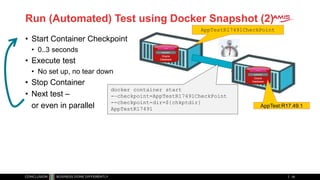
Run (Automated) Test using Docker Snapshot (2)
• Start Container Checkpoint
• 0..3 seconds
• Execute test
• No set up, no tear down
• Stop Container
• Next test –
or even in parallel
39
Oracle
Database
Test Data
Application
AppTestR17491CheckPoint
Oracle
Database
Test Data
Application
AppTest:R17.49.1
docker container start
-–checkpoint=AppTestR17491CheckPoint
--checkpoint-dir=${chkptdir}
AppTestR17491
Oracle
Container Cloud
Run Docker
Containers on
Oracle Cloud
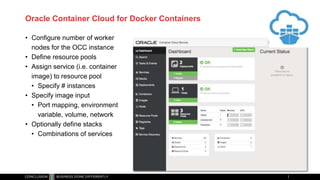
Oracle Container Cloud for Docker Containers
• Configure number of worker
nodes for the OCC instance
• Define resource pools
• Assign service (i.e. container
image) to resource pool
• Specify # instances
• Specify image input
• Port mapping, environment
variable, volume, network
• Optionally define stacks
• Combinations of services
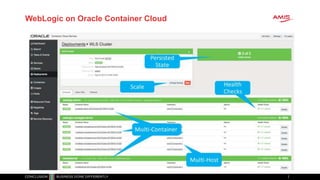
WebLogic on Oracle Container Cloud
Oracle Wercker
Automating CI/CD
Pipeline for
Containers
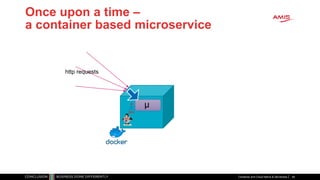
Once upon a time –
a container based microservice
Container and Cloud Native & Serverless 44
µ
http requests
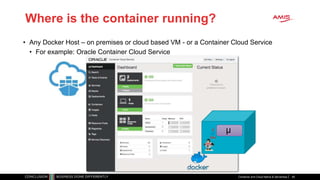
Where is the container running?
• Any Docker Host – on premises or cloud based VM - or a Container Cloud Service
• For example: Oracle Container Cloud Service
Container and Cloud Native & Serverless 45
µ
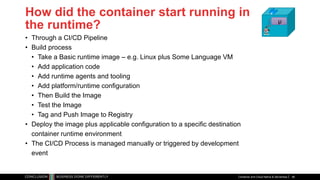
How did the container start running in
the runtime?
• Through a CI/CD Pipeline
• Build process
• Take a Basic runtime image – e.g. Linux plus Some Language VM
• Add application code
• Add runtime agents and tooling
• Add platform/runtime configuration
• Then Build the Image
• Test the Image
• Tag and Push Image to Registry
• Deploy the image plus applicable configuration to a specific destination
container runtime environment
• The CI/CD Process is managed manually or triggered by development
event
Container and Cloud Native & Serverless 46
µ
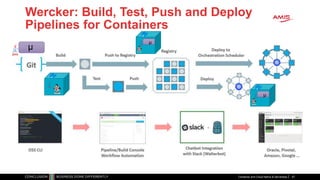
Wercker: Build, Test, Push and Deploy
Pipelines for Containers
Container and Cloud Native & Serverless 47
µ
µ
µ
Kubernetes and
Oracle
Container
Engine Cloud
Microservices and
the application
runtime platform
of tomorrow
Microservices at runtime
• Stateless
• Horizontally scalable
• Mutually Independent
• Deploy, upgrade, patch, relocate
• Can expose Public API (HTTP/REST)
and/or UI
• Communicate with each other through events
• Have their own bounded data context
• Do not rely on other microservices [for the data they need]
• Serverless – do not require allocated server, can be fired up
Generic Infrastructure Platform for running DevOps Products
µ µ µ µ µ
Application
Platform
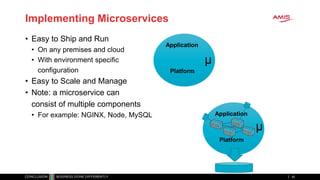
Implementing Microservices
• Easy to Ship and Run
• On any premises and cloud
• With environment specific
configuration
• Easy to Scale and Manage
• Note: a microservice can
consist of multiple components
• For example: NGINX, Node, MySQL
50
Application
Platform
µ
µ
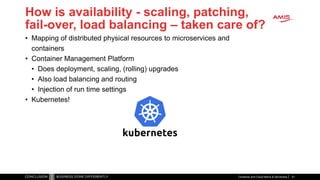
How is availability - scaling, patching,
fail-over, load balancing – taken care of?
• Mapping of distributed physical resources to microservices and
containers
• Container Management Platform
• Does deployment, scaling, (rolling) upgrades
• Also load balancing and routing
• Injection of run time settings
• Kubernetes!
Container and Cloud Native & Serverless 51
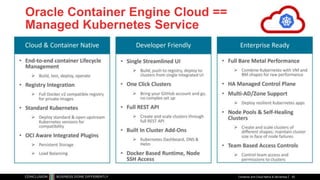
Oracle Container Engine Cloud ==
Managed Kubernetes Service
Container and Cloud Native & Serverless 52
Titel van de presentatie 53
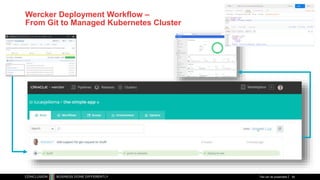
Wercker Deployment Workflow –
From Git to Managed Kubernetes Cluster
Titel van de presentatie 54
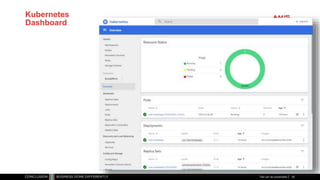
Kubernetes
Dashboard
Titel van de presentatie 55
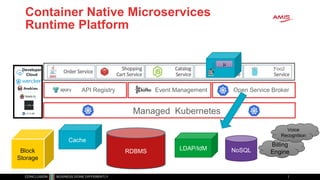
Container Native Microservices
Runtime Platform
Managed Kubernetes
Open Service BrokerEvent ManagementAPI Registry
Foo2
ISTIO
Developer
Cloud
Cache
RDBMS LDAP/IdM NoSQL
Billing
EngineBlock
Storage
Voice
Recognition
µ
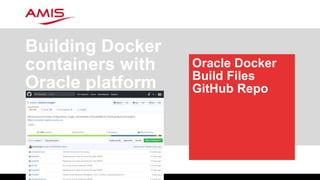
Oracle Docker
Build Files
GitHub Repo
Building Docker
containers with
Oracle platform
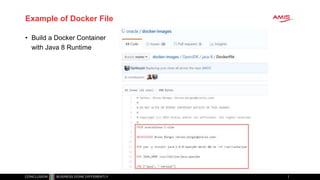
Example of Docker File
• Build a Docker Container
with Java 8 Runtime
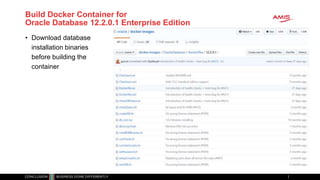
Build Docker Container for
Oracle Database 12.2.0.1 Enterprise Edition
• Download database
installation binaries
before building the
container
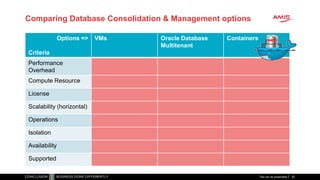
Comparing Database Consolidation & Management options
Options =>
Criteria
VMs Oracle Database
Multitenant
Containers
Performance
Overhead
Compute Resource
License
Scalability (horizontal)
Operations
Isolation
Availability
Supported
Titel van de presentatie 62
Why run Oracle Database on Docker?
• Because we can…
• Automated testing
• Clone environments
• Similar to PDB cloning
• Quick provisioning of new environments
• R&D
• Production workloads?
• Automated Ops/DBA => Autonomous Database (?)
Titel van de presentatie 63
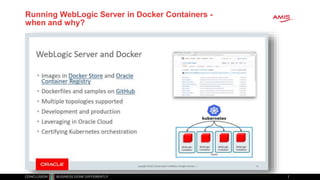
Running WebLogic Server in Docker Containers -
when and why?
Titel van de presentatie 65
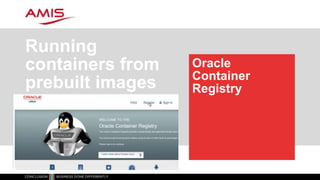
Oracle
Container
Registry
Running
containers from
prebuilt images
Container and Cloud Native & Serverless 67
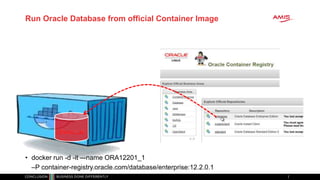
Run Oracle Database from official Container Image
• docker run -d -it –-name ORA12201_1
–P container-registry.oracle.com/database/enterprise:12.2.0.1
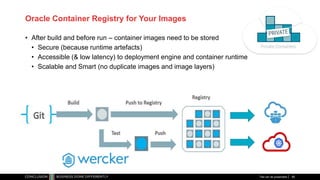
Oracle Container Registry for Your Images
• After build and before run – container images need to be stored
• Secure (because runtime artefacts)
• Accessible (& low latency) to deployment engine and container runtime
• Scalable and Smart (no duplicate images and image layers)
Titel van de presentatie 69
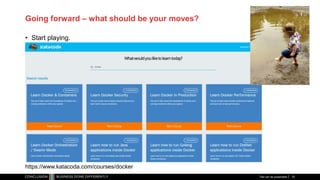
Going forward – what should be your moves?
• Start playing.
Titel van de presentatie 70
https://www.katacoda.com/courses/docker
Going forward – what should be your moves?
• Learn about Docker
• Brush up on your Linux skills
• Install Docker and run some images
• Experiment with Port, Link, Volume, Environment Variables
• Create your own build file, build a container and commit as image
• Push your own image to a Docker Registry
• Using a trial on Oracle Container Cloud – run a container
from your image on the cloud
• Run containers based on the official Oracle Docker build files on GitHub
• Run containers based on the official Oracle Docker images on Oracle Container Registry
• Learn about Kubernetes (KataKoda is an excellent environment)
• Experiment with Kubernetes locally (on minikube)
• And eventually on Oracle Container Engine Cloud
Titel van de presentatie 71
Summary
Titel van de presentatie72
• Docker is a great technology to
• Run
• Share, Ship & Deliver
• Build
encapsulated environments with run time platform
and application
• Containers are likely the core run time unit to manage:
deploy, configure, scale, monitor, interconnect, secure
• Kubernetes is the de facto distributed container
management platform for cloud and on premises
• Oracle does Docker and Kubernetes in anger
Thank you!
Titel van de presentatie73
• Blog: technology.amis.nl
• Email: lucas.jellema@amis.nl
• : @lucasjellema
• : lucas-jellema
• : www.amis.nl, info@amis.nl

Introduction into Docker Containers, the Oracle Platform and the Oracle (Native) Container Cloud Services

  • 1.
    and the Oracle Platform- Database, WebLogic & the Cloud Intro to Docker Containers AMIS Oracle OpenWorld 2017 Review – October 20171
  • 2.
    Setup for OracleOpenWorld Demo What I needed • Local installation of a Kafka Cluster • At least one Broker node and the Zookeeper Kafka Broker Zookeeper Demo Application
  • 3.
    Setup for OracleOpenWorld Demo What I received from Guido • Simple text file – 140 lines Titel van de presentatie 3 Name of Docker image to run Hostname on internal network between Docker containers Environment variable to pass to container Dependency on other container (to start first) Container port to expose externally
  • 4.
    Setup for OracleOpenWorld Demo What I created in a few minutes Titel van de presentatie 4 Kafka Broker Zookeeper Kafka Rest ProxyKafka Schema Registry Kafka Connect Kafka Connect UI Kafka Schema Registry UI Kafka Manager 9092 2181 9000 8084 80018083 8081 8002
  • 5.
    Some Quick Conclusions •Docker provides a great way to • Build environments (application & platform) (from simple, text based build files & public images) • Share & Ship these environments (either through build files or through ready-to-run images) • Run environments making efficient use of physical resources (that can be complex and have complex interdependencies) • And Guido is a very nice guy • And also: • [Docker] Containers are pivotal in cloud native environments, microservices architecture, DevOps and CD • Any IT professional should know her or his way around containers Titel van de presentatie 5
  • 6.
    Overview of today’ssession • Docker Container – what and why? • Build, ship, run & operate • Use in development, training, testing, delivery and production & operations • Running custom containers on Oracle Container Cloud • Microservices and the application platform of tomorrow • Introducing Kubernetes and the upcoming Oracle Container Engine Cloud • Building Containers with Oracle platform from Oracle GitHub repo • Oracle Container Registry with prebaked images for Oracle platform • Going forward…
  • 7.
    Linux essentials • Applicationsshare resources Titel van de presentatie 7 Disk Storage Memory CPUs Application A Application B Application C • Network interface • IP address • Ports • Users & groups • Environment Variables • Packages • Services
  • 8.
    Linux essentials: ControlGroups and Namespaces • Compartmentalize Resources into isolated units Titel van de presentatie 8 Disk Storage Memory CPUs • Network interface • IP address • Ports • Users & groups • Environment Variables • Packages • Services Network interface IP address Ports Users & groups Environment Variables Packages Services Network interface IP address Ports Users & groups Environment Variables Packages Services Network interface IP address Ports Users & groups Environment Variables Packages Services Network interface IP address Ports Users & groups Environment Variables Packages Services
  • 9.
    Linux essentials: ControlGroups and Namespaces • Expose units through mapped network ports Titel van de presentatie 9 Disk Storage Memory CPUs • Network interface • IP address • Ports • Users & groups • Environment Variables • Packages • Services Network interface IP address Ports Users & groups Environment Variables Packages Services Network interface IP address Ports Users & groups Environment Variables Packages Services Network interface IP address Ports Users & groups Environment Variables Packages Services Network interface IP address Ports Users & groups Environment Variables Packages Services
  • 10.
    Linux essentials: Eachunit runs its own processes • Units run their own processes: • OS (Linux) • Platform • Application Titel van de presentatie 10 Disk Storage Memory CPUs • Network interface • IP address • Ports • Users & groups • Environment Variables • Packages • Services Network interface IP address Ports Users & groups Environment Variables Packages Services Network interface IP address Ports Users & groups Environment Variables Packages Services Network interface IP address Ports Users & groups Environment Variables Packages Services Network interface IP address Ports Users & groups Environment Variables Packages Services Application A Application B Application C
  • 11.
    This stuff iscomplex • Core Linux features were hard to use Titel van de presentatie 11 Disk Storage Memory CPUs• Network interface • IP address • Ports • Users & groups • Environment Variables • Packages • Services Network interface IP address Ports Users & groups Environment Variables Packages Services Network interface IP address Ports Users & groups Environment Variables Packages Services Network interface IP address Ports Users & groups Environment Variables Packages Services Network interface IP address Ports Users & groups Environment Variables Packages Services Application A Application B Application C
  • 12.
    Docker has democratizedLinux Containers • Container Image – a serialized file from which we can instantiate a container • Container Build script and workflow – to automate the creation of a container (image) using straightforward vocabulary • Engine – runtime platform for instantiating, running and managing containers, volumes and networks (REST API and CLI) • Docker Registry – Repository for Container Images • And now also Docker Store Titel van de presentatie 12 Disk Storage Memory CPUs• Network interface • IP add res s • Por ts • Users & groups • Environment Variables • Packages • Services Network interface IP address Ports Users & groups Environment Variables Packages Services Network interface IP address Ports Users & groups Environment Variables Packages Services Network interface IP address Ports Users & groups Environment Variables Packages Services Network interface IP address Ports Users & groups Environment Variables Packages Services Application A Application B Application C
  • 13.
    Running Containers usingDocker • Create Container(s) from Image plus: • Port mapping • Volume • Environment Variable • (inter container) Network • Startup script Titel van de presentatie 13 Disk Storage Memory CPUs Network interface IP address Ports Users & groups Environment Variables Packages Services Network interface IP address Ports Users & groups Environment Variables Packages Services Network interface IP address Ports Users & groups Environment Variables Packages Services Network interface IP address Ports Users & groups Environment Variables Packages Services Application A Application B Application C Docker Hub Docker Engine
  • 14.
    Running Containers usingDocker on Windows • Docker is a Linux mechanism • In order to run on a Windows server, we use a Linux VM • VirtualBox • Hyper-V • … • Docker Toolbox • It is possible to run the Docker Engine inside a Docker Container • Docker Container inside Docker Container [inside VM] Disk Storage Memory CPUs• Network interface • IP add res s • Por ts • Users & groups • Environment Variables • Packages • Services Network interface IP address Ports Users & groups Environment Variables Packages Services Network interface IP address Ports Users & groups Environment Variables Packages Services Network interface IP address Ports Users & groups Environment Variables Packages Services Network interface IP address Ports Users & groups Environment Variables Packages Services Application A Application B Application C
  • 15.
    Run container image on Dockerhost Running Docker Containers Titel van de presentatie15
  • 16.
    Running Containers usingDocker 16 Application A Docker Hub Docker Engine docker run --name ApplicationA amis/NodeAppRunnerImage:latest /bin/bash amis/NodeAppRunnerImage:1.4 ApplicationA
  • 17.
    Running Containers usingDocker Titel van de presentatie 17 Application A Docker Hub Docker Engine docker run --name ApplicationA -p 8010:8080 -p 8011:1521 --network=myBridgeNW -e APP_HOME=/home/apps/applicationA -e PARAM1=value1 amis/NodeAppRunnerImage:latest /bin/bash amis/NodeAppRunnerImage:1.4 8010 8011 8080 1521 ApplicationA APP_HOME= /home/apps/applicationA PARAM1= value1
  • 18.
    Running Containers usingDocker Titel van de presentatie 18 Disk Storage /host_files /data Application A Docker Hub Docker Engine docker run --name ApplicationA -p 8010:8080 -p 8011:1521 --network=myBridgeNW -v /hostworkdir -v /tmp/files:/host_files --volumes-from dataContainer -e APP_HOME=/home/apps/applicationA -e PARAM1=value1 amis/NodeAppRunnerImage:latest /bin/bash amis/NodeAppRunnerImage:1.4 8010 8011 8080 1521 dataContainer ApplicationA APP_HOME= /home/apps/applicationA PARAM1= value1
  • 19.
    Containers are ephemeral(* Titel van de presentatie 19 (* Candidate for IT word of the year 2017
  • 20.
    Container state thatneeds to survive should be on an externally mapped volume Titel van de presentatie 20 Host Disk Volume -v /data:/u01/app/data /u01/app/data
  • 21.
    Implicit Docker ContainerImage Interface: environment variables, ports, volumes Titel van de presentatie 21 Docker Hub link mysql Parameters: WORDPRESS_DB_PASSWORD, WORDPRESS_DB_USER, … Volume ..:/var/lib /mysql Parameters: MYSQL_DATABASE, MYSQL_ROOT_PASSWORD
  • 22.
    Running and ManagingContainers • Start | Pause | Stop | Delete | Export | Import containers • Save | Load Images • List containers | images | networks | … • Inspect container • Run multiple instances of an image • Execute into running container • Attach to (standard input | output | error stream of) running container • Get Container Logs • Create Network • Connect container to network • Experimental feature: Snapshot (CRIU)
  • 23.
    GUI tools forManaging Docker Runtime • Kitematic • Portainer.io • Simple Docker UI • Dockstation • Shipyard • MicroBadger • Foxy Titel van de presentatie 23
  • 24.
    Create a runnable Docker Containerimage Building Docker Container Images Titel van de presentatie24
  • 25.
    Building container images •Manual: • Run a container • Perform all installation and configuration • Commit the container and tag as new Container Image • Push Image to Registry to reuse Docker Hub Dockersig-trial:1.0
  • 26.
    Building container images •Scripted (automated & repeatable/evolvable): • Create Docker Build file • Select base image • Gather files required during build • Consider multistage build • To purge intermediate artifacts • Build and Commit Image • Commit build file to Git • Push Image to Registry Docker Hub Dockersig-trial:1.0
  • 27.
    Docker Build Fileson GitHub Titel van de presentatie 27 Summer 2015
  • 28.
  • 29.
    Ship (Container Images) •Package, Distribute, Share, Publish and Consume container images • The frozen state of a container (committed after building and further manipulating) • With everything needed to run the micro service: application and underlying platform & OS, ready to run on any Docker Engine anywhere • With an implicit interface (environment variables, ports, volume) 29
  • 30.
    Public Docker Registry Docker Hub DockerImage Registry 30 push Private Docker Registry Docker Hub push
  • 31.
    Shipping Container Images •Containers can be Exported and Imported • Via TAR-files • Images can be Saved and Loaded • Via TAR-files
  • 32.
    Leveraging Containers on the Oracle workfloor ContainerUse Cases for Oracle Professionals Titel van de presentatie32
  • 33.
    Container Use Casesfor Oracle professionals • Play – try out technology • Quickly, easily, cleanly • Complex, multi-node configurations • Leverage huge number of resources available out in the open • Prepare and Share (running) environments for • Playing, Training, Testing, Beta-testing, • Deploy and Run application on generic cloud infrastructure • Especially ephemeral (stateless) and dynamically scalable • Streamlined CD across Development, Test and Production • Prepare for Cloud (consolidate, lift & shift workloads) • Analysis & What If Scenarios • Clone an environment, spin up, investigate, tear down & quit • Automated Testing • Against rich dataset with minimum set up and tear down • Microservices – implement, deploy and run
  • 34.
    Manage Test DataSet for (automated) tests • Build a Container Image with: • Oracle Database • Application Database Objects from DDL • Test Data Set (with all cases and relevant details) • Commit and Tag with (Sprint) Release 34 Oracle Database DDL DML scripts or Export for Test Data AppTest:R17.49.1
  • 35.
    Run (Automated) Test •Run container image for designated release • with –rm flag • start database • Execute test • No set up, no tear down • Stop container 35 AppTest:R17.49.1 Oracle Database Test Data Application docker container run -d -p 1521:1521 -rm AppTest:R17.49.1
  • 36.
    Run (Automated) Test •Run container image for designated release • with –rm flag • start database • Execute test • No set up, no tear down • Stop container • Next test – or even in parallel 36 AppTest:R17.49.1
  • 37.
    Manage Test DataSet for (automated) tests After a new (Sprint) Release • Run Container for Previous Release • Apply DDL to Upgrade Application • Manage Data Set – test cases to cater for new features • Commit and Tag with new (Sprint) Release label 37 DDL R17.51.1 DML scripts or Export for Test Data Updates R17.51.1 AppTest:R17.51.1 AppTest:R17.49.1
  • 38.
    Run (Automated) Testusing Docker Snapshot (1) • Run container image for designated release • start database • Create Container Checkpoint for running container 38 AppTest:R17.49.1 Oracle Database Test Data Application docker container run -d -p 1521:1521 --name=AppTestR17491 -rm AppTest:R17.49.1 docker checkpoint create --checkpoint-dir=${chkptdir} --leave-running=false AppTestR17491 AppTestR17491CheckPoint Oracle Database Test Data Application AppTestR17491CheckPoint
  • 39.
    Run (Automated) Testusing Docker Snapshot (2) • Start Container Checkpoint • 0..3 seconds • Execute test • No set up, no tear down • Stop Container • Next test – or even in parallel 39 Oracle Database Test Data Application AppTestR17491CheckPoint Oracle Database Test Data Application AppTest:R17.49.1 docker container start -–checkpoint=AppTestR17491CheckPoint --checkpoint-dir=${chkptdir} AppTestR17491
  • 40.
  • 41.
    Oracle Container Cloudfor Docker Containers • Configure number of worker nodes for the OCC instance • Define resource pools • Assign service (i.e. container image) to resource pool • Specify # instances • Specify image input • Port mapping, environment variable, volume, network • Optionally define stacks • Combinations of services
  • 42.
    WebLogic on OracleContainer Cloud
  • 43.
  • 44.
    Once upon atime – a container based microservice Container and Cloud Native & Serverless 44 µ http requests
  • 45.
    Where is thecontainer running? • Any Docker Host – on premises or cloud based VM - or a Container Cloud Service • For example: Oracle Container Cloud Service Container and Cloud Native & Serverless 45 µ
  • 46.
    How did thecontainer start running in the runtime? • Through a CI/CD Pipeline • Build process • Take a Basic runtime image – e.g. Linux plus Some Language VM • Add application code • Add runtime agents and tooling • Add platform/runtime configuration • Then Build the Image • Test the Image • Tag and Push Image to Registry • Deploy the image plus applicable configuration to a specific destination container runtime environment • The CI/CD Process is managed manually or triggered by development event Container and Cloud Native & Serverless 46 µ
  • 47.
    Wercker: Build, Test,Push and Deploy Pipelines for Containers Container and Cloud Native & Serverless 47 µ µ µ
  • 48.
    Kubernetes and Oracle Container Engine Cloud Microservicesand the application runtime platform of tomorrow
  • 49.
    Microservices at runtime •Stateless • Horizontally scalable • Mutually Independent • Deploy, upgrade, patch, relocate • Can expose Public API (HTTP/REST) and/or UI • Communicate with each other through events • Have their own bounded data context • Do not rely on other microservices [for the data they need] • Serverless – do not require allocated server, can be fired up Generic Infrastructure Platform for running DevOps Products µ µ µ µ µ
  • 50.
    Application Platform Implementing Microservices • Easyto Ship and Run • On any premises and cloud • With environment specific configuration • Easy to Scale and Manage • Note: a microservice can consist of multiple components • For example: NGINX, Node, MySQL 50 Application Platform µ µ
  • 51.
    How is availability- scaling, patching, fail-over, load balancing – taken care of? • Mapping of distributed physical resources to microservices and containers • Container Management Platform • Does deployment, scaling, (rolling) upgrades • Also load balancing and routing • Injection of run time settings • Kubernetes! Container and Cloud Native & Serverless 51
  • 52.
    Oracle Container EngineCloud == Managed Kubernetes Service Container and Cloud Native & Serverless 52
  • 53.
    Titel van depresentatie 53
  • 54.
    Wercker Deployment Workflow– From Git to Managed Kubernetes Cluster Titel van de presentatie 54
  • 55.
  • 56.
    Container Native Microservices RuntimePlatform Managed Kubernetes Open Service BrokerEvent ManagementAPI Registry Foo2 ISTIO Developer Cloud Cache RDBMS LDAP/IdM NoSQL Billing EngineBlock Storage Voice Recognition µ
  • 57.
    Oracle Docker Build Files GitHubRepo Building Docker containers with Oracle platform
  • 58.
    Example of DockerFile • Build a Docker Container with Java 8 Runtime
  • 59.
    Build Docker Containerfor Oracle Database 12.2.0.1 Enterprise Edition • Download database installation binaries before building the container
  • 60.
    Comparing Database Consolidation& Management options Options => Criteria VMs Oracle Database Multitenant Containers Performance Overhead Compute Resource License Scalability (horizontal) Operations Isolation Availability Supported Titel van de presentatie 62
  • 61.
    Why run OracleDatabase on Docker? • Because we can… • Automated testing • Clone environments • Similar to PDB cloning • Quick provisioning of new environments • R&D • Production workloads? • Automated Ops/DBA => Autonomous Database (?) Titel van de presentatie 63
  • 62.
    Running WebLogic Serverin Docker Containers - when and why?
  • 63.
    Titel van depresentatie 65
  • 64.
  • 65.
    Container and CloudNative & Serverless 67
  • 66.
    Run Oracle Databasefrom official Container Image • docker run -d -it –-name ORA12201_1 –P container-registry.oracle.com/database/enterprise:12.2.0.1
  • 67.
    Oracle Container Registryfor Your Images • After build and before run – container images need to be stored • Secure (because runtime artefacts) • Accessible (& low latency) to deployment engine and container runtime • Scalable and Smart (no duplicate images and image layers) Titel van de presentatie 69
  • 68.
    Going forward –what should be your moves? • Start playing. Titel van de presentatie 70 https://www.katacoda.com/courses/docker
  • 69.
    Going forward –what should be your moves? • Learn about Docker • Brush up on your Linux skills • Install Docker and run some images • Experiment with Port, Link, Volume, Environment Variables • Create your own build file, build a container and commit as image • Push your own image to a Docker Registry • Using a trial on Oracle Container Cloud – run a container from your image on the cloud • Run containers based on the official Oracle Docker build files on GitHub • Run containers based on the official Oracle Docker images on Oracle Container Registry • Learn about Kubernetes (KataKoda is an excellent environment) • Experiment with Kubernetes locally (on minikube) • And eventually on Oracle Container Engine Cloud Titel van de presentatie 71
  • 70.
    Summary Titel van depresentatie72 • Docker is a great technology to • Run • Share, Ship & Deliver • Build encapsulated environments with run time platform and application • Containers are likely the core run time unit to manage: deploy, configure, scale, monitor, interconnect, secure • Kubernetes is the de facto distributed container management platform for cloud and on premises • Oracle does Docker and Kubernetes in anger
  • 71.
    Thank you! Titel vande presentatie73 • Blog: technology.amis.nl • Email: lucas.jellema@amis.nl • : @lucasjellema • : lucas-jellema • : www.amis.nl, info@amis.nl

Editor's Notes

  • #2 Session structure Introduce Containers - objectives, benefits, implementation Demo of Container build, package, ship and run Discuss Container Management systems - run time Container platforms, such as Oracle Container Cloud Demo of deploying and running a Container first locally then on the Oracle Container Cloud Discussion of CD, DevOps and microservices - and how the Orace platform components fit in (including a discussion of multitenant architecture in DB and WLS) Introduction of Oracle Docker Images Demonstration of building containers based on Oracle Docker Images Run multiple containers based on various Oracle Docker Images and have them interact with each other
  • #24 https://github.com/davidholiday/foxy https://blog.codeship.com/docker-guis/
  • #39 https://docs.docker.com/engine/reference/commandline/checkpoint_create/
  • #40 https://docs.docker.com/engine/reference/commandline/checkpoint_create/ https://yipee.io/2017/06/saving-and-restoring-container-state-with-criu/
  • #41 https://cloud.oracle.com/container-classic
  • #49 https://cloud.oracle.com/container-classic
  • #60 https://github.com/oracle/docker-images
  • #63 Support for running Oracle DB on Docker https://support.oracle.com/epmos/faces/DocumentDisplay?_afrLoop=358003471259260&id=2216342.1&_afrWindowMode=0&_adf.ctrl-state=16vwg63yl6_105 Oracle will support customers running Oracle Database (single instance) in Docker containers running on Oracle Linux 7 with UEK4 or Red Hat Enterprise Linux 7 RAC is NOT supported Oracle database on on a Docker container is now officially certified, you can refer to the MOS Doc ID 2216342.1 https://www.slideshare.net/Seth_Miller/oracle-rac-and-docker-the-why-and-how
  • #65 WLS Roadmap – CON6474 Oracle OpenWorld 2017
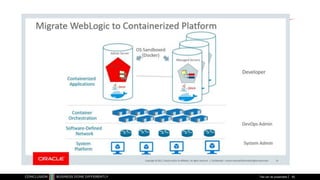
  • #66 Migrate WebLogic to Containers – OOW2017
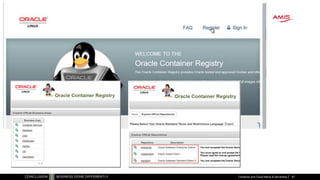
  • #67 https://container-registry.oracle.com
  • #71 https://www.katacoda.com/courses/docker