•The objective of this lesson is to familiarize students
with the basic functions and parts of a computer. By
the end of this lesson, students should be able to
identify and explain the essential components and
understand their respective functions.
•Define the term computer and discuss the four basic
computer operations: input, process, output, and
storage
COMPUTER
MAIN FIVE GENERATIONS OF THE COMPUTER
SYSTEM:
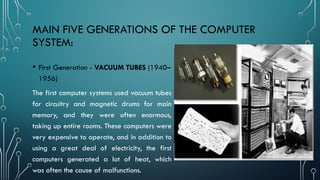
• First Generation - VACUUM TUBES (1940–
1956)
The first computer systems used vacuum tubes
for circuitry and magnetic drums for main
memory, and they were often enormous,
taking up entire rooms. These computers were
very expensive to operate, and in addition to
using a great deal of electricity, the first
computers generated a lot of heat, which
was often the cause of malfunctions.
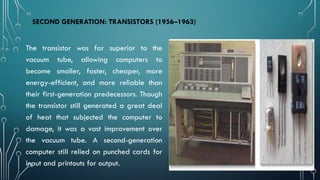
SECOND GENERATION: TRANSISTORS (1956–1963)
The transistor was far superior to the
vacuum tube, allowing computers to
become smaller, faster, cheaper, more
energy-efficient, and more reliable than
their first-generation predecessors. Though
the transistor still generated a great deal
of heat that subjected the computer to
damage, it was a vast improvement over
the vacuum tube. A second-generation
computer still relied on punched cards for
input and printouts for output.
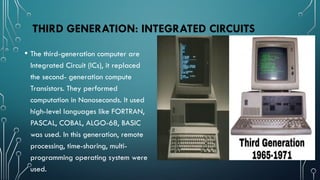
THIRD GENERATION: INTEGRATED CIRCUITS
• The third-generation computer are
Integrated Circuit (ICs), it replaced
the second- generation compute
Transistors. They performed
computation in Nanoseconds. It used
high-level languages like FORTRAN,
PASCAL, COBAL, ALGO-68, BASIC
was used. In this generation, remote
processing, time-sharing, multi-
programming operating system were
used.
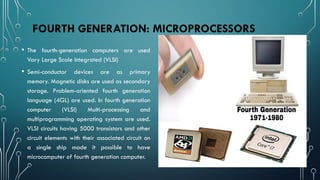
FOURTH GENERATION: MICROPROCESSORS
• The fourth-generation computers are used
Vary Large Scale Integrated (VLSI)
• Semi-conductor devices are as primary
memory. Magnetic disks are used as secondary
storage. Problem-oriented fourth generation
language (4GL) are used. In fourth generation
computer (VLSI) Multi-processing and
multiprogramming operating system are used.
VLSI circuits having 5000 transistors and other
circuit elements with their associated circuit on
a single ship made it possible to have
microcomputer of fourth generation computer.
This Photo by
Unknown Author is
licensed under
CC BY
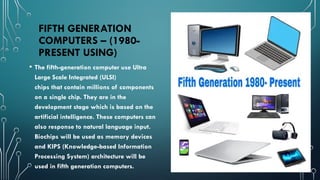
FIFTH GENERATION
COMPUTERS – (1980-
PRESENT USING)
• The fifth-generation computer use Ultra
Large Scale Integrated (ULSI)
chips that contain millions of components
on a single chip. They are in the
development stage which is based on the
artificial intelligence. These computers can
also response to natural language input.
Biochips will be used as memory devices
and KIPS (Knowledge-based Information
Processing System) architecture will be
used in fifth generation computers.
The Five Generations of Computers can be
described as the overall development of
computer technology respective to their size,
power, memory, cost, and application. Compared
to the first generations of the computer, modern-
day computers are faster, smarter, stronger, and
cheaper and can store a huge amount of data.
Due to vast development and huge improvement
of the modern computer, the work of mankind
has been made much more accessible than ever
before with the development of high-speed and
advanced processors (CPU).
MAIN FUNCTIONS OF COMPUTER
• Input - In order for the computer to function, data and instructions have to be input
into it in a suitable form. This is done via input devices. Examples of input devices
are the keyboard, the mouse, and microphone. It involves receiving information from
the environment, or from storage devices, through an input device.
MAIN FUNCTIONS OF COMPUTER
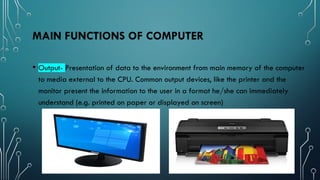
• Output- Presentation of data to the environment from main memory of the computer
to media external to the CPU. Common output devices, like the printer and the
monitor present the information to the user in a format he/she can immediately
understand (e.g. printed on paper or displayed on screen)
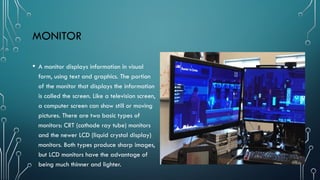
MONITOR
• A monitor displays information in visual
form, using text and graphics. The portion
of the monitor that displays the information
is called the screen. Like a television screen,
a computer screen can show still or moving
pictures. There are two basic types of
monitors: CRT (cathode ray tube) monitors
and the newer LCD (liquid crystal display)
monitors. Both types produce sharp images,
but LCD monitors have the advantage of
being much thinner and lighter.
BASIC PARTS OF COMPUTER
• A. SYSTEM UNIT
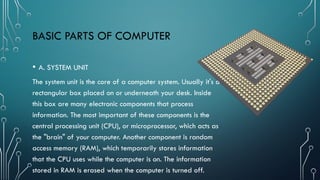
The system unit is the core of a computer system. Usually it's a
rectangular box placed on or underneath your desk. Inside
this box are many electronic components that process
information. The most important of these components is the
central processing unit (CPU), or microprocessor, which acts as
the "brain" of your computer. Another component is random
access memory (RAM), which temporarily stores information
that the CPU uses while the computer is on. The information
stored in RAM is erased when the computer is turned off.
STORAGE
• our computer has one or
more disk drives—
devices that store
information on a metal
or plastic disk. The disk
preserves the
information even when
your computer is turned
off.
RAM AND ROM
• RAM, which stands for random access
memory.
• ROM which stands for read-only memory,
are both present in your computer.
• RAM is volatile memory that temporarily
stores the files you are working on.
• ROM is non-volatile memory that
permanently stores instructions for your
computer.
Introduction in Computer Hard ware and Software

Introduction in Computer Hard ware and Software

  • 1.
    •The objective ofthis lesson is to familiarize students with the basic functions and parts of a computer. By the end of this lesson, students should be able to identify and explain the essential components and understand their respective functions. •Define the term computer and discuss the four basic computer operations: input, process, output, and storage
  • 2.
  • 3.
    MAIN FIVE GENERATIONSOF THE COMPUTER SYSTEM: • First Generation - VACUUM TUBES (1940– 1956) The first computer systems used vacuum tubes for circuitry and magnetic drums for main memory, and they were often enormous, taking up entire rooms. These computers were very expensive to operate, and in addition to using a great deal of electricity, the first computers generated a lot of heat, which was often the cause of malfunctions.
  • 4.
    SECOND GENERATION: TRANSISTORS(1956–1963) The transistor was far superior to the vacuum tube, allowing computers to become smaller, faster, cheaper, more energy-efficient, and more reliable than their first-generation predecessors. Though the transistor still generated a great deal of heat that subjected the computer to damage, it was a vast improvement over the vacuum tube. A second-generation computer still relied on punched cards for input and printouts for output.
  • 5.
    THIRD GENERATION: INTEGRATEDCIRCUITS • The third-generation computer are Integrated Circuit (ICs), it replaced the second- generation compute Transistors. They performed computation in Nanoseconds. It used high-level languages like FORTRAN, PASCAL, COBAL, ALGO-68, BASIC was used. In this generation, remote processing, time-sharing, multi- programming operating system were used.
  • 6.
    FOURTH GENERATION: MICROPROCESSORS •The fourth-generation computers are used Vary Large Scale Integrated (VLSI) • Semi-conductor devices are as primary memory. Magnetic disks are used as secondary storage. Problem-oriented fourth generation language (4GL) are used. In fourth generation computer (VLSI) Multi-processing and multiprogramming operating system are used. VLSI circuits having 5000 transistors and other circuit elements with their associated circuit on a single ship made it possible to have microcomputer of fourth generation computer. This Photo by Unknown Author is licensed under CC BY
  • 7.
    FIFTH GENERATION COMPUTERS –(1980- PRESENT USING) • The fifth-generation computer use Ultra Large Scale Integrated (ULSI) chips that contain millions of components on a single chip. They are in the development stage which is based on the artificial intelligence. These computers can also response to natural language input. Biochips will be used as memory devices and KIPS (Knowledge-based Information Processing System) architecture will be used in fifth generation computers.
  • 8.
    The Five Generationsof Computers can be described as the overall development of computer technology respective to their size, power, memory, cost, and application. Compared to the first generations of the computer, modern- day computers are faster, smarter, stronger, and cheaper and can store a huge amount of data. Due to vast development and huge improvement of the modern computer, the work of mankind has been made much more accessible than ever before with the development of high-speed and advanced processors (CPU).
  • 11.
    MAIN FUNCTIONS OFCOMPUTER • Input - In order for the computer to function, data and instructions have to be input into it in a suitable form. This is done via input devices. Examples of input devices are the keyboard, the mouse, and microphone. It involves receiving information from the environment, or from storage devices, through an input device.
  • 12.
    MAIN FUNCTIONS OFCOMPUTER • Output- Presentation of data to the environment from main memory of the computer to media external to the CPU. Common output devices, like the printer and the monitor present the information to the user in a format he/she can immediately understand (e.g. printed on paper or displayed on screen)
  • 13.
    MONITOR • A monitordisplays information in visual form, using text and graphics. The portion of the monitor that displays the information is called the screen. Like a television screen, a computer screen can show still or moving pictures. There are two basic types of monitors: CRT (cathode ray tube) monitors and the newer LCD (liquid crystal display) monitors. Both types produce sharp images, but LCD monitors have the advantage of being much thinner and lighter.
  • 14.
    BASIC PARTS OFCOMPUTER • A. SYSTEM UNIT The system unit is the core of a computer system. Usually it's a rectangular box placed on or underneath your desk. Inside this box are many electronic components that process information. The most important of these components is the central processing unit (CPU), or microprocessor, which acts as the "brain" of your computer. Another component is random access memory (RAM), which temporarily stores information that the CPU uses while the computer is on. The information stored in RAM is erased when the computer is turned off.
  • 15.
    STORAGE • our computerhas one or more disk drives— devices that store information on a metal or plastic disk. The disk preserves the information even when your computer is turned off.
  • 16.
    RAM AND ROM •RAM, which stands for random access memory. • ROM which stands for read-only memory, are both present in your computer. • RAM is volatile memory that temporarily stores the files you are working on. • ROM is non-volatile memory that permanently stores instructions for your computer.