Introduction to
WSO2 Enterprise Integrator (6.1)
Afkham Azeez
Senior Director,
Platform Architecture
WSO2 Inc.
Vijitha Ekanayake
Software Engineer
WSO2 Inc.
3
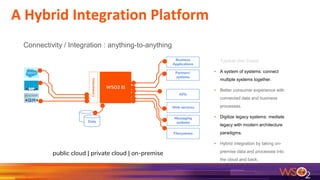
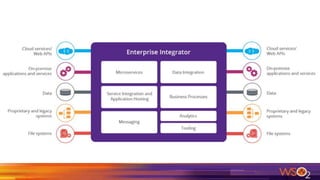
Connectivity / Integration : anything-to-anything
WSO2 EI
Connectors
Web services
APIs
Filesystems
Messaging
systems
Business
Applications
Partners’
systems
Data
public cloud | private cloud | on-premise
Typical Use Cases
▪ A system of systems: connect
multiple systems together.
▪ Better consumer experience with
connected data and business
processes.
▪ Digitize legacy systems: mediate
legacy with modern architecture
paradigms.
▪ Hybrid integration by taking on-
premise data and processes into
the cloud and back.
A Hybrid Integration Platform
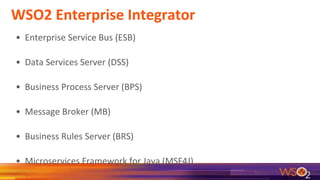
WSO2 Enterprise Integrator
• Enterprise Service Bus (ESB)
• Data Services Server (DSS)
• Business Process Server (BPS)
• Message Broker (MB)
• Business Rules Server (BRS)
• Microservices Framework for Java (MSF4J)
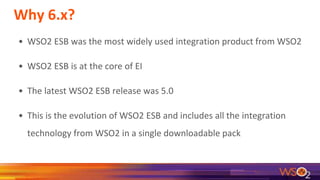
Why 6.x?
• WSO2 ESB was the most widely used integration product from WSO2
• WSO2 ESB is at the core of EI
• The latest WSO2 ESB release was 5.0
• This is the evolution of WSO2 ESB and includes all the integration
technology from WSO2 in a single downloadable pack
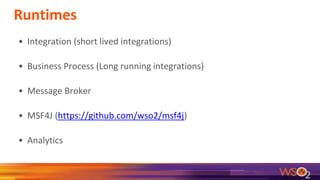
Runtimes
• Integration (short lived integrations)
• Business Process (Long running integrations)
• Message Broker
• MSF4J (https://github.com/wso2/msf4j)
• Analytics
Service Integration
& Messaging
is based on Open Standards & Integration Patterns
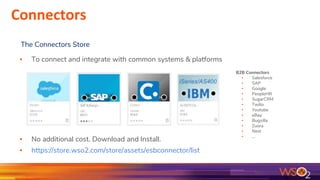
▪ To connect and integrate with common systems & platforms
▪ No additional cost. Download and Install.
▪ https://store.wso2.com/store/assets/esbconnector/list
The Connectors Store
B2B Connectors
▪ Salesforce
▪ SAP
▪ Google
▪ PeopleHR
▪ SugarCRM
▪ Twilio
▪ Youtube
▪ eBay
▪ Bugzilla
▪ Zuora
▪ Nest
▪ ...
Connectors
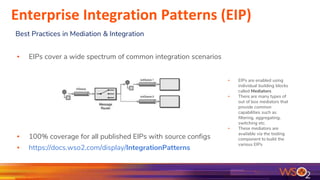
▪ EIPs are enabled using
individual building blocks
called Mediators
▪ There are many types of
out of box mediators that
provide common
capabilities such as
filtering, aggregating,
switching etc.
▪ These mediators are
available via the tooling
component to build the
various EIPs
▪ EIPs cover a wide spectrum of common integration scenarios
▪ 100% coverage for all published EIPs with source configs
▪ https://docs.wso2.com/display/IntegrationPatterns
Best Practices in Mediation & Integration
Enterprise Integration Patterns (EIP)
Data Integration
Data as a Service
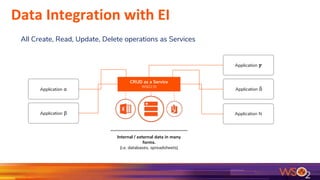
Data Integration with EI
All Create, Read, Update, Delete operations as Services
Application 𝜸
Application ẟ
Application N
Application α
Application β
Internal / external data in many
forms.
(i.e. databases, spreadsheets)
CRUD as a Service
WSO2 EI
Business Processes
Connect humans and processes
13
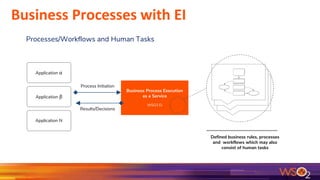
Business Processes with EI
Processes/Workflows and Human Tasks
Application α
Application β
Defined business rules, processes
and workflows which may also
consist of human tasks
Business Process Execution
as a Service
WSO2 EI
Application N
Process Initiation
Results/Decisions
Service Hosting
Host services and microservices
Hosting Java Apps and Services
● Use Tomcat or any other App Server for hosting standard apps
● Tomcat + CXF for JAXWS or JAXRS services
● MSF4J for lightweight, high performance microservices
Migration
Moving from olders products to WSO2 EI
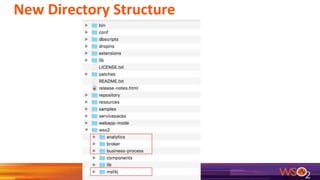
New Directory Structure
Migration Strategy - should I now?
EI 6.x is an integrated and improved packaging of WSO2 ESB 5.0, DSS 3.5,
BPS 3.6
If you are already using these products, you can:
● Continue using these products
● All fixes will be available as WUM updates
● Next major upgrade will be to Ballerina (ballerinalang.org) based Enterprise
Integrator
No, I still want to migrate to EI 6.1!
● Migration is possible
● Deployment artifacts are the same
o Synapse config
o DSS files
o BPEL artifacts
● Location of the deployment artifacts and conf files have changed
● This will require some minor changes to your deployment automation
Documentation
● Documents from ESB, DSS, BPS & MB have been merged
o https://docs.wso2.com/display/EI600/WSO2+Enterprise+Integrato
r+Documentation
● Comprehensive Quick Start Guide which touches on all components of
EI
o https://docs.wso2.com/display/EI600/Quick+Start+Guide
Demo
Enterprise Integrator in Action
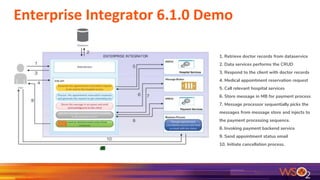
Enterprise Integrator 6.1.0 Demo
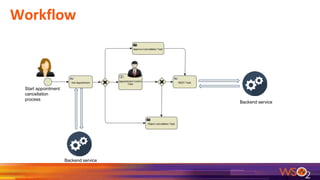
1. Retrieve doctor records from dataservice
2. Data services performs the CRUD
3. Respond to the client with doctor records
4. Medical appointment reservation request
5. Call relevant hospital services
6. Store message in MB for payment process
7. Message processor sequentially picks the
messages from message store and injects to
the payment processing sequence.
8. Invoking payment backend service
9. Send appointment status email
10. Initiate cancellation process.
Some of the EI functionalites used for this demo
● Exposing a database as a service
● Hosting services on MSF4J
● Routing Requests Based on Message Content
● Storing and Forwarding Messages
● Using the Gmail Connector
● Managing a business process
Configurations
● Hosting services on MSF4J
● Setting up message broker with EI
● Configuring data publishing
● Setting up mail connector
● Configuring Activiti.xml in business process
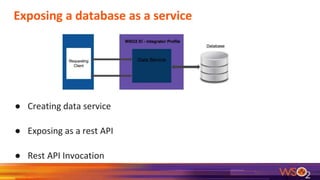
Exposing a database as a service
● Creating data service
● Exposing as a rest API
● Rest API Invocation
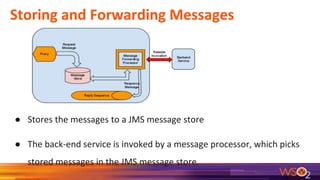
Storing and Forwarding Messages
● Stores the messages to a JMS message store
● The back-end service is invoked by a message processor, which picks
stored messages in the JMS message store.
Workflow
Start appointment
cancellation
process
Backend service
Backend service
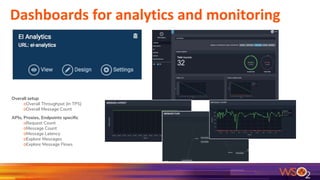
Dashboards for analytics and monitoring
Overall setup
oOverall Throughput (in TPS)
oOverall Message Count
APIs, Proxies, Endpoints specific
oRequest Count
oMessage Count
oMessage Latency
oExplore Messages
oExplore Message Flows
Future
30
Enterprise Integrator (Future)
● Will be based on Ballerina (ballerinalang.org)
● Will include tooling to migrate from Synapse to Ballerina
● Will cover all aspects of integration including short lived, long running
and data integration using Ballerina
● Will include
o MB 4.0
o MSF4J for lightweight, high performance Java services
Questions

Introducing the WSO2 Enterprise Integrator 6.1

  • 1.
    Introduction to WSO2 EnterpriseIntegrator (6.1) Afkham Azeez Senior Director, Platform Architecture WSO2 Inc. Vijitha Ekanayake Software Engineer WSO2 Inc.
  • 3.
    3 Connectivity / Integration: anything-to-anything WSO2 EI Connectors Web services APIs Filesystems Messaging systems Business Applications Partners’ systems Data public cloud | private cloud | on-premise Typical Use Cases ▪ A system of systems: connect multiple systems together. ▪ Better consumer experience with connected data and business processes. ▪ Digitize legacy systems: mediate legacy with modern architecture paradigms. ▪ Hybrid integration by taking on- premise data and processes into the cloud and back. A Hybrid Integration Platform
  • 5.
    WSO2 Enterprise Integrator •Enterprise Service Bus (ESB) • Data Services Server (DSS) • Business Process Server (BPS) • Message Broker (MB) • Business Rules Server (BRS) • Microservices Framework for Java (MSF4J)
  • 6.
    Why 6.x? • WSO2ESB was the most widely used integration product from WSO2 • WSO2 ESB is at the core of EI • The latest WSO2 ESB release was 5.0 • This is the evolution of WSO2 ESB and includes all the integration technology from WSO2 in a single downloadable pack
  • 7.
    Runtimes • Integration (shortlived integrations) • Business Process (Long running integrations) • Message Broker • MSF4J (https://github.com/wso2/msf4j) • Analytics
  • 8.
    Service Integration & Messaging isbased on Open Standards & Integration Patterns
  • 9.
    ▪ To connectand integrate with common systems & platforms ▪ No additional cost. Download and Install. ▪ https://store.wso2.com/store/assets/esbconnector/list The Connectors Store B2B Connectors ▪ Salesforce ▪ SAP ▪ Google ▪ PeopleHR ▪ SugarCRM ▪ Twilio ▪ Youtube ▪ eBay ▪ Bugzilla ▪ Zuora ▪ Nest ▪ ... Connectors
  • 10.
    ▪ EIPs areenabled using individual building blocks called Mediators ▪ There are many types of out of box mediators that provide common capabilities such as filtering, aggregating, switching etc. ▪ These mediators are available via the tooling component to build the various EIPs ▪ EIPs cover a wide spectrum of common integration scenarios ▪ 100% coverage for all published EIPs with source configs ▪ https://docs.wso2.com/display/IntegrationPatterns Best Practices in Mediation & Integration Enterprise Integration Patterns (EIP)
  • 11.
  • 12.
    Data Integration withEI All Create, Read, Update, Delete operations as Services Application 𝜸 Application ẟ Application N Application α Application β Internal / external data in many forms. (i.e. databases, spreadsheets) CRUD as a Service WSO2 EI
  • 13.
  • 14.
    Business Processes withEI Processes/Workflows and Human Tasks Application α Application β Defined business rules, processes and workflows which may also consist of human tasks Business Process Execution as a Service WSO2 EI Application N Process Initiation Results/Decisions
  • 15.
  • 16.
    Hosting Java Appsand Services ● Use Tomcat or any other App Server for hosting standard apps ● Tomcat + CXF for JAXWS or JAXRS services ● MSF4J for lightweight, high performance microservices
  • 17.
    Migration Moving from oldersproducts to WSO2 EI
  • 18.
  • 19.
    Migration Strategy -should I now? EI 6.x is an integrated and improved packaging of WSO2 ESB 5.0, DSS 3.5, BPS 3.6 If you are already using these products, you can: ● Continue using these products ● All fixes will be available as WUM updates ● Next major upgrade will be to Ballerina (ballerinalang.org) based Enterprise Integrator
  • 20.
    No, I stillwant to migrate to EI 6.1! ● Migration is possible ● Deployment artifacts are the same o Synapse config o DSS files o BPEL artifacts ● Location of the deployment artifacts and conf files have changed ● This will require some minor changes to your deployment automation
  • 21.
    Documentation ● Documents fromESB, DSS, BPS & MB have been merged o https://docs.wso2.com/display/EI600/WSO2+Enterprise+Integrato r+Documentation ● Comprehensive Quick Start Guide which touches on all components of EI o https://docs.wso2.com/display/EI600/Quick+Start+Guide
  • 22.
  • 23.
    Enterprise Integrator 6.1.0Demo 1. Retrieve doctor records from dataservice 2. Data services performs the CRUD 3. Respond to the client with doctor records 4. Medical appointment reservation request 5. Call relevant hospital services 6. Store message in MB for payment process 7. Message processor sequentially picks the messages from message store and injects to the payment processing sequence. 8. Invoking payment backend service 9. Send appointment status email 10. Initiate cancellation process.
  • 24.
    Some of theEI functionalites used for this demo ● Exposing a database as a service ● Hosting services on MSF4J ● Routing Requests Based on Message Content ● Storing and Forwarding Messages ● Using the Gmail Connector ● Managing a business process
  • 25.
    Configurations ● Hosting serviceson MSF4J ● Setting up message broker with EI ● Configuring data publishing ● Setting up mail connector ● Configuring Activiti.xml in business process
  • 26.
    Exposing a databaseas a service ● Creating data service ● Exposing as a rest API ● Rest API Invocation
  • 27.
    Storing and ForwardingMessages ● Stores the messages to a JMS message store ● The back-end service is invoked by a message processor, which picks stored messages in the JMS message store.
  • 28.
  • 29.
    Dashboards for analyticsand monitoring Overall setup oOverall Throughput (in TPS) oOverall Message Count APIs, Proxies, Endpoints specific oRequest Count oMessage Count oMessage Latency oExplore Messages oExplore Message Flows
  • 30.
  • 31.
    Enterprise Integrator (Future) ●Will be based on Ballerina (ballerinalang.org) ● Will include tooling to migrate from Synapse to Ballerina ● Will cover all aspects of integration including short lived, long running and data integration using Ballerina ● Will include o MB 4.0 o MSF4J for lightweight, high performance Java services
  • 32.