Copyright © 2006 by The McGraw-Hill Companies, Inc. All rights
McGraw-Hill Technology Education
McGraw-Hill Technology Education Copyright © 2006 by The McGraw-Hill Companies, Inc. All rights
Copyright © 2006 by The McGraw-Hill Companies, Inc. All rights
McGraw-Hill Technology Education
Chapter 5A
Transforming Data Into
Information
5A-3
How Computers Represent Data
• Number systems
– A manner of counting
– Several different number systems exist
• Decimal number system
– Used by humans to count
– Contains ten distinct digits
– Digits combine to make larger numbers
5A-4
How Computers Represent Data
• Binary number system
– Used by computers to count
– Two distinct digits, 0 and 1
– 0 and 1 combine to make numbers
5A-5
How Computers Represent Data
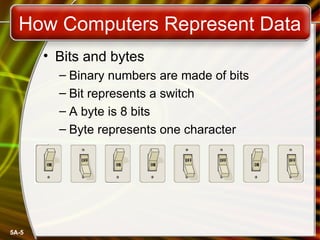
• Bits and bytes
– Binary numbers are made of bits
– Bit represents a switch
– A byte is 8 bits
– Byte represents one character
5A-6
How Computers Represent Data
• Text codes
– Converts letters into binary
– Standard codes necessary for data transfer
– ASCII
• American English symbols
– Extended ASCII
• Graphics and other symbols
– Unicode
• All languages on the planet
5A-7
How Computers Process Data
• The CPU
– Central Processing Unit
– Brain of the computer
– Control unit
• Controls resources in computer
• Instruction set
– Arithmetic logic unit
• Simple math operations
• Registers
5A-8
How Computers Process Data
• Machine cycles
– Steps by CPU to process data
– Instruction cycle
• CPU gets the instruction
– Execution cycle
• CPU performs the instruction
– Billions of cycles per second
– Pipelining processes more data
– Multitasking allows multiple instructions
5A-9
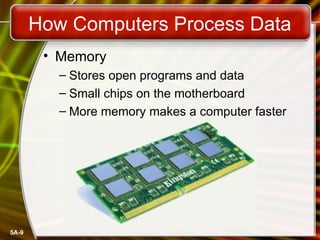
How Computers Process Data
• Memory
– Stores open programs and data
– Small chips on the motherboard
– More memory makes a computer faster
5A-10
How Computers Process Data
• Nonvolatile memory
– Holds data when power is off
– Read Only Memory (ROM)
– Basic Input Output System (BIOS)
– Power On Self Test (POST)
5A-11
How Computers Process Data
• Flash memory
– Data is stored using physical switches
– Special form of nonvolatile memory
– Camera cards, USB key chains
5A-12
How Computers Process Data
• Volatile memory
– Requires power to hold data
– Random Access Memory (RAM)
– Data in RAM has an address
– CPU reads data using the address
– CPU can read any address
5A-13
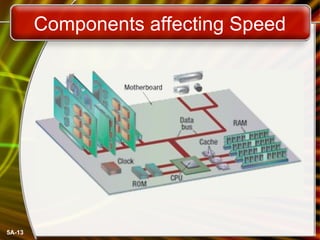
Components affecting Speed
5A-14
Affecting Processing Speed
• Registers
– Number of bits processor can handle
– Word size
– Larger indicates more powerful computer
– Increase by purchasing new CPU
5A-15
Affecting Processing Speed
• Virtual RAM
– Computer is out of actual RAM
– File that emulates RAM
– Computer swaps data to virtual RAM
• Least recently used data is moved
5A-16
Affecting Processing Speed
• The computer’s internal clock
– Quartz crystal
– Every tick causes a cycle
– Speeds measured in Hertz (Hz)
• Modern machines use Giga Hertz (GHz)
5A-17
Affecting Processing Speed
• The bus
– Electronic pathway between components
– Expansion bus connects to peripherals
– System bus connects CPU and RAM
– Bus width is measured in bits
– Speed is tied to the clock
5A-18
Affecting Processing Speed
• External bus standards
– Industry Standard Architecture (ISA)
– Local bus
– Peripheral control interface
– Accelerated graphics port
– Universal serial bus
– IEEE 1394 (FireWire)
– PC Card
5A-19
Affecting Processing Speed
• Peripheral control interface (PCI)
– Connects modems and sound cards
– Found in most modern computers
5A-20
Affecting Processing Speed
• Accelerated Graphics Port (AGP)
– Connects video card to motherboard
– Extremely fast bus
– Found in all modern computers
5A-21
Affecting Processing Speed
• Universal Serial Bus (USB)
– Connects external devices
– Hot swappable
– Allows up to 127 devices
– Cameras, printers, and scanners
5A-22
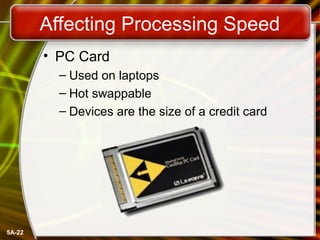
Affecting Processing Speed
• PC Card
– Used on laptops
– Hot swappable
– Devices are the size of a credit card
5A-23
Affecting Processing Speed
• Cache memory
– Very fast memory
– Holds common or recently used data
– Speeds up computer processing
– Most computers have several caches
– L1 holds recently used data
– L2 holds upcoming data
– L3 holds possible upcoming data
Copyright © 2006 by The McGraw-Hill Companies, Inc. All rights
McGraw-Hill Technology Education
Chapter 5A
End of Chapter

Intro_Ch_05A.ppt introduction to computer

  • 1.
    Copyright © 2006by The McGraw-Hill Companies, Inc. All rights McGraw-Hill Technology Education McGraw-Hill Technology Education Copyright © 2006 by The McGraw-Hill Companies, Inc. All rights
  • 2.
    Copyright © 2006by The McGraw-Hill Companies, Inc. All rights McGraw-Hill Technology Education Chapter 5A Transforming Data Into Information
  • 3.
    5A-3 How Computers RepresentData • Number systems – A manner of counting – Several different number systems exist • Decimal number system – Used by humans to count – Contains ten distinct digits – Digits combine to make larger numbers
  • 4.
    5A-4 How Computers RepresentData • Binary number system – Used by computers to count – Two distinct digits, 0 and 1 – 0 and 1 combine to make numbers
  • 5.
    5A-5 How Computers RepresentData • Bits and bytes – Binary numbers are made of bits – Bit represents a switch – A byte is 8 bits – Byte represents one character
  • 6.
    5A-6 How Computers RepresentData • Text codes – Converts letters into binary – Standard codes necessary for data transfer – ASCII • American English symbols – Extended ASCII • Graphics and other symbols – Unicode • All languages on the planet
  • 7.
    5A-7 How Computers ProcessData • The CPU – Central Processing Unit – Brain of the computer – Control unit • Controls resources in computer • Instruction set – Arithmetic logic unit • Simple math operations • Registers
  • 8.
    5A-8 How Computers ProcessData • Machine cycles – Steps by CPU to process data – Instruction cycle • CPU gets the instruction – Execution cycle • CPU performs the instruction – Billions of cycles per second – Pipelining processes more data – Multitasking allows multiple instructions
  • 9.
    5A-9 How Computers ProcessData • Memory – Stores open programs and data – Small chips on the motherboard – More memory makes a computer faster
  • 10.
    5A-10 How Computers ProcessData • Nonvolatile memory – Holds data when power is off – Read Only Memory (ROM) – Basic Input Output System (BIOS) – Power On Self Test (POST)
  • 11.
    5A-11 How Computers ProcessData • Flash memory – Data is stored using physical switches – Special form of nonvolatile memory – Camera cards, USB key chains
  • 12.
    5A-12 How Computers ProcessData • Volatile memory – Requires power to hold data – Random Access Memory (RAM) – Data in RAM has an address – CPU reads data using the address – CPU can read any address
  • 13.
  • 14.
    5A-14 Affecting Processing Speed •Registers – Number of bits processor can handle – Word size – Larger indicates more powerful computer – Increase by purchasing new CPU
  • 15.
    5A-15 Affecting Processing Speed •Virtual RAM – Computer is out of actual RAM – File that emulates RAM – Computer swaps data to virtual RAM • Least recently used data is moved
  • 16.
    5A-16 Affecting Processing Speed •The computer’s internal clock – Quartz crystal – Every tick causes a cycle – Speeds measured in Hertz (Hz) • Modern machines use Giga Hertz (GHz)
  • 17.
    5A-17 Affecting Processing Speed •The bus – Electronic pathway between components – Expansion bus connects to peripherals – System bus connects CPU and RAM – Bus width is measured in bits – Speed is tied to the clock
  • 18.
    5A-18 Affecting Processing Speed •External bus standards – Industry Standard Architecture (ISA) – Local bus – Peripheral control interface – Accelerated graphics port – Universal serial bus – IEEE 1394 (FireWire) – PC Card
  • 19.
    5A-19 Affecting Processing Speed •Peripheral control interface (PCI) – Connects modems and sound cards – Found in most modern computers
  • 20.
    5A-20 Affecting Processing Speed •Accelerated Graphics Port (AGP) – Connects video card to motherboard – Extremely fast bus – Found in all modern computers
  • 21.
    5A-21 Affecting Processing Speed •Universal Serial Bus (USB) – Connects external devices – Hot swappable – Allows up to 127 devices – Cameras, printers, and scanners
  • 22.
    5A-22 Affecting Processing Speed •PC Card – Used on laptops – Hot swappable – Devices are the size of a credit card
  • 23.
    5A-23 Affecting Processing Speed •Cache memory – Very fast memory – Holds common or recently used data – Speeds up computer processing – Most computers have several caches – L1 holds recently used data – L2 holds upcoming data – L3 holds possible upcoming data
  • 24.
    Copyright © 2006by The McGraw-Hill Companies, Inc. All rights McGraw-Hill Technology Education Chapter 5A End of Chapter