The World Leader in High Performance Signal Processing Solutions


  An Introduction to the
VisualDSP++ Kernel (VDK)

          Presented by:
            Ken Atwell
       Product Line Manager
About This Module

    This module discusses the VisualDSP++ kernel (VDK)
    concepts and capabilities.

    It is recommended that users have:
     A working knowledge of software terminology
     Previous experience with other commercial or home-grown
     operating systems


2
Module Outline

    Introduction
     Operating system choices for Blackfin
     Introducing the VDK
    Capabilities of the VDK
    On-line Demo: Building and Debugging VDK Projects
    Timings and Sizes
     Footprints and benchmarks


3
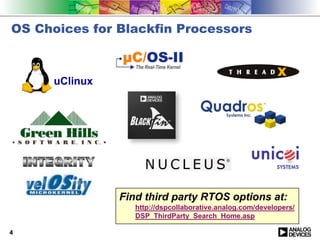
OS Choices for Blackfin Processors


      uClinux


                Find third party RTOS options at:
                   http://dspcollaborative.analog.com/developers/
                   DSP_ThirdParty_Search_Home.asp

4
Introducing the VisualDSP++ Kernel (VDK)

    Small, robust kernel bundled with VisualDSP++
     Designed for application with light-weight OS requirements
     No additional cost or run-time licenses/fees
     Fully supported and maintained along with the rest of
     VisualDSP++
    Supports all current and future Blackfin derivatives
    Complements and co-exists with System Services and its
    device drivers


5
VDK Concepts

    Threads
    Priority and scheduling
     Pre-emptive, cooperative, and time-slicing
    Critical and unscheduled regions
    Semaphores, including periodic
    Messages
    Beyond discussion today, but available in VDK
     Events and event bits
     Multi-processor messaging
     Memory pools
     Device flags
    Fully documented in VisualDSP++ help and PDF manuals


6
Capabilities of the VDK


7
Threads and Priorities (1)

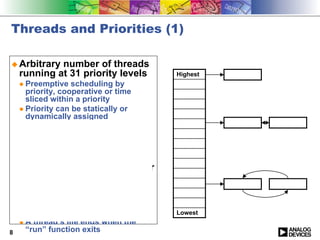
    Arbitrary number of threads
    running at 31 priority levels     Highest
     Preemptive scheduling by
     priority, cooperative or time
     sliced within a priority
     Priority can be statically or
     dynamically assigned
    Threads may be instantiated
    at boot time or later at run
    time
     Each gets its own stack
    Each thread implements four
    functions
     Create, run, destroy, error
     All major execution occurs in
     “run”, many threads never exit
     run                              Lowest
     A thread’s life ends when the
8    “run” function exits
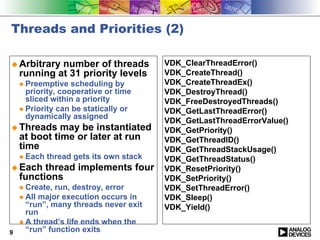
Threads and Priorities (2)

    Arbitrary number of threads       VDK_ClearThreadError()
    running at 31 priority levels     VDK_CreateThread()
     Preemptive scheduling by         VDK_CreateThreadEx()
     priority, cooperative or time    VDK_DestroyThread()
     sliced within a priority         VDK_FreeDestroyedThreads()
     Priority can be statically or    VDK_GetLastThreadError()
     dynamically assigned
                                      VDK_GetLastThreadErrorValue()
    Threads may be instantiated       VDK_GetPriority()
    at boot time or later at run      VDK_GetThreadID()
    time                              VDK_GetThreadStackUsage()
     Each thread gets its own stack   VDK_GetThreadStatus()
    Each thread implements four       VDK_ResetPriority()
    functions                         VDK_SetPriority()
     Create, run, destroy, error      VDK_SetThreadError()
     All major execution occurs in    VDK_Sleep()
     “run”, many threads never exit   VDK_Yield()
     run
     A thread’s life ends when the
9    “run” function exits
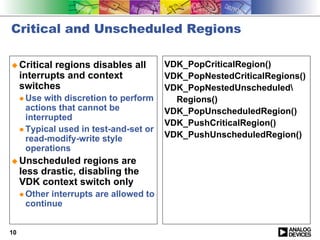
Critical and Unscheduled Regions

     Critical regions disables all      VDK_PopCriticalRegion()
     interrupts and context             VDK_PopNestedCriticalRegions()
     switches                           VDK_PopNestedUnscheduled
      Use with discretion to perform      Regions()
      actions that cannot be            VDK_PopUnscheduledRegion()
      interrupted
                                        VDK_PushCriticalRegion()
      Typical used in test-and-set or
      read-modify-write style           VDK_PushUnscheduledRegion()
      operations
     Unscheduled regions are
     less drastic, disabling the
     VDK context switch only
      Other interrupts are allowed to
      continue


10
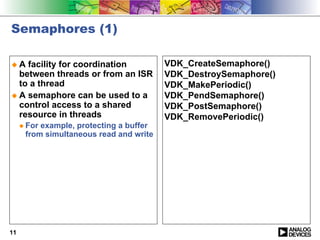
Semaphores (1)

     A facility for coordination         VDK_CreateSemaphore()
     between threads or from an ISR      VDK_DestroySemaphore()
     to a thread                         VDK_MakePeriodic()
     A semaphore can be used to a        VDK_PendSemaphore()
     control access to a shared          VDK_PostSemaphore()
     resource in threads                 VDK_RemovePeriodic()
      For example, protecting a buffer
      from simultaneous read and write


11
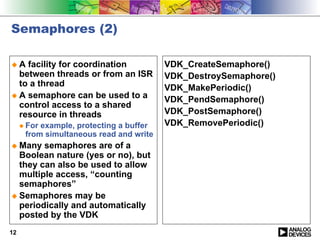
Semaphores (2)

     A facility for coordination         VDK_CreateSemaphore()
     between threads or from an ISR      VDK_DestroySemaphore()
     to a thread                         VDK_MakePeriodic()
     A semaphore can be used to a        VDK_PendSemaphore()
     control access to a shared
     resource in threads                 VDK_PostSemaphore()
      For example, protecting a buffer   VDK_RemovePeriodic()
      from simultaneous read and write
     Many semaphores are of a
     Boolean nature (yes or no), but
     they can also be used to allow
     multiple access, “counting
     semaphores”
     Semaphores may be
     periodically and automatically
     posted by the VDK
12
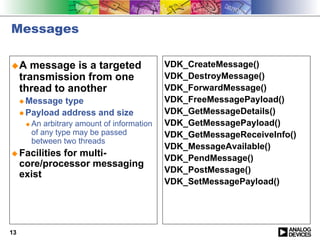
Messages

     A message is a targeted                VDK_CreateMessage()
     transmission from one                  VDK_DestroyMessage()
     thread to another                      VDK_ForwardMessage()
      Message type                          VDK_FreeMessagePayload()
      Payload address and size              VDK_GetMessageDetails()
       An arbitrary amount of information   VDK_GetMessagePayload()
       of any type may be passed            VDK_GetMessageReceiveInfo()
       between two threads
                                            VDK_MessageAvailable()
     Facilities for multi-                  VDK_PendMessage()
     core/processor messaging
                                            VDK_PostMessage()
     exist
                                            VDK_SetMessagePayload()


13
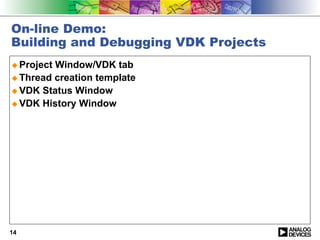
On-line Demo:
Building and Debugging VDK Projects
     Project Window/VDK tab
     Thread creation template
     VDK Status Window
     VDK History Window


14
Sizes and Timings


15
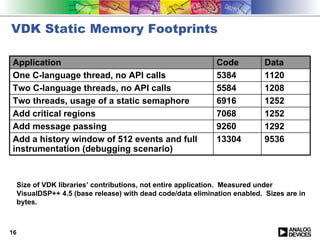
VDK Static Memory Footprints

Application                                                    Code          Data
One C-language thread, no API calls                            5384          1120
Two C-language threads, no API calls                           5584          1208
Two threads, usage of a static semaphore                       6916          1252
Add critical regions                                           7068          1252
Add message passing                                            9260          1292
Add a history window of 512 events and full                    13304         9536
instrumentation (debugging scenario)


     Size of VDK libraries’ contributions, not entire application. Measured under
     VisualDSP++ 4.5 (base release) with dead code/data elimination enabled. Sizes are in
     bytes.


16
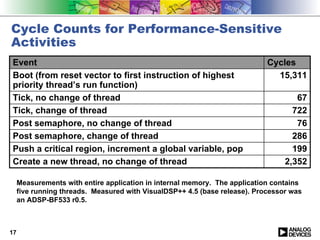
Cycle Counts for Performance-Sensitive
Activities
Event                                                                       Cycles
Boot (from reset vector to first instruction of highest                       15,311
priority thread’s run function)
Tick, no change of thread                                                           67
Tick, change of thread                                                             722
Post semaphore, no change of thread                                                 76
Post semaphore, change of thread                                                   286
Push a critical region, increment a global variable, pop                           199
Create a new thread, no change of thread                                         2,352

     Measurements with entire application in internal memory. The application contains
     five running threads. Measured with VisualDSP++ 4.5 (base release). Processor was
     an ADSP-BF533 r0.5.


17
Conclusion

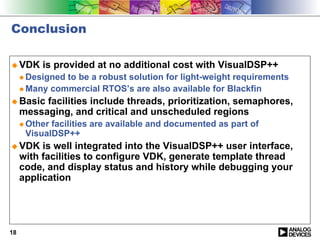
     VDK is provided at no additional cost with VisualDSP++
      Designed to be a robust solution for light-weight requirements
      Many commercial RTOS’s are also available for Blackfin
     Basic facilities include threads, prioritization, semaphores,
     messaging, and critical and unscheduled regions
      Other facilities are available and documented as part of
      VisualDSP++
     VDK is well integrated into the VisualDSP++ user interface,
     with facilities to configure VDK, generate template thread
     code, and display status and history while debugging your
     application


18
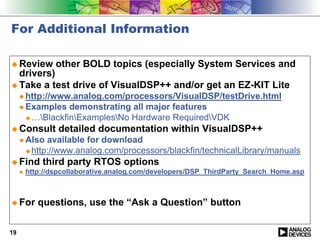
For Additional Information

     Review other BOLD topics (especially System Services and
     drivers)
     Take a test drive of VisualDSP++ and/or get an EZ-KIT Lite
      http://www.analog.com/processors/VisualDSP/testDrive.html
      Examples demonstrating all major features
       …BlackfinExamplesNo Hardware RequiredVDK
     Consult detailed documentation within VisualDSP++
      Also available for download
       http://www.analog.com/processors/blackfin/technicalLibrary/manuals
     Find third party RTOS options
      http://dspcollaborative.analog.com/developers/DSP_ThirdParty_Search_Home.asp


     For questions, use the “Ask a Question” button

19

Introduction to visual DSP++ Kernel

  • 1.
    The World Leaderin High Performance Signal Processing Solutions An Introduction to the VisualDSP++ Kernel (VDK) Presented by: Ken Atwell Product Line Manager
  • 2.
    About This Module This module discusses the VisualDSP++ kernel (VDK) concepts and capabilities. It is recommended that users have: A working knowledge of software terminology Previous experience with other commercial or home-grown operating systems 2
  • 3.
    Module Outline Introduction Operating system choices for Blackfin Introducing the VDK Capabilities of the VDK On-line Demo: Building and Debugging VDK Projects Timings and Sizes Footprints and benchmarks 3
  • 4.
    OS Choices forBlackfin Processors uClinux Find third party RTOS options at: http://dspcollaborative.analog.com/developers/ DSP_ThirdParty_Search_Home.asp 4
  • 5.
    Introducing the VisualDSP++Kernel (VDK) Small, robust kernel bundled with VisualDSP++ Designed for application with light-weight OS requirements No additional cost or run-time licenses/fees Fully supported and maintained along with the rest of VisualDSP++ Supports all current and future Blackfin derivatives Complements and co-exists with System Services and its device drivers 5
  • 6.
    VDK Concepts Threads Priority and scheduling Pre-emptive, cooperative, and time-slicing Critical and unscheduled regions Semaphores, including periodic Messages Beyond discussion today, but available in VDK Events and event bits Multi-processor messaging Memory pools Device flags Fully documented in VisualDSP++ help and PDF manuals 6
  • 7.
  • 8.
    Threads and Priorities(1) Arbitrary number of threads running at 31 priority levels Highest Preemptive scheduling by priority, cooperative or time sliced within a priority Priority can be statically or dynamically assigned Threads may be instantiated at boot time or later at run time Each gets its own stack Each thread implements four functions Create, run, destroy, error All major execution occurs in “run”, many threads never exit run Lowest A thread’s life ends when the 8 “run” function exits
  • 9.
    Threads and Priorities(2) Arbitrary number of threads VDK_ClearThreadError() running at 31 priority levels VDK_CreateThread() Preemptive scheduling by VDK_CreateThreadEx() priority, cooperative or time VDK_DestroyThread() sliced within a priority VDK_FreeDestroyedThreads() Priority can be statically or VDK_GetLastThreadError() dynamically assigned VDK_GetLastThreadErrorValue() Threads may be instantiated VDK_GetPriority() at boot time or later at run VDK_GetThreadID() time VDK_GetThreadStackUsage() Each thread gets its own stack VDK_GetThreadStatus() Each thread implements four VDK_ResetPriority() functions VDK_SetPriority() Create, run, destroy, error VDK_SetThreadError() All major execution occurs in VDK_Sleep() “run”, many threads never exit VDK_Yield() run A thread’s life ends when the 9 “run” function exits
  • 10.
    Critical and UnscheduledRegions Critical regions disables all VDK_PopCriticalRegion() interrupts and context VDK_PopNestedCriticalRegions() switches VDK_PopNestedUnscheduled Use with discretion to perform Regions() actions that cannot be VDK_PopUnscheduledRegion() interrupted VDK_PushCriticalRegion() Typical used in test-and-set or read-modify-write style VDK_PushUnscheduledRegion() operations Unscheduled regions are less drastic, disabling the VDK context switch only Other interrupts are allowed to continue 10
  • 11.
    Semaphores (1) A facility for coordination VDK_CreateSemaphore() between threads or from an ISR VDK_DestroySemaphore() to a thread VDK_MakePeriodic() A semaphore can be used to a VDK_PendSemaphore() control access to a shared VDK_PostSemaphore() resource in threads VDK_RemovePeriodic() For example, protecting a buffer from simultaneous read and write 11
  • 12.
    Semaphores (2) A facility for coordination VDK_CreateSemaphore() between threads or from an ISR VDK_DestroySemaphore() to a thread VDK_MakePeriodic() A semaphore can be used to a VDK_PendSemaphore() control access to a shared resource in threads VDK_PostSemaphore() For example, protecting a buffer VDK_RemovePeriodic() from simultaneous read and write Many semaphores are of a Boolean nature (yes or no), but they can also be used to allow multiple access, “counting semaphores” Semaphores may be periodically and automatically posted by the VDK 12
  • 13.
    Messages A message is a targeted VDK_CreateMessage() transmission from one VDK_DestroyMessage() thread to another VDK_ForwardMessage() Message type VDK_FreeMessagePayload() Payload address and size VDK_GetMessageDetails() An arbitrary amount of information VDK_GetMessagePayload() of any type may be passed VDK_GetMessageReceiveInfo() between two threads VDK_MessageAvailable() Facilities for multi- VDK_PendMessage() core/processor messaging VDK_PostMessage() exist VDK_SetMessagePayload() 13
  • 14.
    On-line Demo: Building andDebugging VDK Projects Project Window/VDK tab Thread creation template VDK Status Window VDK History Window 14
  • 15.
  • 16.
    VDK Static MemoryFootprints Application Code Data One C-language thread, no API calls 5384 1120 Two C-language threads, no API calls 5584 1208 Two threads, usage of a static semaphore 6916 1252 Add critical regions 7068 1252 Add message passing 9260 1292 Add a history window of 512 events and full 13304 9536 instrumentation (debugging scenario) Size of VDK libraries’ contributions, not entire application. Measured under VisualDSP++ 4.5 (base release) with dead code/data elimination enabled. Sizes are in bytes. 16
  • 17.
    Cycle Counts forPerformance-Sensitive Activities Event Cycles Boot (from reset vector to first instruction of highest 15,311 priority thread’s run function) Tick, no change of thread 67 Tick, change of thread 722 Post semaphore, no change of thread 76 Post semaphore, change of thread 286 Push a critical region, increment a global variable, pop 199 Create a new thread, no change of thread 2,352 Measurements with entire application in internal memory. The application contains five running threads. Measured with VisualDSP++ 4.5 (base release). Processor was an ADSP-BF533 r0.5. 17
  • 18.
    Conclusion VDK is provided at no additional cost with VisualDSP++ Designed to be a robust solution for light-weight requirements Many commercial RTOS’s are also available for Blackfin Basic facilities include threads, prioritization, semaphores, messaging, and critical and unscheduled regions Other facilities are available and documented as part of VisualDSP++ VDK is well integrated into the VisualDSP++ user interface, with facilities to configure VDK, generate template thread code, and display status and history while debugging your application 18
  • 19.
    For Additional Information Review other BOLD topics (especially System Services and drivers) Take a test drive of VisualDSP++ and/or get an EZ-KIT Lite http://www.analog.com/processors/VisualDSP/testDrive.html Examples demonstrating all major features …BlackfinExamplesNo Hardware RequiredVDK Consult detailed documentation within VisualDSP++ Also available for download http://www.analog.com/processors/blackfin/technicalLibrary/manuals Find third party RTOS options http://dspcollaborative.analog.com/developers/DSP_ThirdParty_Search_Home.asp For questions, use the “Ask a Question” button 19