OCTOBER 22, 2016
Confidential Jennifer Kenderdine
Strategic Leadership, SharePoint Architecture Services
Introduction to the
SharePoint Framework
Confidential ● trellist.com ● 10/22/2016 ● 3
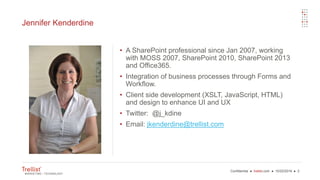
Jennifer Kenderdine
• A SharePoint professional since Jan 2007, working
with MOSS 2007, SharePoint 2010, SharePoint 2013
and Office365.
• Integration of business processes through Forms and
Workflow.
• Client side development (XSLT, JavaScript, HTML)
and design to enhance UI and UX
• Twitter: @j_kdine
• Email: jkenderdine@trellist.com
Confidential ● trellist.com ● 10/22/2016 ● 4
Agenda
• Overview of the SharePoint Framework
• Description
• Key features
• What can you do with it?
• Setting up your Developer environment
• Office 365 requirements
• Frameworks & Tools
• Development Workflow
Confidential ● trellist.com ● 10/22/2016 ● 5
What is the SharePoint Framework (SPFx)?
• SharePoint Framework Overview
• Framework for building client side web parts
• A new development option
• Does not deprecate any of the existing SharePoint development models
• Another asset in the developer toolbox
• Uses modern web development stack
• Cross-platform (Mac and PC)
• With any JavaScript framework
Confidential ● trellist.com ● 10/22/2016 ● 6
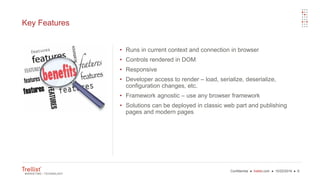
Key Features
• Runs in current context and connection in browser
• Controls rendered in DOM
• Responsive
• Developer access to render – load, serialize, deserialize,
configuration changes, etc.
• Framework agnostic – use any browser framework
• Solutions can be deployed in classic web part and publishing
pages and modern pages
Confidential ● trellist.com ● 10/22/2016 ● 7
What can you do with it?
• TODAY
• Not supported in production (pre-release
candidate)
• Must have a developer tenant.
• Modern or classic UI supported
• FUTURE
• Custom pages and portals
• Document library customizations
• Fully supported in all tenants and
SharePoint 2016 on premise
• SharePoint solutions that combine the
modern UX, code isolation, and security
• How to keep up to date
Confidential ● trellist.com ● 10/22/2016 ● 8
Setting up the Developer Tenant
• SharePoint Framework will only work on
Office 365 Developer Tenant.
• Sign up for Office Developer Program
• Create App Catalog Site
• Create a Developer Site Collection
• Document Library setup
• Add column ClientSideApplicationId
• SharePoint Workbench.aspx
Confidential ● trellist.com ● 10/22/2016 ● 9
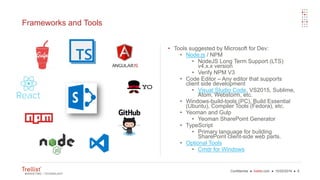
Frameworks and Tools
• Tools suggested by Microsoft for Dev:
• Node.js / NPM
• NodeJS Long Term Support (LTS)
v4.x.x version
• Verify NPM V3
• Code Editor – Any editor that supports
client side development
• Visual Studio Code, VS2015, Sublime,
Atom, Webstorm, etc.
• Windows-build-tools (PC), Build Essential
(Ubuntu), Compiler Tools (Fedora), etc.
• Yeoman and Gulp
• Yeoman SharePoint Generator
• TypeScript
• Primary language for building
SharePoint client-side web parts.
• Optional Tools
• Cmdr for Windows
Confidential ● trellist.com ● 10/22/2016 ● 10
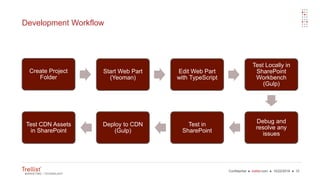
Development Workflow
Create Project
Folder
Start Web Part
(Yeoman)
Edit Web Part
with TypeScript
Test Locally in
SharePoint
Workbench
(Gulp)
Debug and
resolve any
issues
Test in
SharePoint
Deploy to CDN
(Gulp)
Test CDN Assets
in SharePoint
Confidential ● trellist.com
DEMOS
Confidential ● trellist.com ● 10/22/2016 ● 12
REFERENCES
• Office DEV Center
• Github Wiki
Confidential ● trellist.com ● 10/22/2016 ● 13
Thank You
Jennifer Kenderdine
jkenderdine@trellist.com
Trellist Insights
Confidential ● trellist.com ● 10/22/2016 ● 14

Intro to the SharePoint Framework Philly Code Camp Oct 2016

  • 2.
    OCTOBER 22, 2016 ConfidentialJennifer Kenderdine Strategic Leadership, SharePoint Architecture Services Introduction to the SharePoint Framework
  • 3.
    Confidential ● trellist.com● 10/22/2016 ● 3 Jennifer Kenderdine • A SharePoint professional since Jan 2007, working with MOSS 2007, SharePoint 2010, SharePoint 2013 and Office365. • Integration of business processes through Forms and Workflow. • Client side development (XSLT, JavaScript, HTML) and design to enhance UI and UX • Twitter: @j_kdine • Email: jkenderdine@trellist.com
  • 4.
    Confidential ● trellist.com● 10/22/2016 ● 4 Agenda • Overview of the SharePoint Framework • Description • Key features • What can you do with it? • Setting up your Developer environment • Office 365 requirements • Frameworks & Tools • Development Workflow
  • 5.
    Confidential ● trellist.com● 10/22/2016 ● 5 What is the SharePoint Framework (SPFx)? • SharePoint Framework Overview • Framework for building client side web parts • A new development option • Does not deprecate any of the existing SharePoint development models • Another asset in the developer toolbox • Uses modern web development stack • Cross-platform (Mac and PC) • With any JavaScript framework
  • 6.
    Confidential ● trellist.com● 10/22/2016 ● 6 Key Features • Runs in current context and connection in browser • Controls rendered in DOM • Responsive • Developer access to render – load, serialize, deserialize, configuration changes, etc. • Framework agnostic – use any browser framework • Solutions can be deployed in classic web part and publishing pages and modern pages
  • 7.
    Confidential ● trellist.com● 10/22/2016 ● 7 What can you do with it? • TODAY • Not supported in production (pre-release candidate) • Must have a developer tenant. • Modern or classic UI supported • FUTURE • Custom pages and portals • Document library customizations • Fully supported in all tenants and SharePoint 2016 on premise • SharePoint solutions that combine the modern UX, code isolation, and security • How to keep up to date
  • 8.
    Confidential ● trellist.com● 10/22/2016 ● 8 Setting up the Developer Tenant • SharePoint Framework will only work on Office 365 Developer Tenant. • Sign up for Office Developer Program • Create App Catalog Site • Create a Developer Site Collection • Document Library setup • Add column ClientSideApplicationId • SharePoint Workbench.aspx
  • 9.
    Confidential ● trellist.com● 10/22/2016 ● 9 Frameworks and Tools • Tools suggested by Microsoft for Dev: • Node.js / NPM • NodeJS Long Term Support (LTS) v4.x.x version • Verify NPM V3 • Code Editor – Any editor that supports client side development • Visual Studio Code, VS2015, Sublime, Atom, Webstorm, etc. • Windows-build-tools (PC), Build Essential (Ubuntu), Compiler Tools (Fedora), etc. • Yeoman and Gulp • Yeoman SharePoint Generator • TypeScript • Primary language for building SharePoint client-side web parts. • Optional Tools • Cmdr for Windows
  • 10.
    Confidential ● trellist.com● 10/22/2016 ● 10 Development Workflow Create Project Folder Start Web Part (Yeoman) Edit Web Part with TypeScript Test Locally in SharePoint Workbench (Gulp) Debug and resolve any issues Test in SharePoint Deploy to CDN (Gulp) Test CDN Assets in SharePoint
  • 11.
  • 12.
    Confidential ● trellist.com● 10/22/2016 ● 12 REFERENCES • Office DEV Center • Github Wiki
  • 13.
    Confidential ● trellist.com● 10/22/2016 ● 13 Thank You Jennifer Kenderdine jkenderdine@trellist.com Trellist Insights
  • 14.
    Confidential ● trellist.com● 10/22/2016 ● 14