® 
IDE on the Cloud - Orion 
Lakshmi P Shanmugam 
Eclipse SWT Co-lead 
IBM
Agenda 
● What is Orion? 
● Navigator 
● Editor 
● Search 
● SCM(Git) Integration 
● Sites 
● Client-Server architecture 
● Extending Orion 
● Shell
What is Orion? 
Browser-based open tools integration platform, entirely focused on 
developing for the web, on the web. 
code.everywhere = true 
IDE on the Cloud
Navigator 
● The Navigator page is used to browse and modify your files. 
● Creating folders and files 
● Using the common banner 
● Importing folders and files 
● Exporting folders and files
Editor 
● Editing code 
● JavaScript development 
● Firebug Integration 
● CSS development 
● HTML development 
● Java development 
● Extending the editor with a Plug-in
Search 
● Searching for file content 
● Finding a file by name 
● Searching inside the editor
SCM(Git) Integration 
● Git repositories 
● Git Status 
● Commit Page 
● Compare Page
Sites 
● Launching your project as a website 
● Create Site 
● Launch Site 
● Debugging using FireBug
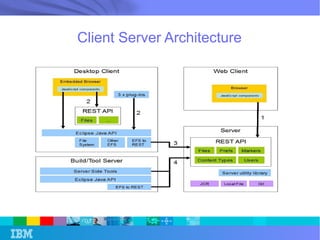
Client Server Architecture
Extending Orion 
● Plugins 
● Example Plugin
Shell 
● Command Line Interface
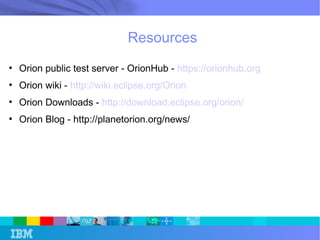
Resources 
● Orion public test server - OrionHub - https://orionhub.org 
● Orion wiki - http://wiki.eclipse.org/Orion 
● Orion Downloads - http://download.eclipse.org/orion/ 
● Orion Blog - http://planetorion.org/news/
Thank You!

Orion - IDE on the cloud

  • 1.
    ® IDE onthe Cloud - Orion Lakshmi P Shanmugam Eclipse SWT Co-lead IBM
  • 2.
    Agenda ● Whatis Orion? ● Navigator ● Editor ● Search ● SCM(Git) Integration ● Sites ● Client-Server architecture ● Extending Orion ● Shell
  • 3.
    What is Orion? Browser-based open tools integration platform, entirely focused on developing for the web, on the web. code.everywhere = true IDE on the Cloud
  • 4.
    Navigator ● TheNavigator page is used to browse and modify your files. ● Creating folders and files ● Using the common banner ● Importing folders and files ● Exporting folders and files
  • 5.
    Editor ● Editingcode ● JavaScript development ● Firebug Integration ● CSS development ● HTML development ● Java development ● Extending the editor with a Plug-in
  • 6.
    Search ● Searchingfor file content ● Finding a file by name ● Searching inside the editor
  • 7.
    SCM(Git) Integration ●Git repositories ● Git Status ● Commit Page ● Compare Page
  • 8.
    Sites ● Launchingyour project as a website ● Create Site ● Launch Site ● Debugging using FireBug
  • 9.
  • 10.
    Extending Orion ●Plugins ● Example Plugin
  • 11.
    Shell ● CommandLine Interface
  • 12.
    Resources ● Orionpublic test server - OrionHub - https://orionhub.org ● Orion wiki - http://wiki.eclipse.org/Orion ● Orion Downloads - http://download.eclipse.org/orion/ ● Orion Blog - http://planetorion.org/news/
  • 13.