Intro to Express
Web Application Framework for Node
Created by /Jason Sich @jasich
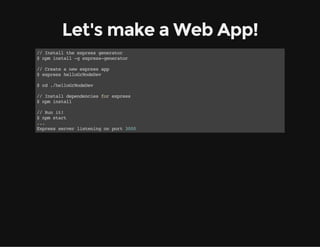
Let's make a Web App!
//Installtheexpressgenerator
$npminstall-gexpress-generator
//Createanewexpressapp
$expresshelloGrNodeDev
$cd./helloGrNodeDev
//Installdependenciesforexpress
$npminstall
//Runit!
$npmstart
...
Expressserverlisteningonport3000
Well that was almost too easy
While running the express generator I had 2 issues that I had to fix
before being able to load the main page.
Sidenote: Modules
There are a ton of modules out there, but not all of them get updated in
a timely manner.
When dependencies break your app it can be painful to fix.
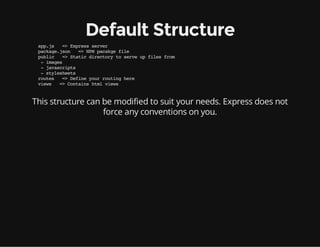
Default Structure
app.js =>Expressserver
package.json =>NPMpacakgefile
public =>Staticdirectorytoserveupfilesfrom
-images
-javascripts
-stylesheets
routes =>Defineyourroutinghere
views =>Containshtmlviews
This structure can be modified to suit your needs. Express does not
force any conventions on you.
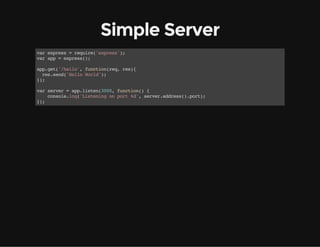
Simple Server
varexpress=require('express');
varapp=express();
app.get('/hello',function(req,res){
res.send('HelloWorld');
});
varserver=app.listen(3000,function(){
console.log('Listeningonport%d',server.address().port);
});
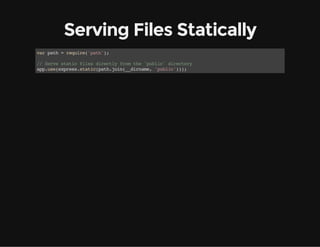
Serving Files Statically
varpath=require('path');
//Servestaticfilesdirectlyfromthe'public'directory
app.use(express.static(path.join(__dirname,'public')));
Using Dynamic Views
//Setsthelocationofourtemplatefilesforviews
//Thisiswhereallthejadetemplatesgo
app.set('views',path.join(__dirname,'views'));
//Setstheviewengineto'jade'becausewe'resoEmo
app.set('viewengine','jade');
//ForHTTPGETrequestsserveuptheindexview
//Setthetitleto'Express'
app.get('/',function(req,res){
res.render('index',{title:'Express'});
});
All Together Now
varexpress=require('express'),
path=require('path');
varapp=express();
app.set('views',path.join(__dirname,'views'));
app.set('viewengine','jade');
app.use(express.static(path.join(__dirname,'public')));
app.get('/',function(req,res){
res.render('index',{title:'Express'});
});
app.listen(3000,function(){
console.log('Listeningonport%d',server.address().port);
});
Example Jade Template
//index.jade
doctypehtml
html
head
title=title
link(rel='stylesheet',href='/stylesheets/style.css')
body
h1=title
pWelcometo#{title}
It Needs an API
Let's say we are using a front-end JS framework and need to serve up
some data in JSON.
Shut the Front Door, That Easy?
//RegistersahandlerforanHTTPGETrequestto'/animals'
app.get('/animals',function(req,res){
varanimals=[
{name:'SharkOwl'},
{name:'Liger'},
{name:'Zebroid'}
];
//Justsendthearrayasaresponse
res.send(animals);
});
And a Post?
.
app.use(express.bodyParser());
.
//RegistersahandlerforanHTTPPOSTrequestto'/animals'
app.post('/animals',function(req,res){
varnewAnimal=req.body;
//Lettheclientknowthatthingsarecoolwithus
res.send(201,{success:true});
});
What's up with app.use()?
It registers middleware in your Express application. Middleware is
additional functionality injected into request handling.
There is an order to middleware. If one piece of middleware services a
request, the request is considered handled and the rest of the
middleware is not used.
For example we can register the 'express.static' middleware to serve up
static files for requests.
app.use(express.static(path.join(__dirname,'public')));
Or we can define our own:
app.use(function(req,res,next){
if(!req.get('authorization')){
res.Send(403,"NotAllowedSon,BetterLuckNextTime");
}else{
next();
}
});
The End
BY Jason Sich

Intro to the Express Web Framework