

Node.js Introduction
2014/12/05
Winston Hsieh
What is Node.js?
 A platform built on Chrome’s JavaScript runtime for easily
building fast, scalable network applications.
 Node.js uses an event-driven, non-blocking I/O model that
makes it lightweight and efficient, perfect for data-intensive real-
time applications that run across distributed devices.
Build on JavaScript
 Developers can write web applications in one language.
 Reducing the context switch between client and server
development
 JSON is a very popular data interchange format today and is
native to JavaScript.
 JavaScript is the language used in various NoSQL databases
 Such as CouchDB and MongoDB
 JavaScript is a compilation target, and there are a number of
languages that compile to it already.
 See the “List of languages that compile to JS”.
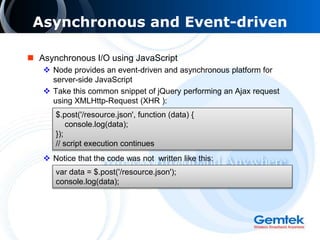
Asynchronous and Event-driven
 Asynchronous I/O using JavaScript
 Node provides an event-driven and asynchronous platform for
server-side JavaScript
 Take this common snippet of jQuery performing an Ajax request
using XMLHttp-Request (XHR ):
 Notice that the code was not written like this:
$.post('/resource.json', function (data) {
console.log(data);
});
// script execution continues
var data = $.post('/resource.json');
console.log(data);
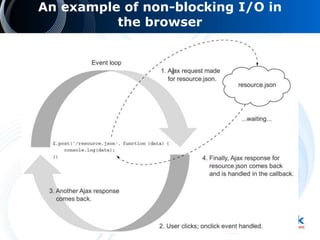
An example of non-blocking I/O in
the browser
Asynchronous and Event-driven
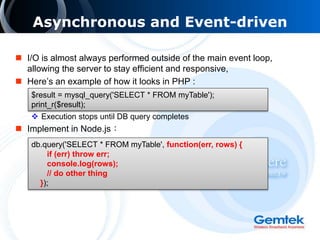
 I/O is almost always performed outside of the main event loop,
allowing the server to stay efficient and responsive,
 Here’s an example of how it looks in PHP :
 Execution stops until DB query completes
 Implement in Node.js:
$result = mysql_query('SELECT * FROM myTable');
print_r($result);
db.query('SELECT * FROM myTable', function(err, rows) {
if (err) throw err;
console.log(rows);
// do other thing
});
DIRTy Applications
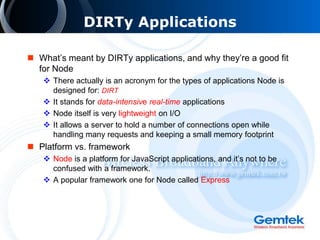
 What’s meant by DIRTy applications, and why they’re a good fit
for Node
 There actually is an acronym for the types of applications Node is
designed for: DIRT
 It stands for data-intensive real-time applications
 Node itself is very lightweight on I/O
 It allows a server to hold a number of connections open while
handling many requests and keeping a small memory footprint
 Platform vs. framework
 Node is a platform for JavaScript applications, and it’s not to be
confused with a framework.
 A popular framework one for Node called Express
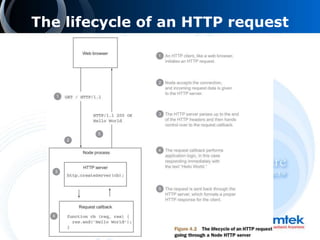
The lifecycle of an HTTP request
HTTP Server Fundamentals
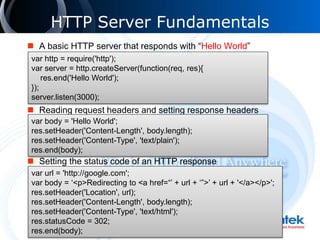
 A basic HTTP server that responds with “Hello World”
 Reading request headers and setting response headers
 Setting the status code of an HTTP response
var http = require('http');
var server = http.createServer(function(req, res){
res.end('Hello World');
});
server.listen(3000);
var body = 'Hello World';
res.setHeader('Content-Length', body.length);
res.setHeader('Content-Type', 'text/plain');
res.end(body);
var url = 'http://google.com';
var body = ‘<p>Redirecting to <a href=“’ + url + ‘”>’ + url + '</a></p>';
res.setHeader('Location', url);
res.setHeader('Content-Length', body.length);
res.setHeader('Content-Type', 'text/html');
res.statusCode = 302;
res.end(body);
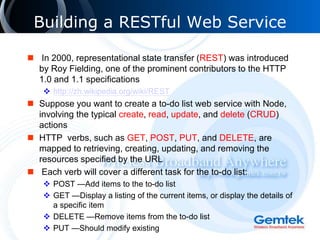
Building a RESTful Web Service
 In 2000, representational state transfer (REST) was introduced
by Roy Fielding, one of the prominent contributors to the HTTP
1.0 and 1.1 specifications
 http://zh.wikipedia.org/wiki/REST
 Suppose you want to create a to-do list web service with Node,
involving the typical create, read, update, and delete (CRUD)
actions
 HTTP verbs, such as GET, POST, PUT, and DELETE, are
mapped to retrieving, creating, updating, and removing the
resources specified by the URL
 Each verb will cover a different task for the to-do list:
 POST —Add items to the to-do list
 GET —Display a listing of the current items, or display the details of
a specific item
 DELETE —Remove items from the to-do list
 PUT —Should modify existing
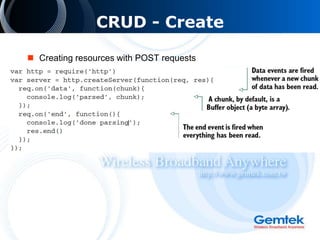
CRUD - Create
 Creating resources with POST requests
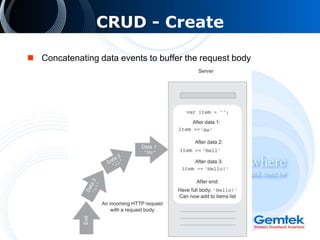
CRUD - Create
 Concatenating data events to buffer the request body
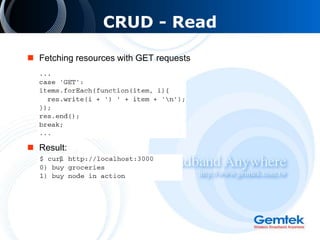
CRUD - Read
 Fetching resources with GET requests
 Result:
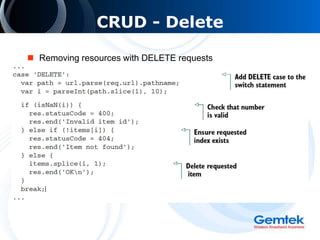
CRUD - Delete
 Removing resources with DELETE requests
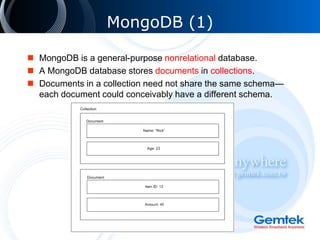
MongoDB (1)
 MongoDB is a general-purpose nonrelational database.
 A MongoDB database stores documents in collections.
 Documents in a collection need not share the same schema—
each document could conceivably have a different schema.
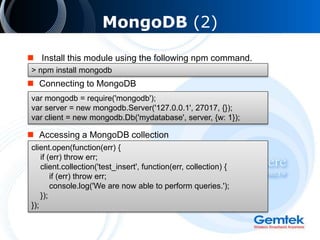
MongoDB (2)
 Install this module using the following npm command.
 Connecting to MongoDB
 Accessing a MongoDB collection
> npm install mongodb
var mongodb = require('mongodb');
var server = new mongodb.Server('127.0.0.1', 27017, {});
var client = new mongodb.Db('mydatabase', server, {w: 1});
client.open(function(err) {
if (err) throw err;
client.collection('test_insert', function(err, collection) {
if (err) throw err;
console.log('We are now able to perform queries.');
});
});
MongoDB (3)
 Insert a document into a collection
 Safe mode – Specifying {safe: true} in a query indicates that you
want the database operation to complete before executing the
callback.
collection.insert(
{
"title": "I like cake",
"body": "It is quite good."
},
{safe: true},
function(err, documents) {
if (err) throw err;
console.log('Document ID is: ' + documents[0]._id);
});
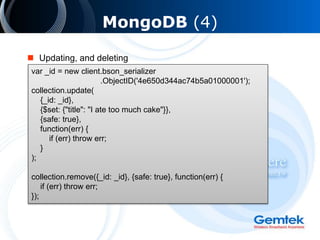
MongoDB (4)
 Updating, and deleting
var _id = new client.bson_serializer
.ObjectID('4e650d344ac74b5a01000001');
collection.update(
{_id: _id},
{$set: {"title": "I ate too much cake"}},
{safe: true},
function(err) {
if (err) throw err;
}
);
collection.remove({_id: _id}, {safe: true}, function(err) {
if (err) throw err;
});
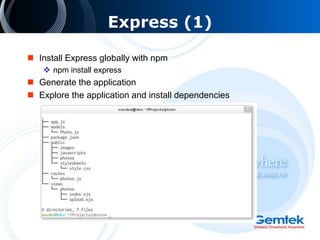
Express (1)
 Install Express globally with npm
 npm install express
 Generate the application
 Explore the application and install dependencies
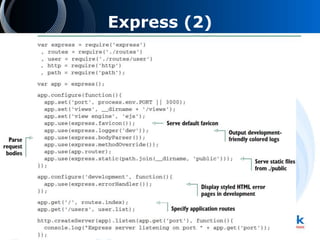
Express (2)
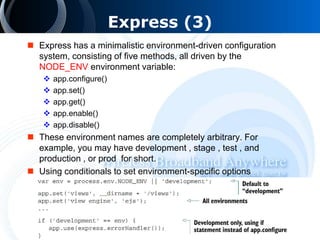
Express (3)
 Express has a minimalistic environment-driven configuration
system, consisting of five methods, all driven by the
NODE_ENV environment variable:
 app.configure()
 app.set()
 app.get()
 app.enable()
 app.disable()
 These environment names are completely arbitrary. For
example, you may have development , stage , test , and
production , or prod for short.
 Using conditionals to set environment-specific options
Express (4)
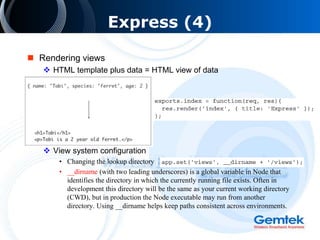
 Rendering views
 HTML template plus data = HTML view of data
 View system configuration
• Changing the lookup directory
• __dirname (with two leading underscores) is a global variable in Node that
identifies the directory in which the currently running file exists. Often in
development this directory will be the same as your current working directory
(CWD), but in production the Node executable may run from another
directory. Using __dirname helps keep paths consistent across environments.
Express (5)
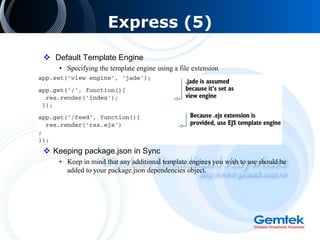
 Default Template Engine
• Specifying the template engine using a file extension
 Keeping package.json in Sync
• Keep in mind that any additional template engines you wish to use should be
added to your package.json dependencies object.
Express (6)
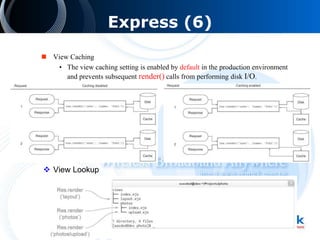
 View Caching
• The view caching setting is enabled by default in the production environment
and prevents subsequent render() calls from performing disk I/O.
 View Lookup
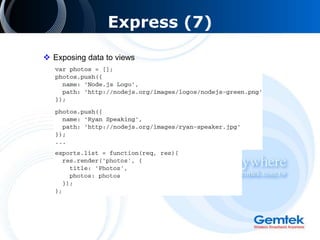
Express (7)
 Exposing data to views
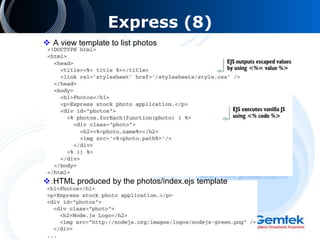
Express (8)
 A view template to list photos
 HTML produced by the photos/index.ejs template
Reference
 eBooks – Node.js in Action
 http://vk.com/doc205367072_271634724
 Code Example
 http://www.manning-source.com/books/cantelon/code_Node.js.zip

Introduction to Node.js

  • 1.
  • 2.
    What is Node.js? A platform built on Chrome’s JavaScript runtime for easily building fast, scalable network applications.  Node.js uses an event-driven, non-blocking I/O model that makes it lightweight and efficient, perfect for data-intensive real- time applications that run across distributed devices.
  • 3.
    Build on JavaScript Developers can write web applications in one language.  Reducing the context switch between client and server development  JSON is a very popular data interchange format today and is native to JavaScript.  JavaScript is the language used in various NoSQL databases  Such as CouchDB and MongoDB  JavaScript is a compilation target, and there are a number of languages that compile to it already.  See the “List of languages that compile to JS”.
  • 4.
    Asynchronous and Event-driven Asynchronous I/O using JavaScript  Node provides an event-driven and asynchronous platform for server-side JavaScript  Take this common snippet of jQuery performing an Ajax request using XMLHttp-Request (XHR ):  Notice that the code was not written like this: $.post('/resource.json', function (data) { console.log(data); }); // script execution continues var data = $.post('/resource.json'); console.log(data);
  • 5.
    An example ofnon-blocking I/O in the browser
  • 6.
    Asynchronous and Event-driven I/O is almost always performed outside of the main event loop, allowing the server to stay efficient and responsive,  Here’s an example of how it looks in PHP :  Execution stops until DB query completes  Implement in Node.js: $result = mysql_query('SELECT * FROM myTable'); print_r($result); db.query('SELECT * FROM myTable', function(err, rows) { if (err) throw err; console.log(rows); // do other thing });
  • 7.
    DIRTy Applications  What’smeant by DIRTy applications, and why they’re a good fit for Node  There actually is an acronym for the types of applications Node is designed for: DIRT  It stands for data-intensive real-time applications  Node itself is very lightweight on I/O  It allows a server to hold a number of connections open while handling many requests and keeping a small memory footprint  Platform vs. framework  Node is a platform for JavaScript applications, and it’s not to be confused with a framework.  A popular framework one for Node called Express
  • 8.
    The lifecycle ofan HTTP request
  • 9.
    HTTP Server Fundamentals A basic HTTP server that responds with “Hello World”  Reading request headers and setting response headers  Setting the status code of an HTTP response var http = require('http'); var server = http.createServer(function(req, res){ res.end('Hello World'); }); server.listen(3000); var body = 'Hello World'; res.setHeader('Content-Length', body.length); res.setHeader('Content-Type', 'text/plain'); res.end(body); var url = 'http://google.com'; var body = ‘<p>Redirecting to <a href=“’ + url + ‘”>’ + url + '</a></p>'; res.setHeader('Location', url); res.setHeader('Content-Length', body.length); res.setHeader('Content-Type', 'text/html'); res.statusCode = 302; res.end(body);
  • 10.
    Building a RESTfulWeb Service  In 2000, representational state transfer (REST) was introduced by Roy Fielding, one of the prominent contributors to the HTTP 1.0 and 1.1 specifications  http://zh.wikipedia.org/wiki/REST  Suppose you want to create a to-do list web service with Node, involving the typical create, read, update, and delete (CRUD) actions  HTTP verbs, such as GET, POST, PUT, and DELETE, are mapped to retrieving, creating, updating, and removing the resources specified by the URL  Each verb will cover a different task for the to-do list:  POST —Add items to the to-do list  GET —Display a listing of the current items, or display the details of a specific item  DELETE —Remove items from the to-do list  PUT —Should modify existing
  • 11.
    CRUD - Create Creating resources with POST requests
  • 12.
    CRUD - Create Concatenating data events to buffer the request body
  • 13.
    CRUD - Read Fetching resources with GET requests  Result:
  • 14.
    CRUD - Delete Removing resources with DELETE requests
  • 15.
    MongoDB (1)  MongoDBis a general-purpose nonrelational database.  A MongoDB database stores documents in collections.  Documents in a collection need not share the same schema— each document could conceivably have a different schema.
  • 16.
    MongoDB (2)  Installthis module using the following npm command.  Connecting to MongoDB  Accessing a MongoDB collection > npm install mongodb var mongodb = require('mongodb'); var server = new mongodb.Server('127.0.0.1', 27017, {}); var client = new mongodb.Db('mydatabase', server, {w: 1}); client.open(function(err) { if (err) throw err; client.collection('test_insert', function(err, collection) { if (err) throw err; console.log('We are now able to perform queries.'); }); });
  • 17.
    MongoDB (3)  Inserta document into a collection  Safe mode – Specifying {safe: true} in a query indicates that you want the database operation to complete before executing the callback. collection.insert( { "title": "I like cake", "body": "It is quite good." }, {safe: true}, function(err, documents) { if (err) throw err; console.log('Document ID is: ' + documents[0]._id); });
  • 18.
    MongoDB (4)  Updating,and deleting var _id = new client.bson_serializer .ObjectID('4e650d344ac74b5a01000001'); collection.update( {_id: _id}, {$set: {"title": "I ate too much cake"}}, {safe: true}, function(err) { if (err) throw err; } ); collection.remove({_id: _id}, {safe: true}, function(err) { if (err) throw err; });
  • 19.
    Express (1)  InstallExpress globally with npm  npm install express  Generate the application  Explore the application and install dependencies
  • 20.
  • 21.
    Express (3)  Expresshas a minimalistic environment-driven configuration system, consisting of five methods, all driven by the NODE_ENV environment variable:  app.configure()  app.set()  app.get()  app.enable()  app.disable()  These environment names are completely arbitrary. For example, you may have development , stage , test , and production , or prod for short.  Using conditionals to set environment-specific options
  • 22.
    Express (4)  Renderingviews  HTML template plus data = HTML view of data  View system configuration • Changing the lookup directory • __dirname (with two leading underscores) is a global variable in Node that identifies the directory in which the currently running file exists. Often in development this directory will be the same as your current working directory (CWD), but in production the Node executable may run from another directory. Using __dirname helps keep paths consistent across environments.
  • 23.
    Express (5)  DefaultTemplate Engine • Specifying the template engine using a file extension  Keeping package.json in Sync • Keep in mind that any additional template engines you wish to use should be added to your package.json dependencies object.
  • 24.
    Express (6)  ViewCaching • The view caching setting is enabled by default in the production environment and prevents subsequent render() calls from performing disk I/O.  View Lookup
  • 25.
  • 26.
    Express (8)  Aview template to list photos  HTML produced by the photos/index.ejs template
  • 27.
    Reference  eBooks –Node.js in Action  http://vk.com/doc205367072_271634724  Code Example  http://www.manning-source.com/books/cantelon/code_Node.js.zip