


Jitendra Zaa
What is Node.js
 Is Light Weight Server
 Used to create scalable network based application
using JavaScript like Syntax
Why Node.js
 Uses same JavaScript engine which is used by Google Chrome
Browser “V8 JavaScript Runtime”.
 Mostly for very Low level network programming
 Very fast because most of modules created in C language
 Single Threaded application
 It is not web development framework and not a complete
replacement of PHP or Ruby like language.
 However, there are few modules available like “Express.js” to
create Single page applications
What's Different about Node.js
 Most expensive job for processor is reading content
from Harddisc (IO Jobs).
 Most programming languages wait for read/write to
complete and then executes next statement.

 Unlike others, node.js executes IO operations
asynchronously and callback method is used to
resume an operation which needs to be completed
after IO.
How to Install
 Install Node.js SDK from http://nodejs.org/
First Program – Hello World
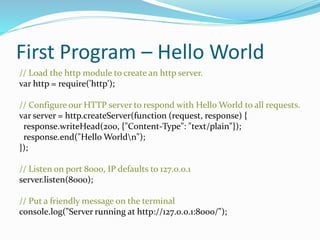
// Load the http module to create an http server.
var http = require('http');
// Configure our HTTP server to respond with Hello World to all requests.
var server = http.createServer(function (request, response) {
response.writeHead(200, {"Content-Type": "text/plain"});
response.end("Hello Worldn");
});
// Listen on port 8000, IP defaults to 127.0.0.1
server.listen(8000);
// Put a friendly message on the terminal
console.log("Server running at http://127.0.0.1:8000/");
Running First Program
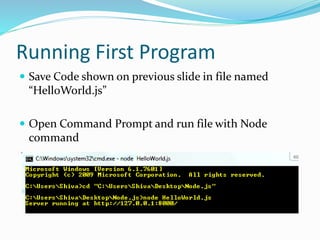
 Save Code shown on previous slide in file named
“HelloWorld.js”
 Open Command Prompt and run file with Node
command
Running First Program (cont)
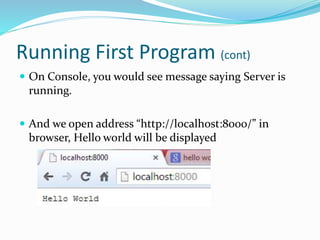
 On Console, you would see message saying Server is
running.
 And we open address “http://localhost:8000/” in
browser, Hello world will be displayed
Creating Web Application
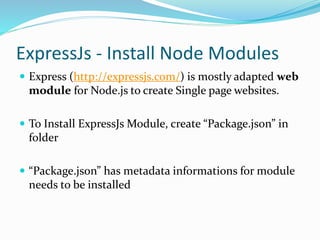
ExpressJs - Install Node Modules
 Express (http://expressjs.com/) is mostly adapted web
module for Node.js to create Single page websites.
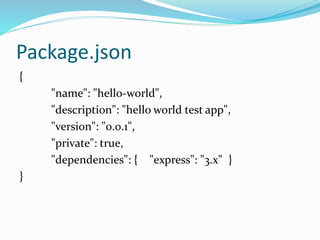
 To Install ExpressJs Module, create “Package.json” in
folder
 “Package.json” has metadata informations for module
needs to be installed
Package.json
{
"name": "hello-world",
"description": "hello world test app",
"version": "0.0.1",
"private": true,
"dependencies": { "express": "3.x" }
}
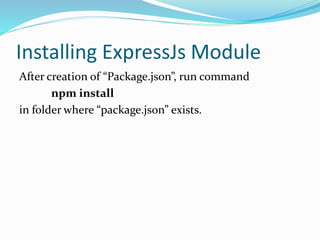
Installing ExpressJs Module
After creation of “Package.json”, run command
npm install
in folder where “package.json” exists.
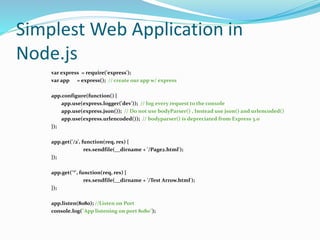
Simplest Web Application in
Node.js
var express = require('express');
var app = express(); // create our app w/ express
app.configure(function() {
app.use(express.logger('dev')); // log every request to the console
app.use(express.json()); // Do not use bodyParser() , Instead use json() and urlencoded()
app.use(express.urlencoded()); // bodyparser() is depreciated from Express 3.0
});
app.get('/2', function(req, res) {
res.sendfile(__dirname + '/Page2.html');
});
app.get('*', function(req, res) {
res.sendfile(__dirname + '/Test Arrow.html');
});
app.listen(8080); //Listen on Port
console.log("App listening on port 8080");
Creating Sample HTML Files
 Save code of previous slide, in file named
“ExpressDemo.js”
 Html File 1 – “Test Arrow.html”
 Html File 2 – “Page2.html”
 Start Node application using command “node
ExpressDemo.js”
Running Web application
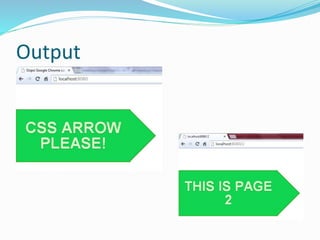
 Initially on navigation at http://localhost:8080/ we will
see content of “Test Arrow.html” file.
 If we change URL with something like
http://localhost:8080/2 , node server will post content
of file “Page2.html”
Output
Thanks !!!

Starting with Node.js

  • 1.
  • 2.
    What is Node.js Is Light Weight Server  Used to create scalable network based application using JavaScript like Syntax
  • 3.
    Why Node.js  Usessame JavaScript engine which is used by Google Chrome Browser “V8 JavaScript Runtime”.  Mostly for very Low level network programming  Very fast because most of modules created in C language  Single Threaded application  It is not web development framework and not a complete replacement of PHP or Ruby like language.  However, there are few modules available like “Express.js” to create Single page applications
  • 4.
    What's Different aboutNode.js  Most expensive job for processor is reading content from Harddisc (IO Jobs).  Most programming languages wait for read/write to complete and then executes next statement.   Unlike others, node.js executes IO operations asynchronously and callback method is used to resume an operation which needs to be completed after IO.
  • 5.
    How to Install Install Node.js SDK from http://nodejs.org/
  • 6.
    First Program –Hello World // Load the http module to create an http server. var http = require('http'); // Configure our HTTP server to respond with Hello World to all requests. var server = http.createServer(function (request, response) { response.writeHead(200, {"Content-Type": "text/plain"}); response.end("Hello Worldn"); }); // Listen on port 8000, IP defaults to 127.0.0.1 server.listen(8000); // Put a friendly message on the terminal console.log("Server running at http://127.0.0.1:8000/");
  • 7.
    Running First Program Save Code shown on previous slide in file named “HelloWorld.js”  Open Command Prompt and run file with Node command
  • 8.
    Running First Program(cont)  On Console, you would see message saying Server is running.  And we open address “http://localhost:8000/” in browser, Hello world will be displayed
  • 9.
  • 10.
    ExpressJs - InstallNode Modules  Express (http://expressjs.com/) is mostly adapted web module for Node.js to create Single page websites.  To Install ExpressJs Module, create “Package.json” in folder  “Package.json” has metadata informations for module needs to be installed
  • 11.
    Package.json { "name": "hello-world", "description": "helloworld test app", "version": "0.0.1", "private": true, "dependencies": { "express": "3.x" } }
  • 12.
    Installing ExpressJs Module Aftercreation of “Package.json”, run command npm install in folder where “package.json” exists.
  • 13.
    Simplest Web Applicationin Node.js var express = require('express'); var app = express(); // create our app w/ express app.configure(function() { app.use(express.logger('dev')); // log every request to the console app.use(express.json()); // Do not use bodyParser() , Instead use json() and urlencoded() app.use(express.urlencoded()); // bodyparser() is depreciated from Express 3.0 }); app.get('/2', function(req, res) { res.sendfile(__dirname + '/Page2.html'); }); app.get('*', function(req, res) { res.sendfile(__dirname + '/Test Arrow.html'); }); app.listen(8080); //Listen on Port console.log("App listening on port 8080");
  • 14.
    Creating Sample HTMLFiles  Save code of previous slide, in file named “ExpressDemo.js”  Html File 1 – “Test Arrow.html”  Html File 2 – “Page2.html”  Start Node application using command “node ExpressDemo.js”
  • 15.
    Running Web application Initially on navigation at http://localhost:8080/ we will see content of “Test Arrow.html” file.  If we change URL with something like http://localhost:8080/2 , node server will post content of file “Page2.html”
  • 16.
  • 17.