

LEARN THE BASICS
                            OF PHOTOSHOP
                             Tips on being a savvy photoshop user

                                      Don't work for Photoshop...
                                             have it work for you.

                                                         Jay Ramirez
                                                  designedbyjay.com
                                                    @designedbyjay


Wednesday, August 8, 12
WHAT’S ON THE
           AGENDA FOR TODAY?


                               Learn some of the basics
                               Explore the interface
                               Have fun creating
                               Learn some shortcuts


Wednesday, August 8, 12
WHAT ARE SIMPLE TASKS
        YOU COULD GET DONE
        IN PHOTOSHOP?
                          PS is the leading software to...

                                   Create comps of many different photos
                                   Make collages of your favorite photos

                                   Retouch photos
                                   Brighten or darken, crop or resize photos.

                                   Create user interface design
                                   Mockup the app of your dreams.

                                   ... and of course much more.


Wednesday, August 8, 12
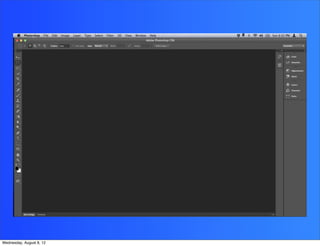
LET’S GET STARTED AND SEE
         WHAT PHOTOSHOP LOOKS LIKE


Wednesday, August 8, 12
WHAT SHOULD I DO AFTER
         INSTALLING THE SOFTWARE?

         THINGS TO LOOK OUT FOR:
                                   Enabling auto select
                                   Clicking show transform controls
                                   Finding and adjust palettes
                                   Open projects as tabs or not?


Wednesday, August 8, 12
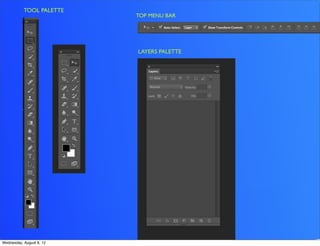
TOOL PALETTE
                          TOP MENU BAR


                          LAYERS PALETTE


Wednesday, August 8, 12
WHAT’S A PRACTICAL WAY
             TO SEE A PHOTOSHOP
             DOCUMENT IN REAL LIFE?


Wednesday, August 8, 12
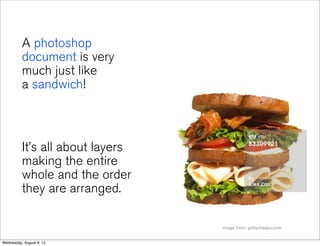
A photoshop
          document is very
          much just like
          a sandwich!


          It’s all about layers
          making the entire
          whole and the order
          they are arranged.

                                  image from: gettyimages.com


Wednesday, August 8, 12
WHAT CAN I DO TO
             MAKE THINGS EASIER FOR ME?

               Readjust location of different palettes
               Save a workspace that works best for you
               Reset a workspace


Wednesday, August 8, 12
EXERCISE   1
                          LET’S SETUP A WORKSPACE
                          THAT WORKS FOR YOU


Wednesday, August 8, 12
2   EXERCISE

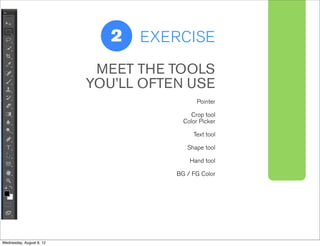
                           MEET THE TOOLS
                          YOU’LL OFTEN USE
                                            Pointer

                                         Crop tool
                                       Color Picker

                                          Text tool

                                        Shape tool

                                         Hand tool

                                     BG / FG Color


Wednesday, August 8, 12
2

                      EXERCISE             3

                          exercise three
                          crop a photo


Wednesday, August 8, 12
????????????
 ????????????
                          HOW DO YOU
                          RESIZE PHOTOS?

 ????????????
 ????????????
Wednesday, August 8, 12
ADJUST
                          COLOR


Wednesday, August 8, 12
LEARN YOUR
                          SHORTCUTS

                          trust me – it helps.


Wednesday, August 8, 12
DO YOURSELF A FAVOR –

                NAME YOUR LAYERS
                & STAY ORGANIZED


Wednesday, August 8, 12
it helps because...


Wednesday, August 8, 12
makes it easier for you.
                ie:       (10 days later you won’t remember half the things you did)


                ... and for others opening
                up your PSD file.


Wednesday, August 8, 12
Group items that
                belong together


                Collect and merge layers
                to avoid confusion


Wednesday, August 8, 12
final thoughts

           Experimentation is key. Have a lot of patience!
           You’ll learn PS really well once you allow yourself
           to be wrong, catch your mistakes and give it
           another go. Don’t heavily rely on tutorials online.
           Focus on getting more oriented within the
           interface (software screen) and how to get simple
           things done.


Wednesday, August 8, 12
2


Wednesday, August 8, 12

Intro to Photoshop Basics

  • 1.
    LEARN THE BASICS OF PHOTOSHOP Tips on being a savvy photoshop user Don't work for Photoshop... have it work for you. Jay Ramirez designedbyjay.com @designedbyjay Wednesday, August 8, 12
  • 2.
    WHAT’S ON THE AGENDA FOR TODAY? Learn some of the basics Explore the interface Have fun creating Learn some shortcuts Wednesday, August 8, 12
  • 3.
    WHAT ARE SIMPLETASKS YOU COULD GET DONE IN PHOTOSHOP? PS is the leading software to... Create comps of many different photos Make collages of your favorite photos Retouch photos Brighten or darken, crop or resize photos. Create user interface design Mockup the app of your dreams. ... and of course much more. Wednesday, August 8, 12
  • 4.
    LET’S GET STARTEDAND SEE WHAT PHOTOSHOP LOOKS LIKE Wednesday, August 8, 12
  • 5.
  • 6.
    WHAT SHOULD IDO AFTER INSTALLING THE SOFTWARE? THINGS TO LOOK OUT FOR: Enabling auto select Clicking show transform controls Finding and adjust palettes Open projects as tabs or not? Wednesday, August 8, 12
  • 7.
    TOOL PALETTE TOP MENU BAR LAYERS PALETTE Wednesday, August 8, 12
  • 8.
    WHAT’S A PRACTICALWAY TO SEE A PHOTOSHOP DOCUMENT IN REAL LIFE? Wednesday, August 8, 12
  • 9.
    A photoshop document is very much just like a sandwich! It’s all about layers making the entire whole and the order they are arranged. image from: gettyimages.com Wednesday, August 8, 12
  • 10.
    WHAT CAN IDO TO MAKE THINGS EASIER FOR ME? Readjust location of different palettes Save a workspace that works best for you Reset a workspace Wednesday, August 8, 12
  • 11.
    EXERCISE 1 LET’S SETUP A WORKSPACE THAT WORKS FOR YOU Wednesday, August 8, 12
  • 12.
    2 EXERCISE MEET THE TOOLS YOU’LL OFTEN USE Pointer Crop tool Color Picker Text tool Shape tool Hand tool BG / FG Color Wednesday, August 8, 12
  • 13.
    2 EXERCISE 3 exercise three crop a photo Wednesday, August 8, 12
  • 14.
    ???????????? ???????????? HOW DO YOU RESIZE PHOTOS? ???????????? ???????????? Wednesday, August 8, 12
  • 15.
    ADJUST COLOR Wednesday, August 8, 12
  • 16.
    LEARN YOUR SHORTCUTS trust me – it helps. Wednesday, August 8, 12
  • 17.
    DO YOURSELF AFAVOR – NAME YOUR LAYERS & STAY ORGANIZED Wednesday, August 8, 12
  • 18.
  • 19.
    makes it easierfor you. ie: (10 days later you won’t remember half the things you did) ... and for others opening up your PSD file. Wednesday, August 8, 12
  • 20.
    Group items that belong together Collect and merge layers to avoid confusion Wednesday, August 8, 12
  • 21.
    final thoughts Experimentation is key. Have a lot of patience! You’ll learn PS really well once you allow yourself to be wrong, catch your mistakes and give it another go. Don’t heavily rely on tutorials online. Focus on getting more oriented within the interface (software screen) and how to get simple things done. Wednesday, August 8, 12
  • 22.