Information Technology Introduction to Computers
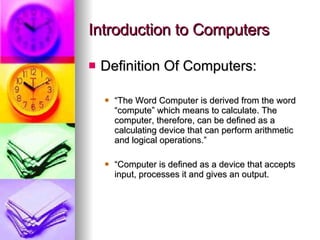
Introduction to Computers Definition Of Computers: “ The Word Computer is derived from the word “compute” which means to calculate. The computer, therefore, can be defined as a calculating device that can perform arithmetic and logical operations.” “ Computer is defined as a device that accepts input, processes it and gives an output.
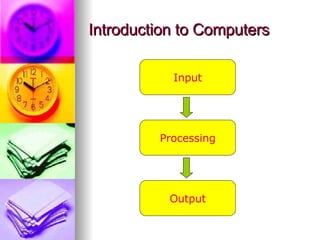
Introduction to Computers Input Processing Output
Types of Computers Analog Computers Digital Computers Hybrid Computers
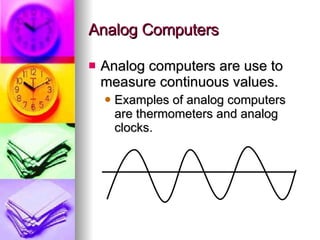
Analog Computers Analog computers are use to measure continuous values. Examples of analog computers are thermometers and analog clocks.
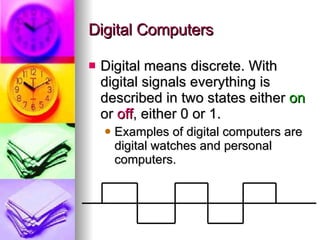
Digital Computers Digital means discrete. With digital signals everything is described in two states either  on  or  off , either 0 or 1. Examples of digital computers are digital watches and personal computers.
Classification of Digital Computers Super Computers Mainframe Computers Mini Computers Micro Computers/PC
Super Computers Super Computers are the largest, the fastest and the most expensive computers in the world. They handle huge amounts of data and can perform more than one trillion calculations per second. They are used in weather forecasting, and modeling complex processes like nuclear fission.
Mainframe Computers They are based on the principle of strong physical computing power. They are sensitive to variations in temperature and environment. They have a large storage capacity. They can use a wide range of software.
Mini Computers They were introduced in the 60’s. They have less capacity as compared to mainframes. They provide facility of direct operation. They were mainly used for data processing and in industry.
Micro Computers They are commonly used nowadays. They are cheap and easy to use. They have limited input and output capacity. They are self-contained units and are to be used by one person.
Types of Micro Computers Desktop Computers Laptop Computers Palmtop Computers
Desktop Computers Single user machines. They can fit on a desk. They can be interconnected to form a network. Their speed depends upon the processor. They are cheaper and sold in millions.
Laptop Computers They are small, mobile personal computers that can fit in your lap. They weigh from one to three Kg. They are also called Notebooks. They run on a battery or from an external AC/DC adapter that can charge the laptop or supply the computer by itself.
Palmtop Computers These are computing devices small enough to fit in your palm. A Personal Digital Assistant is a popular type of a palmtop. Palmtops are also known as handled PCs. They are commonly used for taking notes, e-mails and telephony.
Hybrid Computers They are combinations of analog and digital computers. They demonstrate qualities of both analog and digital computers. An example is cement plants.

Intro to IT

  • 1.
  • 2.
    Introduction to ComputersDefinition Of Computers: “ The Word Computer is derived from the word “compute” which means to calculate. The computer, therefore, can be defined as a calculating device that can perform arithmetic and logical operations.” “ Computer is defined as a device that accepts input, processes it and gives an output.
  • 3.
    Introduction to ComputersInput Processing Output
  • 4.
    Types of ComputersAnalog Computers Digital Computers Hybrid Computers
  • 5.
    Analog Computers Analogcomputers are use to measure continuous values. Examples of analog computers are thermometers and analog clocks.
  • 6.
    Digital Computers Digitalmeans discrete. With digital signals everything is described in two states either on or off , either 0 or 1. Examples of digital computers are digital watches and personal computers.
  • 7.
    Classification of DigitalComputers Super Computers Mainframe Computers Mini Computers Micro Computers/PC
  • 8.
    Super Computers SuperComputers are the largest, the fastest and the most expensive computers in the world. They handle huge amounts of data and can perform more than one trillion calculations per second. They are used in weather forecasting, and modeling complex processes like nuclear fission.
  • 9.
    Mainframe Computers Theyare based on the principle of strong physical computing power. They are sensitive to variations in temperature and environment. They have a large storage capacity. They can use a wide range of software.
  • 10.
    Mini Computers Theywere introduced in the 60’s. They have less capacity as compared to mainframes. They provide facility of direct operation. They were mainly used for data processing and in industry.
  • 11.
    Micro Computers Theyare commonly used nowadays. They are cheap and easy to use. They have limited input and output capacity. They are self-contained units and are to be used by one person.
  • 12.
    Types of MicroComputers Desktop Computers Laptop Computers Palmtop Computers
  • 13.
    Desktop Computers Singleuser machines. They can fit on a desk. They can be interconnected to form a network. Their speed depends upon the processor. They are cheaper and sold in millions.
  • 14.
    Laptop Computers Theyare small, mobile personal computers that can fit in your lap. They weigh from one to three Kg. They are also called Notebooks. They run on a battery or from an external AC/DC adapter that can charge the laptop or supply the computer by itself.
  • 15.
    Palmtop Computers Theseare computing devices small enough to fit in your palm. A Personal Digital Assistant is a popular type of a palmtop. Palmtops are also known as handled PCs. They are commonly used for taking notes, e-mails and telephony.
  • 16.
    Hybrid Computers Theyare combinations of analog and digital computers. They demonstrate qualities of both analog and digital computers. An example is cement plants.