

An Introduction to the Spiceworks Help Desk
Jacqueline Gross
Development Manager, Inventory and Integrations, Spiceworks
Why Use a Help Desk?
• Keep track of work
• Keep users informed
• Build the business case
• Capture knowledge
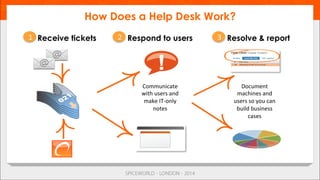
How Does a Help Desk Work?
Receive tickets Resolve & reportRespond to users
Communicate	
  
with	
  users	
  and	
  
make	
  IT-­‐only	
  
notes	
  
Document	
  
machines	
  and	
  
users	
  so	
  you	
  can	
  
build	
  business	
  
cases	
  
21 3
• Live overview of the Help Desk
•  Hopefully it goes smoothly
•  No fallback plan
• Another bullet because you’re not supposed to have just one
Let’s Look at the Help Desk
• Roles
•  Admin
•  Help Desk Admin
•  Help Desk Tech
• Why have Help Desk Roles?
•  Restrict the visibility of tickets (based on the role)
•  Restricts what the User can do
Help Desk Roles
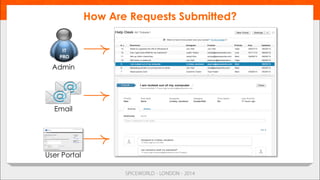
How Are Requests Submitted?
IT	
  
PRO	
  
Admin
Email
User Portal
• A way to provide information to your users
•  Brand and customize your portal
•  Control the content to meet user‘s needs
• Allows users to keep track of their tickets
• Use Knowledge Base articles to help users help themselves
• Single sign-on available with Active Directory Configuration
• Let’s look….(demo)
The User Portal
• Plugins
• Help Desk Responses
• Ticket Checklists
• Ticket Views and Ticket Rules
• Built in
• Must be enabled
• Tickets Anywhere
• Email
• http://community.spiceworks.com/help/Tickets_Anywhere
Things to Make Using the Help Desk Better
• Why use reports?
• Show what team has accomplished
• See trends
• Many ways to get reports
• Shipped with Spiceworks
• Shared in the Community
• Write your own
• Reporting User to allow others to just do reports
Reporting
Intro to the Spiceworks Help Desk

Intro to the Spiceworks Help Desk

  • 1.
    An Introduction tothe Spiceworks Help Desk Jacqueline Gross Development Manager, Inventory and Integrations, Spiceworks
  • 2.
    Why Use aHelp Desk? • Keep track of work • Keep users informed • Build the business case • Capture knowledge
  • 3.
    How Does aHelp Desk Work? Receive tickets Resolve & reportRespond to users Communicate   with  users  and   make  IT-­‐only   notes   Document   machines  and   users  so  you  can   build  business   cases   21 3
  • 4.
    • Live overview ofthe Help Desk •  Hopefully it goes smoothly •  No fallback plan • Another bullet because you’re not supposed to have just one Let’s Look at the Help Desk
  • 5.
    • Roles •  Admin •  HelpDesk Admin •  Help Desk Tech • Why have Help Desk Roles? •  Restrict the visibility of tickets (based on the role) •  Restricts what the User can do Help Desk Roles
  • 6.
    How Are RequestsSubmitted? IT   PRO   Admin Email User Portal
  • 7.
    • A way toprovide information to your users •  Brand and customize your portal •  Control the content to meet user‘s needs • Allows users to keep track of their tickets • Use Knowledge Base articles to help users help themselves • Single sign-on available with Active Directory Configuration • Let’s look….(demo) The User Portal
  • 8.
    • Plugins • Help Desk Responses • TicketChecklists • Ticket Views and Ticket Rules • Built in • Must be enabled • Tickets Anywhere • Email • http://community.spiceworks.com/help/Tickets_Anywhere Things to Make Using the Help Desk Better
  • 9.
    • Why use reports? • Showwhat team has accomplished • See trends • Many ways to get reports • Shipped with Spiceworks • Shared in the Community • Write your own • Reporting User to allow others to just do reports Reporting