


Peter Tsai
Spiceworks IT Content Dude
Group Policy Management
With Special Guest:
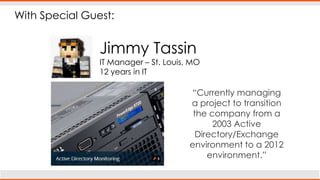
Jimmy Tassin
IT Manager – St. Louis, MO
12 years in IT
“Currently managing
a project to transition
the company from a
2003 Active
Directory/Exchange
environment to a 2012
environment.”
With Special Guest:
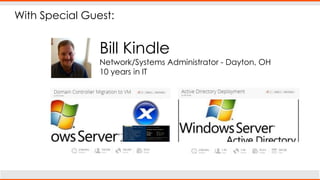
Bill Kindle
Network/Systems Administrator - Dayton, OH
10 years in IT
What is Group Policy?
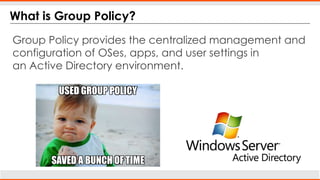
Group Policy provides the centralized management and
configuration of OSes, apps, and user settings in
an Active Directory environment.
USED GROUP POLICY
SAVED A BUNCH OF TIME
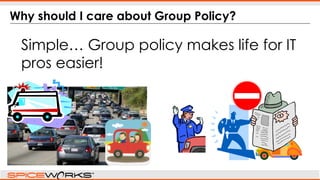
Why should I care about Group Policy?
Simple… Group policy makes life for IT
pros easier!
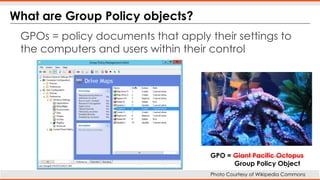
What are Group Policy objects?
GPOs = policy documents that apply their settings to
the computers and users within their control
GPO = Giant Pacific Octopus
Group Policy Object
Photo Courtesy of Wikipedia Commons
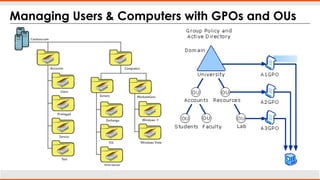
Managing Users & Computers with GPOs and OUs
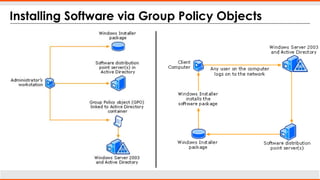
Installing Software via Group Policy Objects
Group Policy Tips + Best Practices
SAVING YOUR BACON
Continue the discussion:
Software Deployment in Active
Directory using GPOs & MSIs
Active Directory & Group Policy
Discussion Group
Continue the discussion:
Spotlight on IT: The inner workings
of Group Policy
Mitigate Zero Day Exploits using Group
Policy to Deny Access
Questions?

Group Policy Management Makes Your Life Easier

  • 1.
    Peter Tsai Spiceworks ITContent Dude Group Policy Management
  • 2.
    With Special Guest: JimmyTassin IT Manager – St. Louis, MO 12 years in IT “Currently managing a project to transition the company from a 2003 Active Directory/Exchange environment to a 2012 environment.”
  • 3.
    With Special Guest: BillKindle Network/Systems Administrator - Dayton, OH 10 years in IT
  • 4.
    What is GroupPolicy? Group Policy provides the centralized management and configuration of OSes, apps, and user settings in an Active Directory environment. USED GROUP POLICY SAVED A BUNCH OF TIME
  • 5.
    Why should Icare about Group Policy? Simple… Group policy makes life for IT pros easier!
  • 6.
    What are GroupPolicy objects? GPOs = policy documents that apply their settings to the computers and users within their control GPO = Giant Pacific Octopus Group Policy Object Photo Courtesy of Wikipedia Commons
  • 7.
    Managing Users &Computers with GPOs and OUs
  • 8.
    Installing Software viaGroup Policy Objects
  • 9.
    Group Policy Tips+ Best Practices SAVING YOUR BACON
  • 10.
    Continue the discussion: SoftwareDeployment in Active Directory using GPOs & MSIs Active Directory & Group Policy Discussion Group
  • 11.
    Continue the discussion: Spotlighton IT: The inner workings of Group Policy Mitigate Zero Day Exploits using Group Policy to Deny Access
  • 12.

Editor's Notes

  • #2 IT Security is a bigger concern than ever and there’s always the issue of managing your many users. Group Policy is a feature of Active directory that both helps keep the bad guys out, and the good guys in AND it helps you keep users from overstepping their boundaries and causing you headaches! Today, we’ll share group policy best practices and learn tips from a couple of the top SpiceHeads in our community.
  • #10 So…. Back to our original point - how can Group Policy save your bacon?You know that zero day Internet Explorer Flash exploit that everyone has been making a big deal about this week? The one where hackers are targeting companies with valuable information and trying to get them to click on malicious links? Well, Group policy can be used to protect all of your users against this threat!How you ask? Well you can disable the Flash plugin for Internet Explorer in a Group Policy object, then apply it to all computers.But wait, there’s another way to use Group Policy to save your bacon against this exploit. SpiceHead “spiceuser” detailed a way to deny file access to a specific DLL file that the exploit needs to work, specifically VGX.dll in a GPO, then applying the object to all users. Then he instructs everyone to run GPUPDATE like I mentioned earlier… and Voila! Threat neutralized across however many computers you have in your environment.Let’s get back to our special guests for other GPO best practices…What are your top tips for managing users or computers using GPOs?What Is the coolest thing you have done using GPOs?What is a caveat that you have to remember with GPO?Do you want to have a lot of GPOs with only a few settings, or do you want to have fewer GPOs that encompass a ton of settings?Bill, how are Virtual machines useful when testing out Group Policy changes?