2 December 2005
Information Visualisation
Interaction
Prof. Beat Signer
Department of Computer Science
Vrije Universiteit Brussel
beatsigner.com
Beat Signer - Department of Computer Science - bsigner@vub.ac.be 2
April 29, 2021
Interaction
▪ Interactivity is necessary for vis tools handling complexity
▪ limitations of people and displays make it impossible to show a
large dataset at once
▪ change level of details
▪ show different aspects of a dataset
▪ different representations and summaries of data
▪ different presentations of data
Beat Signer - Department of Computer Science - bsigner@vub.ac.be 3
April 29, 2021
Handling Visual Complexity
▪ There a 5 major approaches for dealing with
visual complexity
▪ deriving new data to be shown in a view
▪ view manipulation (single view)
▪ reduction (items or attributes)
▪ faceting into multiple views
▪ embed: focus+context (single view)
Beat Signer - Department of Computer Science - bsigner@vub.ac.be 4
April 29, 2021
Facet Into Multiple Views
Beat Signer - Department of Computer Science - bsigner@vub.ac.be 5
April 29, 2021
Facet Into Multiple Views …
Beat Signer - Department of Computer Science - bsigner@vub.ac.be 6
April 29, 2021
Facet Into Multiple Views …
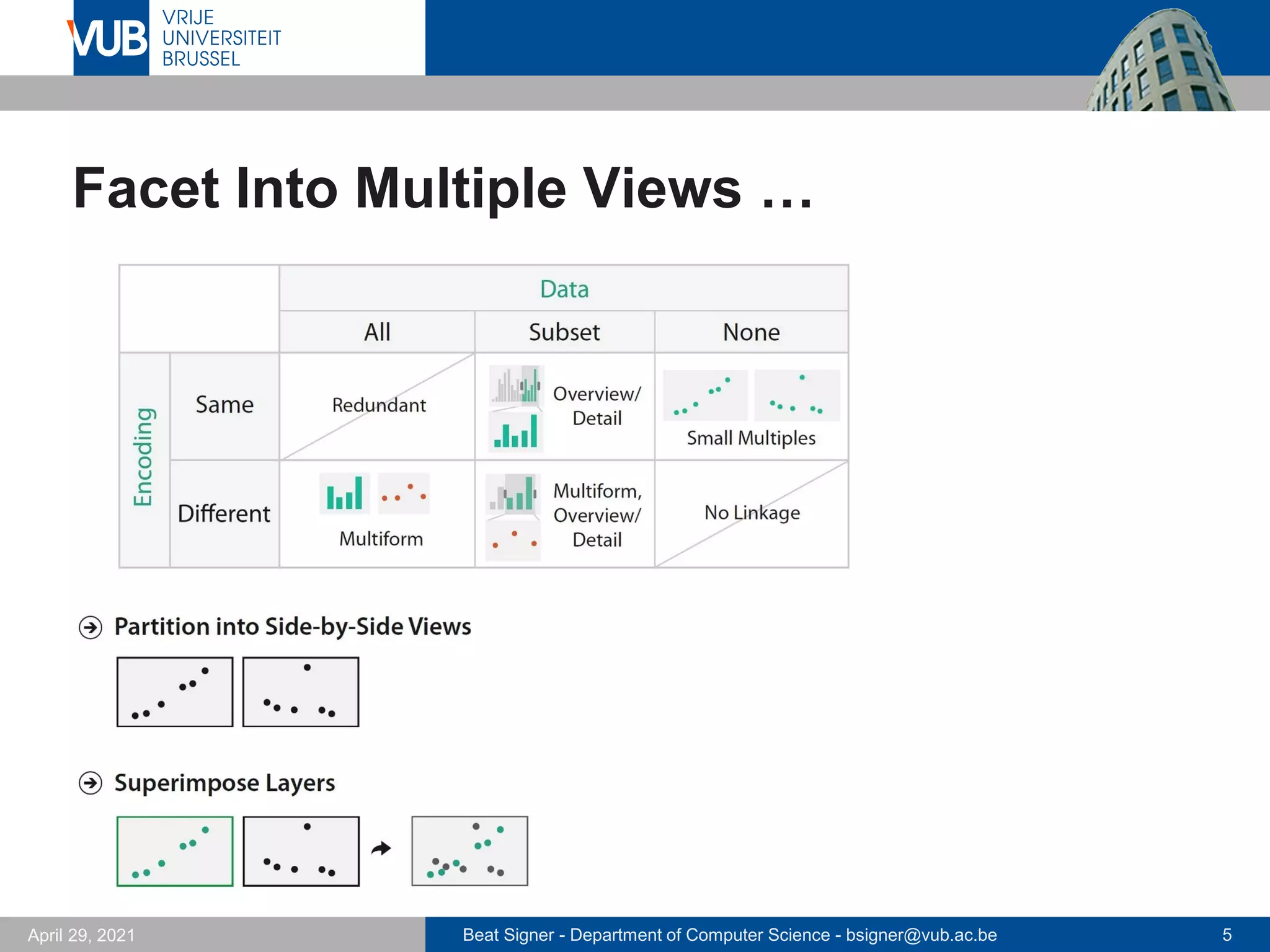
▪ Faceting information into multiple views to deal with
visual complexity
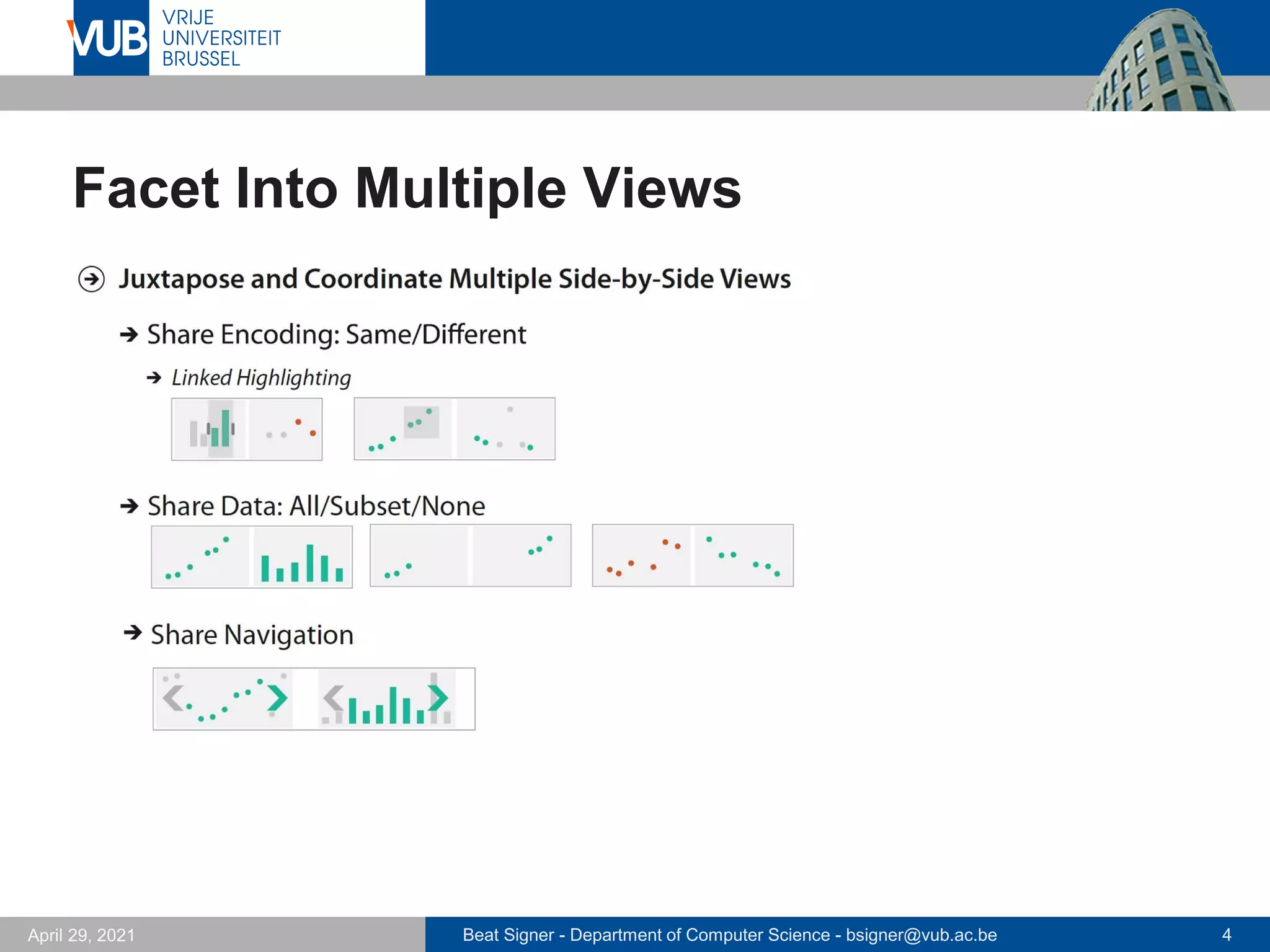
▪ Juxtapose views side by side
▪ coordination of views to create linked views (multiple views)
- sharing of encoding
- sharing of data
- synchronisation of navigation
▪ arrangement of views
▪ when to show views
▪ Superimpose views as layers
▪ partitioning of elements between layers
▪ number of layers
▪ …
Beat Signer - Department of Computer Science - bsigner@vub.ac.be 7
April 29, 2021
Sharing of Encoding
▪ Shared encoding views
▪ all channels handled the same for an identical visual encoding
▪ Multiform views (multiple views)
▪ some aspects of the visual encoding different between views
▪ each view might show a subset of attributes to avoid visual clutter
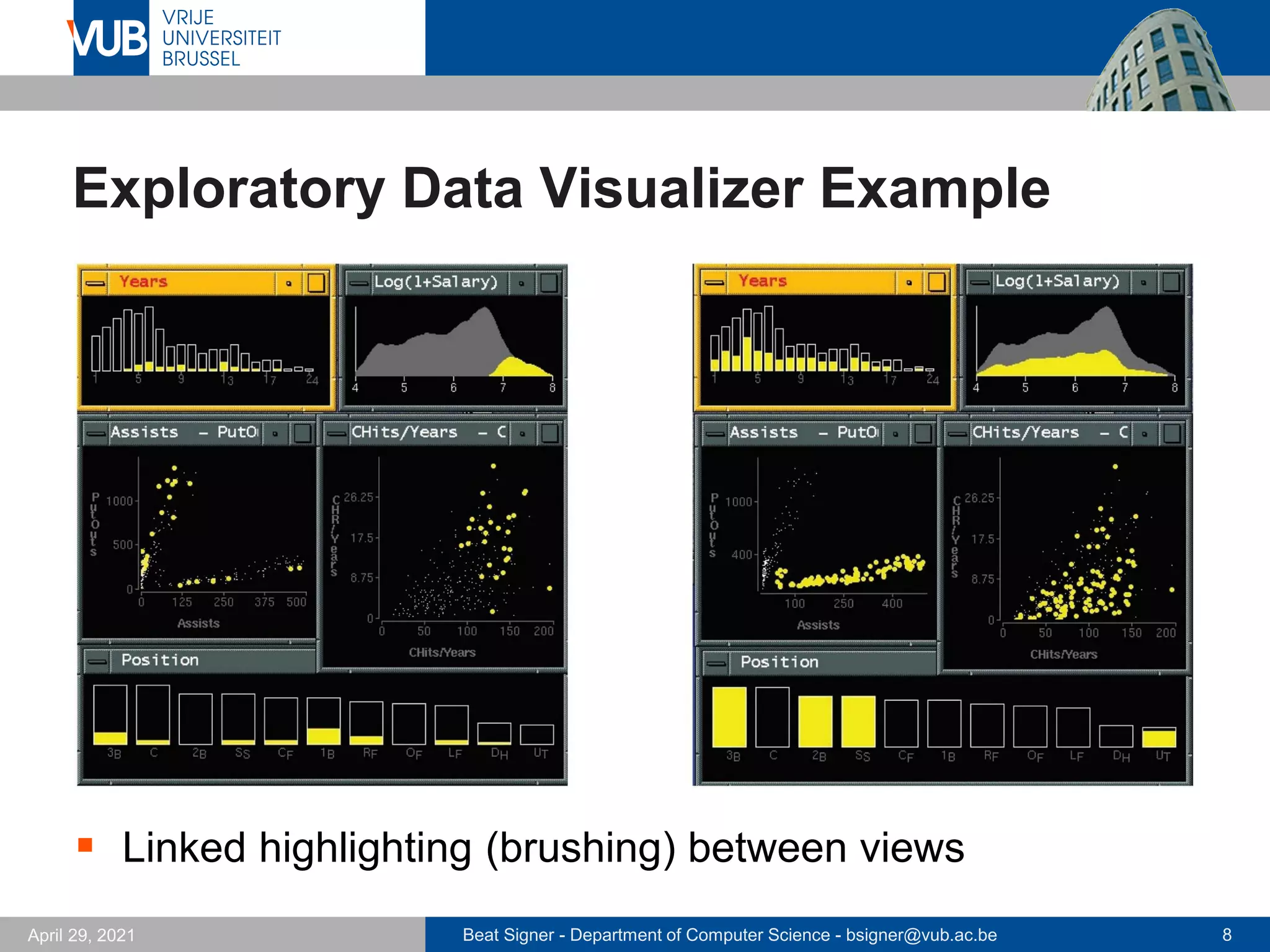
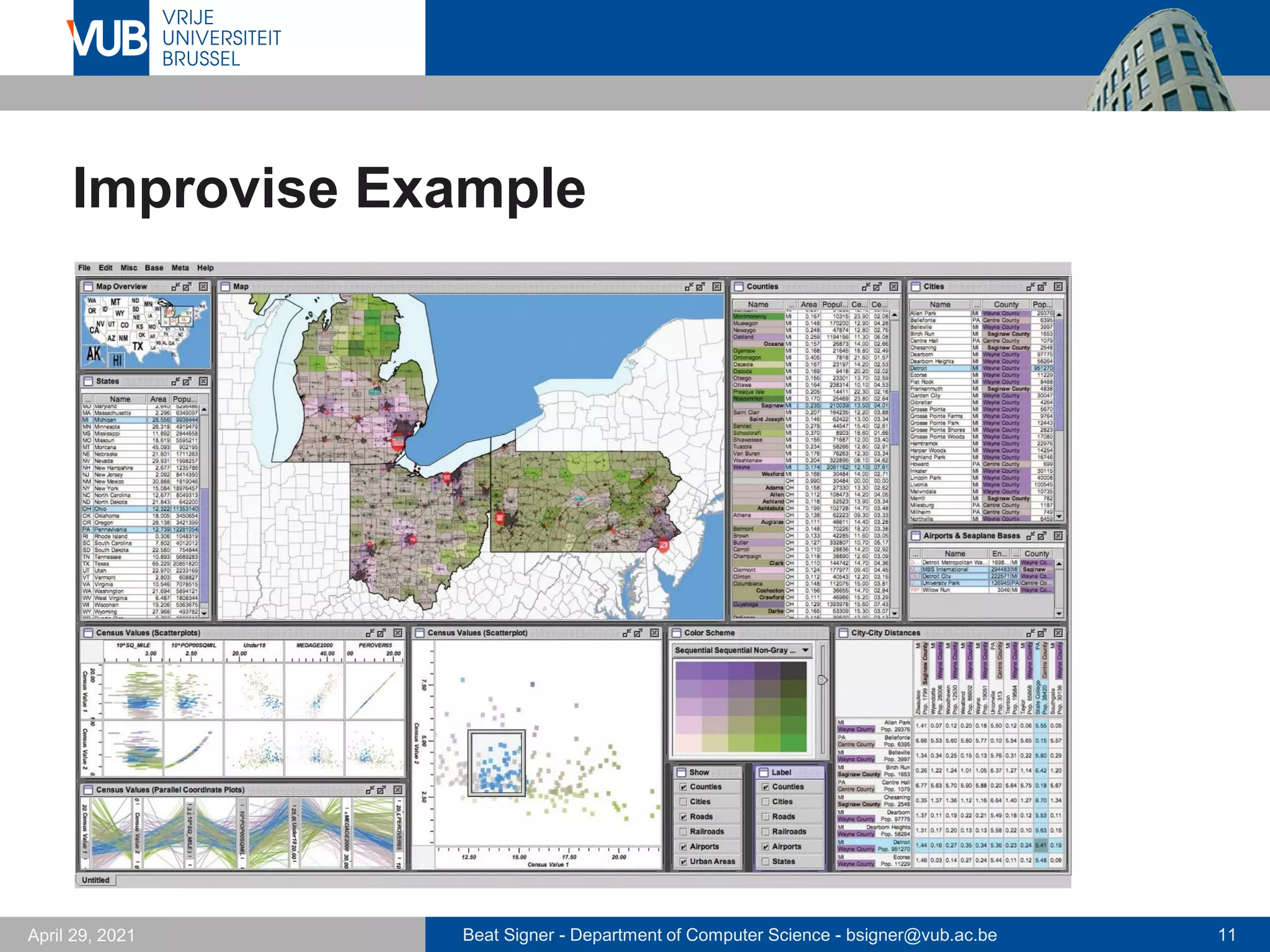
▪ Linked highlighting (brushing)
▪ items interactively selected in one view are highlighted with the
same colour in all other views
- see how region that is continous in one view is distributed in another
Beat Signer - Department of Computer Science - bsigner@vub.ac.be 8
April 29, 2021
Exploratory Data Visualizer Example
▪ Linked highlighting (brushing) between views
Beat Signer - Department of Computer Science - bsigner@vub.ac.be 9
April 29, 2021
Sharing of Data
▪ Shared data
▪ each view shows all the data
▪ Overview-detail (subset)
▪ one view shows entire dataset (overview) and another view
shows detailed information about a selected subset of the data
▪ different possible combinations of views
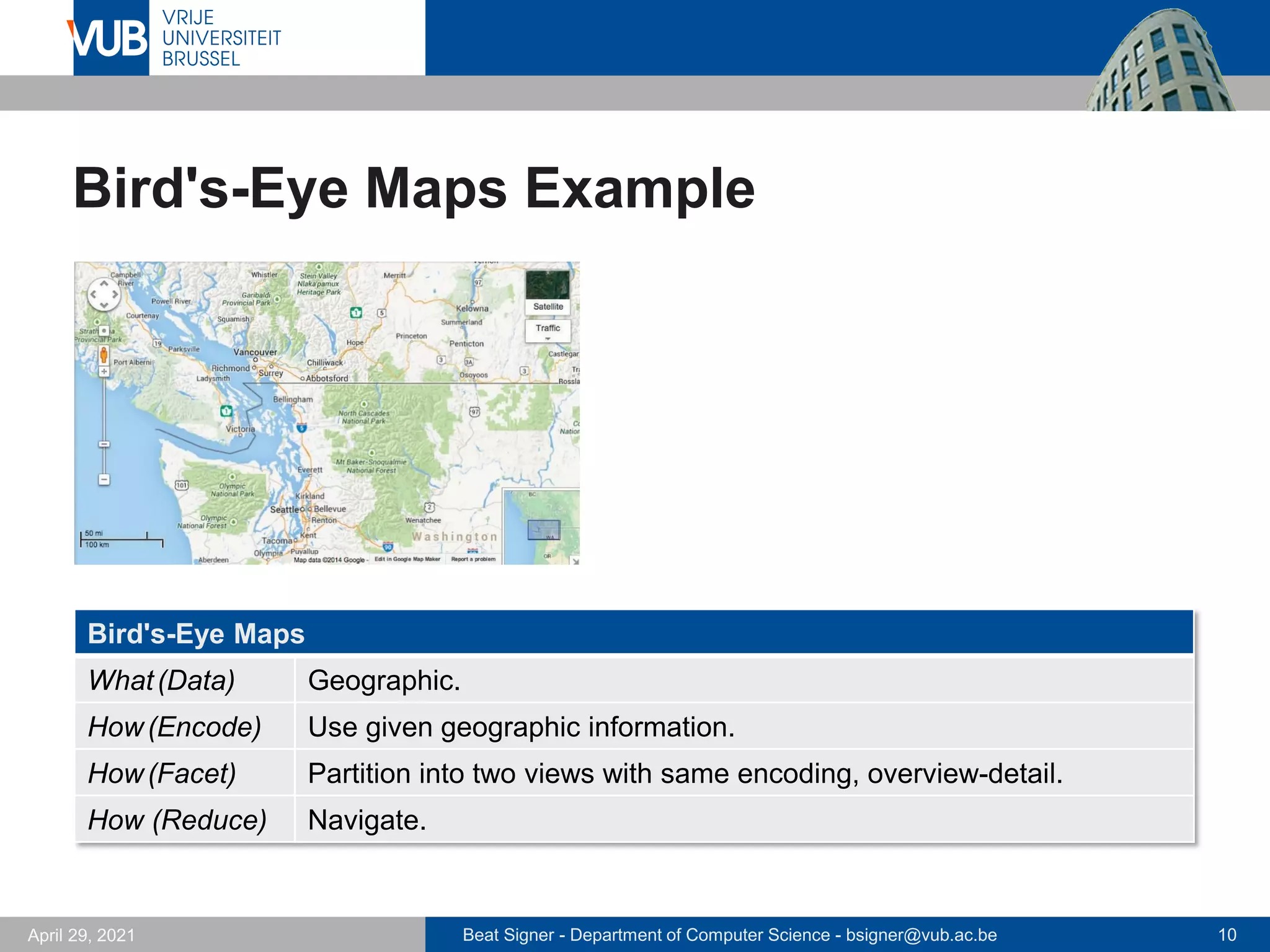
- subset data and shared encoding (e.g. bird's-eye map)
- multiform views (e.g. details-on-demand view)
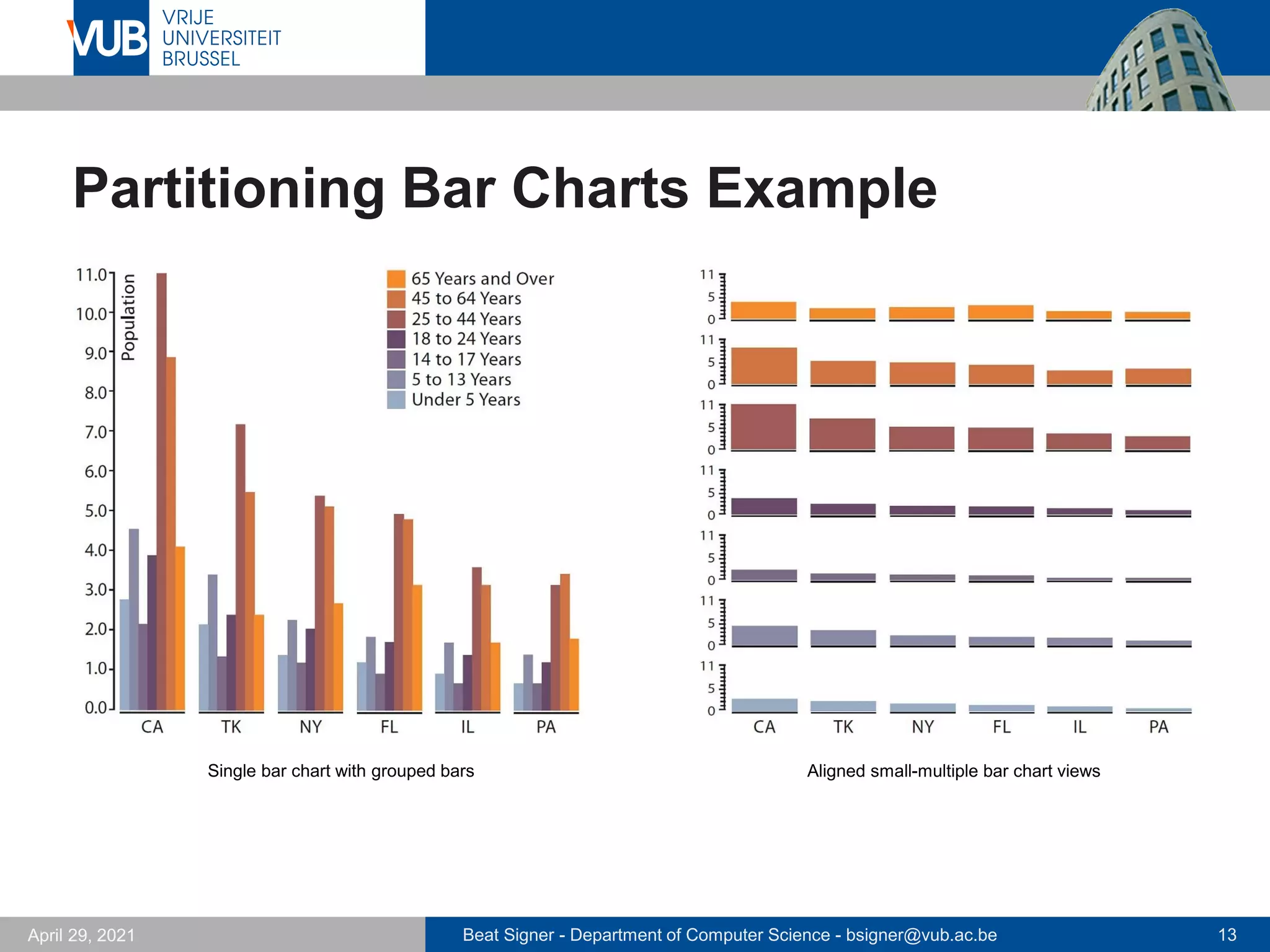
▪ Small multiples
▪ multiple views with same visual encoding but different partitions of
the data
- often aligned in matrix to support comparison between datasets
- limited screen estate to show many views next to each other
Beat Signer - Department of Computer Science - bsigner@vub.ac.be 10
April 29, 2021
Bird's-Eye Maps Example
Bird's-Eye Maps
What(Data) Geographic.
How(Encode) Use given geographic information.
How(Facet) Partition into two views with same encoding, overview-detail.
How (Reduce) Navigate.
Beat Signer - Department of Computer Science - bsigner@vub.ac.be 11
April 29, 2021
Improvise Example
Beat Signer - Department of Computer Science - bsigner@vub.ac.be 12
April 29, 2021
Partition Into Views
▪ Divide data up between views based on attributes
▪ partitioning attribute typically a categorical variable with limited
number of values (levels)
▪ List alignment or matrix alignment
▪ Recursive subdivision
▪ partitioning used in an exploratory way
▪ user can reconfigure the display to see different choices of
partitioning variables
Beat Signer - Department of Computer Science - bsigner@vub.ac.be 13
April 29, 2021
Partitioning Bar Charts Example
Single bar chart with grouped bars Aligned small-multiple bar chart views
Beat Signer - Department of Computer Science - bsigner@vub.ac.be 14
April 29, 2021
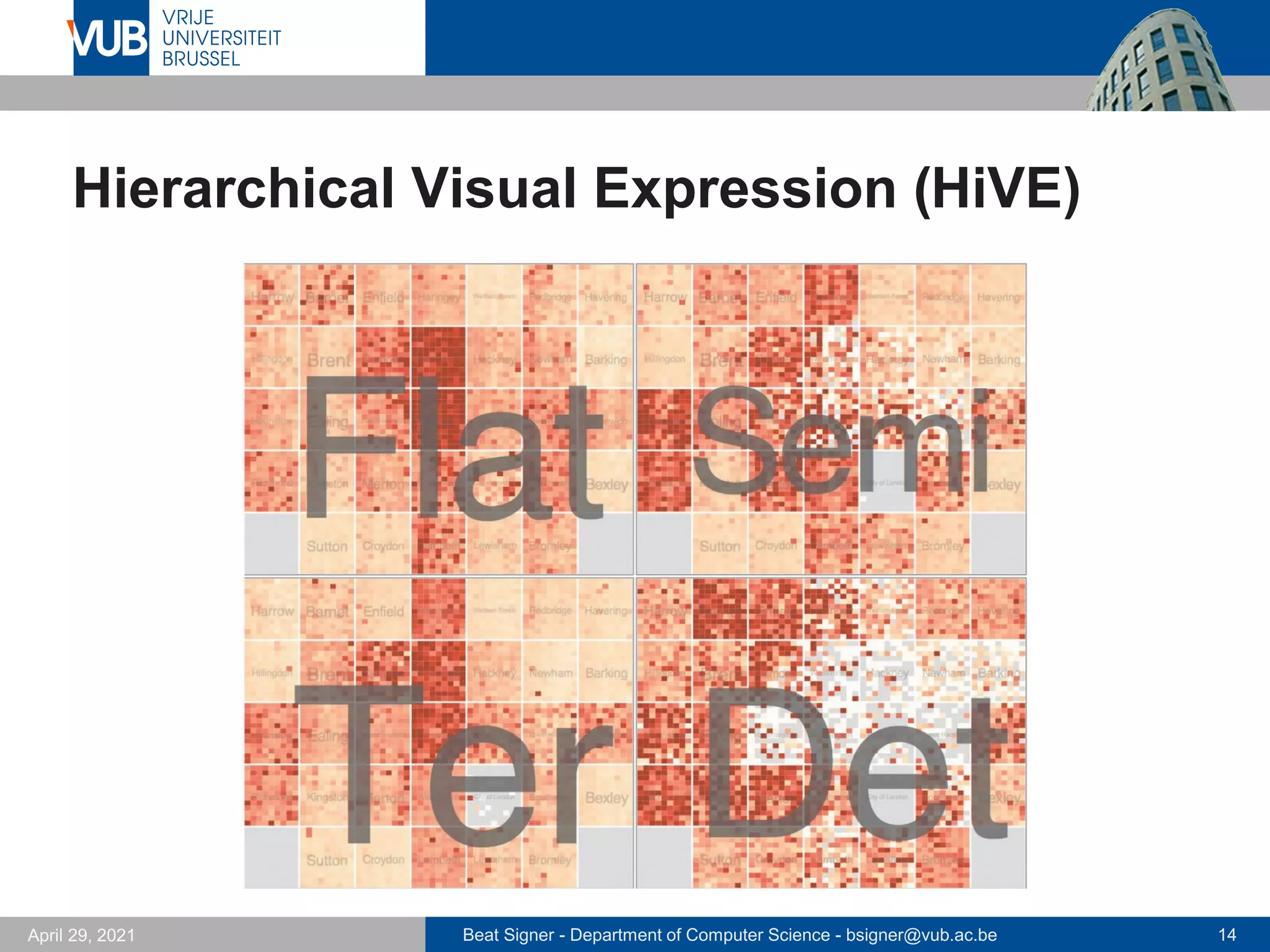
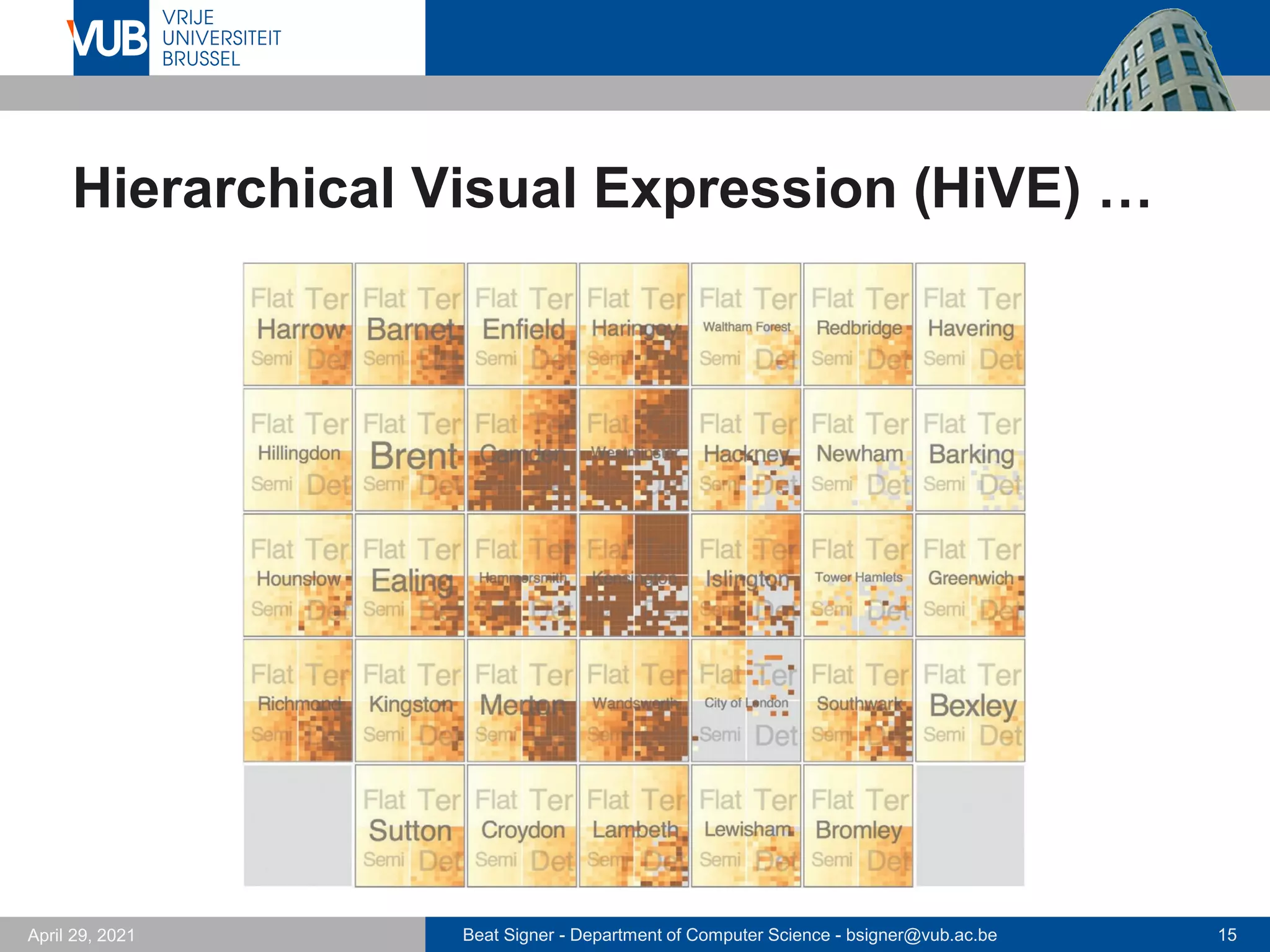
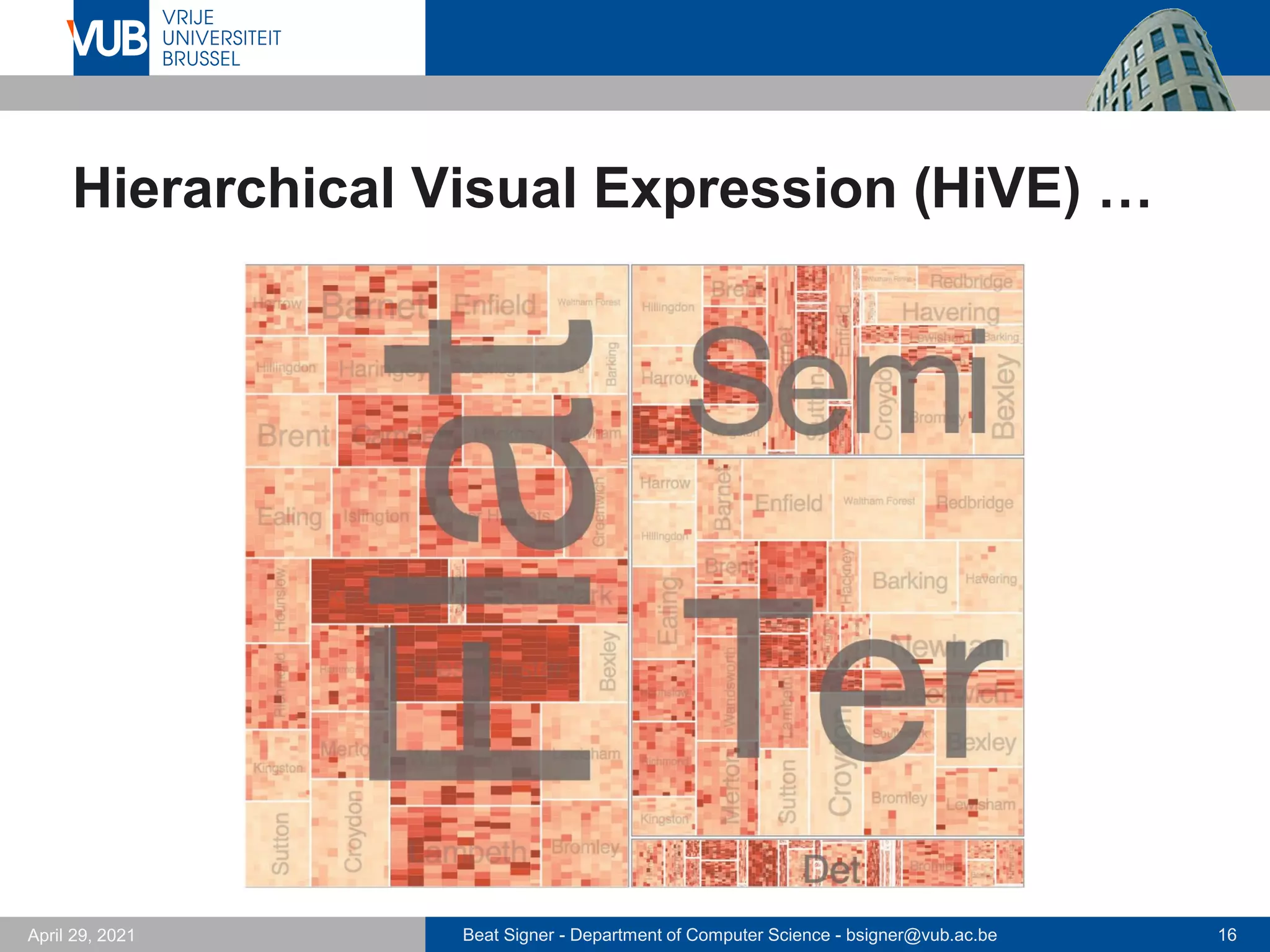
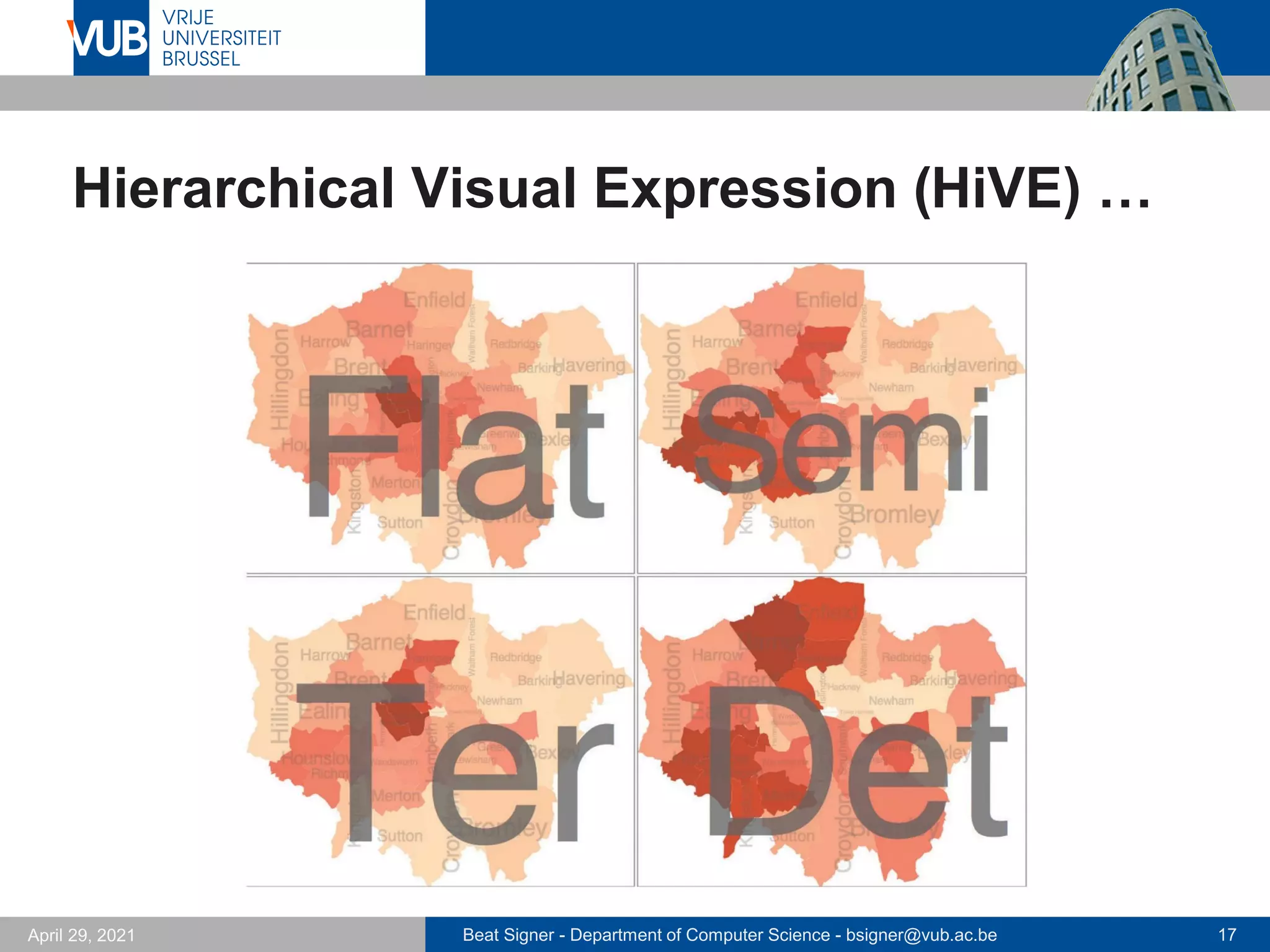
Hierarchical Visual Expression (HiVE)
Beat Signer - Department of Computer Science - bsigner@vub.ac.be 15
April 29, 2021
Hierarchical Visual Expression (HiVE) …
Beat Signer - Department of Computer Science - bsigner@vub.ac.be 16
April 29, 2021
Hierarchical Visual Expression (HiVE) …
Beat Signer - Department of Computer Science - bsigner@vub.ac.be 17
April 29, 2021
Hierarchical Visual Expression (HiVE) …
Beat Signer - Department of Computer Science - bsigner@vub.ac.be 18
April 29, 2021
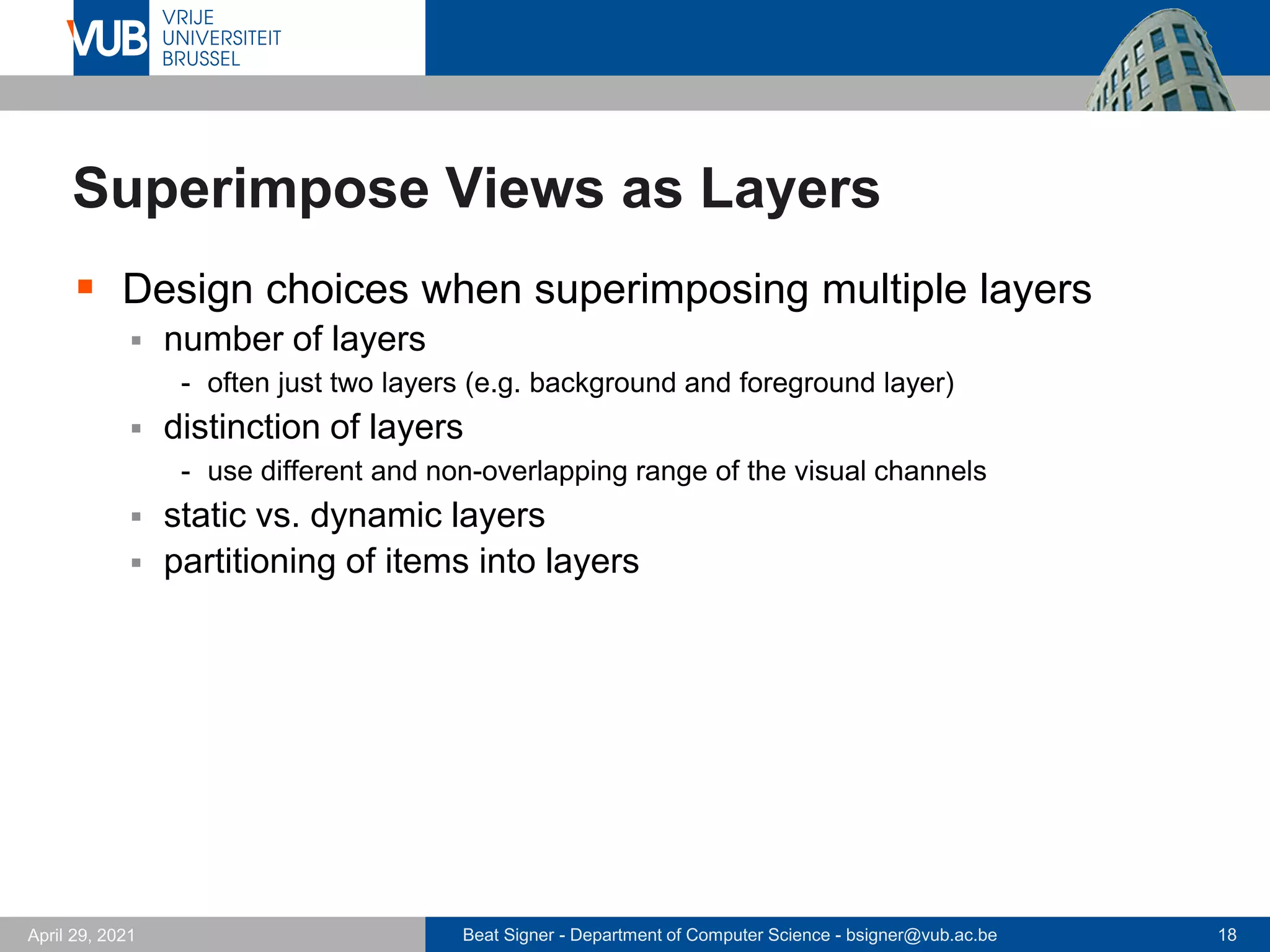
Superimpose Views as Layers
▪ Design choices when superimposing multiple layers
▪ number of layers
- often just two layers (e.g. background and foreground layer)
▪ distinction of layers
- use different and non-overlapping range of the visual channels
▪ static vs. dynamic layers
▪ partitioning of items into layers
Beat Signer - Department of Computer Science - bsigner@vub.ac.be 19
April 29, 2021
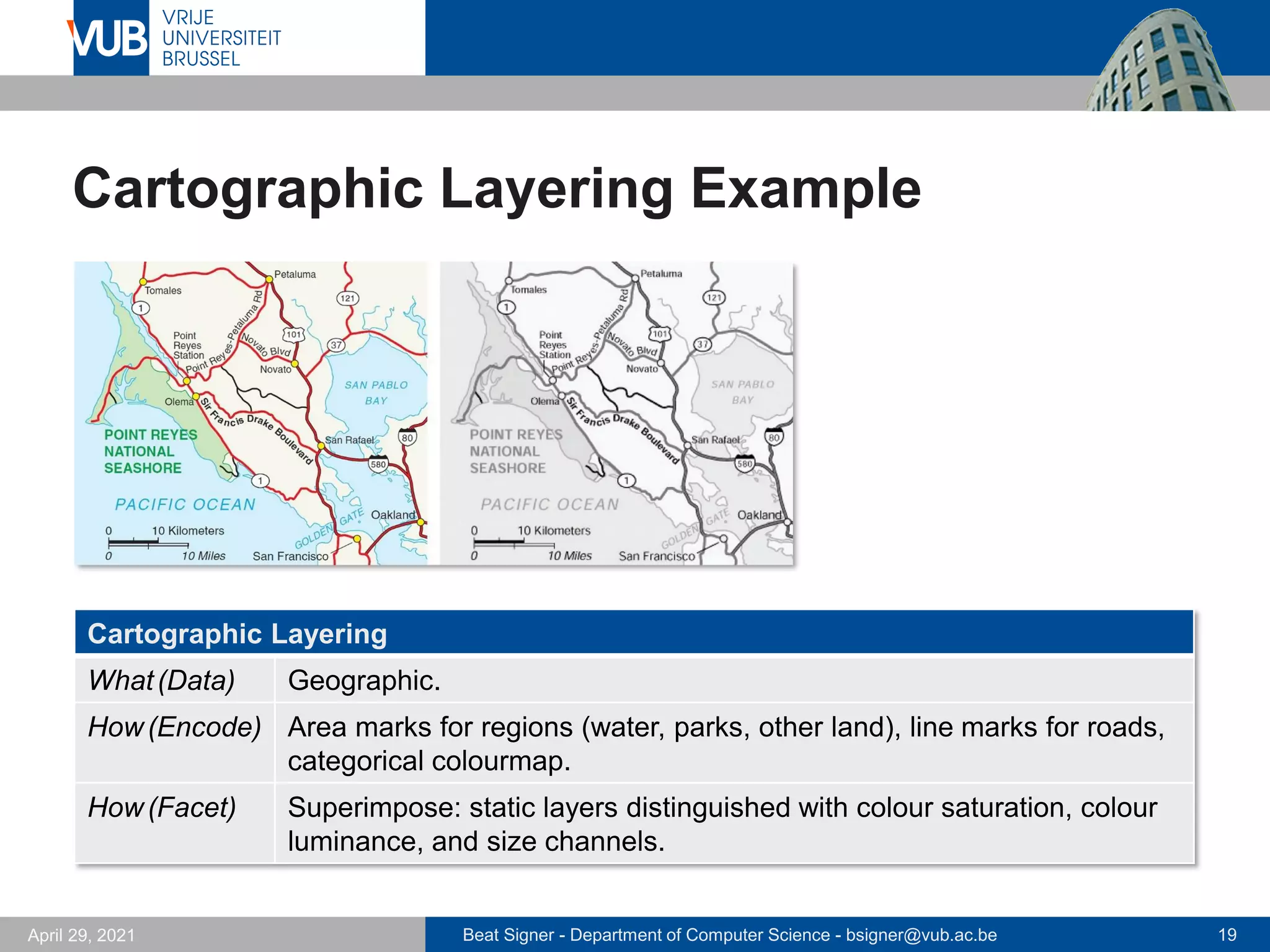
Cartographic Layering Example
Cartographic Layering
What(Data) Geographic.
How(Encode) Area marks for regions (water, parks, other land), line marks for roads,

categorical colourmap.
How(Facet) Superimpose: static layers distinguished with colour saturation, colour
luminance, and size channels.
Beat Signer - Department of Computer Science - bsigner@vub.ac.be 20
April 29, 2021
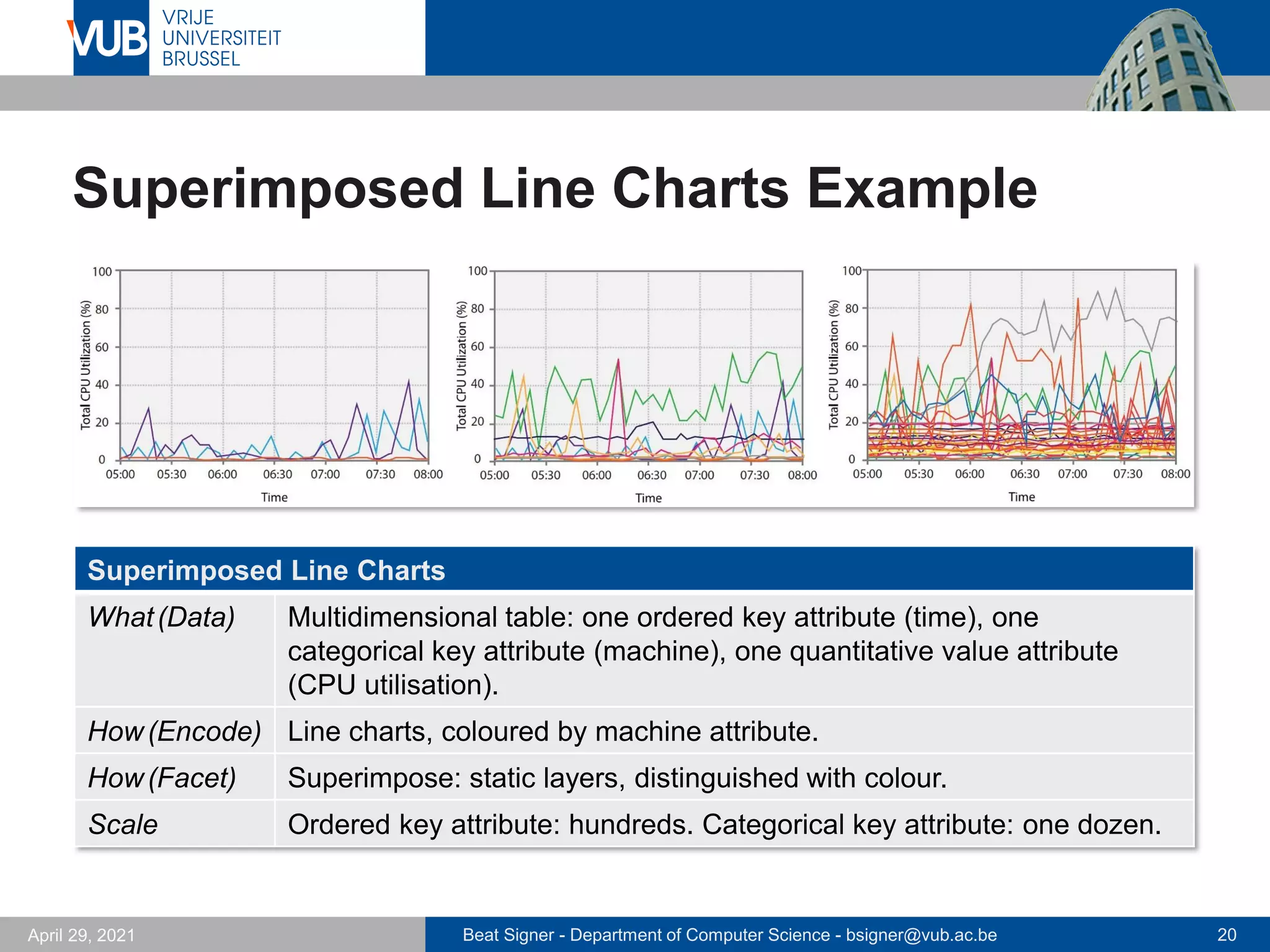
Superimposed Line Charts Example
Superimposed Line Charts
What(Data) Multidimensional table: one ordered key attribute (time), one
categorical key attribute (machine), one quantitative value attribute
(CPU utilisation).
How(Encode) Line charts, coloured by machine attribute.
How(Facet) Superimpose: static layers, distinguished with colour.
Scale Ordered key attribute: hundreds. Categorical key attribute: one dozen.
Beat Signer - Department of Computer Science - bsigner@vub.ac.be 21
April 29, 2021
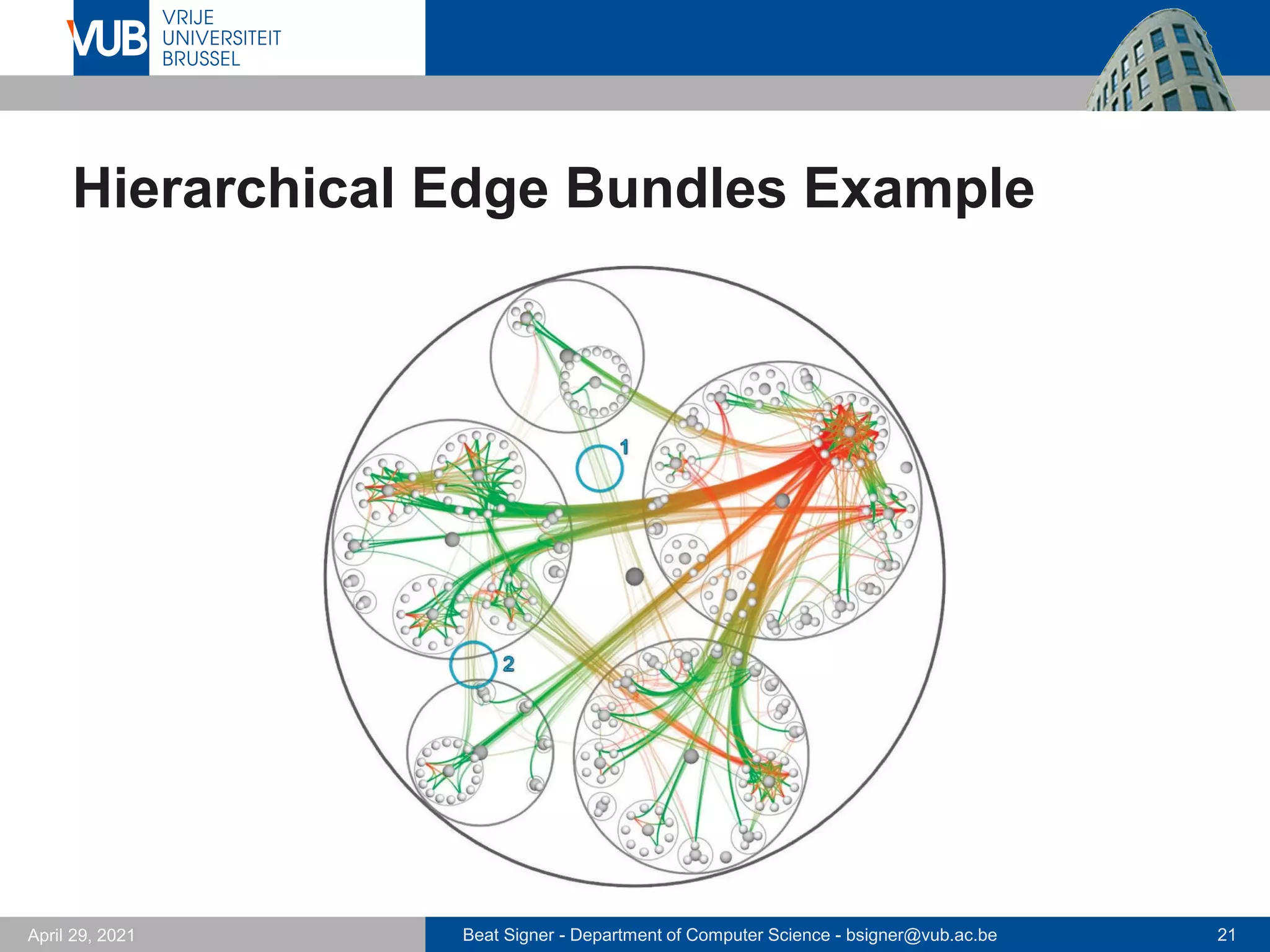
Hierarchical Edge Bundles Example
Beat Signer - Department of Computer Science - bsigner@vub.ac.be 22
April 29, 2021
Hierarchical Edge Bundles Example …
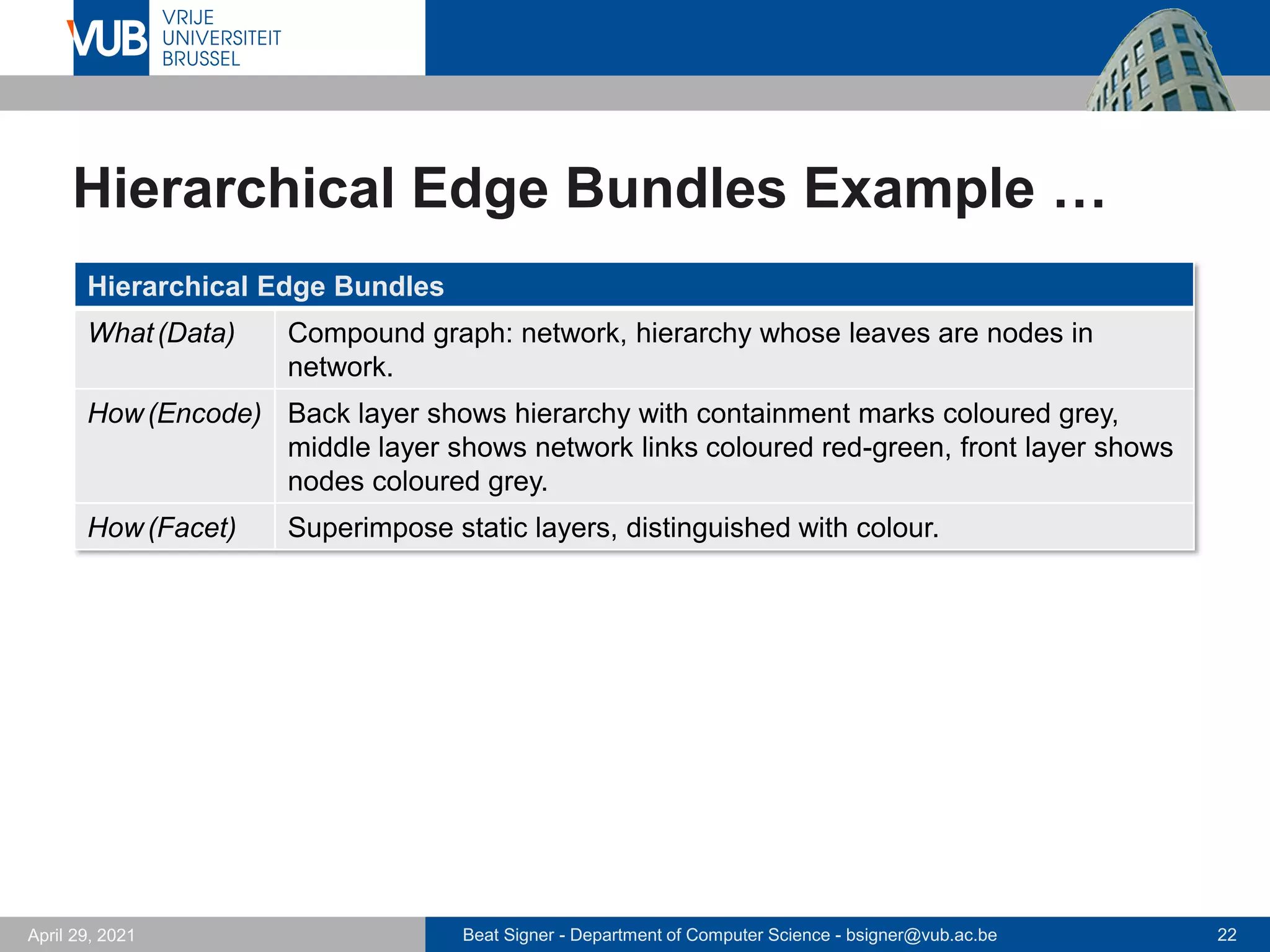
Hierarchical Edge Bundles
What(Data) Compound graph: network, hierarchy whose leaves are nodes in
network.
How(Encode) Back layer shows hierarchy with containment marks coloured grey,
middle layer shows network links coloured red-green, front layer shows
nodes coloured grey.
How(Facet) Superimpose static layers, distinguished with colour.
Beat Signer - Department of Computer Science - bsigner@vub.ac.be 23
April 29, 2021
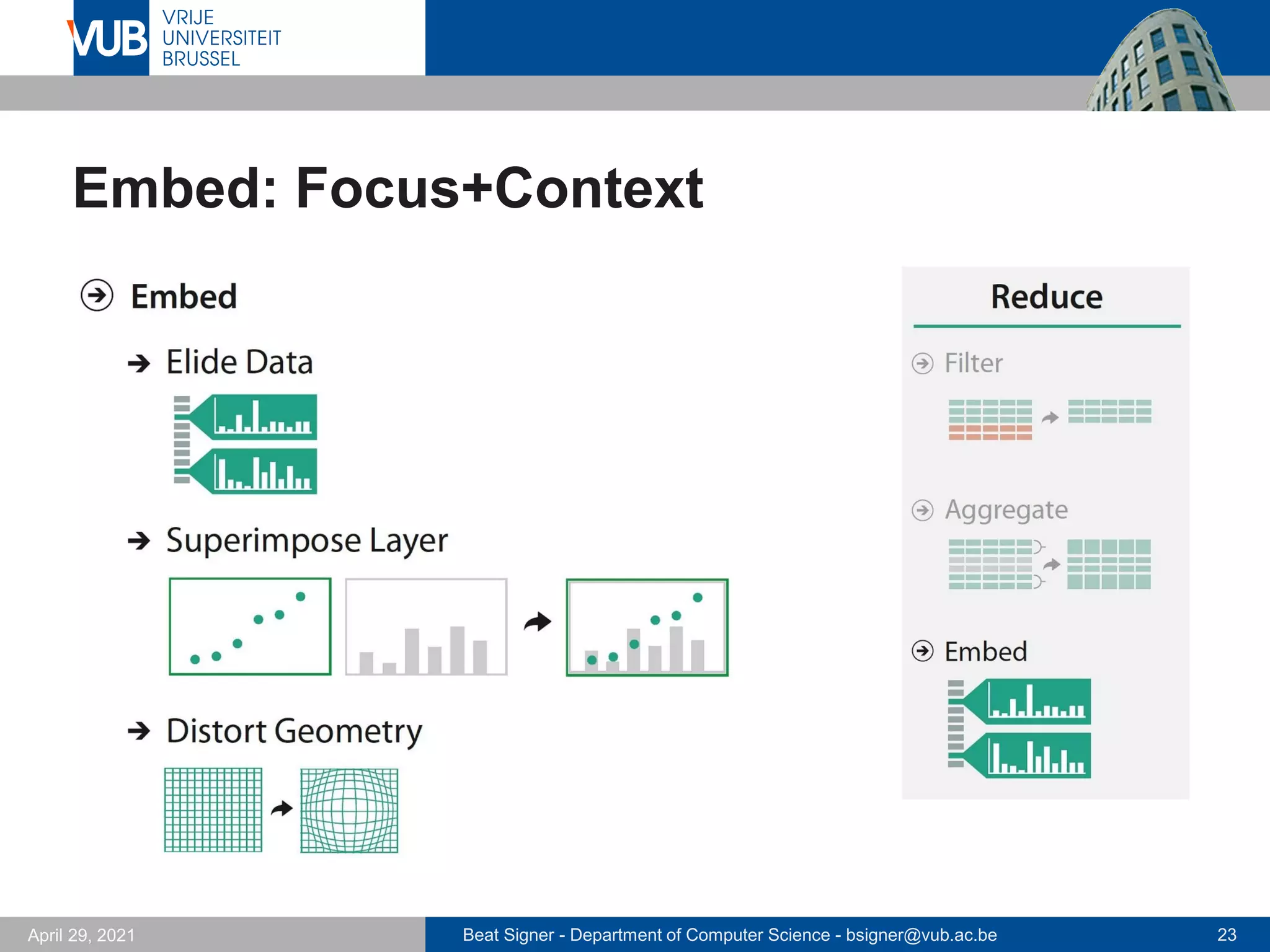
Embed: Focus+Context
Beat Signer - Department of Computer Science - bsigner@vub.ac.be 24
April 29, 2021
Embed: Focus+Context
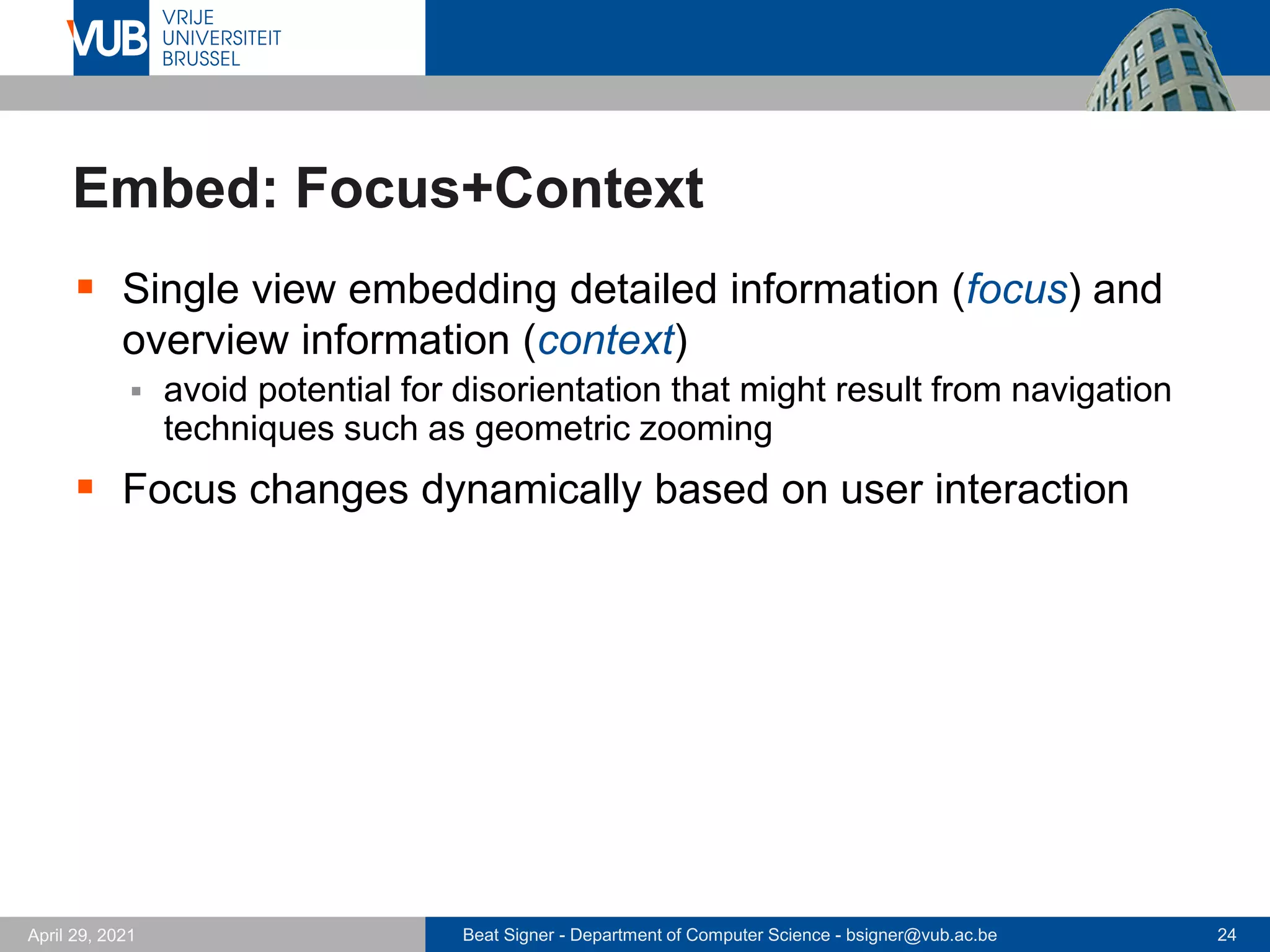
▪ Single view embedding detailed information (focus) and
overview information (context)
▪ avoid potential for disorientation that might result from navigation
techniques such as geometric zooming
▪ Focus changes dynamically based on user interaction
Beat Signer - Department of Computer Science - bsigner@vub.ac.be 25
April 29, 2021
Elide and Superimpose Data
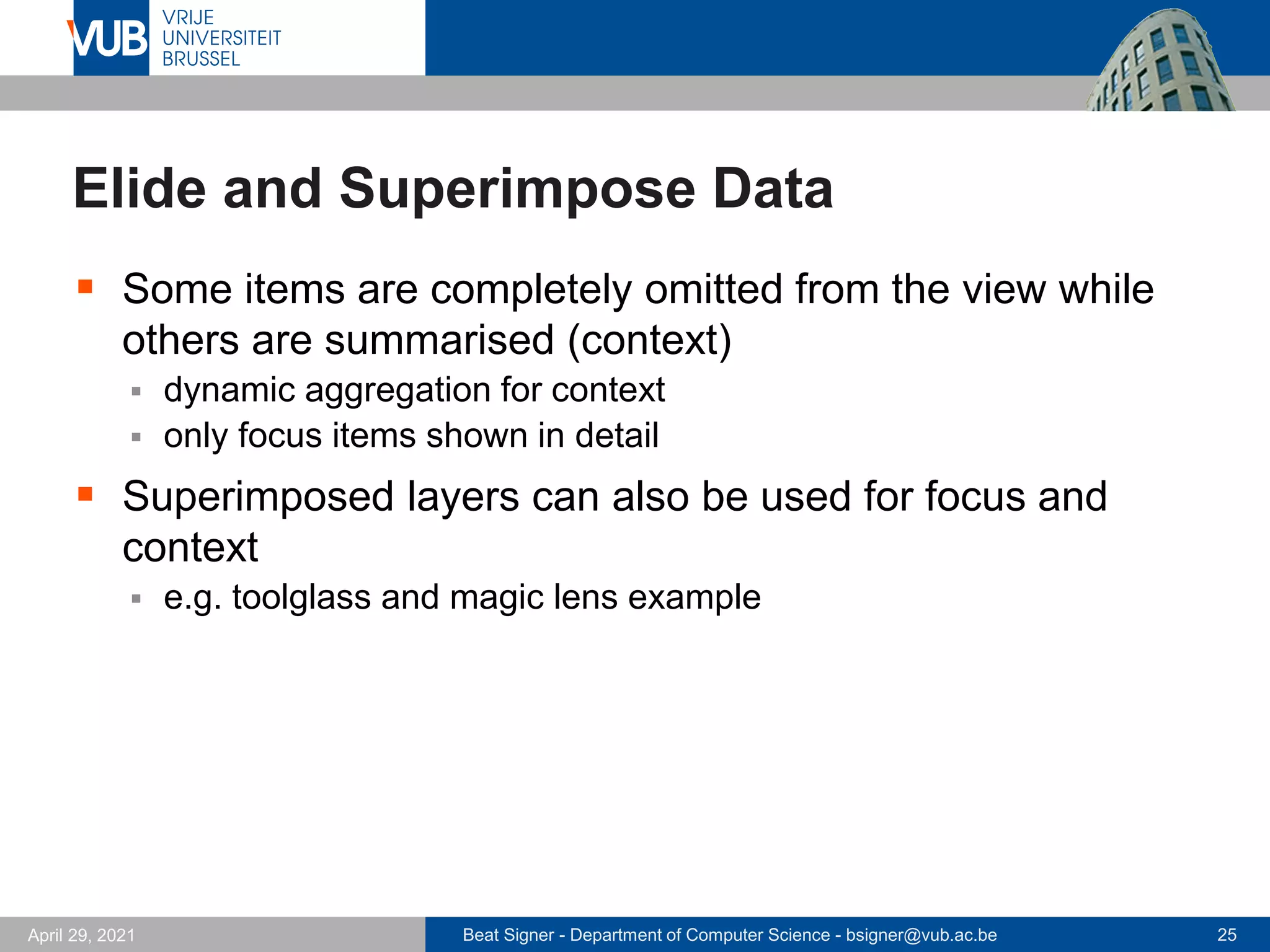
▪ Some items are completely omitted from the view while
others are summarised (context)
▪ dynamic aggregation for context
▪ only focus items shown in detail
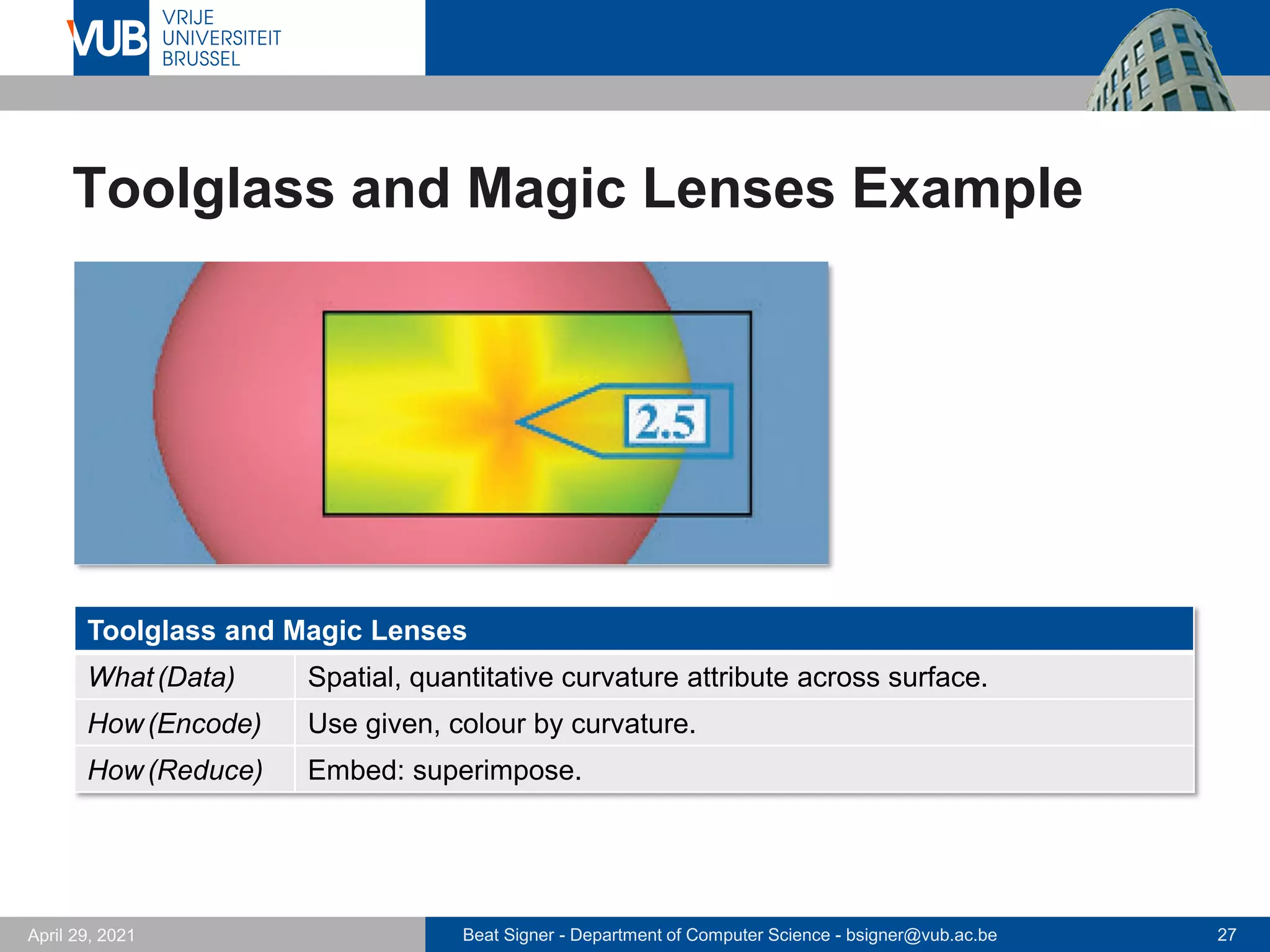
▪ Superimposed layers can also be used for focus and
context
▪ e.g. toolglass and magic lens example
Beat Signer - Department of Computer Science - bsigner@vub.ac.be 26
April 29, 2021
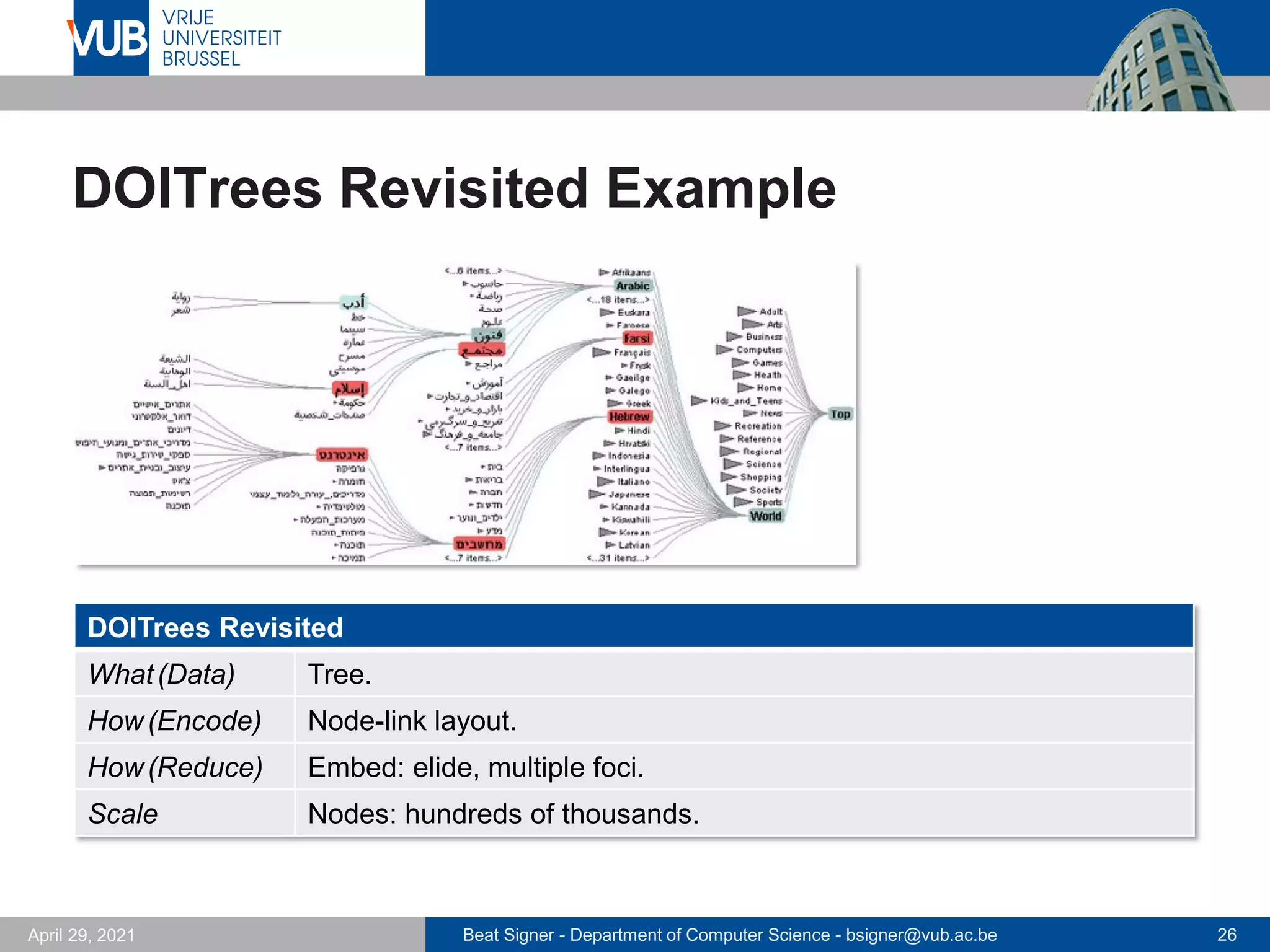
DOITrees Revisited Example
DOITrees Revisited
What(Data) Tree.
How(Encode) Node-link layout.
How(Reduce) Embed: elide, multiple foci.
Scale Nodes: hundreds of thousands.
Beat Signer - Department of Computer Science - bsigner@vub.ac.be 27
April 29, 2021
Toolglass and Magic Lenses Example
Toolglass and Magic Lenses
What(Data) Spatial, quantitative curvature attribute across surface.
How(Encode) Use given, colour by curvature.
How(Reduce) Embed: superimpose.
Beat Signer - Department of Computer Science - bsigner@vub.ac.be 28
April 29, 2021
Distortion
▪ Geometric distortion of contextual regions to make more
space for details in focus region
▪ Design choices
▪ number of focus regions
▪ shape of focus region (e.g. radial or rectangular)
▪ global or local focus region
▪ interaction metaphor (e.g. movable lenses)
▪ Costs and benefits
▪ good for topological network structures
▪ length judgements severely impaired
▪ users might not be aware of distortion (potential misunderstanding)
Beat Signer - Department of Computer Science - bsigner@vub.ac.be 29
April 29, 2021
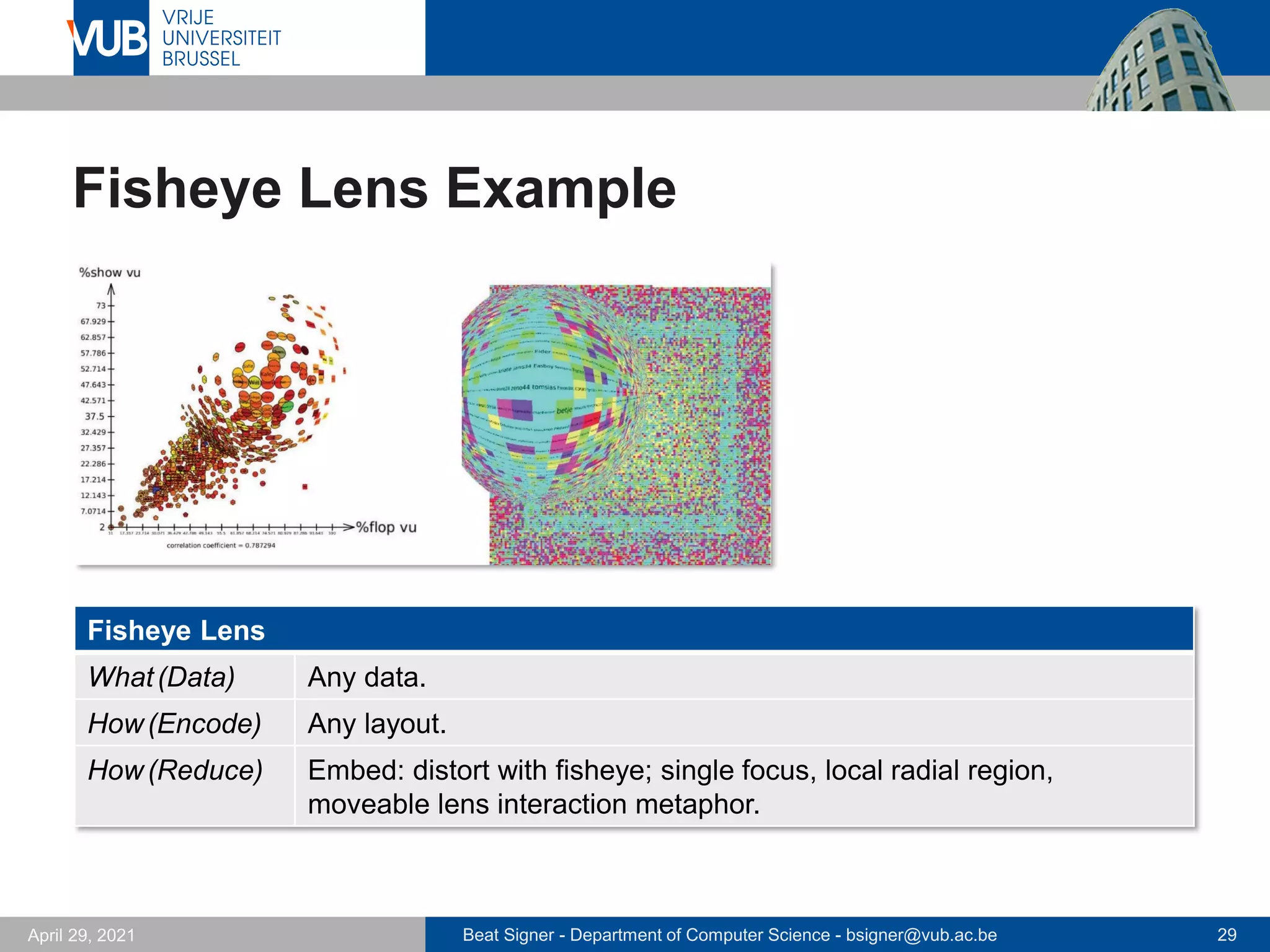
Fisheye Lens Example
Fisheye Lens
What(Data) Any data.
How(Encode) Any layout.
How(Reduce) Embed: distort with fisheye; single focus, local radial region,
moveable lens interaction metaphor.
Beat Signer - Department of Computer Science - bsigner@vub.ac.be 30
April 29, 2021
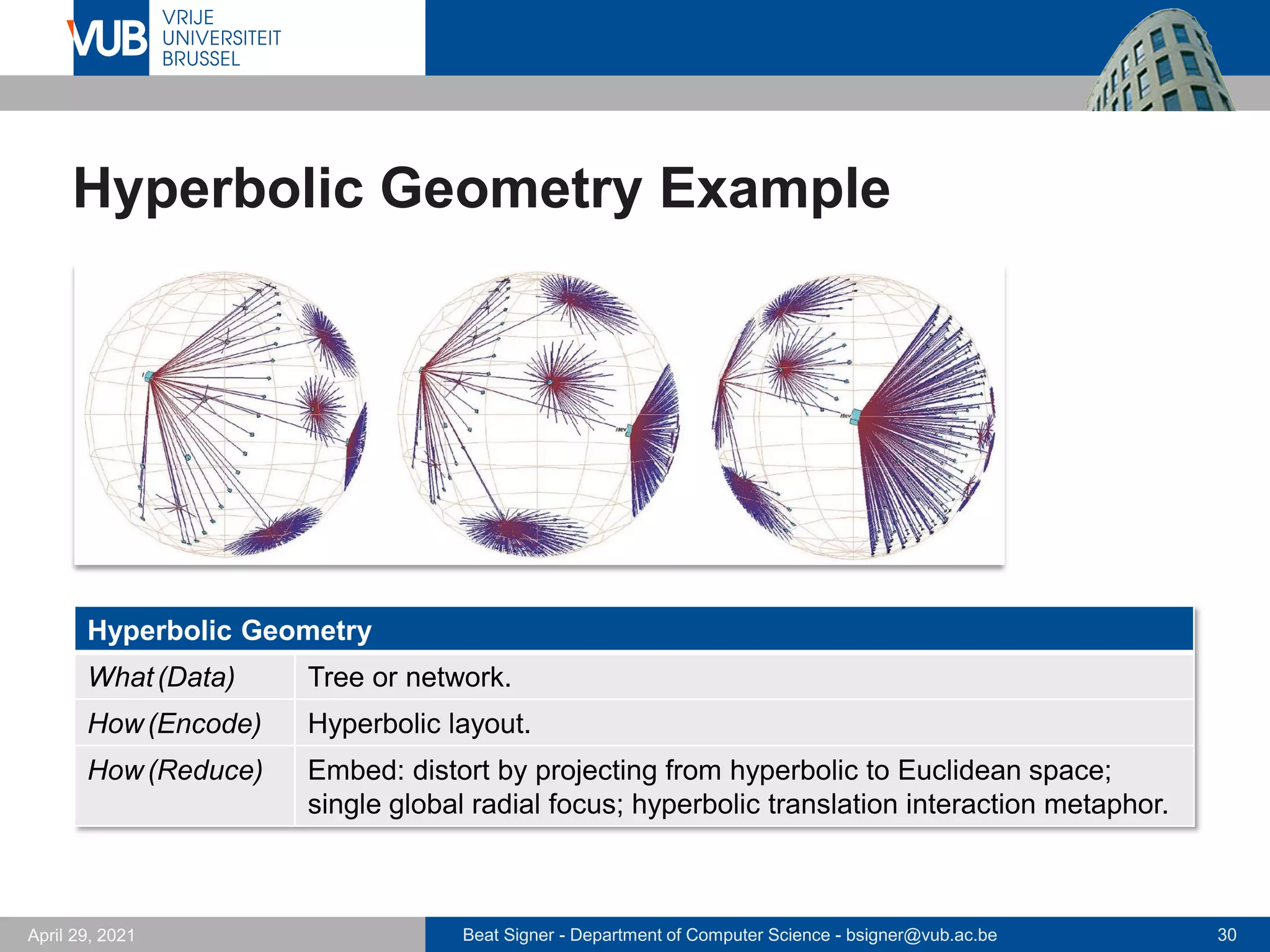
Hyperbolic Geometry Example
Hyperbolic Geometry
What(Data) Tree or network.
How(Encode) Hyperbolic layout.
How(Reduce) Embed: distort by projecting from hyperbolic to Euclidean space;
single global radial focus; hyperbolic translation interaction metaphor.
Beat Signer - Department of Computer Science - bsigner@vub.ac.be 31
April 29, 2021
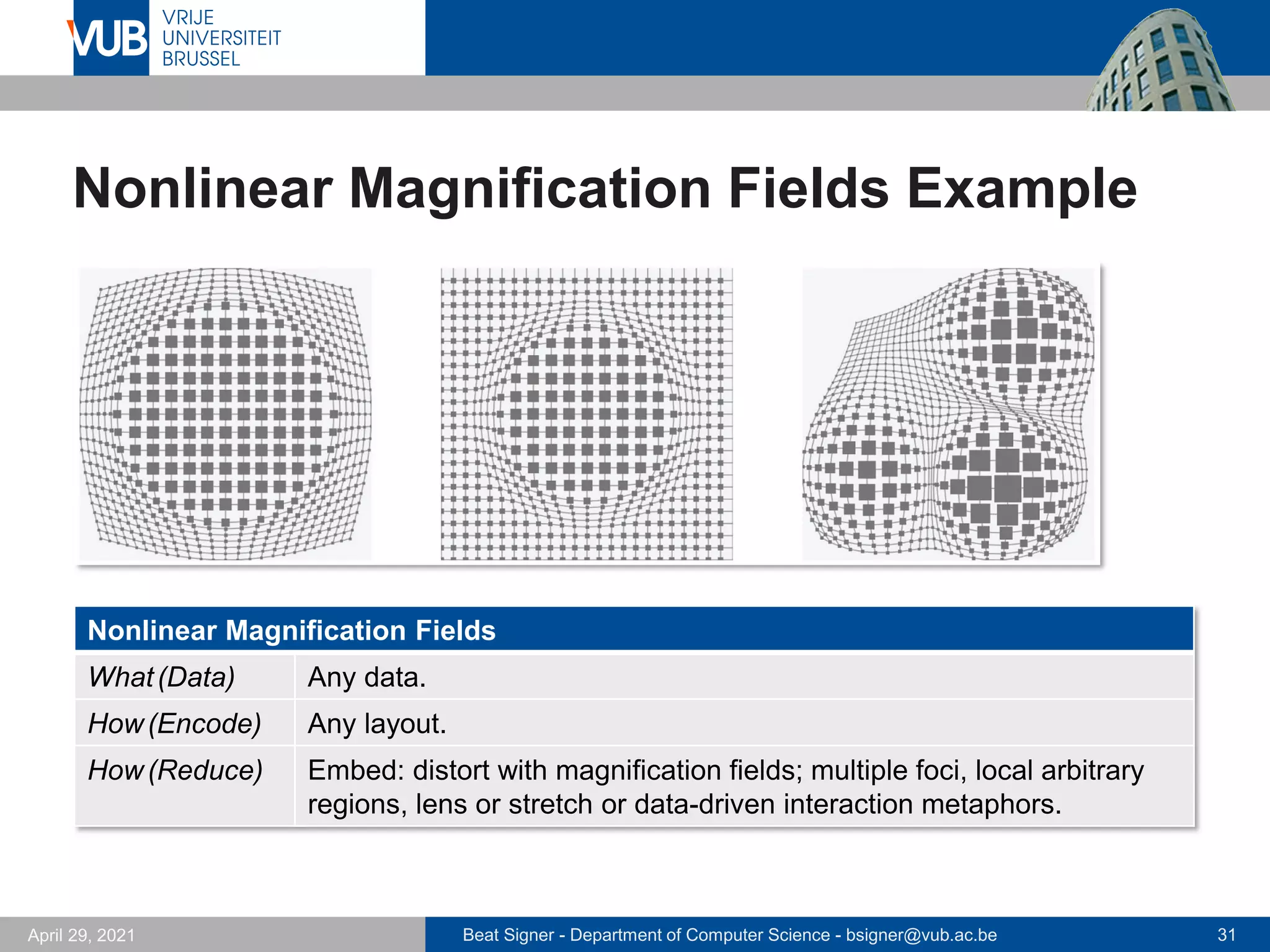
Nonlinear Magnification Fields Example
Nonlinear Magnification Fields
What(Data) Any data.
How(Encode) Any layout.
How(Reduce) Embed: distort with magnification fields; multiple foci, local arbitrary
regions, lens or stretch or data-driven interaction metaphors.
Beat Signer - Department of Computer Science - bsigner@vub.ac.be 32
April 29, 2021
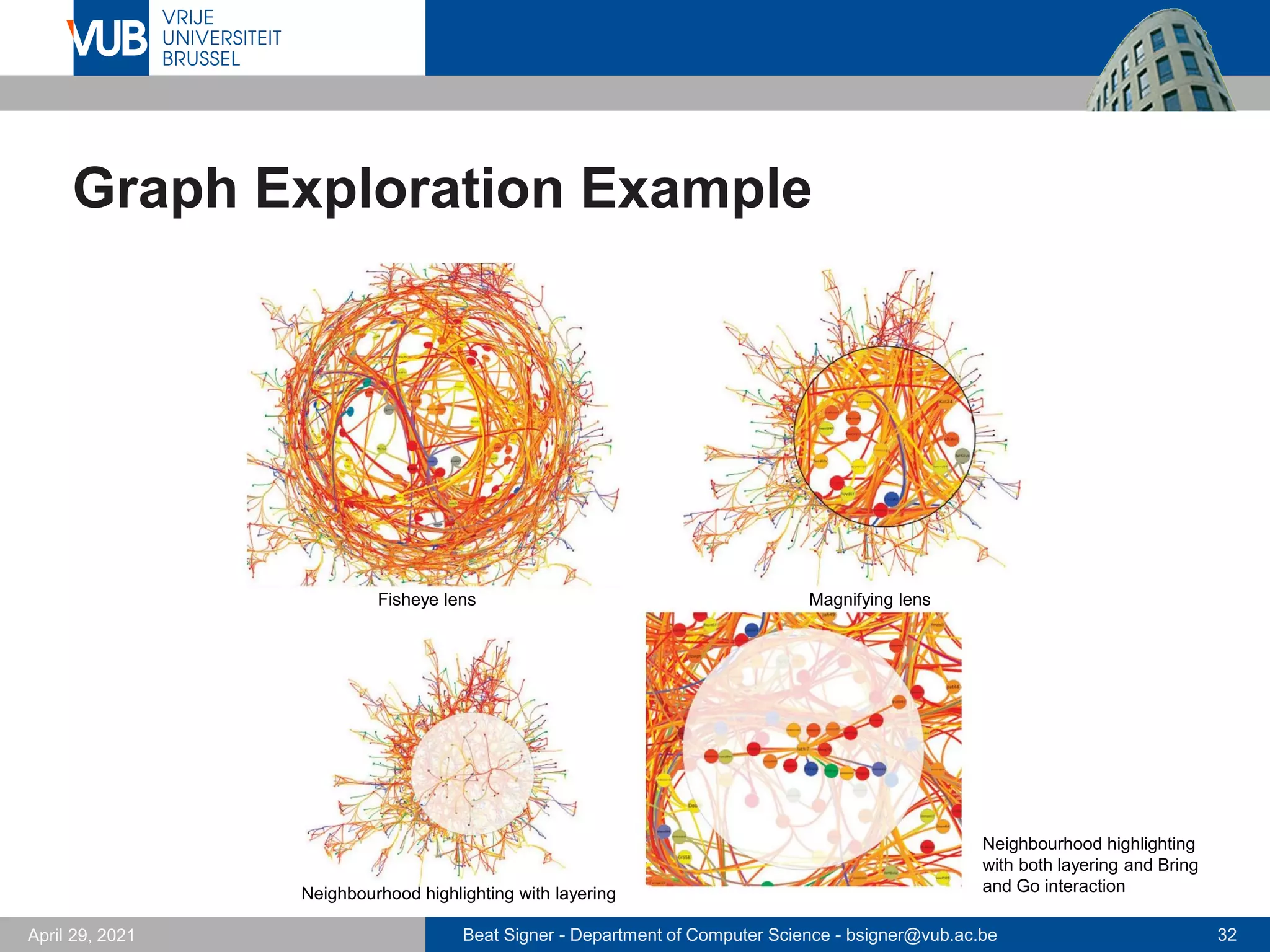
Graph Exploration Example
Fisheye lens Magnifying lens
Neighbourhood highlighting with layering
Neighbourhood highlighting
with both layering and Bring
and Go interaction
Beat Signer - Department of Computer Science - bsigner@vub.ac.be 33
April 29, 2021
Exercise 8
▪ Interaction and Design Guidelines
with Bokeh and Plotly
Beat Signer - Department of Computer Science - bsigner@vub.ac.be 34
April 29, 2021
Further Reading
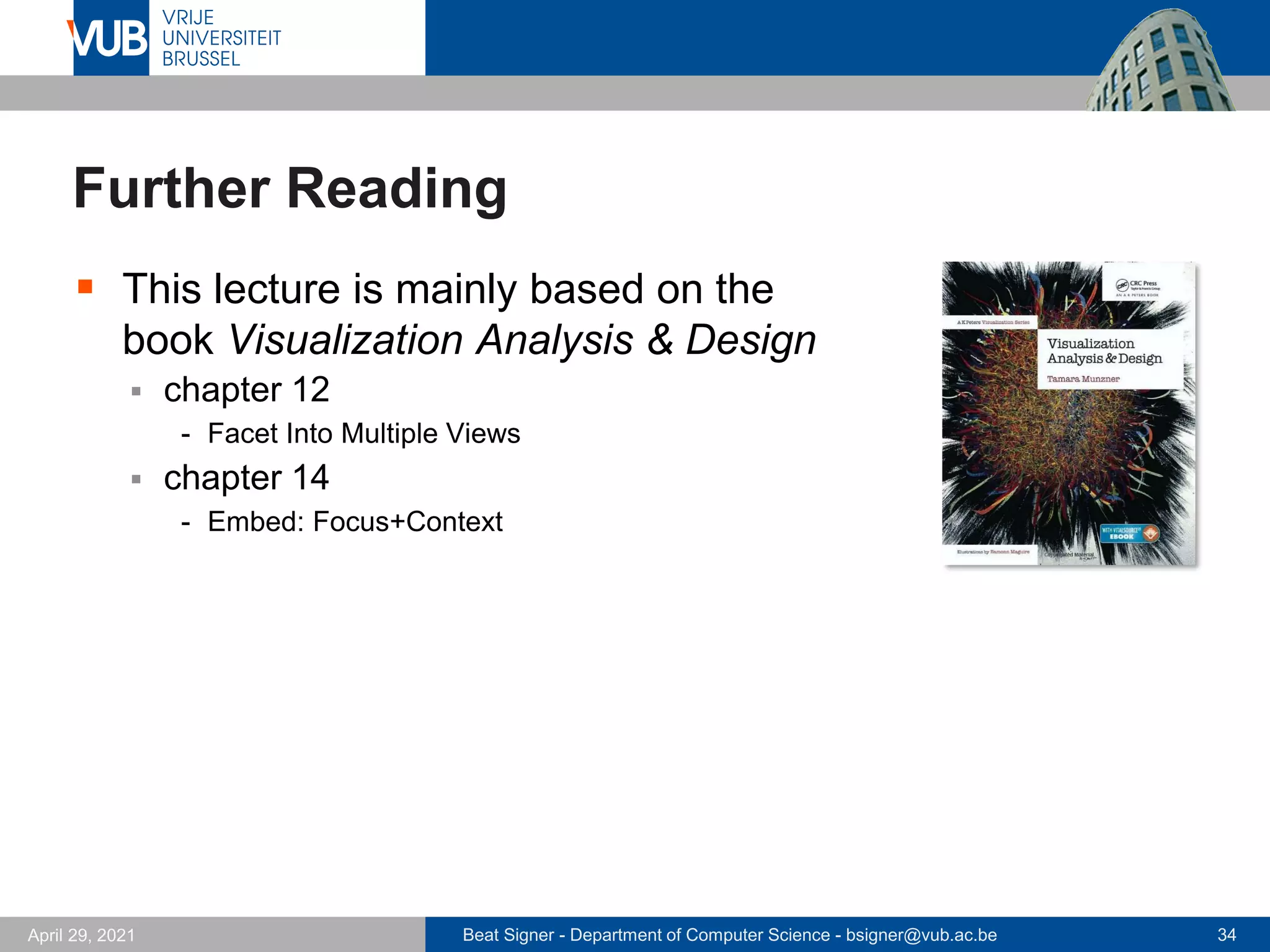
▪ This lecture is mainly based on the
book Visualization Analysis & Design
▪ chapter 12
- Facet Into Multiple Views
▪ chapter 14
- Embed: Focus+Context
Beat Signer - Department of Computer Science - bsigner@vub.ac.be 35
April 29, 2021
References
▪ Visualization Analysis & Design, Tamara
Munzner, Taylor & Francis Inc, (Har/Psc edition),
May, November 2014,
ISBN-13: 978-1466508910
2 December 2005
Next Lecture
Dashboards

Interaction - Lecture 10 - Information Visualisation (4019538FNR)

  • 1.
    2 December 2005 InformationVisualisation Interaction Prof. Beat Signer Department of Computer Science Vrije Universiteit Brussel beatsigner.com
  • 2.
    Beat Signer -Department of Computer Science - bsigner@vub.ac.be 2 April 29, 2021 Interaction ▪ Interactivity is necessary for vis tools handling complexity ▪ limitations of people and displays make it impossible to show a large dataset at once ▪ change level of details ▪ show different aspects of a dataset ▪ different representations and summaries of data ▪ different presentations of data
  • 3.
    Beat Signer -Department of Computer Science - bsigner@vub.ac.be 3 April 29, 2021 Handling Visual Complexity ▪ There a 5 major approaches for dealing with visual complexity ▪ deriving new data to be shown in a view ▪ view manipulation (single view) ▪ reduction (items or attributes) ▪ faceting into multiple views ▪ embed: focus+context (single view)
  • 4.
    Beat Signer -Department of Computer Science - bsigner@vub.ac.be 4 April 29, 2021 Facet Into Multiple Views
  • 5.
    Beat Signer -Department of Computer Science - bsigner@vub.ac.be 5 April 29, 2021 Facet Into Multiple Views …
  • 6.
    Beat Signer -Department of Computer Science - bsigner@vub.ac.be 6 April 29, 2021 Facet Into Multiple Views … ▪ Faceting information into multiple views to deal with visual complexity ▪ Juxtapose views side by side ▪ coordination of views to create linked views (multiple views) - sharing of encoding - sharing of data - synchronisation of navigation ▪ arrangement of views ▪ when to show views ▪ Superimpose views as layers ▪ partitioning of elements between layers ▪ number of layers ▪ …
  • 7.
    Beat Signer -Department of Computer Science - bsigner@vub.ac.be 7 April 29, 2021 Sharing of Encoding ▪ Shared encoding views ▪ all channels handled the same for an identical visual encoding ▪ Multiform views (multiple views) ▪ some aspects of the visual encoding different between views ▪ each view might show a subset of attributes to avoid visual clutter ▪ Linked highlighting (brushing) ▪ items interactively selected in one view are highlighted with the same colour in all other views - see how region that is continous in one view is distributed in another
  • 8.
    Beat Signer -Department of Computer Science - bsigner@vub.ac.be 8 April 29, 2021 Exploratory Data Visualizer Example ▪ Linked highlighting (brushing) between views
  • 9.
    Beat Signer -Department of Computer Science - bsigner@vub.ac.be 9 April 29, 2021 Sharing of Data ▪ Shared data ▪ each view shows all the data ▪ Overview-detail (subset) ▪ one view shows entire dataset (overview) and another view shows detailed information about a selected subset of the data ▪ different possible combinations of views - subset data and shared encoding (e.g. bird's-eye map) - multiform views (e.g. details-on-demand view) ▪ Small multiples ▪ multiple views with same visual encoding but different partitions of the data - often aligned in matrix to support comparison between datasets - limited screen estate to show many views next to each other
  • 10.
    Beat Signer -Department of Computer Science - bsigner@vub.ac.be 10 April 29, 2021 Bird's-Eye Maps Example Bird's-Eye Maps What(Data) Geographic. How(Encode) Use given geographic information. How(Facet) Partition into two views with same encoding, overview-detail. How (Reduce) Navigate.
  • 11.
    Beat Signer -Department of Computer Science - bsigner@vub.ac.be 11 April 29, 2021 Improvise Example
  • 12.
    Beat Signer -Department of Computer Science - bsigner@vub.ac.be 12 April 29, 2021 Partition Into Views ▪ Divide data up between views based on attributes ▪ partitioning attribute typically a categorical variable with limited number of values (levels) ▪ List alignment or matrix alignment ▪ Recursive subdivision ▪ partitioning used in an exploratory way ▪ user can reconfigure the display to see different choices of partitioning variables
  • 13.
    Beat Signer -Department of Computer Science - bsigner@vub.ac.be 13 April 29, 2021 Partitioning Bar Charts Example Single bar chart with grouped bars Aligned small-multiple bar chart views
  • 14.
    Beat Signer -Department of Computer Science - bsigner@vub.ac.be 14 April 29, 2021 Hierarchical Visual Expression (HiVE)
  • 15.
    Beat Signer -Department of Computer Science - bsigner@vub.ac.be 15 April 29, 2021 Hierarchical Visual Expression (HiVE) …
  • 16.
    Beat Signer -Department of Computer Science - bsigner@vub.ac.be 16 April 29, 2021 Hierarchical Visual Expression (HiVE) …
  • 17.
    Beat Signer -Department of Computer Science - bsigner@vub.ac.be 17 April 29, 2021 Hierarchical Visual Expression (HiVE) …
  • 18.
    Beat Signer -Department of Computer Science - bsigner@vub.ac.be 18 April 29, 2021 Superimpose Views as Layers ▪ Design choices when superimposing multiple layers ▪ number of layers - often just two layers (e.g. background and foreground layer) ▪ distinction of layers - use different and non-overlapping range of the visual channels ▪ static vs. dynamic layers ▪ partitioning of items into layers
  • 19.
    Beat Signer -Department of Computer Science - bsigner@vub.ac.be 19 April 29, 2021 Cartographic Layering Example Cartographic Layering What(Data) Geographic. How(Encode) Area marks for regions (water, parks, other land), line marks for roads, categorical colourmap. How(Facet) Superimpose: static layers distinguished with colour saturation, colour luminance, and size channels.
  • 20.
    Beat Signer -Department of Computer Science - bsigner@vub.ac.be 20 April 29, 2021 Superimposed Line Charts Example Superimposed Line Charts What(Data) Multidimensional table: one ordered key attribute (time), one categorical key attribute (machine), one quantitative value attribute (CPU utilisation). How(Encode) Line charts, coloured by machine attribute. How(Facet) Superimpose: static layers, distinguished with colour. Scale Ordered key attribute: hundreds. Categorical key attribute: one dozen.
  • 21.
    Beat Signer -Department of Computer Science - bsigner@vub.ac.be 21 April 29, 2021 Hierarchical Edge Bundles Example
  • 22.
    Beat Signer -Department of Computer Science - bsigner@vub.ac.be 22 April 29, 2021 Hierarchical Edge Bundles Example … Hierarchical Edge Bundles What(Data) Compound graph: network, hierarchy whose leaves are nodes in network. How(Encode) Back layer shows hierarchy with containment marks coloured grey, middle layer shows network links coloured red-green, front layer shows nodes coloured grey. How(Facet) Superimpose static layers, distinguished with colour.
  • 23.
    Beat Signer -Department of Computer Science - bsigner@vub.ac.be 23 April 29, 2021 Embed: Focus+Context
  • 24.
    Beat Signer -Department of Computer Science - bsigner@vub.ac.be 24 April 29, 2021 Embed: Focus+Context ▪ Single view embedding detailed information (focus) and overview information (context) ▪ avoid potential for disorientation that might result from navigation techniques such as geometric zooming ▪ Focus changes dynamically based on user interaction
  • 25.
    Beat Signer -Department of Computer Science - bsigner@vub.ac.be 25 April 29, 2021 Elide and Superimpose Data ▪ Some items are completely omitted from the view while others are summarised (context) ▪ dynamic aggregation for context ▪ only focus items shown in detail ▪ Superimposed layers can also be used for focus and context ▪ e.g. toolglass and magic lens example
  • 26.
    Beat Signer -Department of Computer Science - bsigner@vub.ac.be 26 April 29, 2021 DOITrees Revisited Example DOITrees Revisited What(Data) Tree. How(Encode) Node-link layout. How(Reduce) Embed: elide, multiple foci. Scale Nodes: hundreds of thousands.
  • 27.
    Beat Signer -Department of Computer Science - bsigner@vub.ac.be 27 April 29, 2021 Toolglass and Magic Lenses Example Toolglass and Magic Lenses What(Data) Spatial, quantitative curvature attribute across surface. How(Encode) Use given, colour by curvature. How(Reduce) Embed: superimpose.
  • 28.
    Beat Signer -Department of Computer Science - bsigner@vub.ac.be 28 April 29, 2021 Distortion ▪ Geometric distortion of contextual regions to make more space for details in focus region ▪ Design choices ▪ number of focus regions ▪ shape of focus region (e.g. radial or rectangular) ▪ global or local focus region ▪ interaction metaphor (e.g. movable lenses) ▪ Costs and benefits ▪ good for topological network structures ▪ length judgements severely impaired ▪ users might not be aware of distortion (potential misunderstanding)
  • 29.
    Beat Signer -Department of Computer Science - bsigner@vub.ac.be 29 April 29, 2021 Fisheye Lens Example Fisheye Lens What(Data) Any data. How(Encode) Any layout. How(Reduce) Embed: distort with fisheye; single focus, local radial region, moveable lens interaction metaphor.
  • 30.
    Beat Signer -Department of Computer Science - bsigner@vub.ac.be 30 April 29, 2021 Hyperbolic Geometry Example Hyperbolic Geometry What(Data) Tree or network. How(Encode) Hyperbolic layout. How(Reduce) Embed: distort by projecting from hyperbolic to Euclidean space; single global radial focus; hyperbolic translation interaction metaphor.
  • 31.
    Beat Signer -Department of Computer Science - bsigner@vub.ac.be 31 April 29, 2021 Nonlinear Magnification Fields Example Nonlinear Magnification Fields What(Data) Any data. How(Encode) Any layout. How(Reduce) Embed: distort with magnification fields; multiple foci, local arbitrary regions, lens or stretch or data-driven interaction metaphors.
  • 32.
    Beat Signer -Department of Computer Science - bsigner@vub.ac.be 32 April 29, 2021 Graph Exploration Example Fisheye lens Magnifying lens Neighbourhood highlighting with layering Neighbourhood highlighting with both layering and Bring and Go interaction
  • 33.
    Beat Signer -Department of Computer Science - bsigner@vub.ac.be 33 April 29, 2021 Exercise 8 ▪ Interaction and Design Guidelines with Bokeh and Plotly
  • 34.
    Beat Signer -Department of Computer Science - bsigner@vub.ac.be 34 April 29, 2021 Further Reading ▪ This lecture is mainly based on the book Visualization Analysis & Design ▪ chapter 12 - Facet Into Multiple Views ▪ chapter 14 - Embed: Focus+Context
  • 35.
    Beat Signer -Department of Computer Science - bsigner@vub.ac.be 35 April 29, 2021 References ▪ Visualization Analysis & Design, Tamara Munzner, Taylor & Francis Inc, (Har/Psc edition), May, November 2014, ISBN-13: 978-1466508910
  • 36.
    2 December 2005 NextLecture Dashboards