
#evolverocks
Intelligent Assets: Smart TAGS, Asset Insights &
Brand Portal
KANIKA GERA, ADOBE
August 31st, 2016
Intelligent Assets:
Smart Tags, Asset Insights & Brand
Portal
#evolverocks 2
Adobe Experience
Manager:
Smart tags, Asset Insights &
Brand Portal
1 | SmartTags in AEM
2 | Asset Insights
3 | Brand Portal
4 | Q&A
#evolverocks 3
#evolverocks
SMART TAGGING
• Less time searching, more time creating!
• Reduce Creation Costs
• Find Dark Assets
• Boost Search Results
• Content Reuse
• Greater Content velocity with Auto Tagging
#evolverocks
Intelligently Tagging Assets
• Based on Deep Convolution Neural
Networks
• Broader set, best in class accuracy
of tagging results given unique data
set powered by 16M Adobe Stock
images
• Confidence score derived from tag
space voting
#evolverocks
Configuring the Intelligent Tagging - 1..2..3
1. Enable the “AEM Assets Tag Feature Flag” from configMgr in OSGI console
3. Enable Auto Tagging in Update Asset Workflow2. Configure Endpoints in DAM Similarity Search
Service
#evolverocks
How Intelligent Tagging Works
• Computers beat humans at
image recognition
• Automatically tags new assets
on upload
• Deep Convolutional Neural
Network based approach
#evolverocks
Intelligent Tagging
Architecture
#evolverocks
Technical Sneak Peak
• Tags predicted with a certain
confidence score which ranges for
0 to 1.
• Predicted Tags stored at <asset>/
jcr:content/metadata/predictedtags
• Smart tags are considered in
Omnisearch
#evolverocks
Intelligent Tagging – Road Map
• Smart Tags moderation : User can choose
according to brand Image
• Multi-Lingual Tags: Incoming assets will be
tagged based on locale
• Similarity Search to easily find digital assets
similar to asset of interest
• Curation to automatically organize, discover
digital assets
#evolverocks
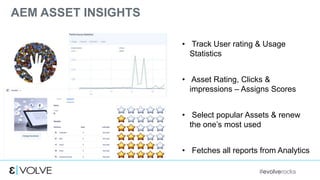
AEM ASSET INSIGHTS
• Track User rating & Usage
Statistics
• Asset Rating, Clicks &
impressions – Assigns Scores
• Select popular Assets & renew
the one’s most used
• Fetches all reports from Analytics
#evolverocks
Technical Sneak Peak
Usage Statistics & Score
Performance
Statistics
#evolverocks
Performance – Data Collected in Analytics
#evolverocks
Usage - Data collected within AEM
#evolverocks
BRAND PORTAL
• Turn-Key portal that allows
sharing of assets with internal
and external
personnel/partners
• Limited customization of
Brand portal (i.e browse,
preview, download)
• Makes datasets available
faster
#evolverocks
DEMO:
#evolverocks
#evolverocks 18
“TURN FACTS INTO RELEVANT,
CONTEXTUAL,
STORYTELLING OPPORTUNITIES”
A E M S M A R T T A G G I N G | A S S E T I N S I G H T S | B R A N D P O R T A L
QUESTIONS..???
#evolverocks
THANK YOU!

Intelligent assets_kanikagera

Editor's Notes

  • #3 Hello, I am the voice you hear when you call the Aem Support Line at Adobe, So, technically the “AEM Mechanic” – Kanika Gera. I will be talking about the Smart Tagging, Asset Insights & Brand Portal. At end of the session, will take up all queries.
  • #4 We at Adobe have been focusing at all our enterprise use cases to find solutions using the cutting edge innovation & deliver on Adobe Advantage.
  • #5 We all have been hearing about “SMART TAGS” What is is ? Intelligent tagging., Assets get automatically tagged on upload. The assets that are not tagged properly and miss proper metadata, are lying in the repository – called Dark Assets. Smart tagging features tags all these assets and boost the search results. This reduces creation cost for the marketers. I will show you a quick demo for it
  • #6 Intelligent tagging uses machine learning and based on Image recognition Algorithm- Deep Convolution Neural Network. The dataset is powered by 16M Adobe stock images. For Accuracy – Each Asset is assigned a confidence score based on the tag space voting algo.
  • #7 Currently the Intelligent Assets are a Managed Services Offering. Configuring the Intelligent Assets is a simple 3 step process: Enable a flag, Configure Endpoints, Enable Auto Tagging in workflow Show Demo
  • #8 Quick Diagram shows the flow of how smart tagging works
  • #9 Architecture – The Image Search Servers are hosted at the Adobe side and are fed with a 16M Adobe Stock Images. User Uploads Images – they are processed upon and are sent to analyze the image servers. - Secure processing Assets are tagged and saved in repository
  • #10  Smart Tags are always generated in English by the image-search-server and are translatable to another language just like any other asset metadata and subsequently be searched in their translated form. The threshold is .7, which avoids too many tags & performance Show CRX-DE view, confidence score, & omni search – My colleague Justin will be talking more about Omin Search later today
  • #11 Intelligence continues to Evolve – Amazing features to look out for in later release down the lane: Choosing your Tags Need not wory about translations, tags will be based on locale Finding assets of similar interest would be more easier ,
  • #12 With all the large repositories, which asset to keep? Which asset should marketers use & which to use in campaigns? But Adobe combined ASSET with Analytics to meet your needs & brought Asset Insights Asset Insight gives performance & Usage of all assets by assigning score to each asset. Score is based on usage, rating. Click & impression. It allso allows you to featch reports from Analytics.
  • #13 Show Demo
  • #14 Unique Asset ID created on asset upload, UNIQUE Asset id identifies the asset within the DAM & Analytics. When an is accessed or hit, information goes to analytics along with type of interaction (e.g. impression, click, etc.), which channel (web, email, social, etc.) AEM pulls data from Analytics and uses the Asset ID to match the data with the assets and generate report Obtain embed code of an asset to get the performance data
  • #15 Assets use the common Asset Selector within AEM / Adobe Solutions, and the selectors are registered directly within AEM Assets. Allows AEM Assets to report metrics such as how many times an asset has been used, which solutions that used a given asset, most recent usage. Score assigned basis on number of times the asset is loaded
  • #16 As the creative team sizes are increasing & the revolutions in digital media has lead to situations where the asset needs to be accessed by various groups. Adobe brought a SAAS offering available as an add-on to marketers and business users who purchases AEM asset. Neither only it makes the distribution easy but also also provides capabilities like broswe, search , prebview & downlaod to limites users Often a common question – Difference between LinkShare & Brand Portal – customize portal, provide fucntionality
  • #18 By using automatically Tagging asset using smart tags marketers can use the anlaytical data provided by Asset Insight to share creaete relevant content usong brand portal to ensure the story is consistent across their brand