Integrating AI in React Applications
Prepared By: Jaydeep N. Kale
• Prepared By:
• Jaydeep N. Kale
• Assistant Professor,
• Computer Engineering Department,
• Sanjivani College of Engineering, Kopargaon
This PPT will show how front-end React apps can be made smarter by integrating AI services such as OpenAI,
Google Gemini, and Hugging Face.
Prepared By: Jaydeep N. Kale
What is React? What is AI integration?
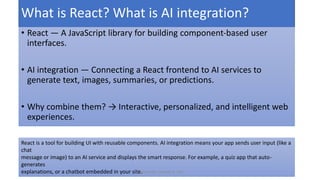
• React — A JavaScript library for building component-based user
interfaces.
• AI integration — Connecting a React frontend to AI services to
generate text, images, summaries, or predictions.
• Why combine them? → Interactive, personalized, and intelligent web
experiences.
React is a tool for building UI with reusable components. AI integration means your app sends user input (like a
chat
message or image) to an AI service and displays the smart response. For example, a quiz app that auto-
generates
explanations, or a chatbot embedded in your site.
Prepared By: Jaydeep N. Kale
Real-world examples & motivation
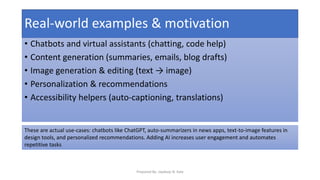
• Chatbots and virtual assistants (chatting, code help)
• Content generation (summaries, emails, blog drafts)
• Image generation & editing (text → image)
• Personalization & recommendations
• Accessibility helpers (auto-captioning, translations)
These are actual use-cases: chatbots like ChatGPT, auto-summarizers in news apps, text-to-image features in
design tools, and personalized recommendations. Adding AI increases user engagement and automates
repetitive tasks
Prepared By: Jaydeep N. Kale
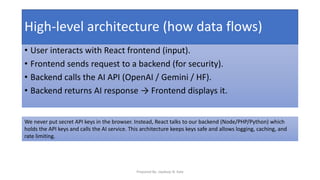
High-level architecture (how data flows)
• User interacts with React frontend (input).
• Frontend sends request to a backend (for security).
• Backend calls the AI API (OpenAI / Gemini / HF).
• Backend returns AI response → Frontend displays it.
We never put secret API keys in the browser. Instead, React talks to our backend (Node/PHP/Python) which
holds the API keys and calls the AI service. This architecture keeps keys safe and allows logging, caching, and
rate limiting.
Prepared By: Jaydeep N. Kale
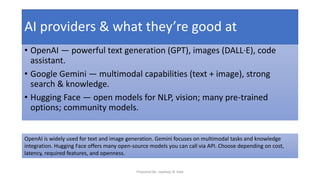
AI providers & what they’re good at
• OpenAI — powerful text generation (GPT), images (DALL·E), code
assistant.
• Google Gemini — multimodal capabilities (text + image), strong
search & knowledge.
• Hugging Face — open models for NLP, vision; many pre-trained
options; community models.
OpenAI is widely used for text and image generation. Gemini focuses on multimodal tasks and knowledge
integration. Hugging Face offers many open-source models you can call via API. Choose depending on cost,
latency, required features, and openness.
Prepared By: Jaydeep N. Kale
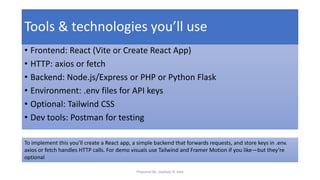
Tools & technologies you’ll use
• Frontend: React (Vite or Create React App)
• HTTP: axios or fetch
• Backend: Node.js/Express or PHP or Python Flask
• Environment: .env files for API keys
• Optional: Tailwind CSS
• Dev tools: Postman for testing
To implement this you’ll create a React app, a simple backend that forwards requests, and store keys in .env.
axios or fetch handles HTTP calls. For demo visuals use Tailwind and Framer Motion if you like—but they’re
optional
Prepared By: Jaydeep N. Kale
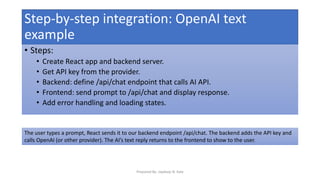
Step-by-step integration: OpenAI text
example
• Steps:
• Create React app and backend server.
• Get API key from the provider.
• Backend: define /api/chat endpoint that calls AI API.
• Frontend: send prompt to /api/chat and display response.
• Add error handling and loading states.
The user types a prompt, React sends it to our backend endpoint /api/chat. The backend adds the API key and
calls OpenAI (or other provider). The AI’s text reply returns to the frontend to show to the user.
Prepared By: Jaydeep N. Kale
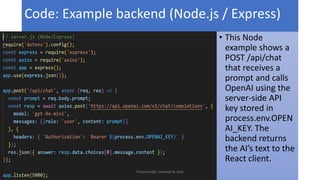
Code: Example backend (Node.js / Express)
• This Node
example shows a
POST /api/chat
that receives a
prompt and calls
OpenAI using the
server-side API
key stored in
process.env.OPEN
AI_KEY. The
backend returns
the AI’s text to the
React client.
Prepared By: Jaydeep N. Kale
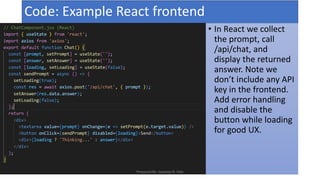
Code: Example React frontend
• In React we collect
the prompt, call
/api/chat, and
display the returned
answer. Note we
don’t include any API
key in the frontend.
Add error handling
and disable the
button while loading
for good UX.
Prepared By: Jaydeep N. Kale
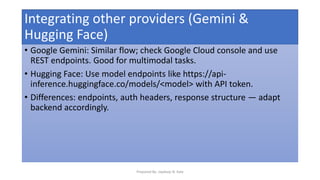
Integrating other providers (Gemini &
Hugging Face)
• Google Gemini: Similar flow; check Google Cloud console and use
REST endpoints. Good for multimodal tasks.
• Hugging Face: Use model endpoints like https://api-
inference.huggingface.co/models/<model> with API token.
• Differences: endpoints, auth headers, response structure — adapt
backend accordingly.
Prepared By: Jaydeep N. Kale
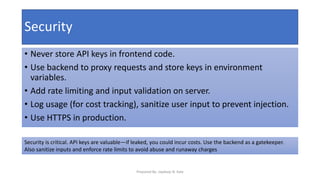
Security
• Never store API keys in frontend code.
• Use backend to proxy requests and store keys in environment
variables.
• Add rate limiting and input validation on server.
• Log usage (for cost tracking), sanitize user input to prevent injection.
• Use HTTPS in production.
Security is critical. API keys are valuable—if leaked, you could incur costs. Use the backend as a gatekeeper.
Also sanitize inputs and enforce rate limits to avoid abuse and runaway charges
Prepared By: Jaydeep N. Kale
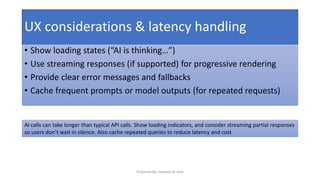
UX considerations & latency handling
• Show loading states (“AI is thinking…”)
• Use streaming responses (if supported) for progressive rendering
• Provide clear error messages and fallbacks
• Cache frequent prompts or model outputs (for repeated requests)
AI calls can take longer than typical API calls. Show loading indicators, and consider streaming partial responses
so users don’t wait in silence. Also cache repeated queries to reduce latency and cost
Prepared By: Jaydeep N. Kale
Thank you..
Prepared By: Jaydeep N. Kale

Integrating_AI_in_React_Applications_Using_OpenAI_Gemini_and_Hugging_Face_Technologies.pdf

  • 1.
    Integrating AI inReact Applications Prepared By: Jaydeep N. Kale
  • 2.
    • Prepared By: •Jaydeep N. Kale • Assistant Professor, • Computer Engineering Department, • Sanjivani College of Engineering, Kopargaon This PPT will show how front-end React apps can be made smarter by integrating AI services such as OpenAI, Google Gemini, and Hugging Face. Prepared By: Jaydeep N. Kale
  • 3.
    What is React?What is AI integration? • React — A JavaScript library for building component-based user interfaces. • AI integration — Connecting a React frontend to AI services to generate text, images, summaries, or predictions. • Why combine them? → Interactive, personalized, and intelligent web experiences. React is a tool for building UI with reusable components. AI integration means your app sends user input (like a chat message or image) to an AI service and displays the smart response. For example, a quiz app that auto- generates explanations, or a chatbot embedded in your site. Prepared By: Jaydeep N. Kale
  • 4.
    Real-world examples &motivation • Chatbots and virtual assistants (chatting, code help) • Content generation (summaries, emails, blog drafts) • Image generation & editing (text → image) • Personalization & recommendations • Accessibility helpers (auto-captioning, translations) These are actual use-cases: chatbots like ChatGPT, auto-summarizers in news apps, text-to-image features in design tools, and personalized recommendations. Adding AI increases user engagement and automates repetitive tasks Prepared By: Jaydeep N. Kale
  • 5.
    High-level architecture (howdata flows) • User interacts with React frontend (input). • Frontend sends request to a backend (for security). • Backend calls the AI API (OpenAI / Gemini / HF). • Backend returns AI response → Frontend displays it. We never put secret API keys in the browser. Instead, React talks to our backend (Node/PHP/Python) which holds the API keys and calls the AI service. This architecture keeps keys safe and allows logging, caching, and rate limiting. Prepared By: Jaydeep N. Kale
  • 6.
    AI providers &what they’re good at • OpenAI — powerful text generation (GPT), images (DALL·E), code assistant. • Google Gemini — multimodal capabilities (text + image), strong search & knowledge. • Hugging Face — open models for NLP, vision; many pre-trained options; community models. OpenAI is widely used for text and image generation. Gemini focuses on multimodal tasks and knowledge integration. Hugging Face offers many open-source models you can call via API. Choose depending on cost, latency, required features, and openness. Prepared By: Jaydeep N. Kale
  • 7.
    Tools & technologiesyou’ll use • Frontend: React (Vite or Create React App) • HTTP: axios or fetch • Backend: Node.js/Express or PHP or Python Flask • Environment: .env files for API keys • Optional: Tailwind CSS • Dev tools: Postman for testing To implement this you’ll create a React app, a simple backend that forwards requests, and store keys in .env. axios or fetch handles HTTP calls. For demo visuals use Tailwind and Framer Motion if you like—but they’re optional Prepared By: Jaydeep N. Kale
  • 8.
    Step-by-step integration: OpenAItext example • Steps: • Create React app and backend server. • Get API key from the provider. • Backend: define /api/chat endpoint that calls AI API. • Frontend: send prompt to /api/chat and display response. • Add error handling and loading states. The user types a prompt, React sends it to our backend endpoint /api/chat. The backend adds the API key and calls OpenAI (or other provider). The AI’s text reply returns to the frontend to show to the user. Prepared By: Jaydeep N. Kale
  • 9.
    Code: Example backend(Node.js / Express) • This Node example shows a POST /api/chat that receives a prompt and calls OpenAI using the server-side API key stored in process.env.OPEN AI_KEY. The backend returns the AI’s text to the React client. Prepared By: Jaydeep N. Kale
  • 10.
    Code: Example Reactfrontend • In React we collect the prompt, call /api/chat, and display the returned answer. Note we don’t include any API key in the frontend. Add error handling and disable the button while loading for good UX. Prepared By: Jaydeep N. Kale
  • 11.
    Integrating other providers(Gemini & Hugging Face) • Google Gemini: Similar flow; check Google Cloud console and use REST endpoints. Good for multimodal tasks. • Hugging Face: Use model endpoints like https://api- inference.huggingface.co/models/<model> with API token. • Differences: endpoints, auth headers, response structure — adapt backend accordingly. Prepared By: Jaydeep N. Kale
  • 12.
    Security • Never storeAPI keys in frontend code. • Use backend to proxy requests and store keys in environment variables. • Add rate limiting and input validation on server. • Log usage (for cost tracking), sanitize user input to prevent injection. • Use HTTPS in production. Security is critical. API keys are valuable—if leaked, you could incur costs. Use the backend as a gatekeeper. Also sanitize inputs and enforce rate limits to avoid abuse and runaway charges Prepared By: Jaydeep N. Kale
  • 13.
    UX considerations &latency handling • Show loading states (“AI is thinking…”) • Use streaming responses (if supported) for progressive rendering • Provide clear error messages and fallbacks • Cache frequent prompts or model outputs (for repeated requests) AI calls can take longer than typical API calls. Show loading indicators, and consider streaming partial responses so users don’t wait in silence. Also cache repeated queries to reduce latency and cost Prepared By: Jaydeep N. Kale
  • 14.
    Thank you.. Prepared By:Jaydeep N. Kale