Moving Beyond WordPress
at Tech in Asia
- Lester & Melvin
T
Tech in Asia (YC W2015) is a media, events, and jobs platform
for Asia’s tech communities.
We are a team of 100 across 12 cities in the region
spanning editorial, product, community and events functions.
About Tech in Asia
History of WordPress at Tech in
Asia
● Tech in Asia is 5 years old
● Back then Tech in Asia was known as Penn Olson
● Been on WordPress since the start
● Using a customized WordPress theme (not using any theme
framework)
● Most features are custom coded plugins. Third-party plugins just
doesn’t scale well and didn’t meet our requirements.
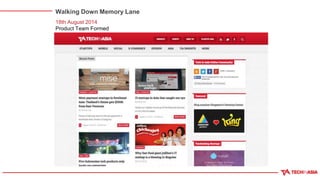
Walking Down Memory Lane
18th August 2014
Product Team Formed
Walking Down Memory Lane
27th October 2014
List View
Walking Down Memory Lane
17th October 2014
Trending Articles / Member System
Walking Down Memory Lane
20th April 2015
Added Facebook & Google Login
Walking Down Memory Lane
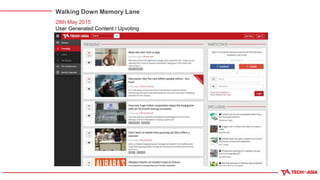
28th May 2015
User Generated Content / Upvoting
Articles
Walking Down Memory Lane
17th August 2015
Whiter, Flatter, Sleeker Design
Walking Down Memory Lane
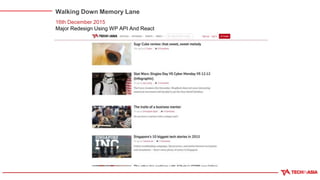
16th December 2015
Major Redesign Using WP API And React
Walking Down Memory Lane
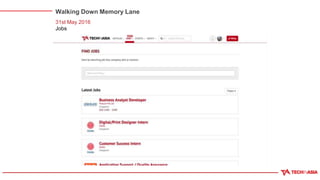
31st May 2016
Jobs
WordPress as our Back-end
WordPress API
● WordPress REST API infrastructure was in WordPress core since
WordPress 4.4 (8th December 2015)
● Prior to WordPress 4.4, we have been testing WordPress REST
API Plugin (https://wordpress.org/plugins/rest-api/) in preparation
for the release
● We are not using the default namespace provided by the plugin
○ Eg: /wp-json/wp/v2/posts
● We are using our own namespace with our own payload format
○ Eg: /wp-json/techinasia/2.0/posts
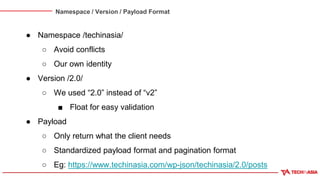
Namespace / Version / Payload Format
● Namespace /techinasia/
○ Avoid conflicts
○ Our own identity
● Version /2.0/
○ We used “2.0” instead of “v2”
■ Float for easy validation
● Payload
○ Only return what the client needs
○ Standardized payload format and pagination format
○ Eg: https://www.techinasia.com/wp-json/techinasia/2.0/posts
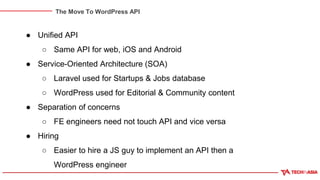
The Move To WordPress API
● Unified API
○ Same API for web, iOS and Android
● Service-Oriented Architecture (SOA)
○ Laravel used for Startups & Jobs database
○ WordPress used for Editorial & Community content
● Separation of concerns
○ FE engineers need not touch API and vice versa
● Hiring
○ Easier to hire a JS guy to implement an API then a
WordPress engineer
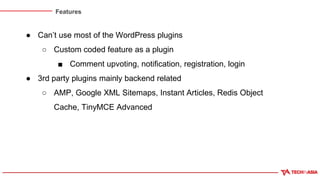
Features
● Can’t use most of the WordPress plugins
○ Custom coded feature as a plugin
■ Comment upvoting, notification, registration, login
● 3rd party plugins mainly backend related
○ AMP, Google XML Sitemaps, Instant Articles, Redis Object
Cache, TinyMCE Advanced
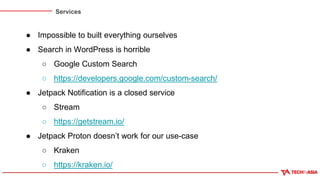
Services
● Impossible to built everything ourselves
● Search in WordPress is horrible
○ Google Custom Search
○ https://developers.google.com/custom-search/
● Jetpack Notification is a closed service
○ Stream
○ https://getstream.io/
● Jetpack Proton doesn’t work for our use-case
○ Kraken
○ https://kraken.io/
Authentication, Authorization and
Session
● Deal with Authentication, Authorization and Session management
● Authentication / Authorization
○ WordPress
○ wp_signon() and user_can() function
● Session
○ Data stored in Redis
○ Overwrite WP session data with “determine_current_user”
filter
○ Session information is set in cookie in the browser
○ Cookie sent along with API request (web) or via Authorization
Rate Limiting / Caching
● API is open, prone to abuse
● Rate limiting GET / PUT / POST requests
○ Discourage spamming
○ Return 429 Too Many Requests when that happens
● Caching
○ Most of our users are “logged out” which makes caching easy
○ Most GET requests should be cached
○ Even a 1-minute cache would help for a heavy traffic site like
TIA
Future?
● Editorial CMS like Automattic’s Calypso
○ Bypass WP-Admin
○ Desktop app using React with Electron
○ Customized to our editor’s workflow
○ More APIs needed
React as our Front-end
Choosing a front-end framework
● 2015 was an interesting year for front-end development.
○ React’s popularity exploded.
○ Angular 2 was being announced; not fully backward
compatible with Angular 1.
○ ES2015 - the most significant upgrade to JavaScript was
finalised in June.
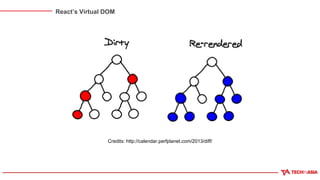
React’s Virtual DOM
Credits: http://calendar.perfplanet.com/2013/diff/
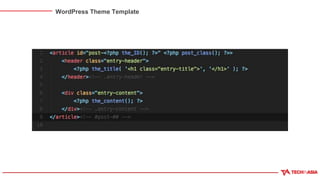
WordPress Theme Template
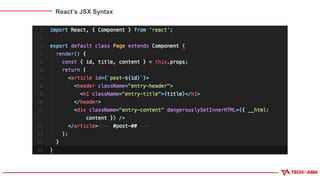
React’s JSX Syntax
React Ops Stuff
● Babel (https://babeljs.io/)
○ Transpile JSX and ES2015+ code to ES5
● webpack (http://webpack.github.io/)
○ Module bundler (with a lot of magic)
○ Code splitting
○ Hot reloading
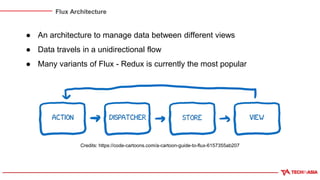
Flux Architecture
● An architecture to manage data between different views
● Data travels in a unidirectional flow
● Many variants of Flux - Redux is currently the most popular
Credits: https://code-cartoons.com/a-cartoon-guide-to-flux-6157355ab207
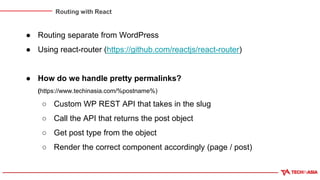
Routing with React
● Routing separate from WordPress
● Using react-router (https://github.com/reactjs/react-router)
● How do we handle pretty permalinks?
(https://www.techinasia.com/%postname%)
○ Custom WP REST API that takes in the slug
○ Call the API that returns the post object
○ Get post type from the object
○ Render the correct component accordingly (page / post)
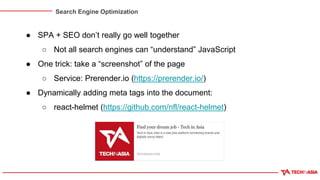
Search Engine Optimization
● SPA + SEO don’t really go well together
○ Not all search engines can “understand” JavaScript
● One trick: take a “screenshot” of the page
○ Service: Prerender.io (https://prerender.io/)
● Dynamically adding meta tags into the document:
○ react-helmet (https://github.com/nfl/react-helmet)
Tips on Starting out React
● Cover the basics without the ops part:
https://facebook.github.io/react/docs/getting-started.html
● Start with a good boilerplate (react-boilerplate)
● Learn JavaScript (ES2015+)
○ Challenge: Functional Programming with JS
Free book: https://leanpub.com/javascriptallongesix
● Redux: https://egghead.io/courses/getting-started-with-redux
Any Questions?
The End

Moving Beyond WordPress At Tech in Asia

  • 1.
    Moving Beyond WordPress atTech in Asia - Lester & Melvin T
  • 2.
    Tech in Asia(YC W2015) is a media, events, and jobs platform for Asia’s tech communities. We are a team of 100 across 12 cities in the region spanning editorial, product, community and events functions. About Tech in Asia
  • 3.
    History of WordPressat Tech in Asia ● Tech in Asia is 5 years old ● Back then Tech in Asia was known as Penn Olson ● Been on WordPress since the start ● Using a customized WordPress theme (not using any theme framework) ● Most features are custom coded plugins. Third-party plugins just doesn’t scale well and didn’t meet our requirements.
  • 4.
    Walking Down MemoryLane 18th August 2014 Product Team Formed
  • 5.
    Walking Down MemoryLane 27th October 2014 List View
  • 6.
    Walking Down MemoryLane 17th October 2014 Trending Articles / Member System
  • 7.
    Walking Down MemoryLane 20th April 2015 Added Facebook & Google Login
  • 8.
    Walking Down MemoryLane 28th May 2015 User Generated Content / Upvoting Articles
  • 9.
    Walking Down MemoryLane 17th August 2015 Whiter, Flatter, Sleeker Design
  • 10.
    Walking Down MemoryLane 16th December 2015 Major Redesign Using WP API And React
  • 11.
    Walking Down MemoryLane 31st May 2016 Jobs
  • 12.
    WordPress as ourBack-end WordPress as our Back-end
  • 13.
    WordPress API ● WordPressREST API infrastructure was in WordPress core since WordPress 4.4 (8th December 2015) ● Prior to WordPress 4.4, we have been testing WordPress REST API Plugin (https://wordpress.org/plugins/rest-api/) in preparation for the release ● We are not using the default namespace provided by the plugin ○ Eg: /wp-json/wp/v2/posts ● We are using our own namespace with our own payload format ○ Eg: /wp-json/techinasia/2.0/posts
  • 14.
    Namespace / Version/ Payload Format ● Namespace /techinasia/ ○ Avoid conflicts ○ Our own identity ● Version /2.0/ ○ We used “2.0” instead of “v2” ■ Float for easy validation ● Payload ○ Only return what the client needs ○ Standardized payload format and pagination format ○ Eg: https://www.techinasia.com/wp-json/techinasia/2.0/posts
  • 15.
    The Move ToWordPress API ● Unified API ○ Same API for web, iOS and Android ● Service-Oriented Architecture (SOA) ○ Laravel used for Startups & Jobs database ○ WordPress used for Editorial & Community content ● Separation of concerns ○ FE engineers need not touch API and vice versa ● Hiring ○ Easier to hire a JS guy to implement an API then a WordPress engineer
  • 16.
    Features ● Can’t usemost of the WordPress plugins ○ Custom coded feature as a plugin ■ Comment upvoting, notification, registration, login ● 3rd party plugins mainly backend related ○ AMP, Google XML Sitemaps, Instant Articles, Redis Object Cache, TinyMCE Advanced
  • 17.
    Services ● Impossible tobuilt everything ourselves ● Search in WordPress is horrible ○ Google Custom Search ○ https://developers.google.com/custom-search/ ● Jetpack Notification is a closed service ○ Stream ○ https://getstream.io/ ● Jetpack Proton doesn’t work for our use-case ○ Kraken ○ https://kraken.io/
  • 18.
    Authentication, Authorization and Session ●Deal with Authentication, Authorization and Session management ● Authentication / Authorization ○ WordPress ○ wp_signon() and user_can() function ● Session ○ Data stored in Redis ○ Overwrite WP session data with “determine_current_user” filter ○ Session information is set in cookie in the browser ○ Cookie sent along with API request (web) or via Authorization
  • 19.
    Rate Limiting /Caching ● API is open, prone to abuse ● Rate limiting GET / PUT / POST requests ○ Discourage spamming ○ Return 429 Too Many Requests when that happens ● Caching ○ Most of our users are “logged out” which makes caching easy ○ Most GET requests should be cached ○ Even a 1-minute cache would help for a heavy traffic site like TIA
  • 20.
    Future? ● Editorial CMSlike Automattic’s Calypso ○ Bypass WP-Admin ○ Desktop app using React with Electron ○ Customized to our editor’s workflow ○ More APIs needed
  • 21.
    React as ourFront-end React as our Front-end
  • 22.
    Choosing a front-endframework ● 2015 was an interesting year for front-end development. ○ React’s popularity exploded. ○ Angular 2 was being announced; not fully backward compatible with Angular 1. ○ ES2015 - the most significant upgrade to JavaScript was finalised in June.
  • 23.
    React’s Virtual DOM Credits:http://calendar.perfplanet.com/2013/diff/
  • 24.
  • 25.
  • 26.
    React Ops Stuff ●Babel (https://babeljs.io/) ○ Transpile JSX and ES2015+ code to ES5 ● webpack (http://webpack.github.io/) ○ Module bundler (with a lot of magic) ○ Code splitting ○ Hot reloading
  • 27.
    Flux Architecture ● Anarchitecture to manage data between different views ● Data travels in a unidirectional flow ● Many variants of Flux - Redux is currently the most popular Credits: https://code-cartoons.com/a-cartoon-guide-to-flux-6157355ab207
  • 28.
    Routing with React ●Routing separate from WordPress ● Using react-router (https://github.com/reactjs/react-router) ● How do we handle pretty permalinks? (https://www.techinasia.com/%postname%) ○ Custom WP REST API that takes in the slug ○ Call the API that returns the post object ○ Get post type from the object ○ Render the correct component accordingly (page / post)
  • 29.
    Search Engine Optimization ●SPA + SEO don’t really go well together ○ Not all search engines can “understand” JavaScript ● One trick: take a “screenshot” of the page ○ Service: Prerender.io (https://prerender.io/) ● Dynamically adding meta tags into the document: ○ react-helmet (https://github.com/nfl/react-helmet)
  • 30.
    Tips on Startingout React ● Cover the basics without the ops part: https://facebook.github.io/react/docs/getting-started.html ● Start with a good boilerplate (react-boilerplate) ● Learn JavaScript (ES2015+) ○ Challenge: Functional Programming with JS Free book: https://leanpub.com/javascriptallongesix ● Redux: https://egghead.io/courses/getting-started-with-redux
  • 31.