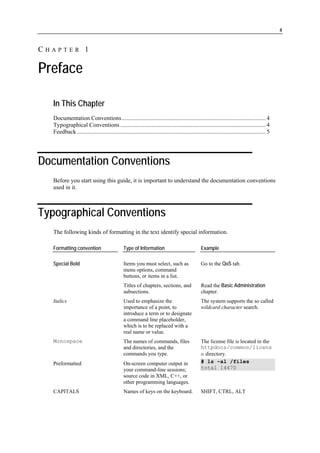
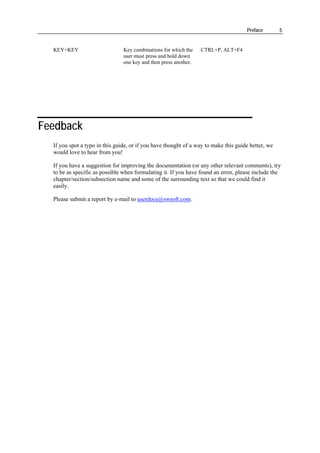
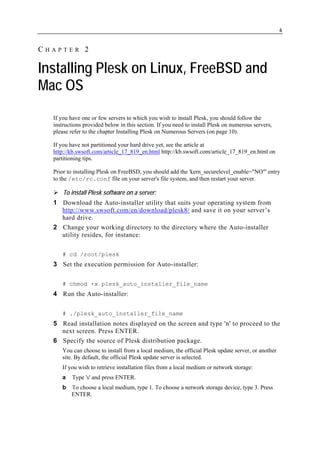
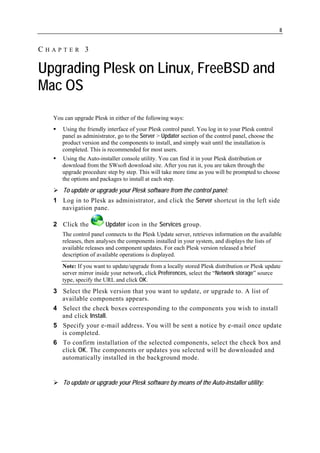
This document provides instructions for installing Plesk on Linux, FreeBSD, and Mac OS systems. The key steps are:
1. Download the Auto-installer utility for the desired OS from the Plesk website.
2. Run the Auto-installer, specifying whether to install from a local file, official update server, or other site.
3. The Auto-installer will then guide the user through the remainder of the installation process.
Prior to installing Plesk on FreeBSD, the 'kern_securelevel_enable="NO"' entry must be added to /etc/rc.conf and the server restarted. Instructions are provided for a single server installation; multi-server

![Installing Plesk on Linux, FreeBSD and Mac OS 7
c If you chose a local medium, specify the location of psa.inf configuration file. If you
chose a network storage, specify the address. For example, http://example.com,
http://192.168.10.10, ftp://192.168.10.10.
d When finished selecting the source, type 'n' to proceed to the next step and press
ENTER.
7 If you use a proxy server, specify the following settings:
a Proxy host name and port number. To specify them, type 's', type the host name, type the
port number, press ENTER to continue.
b User name and password. If this proxy server requires authentication, type 'a', press
ENTER, type user name and press ENTER, type password and press ENTER.
c When finished with specifying proxy settings, type 'n' and press ENTER to continue
with installation.
8 Select the product version that you wish to install: type the number
corresponding to the product version you need and press ENTER, then type
'n' and press ENTER to continue.
9 Select the components that you wish to install or upgrade.
By default, all packages are selected, including Plesk modules. The selected packages are
marked with [*] symbols. The packages that are already installed and do not require
updating are marked with [=] symbols. To select or deselect a package, type the respective
number and press ENTER.
10 To continue with installation, type 'n' and press ENTER. When prompted,
confirm installing: type 'n' and press ENTER again.
The packages will be downloaded and installed. When the installation is finished, Plesk will
have started automatically.
11 Now to complete the initial configuration, log in to the Plesk control panel
running on your host at https://machine.domain.name:8443/ or https://IP-
address:8443/. Use the username 'admin' and password 'setup' (both are case
sensitive). For security reasons, change the password upon initial login.
Once the installation is completed, a trial license key is installed for evaluation purposes. See
the chapter Installing License Keys (on page 19) to learn how to obtain and install a new fully
functional license key for your Plesk.](https://image.slidesharecdn.com/installation-guide1923/85/Installation-Guide-7-320.jpg)
![Upgrading Plesk on Linux, FreeBSD and Mac OS 9
1 Run the autoinstaller binary file, which is located in the directory
/usr/local/psa/admin/bin/ on RPM-based Linux, FreeBSD and
Mac OS systems, and /opt/psa/admin/bin/ on deb-based Linux
systems.
2 Read the installation instructions displayed on the screen, and then type 'n'
and press ENTER to continue. The Auto-installer will detect your existing
installation of Plesk and ask if you want to upgrade it.
3 To confirm upgrade, type 'y' and press ENTER.
4 Specify the source of Plesk distribution package.
You can choose to upgrade from a local medium, the official Plesk update server, or another
site. By default, the official Plesk update server is selected. If you wish to retrieve
installation files from a local medium or network storage:
a Type 's' and press ENTER.
b To choose a local medium, type 1. To choose a network storage device, type 3. Press
ENTER.
c If you chose a local medium, specify the location of psa.inf configuration file. If you
chose a network storage, specify the address. For example, http://example.com,
http://192.168.10.10, ftp://192.168.10.10.
5 If you use a proxy server, specify the following settings:
a Proxy host name and port number. To specify them, type 's', type the host name, type the
port number, and press ENTER to continue.
b User name and password. If this proxy server requires authentication, type 'a', press
ENTER, type user name and press ENTER, type password and press ENTER.
c When finished with specifying proxy settings, type 'n' and press ENTER to continue
with installation.
6 Select the product version that you wish to upgrade to: type the number
corresponding to the product version you need and press ENTER, then type
'n' and press ENTER to continue.
7 Select the components that you wish to install or upgrade.
By default, all packages are selected, including Plesk modules. The selected packages are
marked with [*] symbols. The packages that are already installed and do not require
updating are marked with [=] symbols. To select or deselect a package, type the respective
number and press ENTER.
8 To continue with the upgrade, type 'n' and press ENTER. When prompted,
confirm upgrading: type 'n' and press ENTER again.
The packages will be downloaded and installed.](https://image.slidesharecdn.com/installation-guide1923/85/Installation-Guide-9-320.jpg)
![Installing Plesk on Numerous Servers 17
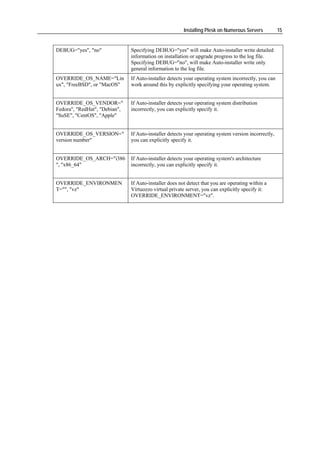
A list of components will open displaying component identifiers in the left part, and
brief descriptions in brackets:
base (Base packages of Plesk)
autoinstaller (Plesk Updater)
fp (Frontpage 2002 support)
asp (Apache ASP support)
mailman (Mailman mailing list manager support)
postgresql (PosgreSQL server support)
java (Tomcat Java Servlets support)
spamassassin (SpamAssassin support)
rblsmtpd (SPAM blocker for QMail daemon)
mod_python (Apache mod_python module)
vault (Application vault packages)
horde-comps (Additional Horde (webmail) components for
Plesk)
docs (Additional Plesk manuals)
bu (Backup utilities)
drweb (Dr. Web antivirus)
ppwse (Plesk Professional Web Site Editor)
api (Plesk API [former Plesk Agent])
sshterm (SSHTerm - SSH Terminal java applet)
pmm (Plesk migration manager)
psa-firewall (Plesk Firewall module)
cs-gs (Plesk Counter-Strike game server module)
psa-vpn (Plesk VPN module)
battlefield (Plesk Battlefield 1942 game server module)
psa-fileserver (Plesk Fileserver module and SMB file server
package)
watchdog (Watchdog (System monitoring module))
sitebuilder (SiteBuilder and SiteBuilder Remote
Administration module for Plesk)
psa-cf (ColdFusion support for Plesk)
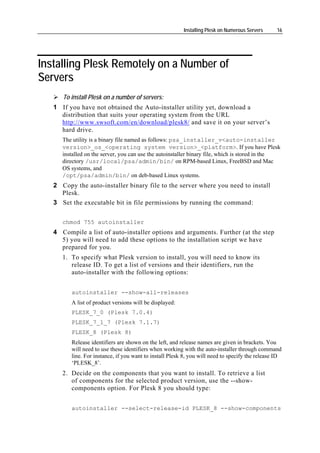
Therefore, for Plesk 8 installation comprising the components ‘base’, ‘postgresql’ and
‘asp’, you will need to use the following string of options and arguments: ‘--select-
release-id PLESK_8 --install-component base --install-component postgresql --install-
component asp’.
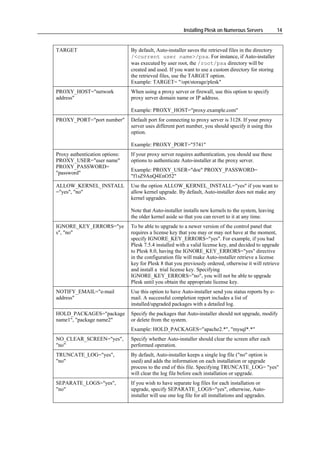
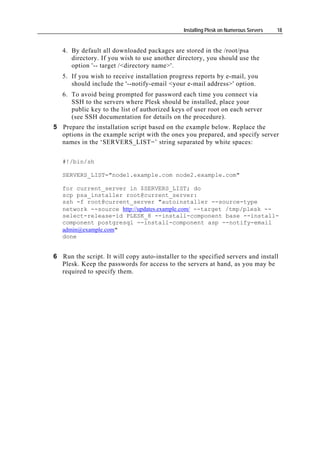
3. If you have set up a local mirror of Plesk updates server (as
described in the Setting up mirrors (on page 11) section of this
guide), you will need to include the following option into the
installation script: --source-type network --source <mirror URL>.](https://image.slidesharecdn.com/installation-guide1923/85/Installation-Guide-17-320.jpg)
![22
CHAPTER 6
Installing Adobe ColdFusion
To install Adobe ColdFusion:
1 Once you have purchased a ColdFusion distribution package, copy it to your
Plesk server.
2 Login as 'root' to the server and run the coldfusion-70-lin.bin
installation file.
3 Choose your language: type the appropriate number and press ENTER.
4 Read the Introduction and press ENTER to continue.
5 Read carefully the end user license agreement and accept it by typing 'y' and
pressing ENTER. A pre-installation check will be performed.
6 To continue with installation, press ENTER.
7 Choose installation type. Select the option Install new version of ColdFusion MX
with a serial number: type '1' and press ENTER, and then type in the serial
number. Press ENTER.
8 Select the type of installation. To install ColdFusion on the server, leave the
Server configuration option selected: type 1 and press ENTER.
9 Type 2 and then press ENTER to confirm that you do not yet have Adobe
ColdFusion installed.
10 To continue with installation, type 4 and press ENTER.
11 Specify an absolute path to the installation folder. The default installation
folder is /opt/coldfusionmx7. Press ENTER.
12 If you had earlier versions of ColdFusion installed, you can choose to
migrate your settings. Otherwise press ENTER to continue.
13 Type 2 and press ENTER to continue with installation.
14 Leave the Runtime user name field blank. Press ENTER.
15 Specify the password that you will use to control access to the ColdFusion
MX Administrator.
16 Disable the ColdFusion Remote Development Service (RDS): type 'n' and
press ENTER.
17 To continue with installation, press ENTER.
18 Once the installation is completed, press ENTER to exit the installer.
19 If your server is running Linux for 64-bit platforms, modify the files
/etc/init.d/coldfusionmx7 and
[path_to_coldfusion_installation]/bin/coldfusion —
comment out the following lines (that is, put a # symbol in the beginning of
each of the following lines):](https://image.slidesharecdn.com/installation-guide1923/85/Installation-Guide-22-320.jpg)
![Installing Adobe ColdFusion 23
SUSEFLAG=`grep 'SuSE Linux 8.1|UnitedLinux 1.0' /etc/SuSE-release
/etc/UnitedLinux-release /etc/UnitedLinux-release 2> /dev/null`
if [ ! "$SUSEFLAG" ]; then
LD_ASSUME_KERNEL=2.2.9
export LD_ASSUME_KERNEL
fi
20 Login to Plesk control panel as administrator.
21 Click the Server shortcut in the left side navigation pane.
22 Click the Updater icon in the right frame.
23 Click a link corresponding to the appropriate release version.
24 Select the check box corresponding to the ColdFusion support for Plesk item,
and click Install. Confirm the installation when prompted.
25 Once the selected components are installed, click the ColdFusion Settings
icon on the Server Administration screen (Plesk control panel > Server).
26 Specify the path to ColdFusion installation directory and click OK.
To uninstall Adobe ColdFusion from your server:
1 Log in as root.
2 Issue the following command at the prompt
/opt/coldfusionmx7/uninstall/uninstall
3 To confirm deinstalling, press ENTER.
4 When the program completes, remove any remaining files and directories in
the /opt/coldfusionmx7/ directory.
5 Log in to Plesk control panel as administrator, click the Server shortcut in
the navigation pane, and then click the Components icon.
6 Click the Refresh icon.
The list of installed components will be updated. Your control panel will find out that you
deinstalled ColdFusion and will remove the ColdFusion related controls from the control
panel screens or will make them unselectable and mark them with the (component is not
installed) comment.
7 Issue the command at the server shell
/usr/local/psa/admin/bin/websrvmng -a
For Debian Linux systems, issue the command /opt/psa/admin/bin/websrvmng -
a](https://image.slidesharecdn.com/installation-guide1923/85/Installation-Guide-23-320.jpg)