INSTAGRAM NEW
UPDATES-2021
MOST IMPORTANT UPDATES AND CHANGES THAT MARKETERS NEED TO
KNOW.
1)PROFESSIONAL DASHBOARD
At the beginning of 2021, Instagram launched a new tab called Professional Dashboard, available to all
Business and Creator Accounts on Instagram. This Professional Dashboard encourages and helps Creators
and Businesses to turn their passion into living and build their business more efficiently.
This update has three new features :
 Track Your Performance.
 Grow Your Business.
 Stay Informed.
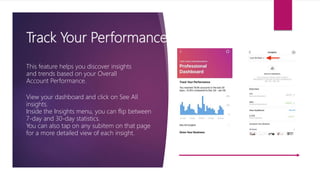
Track Your Performance
This feature helps you discover insights
and trends based on your Overall
Account Performance.
View your dashboard and click on See All
insights.
Inside the Insights menu, you can flip between
7-day and 30-day statistics.
You can also tap on any subitem on that page
for a more detailed view of each insight.
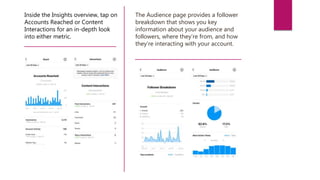
Inside the Insights overview, tap on
Accounts Reached or Content
Interactions for an in-depth look
into either metric.
The Audience page provides a follower
breakdown that shows you key
information about your audience and
followers, where they’re from, and how
they’re interacting with your account.
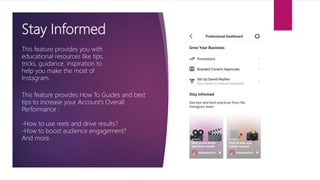
Stay Informed
This feature provides you with
educational resources like tips,
tricks, guidance, inspiration to
help you make the most of
Instagram.
This feature provides How To Guides and best
tips to increase your Account’s Overall
Performance :
-How to use reels and drive results?
-How to boost audience engagement?
And more.
2)REMIX REELS
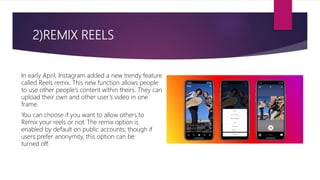
In early April, Instagram added a new trendy feature
called Reels remix. This new function allows people
to use other people’s content within theirs. They can
upload their own and other user’s video in one
frame.
You can choose if you want to allow others to
Remix your reels or not. The remix option is
enabled by default on public accounts; though if
users prefer anonymity, this option can be
turned off.
Here’s how you can use this option :
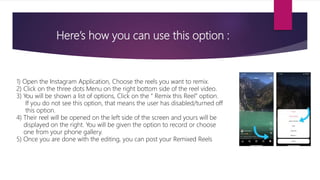
1) Open the Instagram Application, Choose the reels you want to remix.
2) Click on the three dots Menu on the right bottom side of the reel video.
3) You will be shown a list of options, Click on the “ Remix this Reel” option.
If you do not see this option, that means the user has disabled/turned off
this option.
4) Their reel will be opened on the left side of the screen and yours will be
displayed on the right. You will be given the option to record or choose
one from your phone gallery.
5) Once you are done with the editing, you can post your Remixed Reels
Contact Info :
O’Priya Bldg., 1st Floor
Dr. Peter Dias Road,
Near Mehboob Studio, Bandra (W),
Mumbai - 400 050, India.
+91-9322755916
+91-9833361338
www.compufield.com
khairaz@compufield.com

Instagram new updates 2021

  • 1.
    INSTAGRAM NEW UPDATES-2021 MOST IMPORTANTUPDATES AND CHANGES THAT MARKETERS NEED TO KNOW.
  • 2.
    1)PROFESSIONAL DASHBOARD At thebeginning of 2021, Instagram launched a new tab called Professional Dashboard, available to all Business and Creator Accounts on Instagram. This Professional Dashboard encourages and helps Creators and Businesses to turn their passion into living and build their business more efficiently. This update has three new features :  Track Your Performance.  Grow Your Business.  Stay Informed.
  • 3.
    Track Your Performance Thisfeature helps you discover insights and trends based on your Overall Account Performance. View your dashboard and click on See All insights. Inside the Insights menu, you can flip between 7-day and 30-day statistics. You can also tap on any subitem on that page for a more detailed view of each insight.
  • 4.
    Inside the Insightsoverview, tap on Accounts Reached or Content Interactions for an in-depth look into either metric. The Audience page provides a follower breakdown that shows you key information about your audience and followers, where they’re from, and how they’re interacting with your account.
  • 5.
    Stay Informed This featureprovides you with educational resources like tips, tricks, guidance, inspiration to help you make the most of Instagram. This feature provides How To Guides and best tips to increase your Account’s Overall Performance : -How to use reels and drive results? -How to boost audience engagement? And more.
  • 6.
    2)REMIX REELS In earlyApril, Instagram added a new trendy feature called Reels remix. This new function allows people to use other people’s content within theirs. They can upload their own and other user’s video in one frame. You can choose if you want to allow others to Remix your reels or not. The remix option is enabled by default on public accounts; though if users prefer anonymity, this option can be turned off.
  • 7.
    Here’s how youcan use this option : 1) Open the Instagram Application, Choose the reels you want to remix. 2) Click on the three dots Menu on the right bottom side of the reel video. 3) You will be shown a list of options, Click on the “ Remix this Reel” option. If you do not see this option, that means the user has disabled/turned off this option. 4) Their reel will be opened on the left side of the screen and yours will be displayed on the right. You will be given the option to record or choose one from your phone gallery. 5) Once you are done with the editing, you can post your Remixed Reels
  • 8.
    Contact Info : O’PriyaBldg., 1st Floor Dr. Peter Dias Road, Near Mehboob Studio, Bandra (W), Mumbai - 400 050, India. +91-9322755916 +91-9833361338 www.compufield.com khairaz@compufield.com