INPUT OUTPUT
DEVICES
IO DEVICES
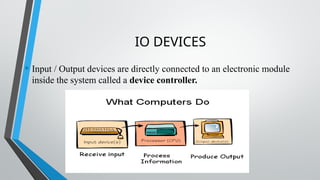
• Input / Output devices are directly connected to an electronic module
inside the system called a device controller.
INPUT DEVICES
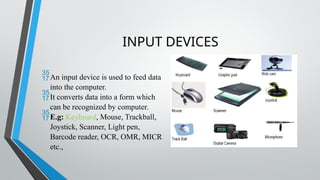
An input device is used to feed data
into the computer.
It converts data into a form which
can be recognized by computer.
E.g: Keyboard, Mouse, Trackball,
Joystick, Scanner, Light pen,
Barcode reader, OCR, OMR, MICR
etc.,
KEYBOARD
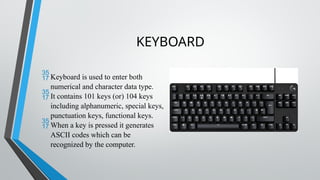
Keyboard is used to enter both
numerical and character data type.
It contains 101 keys (or) 104 keys
including alphanumeric, special keys,
punctuation keys, functional keys.
When a key is pressed it generates
ASCII codes which can be
recognized by the computer.
TYPE OF KEYS
• Alphanumeric key: Letters, numbers, and symbols used for typing and
basic data entry
• Function keys: located at top (F1 to F12) used for various functions
• Control keys: control, Alt and Shift (when pressed in combination-
modifies the actions of other keys)
• Navigation keys: Arrow, Home, End, Pageup, Pagedown for moving cursor
and navigation of documents
• Special keys: Enter, Backspace, Tab, Capslock, spacebar (text editing and
formatting)
• Numeric keypad: separate set of keys for numeric inputs
• Modifies keys: control, Shift, Alt and windows/command keys
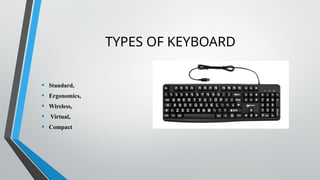
TYPES OF KEYBOARD
• Standard,
• Ergonomics,
• Wireless,
• Virtual,
• Compact
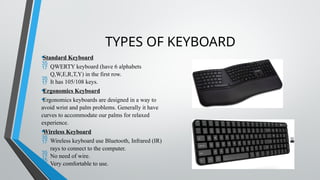
TYPES OF KEYBOARD
•Standard Keyboard
 QWERTY keyboard (have 6 alphabets
Q,W,E,R,T,Y) in the first row.
 It has 105/108 keys.
•Ergonomics Keyboard
•Ergonomics keyboards are designed in a way to
avoid wrist and palm problems. Generally it have
curves to accommodate our palms for relaxed
experience.
•Wireless Keyboard
 Wireless keyboard use Bluetooth, Infrared (IR)
rays to connect to the computer.
 No need of wire.
 Very comfortable to use.
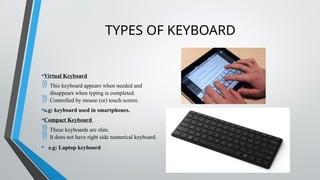
TYPES OF KEYBOARD
•Virtual Keyboard
 This keyboard appears when needed and
disappears when typing is completed.
 Controlled by mouse (or) touch screen.
•e.g: keyboard used in smartphones.
•Compact Keyboard
 These keyboards are slim.
 It does not have right side numerical keyboard.
• e.g: Laptop keyboard
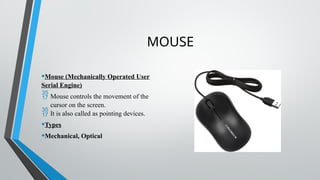
MOUSE
•Mouse (Mechanically Operated User
Serial Engine)
 Mouse controls the movement of the
cursor on the screen.
 It is also called as pointing devices.
•Types
•Mechanical, Optical
MOUSE TYPES
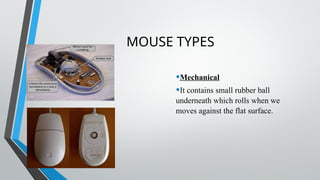
•Mechanical
•It contains small rubber ball
underneath which rolls when we
moves against the flat surface.
MOUSE TYPES
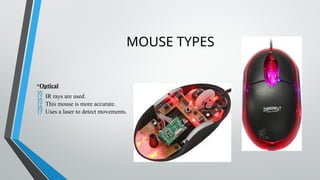
•Optical
 IR rays are used.
 This mouse is more accurate.
 Uses a laser to detect movements.
SCANNER
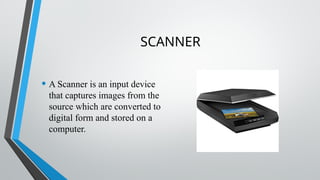
• A Scanner is an input device
that captures images from the
source which are converted to
digital form and stored on a
computer.
JOYSTICK
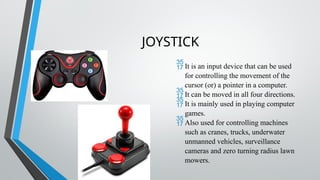
It is an input device that can be used
for controlling the movement of the
cursor (or) a pointer in a computer.
It can be moved in all four directions.
It is mainly used in playing computer
games.
Also used for controlling machines
such as cranes, trucks, underwater
unmanned vehicles, surveillance
cameras and zero turning radius lawn
mowers.
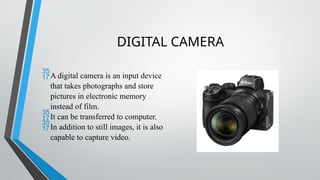
DIGITAL CAMERA
A digital camera is an input device
that takes photographs and store
pictures in electronic memory
instead of film.
It can be transferred to computer.
In addition to still images, it is also
capable to capture video.
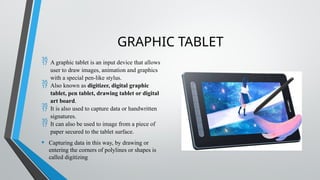
GRAPHIC TABLET
 A graphic tablet is an input device that allows
user to draw images, animation and graphics
with a special pen-like stylus.
 Also known as digitizer, digital graphic
tablet, pen tablet, drawing tablet or digital
art board.
 It is also used to capture data or handwritten
signatures.
 It can also be used to image from a piece of
paper secured to the tablet surface.
• Capturing data in this way, by drawing or
entering the corners of polylines or shapes is
called digitizing
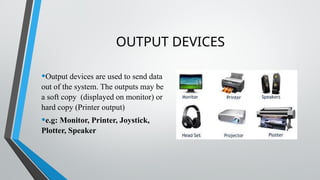
OUTPUT DEVICES
•Output devices are used to send data
out of the system. The outputs may be
a soft copy (displayed on monitor) or
hard copy (Printer output)
•e.g: Monitor, Printer, Joystick,
Plotter, Speaker
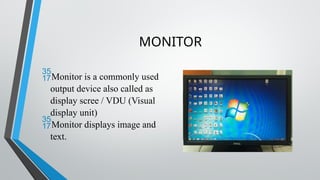
MONITOR
Monitor is a commonly used
output device also called as
display scree / VDU (Visual
display unit)
Monitor displays image and
text.
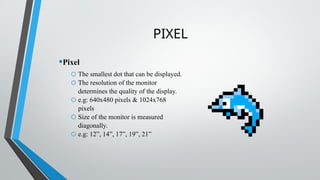
PIXEL
•Pixel
o The smallest dot that can be displayed.
o The resolution of the monitor
determines the quality of the display.
o e.g: 640x480 pixels & 1024x768
pixels
o Size of the monitor is measured
diagonally.
o e.g: 12”, 14”, 17”, 19”, 21”
MONITOR TYPES
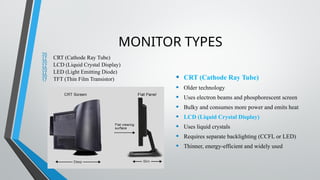
 CRT (Cathode Ray Tube)
 LCD (Liquid Crystal Display)
 LED (Light Emitting Diode)
 TFT (Thin Film Transistor) • CRT (Cathode Ray Tube)
• Older technology
• Uses electron beams and phosphorescent screen
• Bulky and consumes more power and emits heat
• LCD (Liquid Crystal Display)
• Uses liquid crystals
• Requires separate backlighting (CCFL or LED)
• Thinner, energy-efficient and widely used
MONITOR TYPES
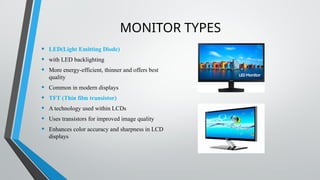
• LED(Light Emitting Diode)
• with LED backlighting
• More energy-efficient, thinner and offers best
quality
• Common in modern displays
• TFT (Thin film transistor)
• A technology used within LCDs
• Uses transistors for improved image quality
• Enhances color accuracy and sharpness in LCD
displays
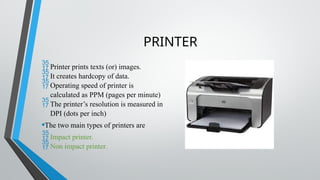
PRINTER
Printer prints texts (or) images.
It creates hardcopy of data.
Operating speed of printer is
calculated as PPM (pages per minute)
The printer’s resolution is measured in
DPI (dots per inch)
•The two main types of printers are
Impact printer.
Non impact printer.
PRINTER TYPES
Impact printer Non impact printer
Operates by striking a metal or
plastic head against an ink
ribbon
It produces output on paper
without striking the paper
e.g: Dotmatrix and line printers E.g: Thermal, Inkjet, Deskjet
printers
IMPACT PRINTER
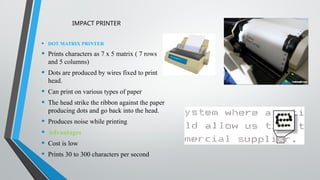
• DOT MATRIX PRINTER
• Prints characters as 7 x 5 matrix ( 7 rows
and 5 columns)
• Dots are produced by wires fixed to print
head.
• Can print on various types of paper
• The head strike the ribbon against the paper
producing dots and go back into the head.
• Produces noise while printing
• Advantages
• Cost is low
• Prints 30 to 300 characters per second
INKJET PRINTER
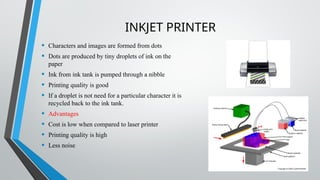
• Characters and images are formed from dots
• Dots are produced by tiny droplets of ink on the
paper
• Ink from ink tank is pumped through a nibble
• Printing quality is good
• If a droplet is not need for a particular character it is
recycled back to the ink tank.
• Advantages
• Cost is low when compared to laser printer
• Printing quality is high
• Less noise
LASER PRINTER
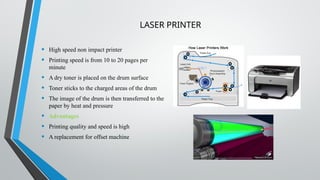
• High speed non impact printer
• Printing speed is from 10 to 20 pages per
minute
• A dry toner is placed on the drum surface
• Toner sticks to the charged areas of the drum
• The image of the drum is then transferred to the
paper by heat and pressure
• Advantages
• Printing quality and speed is high
• A replacement for offset machine
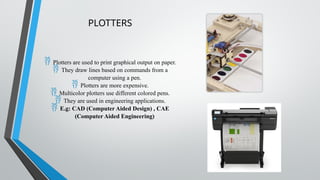
PLOTTERS
 Plotters are used to print graphical output on paper.
 They draw lines based on commands from a
computer using a pen.
 Plotters are more expensive.
 Multicolor plotters use different colored pens.
 They are used in engineering applications.
 E.g: CAD (Computer Aided Design) , CAE
(Computer Aided Engineering)
INPUT OUTPUT DEVICES used in the computer.pptx

  • 1.
  • 2.
    IO DEVICES • Input/ Output devices are directly connected to an electronic module inside the system called a device controller.
  • 3.
    INPUT DEVICES An inputdevice is used to feed data into the computer. It converts data into a form which can be recognized by computer. E.g: Keyboard, Mouse, Trackball, Joystick, Scanner, Light pen, Barcode reader, OCR, OMR, MICR etc.,
  • 4.
    KEYBOARD Keyboard is usedto enter both numerical and character data type. It contains 101 keys (or) 104 keys including alphanumeric, special keys, punctuation keys, functional keys. When a key is pressed it generates ASCII codes which can be recognized by the computer.
  • 5.
    TYPE OF KEYS •Alphanumeric key: Letters, numbers, and symbols used for typing and basic data entry • Function keys: located at top (F1 to F12) used for various functions • Control keys: control, Alt and Shift (when pressed in combination- modifies the actions of other keys) • Navigation keys: Arrow, Home, End, Pageup, Pagedown for moving cursor and navigation of documents • Special keys: Enter, Backspace, Tab, Capslock, spacebar (text editing and formatting) • Numeric keypad: separate set of keys for numeric inputs • Modifies keys: control, Shift, Alt and windows/command keys
  • 6.
    TYPES OF KEYBOARD •Standard, • Ergonomics, • Wireless, • Virtual, • Compact
  • 7.
    TYPES OF KEYBOARD •StandardKeyboard  QWERTY keyboard (have 6 alphabets Q,W,E,R,T,Y) in the first row.  It has 105/108 keys. •Ergonomics Keyboard •Ergonomics keyboards are designed in a way to avoid wrist and palm problems. Generally it have curves to accommodate our palms for relaxed experience. •Wireless Keyboard  Wireless keyboard use Bluetooth, Infrared (IR) rays to connect to the computer.  No need of wire.  Very comfortable to use.
  • 8.
    TYPES OF KEYBOARD •VirtualKeyboard  This keyboard appears when needed and disappears when typing is completed.  Controlled by mouse (or) touch screen. •e.g: keyboard used in smartphones. •Compact Keyboard  These keyboards are slim.  It does not have right side numerical keyboard. • e.g: Laptop keyboard
  • 9.
    MOUSE •Mouse (Mechanically OperatedUser Serial Engine)  Mouse controls the movement of the cursor on the screen.  It is also called as pointing devices. •Types •Mechanical, Optical
  • 10.
    MOUSE TYPES •Mechanical •It containssmall rubber ball underneath which rolls when we moves against the flat surface.
  • 11.
    MOUSE TYPES •Optical  IRrays are used.  This mouse is more accurate.  Uses a laser to detect movements.
  • 12.
    SCANNER • A Scanneris an input device that captures images from the source which are converted to digital form and stored on a computer.
  • 13.
    JOYSTICK It is aninput device that can be used for controlling the movement of the cursor (or) a pointer in a computer. It can be moved in all four directions. It is mainly used in playing computer games. Also used for controlling machines such as cranes, trucks, underwater unmanned vehicles, surveillance cameras and zero turning radius lawn mowers.
  • 14.
    DIGITAL CAMERA A digitalcamera is an input device that takes photographs and store pictures in electronic memory instead of film. It can be transferred to computer. In addition to still images, it is also capable to capture video.
  • 15.
    GRAPHIC TABLET  Agraphic tablet is an input device that allows user to draw images, animation and graphics with a special pen-like stylus.  Also known as digitizer, digital graphic tablet, pen tablet, drawing tablet or digital art board.  It is also used to capture data or handwritten signatures.  It can also be used to image from a piece of paper secured to the tablet surface. • Capturing data in this way, by drawing or entering the corners of polylines or shapes is called digitizing
  • 16.
    OUTPUT DEVICES •Output devicesare used to send data out of the system. The outputs may be a soft copy (displayed on monitor) or hard copy (Printer output) •e.g: Monitor, Printer, Joystick, Plotter, Speaker
  • 17.
    MONITOR Monitor is acommonly used output device also called as display scree / VDU (Visual display unit) Monitor displays image and text.
  • 18.
    PIXEL •Pixel o The smallestdot that can be displayed. o The resolution of the monitor determines the quality of the display. o e.g: 640x480 pixels & 1024x768 pixels o Size of the monitor is measured diagonally. o e.g: 12”, 14”, 17”, 19”, 21”
  • 19.
    MONITOR TYPES  CRT(Cathode Ray Tube)  LCD (Liquid Crystal Display)  LED (Light Emitting Diode)  TFT (Thin Film Transistor) • CRT (Cathode Ray Tube) • Older technology • Uses electron beams and phosphorescent screen • Bulky and consumes more power and emits heat • LCD (Liquid Crystal Display) • Uses liquid crystals • Requires separate backlighting (CCFL or LED) • Thinner, energy-efficient and widely used
  • 20.
    MONITOR TYPES • LED(LightEmitting Diode) • with LED backlighting • More energy-efficient, thinner and offers best quality • Common in modern displays • TFT (Thin film transistor) • A technology used within LCDs • Uses transistors for improved image quality • Enhances color accuracy and sharpness in LCD displays
  • 21.
    PRINTER Printer prints texts(or) images. It creates hardcopy of data. Operating speed of printer is calculated as PPM (pages per minute) The printer’s resolution is measured in DPI (dots per inch) •The two main types of printers are Impact printer. Non impact printer.
  • 22.
    PRINTER TYPES Impact printerNon impact printer Operates by striking a metal or plastic head against an ink ribbon It produces output on paper without striking the paper e.g: Dotmatrix and line printers E.g: Thermal, Inkjet, Deskjet printers
  • 23.
    IMPACT PRINTER • DOTMATRIX PRINTER • Prints characters as 7 x 5 matrix ( 7 rows and 5 columns) • Dots are produced by wires fixed to print head. • Can print on various types of paper • The head strike the ribbon against the paper producing dots and go back into the head. • Produces noise while printing • Advantages • Cost is low • Prints 30 to 300 characters per second
  • 24.
    INKJET PRINTER • Charactersand images are formed from dots • Dots are produced by tiny droplets of ink on the paper • Ink from ink tank is pumped through a nibble • Printing quality is good • If a droplet is not need for a particular character it is recycled back to the ink tank. • Advantages • Cost is low when compared to laser printer • Printing quality is high • Less noise
  • 25.
    LASER PRINTER • Highspeed non impact printer • Printing speed is from 10 to 20 pages per minute • A dry toner is placed on the drum surface • Toner sticks to the charged areas of the drum • The image of the drum is then transferred to the paper by heat and pressure • Advantages • Printing quality and speed is high • A replacement for offset machine
  • 26.
    PLOTTERS  Plotters areused to print graphical output on paper.  They draw lines based on commands from a computer using a pen.  Plotters are more expensive.  Multicolor plotters use different colored pens.  They are used in engineering applications.  E.g: CAD (Computer Aided Design) , CAE (Computer Aided Engineering)