Welcome to
Digital Sales
Platform.
22/11 Release
What is new in
22/11 Release?
Features-at-a-Glance
Commerce
– Website integration – Enhanced Navigation
– Payment gateway with Authorize.net
– Equipment list view with links/attachments
CPQ
– Integration with external configurator like ConfigAir
– Quantity update pop-up (Product BOM, Script)
– KB Version check – after item templating
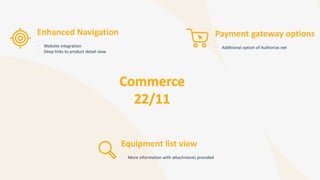
Payment gateway options
• Additional option of Authorize.net
Enhanced Navigation
• Website integration
• Deep links to product detail view
Equipment list view
• More information with attachments provided
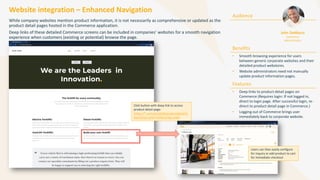
Website integration – Enhanced Navigation
While company websites mention product information, it is not necessarily as comprehensive or updated as the
product detail pages hosted in the Commerce application.
Deep links of these detailed Commerce screens can be included in companies’ websites for a smooth navigation
experience when customers (existing or potential) browse the page.
Audience
Benefits
• Smooth browsing experience for users
between generic corporate websites and their
detailed product webstores.
• Website administrators need not manually
update product information pages.
Features
• Deep links to product detail pages on
Commerce (Requires login: If not logged in,
direct to login page. After successful login, re-
direct to product detail page in Commerce.)
• Logging out of Commerce brings user
immediately back to corporate website.
John DeMarco
Commerce
Administrator
Click button with deep link to access
product detail page:
https://*.com/portal/#/productdetail?o
bjectExternalId=FX50Configurable
Users can then easily configure
for inquiry or add product to cart
for immediate checkout
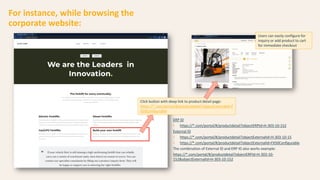
For instance, while browsing the
corporate website:
Click button with deep link to product detail page:
https://*.com/portal/#/productdetail?objectExternalId=F
X50Configurable
Users can easily configure for
inquiry or add product to cart
for immediate checkout
ERP ID
• https://*.com/portal/#/productdetail?objectERPId=H-303-10-152
External ID
• https://*.com/portal/#/productdetail?objectExternalId=H-303-10-15
• https://*.com/portal/#/productdetail?objectExternalId=FX50Configurable
The combination of External ID and ERP ID also works example:
https://*.com/portal/#/productdetail?objectERPId=H-303-10-
152&objectExternalId=H-303-10-152
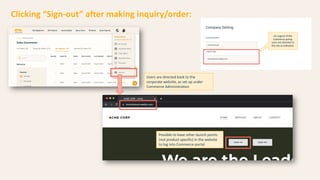
Clicking “Sign-out” after making inquiry/order:
Users are directed back to the
corporate website, as set up under
Commerce Administration
Possible to have other launch points
(not product specific) in the website
to log into Commerce portal
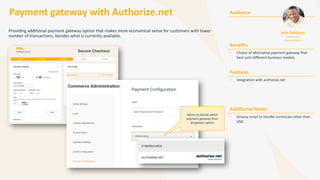
Payment gateway with Authorize.net
Providing additional payment gateway option that makes more economical sense for customers with lower
number of transactions, besides what is currently available.
Audience
Benefits
• Choice of alternative payment gateway that
best suits different business models.
Features
• Integration with authorize.net
Additional Notes
• Groovy script to handle currencies other than
USD
John DeMarco
Commerce
Administrator
Admin to decide which
payment gateway from
dropdown option
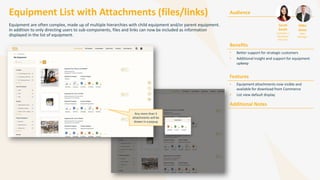
Equipment List with Attachments (files/links) Audience
Benefits
• Better support for strategic customers
• Additional insight and support for equipment
upkeep
Features
• Equipment attachments now visible and
available for download from Commerce
• List view default display
Additional Notes
Sarah
Smith
Customer /
Distributor
End User
MIke
Jones
Sales
Manager
Equipment are often complex, made up of multiple hierarchies with child equipment and/or parent equipment.
In addition to only directing users to sub-components, files and links can now be included as information
displayed in the list of equipment.
Any more than 5
attachments will be
shown in a popup
Quantity update pop-up
• Suppress Quantity assist when item is added
via script
• Improved Product BOM setting, to allow
manual edit of quantity which are calculated
via script.
KB version check
• Done after item-templating
External Configurator
integration
• Integration with Config Air (external configuration
engine)
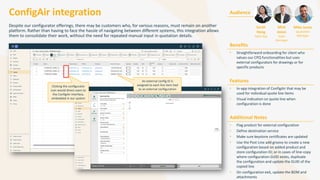
ConfigAir integration
Despite our configurator offerings, there may be customers who, for various reasons, must remain on another
platform. Rather than having to face the hassle of navigating between different systems, this integration allows
them to consolidate their work, without the need for repeated manual input in quotation details.
Audience
Benefits
• Straightforward onboarding for client who
values our CPQ functionalities but uses
external configurators for drawings or for
specific products
Features
• In-app integration of ConfigAir that may be
used for individual quote line items
• Visual indication on quote line when
configuration is done
Additional Notes
• Flag product for external configuration
• Define destination service
• Make sure keystore certificates are updated
• Use the Post Line add groovy to create a new
configuration based on added product and
store configuration ID; or in cases of line-copy
where configuration GUID exists, duplicate
the configuration and update the GUID of the
copied line
• On configuration exit, update the BOM and
attachments
Sarah
Hong
Sales Rep
Mick
Jones
Sales
Manager
Mike Jones
Quotation
Manager
An external config ID is
assigned to each line item tied
to an external configuration
Clicking the configurator
icon would direct users to
the ConfigAir interface,
embedded in our system
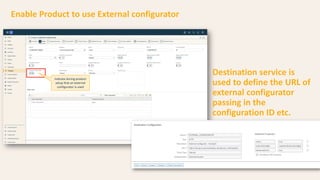
Indicate during product
setup that an external
configurator is used
Enable Product to use External configurator
Destination service is
used to define the URL of
external configurator
passing in the
configuration ID etc.
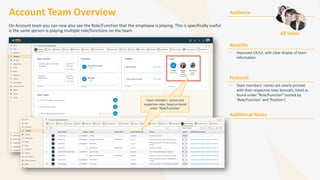
Account Team Overview
On Account team you can now also see the Role/Function that the employee is playing. This is specifically useful
is the same person is playing multiple role/functions on the team.
Audience
Benefits
• Improved UX/UI, with clear display of team
information
Features
• Team members’ names are clearly printed,
with their respective roles beneath, listed as
found under “Role/Function” (sorted by
‘Role/Function’ and ‘Position’)
Additional Notes
Team members’ names and
respective roles, listed as found
under “Role/Function”
Team members’ names and
respective roles, listed as found
under “Role/Function”
All Users
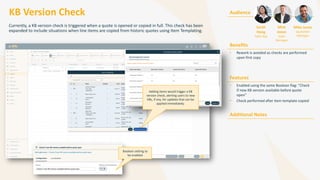
KB Version Check
Currently, a KB version check is triggered when a quote is opened or copied in full. This check has been
expanded to include situations when line items are copied from historic quotes using Item Templating.
Audience
Benefits
• Rework is avoided as checks are performed
upon first copy
Features
• Enabled using the same Boolean flag: “Check
if new KB version available before quote
open”
• Check performed after item template copied
Additional Notes
Sarah
Hong
Sales Rep
Mick
Jones
Sales
Manager
Mike Jones
Quotation
Manager
Adding items would trigger a KB
version check, alerting users to new
KBs, if any, for updates that can be
applied immediately.
Boolean setting to
be enabled
Suppress Quantity Update assist
when item is added via script
Audience
Benefits
• Additional flexibility to make quantity read-
only or updatable when added via script.
• Decide when user input is needed for child
item quantity, if the parent quantity is
modified.
Features
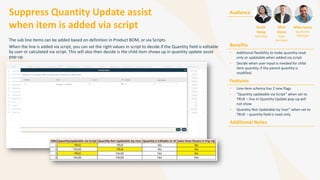
• Line-item schema has 2 new flags
• “Quantity updatable via Script” when set to
TRUE – line in Quantity Update pop-up will
not show
• Quantity Not Updatable by User” when set to
TRUE – quantity field is read-only
Additional Notes
The sub line items can be added based on definition in Product BOM, or via Scripts.
When the line is added via script, you can set the right values in script to decide if the Quantity field is editable
by user or calculated via script. This will also then decide is the child item shows up in quantity update assist
pop-up.
Sarah
Hong
Sales Rep
Mick
Jones
Sales
Manager
Mike Jones
Quotation
Manager
Improved Product BOM setting
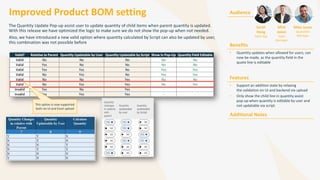
The Quantity Update Pop-up assist user to update quantity of child items when parent quantity is updated.
With this release we have optimized the logic to make sure we do not show the pop-up when not needed.
Also, we have introduced a new valid option where quantity calculated by Script can also be updated by user,
this combination was not possible before
Audience
Benefits
• Quantity updates when allowed for users, can
now be made, as the quantity field in the
quote line is editable
Features
• Support an addition state by relaxing
the validation on UI and backend via upload
• Only show the child line in quantity assist
pop-up when quantity is editable by user and
not updatable via script.
Additional Notes
Sarah
Hong
Sales Rep
Mick
Jones
Sales
Manager
Mike Jones
Quotation
Manager
This option is now supported
both via UI and Excel upload

In Mind Cloud - Product Release - 2211

  • 1.
  • 2.
    What is newin 22/11 Release? Features-at-a-Glance Commerce – Website integration – Enhanced Navigation – Payment gateway with Authorize.net – Equipment list view with links/attachments CPQ – Integration with external configurator like ConfigAir – Quantity update pop-up (Product BOM, Script) – KB Version check – after item templating
  • 3.
    Payment gateway options •Additional option of Authorize.net Enhanced Navigation • Website integration • Deep links to product detail view Equipment list view • More information with attachments provided
  • 4.
    Website integration –Enhanced Navigation While company websites mention product information, it is not necessarily as comprehensive or updated as the product detail pages hosted in the Commerce application. Deep links of these detailed Commerce screens can be included in companies’ websites for a smooth navigation experience when customers (existing or potential) browse the page. Audience Benefits • Smooth browsing experience for users between generic corporate websites and their detailed product webstores. • Website administrators need not manually update product information pages. Features • Deep links to product detail pages on Commerce (Requires login: If not logged in, direct to login page. After successful login, re- direct to product detail page in Commerce.) • Logging out of Commerce brings user immediately back to corporate website. John DeMarco Commerce Administrator Click button with deep link to access product detail page: https://*.com/portal/#/productdetail?o bjectExternalId=FX50Configurable Users can then easily configure for inquiry or add product to cart for immediate checkout
  • 5.
    For instance, whilebrowsing the corporate website: Click button with deep link to product detail page: https://*.com/portal/#/productdetail?objectExternalId=F X50Configurable Users can easily configure for inquiry or add product to cart for immediate checkout ERP ID • https://*.com/portal/#/productdetail?objectERPId=H-303-10-152 External ID • https://*.com/portal/#/productdetail?objectExternalId=H-303-10-15 • https://*.com/portal/#/productdetail?objectExternalId=FX50Configurable The combination of External ID and ERP ID also works example: https://*.com/portal/#/productdetail?objectERPId=H-303-10- 152&objectExternalId=H-303-10-152
  • 6.
    Clicking “Sign-out” aftermaking inquiry/order: Users are directed back to the corporate website, as set up under Commerce Administration Possible to have other launch points (not product specific) in the website to log into Commerce portal
  • 7.
    Payment gateway withAuthorize.net Providing additional payment gateway option that makes more economical sense for customers with lower number of transactions, besides what is currently available. Audience Benefits • Choice of alternative payment gateway that best suits different business models. Features • Integration with authorize.net Additional Notes • Groovy script to handle currencies other than USD John DeMarco Commerce Administrator Admin to decide which payment gateway from dropdown option
  • 8.
    Equipment List withAttachments (files/links) Audience Benefits • Better support for strategic customers • Additional insight and support for equipment upkeep Features • Equipment attachments now visible and available for download from Commerce • List view default display Additional Notes Sarah Smith Customer / Distributor End User MIke Jones Sales Manager Equipment are often complex, made up of multiple hierarchies with child equipment and/or parent equipment. In addition to only directing users to sub-components, files and links can now be included as information displayed in the list of equipment. Any more than 5 attachments will be shown in a popup
  • 9.
    Quantity update pop-up •Suppress Quantity assist when item is added via script • Improved Product BOM setting, to allow manual edit of quantity which are calculated via script. KB version check • Done after item-templating External Configurator integration • Integration with Config Air (external configuration engine)
  • 10.
    ConfigAir integration Despite ourconfigurator offerings, there may be customers who, for various reasons, must remain on another platform. Rather than having to face the hassle of navigating between different systems, this integration allows them to consolidate their work, without the need for repeated manual input in quotation details. Audience Benefits • Straightforward onboarding for client who values our CPQ functionalities but uses external configurators for drawings or for specific products Features • In-app integration of ConfigAir that may be used for individual quote line items • Visual indication on quote line when configuration is done Additional Notes • Flag product for external configuration • Define destination service • Make sure keystore certificates are updated • Use the Post Line add groovy to create a new configuration based on added product and store configuration ID; or in cases of line-copy where configuration GUID exists, duplicate the configuration and update the GUID of the copied line • On configuration exit, update the BOM and attachments Sarah Hong Sales Rep Mick Jones Sales Manager Mike Jones Quotation Manager An external config ID is assigned to each line item tied to an external configuration Clicking the configurator icon would direct users to the ConfigAir interface, embedded in our system
  • 11.
    Indicate during product setupthat an external configurator is used Enable Product to use External configurator Destination service is used to define the URL of external configurator passing in the configuration ID etc.
  • 12.
    Account Team Overview OnAccount team you can now also see the Role/Function that the employee is playing. This is specifically useful is the same person is playing multiple role/functions on the team. Audience Benefits • Improved UX/UI, with clear display of team information Features • Team members’ names are clearly printed, with their respective roles beneath, listed as found under “Role/Function” (sorted by ‘Role/Function’ and ‘Position’) Additional Notes Team members’ names and respective roles, listed as found under “Role/Function” Team members’ names and respective roles, listed as found under “Role/Function” All Users
  • 13.
    KB Version Check Currently,a KB version check is triggered when a quote is opened or copied in full. This check has been expanded to include situations when line items are copied from historic quotes using Item Templating. Audience Benefits • Rework is avoided as checks are performed upon first copy Features • Enabled using the same Boolean flag: “Check if new KB version available before quote open” • Check performed after item template copied Additional Notes Sarah Hong Sales Rep Mick Jones Sales Manager Mike Jones Quotation Manager Adding items would trigger a KB version check, alerting users to new KBs, if any, for updates that can be applied immediately. Boolean setting to be enabled
  • 14.
    Suppress Quantity Updateassist when item is added via script Audience Benefits • Additional flexibility to make quantity read- only or updatable when added via script. • Decide when user input is needed for child item quantity, if the parent quantity is modified. Features • Line-item schema has 2 new flags • “Quantity updatable via Script” when set to TRUE – line in Quantity Update pop-up will not show • Quantity Not Updatable by User” when set to TRUE – quantity field is read-only Additional Notes The sub line items can be added based on definition in Product BOM, or via Scripts. When the line is added via script, you can set the right values in script to decide if the Quantity field is editable by user or calculated via script. This will also then decide is the child item shows up in quantity update assist pop-up. Sarah Hong Sales Rep Mick Jones Sales Manager Mike Jones Quotation Manager
  • 15.
    Improved Product BOMsetting The Quantity Update Pop-up assist user to update quantity of child items when parent quantity is updated. With this release we have optimized the logic to make sure we do not show the pop-up when not needed. Also, we have introduced a new valid option where quantity calculated by Script can also be updated by user, this combination was not possible before Audience Benefits • Quantity updates when allowed for users, can now be made, as the quantity field in the quote line is editable Features • Support an addition state by relaxing the validation on UI and backend via upload • Only show the child line in quantity assist pop-up when quantity is editable by user and not updatable via script. Additional Notes Sarah Hong Sales Rep Mick Jones Sales Manager Mike Jones Quotation Manager This option is now supported both via UI and Excel upload