Improving your Drupal 8
Development Workflow
by Jesus Manuel Olivas / WeKnow
Who I am?
Jesus Manuel Olivas
jmolivas@weknowinc.com
jmolivas
jmolivas
http://drupal.org/u/jmolivas
http://jmolivas.weknowinc.com
WeGive
2,572,697
WeAre
WeKnow
Local environment
Local environment.
Isolate local machine from project dependencies.
Easy and simple to start and continue working on existing projects.
Facilitate on boarding and adding new team members.
Project scope configurations.
Shareable with the team using a code repository via git.
Mimic production environment and other temporary stages.
Local environment.
●OS Native, LAMP, Dev Desktop
●XAMPP => https://www.apachefriends.org
●MAMP => https://www.mamp.info/en/
●WAMP => http://www.wampserver.com/en/
●Vagrant => https://www.vagrantup.com/
●Docker => https://www.docker.com/
Vagrant | Docker
Local environment.
DrupalVM => https://www.drupalvm.com/
Docksal => https://docksal.io/
DDEV => https://github.com/drud/ddev
Lando => https://docs.devwithlando.io/
Outrigger => http://outrigger.sh/
Docker4Drupal => https://github.com/wodby/docker4drupal
Ahoy
Ahoy
Ahoy is command line tool that gives each of
your projects their own CLI app with with zero
code and dependencies.
http://www.ahoycli.com
.ahoy.yml
ahoyapi: v2
commands:
up:
cmd: docker-compose up -d "$@"
usage: Create and start containers.
down:
cmd: docker-compose down "$@"
usage: Stop and remove containers, networks, images, and volumes.
composer:
cmd: docker-compose exec --user=wodby php composer "$@"
usage: Run Composer commands in the php service container.
drupal:
cmd: docker-compose exec --user=wodby php vendor/bin/drupal "$@"
usage: Run Drupal Console commands in the php service container.
Download and Install
Drupal 8
Download Drupal (Composer)
● https://github.com/weknowinc/drupal-project (drupal.dev)
●# Includes configurations for Docker and DrupalConsole.
●composer create-project weknowinc/drupal-project /path/to/drupal
# Clone project using git
git clone git@github.com:weknowinc/drupal-project.git
Manage environment variables (.env.dist => .env)
# Copy env file
cp .env.dist .env
# Customize values

vim .env
What if this is not a new project? | How to automate this?
# Create site alias, .env, and docker-compose.yml files.
drupal dockerize (Available on 1.9.0 ETA TBD)
# This will run
drupal generate:site:alias
drupal dotenv:init
drupal docker:init
Environment variables (.env)
ENVIRONMENT=develop
DATABASE_NAME=drupal
DATABASE_USER=drupal
DATABASE_PASSWORD=drupal
DATABASE_HOST=mariadb
DATABASE_PORT=3306
HOST_NAME=drupal.develop
HOST_PORT=80
DRUPAL_ROOT=/var/www/html
SERVER_ROOT=/var/www/html/web
Ignore configuration files (.gitignore)
# External dependencies
vendor
# Drupal dependencies
web/core
web/modules/contrib
web/themes/contrib
web/profiles/contrib
web/libraries/contrib
# Files

web/sites/*/files
# env file
.env
# DB backups
mariadb-init
The new directory structure
drupal.develop/ web/
├── LICENSE ├── autoload.php
├── README.md ├── core
├── composer.json ├── index.php
├── composer.lock ├── modules
├── scripts ├── profiles
├── vendor ├── sites
└── web └── themes
Interact with containers
# Start containers
ahoy up
# Stop containers
ahoy down
# Show logs
ahoy logs <SERVICE_NAME>
# Stop containers destroy data
ahoy destroy
docker-compose.yml | overview
version: "2.x"
services:
mariadb:
php:
nginx:
mailhog:
traefik:
volumes:
mysqldata:
driver: "local"
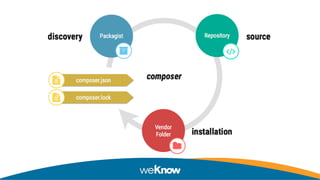
Using Composer to
manage project
dependencies
Composer
● https://getcomposer.org/
Using composer within the container
Drupal 8 really takes a lot of advantages of using composer,
you can install/uninstall dependencies and apply patches.
Although it’s a good practice when using Docker, to run this
commands inside your container because if you have a PHP
version on your local machine, you could install dependencies
that are not suitable for your container instance.
Manage dependencies
ahoy composer install
ahoy composer update
ahoy composer require drupal/admin_toolbar
ahoy composer update drupal/admin_toolbar
ahoy composer update drupal/admin_toolbar --with-dependencies
ahoy composer remove drupal/admin_toolbar
Composer commands
ahoy composer why drupal/admin_toolbar
ahoy composer show [-o] [drupal/admin_toolbar]
ahoy composer check-platform-reqs
ahoy composer diagnose
How composer know about Drupal dependencies
"repositories": [
{
"type": "composer",
"url": "https://packages.drupal.org/8"
}
],
How composer know where to download dependencies
"extra": {
"installer-paths": {
"docroot/core": [
"type:drupal-core"
],
"docroot/modules/contrib/{$name}": [
"type:drupal-module"
],
"docroot/theme/contrib/{$name}": [
“type:drupal-theme"
]
}
}
Apply patches (composer.json)
"extra": {
"patches": {
"drupal/admin_toolbar": {
"Patch description": “URL/local path to patch"
}
}
}
● https://github.com/cweagans/composer-patches
Composer configuration
"minimum-stability": "dev",
"prefer-stable": true,
"config": {
"platform": {
"php": "7.0",
"sort-packages": true
}
}
Managing external
libraries and dependencies
Register a drupal-library (composer.json)
"repositories": [
{
"type": "package",
"package": {
"name": "ckeditor/codesnippet",
"description": "This plugin …",
"type": "drupal-library",
"homepage": "https://ckeditor.com/cke4/addon/codesnippet",
"version": “4.7.3”,
"dist": {
"type": "zip",
"url": "https://download.ckeditor.com/codesnippet/releases/codesnippet_4.7.3.zip",
"reference": "master"
}
}
}
],
Download a drupal-library (composer)
composer require ckeditor/codesnippet
# composer.json
"extra": {
"installer-paths": {
"web/libraries/{$name}": [
“type:drupal-library"
],
}
}
Drupal Console
● https://drupalconsole.com
Drupal Console Launcher
https://docs.drupalconsole.com/en/getting/launcher.html
curl https://drupalconsole.com/installer -L -o drupal.phar
mv drupal.phar /usr/local/bin/drupal
chmod +x /usr/local/bin/drupal
Why do I need the Launcher?
This is a global executable that enables you to run the command, drupal, from any
directory within your site's project. Without it you will be inconvenienced by having to
run the command only from your drupal root directory.
For example, if you have Drupal root in a /web directory, and a composer.json and your
vendor directory in the directory above that, you will be able to run the drupal command
from the same directory as the composer.json file. Even better, you can run it from any
subdirectory under that as many levels deep as you would like to go.
https://docs.drupalconsole.com/en/getting/project.html
Drupal Console per-site installation
composer require drupal/console:~1.0 
--prefer-dist 
--optimize-autoloader
●https://docs.drupalconsole.com/en/getting/composer.html
Site alias
● https://docs.drupalconsole.com/en/alias/using-site-alias.html
Drupal Console allows you to run commands from your local server but being
able to execute those commands on a local, remote (VPS, PaaS) or virtual (VM,
Docker) Drupal installation using site aliases.
A site alias file use the YAML format to provide a collection of predefined
options. Once an alias is defined you can call them using a short name.
Site alias console/sites/drupal.yml (container | docker4drupal)
develop:
root: /var/www/html
extra-options: docker-compose exec --user=82 php
type: container
● https://docs.drupalconsole.com/en/alias/connecting-to-a-virtual-environment.html
Site alias console/sites/drupal.yml (ssh | drupalvm)
drupalvm:
root: /var/www/drupalvm/drupal
host: 192.168.88.88
user: vagrant
extra-options: '-o PasswordAuthentication=no -i ~/.vagrant.d/insecure_private_key'
type: ssh
● https://docs.drupalconsole.com/en/alias/connecting-to-a-virtual-environment.html
Execute Drupal Console using site alias
# Using the --target option

drupal --target=drupal.develop cr all
# Using the legacy @ identifier
drupal @drupal.develop cr all
Configuration Management
Managing configuration changes through the CLI.
Install Drupal and import a previously exported
configuration.
Override configuration per environment
Content synchronization.
Managing configuration
changes through the CLI.
Configuration Management
In Drupal, configuration is the collection of admin settings
that determine how the site functions, as opposed to the
content of the site.
Configuration will typically include things such as the site
name, the content types and fields, taxonomy vocabularies,
views and so on.
Configuration system
The Drupal configuration system handles configuration in a
unified manner.
By default, Drupal stores configuration data in the
database, but it can be exported to YAML files, allowing the
configuration to be managed by version control.
Configuration Management
Configuration is a mapping of keys and values.
Stored on the Database by default.
Exported as YAML for synchronization between environments.
Once a module is installed the configuration provided by the
module is owned by the site not the by the module anymore.
Exporting Configuration
drupal config:export
drupal config:export [--directory] [--tar]
drupal config:export:single [--directory] [--module]
drupal config:export:content:type
drupal config:export:view
Importing Configuration
drupal config:import
drupal config:import [--file] [--directory]
drupal config:import:single [--directory] [--file]
drupal config:import:single [--file] [--file]
Useful Configuration commands
drupal config:diff
drupal config:edit
drupal config:override
drupal config:delete
drupal debug:config
Override configuration per
environment
Configuration override system
There are cases when configuration values need to be overridden
for specific purposes as custom settings per environment.
For this cases the Drupal configuration systems provides the
configuration override system. This system allow you to override
configuration values.
https://www.drupal.org/node/1928898
Configuration override system
* Maintains these overrides as temporary layers on top of the
standard configuration values.
* Does not use overridden values for configuration forms.
* May store overrides with other configuration files for staging
and version control support.
https://www.drupal.org/node/1928898
Main web/sites/default/settings.php file
…
if (file_exists(__DIR__ . '/settings.environment.php')) {
include __DIR__ . '/settings.environment.php';
}
Main web/sites/default/settings.environment.php file
$env = getenv('ENVIRONMENT');
$base_path = $app_root . '/' . $site_path;
$servicesFile = $base_path . '/services.'.$env.'.yml';
$settingsFile = $base_path . '/settings.'.$env.'.php';
if (file_exists($servicesFile)) {
$settings['container_yamls'][] = $servicesFile;
}
if (file_exists($settingsFile)) {
include $settingsFile;
}
Using web/sites/default/services.develop.yml
parameters:
…
twig.config: { debug: true, auto_reload: true, cache: false }
…
services:
cache.backend.null:
class: DrupalCoreCacheNullBackendFactory
Using web/sites/default/settings.develop.php
<?php
$config['system.performance']['css']['preprocess'] = FALSE;
$config['system.performance']['js']['preprocess'] = FALSE;
require_once DRUPAL_ROOT . '/modules/contrib/devel/kint/kint/Kint.class.php';
Kint::$maxLevels = 5;
$settings['cache']['bins']['render'] = 'cache.backend.null';
$settings['cache']['bins']['dynamic_page_cache'] = 'cache.backend.null';
Showing overridden configuration
# Pass the --show-overridden flag
drupal debug:config system.performance --show-overridden
Config Override Inspector
Config Override Inspector provides indicators to administrators
where form fields represent configuration that is overridden.
This module is especially useful for developers working on sites
where there are configuration overrides in place depending on the
environment. It prevents confusion that arise when changing a
form setting, but appears to not take effect.
https://www.drupal.org/project/coi
Install Drupal and import a
previously exported configuration.
Configuration Management
The Configuration Management (CM) system, is great. But
wouldn't it be even more awesome to be able to install a
site, export configuration and then re-install site from
scratch importing the previously exported configuration?
●
●
Install site and import previously exported configuration.
Not supported by Drupal out-of-the-box.
"Site UUID in source storage does not match the target
storage."
https://weknowinc.com/blog/how-install-drupal-8-existing-configuration
Why would you want to install your site from an existing configuration?
Automate the creation of reproducible build/artifacts from scratch at
any stage (Development, QA, Production) to test, launch or deploy
your site.
Simplify on-boarding for new developers to any project without the
need to obtain a database-dump. Developers will be able spin-up sites
from scratch just by installing the site and importing configuration files.
How to achieve this using Drupal Console? [ 1/2 ]
application:
...
 overrides:
   config:
     skip-validate-site-uuid: true
Simple as updating your console/config.yml adding:
How to achieve this using Drupal Console? [ 2/2 ]
drupal site:install --force —no-interaction
drupal config:import --no-interaction
Execute commands to install the site and import your previously
exported configuration:
Automate both commands
command:
 name: build:develop
 description: 'Build site by installing and importing configuration'
commands:
 # Install site
 - command: site:install
   options:
     force: true
   arguments:
     profile: standard
 # Import configurations
 - command: config:import
Using contributed modules to
improve configuration management.
Configuration Split
This module allows to define sets of configuration that will get
exported to separate directories when exporting, and get
merged together when importing.
https://www.drupal.org/project/config_split
Configuration Split | Export Configuration
# Export without development settings
drupal config:export
# Export including development settings
drupal config_split:export --split=develop
Configuration Split | Import Configuration
# Import without development settings
drupal config:import
# Import including development settings
drupal config_split:import --split=develop
Configuration Read-only mode
This module allows to lock any configuration changes done via
the Drupal admin UI. This can be useful in scenarios where for
example configuration changes should not be done on the
production environment, but only on specific environments.
https://www.drupal.org/project/config_readonly
Using web/sites/default/settings.production.php
if (PHP_SAPI !== 'cli') {
$settings['config_readonly'] = TRUE;
}
$settings['config_readonly_whitelist_patterns'] = [
‘system.site’,
‘views*',
‘blocks*',
];
Drupal hosting/deploying
alternatives PaaS
PaaS
Drupal deploy tools
Deploying site to a stage or
production server.
VPS
# 1st release
-- /var/www/my-app.com
|-- current -> /var/www/my-app.com/releases/20100509145325
|-- releases
| |-- 20100509145325
|-- shared
_______________________________________________________________________________
# 2nd release
-- /var/www/my-app.com
|-- current -> /var/www/my-app.com/releases/20100509150741
|-- releases
| |-- 20100509150741
| |-- 20100509145325
|-- shared
_______________________________________________________________________________
# 3rd release
-- /var/www/my-app.com
|-- current -> /var/www/my-app.com/releases/20100512131539
|-- releases
| |-- 20100512131539
| |-- 20100509150741
| |-- 20100509145325
|-- shared
Deploy via ssh to a server
Deployer
Deployer is a deployment tool written in
PHP with support for popular frameworks
out of the box.
Ansistrano (Ansible + Capistrano)
ansistrano.deploy and ansistrano.rollback are Ansible
Galaxy roles to easily manage the deployment process for
scripting applications such as PHP, Python and Ruby. It's an
Ansible port for Capistrano.
Docker in production
Kubernetes
> Create the Docker File(s).
> Build the image(s).
> Create a release tag.
> Push release to a public/private registry (dockerhub, quay, googlecloud).
> Orchestration Config pods, persistent volumes, services, etc.
Thank you … Questions?

Improving your Drupal 8 development workflow DrupalCampLA

  • 1.
    Improving your Drupal8 Development Workflow by Jesus Manuel Olivas / WeKnow
  • 2.
    Who I am? JesusManuel Olivas jmolivas@weknowinc.com jmolivas jmolivas http://drupal.org/u/jmolivas http://jmolivas.weknowinc.com
  • 3.
  • 4.
  • 5.
  • 6.
  • 7.
    Local environment. Isolate localmachine from project dependencies. Easy and simple to start and continue working on existing projects. Facilitate on boarding and adding new team members. Project scope configurations. Shareable with the team using a code repository via git. Mimic production environment and other temporary stages.
  • 8.
    Local environment. ●OS Native,LAMP, Dev Desktop ●XAMPP => https://www.apachefriends.org ●MAMP => https://www.mamp.info/en/ ●WAMP => http://www.wampserver.com/en/ ●Vagrant => https://www.vagrantup.com/ ●Docker => https://www.docker.com/
  • 9.
  • 10.
    Local environment. DrupalVM =>https://www.drupalvm.com/ Docksal => https://docksal.io/ DDEV => https://github.com/drud/ddev Lando => https://docs.devwithlando.io/ Outrigger => http://outrigger.sh/ Docker4Drupal => https://github.com/wodby/docker4drupal
  • 11.
  • 12.
    Ahoy Ahoy is commandline tool that gives each of your projects their own CLI app with with zero code and dependencies. http://www.ahoycli.com
  • 13.
    .ahoy.yml ahoyapi: v2 commands: up: cmd: docker-composeup -d "$@" usage: Create and start containers. down: cmd: docker-compose down "$@" usage: Stop and remove containers, networks, images, and volumes. composer: cmd: docker-compose exec --user=wodby php composer "$@" usage: Run Composer commands in the php service container. drupal: cmd: docker-compose exec --user=wodby php vendor/bin/drupal "$@" usage: Run Drupal Console commands in the php service container.
  • 14.
  • 15.
    Download Drupal (Composer) ●https://github.com/weknowinc/drupal-project (drupal.dev) ●# Includes configurations for Docker and DrupalConsole. ●composer create-project weknowinc/drupal-project /path/to/drupal # Clone project using git git clone git@github.com:weknowinc/drupal-project.git
  • 16.
    Manage environment variables(.env.dist => .env) # Copy env file cp .env.dist .env # Customize values
 vim .env
  • 17.
    What if thisis not a new project? | How to automate this? # Create site alias, .env, and docker-compose.yml files. drupal dockerize (Available on 1.9.0 ETA TBD) # This will run drupal generate:site:alias drupal dotenv:init drupal docker:init
  • 18.
  • 19.
    Ignore configuration files(.gitignore) # External dependencies vendor # Drupal dependencies web/core web/modules/contrib web/themes/contrib web/profiles/contrib web/libraries/contrib # Files
 web/sites/*/files # env file .env # DB backups mariadb-init
  • 20.
    The new directorystructure drupal.develop/ web/ ├── LICENSE ├── autoload.php ├── README.md ├── core ├── composer.json ├── index.php ├── composer.lock ├── modules ├── scripts ├── profiles ├── vendor ├── sites └── web └── themes
  • 21.
    Interact with containers #Start containers ahoy up # Stop containers ahoy down # Show logs ahoy logs <SERVICE_NAME> # Stop containers destroy data ahoy destroy
  • 22.
    docker-compose.yml | overview version:"2.x" services: mariadb: php: nginx: mailhog: traefik: volumes: mysqldata: driver: "local"
  • 23.
    Using Composer to manageproject dependencies
  • 24.
  • 26.
    Using composer withinthe container Drupal 8 really takes a lot of advantages of using composer, you can install/uninstall dependencies and apply patches. Although it’s a good practice when using Docker, to run this commands inside your container because if you have a PHP version on your local machine, you could install dependencies that are not suitable for your container instance.
  • 27.
    Manage dependencies ahoy composerinstall ahoy composer update ahoy composer require drupal/admin_toolbar ahoy composer update drupal/admin_toolbar ahoy composer update drupal/admin_toolbar --with-dependencies ahoy composer remove drupal/admin_toolbar
  • 28.
    Composer commands ahoy composerwhy drupal/admin_toolbar ahoy composer show [-o] [drupal/admin_toolbar] ahoy composer check-platform-reqs ahoy composer diagnose
  • 29.
    How composer knowabout Drupal dependencies "repositories": [ { "type": "composer", "url": "https://packages.drupal.org/8" } ],
  • 30.
    How composer knowwhere to download dependencies "extra": { "installer-paths": { "docroot/core": [ "type:drupal-core" ], "docroot/modules/contrib/{$name}": [ "type:drupal-module" ], "docroot/theme/contrib/{$name}": [ “type:drupal-theme" ] } }
  • 31.
    Apply patches (composer.json) "extra":{ "patches": { "drupal/admin_toolbar": { "Patch description": “URL/local path to patch" } } } ● https://github.com/cweagans/composer-patches
  • 32.
    Composer configuration "minimum-stability": "dev", "prefer-stable":true, "config": { "platform": { "php": "7.0", "sort-packages": true } }
  • 33.
  • 34.
    Register a drupal-library(composer.json) "repositories": [ { "type": "package", "package": { "name": "ckeditor/codesnippet", "description": "This plugin …", "type": "drupal-library", "homepage": "https://ckeditor.com/cke4/addon/codesnippet", "version": “4.7.3”, "dist": { "type": "zip", "url": "https://download.ckeditor.com/codesnippet/releases/codesnippet_4.7.3.zip", "reference": "master" } } } ],
  • 35.
    Download a drupal-library(composer) composer require ckeditor/codesnippet # composer.json "extra": { "installer-paths": { "web/libraries/{$name}": [ “type:drupal-library" ], } }
  • 36.
  • 37.
  • 38.
    Drupal Console Launcher https://docs.drupalconsole.com/en/getting/launcher.html curlhttps://drupalconsole.com/installer -L -o drupal.phar mv drupal.phar /usr/local/bin/drupal chmod +x /usr/local/bin/drupal
  • 39.
    Why do Ineed the Launcher? This is a global executable that enables you to run the command, drupal, from any directory within your site's project. Without it you will be inconvenienced by having to run the command only from your drupal root directory. For example, if you have Drupal root in a /web directory, and a composer.json and your vendor directory in the directory above that, you will be able to run the drupal command from the same directory as the composer.json file. Even better, you can run it from any subdirectory under that as many levels deep as you would like to go. https://docs.drupalconsole.com/en/getting/project.html
  • 40.
    Drupal Console per-siteinstallation composer require drupal/console:~1.0 --prefer-dist --optimize-autoloader ●https://docs.drupalconsole.com/en/getting/composer.html
  • 41.
    Site alias ● https://docs.drupalconsole.com/en/alias/using-site-alias.html DrupalConsole allows you to run commands from your local server but being able to execute those commands on a local, remote (VPS, PaaS) or virtual (VM, Docker) Drupal installation using site aliases. A site alias file use the YAML format to provide a collection of predefined options. Once an alias is defined you can call them using a short name.
  • 42.
    Site alias console/sites/drupal.yml(container | docker4drupal) develop: root: /var/www/html extra-options: docker-compose exec --user=82 php type: container ● https://docs.drupalconsole.com/en/alias/connecting-to-a-virtual-environment.html
  • 43.
    Site alias console/sites/drupal.yml(ssh | drupalvm) drupalvm: root: /var/www/drupalvm/drupal host: 192.168.88.88 user: vagrant extra-options: '-o PasswordAuthentication=no -i ~/.vagrant.d/insecure_private_key' type: ssh ● https://docs.drupalconsole.com/en/alias/connecting-to-a-virtual-environment.html
  • 44.
    Execute Drupal Consoleusing site alias # Using the --target option
 drupal --target=drupal.develop cr all # Using the legacy @ identifier drupal @drupal.develop cr all
  • 45.
    Configuration Management Managing configurationchanges through the CLI. Install Drupal and import a previously exported configuration. Override configuration per environment Content synchronization.
  • 46.
  • 47.
    Configuration Management In Drupal,configuration is the collection of admin settings that determine how the site functions, as opposed to the content of the site. Configuration will typically include things such as the site name, the content types and fields, taxonomy vocabularies, views and so on.
  • 48.
    Configuration system The Drupalconfiguration system handles configuration in a unified manner. By default, Drupal stores configuration data in the database, but it can be exported to YAML files, allowing the configuration to be managed by version control.
  • 49.
    Configuration Management Configuration isa mapping of keys and values. Stored on the Database by default. Exported as YAML for synchronization between environments. Once a module is installed the configuration provided by the module is owned by the site not the by the module anymore.
  • 50.
    Exporting Configuration drupal config:export drupalconfig:export [--directory] [--tar] drupal config:export:single [--directory] [--module] drupal config:export:content:type drupal config:export:view
  • 51.
    Importing Configuration drupal config:import drupalconfig:import [--file] [--directory] drupal config:import:single [--directory] [--file] drupal config:import:single [--file] [--file]
  • 52.
    Useful Configuration commands drupalconfig:diff drupal config:edit drupal config:override drupal config:delete drupal debug:config
  • 53.
  • 54.
    Configuration override system Thereare cases when configuration values need to be overridden for specific purposes as custom settings per environment. For this cases the Drupal configuration systems provides the configuration override system. This system allow you to override configuration values. https://www.drupal.org/node/1928898
  • 55.
    Configuration override system *Maintains these overrides as temporary layers on top of the standard configuration values. * Does not use overridden values for configuration forms. * May store overrides with other configuration files for staging and version control support. https://www.drupal.org/node/1928898
  • 56.
    Main web/sites/default/settings.php file … if(file_exists(__DIR__ . '/settings.environment.php')) { include __DIR__ . '/settings.environment.php'; }
  • 57.
    Main web/sites/default/settings.environment.php file $env= getenv('ENVIRONMENT'); $base_path = $app_root . '/' . $site_path; $servicesFile = $base_path . '/services.'.$env.'.yml'; $settingsFile = $base_path . '/settings.'.$env.'.php'; if (file_exists($servicesFile)) { $settings['container_yamls'][] = $servicesFile; } if (file_exists($settingsFile)) { include $settingsFile; }
  • 58.
    Using web/sites/default/services.develop.yml parameters: … twig.config: {debug: true, auto_reload: true, cache: false } … services: cache.backend.null: class: DrupalCoreCacheNullBackendFactory
  • 59.
    Using web/sites/default/settings.develop.php <?php $config['system.performance']['css']['preprocess'] =FALSE; $config['system.performance']['js']['preprocess'] = FALSE; require_once DRUPAL_ROOT . '/modules/contrib/devel/kint/kint/Kint.class.php'; Kint::$maxLevels = 5; $settings['cache']['bins']['render'] = 'cache.backend.null'; $settings['cache']['bins']['dynamic_page_cache'] = 'cache.backend.null';
  • 60.
    Showing overridden configuration #Pass the --show-overridden flag drupal debug:config system.performance --show-overridden
  • 61.
    Config Override Inspector ConfigOverride Inspector provides indicators to administrators where form fields represent configuration that is overridden. This module is especially useful for developers working on sites where there are configuration overrides in place depending on the environment. It prevents confusion that arise when changing a form setting, but appears to not take effect. https://www.drupal.org/project/coi
  • 62.
    Install Drupal andimport a previously exported configuration.
  • 63.
    Configuration Management The ConfigurationManagement (CM) system, is great. But wouldn't it be even more awesome to be able to install a site, export configuration and then re-install site from scratch importing the previously exported configuration?
  • 64.
  • 65.
  • 66.
    Install site andimport previously exported configuration. Not supported by Drupal out-of-the-box. "Site UUID in source storage does not match the target storage." https://weknowinc.com/blog/how-install-drupal-8-existing-configuration
  • 67.
    Why would youwant to install your site from an existing configuration? Automate the creation of reproducible build/artifacts from scratch at any stage (Development, QA, Production) to test, launch or deploy your site. Simplify on-boarding for new developers to any project without the need to obtain a database-dump. Developers will be able spin-up sites from scratch just by installing the site and importing configuration files.
  • 68.
    How to achievethis using Drupal Console? [ 1/2 ] application: ...  overrides:    config:      skip-validate-site-uuid: true Simple as updating your console/config.yml adding:
  • 69.
    How to achievethis using Drupal Console? [ 2/2 ] drupal site:install --force —no-interaction drupal config:import --no-interaction Execute commands to install the site and import your previously exported configuration:
  • 70.
    Automate both commands command:  name:build:develop  description: 'Build site by installing and importing configuration' commands:  # Install site  - command: site:install    options:      force: true    arguments:      profile: standard  # Import configurations  - command: config:import
  • 71.
    Using contributed modulesto improve configuration management.
  • 72.
    Configuration Split This moduleallows to define sets of configuration that will get exported to separate directories when exporting, and get merged together when importing. https://www.drupal.org/project/config_split
  • 73.
    Configuration Split |Export Configuration # Export without development settings drupal config:export # Export including development settings drupal config_split:export --split=develop
  • 74.
    Configuration Split |Import Configuration # Import without development settings drupal config:import # Import including development settings drupal config_split:import --split=develop
  • 75.
    Configuration Read-only mode Thismodule allows to lock any configuration changes done via the Drupal admin UI. This can be useful in scenarios where for example configuration changes should not be done on the production environment, but only on specific environments. https://www.drupal.org/project/config_readonly
  • 76.
    Using web/sites/default/settings.production.php if (PHP_SAPI!== 'cli') { $settings['config_readonly'] = TRUE; } $settings['config_readonly_whitelist_patterns'] = [ ‘system.site’, ‘views*', ‘blocks*', ];
  • 77.
  • 78.
  • 79.
  • 80.
    Deploying site toa stage or production server.
  • 81.
  • 82.
    # 1st release --/var/www/my-app.com |-- current -> /var/www/my-app.com/releases/20100509145325 |-- releases | |-- 20100509145325 |-- shared _______________________________________________________________________________ # 2nd release -- /var/www/my-app.com |-- current -> /var/www/my-app.com/releases/20100509150741 |-- releases | |-- 20100509150741 | |-- 20100509145325 |-- shared _______________________________________________________________________________ # 3rd release -- /var/www/my-app.com |-- current -> /var/www/my-app.com/releases/20100512131539 |-- releases | |-- 20100512131539 | |-- 20100509150741 | |-- 20100509145325 |-- shared Deploy via ssh to a server
  • 83.
    Deployer Deployer is adeployment tool written in PHP with support for popular frameworks out of the box.
  • 84.
    Ansistrano (Ansible +Capistrano) ansistrano.deploy and ansistrano.rollback are Ansible Galaxy roles to easily manage the deployment process for scripting applications such as PHP, Python and Ruby. It's an Ansible port for Capistrano.
  • 85.
  • 87.
    Kubernetes > Create theDocker File(s). > Build the image(s). > Create a release tag. > Push release to a public/private registry (dockerhub, quay, googlecloud). > Orchestration Config pods, persistent volumes, services, etc.
  • 88.
    Thank you …Questions?