René Olivo
Boston, MA
April 14th, 2014
LESS
Bootstrap
Implementing
the right way using
Mobile FirstCSS Framework
Fluid
Grid
Accessibility
Prototyping
The problem
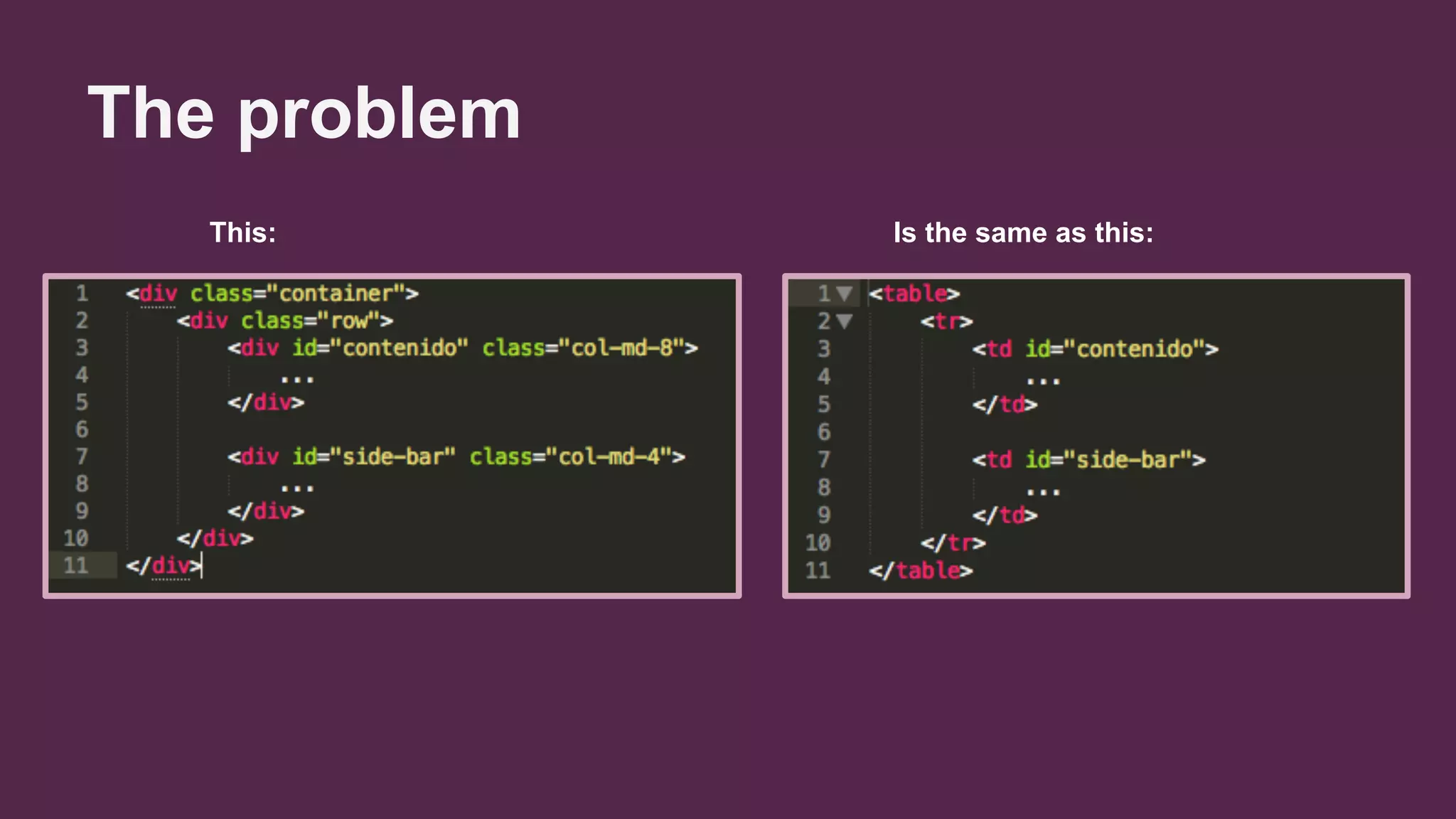
This: Is the same as this:
The problem
● It's not because they have the same number
of lines.
● It's not because .row is similar to TR.
● It's not because both are using a grid
system.
The problem
We are defining how our website should
behave right into the HTML.
.pull-left
.col-md-6
.img-responsive
.show
.clearfix
.hide
.pull-right
.img-circle
.col-sm-offset-2
.row
.sr-only
Why is that a problem?
● It's difficult to integrate it to an existing
project.
● It doesn't adapt well to new changes or
requirements.
Real life lesson
Bootstrap 2.x -> 3.x
¿What is LESS?
● Supercharged CSS.
● It allows you to use:
○ Modularization
○ Variables
○ Functions
○ Operators
○ Nested selectors
○ Conditions (Guards)
○ Etc.
LESS Tutorial
A short introduction
How can LESS help
Bootstrap?
Separating content from behaviour
LESS removes Bootstrap completely from our
HTML and takes it right into your CSS, where it
belongs.
You can use LESS awesome features
Using modules, variables, operators, mixins
and functions improves considerably your
workflow.
Reduces the project's size
When you import only the modules that you will
need for your project, you can reduce the
Bootstrap file considerably.
What I want to use
What Bootstrap makes
me use
20%
80%
Functions (Mixins)
● .sr-only -> .sr-only();
● .sr-only-focusable -> .sr-only-focusable();
● .container -> .container();
● .row -> .make-row();
● .col-md-8 -> .make-md-column(8);
● .col-md-offset-2 -> .make-md-column-offset(2)
● .bg-info -> background: @brand-info;
● .text-info -> color: @brand-info;
Demo
Final remarks
● Use SASS, LESS or Stylus for your projects (tutorial).
● Don't adapt your HTML to Bootstrap. Don't even adapt
your HTML to your own CSS.
● Use Webcomponents.
● Recommended books:
Q&A
Thanks!

Implementing bootstrap the right way using less (1)

  • 1.
    René Olivo Boston, MA April14th, 2014 LESS Bootstrap Implementing the right way using
  • 2.
  • 3.
    The problem This: Isthe same as this:
  • 4.
    The problem ● It'snot because they have the same number of lines. ● It's not because .row is similar to TR. ● It's not because both are using a grid system.
  • 5.
    The problem We aredefining how our website should behave right into the HTML. .pull-left .col-md-6 .img-responsive .show .clearfix .hide .pull-right .img-circle .col-sm-offset-2 .row .sr-only
  • 6.
    Why is thata problem? ● It's difficult to integrate it to an existing project. ● It doesn't adapt well to new changes or requirements.
  • 7.
  • 9.
    ¿What is LESS? ●Supercharged CSS. ● It allows you to use: ○ Modularization ○ Variables ○ Functions ○ Operators ○ Nested selectors ○ Conditions (Guards) ○ Etc.
  • 10.
  • 11.
    How can LESShelp Bootstrap?
  • 12.
    Separating content frombehaviour LESS removes Bootstrap completely from our HTML and takes it right into your CSS, where it belongs.
  • 13.
    You can useLESS awesome features Using modules, variables, operators, mixins and functions improves considerably your workflow.
  • 14.
    Reduces the project'ssize When you import only the modules that you will need for your project, you can reduce the Bootstrap file considerably. What I want to use What Bootstrap makes me use 20% 80%
  • 15.
    Functions (Mixins) ● .sr-only-> .sr-only(); ● .sr-only-focusable -> .sr-only-focusable(); ● .container -> .container(); ● .row -> .make-row(); ● .col-md-8 -> .make-md-column(8); ● .col-md-offset-2 -> .make-md-column-offset(2) ● .bg-info -> background: @brand-info; ● .text-info -> color: @brand-info;
  • 16.
  • 17.
    Final remarks ● UseSASS, LESS or Stylus for your projects (tutorial). ● Don't adapt your HTML to Bootstrap. Don't even adapt your HTML to your own CSS. ● Use Webcomponents. ● Recommended books:
  • 18.
  • 19.