scurity threats has increased exponentially.
While there are many differenet steps that can be taken to secure a wireless network, these 12 best practices.
LO1: Identify andanalyze maintenance needs
Definition maintenance
Maintenance is the process of keeping
equipment or property in good condition by
performing repairs and correcting problems.
It is a combination of technical,
administrative, and managerial actions that are
performed throughout an item's life cycle.
The goal of maintenance is to keep an item in a
state where it can perform its required
function.
2.
Maintenance strategy
Definition ofMaintenance Strategy
A maintenance strategy is a plan for maintaining
equipment or assets to prevent breakdowns and keep
them in good condition.
There are several types of maintenance strategies,
including : Preventive maintenance, Predictive maintenance,
Reliability-centered maintenance, Reactive maintenance
An effective maintenance strategy is concerned
with maximizing equipment uptime and facility
performance while balancing the associated resources
expended and ultimately the cost.
3.
Maintenance Objectives
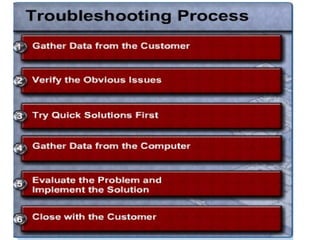
Definition ofMaintenance Objectives
Maintenance objectives are the outcomes that a
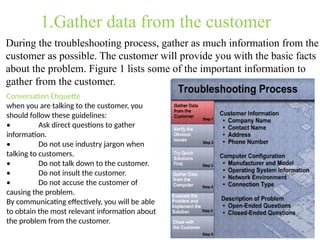
company aims to achieve through its maintenance
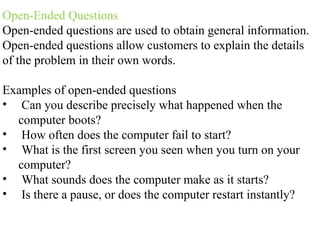
strategy.
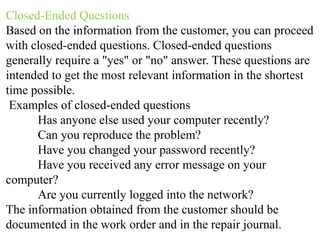
The primary goal of maintenance is to ensure that
assets are reliable and perform well. Other objectives include:
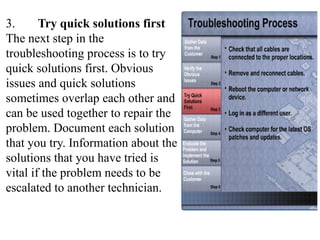
Minimizing downtime: Unplanned downtime can
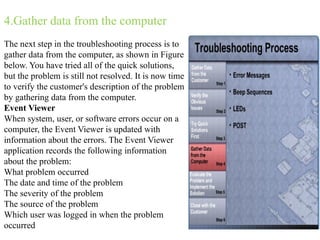
lead to financial losses and missed deadlines.
Reducing maintenance costs: This can be achieved by
focusing on preventive maintenance instead of
reactive maintenance.
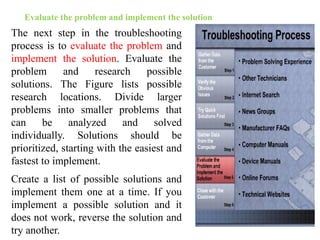
4.
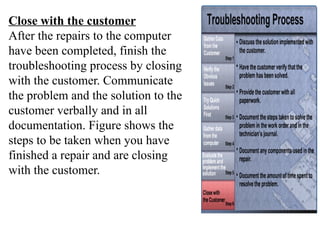
Improving asset availability:Assets should be
ready for operations and available when needed.
Ensuring compliance: Maintenance should
comply with safety standards and regulations.
Improving productivity: Assets should be kept
operating efficiently to enhance overall
productivity.
Extending asset life: This can be achieved by
minimizing wear and deterioration.
5.
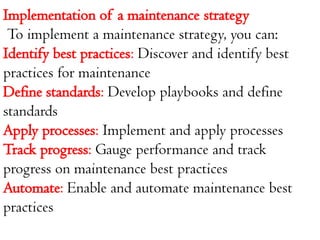
Implementation of amaintenance strategy
To implement a maintenance strategy, you can:
Identify best practices: Discover and identify best
practices for maintenance
Define standards: Develop playbooks and define
standards
Apply processes: Implement and apply processes
Track progress: Gauge performance and track
progress on maintenance best practices
Automate: Enable and automate maintenance best
practices
6.
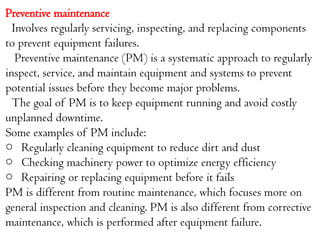
Preventive maintenance
Involves regularlyservicing, inspecting, and replacing components
to prevent equipment failures.
Preventive maintenance (PM) is a systematic approach to regularly
inspect, service, and maintain equipment and systems to prevent
potential issues before they become major problems.
The goal of PM is to keep equipment running and avoid costly
unplanned downtime.
Some examples of PM include:
o Regularly cleaning equipment to reduce dirt and dust
o Checking machinery power to optimize energy efficiency
o Repairing or replacing equipment before it fails
PM is different from routine maintenance, which focuses more on
general inspection and cleaning. PM is also different from corrective
maintenance, which is performed after equipment failure.
7.
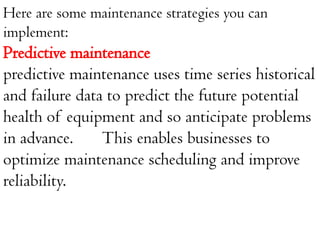
Here are somemaintenance strategies you can
implement:
Predictive maintenance
predictive maintenance uses time series historical
and failure data to predict the future potential
health of equipment and so anticipate problems
in advance. This enables businesses to
optimize maintenance scheduling and improve
reliability.
8.
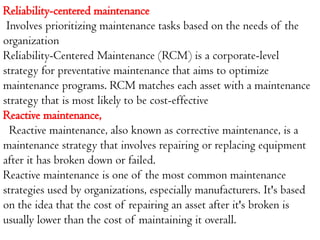
Reliability-centered maintenance
Involves prioritizingmaintenance tasks based on the needs of the
organization
Reliability-Centered Maintenance (RCM) is a corporate-level
strategy for preventative maintenance that aims to optimize
maintenance programs. RCM matches each asset with a maintenance
strategy that is most likely to be cost-effective
Reactive maintenance,
Reactive maintenance, also known as corrective maintenance, is a
maintenance strategy that involves repairing or replacing equipment
after it has broken down or failed.
Reactive maintenance is one of the most common maintenance
strategies used by organizations, especially manufacturers. It's based
on the idea that the cost of repairing an asset after it's broken is
usually lower than the cost of maintaining it overall.
9.
Maintenance management
Maintenance managementis the process of planning,
scheduling, and managing maintenance for equipment,
vehicles, and parts.
It involves predicting potential issues and scheduling
regular maintenance tasks to prevent them.
The product that maintenance delivers is uptime, i.e.
10.
mission – whatto achieve,
vision – where to go and the policies, goals and
strategies –the how to do it.
Maintenance management generally consists of the following
basic concepts,
1. Setting aims and objectives
2. Providing the means of attaining those aims and objectives
3. Decision making
11.
The maintenance functionmust integrate five
major factors in order to achieve optimum costs
for upkeep and repair, and those factors are,
1. People
2. Policies
3. Equipment
4. Practices
5. Performance evaluation
12.
The role ofMaintenance
Maintenance is the process of keeping equipment and machinery in
good working order, and it plays a key role in the success of a
business:
Ensures quality
Quality is the degree of excellence of something, or how good or bad
it is. Quality control is important for customer satisfaction,
competitiveness, and a company's economic success.
Define quality criteria: Set clear, measurable goals, metrics, and
performance targets.
Implement quality assurance: A critical part of organizational
success.
Perform quality control: Monitor and evaluate products and services
to ensure quality and compliance with standards.
13.
Manage quality risks:Consider how to mitigate risks.
Solicit quality feedback: Collect customer feedback or satisfaction
ratings.
Implement quality improvement: Consider ways to improve quality.
Train staff: Train staff to detect and repair issues early in product
development.
Use quality tools and techniques: Use tools like control charts to
evaluate quality performance.
Extends equipment life
Equipment life is the time from when a piece of equipment is
purchased until it reaches the end of its life.
Equipment lifecycle is an important factor in productivity and
throughput. A longer equipment lifecycle means a better return on
investment
Maintenance can help extend the life of equipment and machinery,
which can lead to long-term success for a business.
14.
Reduces expenses
Maintenance canhelp reduce expenses by preventing
machine breakdowns and malfunctions, which can be costly
to repair.
Improves productivity
Maintenance can help increase output with the same level of
input, or even increase output faster than input.
Productivity is a measure of how much output is produced
from a given amount of input.
Improving productivity means achieving more output from
the same amount of work. Here are some ways to improve
productivity
Improves safety
Maintenance helps ensure that equipment is safe to use.
15.
Reduce production disturbance
Aproduction disturbance is an unplanned event that causes a
production system to not perform as expected.
Production disturbances can be caused by a variety of factors,
including:
Power outages,Tool failures, Machine breakdowns, Material
shortages, Natural disasters, and Social and economic events.
Production disturbances can have a number of negative consequences,
including:
o Decreased productivity
o Increased product costs
o Reduced profitability
o Safety risks for operators
o Financial risk for the organization
o Threatened competitiveness
16.
Improve the reliability,maintainability, and safety of your object with comprehensive
improvement maintenance. This combination of technical, administrative, and
managerial actions will help to ensure that your object is operating at its best.
Maintenance improvement can include:
Preventive maintenance
A proactive approach to maintenance that can help identify aThis can reduce wear and
tear, prevent unexpected breakdowns, and extend the lifespan of assets. nd address
potential issues before they become major problems.
Assessing your maintenance team
A culture of continuous improvement and feedback loops can help prevent recurring
problems, adapt to changing needs, and enhance customer satisfaction.
Developing comprehensive maintenance plans
Following a preventative maintenance plan can significantly improve maintenance
efficiency and reduce the risk of costly repairs.
Equipment management
Maintenance management software can help you create a centralized database of all
your assets, including machinery, equipment, and infrastructure.
Improving maintenance metrics
Achieving a high level of maintenance efficiency can ensure proper functioning of
systems, reduce operational costs, improve safety, and prolong asset lifespan
17.
LO 2:- DevelopService Level
Agreements
If you want to better manage your
customers' expectations, a service
level agreement (SLA) may be worth
considering. An SLA is a negotiated
agreement designed to create a
common understanding about
services, priorities and
responsibilities.
18.
The starting point
Acommunications tool. The value of an agreement is not just in
the final product; the very process of establishing an SLA helps
to open up communications.
A conflict-prevention tool. An agreement helps to avoid or
alleviate disputes by providing a shared understanding of needs
and priorities. And if conflicts do occur, they tend to be
resolved more readily.
A living document. This is one of its most important benefits.
The agreement isn't a dead-end document consigned to the
Forget Forever file. On a predetermined frequency, the parties
to the SLA review the agreement to assess service adequacy
and negotiate adjustments.
19.
Management elements
The managementelements focus on such things as:
how service effectiveness will be tracked
how information about service effectiveness will
be reported and addressed.
how service-related disagreements will be
resolved.
how the parties will review and revise the
agreement.
20.
When is anagreement not an agreement?
Both service and management elements are necessary
if an SLA is to be effective;
. The process of planning, establishing, and
implementing an agreement is typically a many-month
process of information-gathering, analyzing,
documenting, presenting, educating, negotiating, and
consensus-building – and the process must involve
customers. If customers are not part of the process, it's
not an agreement!
The assumption that creating an SLA is a start-today,
done- tomorrow process is the most common
misconception among participants in my SLA
21.
How to DevelopService Level Agreements
Many companies (including large ones) do
not have existing Service Level Agreements
(SLAs). A service level agreement is a
standard measure that provides customers
(internal or external) a time frame in which
to expect contact or resolution. Companies
frequently fear implementing SLAs, not
wanting to make promises that they cannot
keep.
22.
Why do Ineed SLAs?
Every company who provides a service to
customers should have established SLAs.
1.Set expectations with your customers
2.Set expectations with your employees
3.Consistent delivery of support
23.
Implementing SLAs
SLAs aregenerally set up by Priority level. I would
recommend starting with four buckets - Priority 1, 2, 3, and 4.
Consider your most common service requests and assign them
a priority level. Priority 1 would be your most urgent requests
and should be dealt with immediately. Priority 4 requests
would represent your least urgent requests, those you might
look at and say, "when we get around to it".
Communicate SLAs to your Customers
Once you have determined what your SLAs will be, provide
consistence communication and guidance to your customers.
When a customer calls in a request, set an expectation
immediately on communication and resolution (if available)
timing.
24.
Key Steps inEstablishing a Service Level Agreement.
A service level agreement is an excellent tool for helping two parties improve
communications, manage expectations, clarify responsibilities and build the
foundation for a win-win relationship. However, establishing an agreement is neither a
quick nor a simple process. Having worked with numerous organizations
internationally on establishing SLAs, I recommend paying particular attention to the
following key steps:
1. Gather background information
Both the customer and the service provider need to start by gathering information so
that each has a solid basis from which to negotiate
2. Ensure agreement about the agreement
The two parties to an agreement often have different views about the role of the SLA
and what it can realistically accomplish.
3. Establish ground rules for working together
In this critical, but often overlooked, step the SLA developers (those assigned to
negotiate the SLA) focus not on the agreement, but on the process by which they will
work together to create the agreement.
4. Develop the agreement
This is but one step in the process of establishing an SLA; it's not the entire process. In
this step, the two parties create a structure for the SLA document and then discuss,
debate, negotiate and, over time, reach agreement about the contents of the agreement.
25.
Unit:Three troubleshooting process.
Troubleshootingis a systematic, logical
process of identifying and resolving problems,
especially technical ones, by identifying the
root cause and implementing a solution.
26.
Hardware
Check the conditionof cables, components, and peripherals. Clean
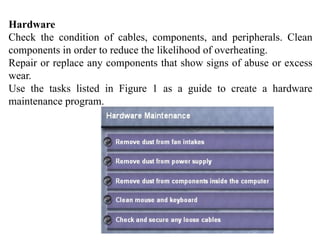
components in order to reduce the likelihood of overheating.
Repair or replace any components that show signs of abuse or excess
wear.
Use the tasks listed in Figure 1 as a guide to create a hardware
maintenance program.
27.
Software
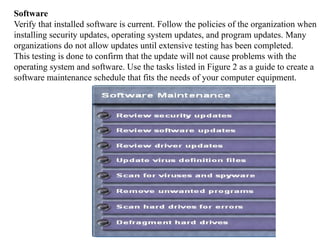
Verify that installedsoftware is current. Follow the policies of the organization when
installing security updates, operating system updates, and program updates. Many
organizations do not allow updates until extensive testing has been completed.
This testing is done to confirm that the update will not cause problems with the
operating system and software. Use the tasks listed in Figure 2 as a guide to create a
software maintenance schedule that fits the needs of your computer equipment.
28.
Identify the stepsof the troubleshooting
Identify the steps of the troubleshooting
process Before you begin troubleshooting
problems, always follow the necessary
precautions to protect data on a
computer. Some repairs, such as replacing
a hard drive or reinstalling an operating
system, may put the data on the
computer at risk. Make sure that you do
everything possible to prevent data loss
while attempting repairs.
30.
1.Gather data fromthe customer
During the troubleshooting process, gather as much information from the
customer as possible. The customer will provide you with the basic facts
about the problem. Figure 1 lists some of the important information to
gather from the customer.
Conversation Etiquette
when you are talking to the customer, you
should follow these guidelines:
• Ask direct questions to gather
information.
• Do not use industry jargon when
talking to customers.
• Do not talk down to the customer.
• Do not insult the customer.
• Do not accuse the customer of
causing the problem.
By communicating effectively, you will be able
to obtain the most relevant information about
the problem from the customer.
31.
Open-Ended Questions
Open-ended questionsare used to obtain general information.
Open-ended questions allow customers to explain the details
of the problem in their own words.
Examples of open-ended questions
• Can you describe precisely what happened when the
computer boots?
• How often does the computer fail to start?
• What is the first screen you seen when you turn on your
computer?
• What sounds does the computer make as it starts?
• Is there a pause, or does the computer restart instantly?
32.
Closed-Ended Questions
Based onthe information from the customer, you can proceed
with closed-ended questions. Closed-ended questions
generally require a "yes" or "no" answer. These questions are
intended to get the most relevant information in the shortest
time possible.
Examples of closed-ended questions
Has anyone else used your computer recently?
Can you reproduce the problem?
Have you changed your password recently?
Have you received any error message on your
computer?
Are you currently logged into the network?
The information obtained from the customer should be
documented in the work order and in the repair journal.
33.
2. Verify theobvious issues
The second step in the troubleshooting process is to verify
the obvious issues. Even though the customer may think
that there is a major problem, start with the obvious issues
before moving to more complex diagnoses.
34.
3. Try quicksolutions first
The next step in the
troubleshooting process is to try
quick solutions first. Obvious
issues and quick solutions
sometimes overlap each other and
can be used together to repair the
problem. Document each solution
that you try. Information about the
solutions that you have tried is
vital if the problem needs to be
escalated to another technician.
35.
4.Gather data fromthe computer
The next step in the troubleshooting process is to
gather data from the computer, as shown in Figure
below. You have tried all of the quick solutions,
but the problem is still not resolved. It is now time
to verify the customer's description of the problem
by gathering data from the computer.
Event Viewer
When system, user, or software errors occur on a
computer, the Event Viewer is updated with
information about the errors. The Event Viewer
application records the following information
about the problem:
What problem occurred
The date and time of the problem
The severity of the problem
The source of the problem
Which user was logged in when the problem
occurred
36.
Device Manager
The DeviceManager displays all of the devices
that are configured on a computer. Any device
that the operating system determines to be acting
incorrectly will be flagged with an error icon.
This type of error is denoted as a yellow circle
with an exclamation point ("!"). If a device is
disabled, it will be flagged with a red circle and
an "X".
37.
Beep Codes
Each BIOSmanufacturer has a unique beep
sequence for hardware failures. When
troubleshooting, power on the computer and
listen. As the system proceeds through the
POST, most computers will emit one beep to
indicate that the system is booting properly. If
there is an error, you may hear multiple beeps.
Document the beep code sequence and research
the code to determine the specific hardware
failure.
38.
BIOS Information
If thecomputer boots and stops after the
POST, you should investigate the BIOS
settings to determine where to find the
problem. A device may not be detected or
configured properly. Refer to the
motherboard manual to make sure that the
BIOS settings are accurate.
39.
Evaluate the problemand implement the solution
The next step in the troubleshooting
process is to evaluate the problem and
implement the solution. Evaluate the
problem and research possible
solutions. The Figure lists possible
research locations. Divide larger
problems into smaller problems that
can be analyzed and solved
individually. Solutions should be
prioritized, starting with the easiest and
fastest to implement.
Create a list of possible solutions and
implement them one at a time. If you
implement a possible solution and it
does not work, reverse the solution and
try another.
40.
Close with thecustomer
After the repairs to the computer
have been completed, finish the
troubleshooting process by closing
with the customer. Communicate
the problem and the solution to the
customer verbally and in all
documentation. Figure shows the
steps to be taken when you have
finished a repair and are closing
with the customer.
41.
Summary
This Learning Guidediscussed the concepts of
preventive maintenance and the troubleshooting
process.
Regular preventive maintenance reduces hardware
and software problems.
Before beginning any repair, back up the data on a
computer.
The troubleshooting process is a guideline to help
you solve computer problems in an efficient manner.
Document everything that you try, even if it fails. The
documentation that you create will become a useful
resource for you and other technicians.