IMPACTOFCOMPUTERNETWORKING&NETWORK
DEVICES
COMPUTER NETWORKING
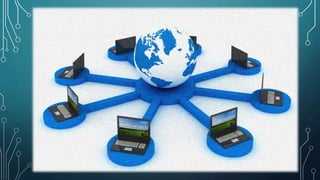
• Computer networking refers to connected computing devices (such as laptops,
desktops, servers, smartphones, and tablets) and an ever-expanding array of IoT
devices (such as cameras, door locks, doorbells, refrigerators, audio/visual systems,
thermostats, and various sensors) that communicate with one another.
• It is also an interconnection of multiple devices, also known as hosts, that are
connected using multiple paths for the purpose of sending/receiving data or media.
• A “computer network” is just a multitude of connected computers. This allows the
computers in the network to share data and resources with each other. An IT
technician can set up your computer network to work on a “peer-to-peer” basis.
IMPACT OF COMPUTER
NETWORKING
Advantages
Resource Sharing: the main goal is to make all programs, equipment, and data available to anyone on
the network. People can find and share information and data because of networking.
Highreliability: goal of computer network is to provide high reliability by having alternative source
of supply, the presence of multiple CPUs means that, if one goes down, the other may be able to
take over it works, although at reduced performance.
Easycommunication: it is very easy to communicate through a network. Network provide a powerful
communication medium people can enjoy benefits of e-mails, instant messaging, video-conferencing
etc.
Speed : sharing and transferring files within networks is very rapid, depending on the type of
network. Thus will save time while maintaining the integrity of files.
Communication medium: network can provide a powerful communication medium among widely
separated users giving the virtual absence of geographical boundaries.
Hardware sharing : ability to share hardware. For an example, a printer can be shared among the users
in a network so that there’s no need to have individual printers for each and every computer in the
company. This will significantly reduce the cost of purchasing hardware.
Disadvantages
 Crashes : when the server crashes, works get disrupted as all network
resources and its benefits are lost, the crash may result in the loss of day’s and
even months of crucial data and time.
 Data security : there is danger of hacking. There are hackers who are trying to
steal valuable data of large companies for their own benefits
 Privacy : a network also mean loss of privacy as anyone, especially your boss,
with the right network privileges may be in a position to rea your private e-
mails.
Cost benefits of computer networking
Storing information in one centralised database can also help you reduce costs and drive efficiency. For example:
staff can deal with more customers in less time since they have shared access to customer and product databases
you can centralise network administration, meaning less IT support is required
you can cut costs through sharing of peripherals and internet access
You can reduce errors and improve consistency by having all staff work from a single source of information. This
way, you can make standard versions of manuals and directories available to them, and back up data from a single point
on a scheduled basis, ensuring consistency.
Network devices, or networking hardware, are physical
devices that are required for communication and interaction
between hardware on a computer network.
Types of network devices
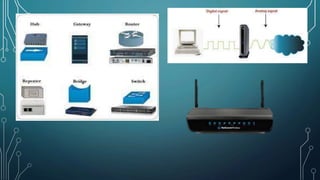
Here is the common network device list:
 Hub
 Switch
 Router
 Bridge
 Gateway
 Modem
 Repeater
Network Devices
Hub
Hubs connect multiple computer networking devices
together. A hub also acts as a repeater in that it amplifies
signals that deteriorate after traveling long distances over
connecting cables.
Switch
Switches generally have a more intelligent role than hubs. A
switch is a multiport device that improves network
efficiency.
Router
Routers help transmit packets to their destinations by
charting a path through the sea of interconnected
networking devices using different network topologies.
Routers are intelligent devices, and they store information
about the networks they’re connected to.
Bridge
Bridges are used to connect two or more hosts or network
segments together. The basic role of bridges in network
architecture is storing and forwarding frames between the
different segments that the bridge connects.
Repeater
A repeater is an electronic device that amplifies the signal
it receives. A device which receives a signal and
retransmits it at a higher level or higher power so that the
signal can cover longer distances,
Gateway
Gateways normally work at the Transport and Session
layers of the OSI model. At the Transport layer and above,
there are numerous protocols and standards from different
vendors; gateways are used to deal with them.
Modem
Modems (modulators-demodulators) are used to transmit
digital signals over analog telephone lines. Thus, digital
signals are converted by the modem into analog signals of
different frequencies and transmitted to a modem at the
receiving location.
Submitted by,
JANAKI J KAIMAL
XII A
5
THANK YOU

Impact of computer networking and network devices

  • 1.
  • 2.
    COMPUTER NETWORKING • Computernetworking refers to connected computing devices (such as laptops, desktops, servers, smartphones, and tablets) and an ever-expanding array of IoT devices (such as cameras, door locks, doorbells, refrigerators, audio/visual systems, thermostats, and various sensors) that communicate with one another. • It is also an interconnection of multiple devices, also known as hosts, that are connected using multiple paths for the purpose of sending/receiving data or media. • A “computer network” is just a multitude of connected computers. This allows the computers in the network to share data and resources with each other. An IT technician can set up your computer network to work on a “peer-to-peer” basis.
  • 3.
    IMPACT OF COMPUTER NETWORKING Advantages ResourceSharing: the main goal is to make all programs, equipment, and data available to anyone on the network. People can find and share information and data because of networking. Highreliability: goal of computer network is to provide high reliability by having alternative source of supply, the presence of multiple CPUs means that, if one goes down, the other may be able to take over it works, although at reduced performance. Easycommunication: it is very easy to communicate through a network. Network provide a powerful communication medium people can enjoy benefits of e-mails, instant messaging, video-conferencing etc. Speed : sharing and transferring files within networks is very rapid, depending on the type of network. Thus will save time while maintaining the integrity of files. Communication medium: network can provide a powerful communication medium among widely separated users giving the virtual absence of geographical boundaries. Hardware sharing : ability to share hardware. For an example, a printer can be shared among the users in a network so that there’s no need to have individual printers for each and every computer in the company. This will significantly reduce the cost of purchasing hardware.
  • 4.
    Disadvantages  Crashes :when the server crashes, works get disrupted as all network resources and its benefits are lost, the crash may result in the loss of day’s and even months of crucial data and time.  Data security : there is danger of hacking. There are hackers who are trying to steal valuable data of large companies for their own benefits  Privacy : a network also mean loss of privacy as anyone, especially your boss, with the right network privileges may be in a position to rea your private e- mails. Cost benefits of computer networking Storing information in one centralised database can also help you reduce costs and drive efficiency. For example: staff can deal with more customers in less time since they have shared access to customer and product databases you can centralise network administration, meaning less IT support is required you can cut costs through sharing of peripherals and internet access You can reduce errors and improve consistency by having all staff work from a single source of information. This way, you can make standard versions of manuals and directories available to them, and back up data from a single point on a scheduled basis, ensuring consistency.
  • 7.
    Network devices, ornetworking hardware, are physical devices that are required for communication and interaction between hardware on a computer network. Types of network devices Here is the common network device list:  Hub  Switch  Router  Bridge  Gateway  Modem  Repeater Network Devices
  • 8.
    Hub Hubs connect multiplecomputer networking devices together. A hub also acts as a repeater in that it amplifies signals that deteriorate after traveling long distances over connecting cables. Switch Switches generally have a more intelligent role than hubs. A switch is a multiport device that improves network efficiency. Router Routers help transmit packets to their destinations by charting a path through the sea of interconnected networking devices using different network topologies. Routers are intelligent devices, and they store information about the networks they’re connected to. Bridge Bridges are used to connect two or more hosts or network segments together. The basic role of bridges in network architecture is storing and forwarding frames between the different segments that the bridge connects.
  • 9.
    Repeater A repeater isan electronic device that amplifies the signal it receives. A device which receives a signal and retransmits it at a higher level or higher power so that the signal can cover longer distances, Gateway Gateways normally work at the Transport and Session layers of the OSI model. At the Transport layer and above, there are numerous protocols and standards from different vendors; gateways are used to deal with them. Modem Modems (modulators-demodulators) are used to transmit digital signals over analog telephone lines. Thus, digital signals are converted by the modem into analog signals of different frequencies and transmitted to a modem at the receiving location.
  • 11.
    Submitted by, JANAKI JKAIMAL XII A 5 THANK YOU