Images Analysis
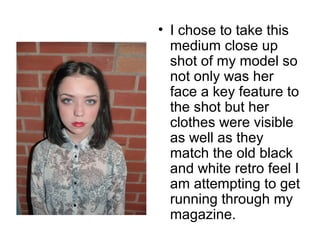
• I chose to take this 
medium close up 
shot of my model so 
not only was her 
face a key feature to 
the shot but her 
clothes were visible 
as well as they 
match the old black 
and white retro feel I 
am attempting to get 
running through my 
magazine.
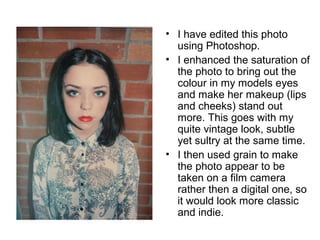
• I have edited this photo 
using Photoshop. 
• I enhanced the saturation of 
the photo to bring out the 
colour in my models eyes 
and make her makeup (lips 
and cheeks) stand out 
more. This goes with my 
quite vintage look, subtle 
yet sultry at the same time. 
• I then used grain to make 
the photo appear to be 
taken on a film camera 
rather then a digital one, so 
it would look more classic 
and indie.
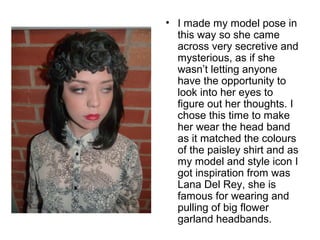
• I made my model pose in 
this way so she came 
across very secretive and 
mysterious, as if she 
wasn’t letting anyone 
have the opportunity to 
look into her eyes to 
figure out her thoughts. I 
chose this time to make 
her wear the head band 
as it matched the colours 
of the paisley shirt and as 
my model and style icon I 
got inspiration from was 
Lana Del Rey, she is 
famous for wearing and 
pulling of big flower 
garland headbands.
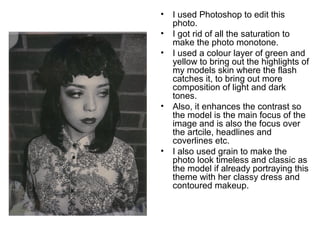
• I used Photoshop to edit this 
photo. 
• I got rid of all the saturation to 
make the photo monotone. 
• I used a colour layer of green and 
yellow to bring out the highlights of 
my models skin where the flash 
catches it, to bring out more 
composition of light and dark 
tones. 
• Also, it enhances the contrast so 
the model is the main focus of the 
image and is also the focus over 
the artcile, headlines and 
coverlines etc. 
• I also used grain to make the 
photo look timeless and classic as 
the model if already portraying this 
theme with her classy dress and 
contoured makeup.
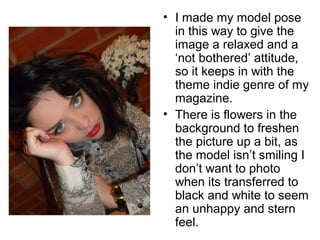
• I made my model pose 
in this way to give the 
image a relaxed and a 
‘not bothered’ attitude, 
so it keeps in with the 
theme indie genre of my 
magazine. 
• There is flowers in the 
background to freshen 
the picture up a bit, as 
the model isn’t smiling I 
don’t want to photo 
when its transferred to 
black and white to seem 
an unhappy and stern 
feel.
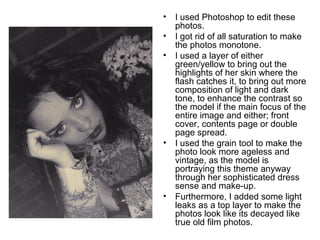
• I used Photoshop to edit these 
photos. 
• I got rid of all saturation to make 
the photos monotone. 
• I used a layer of either 
green/yellow to bring out the 
highlights of her skin where the 
flash catches it, to bring out more 
composition of light and dark 
tone, to enhance the contrast so 
the model if the main focus of the 
entire image and either; front 
cover, contents page or double 
page spread. 
• I used the grain tool to make the 
photo look more ageless and 
vintage, as the model is 
portraying this theme anyway 
through her sophisticated dress 
sense and make-up. 
• Furthermore, I added some light 
leaks as a top layer to make the 
photos look like its decayed like 
true old film photos.
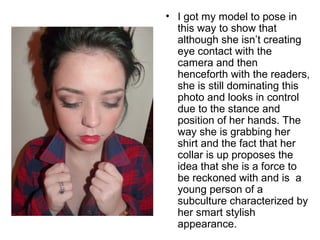
• I got my model to pose in 
this way to show that 
although she isn’t creating 
eye contact with the 
camera and then 
henceforth with the readers, 
she is still dominating this 
photo and looks in control 
due to the stance and 
position of her hands. The 
way she is grabbing her 
shirt and the fact that her 
collar is up proposes the 
idea that she is a force to 
be reckoned with and is a 
young person of a 
subculture characterized by 
her smart stylish 
appearance.
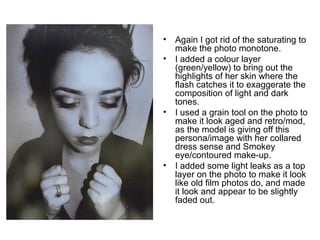
• Again I got rid of the saturating to 
make the photo monotone. 
• I added a colour layer 
(green/yellow) to bring out the 
highlights of her skin where the 
flash catches it to exaggerate the 
composition of light and dark 
tones. 
• I used a grain tool on the photo to 
make it look aged and retro/mod, 
as the model is giving off this 
persona/image with her collared 
dress sense and Smokey 
eye/contoured make-up. 
• I added some light leaks as a top 
layer on the photo to make it look 
like old film photos do, and made 
it look and appear to be slightly 
faded out.
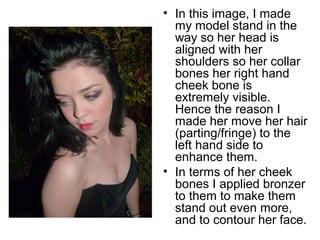
• In this image, I made 
my model stand in the 
way so her head is 
aligned with her 
shoulders so her collar 
bones her right hand 
cheek bone is 
extremely visible. 
Hence the reason I 
made her move her hair 
(parting/fringe) to the 
left hand side to 
enhance them. 
• In terms of her cheek 
bones I applied bronzer 
to them to make them 
stand out even more, 
and to contour her face.
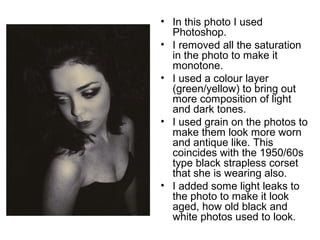
• In this photo I used 
Photoshop. 
• I removed all the saturation 
in the photo to make it 
monotone. 
• I used a colour layer 
(green/yellow) to bring out 
more composition of light 
and dark tones. 
• I used grain on the photos to 
make them look more worn 
and antique like. This 
coincides with the 1950/60s 
type black strapless corset 
that she is wearing also. 
• I added some light leaks to 
the photo to make it look 
aged, how old black and 
white photos used to look.
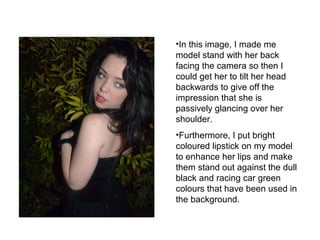
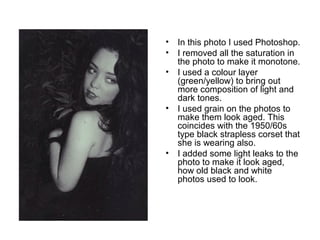
•In this image, I made me 
model stand with her back 
facing the camera so then I 
could get her to tilt her head 
backwards to give off the 
impression that she is 
passively glancing over her 
shoulder. 
•Furthermore, I put bright 
coloured lipstick on my model 
to enhance her lips and make 
them stand out against the dull 
black and racing car green 
colours that have been used in 
the background.
• In this photo I used Photoshop. 
• I removed all the saturation in 
the photo to make it monotone. 
• I used a colour layer 
(green/yellow) to bring out 
more composition of light and 
dark tones. 
• I used grain on the photos to 
make them look aged. This 
coincides with the 1950/60s 
type black strapless corset that 
she is wearing also. 
• I added some light leaks to the 
photo to make it look aged, 
how old black and white 
photos used to look.
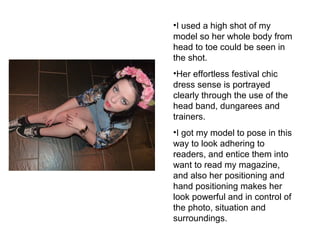
•I used a high shot of my 
model so her whole body from 
head to toe could be seen in 
the shot. 
•Her effortless festival chic 
dress sense is portrayed 
clearly through the use of the 
head band, dungarees and 
trainers. 
•I got my model to pose in this 
way to look adhering to 
readers, and entice them into 
want to read my magazine, 
and also her positioning and 
hand positioning makes her 
look powerful and in control of 
the photo, situation and 
surroundings.
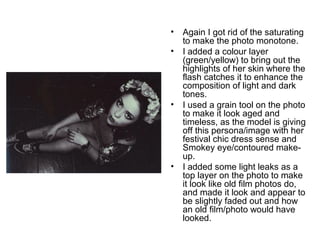
• Again I got rid of the saturating 
to make the photo monotone. 
• I added a colour layer 
(green/yellow) to bring out the 
highlights of her skin where the 
flash catches it to enhance the 
composition of light and dark 
tones. 
• I used a grain tool on the photo 
to make it look aged and 
timeless, as the model is giving 
off this persona/image with her 
festival chic dress sense and 
Smokey eye/contoured make-up. 
• I added some light leaks as a 
top layer on the photo to make 
it look like old film photos do, 
and made it look and appear to 
be slightly faded out and how 
an old film/photo would have 
looked.
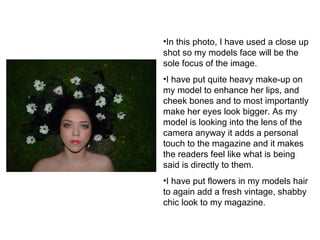
•In this photo, I have used a close up 
shot so my models face will be the 
sole focus of the image. 
•I have put quite heavy make-up on 
my model to enhance her lips, and 
cheek bones and to most importantly 
make her eyes look bigger. As my 
model is looking into the lens of the 
camera anyway it adds a personal 
touch to the magazine and it makes 
the readers feel like what is being 
said is directly to them. 
•I have put flowers in my models hair 
to again add a fresh vintage, shabby 
chic look to my magazine.
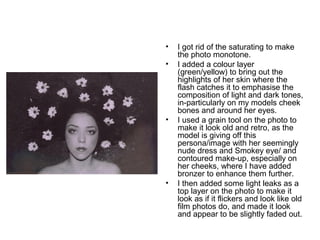
• I got rid of the saturating to make 
the photo monotone. 
• I added a colour layer 
(green/yellow) to bring out the 
highlights of her skin where the 
flash catches it to emphasise the 
composition of light and dark tones, 
in-particularly on my models cheek 
bones and around her eyes. 
• I used a grain tool on the photo to 
make it look old and retro, as the 
model is giving off this 
persona/image with her seemingly 
nude dress and Smokey eye/ and 
contoured make-up, especially on 
her cheeks, where I have added 
bronzer to enhance them further. 
• I then added some light leaks as a 
top layer on the photo to make it 
look as if it flickers and look like old 
film photos do, and made it look 
and appear to be slightly faded out.

Image analysis

  • 1.
  • 2.
    • I choseto take this medium close up shot of my model so not only was her face a key feature to the shot but her clothes were visible as well as they match the old black and white retro feel I am attempting to get running through my magazine.
  • 3.
    • I haveedited this photo using Photoshop. • I enhanced the saturation of the photo to bring out the colour in my models eyes and make her makeup (lips and cheeks) stand out more. This goes with my quite vintage look, subtle yet sultry at the same time. • I then used grain to make the photo appear to be taken on a film camera rather then a digital one, so it would look more classic and indie.
  • 4.
    • I mademy model pose in this way so she came across very secretive and mysterious, as if she wasn’t letting anyone have the opportunity to look into her eyes to figure out her thoughts. I chose this time to make her wear the head band as it matched the colours of the paisley shirt and as my model and style icon I got inspiration from was Lana Del Rey, she is famous for wearing and pulling of big flower garland headbands.
  • 5.
    • I usedPhotoshop to edit this photo. • I got rid of all the saturation to make the photo monotone. • I used a colour layer of green and yellow to bring out the highlights of my models skin where the flash catches it, to bring out more composition of light and dark tones. • Also, it enhances the contrast so the model is the main focus of the image and is also the focus over the artcile, headlines and coverlines etc. • I also used grain to make the photo look timeless and classic as the model if already portraying this theme with her classy dress and contoured makeup.
  • 6.
    • I mademy model pose in this way to give the image a relaxed and a ‘not bothered’ attitude, so it keeps in with the theme indie genre of my magazine. • There is flowers in the background to freshen the picture up a bit, as the model isn’t smiling I don’t want to photo when its transferred to black and white to seem an unhappy and stern feel.
  • 7.
    • I usedPhotoshop to edit these photos. • I got rid of all saturation to make the photos monotone. • I used a layer of either green/yellow to bring out the highlights of her skin where the flash catches it, to bring out more composition of light and dark tone, to enhance the contrast so the model if the main focus of the entire image and either; front cover, contents page or double page spread. • I used the grain tool to make the photo look more ageless and vintage, as the model is portraying this theme anyway through her sophisticated dress sense and make-up. • Furthermore, I added some light leaks as a top layer to make the photos look like its decayed like true old film photos.
  • 8.
    • I gotmy model to pose in this way to show that although she isn’t creating eye contact with the camera and then henceforth with the readers, she is still dominating this photo and looks in control due to the stance and position of her hands. The way she is grabbing her shirt and the fact that her collar is up proposes the idea that she is a force to be reckoned with and is a young person of a subculture characterized by her smart stylish appearance.
  • 9.
    • Again Igot rid of the saturating to make the photo monotone. • I added a colour layer (green/yellow) to bring out the highlights of her skin where the flash catches it to exaggerate the composition of light and dark tones. • I used a grain tool on the photo to make it look aged and retro/mod, as the model is giving off this persona/image with her collared dress sense and Smokey eye/contoured make-up. • I added some light leaks as a top layer on the photo to make it look like old film photos do, and made it look and appear to be slightly faded out.
  • 10.
    • In thisimage, I made my model stand in the way so her head is aligned with her shoulders so her collar bones her right hand cheek bone is extremely visible. Hence the reason I made her move her hair (parting/fringe) to the left hand side to enhance them. • In terms of her cheek bones I applied bronzer to them to make them stand out even more, and to contour her face.
  • 11.
    • In thisphoto I used Photoshop. • I removed all the saturation in the photo to make it monotone. • I used a colour layer (green/yellow) to bring out more composition of light and dark tones. • I used grain on the photos to make them look more worn and antique like. This coincides with the 1950/60s type black strapless corset that she is wearing also. • I added some light leaks to the photo to make it look aged, how old black and white photos used to look.
  • 12.
    •In this image,I made me model stand with her back facing the camera so then I could get her to tilt her head backwards to give off the impression that she is passively glancing over her shoulder. •Furthermore, I put bright coloured lipstick on my model to enhance her lips and make them stand out against the dull black and racing car green colours that have been used in the background.
  • 13.
    • In thisphoto I used Photoshop. • I removed all the saturation in the photo to make it monotone. • I used a colour layer (green/yellow) to bring out more composition of light and dark tones. • I used grain on the photos to make them look aged. This coincides with the 1950/60s type black strapless corset that she is wearing also. • I added some light leaks to the photo to make it look aged, how old black and white photos used to look.
  • 14.
    •I used ahigh shot of my model so her whole body from head to toe could be seen in the shot. •Her effortless festival chic dress sense is portrayed clearly through the use of the head band, dungarees and trainers. •I got my model to pose in this way to look adhering to readers, and entice them into want to read my magazine, and also her positioning and hand positioning makes her look powerful and in control of the photo, situation and surroundings.
  • 15.
    • Again Igot rid of the saturating to make the photo monotone. • I added a colour layer (green/yellow) to bring out the highlights of her skin where the flash catches it to enhance the composition of light and dark tones. • I used a grain tool on the photo to make it look aged and timeless, as the model is giving off this persona/image with her festival chic dress sense and Smokey eye/contoured make-up. • I added some light leaks as a top layer on the photo to make it look like old film photos do, and made it look and appear to be slightly faded out and how an old film/photo would have looked.
  • 16.
    •In this photo,I have used a close up shot so my models face will be the sole focus of the image. •I have put quite heavy make-up on my model to enhance her lips, and cheek bones and to most importantly make her eyes look bigger. As my model is looking into the lens of the camera anyway it adds a personal touch to the magazine and it makes the readers feel like what is being said is directly to them. •I have put flowers in my models hair to again add a fresh vintage, shabby chic look to my magazine.
  • 17.
    • I gotrid of the saturating to make the photo monotone. • I added a colour layer (green/yellow) to bring out the highlights of her skin where the flash catches it to emphasise the composition of light and dark tones, in-particularly on my models cheek bones and around her eyes. • I used a grain tool on the photo to make it look old and retro, as the model is giving off this persona/image with her seemingly nude dress and Smokey eye/ and contoured make-up, especially on her cheeks, where I have added bronzer to enhance them further. • I then added some light leaks as a top layer on the photo to make it look as if it flickers and look like old film photos do, and made it look and appear to be slightly faded out.