ICT INTEGRATION IN
INSTRUCTION/ TEACHING-
LEARNING PROCESS:
RHEA LYNN DALA RETUTA BSED-ENGLISH III
INTRODUCTION
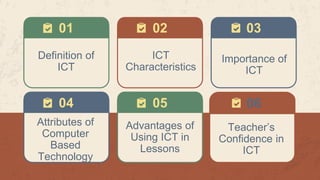
01 03
04 05
Definition of
ICT
ICT
Characteristics
02
Importance of
ICT
Attributes of
Computer
Based
Technology
Advantages of
Using ICT in
Lessons
Teacher’s
Confidence in
ICT
06
07
09 10
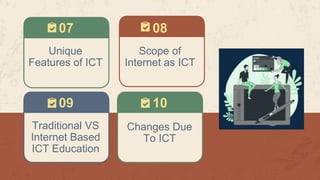
Unique
Features of ICT
Scope of
Internet as ICT
08
Traditional VS
Internet Based
ICT Education
Changes Due
To ICT
DEFINITION OF ICT
01
INFORMATION AND
COMMUNICATION TECHNOLOGY
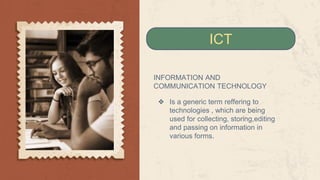
❖ Is a generic term reffering to
technologies , which are being
used for collecting, storing,editing
and passing on information in
various forms.
ICT
INFORMATION AND COMMUNICATION
TECHNOLOGY
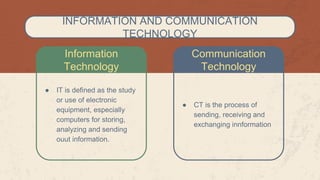
Information
Technology
Communication
Technology
● IT is defined as the study
or use of electronic
equipment, especially
computers for storing,
analyzing and sending
ouut information.
● CT is the process of
sending, receiving and
exchanging innformation
ICT
CHARACTERISTICS
02
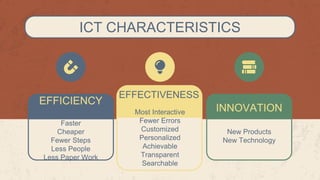
ICT CHARACTERISTICS
INNOVATION
EFFICIENCY
Faster
Cheaper
Fewer Steps
Less People
Less Paper Work
EFFECTIVENESS
Most Interactive
Fewer Errors
Customized
Personalized
Achievable
Transparent
Searchable
New Products
New Technology
IMPORTANCE
OF ICT
03
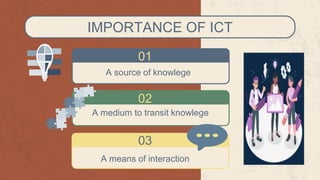
IMPORTANCE OF ICT
A source of knowlege
01
02
A medium to transit knowlege
03
A means of interaction
ATTRIBUTES OF
COMPUTER BASED
TECHNOLOGY
04
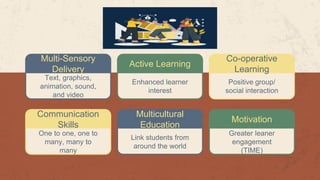
Multi-Sensory
Delivery
Text, graphics,
animation, sound,
and video
Active Learning
Enhanced learner
interest
Communication
Skills
One to one, one to
many, many to
many
Multicultural
Education
Link students from
around the world
Co-operative
Learning
Positive group/
social interaction
Motivation
Greater leaner
engagement
(TIME)
ADVANTAGES OF
USING ICT
05
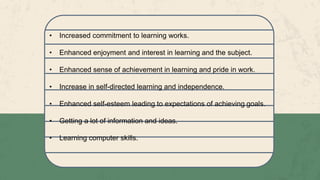
• Increased commitment to learning works.
• Enhanced enjoyment and interest in learning and the subject.
• Enhanced sense of achievement in learning and pride in work.
• Increase in self-directed learning and independence.
• Enhanced self-esteem leading to expectations of achieving goals.
• Getting a lot of information and ideas.
• Learning computer skills.
• Increase motivation to stay on-work, behave better and produce
higher.
• Analyzing information.
• Quality output.
• Produce higher quality work.
• Learn more independently and at their own pace.
• Do things they cannot do using traditional methods and resources.
• Do more work and work more quickly.
TEACHERS
CONFIDENCE
IN ICT
06
• The teacher’s expertise in ICT was an important factor in
its successful use in lessons. The ways that teachers have
their students use computers are certainly affected by their
own level of technical expertise.
• The representations of software of many non-specialist
teachers are idiosyncratic, fragmentary and transient with
imperfectly learnt links and false assumptions and that
these teachers are concerned that the skills of their
students are more advanced than their own.
• It is hardly surprising that teachers are reluctant to
experiment with ICT if they are concerned that their
students’ knowledge is greater than their own.
UNIQUE FEATURES
OF ICT
07
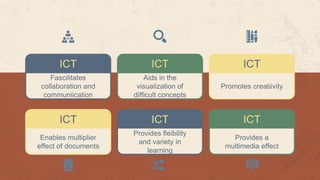
ICT
Fascilitates
collaboration and
communiication
ICT
Aids in the
visualization of
difficult concepts
ICT
Enables multiplier
effect of documents
ICT
Provides fleibility
and variety in
learning
ICT
Promotes creatiivity
ICT
Provides a
multimedia effect
SCOPE OF
INTERNET
AS ICT
08
• EDUCATION
• RESEARCH
• COMMUNICATION
• LEISURE AND ENTERTAINMENT
• EXPLORING THE WORLD
• FINANCE
• SHOPPING
• AND MANY MORE…
SCOPE OF INTERNET AS ICT
TRADITIONAL VS
INTERNET BASED
EDUCATION
09
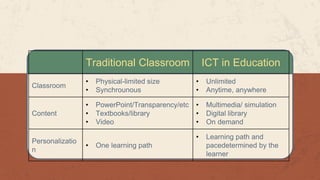
Traditional Classroom ICT in Education
Classroom
• Physical-limited size
• Synchrounous
• Unlimited
• Anytime, anywhere
Content
• PowerPoint/Transparency/etc
• Textbooks/library
• Video
• Multimedia/ simulation
• Digital library
• On demand
Personalizatio
n
• One learning path
• Learning path and
pacedetermined by the
learner
CHANGES DUE TO
ICT
10
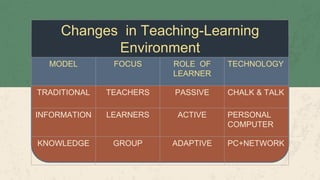
Changes in Teaching-Learning
Environment
MODEL FOCUS ROLE OF
LEARNER
TECHNOLOGY
TRADITIONAL TEACHERS PASSIVE CHALK & TALK
INFORMATION LEARNERS ACTIVE PERSONAL
COMPUTER
KNOWLEDGE GROUP ADAPTIVE PC+NETWORK
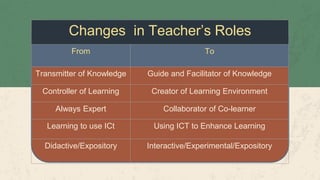
Changes in Teacher’s Roles
From To
Transmitter of Knowledge Guide and Facilitator of Knowledge
Controller of Learning Creator of Learning Environment
Always Expert Collaborator of Co-learner
Learning to use ICt Using ICT to Enhance Learning
Didactive/Expository Interactive/Experimental/Expository
CREDITS: This presentation
template was created by Slidesgo,
including icons by Flaticon and
infographics & images by Freepik
Please keep this slide for attribution
Rhea Lynn Retuta
Student
Kathryn Archuleta
Instructor
THANKS!
Here’s an assortment of alternative resources whose style fits the one of this
template.
❖ Young adults travelling in winter time
❖ Beautiful women friends spending time together
❖ Beautiful women friends spending time together I
❖ Close up students in class
❖ Close up students indoors
❖ Women traveling together in France
❖ Women traveling together in France I
❖ Portrait female student with luggage
❖ Colleagues studying together for an exam
❖ Colleagues studying together for an exam I
❖ Beautiful women friends spending time together II
❖ Close up on beautiful French woman
❖ Women traveling together in Paris
ALTERNATIVE RESOURCES
Photos
❖ Portrait male student with books
❖ College girl and boy studying together
❖ Women traveling together in France
❖ Beautiful women friends spending time
together
❖ Close up on picnic near eiffel tower
❖ Diverse young male and female student
❖ University students in class close up
RESOURCES
❖ Women friends spending time together
❖ Teacher doing her english lessons
online
❖ Senior man taking notes in class
❖ Senior woman paying attention in class
PSD
❖ Business document banner template
❖ Business document business card
template
❖ Business document landing page
template
Did you like the resources on this template? Get them for free at our other
websites.
In order to use this template, you must credit Slidesgo by keeping the Thanks slide.
You are allowed to:
- Modify this template.
- Use it for both personal and commercial projects.
You are not allowed to:
- Sublicense, sell or rent any of Slidesgo Content (or a modified version of Slidesgo Content).
- Distribute Slidesgo Content unless it has been expressly authorized by Slidesgo.
- Include Slidesgo Content in an online or offline database or file.
- Offer Slidesgo templates (or modified versions of Slidesgo templates) for download.
- Acquire the copyright of Slidesgo Content.
For more information about editing slides, please read our FAQs or visit Slidesgo School:
https://slidesgo.com/faqs and https://slidesgo.com/slidesgo-school
Instructions for use
As a Premium user, you can use this template without attributing Slidesgo or keeping the "Thanks" slide.
You are allowed to:
● Modify this template.
● Use it for both personal and commercial purposes.
● Hide or delete the “Thanks” slide and the mention to Slidesgo in the credits.
● Share this template in an editable format with people who are not part of your team.
You are not allowed to:
● Sublicense, sell or rent this Slidesgo Template (or a modified version of this Slidesgo Template).
● Distribute this Slidesgo Template (or a modified version of this Slidesgo Template) or include it in a database or in
any other product or service that offers downloadable images, icons or presentations that may be subject to
distribution or resale.
● Use any of the elements that are part of this Slidesgo Template in an isolated and separated way from this
Template.
● Register any of the elements that are part of this template as a trademark or logo, or register it as a work in an
intellectual property registry or similar.
For more information about editing slides, please read our FAQs or visit Slidesgo School:
https://slidesgo.com/faqs and https://slidesgo.com/slidesgo-school
Instructions for use (premium users)
This presentation has been made using the following fonts:
Special Elite
(https://fonts.google.com/specimen/Special+Elite)
IM Fell English
(https://fonts.google.com/specimen/IM+Fell+English)
#f5ebdb #f3df8d #a4583e #5d876a #56697e #000000
Fonts & colors used
Create your Story with our illustrated concepts. Choose the style you like the most, edit its colors, pick
the background and layers you want to show and bring them to life with the animator panel! It will boost
your presentation. Check out how it works.
Pana Amico Bro Rafiki Cuate
Storyset
You can easily resize these resources without losing quality. To change the color, just ungroup the resource
and click on the object you want to change. Then, click on the paint bucket and select the color you want.
Group the resource again when you’re done. You can also look for more infographics on Slidesgo.
Use our editable graphic resources...
JANUARY FEBRUARY MARCH APRIL MAY JUNE
PHASE 1
PHASE 2
Task 1
Task 2
Task 1
Task 2
JANUARY FEBRUARY MARCH APRIL
PHASE 1
Task 1
Task 2
You can resize these icons without losing quality.
You can change the stroke and fill color; just select the icon and click on the paint bucket/pen.
In Google Slides, you can also use Flaticon’s extension, allowing you to customize and add even more icons.
...and our sets of editable icons
Educational Icons Medical Icons
Business Icons Teamwork Icons
Help & Support Icons Avatar Icons
Creative Process Icons Performing Arts Icons
Nature Icons
SEO & Marketing Icons
Add the title here
Text 1 Text 2 Text 3
Text 4 Text 5 Text 6
2016 2017 2018 2019 2020
“Despite being red,
Mars is actually a
very cold place”
“Mercury is closest
planet to the Sun
and the smallest”
“Neptune is the
farthest-known
planet from the Sun”
“Saturn is a gas
giant and has
several rings”
“Venus has a
beautiful name and
is the second planet”
Premium infographics
“Mercury is closest
planet to the Sun
and the smallest”
“Mercury is closest
planet to the Sun
and the smallest”
“Mercury is closest
planet to the Sun
and the smallest”
“Mercury is closest
planet to the Sun
and the smallest”
TITLE 1
75%
75%
Premium infographics
Digital Marketing
Premium Icons
Online Learning
Premium Icons
Laboratory
Premium Icons
Goals & Results
Premium Icons
Infographic Elements
Premium Icons
ICT Integration in INSTRUCTION

ICT Integration in INSTRUCTION

  • 1.
    ICT INTEGRATION IN INSTRUCTION/TEACHING- LEARNING PROCESS: RHEA LYNN DALA RETUTA BSED-ENGLISH III
  • 2.
  • 3.
    01 03 04 05 Definitionof ICT ICT Characteristics 02 Importance of ICT Attributes of Computer Based Technology Advantages of Using ICT in Lessons Teacher’s Confidence in ICT 06
  • 4.
    07 09 10 Unique Features ofICT Scope of Internet as ICT 08 Traditional VS Internet Based ICT Education Changes Due To ICT
  • 5.
  • 6.
    INFORMATION AND COMMUNICATION TECHNOLOGY ❖Is a generic term reffering to technologies , which are being used for collecting, storing,editing and passing on information in various forms. ICT
  • 7.
    INFORMATION AND COMMUNICATION TECHNOLOGY Information Technology Communication Technology ●IT is defined as the study or use of electronic equipment, especially computers for storing, analyzing and sending ouut information. ● CT is the process of sending, receiving and exchanging innformation
  • 8.
  • 9.
    ICT CHARACTERISTICS INNOVATION EFFICIENCY Faster Cheaper Fewer Steps LessPeople Less Paper Work EFFECTIVENESS Most Interactive Fewer Errors Customized Personalized Achievable Transparent Searchable New Products New Technology
  • 10.
  • 11.
    IMPORTANCE OF ICT Asource of knowlege 01 02 A medium to transit knowlege 03 A means of interaction
  • 12.
  • 13.
    Multi-Sensory Delivery Text, graphics, animation, sound, andvideo Active Learning Enhanced learner interest Communication Skills One to one, one to many, many to many Multicultural Education Link students from around the world Co-operative Learning Positive group/ social interaction Motivation Greater leaner engagement (TIME)
  • 14.
  • 15.
    • Increased commitmentto learning works. • Enhanced enjoyment and interest in learning and the subject. • Enhanced sense of achievement in learning and pride in work. • Increase in self-directed learning and independence. • Enhanced self-esteem leading to expectations of achieving goals. • Getting a lot of information and ideas. • Learning computer skills.
  • 16.
    • Increase motivationto stay on-work, behave better and produce higher. • Analyzing information. • Quality output. • Produce higher quality work. • Learn more independently and at their own pace. • Do things they cannot do using traditional methods and resources. • Do more work and work more quickly.
  • 17.
  • 18.
    • The teacher’sexpertise in ICT was an important factor in its successful use in lessons. The ways that teachers have their students use computers are certainly affected by their own level of technical expertise. • The representations of software of many non-specialist teachers are idiosyncratic, fragmentary and transient with imperfectly learnt links and false assumptions and that these teachers are concerned that the skills of their students are more advanced than their own. • It is hardly surprising that teachers are reluctant to experiment with ICT if they are concerned that their students’ knowledge is greater than their own.
  • 19.
  • 20.
    ICT Fascilitates collaboration and communiication ICT Aids inthe visualization of difficult concepts ICT Enables multiplier effect of documents ICT Provides fleibility and variety in learning ICT Promotes creatiivity ICT Provides a multimedia effect
  • 21.
  • 22.
    • EDUCATION • RESEARCH •COMMUNICATION • LEISURE AND ENTERTAINMENT • EXPLORING THE WORLD • FINANCE • SHOPPING • AND MANY MORE… SCOPE OF INTERNET AS ICT
  • 23.
  • 24.
    Traditional Classroom ICTin Education Classroom • Physical-limited size • Synchrounous • Unlimited • Anytime, anywhere Content • PowerPoint/Transparency/etc • Textbooks/library • Video • Multimedia/ simulation • Digital library • On demand Personalizatio n • One learning path • Learning path and pacedetermined by the learner
  • 25.
  • 26.
    Changes in Teaching-Learning Environment MODELFOCUS ROLE OF LEARNER TECHNOLOGY TRADITIONAL TEACHERS PASSIVE CHALK & TALK INFORMATION LEARNERS ACTIVE PERSONAL COMPUTER KNOWLEDGE GROUP ADAPTIVE PC+NETWORK
  • 27.
    Changes in Teacher’sRoles From To Transmitter of Knowledge Guide and Facilitator of Knowledge Controller of Learning Creator of Learning Environment Always Expert Collaborator of Co-learner Learning to use ICt Using ICT to Enhance Learning Didactive/Expository Interactive/Experimental/Expository
  • 28.
    CREDITS: This presentation templatewas created by Slidesgo, including icons by Flaticon and infographics & images by Freepik Please keep this slide for attribution Rhea Lynn Retuta Student Kathryn Archuleta Instructor THANKS!
  • 29.
    Here’s an assortmentof alternative resources whose style fits the one of this template. ❖ Young adults travelling in winter time ❖ Beautiful women friends spending time together ❖ Beautiful women friends spending time together I ❖ Close up students in class ❖ Close up students indoors ❖ Women traveling together in France ❖ Women traveling together in France I ❖ Portrait female student with luggage ❖ Colleagues studying together for an exam ❖ Colleagues studying together for an exam I ❖ Beautiful women friends spending time together II ❖ Close up on beautiful French woman ❖ Women traveling together in Paris ALTERNATIVE RESOURCES
  • 30.
    Photos ❖ Portrait malestudent with books ❖ College girl and boy studying together ❖ Women traveling together in France ❖ Beautiful women friends spending time together ❖ Close up on picnic near eiffel tower ❖ Diverse young male and female student ❖ University students in class close up RESOURCES ❖ Women friends spending time together ❖ Teacher doing her english lessons online ❖ Senior man taking notes in class ❖ Senior woman paying attention in class PSD ❖ Business document banner template ❖ Business document business card template ❖ Business document landing page template Did you like the resources on this template? Get them for free at our other websites.
  • 31.
    In order touse this template, you must credit Slidesgo by keeping the Thanks slide. You are allowed to: - Modify this template. - Use it for both personal and commercial projects. You are not allowed to: - Sublicense, sell or rent any of Slidesgo Content (or a modified version of Slidesgo Content). - Distribute Slidesgo Content unless it has been expressly authorized by Slidesgo. - Include Slidesgo Content in an online or offline database or file. - Offer Slidesgo templates (or modified versions of Slidesgo templates) for download. - Acquire the copyright of Slidesgo Content. For more information about editing slides, please read our FAQs or visit Slidesgo School: https://slidesgo.com/faqs and https://slidesgo.com/slidesgo-school Instructions for use
  • 32.
    As a Premiumuser, you can use this template without attributing Slidesgo or keeping the "Thanks" slide. You are allowed to: ● Modify this template. ● Use it for both personal and commercial purposes. ● Hide or delete the “Thanks” slide and the mention to Slidesgo in the credits. ● Share this template in an editable format with people who are not part of your team. You are not allowed to: ● Sublicense, sell or rent this Slidesgo Template (or a modified version of this Slidesgo Template). ● Distribute this Slidesgo Template (or a modified version of this Slidesgo Template) or include it in a database or in any other product or service that offers downloadable images, icons or presentations that may be subject to distribution or resale. ● Use any of the elements that are part of this Slidesgo Template in an isolated and separated way from this Template. ● Register any of the elements that are part of this template as a trademark or logo, or register it as a work in an intellectual property registry or similar. For more information about editing slides, please read our FAQs or visit Slidesgo School: https://slidesgo.com/faqs and https://slidesgo.com/slidesgo-school Instructions for use (premium users)
  • 33.
    This presentation hasbeen made using the following fonts: Special Elite (https://fonts.google.com/specimen/Special+Elite) IM Fell English (https://fonts.google.com/specimen/IM+Fell+English) #f5ebdb #f3df8d #a4583e #5d876a #56697e #000000 Fonts & colors used
  • 34.
    Create your Storywith our illustrated concepts. Choose the style you like the most, edit its colors, pick the background and layers you want to show and bring them to life with the animator panel! It will boost your presentation. Check out how it works. Pana Amico Bro Rafiki Cuate Storyset
  • 35.
    You can easilyresize these resources without losing quality. To change the color, just ungroup the resource and click on the object you want to change. Then, click on the paint bucket and select the color you want. Group the resource again when you’re done. You can also look for more infographics on Slidesgo. Use our editable graphic resources...
  • 38.
    JANUARY FEBRUARY MARCHAPRIL MAY JUNE PHASE 1 PHASE 2 Task 1 Task 2 Task 1 Task 2 JANUARY FEBRUARY MARCH APRIL PHASE 1 Task 1 Task 2
  • 41.
    You can resizethese icons without losing quality. You can change the stroke and fill color; just select the icon and click on the paint bucket/pen. In Google Slides, you can also use Flaticon’s extension, allowing you to customize and add even more icons. ...and our sets of editable icons
  • 42.
  • 43.
  • 44.
    Help & SupportIcons Avatar Icons
  • 45.
    Creative Process IconsPerforming Arts Icons
  • 46.
  • 47.
  • 48.
    Add the titlehere Text 1 Text 2 Text 3 Text 4 Text 5 Text 6 2016 2017 2018 2019 2020 “Despite being red, Mars is actually a very cold place” “Mercury is closest planet to the Sun and the smallest” “Neptune is the farthest-known planet from the Sun” “Saturn is a gas giant and has several rings” “Venus has a beautiful name and is the second planet” Premium infographics
  • 49.
    “Mercury is closest planetto the Sun and the smallest” “Mercury is closest planet to the Sun and the smallest” “Mercury is closest planet to the Sun and the smallest” “Mercury is closest planet to the Sun and the smallest” TITLE 1 75% 75% Premium infographics
  • 50.
  • 51.
  • 52.
  • 53.
  • 54.