La educación
José Daniel Barrales Morga.
Dana Paola Tepal Tenahua.
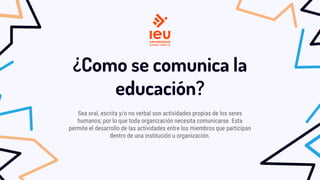
¿Qué app o sistema utiliza la educación?
El uso de apps educativas en el ámbito escolar presenta numerosas ventajas:
• Meet.
• Google Classroom.
• Google Drive.
• SelfControl.
• Babbel.
• Penultimate.
• Evernote.
• Smartick.
• Duolingo.
• Photomath.
• Bible app for kids.
• Kahoot!
• U-Dictionary.
• Khan Academy.
¿Como se comunica la
educación?
Sea oral, escrita y/o no verbal son actividades propias de los seres
humanos; por lo que toda organización necesita comunicarse. Esta
permite el desarrollo de las actividades entre los miembros que participan
dentro de una institución u organización.
¿Qué tipo de
información maneja?
─ Los sistemas educativos nacionales más exitosos se
aseguran la disponibilidad de la información necesaria
para identificar oportunidades de mejora, mediante un
tipo de herramientas conocidas como EMIS (Education
Management Information System). Este tipo de sistemas
permiten gestionar (capturar, procesar, analizar y
reportar) toda la información relativa a los
estudiantes (registro, transferencia entre
instituciones, evaluaciones formativas, calificaciones
periódicas, exámenes nacionales, datos de los padres,
necesidades especiales, situación sanitaria, etc.),
escuelas (ubicación, tipo, infraestructuras
disponibles, programas brindados, etc.), clases,
planes de estudio y docentes (registro, habilitación
para ejercer, formación, especializaciones, tipo de
contrato, aptitudes, promociones, etc).
¿Que tipo de red utiliza la
Educación?
Las Redes de Área Local o Local Area Network (LAN)
son las más comunes, ya que permiten conectar miles de
dispositivos dentro de un mismo recinto. Por ello, es la
elegida como red para escuelas, universidades, empresas
e instituciones públicas.
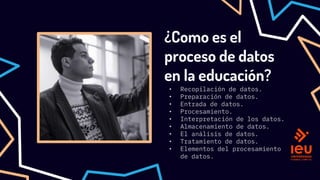
¿Como es el
proceso de datos
en la educación?
• Recopilación de datos.
• Preparación de datos.
• Entrada de datos.
• Procesamiento.
• Interpretación de los datos.
• Almacenamiento de datos.
• El análisis de datos.
• Tratamiento de datos.
• Elementos del procesamiento
de datos.
Pros y contras
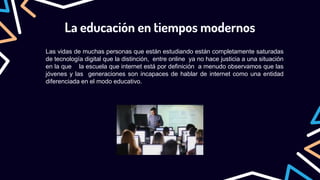
La educación en tiempos modernos
Las vidas de muchas personas que están estudiando están completamente saturadas
de tecnología digital que la distinción, entre online ya no hace justicia a una situación
en la que la escuela que internet está por definición a menudo observamos que las
jóvenes y las generaciones son incapaces de hablar de internet como una entidad
diferenciada en el modo educativo.
Gracias por su
atención.
Important leadership traits
Mercury
It’s the closest
planet to the Sun
and the smallest in
the Solar System
Venus
Venus has a
beautiful name and
is the second
planet from the Sun
Mars
Despite being red,
Mars is a cold
place. It’s full of
iron oxide dust
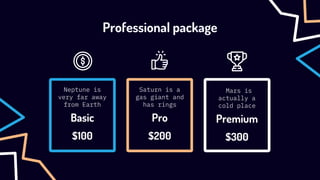
Premium
Professional package
Neptune is
very far away
from Earth
Basic
Saturn is a
gas giant and
has rings
Pro
Mars is
actually a
cold place
$100 $200 $300
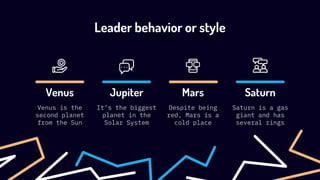
Mars
Leader behavior or style
Venus
Venus is the
second planet
from the Sun
Jupiter
It’s the biggest
planet in the
Solar System
Despite being
red, Mars is a
cold place
Saturn
Saturn is a gas
giant and has
several rings
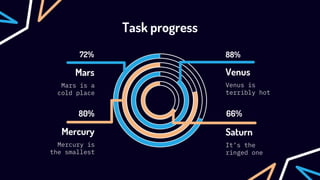
Task progress
88%
72%
80%
Mars
Mars is a
cold place
Mercury
Mercury is
the smallest
Saturn
It’s the
ringed one
66%
Venus
Venus is
terribly hot
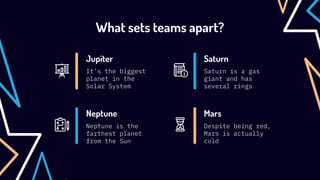
What sets teams apart?
Jupiter
It’s the biggest
planet in the
Solar System
Saturn is a gas
giant and has
several rings
Saturn
Neptune is the
farthest planet
from the Sun
Neptune
Despite being red,
Mars is actually
cold
Mars
Mars is actually
very cold
It’s the
farthest planet
Mars
Neptune
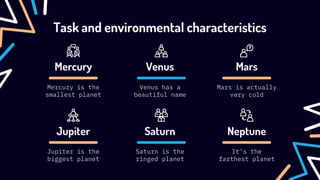
Task and environmental characteristics
Mercury
Mercury is the
smallest planet
Venus
Venus has a
beautiful name
Jupiter
Jupiter is the
biggest planet
Saturn
Saturn is the
ringed planet
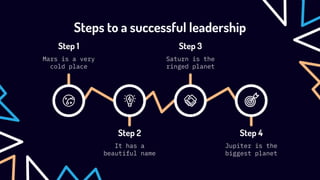
Steps to a successful leadership
Step 1
Mars is a very
cold place
Step 3
Saturn is the
ringed planet
Step 2
It has a
beautiful name
Step 4
Jupiter is the
biggest planet
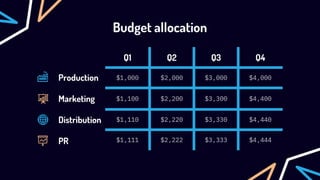
Budget allocation
Q1 Q2 Q3 Q4
$1,000 $2,000 $3,000 $4,000
$1,100 $2,200 $3,300 $4,400
$1,110 $2,220 $3,330 $4,440
$1,111 $2,222 $3,333 $4,444
Production
Marketing
Distribution
PR
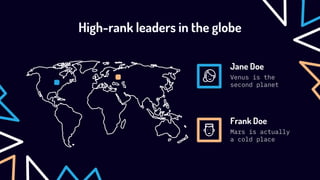
High-rank leaders in the globe
Venus is the
second planet
Jane Doe
Mars is actually
a cold place
Frank Doe
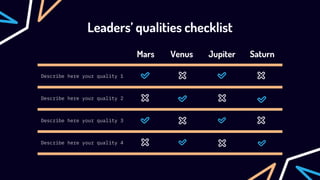
Leaders’ qualities checklist
Mars Venus Jupiter Saturn
Describe here your quality 1
Describe here your quality 2
Describe here your quality 3
Describe here your quality 4
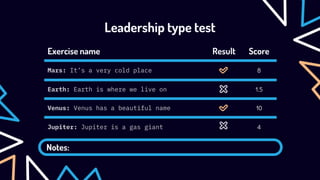
Leadership type test
Notes:
Exercise name Result Score
Mars: It’s a very cold place 8
Earth: Earth is where we live on 1.5
Venus: Venus has a beautiful name 10
Jupiter: Jupiter is a gas giant 4
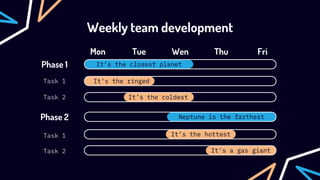
It’s the hottest
It's a gas giant
It's the ringed
It’s the coldest
It’s the closest planet
Weekly team development
Mon Tue Wen Thu
Phase 1
Phase 2
Task 1
Task 2
Task 1
Task 2
Fri
Neptune is the farthest
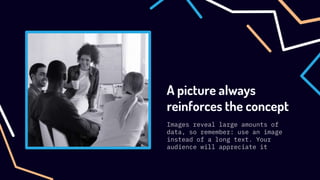
A picture always
reinforces the concept
Images reveal large amounts of
data, so remember: use an image
instead of a long text. Your
audience will appreciate it
150,000,000
Big numbers catch your audience’s attention
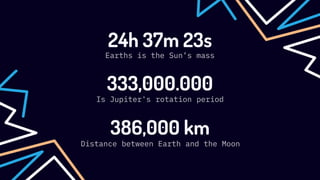
24h 37m 23s
Earths is the Sun’s mass
333,000.000
Is Jupiter's rotation period
386,000 km
Distance between Earth and the Moon
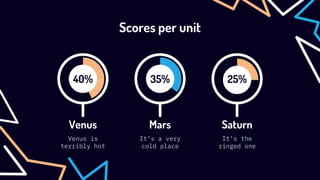
35%
It’s a very
cold place
Mars
40%
Venus is
terribly hot
Venus
25%
It’s the
ringed one
Saturn
Scores per unit
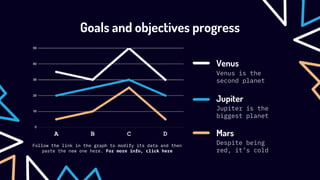
Goals and objectives progress
Venus is the
second planet
Jupiter is the
biggest planet
Despite being
red, it’s cold
Venus
Jupiter
Mars
Follow the link in the graph to modify its data and then
paste the new one here. For more info, click here
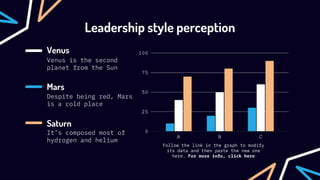
Venus is the second
planet from the Sun
Despite being red, Mars
is a cold place
It’s composed most of
hydrogen and helium
Venus
Mars
Saturn
Follow the link in the graph to modify
its data and then paste the new one
here. For more info, click here
Leadership style perception
Awesome
words
Business Overview
02
You can enter a subtitle here if you need it
A picture is worth a thousand words
Desktop
software
You can replace the
image on the screen with
your own work. Just
right-click on it and
select “Replace image”
Tablet
app
You can replace the
image on the screen with
your own work. Just
right-click on it and
select “Replace image”
Mobile
web
You can replace the
image on the screen with
your own work. Just
right-click on it and
select “Replace image”
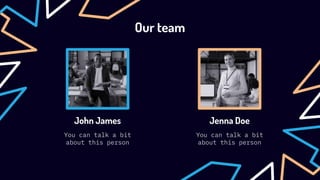
Our team
You can talk a bit
about this person
John James
You can talk a bit
about this person
Jenna Doe
CREDITS: This presentation template was created by Slidesgo,
including icons by Flaticon, and infographics & images by Freepik
Thanks!
Do you have any questions?
youremail@freepik.com
+91 620 421 838
yourcompany.com
Please keep this slide for
attribution
Alternative resources
Presentation’s resources
Did you like the resources on this template? Get them for free at our
other websites:
Photos:
─ Man writing business idea
─ High view polygonal pushpin map
─ Smiley business people with pizza
─ Employees in business meeting
─ Business people in conference room
─ Medium shot smiley woman at business meeting
Vectors:
─ Business card template with abstract shapes
─ Business card with distorted lines
─ Business card template
Instructions for use
In order to use this template, you must credit Slidesgo by keeping the Thanks slide.
You are allowed to:
- Modify this template.
- Use it for both personal and commercial projects.
You are not allowed to:
- Sublicense, sell or rent any of Slidesgo Content (or a modified version of Slidesgo Content).
- Distribute Slidesgo Content unless it has been expressly authorized by Slidesgo.
- Include Slidesgo Content in an online or offline database or file.
- Offer Slidesgo templates (or modified versions of Slidesgo templates) for download.
- Acquire the copyright of Slidesgo Content.
For more information about editing slides, please read our FAQs or visit Slidesgo School:
https://slidesgo.com/faqs and https://slidesgo.com/slidesgo-school
Instructions for use (premium users)
In order to use this template, you must be a Premium user on Slidesgo.
You are allowed to:
● Modify this template.
● Use it for both personal and commercial purposes.
● Hide or delete the “Thanks” slide and the mention to Slidesgo in the credits.
● Share this template in an editable format with people who are not part of your team.
You are not allowed to:
● Sublicense, sell or rent this Slidesgo Template (or a modified version of this Slidesgo Template).
● Distribute this Slidesgo Template (or a modified version of this Slidesgo Template) or include it in a database or in
any other product or service that offers downloadable images, icons or presentations that may be subject to
distribution or resale.
● Use any of the elements that are part of this Slidesgo Template in an isolated and separated way from this
Template.
● Register any of the elements that are part of this template as a trademark or logo, or register it as a work in an
intellectual property registry or similar.
For more information about editing slides, please read our FAQs or visit Slidesgo School:
https://slidesgo.com/faqs and https://slidesgo.com/slidesgo-school
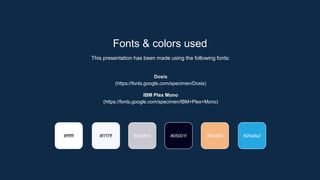
Fonts & colors used
This presentation has been made using the following fonts:
Dosis
(https://fonts.google.com/specimen/Dosis)
IBM Plex Mono
(https://fonts.google.com/specimen/IBM+Plex+Mono)
#05001f
#c9c8d0
#ffffff #f7f7ff #f5b680 #25a8e2
Storyset
Create your Story with our illustrated concepts. Choose the style you like the most, edit its colors, pick
the background and layers you want to show and bring them to life with the animator panel! It will boost
your presentation. Check out How it Works.
Pana Amico Bro Rafiki Cuate
You can easily resize these resources without losing quality. To change the color, just ungroup the resource
and click on the object you want to change. Then, click on the paint bucket and select the color you want.
Group the resource again when you’re done. You can also look for more infographics on Slidesgo.
Use our editable graphic resources...
JANUARY FEBRUARY MARCH APRIL
PHASE 1
Task 1
Task 2
JANUARY FEBRUARY MARCH APRIL MAY JUNE
PHASE 1
PHASE 2
Task 1
Task 2
Task 1
Task 2
...and our sets of editable icons
You can resize these icons without losing quality.
You can change the stroke and fill color; just select the icon and click on the paint bucket/pen.
In Google Slides, you can also use Flaticon’s extension, allowing you to customize and add even more icons.
Educational Icons Medical Icons
Business Icons Teamwork Icons
Help & Support Icons Avatar Icons
Creative Process Icons Performing Arts Icons
Nature Icons
SEO & Marketing Icons
La educación.

La educación.

  • 1.
    La educación José DanielBarrales Morga. Dana Paola Tepal Tenahua.
  • 2.
    ¿Qué app osistema utiliza la educación? El uso de apps educativas en el ámbito escolar presenta numerosas ventajas: • Meet. • Google Classroom. • Google Drive. • SelfControl. • Babbel. • Penultimate. • Evernote. • Smartick. • Duolingo. • Photomath. • Bible app for kids. • Kahoot! • U-Dictionary. • Khan Academy.
  • 3.
    ¿Como se comunicala educación? Sea oral, escrita y/o no verbal son actividades propias de los seres humanos; por lo que toda organización necesita comunicarse. Esta permite el desarrollo de las actividades entre los miembros que participan dentro de una institución u organización.
  • 4.
    ¿Qué tipo de informaciónmaneja? ─ Los sistemas educativos nacionales más exitosos se aseguran la disponibilidad de la información necesaria para identificar oportunidades de mejora, mediante un tipo de herramientas conocidas como EMIS (Education Management Information System). Este tipo de sistemas permiten gestionar (capturar, procesar, analizar y reportar) toda la información relativa a los estudiantes (registro, transferencia entre instituciones, evaluaciones formativas, calificaciones periódicas, exámenes nacionales, datos de los padres, necesidades especiales, situación sanitaria, etc.), escuelas (ubicación, tipo, infraestructuras disponibles, programas brindados, etc.), clases, planes de estudio y docentes (registro, habilitación para ejercer, formación, especializaciones, tipo de contrato, aptitudes, promociones, etc).
  • 5.
    ¿Que tipo dered utiliza la Educación? Las Redes de Área Local o Local Area Network (LAN) son las más comunes, ya que permiten conectar miles de dispositivos dentro de un mismo recinto. Por ello, es la elegida como red para escuelas, universidades, empresas e instituciones públicas.
  • 6.
    ¿Como es el procesode datos en la educación? • Recopilación de datos. • Preparación de datos. • Entrada de datos. • Procesamiento. • Interpretación de los datos. • Almacenamiento de datos. • El análisis de datos. • Tratamiento de datos. • Elementos del procesamiento de datos.
  • 7.
  • 8.
    La educación entiempos modernos Las vidas de muchas personas que están estudiando están completamente saturadas de tecnología digital que la distinción, entre online ya no hace justicia a una situación en la que la escuela que internet está por definición a menudo observamos que las jóvenes y las generaciones son incapaces de hablar de internet como una entidad diferenciada en el modo educativo.
  • 9.
  • 10.
    Important leadership traits Mercury It’sthe closest planet to the Sun and the smallest in the Solar System Venus Venus has a beautiful name and is the second planet from the Sun Mars Despite being red, Mars is a cold place. It’s full of iron oxide dust
  • 11.
    Premium Professional package Neptune is veryfar away from Earth Basic Saturn is a gas giant and has rings Pro Mars is actually a cold place $100 $200 $300
  • 12.
    Mars Leader behavior orstyle Venus Venus is the second planet from the Sun Jupiter It’s the biggest planet in the Solar System Despite being red, Mars is a cold place Saturn Saturn is a gas giant and has several rings
  • 13.
    Task progress 88% 72% 80% Mars Mars isa cold place Mercury Mercury is the smallest Saturn It’s the ringed one 66% Venus Venus is terribly hot
  • 14.
    What sets teamsapart? Jupiter It’s the biggest planet in the Solar System Saturn is a gas giant and has several rings Saturn Neptune is the farthest planet from the Sun Neptune Despite being red, Mars is actually cold Mars
  • 15.
    Mars is actually verycold It’s the farthest planet Mars Neptune Task and environmental characteristics Mercury Mercury is the smallest planet Venus Venus has a beautiful name Jupiter Jupiter is the biggest planet Saturn Saturn is the ringed planet
  • 16.
    Steps to asuccessful leadership Step 1 Mars is a very cold place Step 3 Saturn is the ringed planet Step 2 It has a beautiful name Step 4 Jupiter is the biggest planet
  • 17.
    Budget allocation Q1 Q2Q3 Q4 $1,000 $2,000 $3,000 $4,000 $1,100 $2,200 $3,300 $4,400 $1,110 $2,220 $3,330 $4,440 $1,111 $2,222 $3,333 $4,444 Production Marketing Distribution PR
  • 18.
    High-rank leaders inthe globe Venus is the second planet Jane Doe Mars is actually a cold place Frank Doe
  • 19.
    Leaders’ qualities checklist MarsVenus Jupiter Saturn Describe here your quality 1 Describe here your quality 2 Describe here your quality 3 Describe here your quality 4
  • 20.
    Leadership type test Notes: Exercisename Result Score Mars: It’s a very cold place 8 Earth: Earth is where we live on 1.5 Venus: Venus has a beautiful name 10 Jupiter: Jupiter is a gas giant 4
  • 21.
    It’s the hottest It'sa gas giant It's the ringed It’s the coldest It’s the closest planet Weekly team development Mon Tue Wen Thu Phase 1 Phase 2 Task 1 Task 2 Task 1 Task 2 Fri Neptune is the farthest
  • 22.
    A picture always reinforcesthe concept Images reveal large amounts of data, so remember: use an image instead of a long text. Your audience will appreciate it
  • 23.
    150,000,000 Big numbers catchyour audience’s attention
  • 24.
    24h 37m 23s Earthsis the Sun’s mass 333,000.000 Is Jupiter's rotation period 386,000 km Distance between Earth and the Moon
  • 25.
    35% It’s a very coldplace Mars 40% Venus is terribly hot Venus 25% It’s the ringed one Saturn Scores per unit
  • 26.
    Goals and objectivesprogress Venus is the second planet Jupiter is the biggest planet Despite being red, it’s cold Venus Jupiter Mars Follow the link in the graph to modify its data and then paste the new one here. For more info, click here
  • 27.
    Venus is thesecond planet from the Sun Despite being red, Mars is a cold place It’s composed most of hydrogen and helium Venus Mars Saturn Follow the link in the graph to modify its data and then paste the new one here. For more info, click here Leadership style perception
  • 28.
  • 29.
    Business Overview 02 You canenter a subtitle here if you need it
  • 30.
    A picture isworth a thousand words
  • 31.
    Desktop software You can replacethe image on the screen with your own work. Just right-click on it and select “Replace image”
  • 32.
    Tablet app You can replacethe image on the screen with your own work. Just right-click on it and select “Replace image”
  • 33.
    Mobile web You can replacethe image on the screen with your own work. Just right-click on it and select “Replace image”
  • 34.
    Our team You cantalk a bit about this person John James You can talk a bit about this person Jenna Doe
  • 35.
    CREDITS: This presentationtemplate was created by Slidesgo, including icons by Flaticon, and infographics & images by Freepik Thanks! Do you have any questions? youremail@freepik.com +91 620 421 838 yourcompany.com Please keep this slide for attribution
  • 36.
  • 37.
    Presentation’s resources Did youlike the resources on this template? Get them for free at our other websites: Photos: ─ Man writing business idea ─ High view polygonal pushpin map ─ Smiley business people with pizza ─ Employees in business meeting ─ Business people in conference room ─ Medium shot smiley woman at business meeting Vectors: ─ Business card template with abstract shapes ─ Business card with distorted lines ─ Business card template
  • 38.
    Instructions for use Inorder to use this template, you must credit Slidesgo by keeping the Thanks slide. You are allowed to: - Modify this template. - Use it for both personal and commercial projects. You are not allowed to: - Sublicense, sell or rent any of Slidesgo Content (or a modified version of Slidesgo Content). - Distribute Slidesgo Content unless it has been expressly authorized by Slidesgo. - Include Slidesgo Content in an online or offline database or file. - Offer Slidesgo templates (or modified versions of Slidesgo templates) for download. - Acquire the copyright of Slidesgo Content. For more information about editing slides, please read our FAQs or visit Slidesgo School: https://slidesgo.com/faqs and https://slidesgo.com/slidesgo-school
  • 39.
    Instructions for use(premium users) In order to use this template, you must be a Premium user on Slidesgo. You are allowed to: ● Modify this template. ● Use it for both personal and commercial purposes. ● Hide or delete the “Thanks” slide and the mention to Slidesgo in the credits. ● Share this template in an editable format with people who are not part of your team. You are not allowed to: ● Sublicense, sell or rent this Slidesgo Template (or a modified version of this Slidesgo Template). ● Distribute this Slidesgo Template (or a modified version of this Slidesgo Template) or include it in a database or in any other product or service that offers downloadable images, icons or presentations that may be subject to distribution or resale. ● Use any of the elements that are part of this Slidesgo Template in an isolated and separated way from this Template. ● Register any of the elements that are part of this template as a trademark or logo, or register it as a work in an intellectual property registry or similar. For more information about editing slides, please read our FAQs or visit Slidesgo School: https://slidesgo.com/faqs and https://slidesgo.com/slidesgo-school
  • 40.
    Fonts & colorsused This presentation has been made using the following fonts: Dosis (https://fonts.google.com/specimen/Dosis) IBM Plex Mono (https://fonts.google.com/specimen/IBM+Plex+Mono) #05001f #c9c8d0 #ffffff #f7f7ff #f5b680 #25a8e2
  • 41.
    Storyset Create your Storywith our illustrated concepts. Choose the style you like the most, edit its colors, pick the background and layers you want to show and bring them to life with the animator panel! It will boost your presentation. Check out How it Works. Pana Amico Bro Rafiki Cuate
  • 42.
    You can easilyresize these resources without losing quality. To change the color, just ungroup the resource and click on the object you want to change. Then, click on the paint bucket and select the color you want. Group the resource again when you’re done. You can also look for more infographics on Slidesgo. Use our editable graphic resources...
  • 45.
    JANUARY FEBRUARY MARCHAPRIL PHASE 1 Task 1 Task 2 JANUARY FEBRUARY MARCH APRIL MAY JUNE PHASE 1 PHASE 2 Task 1 Task 2 Task 1 Task 2
  • 48.
    ...and our setsof editable icons You can resize these icons without losing quality. You can change the stroke and fill color; just select the icon and click on the paint bucket/pen. In Google Slides, you can also use Flaticon’s extension, allowing you to customize and add even more icons.
  • 49.
  • 50.
  • 51.
    Help & SupportIcons Avatar Icons
  • 52.
    Creative Process IconsPerforming Arts Icons
  • 53.
  • 54.