
Chapter 1
Introduction to ICT in
Language Learning
By Hartoyo, M.A., Ph.D
Prepared by:
Kin Susansi
Neng Syamsiyah
Sinta Dewi R
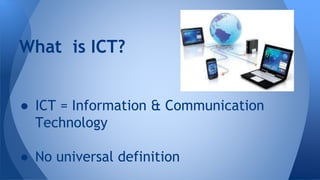
What is ICT?
● ICT = Information & Communication
Technology
● No universal definition
● Information & Communication Technology
(Shore, Levis, Hubbley, Hartoyo) :
o The scientific knowledge of art or skills on how
to interact between interlocutors in
transferring processed & meaningful data as
well as ideas, emotions, skills and knowledges.
DEFINITIONS
● Technology functioning to support the
process of conveying information and
communication especially in education
areas (Hartoyo).
● CALL (Computer-Assisted Language
Learning), the internet, generic computer
applications.
ICT in Education
1. Exposure to ‘authentic’ language
2. Access to wider sources
3. Opportunities to communicate with
outside world
4. A learner-centered approach
5. Development of learner autonomy
ICT in Language Learning
Advantages
ICT in General Context
❖ Standard office applications
○ Word processing
E.g. Microsoft Word: write, letters, reports etc.
○ Spreadsheets
E.g. Microsoft excel; Analyze financial information; calculation;
create forecasting models etc.
○ Database software
E.g. Oracle, Microsoft SQL Server, Access; Managing data in many forms,
from basic lists (e.g. customer contrast through to complex material
(e.g. catalogue).
○ Presentation soft-ware:
E.g Microsoft Powerpoint: Make presentations, and publish in digital
format via email or over the internet.
● Desktop Publishing
E.g. Adobe InDesign, Quark express, Microsoft Publisher: produce
newsletter, magazines and other complex document.
● Graphics software
● E.g. Adobe photoshop and Illustrator; Marcromedia Freehand and
fireworks; create and edit images such as logos, drawings or pictures
for use in DTP, web sites or other publications.
❖ Specialist applications
● Accounting package
E.g. Sage Oracle: Manage an organization’s accounts including
revenues/sales, purchases, bank accounts etc.
● Computer Aided Design
Computer Aided Design (CAD) is the use of computers to assist the
design process, it exist for many types of design: architectural,
engineering, electronics, roadways
● Customer Relation Management (CRM).
Sofware that allows businesses to better
understand their customers by collecting and
analyzing data on them such as their product
preferences, buying habits etc. Often linked to
software applications that run call centers and
loyalty cards for example.
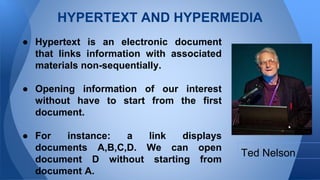
HYPERTEXT AND HYPERMEDIA
● Hypertext is an electronic document
that links information with associated
materials non-sequentially.
● Opening information of our interest
without have to start from the first
document.
● For instance: a link displays
documents A,B,C,D. We can open
document D without starting from
document A.
Ted Nelson
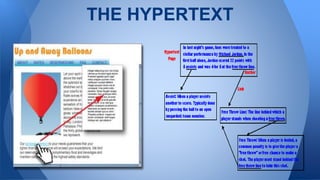
THE HYPERTEXT
● Hypertext → electronic document in the
form of plain text connects to other plain
texts
● Hypermedia → plain text connects to
other media such as graphics, video,
spreadsheet, animation, and sound.
The DIFFERENCE
➢ Ease of tracing references or creating new
references
➢ Information structuring
➢ Global views
➢ Customized documents
➢ Modularity of information
➢ Consistency of information
➢ Task stacking
➢ Collaboration
THE ADVANTAGES
➢Disorientation problems
➢A massive number of nodes make
information hard to be obtained
THE PROBLEMS WITH HYPERTEXT
➢For business
➢For information resources
➢For education
- The computer assisted learning (CAL) → for personal
learning
- for clearer explanations, description and illustration
using pictures, sound, music, animation, and video.
HYPERTEXT AS APPLICATION
● For learning language and teaching purposes
● Learning all language skills: listening, speaking,
reading, writing as well as vocabulary and
grammar
● The best and most successful result in learning
grammar
HYPERTEXT FOR
LANGUAGE LEARNING

ICT chapter 1

  • 1.
    Chapter 1 Introduction toICT in Language Learning By Hartoyo, M.A., Ph.D Prepared by: Kin Susansi Neng Syamsiyah Sinta Dewi R
  • 3.
    What is ICT? ●ICT = Information & Communication Technology ● No universal definition
  • 4.
    ● Information &Communication Technology (Shore, Levis, Hubbley, Hartoyo) : o The scientific knowledge of art or skills on how to interact between interlocutors in transferring processed & meaningful data as well as ideas, emotions, skills and knowledges. DEFINITIONS
  • 5.
    ● Technology functioningto support the process of conveying information and communication especially in education areas (Hartoyo). ● CALL (Computer-Assisted Language Learning), the internet, generic computer applications. ICT in Education
  • 7.
    1. Exposure to‘authentic’ language 2. Access to wider sources 3. Opportunities to communicate with outside world 4. A learner-centered approach 5. Development of learner autonomy ICT in Language Learning Advantages
  • 8.
    ICT in GeneralContext ❖ Standard office applications ○ Word processing E.g. Microsoft Word: write, letters, reports etc. ○ Spreadsheets E.g. Microsoft excel; Analyze financial information; calculation; create forecasting models etc. ○ Database software E.g. Oracle, Microsoft SQL Server, Access; Managing data in many forms, from basic lists (e.g. customer contrast through to complex material (e.g. catalogue). ○ Presentation soft-ware: E.g Microsoft Powerpoint: Make presentations, and publish in digital format via email or over the internet.
  • 9.
    ● Desktop Publishing E.g.Adobe InDesign, Quark express, Microsoft Publisher: produce newsletter, magazines and other complex document. ● Graphics software ● E.g. Adobe photoshop and Illustrator; Marcromedia Freehand and fireworks; create and edit images such as logos, drawings or pictures for use in DTP, web sites or other publications. ❖ Specialist applications ● Accounting package E.g. Sage Oracle: Manage an organization’s accounts including revenues/sales, purchases, bank accounts etc. ● Computer Aided Design Computer Aided Design (CAD) is the use of computers to assist the design process, it exist for many types of design: architectural, engineering, electronics, roadways
  • 10.
    ● Customer RelationManagement (CRM). Sofware that allows businesses to better understand their customers by collecting and analyzing data on them such as their product preferences, buying habits etc. Often linked to software applications that run call centers and loyalty cards for example.
  • 11.
    HYPERTEXT AND HYPERMEDIA ●Hypertext is an electronic document that links information with associated materials non-sequentially. ● Opening information of our interest without have to start from the first document. ● For instance: a link displays documents A,B,C,D. We can open document D without starting from document A. Ted Nelson
  • 12.
  • 13.
    ● Hypertext →electronic document in the form of plain text connects to other plain texts ● Hypermedia → plain text connects to other media such as graphics, video, spreadsheet, animation, and sound. The DIFFERENCE
  • 14.
    ➢ Ease oftracing references or creating new references ➢ Information structuring ➢ Global views ➢ Customized documents ➢ Modularity of information ➢ Consistency of information ➢ Task stacking ➢ Collaboration THE ADVANTAGES
  • 15.
    ➢Disorientation problems ➢A massivenumber of nodes make information hard to be obtained THE PROBLEMS WITH HYPERTEXT
  • 16.
    ➢For business ➢For informationresources ➢For education - The computer assisted learning (CAL) → for personal learning - for clearer explanations, description and illustration using pictures, sound, music, animation, and video. HYPERTEXT AS APPLICATION
  • 17.
    ● For learninglanguage and teaching purposes ● Learning all language skills: listening, speaking, reading, writing as well as vocabulary and grammar ● The best and most successful result in learning grammar HYPERTEXT FOR LANGUAGE LEARNING