© 2007 Cisco Systems, Inc. All rights reserved. ICND2 v1.0—6-1
Access Control Lists
Configuring and
Troubleshooting
ACLs
© 2007 Cisco Systems, Inc. All rights reserved. ICND2 v1.0—6-2
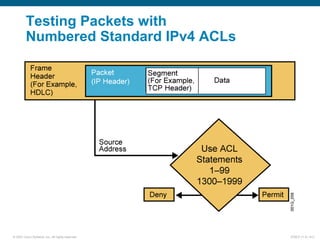
Testing Packets with
Numbered Standard IPv4 ACLs
© 2007 Cisco Systems, Inc. All rights reserved. ICND2 v1.0—6-3
 Activates the list on an interface.
 Sets inbound or outbound testing.
 no ip access-group access-list-number {in | out} removes the ACL from the interface.
ip access-group access-list-number {in | out}
 Uses 1 to 99 for the access-list-number.
 The first entry is assigned a sequence number of 10, and successive entries
are incremented by 10.
 Default wildcard mask is 0.0.0.0 (only standard ACL).
 no access-list access-list-number removes the entire ACL.
 remark lets you add a description to the ACL.
access-list access-list-number
{permit | deny | remark} source [mask]
RouterX(config)#
RouterX(config-if)#
Numbered Standard IPv4 ACL
Configuration
© 2007 Cisco Systems, Inc. All rights reserved. ICND2 v1.0—6-4
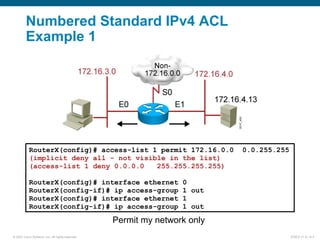
Permit my network only
Numbered Standard IPv4 ACL
Example 1
RouterX(config)# access-list 1 permit 172.16.0.0 0.0.255.255
(implicit deny all - not visible in the list)
(access-list 1 deny 0.0.0.0 255.255.255.255)
RouterX(config)# interface ethernet 0
RouterX(config-if)# ip access-group 1 out
RouterX(config)# interface ethernet 1
RouterX(config-if)# ip access-group 1 out
© 2007 Cisco Systems, Inc. All rights reserved. ICND2 v1.0—6-5
Deny a specific host
Numbered Standard IPv4 ACL
Example 2
RouterX(config)# access-list 1 deny 172.16.4.13 0.0.0.0
RouterX(config)# access-list 1 permit 0.0.0.0 255.255.255.255
(implicit deny all)
(access-list 1 deny 0.0.0.0 255.255.255.255)
RouterX(config)# interface ethernet 0
RouterX(config-if)# ip access-group 1 out
© 2007 Cisco Systems, Inc. All rights reserved. ICND2 v1.0—6-6
Deny a specific subnet
Numbered Standard IPv4 ACL
Example 3
RouterX(config)# access-list 1 deny 172.16.4.0 0.0.0.255
RouterX(config)# access-list 1 permit any
(implicit deny all)
(access-list 1 deny 0.0.0.0 255.255.255.255)
RouterX(config)# interface ethernet 0
RouterX(config-if)# ip access-group 1 out
© 2007 Cisco Systems, Inc. All rights reserved. ICND2 v1.0—6-7
 Permits only hosts in network 192.168.1.0 0.0.0.255 to connect
to the router vty lines
access-list 12 permit 192.168.1.0 0.0.0.255
(implicit deny any)
!
line vty 0 4
access-class 12 in
Example:
access-class access-list-number {in | out}
 Restricts incoming or outgoing connections between a particular
vty and the addresses in an ACL
RouterX(config-line)#
Standard ACLs to Control vty Access
© 2007 Cisco Systems, Inc. All rights reserved. ICND2 v1.0—6-8
Testing Packets with
Numbered Extended IPv4 ACLs
© 2007 Cisco Systems, Inc. All rights reserved. ICND2 v1.0—6-9
ip access-group access-list-number {in | out}
 Activates the extended list on an interface
 Sets parameters for this list entry
access-list access-list-number {permit | deny}
protocol source source-wildcard [operator port]
destination destination-wildcard [operator port]
[established] [log]
RouterX(config)#
RouterX(config-if)#
Numbered Extended IPv4 ACL
Configuration
© 2007 Cisco Systems, Inc. All rights reserved. ICND2 v1.0—6-10
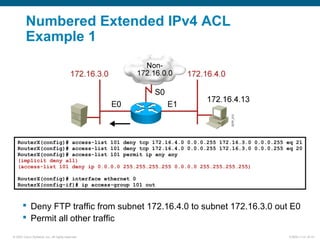
Numbered Extended IPv4 ACL
Example 1
RouterX(config)# access-list 101 deny tcp 172.16.4.0 0.0.0.255 172.16.3.0 0.0.0.255 eq 21
RouterX(config)# access-list 101 deny tcp 172.16.4.0 0.0.0.255 172.16.3.0 0.0.0.255 eq 20
RouterX(config)# access-list 101 permit ip any any
(implicit deny all)
(access-list 101 deny ip 0.0.0.0 255.255.255.255 0.0.0.0 255.255.255.255)
RouterX(config)# interface ethernet 0
RouterX(config-if)# ip access-group 101 out
 Deny FTP traffic from subnet 172.16.4.0 to subnet 172.16.3.0 out E0
 Permit all other traffic
© 2007 Cisco Systems, Inc. All rights reserved. ICND2 v1.0—6-11
Numbered Extended IPv4 ACL
Example 2
RouterX(config)# access-list 101 deny tcp 172.16.4.0 0.0.0.255 any eq 23
RouterX(config)# access-list 101 permit ip any any
(implicit deny all)
RouterX(config)# interface ethernet 0
RouterX(config-if)# ip access-group 101 out
 Deny only Telnet traffic from subnet 172.16.4.0 out E0
 Permit all other traffic
© 2007 Cisco Systems, Inc. All rights reserved. ICND2 v1.0—6-12
ip access-list {standard | extended} name
[sequence-number] {permit | deny} {ip access list test conditions}
{permit | deny} {ip access list test conditions}
ip access-group name {in | out}
Named IP ACL Configuration
 Alphanumeric name string must be unique
 If not configured, sequence numbers are generated automatically starting at 10 and
incrementing by 10
 no sequence number removes the specific test from the named ACL
 Activates the named IP ACL on an interface
RouterX(config {std- | ext-}nacl)#
RouterX(config-if)#
RouterX(config)#
© 2007 Cisco Systems, Inc. All rights reserved. ICND2 v1.0—6-13
Deny a specific host
Named Standard IPv4 ACL Example
RouterX(config)#ip access-list standard troublemaker
RouterX(config-std-nacl)#deny host 172.16.4.13
RouterX(config-std-nacl)#permit 172.16.4.0 0.0.0.255
RouterX(config-std-nacl)#interface e0
RouterX(config-if)#ip access-group troublemaker out
© 2007 Cisco Systems, Inc. All rights reserved. ICND2 v1.0—6-14
Deny Telnet from a specific subnet
Named Extended IPv4 ACL Example
RouterX(config)#ip access-list extended badgroup
RouterX(config-ext-nacl)#deny tcp 172.16.4.0 0.0.0.255 any eq 23
RouterX(config-ext-nacl)#permit ip any any
RouterX(config-ext-nacl)#interface e0
RouterX(config-if)#ip access-group badgroup out
© 2007 Cisco Systems, Inc. All rights reserved. ICND2 v1.0—6-15
Commenting ACL Statements
access-list access-list-number remark remark
ip access-list {standard|extended} name
 Creates a named ACL comment
 Creates a numbered ACL comment
RouterX(config {std- | ext-}nacl)#
RouterX(config)#
remark remark
RouterX(config)#
 Creates a named ACL
Or
© 2007 Cisco Systems, Inc. All rights reserved. ICND2 v1.0—6-16
Monitoring ACL Statements
RouterX# show access-lists {access-list number|name}
RouterX# show access-lists
Standard IP access list SALES
10 deny 10.1.1.0, wildcard bits 0.0.0.255
20 permit 10.3.3.1
30 permit 10.4.4.1
40 permit 10.5.5.1
Extended IP access list ENG
10 permit tcp host 10.22.22.1 any eq telnet (25 matches)
20 permit tcp host 10.33.33.1 any eq ftp
30 permit tcp host 10.44.44.1 any eq ftp-data
Displays all access lists
© 2007 Cisco Systems, Inc. All rights reserved. ICND2 v1.0—6-17
Verifying ACLs
RouterX# show ip interfaces e0
Ethernet0 is up, line protocol is up
Internet address is 10.1.1.11/24
Broadcast address is 255.255.255.255
Address determined by setup command
MTU is 1500 bytes
Helper address is not set
Directed broadcast forwarding is disabled
Outgoing access list is not set
Inbound access list is 1
Proxy ARP is enabled
Security level is default
Split horizon is enabled
ICMP redirects are always sent
ICMP unreachables are always sent
ICMP mask replies are never sent
IP fast switching is enabled
IP fast switching on the same interface is disabled
IP Feature Fast switching turbo vector
IP multicast fast switching is enabled
IP multicast distributed fast switching is disabled
<text ommitted>
© 2007 Cisco Systems, Inc. All rights reserved. ICND2 v1.0—6-18
Troubleshooting Common ACL Errors
Error 1: Host 10.1.1.1 has no connectivity with 10.100.100.1.
© 2007 Cisco Systems, Inc. All rights reserved. ICND2 v1.0—6-19
Error 2: The 192.168.1.0 network cannot use TFTP to connect to
10.100.100.1.
Troubleshooting Common ACL Errors
(Cont.)
© 2007 Cisco Systems, Inc. All rights reserved. ICND2 v1.0—6-20
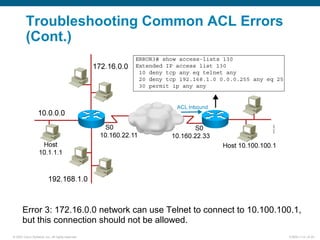
Error 3: 172.16.0.0 network can use Telnet to connect to 10.100.100.1,
but this connection should not be allowed.
Troubleshooting Common ACL Errors
(Cont.)
© 2007 Cisco Systems, Inc. All rights reserved. ICND2 v1.0—6-21
Error 4: Host 10.1.1.1 can use Telnet to connect to 10.100.100.1,
but this connection should not be allowed.
Troubleshooting Common ACL Errors
(Cont.)
© 2007 Cisco Systems, Inc. All rights reserved. ICND2 v1.0—6-22
Error 5: Host 10.100.100.1 can use Telnet to connect to 10.1.1.1,
but this connection should not be allowed.
A B
Troubleshooting Common ACL Errors
(Cont.)
© 2007 Cisco Systems, Inc. All rights reserved. ICND2 v1.0—6-23
Error 6: Host 10.1.1.1 can use Telnet to connect into router B, but
this connection should not be allowed.
BA
Troubleshooting Common ACL Errors
(Cont.)
© 2007 Cisco Systems, Inc. All rights reserved. ICND2 v1.0—6-24
Visual Objective 6-1: Implementing
and Troubleshooting ACLs
WG Router s0/0/0 Router fa0/0 Switch
A 10.140.1.2 10.2.2.3
10.2.2.11
B 10.140.2.2 10.3.3.3
10.3.3.11
C 10.140.3.2 10.4.4.3
10.4.4.11
D 10.140.4.2 10.5.5.3
10.5.5.11
E 10.140.5.2 10.6.6.3
10.6.6.11
F 10.140.6.2 10.7.7.3
10.7.7.11
G 10.140.7.2 10.8.8.3
10.8.8.11
H 10.140.8.2 10.9.9.3
10.9.9.11
SwitchH
© 2007 Cisco Systems, Inc. All rights reserved. ICND2 v1.0—6-25
Summary
 Standard IPv4 ACLs allow you to filter based on source IP
address.
 Extended ACLs allow you to filter based on source IP address,
destination IP address, protocol, and port number.
 Named ACLs allow you to delete individual statements from
an ACL.
 You can use the show access-lists and show ip interface
commands to troubleshoot common ACL configuration errors.
© 2007 Cisco Systems, Inc. All rights reserved. ICND2 v1.0—6-26

Icnd210 s06l02

  • 1.
    © 2007 CiscoSystems, Inc. All rights reserved. ICND2 v1.0—6-1 Access Control Lists Configuring and Troubleshooting ACLs
  • 2.
    © 2007 CiscoSystems, Inc. All rights reserved. ICND2 v1.0—6-2 Testing Packets with Numbered Standard IPv4 ACLs
  • 3.
    © 2007 CiscoSystems, Inc. All rights reserved. ICND2 v1.0—6-3  Activates the list on an interface.  Sets inbound or outbound testing.  no ip access-group access-list-number {in | out} removes the ACL from the interface. ip access-group access-list-number {in | out}  Uses 1 to 99 for the access-list-number.  The first entry is assigned a sequence number of 10, and successive entries are incremented by 10.  Default wildcard mask is 0.0.0.0 (only standard ACL).  no access-list access-list-number removes the entire ACL.  remark lets you add a description to the ACL. access-list access-list-number {permit | deny | remark} source [mask] RouterX(config)# RouterX(config-if)# Numbered Standard IPv4 ACL Configuration
  • 4.
    © 2007 CiscoSystems, Inc. All rights reserved. ICND2 v1.0—6-4 Permit my network only Numbered Standard IPv4 ACL Example 1 RouterX(config)# access-list 1 permit 172.16.0.0 0.0.255.255 (implicit deny all - not visible in the list) (access-list 1 deny 0.0.0.0 255.255.255.255) RouterX(config)# interface ethernet 0 RouterX(config-if)# ip access-group 1 out RouterX(config)# interface ethernet 1 RouterX(config-if)# ip access-group 1 out
  • 5.
    © 2007 CiscoSystems, Inc. All rights reserved. ICND2 v1.0—6-5 Deny a specific host Numbered Standard IPv4 ACL Example 2 RouterX(config)# access-list 1 deny 172.16.4.13 0.0.0.0 RouterX(config)# access-list 1 permit 0.0.0.0 255.255.255.255 (implicit deny all) (access-list 1 deny 0.0.0.0 255.255.255.255) RouterX(config)# interface ethernet 0 RouterX(config-if)# ip access-group 1 out
  • 6.
    © 2007 CiscoSystems, Inc. All rights reserved. ICND2 v1.0—6-6 Deny a specific subnet Numbered Standard IPv4 ACL Example 3 RouterX(config)# access-list 1 deny 172.16.4.0 0.0.0.255 RouterX(config)# access-list 1 permit any (implicit deny all) (access-list 1 deny 0.0.0.0 255.255.255.255) RouterX(config)# interface ethernet 0 RouterX(config-if)# ip access-group 1 out
  • 7.
    © 2007 CiscoSystems, Inc. All rights reserved. ICND2 v1.0—6-7  Permits only hosts in network 192.168.1.0 0.0.0.255 to connect to the router vty lines access-list 12 permit 192.168.1.0 0.0.0.255 (implicit deny any) ! line vty 0 4 access-class 12 in Example: access-class access-list-number {in | out}  Restricts incoming or outgoing connections between a particular vty and the addresses in an ACL RouterX(config-line)# Standard ACLs to Control vty Access
  • 8.
    © 2007 CiscoSystems, Inc. All rights reserved. ICND2 v1.0—6-8 Testing Packets with Numbered Extended IPv4 ACLs
  • 9.
    © 2007 CiscoSystems, Inc. All rights reserved. ICND2 v1.0—6-9 ip access-group access-list-number {in | out}  Activates the extended list on an interface  Sets parameters for this list entry access-list access-list-number {permit | deny} protocol source source-wildcard [operator port] destination destination-wildcard [operator port] [established] [log] RouterX(config)# RouterX(config-if)# Numbered Extended IPv4 ACL Configuration
  • 10.
    © 2007 CiscoSystems, Inc. All rights reserved. ICND2 v1.0—6-10 Numbered Extended IPv4 ACL Example 1 RouterX(config)# access-list 101 deny tcp 172.16.4.0 0.0.0.255 172.16.3.0 0.0.0.255 eq 21 RouterX(config)# access-list 101 deny tcp 172.16.4.0 0.0.0.255 172.16.3.0 0.0.0.255 eq 20 RouterX(config)# access-list 101 permit ip any any (implicit deny all) (access-list 101 deny ip 0.0.0.0 255.255.255.255 0.0.0.0 255.255.255.255) RouterX(config)# interface ethernet 0 RouterX(config-if)# ip access-group 101 out  Deny FTP traffic from subnet 172.16.4.0 to subnet 172.16.3.0 out E0  Permit all other traffic
  • 11.
    © 2007 CiscoSystems, Inc. All rights reserved. ICND2 v1.0—6-11 Numbered Extended IPv4 ACL Example 2 RouterX(config)# access-list 101 deny tcp 172.16.4.0 0.0.0.255 any eq 23 RouterX(config)# access-list 101 permit ip any any (implicit deny all) RouterX(config)# interface ethernet 0 RouterX(config-if)# ip access-group 101 out  Deny only Telnet traffic from subnet 172.16.4.0 out E0  Permit all other traffic
  • 12.
    © 2007 CiscoSystems, Inc. All rights reserved. ICND2 v1.0—6-12 ip access-list {standard | extended} name [sequence-number] {permit | deny} {ip access list test conditions} {permit | deny} {ip access list test conditions} ip access-group name {in | out} Named IP ACL Configuration  Alphanumeric name string must be unique  If not configured, sequence numbers are generated automatically starting at 10 and incrementing by 10  no sequence number removes the specific test from the named ACL  Activates the named IP ACL on an interface RouterX(config {std- | ext-}nacl)# RouterX(config-if)# RouterX(config)#
  • 13.
    © 2007 CiscoSystems, Inc. All rights reserved. ICND2 v1.0—6-13 Deny a specific host Named Standard IPv4 ACL Example RouterX(config)#ip access-list standard troublemaker RouterX(config-std-nacl)#deny host 172.16.4.13 RouterX(config-std-nacl)#permit 172.16.4.0 0.0.0.255 RouterX(config-std-nacl)#interface e0 RouterX(config-if)#ip access-group troublemaker out
  • 14.
    © 2007 CiscoSystems, Inc. All rights reserved. ICND2 v1.0—6-14 Deny Telnet from a specific subnet Named Extended IPv4 ACL Example RouterX(config)#ip access-list extended badgroup RouterX(config-ext-nacl)#deny tcp 172.16.4.0 0.0.0.255 any eq 23 RouterX(config-ext-nacl)#permit ip any any RouterX(config-ext-nacl)#interface e0 RouterX(config-if)#ip access-group badgroup out
  • 15.
    © 2007 CiscoSystems, Inc. All rights reserved. ICND2 v1.0—6-15 Commenting ACL Statements access-list access-list-number remark remark ip access-list {standard|extended} name  Creates a named ACL comment  Creates a numbered ACL comment RouterX(config {std- | ext-}nacl)# RouterX(config)# remark remark RouterX(config)#  Creates a named ACL Or
  • 16.
    © 2007 CiscoSystems, Inc. All rights reserved. ICND2 v1.0—6-16 Monitoring ACL Statements RouterX# show access-lists {access-list number|name} RouterX# show access-lists Standard IP access list SALES 10 deny 10.1.1.0, wildcard bits 0.0.0.255 20 permit 10.3.3.1 30 permit 10.4.4.1 40 permit 10.5.5.1 Extended IP access list ENG 10 permit tcp host 10.22.22.1 any eq telnet (25 matches) 20 permit tcp host 10.33.33.1 any eq ftp 30 permit tcp host 10.44.44.1 any eq ftp-data Displays all access lists
  • 17.
    © 2007 CiscoSystems, Inc. All rights reserved. ICND2 v1.0—6-17 Verifying ACLs RouterX# show ip interfaces e0 Ethernet0 is up, line protocol is up Internet address is 10.1.1.11/24 Broadcast address is 255.255.255.255 Address determined by setup command MTU is 1500 bytes Helper address is not set Directed broadcast forwarding is disabled Outgoing access list is not set Inbound access list is 1 Proxy ARP is enabled Security level is default Split horizon is enabled ICMP redirects are always sent ICMP unreachables are always sent ICMP mask replies are never sent IP fast switching is enabled IP fast switching on the same interface is disabled IP Feature Fast switching turbo vector IP multicast fast switching is enabled IP multicast distributed fast switching is disabled <text ommitted>
  • 18.
    © 2007 CiscoSystems, Inc. All rights reserved. ICND2 v1.0—6-18 Troubleshooting Common ACL Errors Error 1: Host 10.1.1.1 has no connectivity with 10.100.100.1.
  • 19.
    © 2007 CiscoSystems, Inc. All rights reserved. ICND2 v1.0—6-19 Error 2: The 192.168.1.0 network cannot use TFTP to connect to 10.100.100.1. Troubleshooting Common ACL Errors (Cont.)
  • 20.
    © 2007 CiscoSystems, Inc. All rights reserved. ICND2 v1.0—6-20 Error 3: 172.16.0.0 network can use Telnet to connect to 10.100.100.1, but this connection should not be allowed. Troubleshooting Common ACL Errors (Cont.)
  • 21.
    © 2007 CiscoSystems, Inc. All rights reserved. ICND2 v1.0—6-21 Error 4: Host 10.1.1.1 can use Telnet to connect to 10.100.100.1, but this connection should not be allowed. Troubleshooting Common ACL Errors (Cont.)
  • 22.
    © 2007 CiscoSystems, Inc. All rights reserved. ICND2 v1.0—6-22 Error 5: Host 10.100.100.1 can use Telnet to connect to 10.1.1.1, but this connection should not be allowed. A B Troubleshooting Common ACL Errors (Cont.)
  • 23.
    © 2007 CiscoSystems, Inc. All rights reserved. ICND2 v1.0—6-23 Error 6: Host 10.1.1.1 can use Telnet to connect into router B, but this connection should not be allowed. BA Troubleshooting Common ACL Errors (Cont.)
  • 24.
    © 2007 CiscoSystems, Inc. All rights reserved. ICND2 v1.0—6-24 Visual Objective 6-1: Implementing and Troubleshooting ACLs WG Router s0/0/0 Router fa0/0 Switch A 10.140.1.2 10.2.2.3 10.2.2.11 B 10.140.2.2 10.3.3.3 10.3.3.11 C 10.140.3.2 10.4.4.3 10.4.4.11 D 10.140.4.2 10.5.5.3 10.5.5.11 E 10.140.5.2 10.6.6.3 10.6.6.11 F 10.140.6.2 10.7.7.3 10.7.7.11 G 10.140.7.2 10.8.8.3 10.8.8.11 H 10.140.8.2 10.9.9.3 10.9.9.11 SwitchH
  • 25.
    © 2007 CiscoSystems, Inc. All rights reserved. ICND2 v1.0—6-25 Summary  Standard IPv4 ACLs allow you to filter based on source IP address.  Extended ACLs allow you to filter based on source IP address, destination IP address, protocol, and port number.  Named ACLs allow you to delete individual statements from an ACL.  You can use the show access-lists and show ip interface commands to troubleshoot common ACL configuration errors.
  • 26.
    © 2007 CiscoSystems, Inc. All rights reserved. ICND2 v1.0—6-26

Editor's Notes

  • #3 &amp;lt;number&amp;gt; Purpose: This graphic gives an overview of the type of TCP/IP packet tests that standard access lists can filter. It uses the encapsulation graphic and diamond decision graphic to remind students of material presented earlier in this course.
  • #4 &amp;lt;number&amp;gt; Layer 2 of 2 Purpose: This layer shows the ip access-group command. Emphasize: The ip access-group command links an access list to an interface. Only one access list per interface, per direction, per protocol is allowed. The ip access-group field descriptions are as follows: list—Number of the access list to be linked to this interface. direction—Default is outbound. Note: Create the access list first before applying it to the interface. If it is applied to the interface before it is created, the action will be to permit all traffic. However, as soon as you create the first statement in the access list, the access list will be active on the interface. Since there is the implicit deny all at the end of every access list, the access list may cause most traffic to be blocked on the interface. To remove an access list, remove it from all the interfaces first, then remove the access list. In older versions of Cisco IOS, removing the access list without removing it from the interface can cause problems.
  • #5 &amp;lt;number&amp;gt; Layer 2 of 2 Emphasize: Because of the implicit deny all, all non-172.16.x.x traffic is blocked going out E0 and E1. Note: The red arrows represent the access list is applied as an outbound access list.
  • #6 &amp;lt;number&amp;gt; Layer 3 of 3 Emphasize: Only host 172.16.4.13 is blocked from going out on E0 to subnet 172.16.3.0. Ask the students what will happen if the access list is placed as an input access list on E1 instead. Host 172.16.4.13 will be blocked from going out to the non-172.16.0.0 cloud, as well as to subnet 172.16.3.0. Note: The red arrows represent the access list is applied as an outbound access list.
  • #7 &amp;lt;number&amp;gt; Layer 2 of 2 Emphasize: All hosts on subnet 172.16.4.0 are blocked from going out on E0 to subnet 172.16.3.0. Note: The red arrows represent the access list is applied as an outbound access list.
  • #8 &amp;lt;number&amp;gt; Purpose: This example shows how to restrict incoming Telnet sessions to the router’s vty ports. Emphasize: The access class is applied as an input filter. Note: Ask the student about the effect of changing the direction of the access class to outbound instead of inbound. Now the router can accept incoming Telnet sessions to its vty ports from all hosts, but will block outgoing Telnet sessions from its vty ports to all hosts except hosts in network 192.89.55.0. Once a user is Telneted into a router’s vty port, the outbound access-class filter will prevent the user from Telneting to other hosts as specified by the standard access list. Remember, when an access list is applied to an interface, it only blocks or permits traffic going through the router, it does not block or permit traffic initiated from the router itself.
  • #9 &amp;lt;number&amp;gt; Purpose: This graphic gives an overview of the type of TCP/IP packet tests that extended access lists can filter. It uses the encapsulation graphic and diamond decision graphic to remind students of material presented earlier in this course.
  • #10 &amp;lt;number&amp;gt; Layer 2 of 2 Purpose: Layer 2—Adds the access-group command for IP. Emphasize: The list number must match the number (100 to 199) you specified in the access-list command.
  • #11 &amp;lt;number&amp;gt; Layer 3 of 3
  • #12 &amp;lt;number&amp;gt; Layer 3 of 3
  • #13 &amp;lt;number&amp;gt; Layer 3 of 3 Purpose: Layer 3—Finishes with the new form of the access-group command, now able to refer to an IP access list name as well as an access list number. Emphasize: Introduced with Cisco IOS Release 11.2, named access lists: Intuitively identify IP access lists using alphanumeric identifiers. Remove the limit on the number of access lists (previously 99 for IP standard and 100 for IP extended access lists). Allow per-access-list statement deletions (previously the entire numbered access list needed to be deleted as a single entity). Require Cisco IOS Release 11.2 or later.
  • #14 &amp;lt;number&amp;gt; Layer 2 of 2 Emphasize: All hosts on subnet 172.16.4.0 are blocked from going out on E0 to subnet 172.16.3.0. Note: The red arrows represent the access list is applied as an outbound access list.
  • #15 &amp;lt;number&amp;gt; Layer 2 of 2 Emphasize: All hosts on subnet 172.16.4.0 are blocked from going out on E0 to subnet 172.16.3.0. Note: The red arrows represent the access list is applied as an outbound access list.
  • #16 &amp;lt;number&amp;gt;
  • #17 &amp;lt;number&amp;gt; Purpose: This slide introduces the show access-lists command used to verify access lists. Emphasize: This is the most consolidated method for seeing several access lists. Note: The implicit deny all statement is not displayed unless it is explicitly entered in the access list.
  • #18 &amp;lt;number&amp;gt; 240, 197, 102
  • #19 &amp;lt;number&amp;gt; Layer 3 of 3 Purpose: Shows a deny result of the access list test. Emphasize: Now the packet is discarded into the packet discard bucket. The unwanted packet has been denied access to the outbound interface. The Notify Sender message shows a process like ICMP, returning an “administratively prohibited” message back to the sender.
  • #20 &amp;lt;number&amp;gt; Layer 3 of 3 Purpose: Shows a deny result of the access list test. Emphasize: Now the packet is discarded into the packet discard bucket. The unwanted packet has been denied access to the outbound interface. The Notify Sender message shows a process like ICMP, returning an “administratively prohibited” message back to the sender.
  • #21 &amp;lt;number&amp;gt; Layer 3 of 3 Purpose: Shows a deny result of the access list test. Emphasize: Now the packet is discarded into the packet discard bucket. The unwanted packet has been denied access to the outbound interface. The Notify Sender message shows a process like ICMP, returning an “administratively prohibited” message back to the sender.
  • #22 &amp;lt;number&amp;gt; Layer 3 of 3 Purpose: Shows a deny result of the access list test. Emphasize: Now the packet is discarded into the packet discard bucket. The unwanted packet has been denied access to the outbound interface. The Notify Sender message shows a process like ICMP, returning an “administratively prohibited” message back to the sender.
  • #23 &amp;lt;number&amp;gt; Layer 3 of 3 Purpose: Shows a deny result of the access list test. Emphasize: Now the packet is discarded into the packet discard bucket. The unwanted packet has been denied access to the outbound interface. The Notify Sender message shows a process like ICMP, returning an “administratively prohibited” message back to the sender.
  • #24 &amp;lt;number&amp;gt; Layer 3 of 3 Purpose: Shows a deny result of the access list test. Emphasize: Now the packet is discarded into the packet discard bucket. The unwanted packet has been denied access to the outbound interface. The Notify Sender message shows a process like ICMP, returning an “administratively prohibited” message back to the sender.
  • #25 &amp;lt;number&amp;gt; Lab 13 ACL Note: Refer to the lab setup guide for lab instructions.