An Architects Hands-on Experience in
Securing Microservices with JSON Web
Security using IBM Datapower
Sandip Gupta
Senior Client Architect
Cloud & Cognitive BU, IBM India
31st Mar 2020
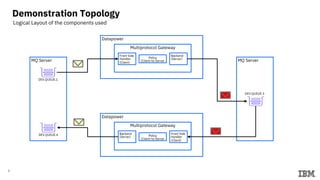
Demonstration Topology
2
Datapower
Multiprotocol Gateway
Front Side
Handler
(Client)
Policy
(Client-to-Server
Backend
(Server)
MQ Server
DEV.QUEUE.1
Datapower
Multiprotocol Gateway
Backend
(Server) Policy
(Client-to-Server
Front Side
Handler
(Client)
DEV.QUEUE.4
MQ Server
DEV.QUEUE.3
Logical Layout of the components used
Laptop
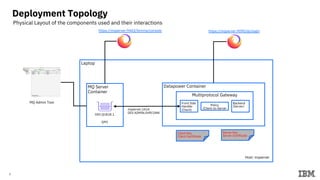
Deployment Topology
3
Datapower Container
Multiprotocol Gateway
Front Side
Handler
(Client)
Policy
(Client-to-Server
Backend
(Server)
MQ Server
Container
DEV.QUEUE.1
https://mqserver:9443/ibmmq/console https://mqserver:9090/dp/login
MQ Admin Tool
Host: mqserver
mqserver:1414
DEV.ADMIN.SVRCONN
QM1
Client Key
Client Certificate
Server Key
Server Certificate
Physical Layout of the components used and their interactions
4
Setup Details
5
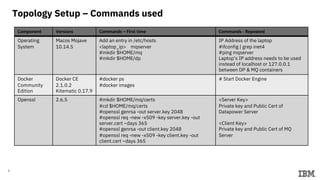
Topology Setup – Commands used
Component Versions Commands – First time Commands - Repeated
Operating
System
Macos Mojave
10.14.5
Add an entry in /etc/hosts
<laptop_ip> mqserver
#mkdir $HOME/mq
#mkdir $HOME/dp
IP Address of the laptop
#ifconfig | grep inet4
#ping mqserver
Laptop’s IP address needs to be used
instead of localhost or 127.0.0.1
between DP & MQ containers
Docker
Community
Edition
Docker CE
2.1.0.2
Kitematic 0.17.9
#docker ps
#docker images
# Start Docker Engine
Openssl 2.6.5 #mkdir $HOME/mq/certs
#cd $HOME/mq/certs
#openssl genrsa -out server.key 2048
#openssl req -new -x509 -key server.key -out
server.cert –days 365
#openssl genrsa -out client.key 2048
#openssl req -new -x509 -key client.key -out
client.cert –days 365
<Server Key>
Private key and Public Cert of
Datapower Server
<Client Key>
Private key and Public Cert of MQ
Server
6
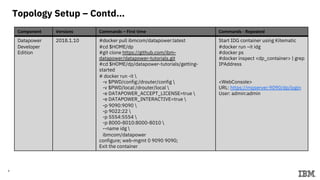
Topology Setup – Contd…
Component Versions Commands – First time Commands - Repeated
Datapower
Developer
Edition
2018.1.10 #docker pull ibmcom/datapower:latest
#cd $HOME/dp
#git clone https://github.com/ibm-
datapower/datapower-tutorials.git
#cd $HOME/dp/datapower-tutorials/getting-
started
# docker run -it 
-v $PWD/config:/drouter/config 
-v $PWD/local:/drouter/local 
-e DATAPOWER_ACCEPT_LICENSE=true 
-e DATAPOWER_INTERACTIVE=true 
-p 9090:9090 
-p 9022:22 
-p 5554:5554 
-p 8000-8010:8000-8010 
--name idg 
ibmcom/datapower
configure; web-mgmt 0 9090 9090;
Exit the container
Start IDG container using Kitematic
#docker run –it idg
#docker ps
#docker inspect <dp_container> | grep
IPAddress
<WebConsole>
URL: https://mqserver:9090/dp/login
User: admin:admin
7
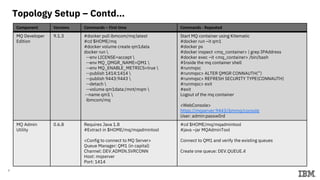
Topology Setup – Contd…
Component Versions Commands – First time Commands - Repeated
MQ Developer
Edition
9.1.3 #docker pull ibmcom/mq:latest
#cd $HOME/mq
#docker volume create qm1data
docker run 
--env LICENSE=accept 
--env MQ_QMGR_NAME=QM1 
--env MQ_ENABLE_METRICS=true 
--publish 1414:1414 
--publish 9443:9443 
--detach 
--volume qm1data:/mnt/mqm 
--name qm1 
ibmcom/mq
Start MQ container using Kitematic
#docker run –it qm1
#docker ps
#docker inspect <mq_container> | grep IPAddress
#docker exec –it <mq_container> /bin/bash
#Inside the mq container shell
#runmqsc
#runmqsc> ALTER QMGR CONNAUTH(‘’)
#runmqsc> REFRESH SECURITY TYPE(CONNAUTH)
#runmqsc> exit
#exit
Logout of the mq container
<WebConsole>
https://mqserver:9443/ibmmq/console
User: admin:passw0rd
MQ Admin
Utility
0.6.8 Requires Java 1.8
#Extract in $HOME/mq/mqadmintool
<Config to connect to MQ Server>
Queue Manager: QM1 (in capital)
Channel: DEV.ADMIN.SVRCONN
Host: mqserver
Port: 1414
#cd $HOME/mq/mqadmintool
#java –jar MQAdminTool
Connect to QM1 and verify the existing queues
Create one queue: DEV.QUEUE.4
8
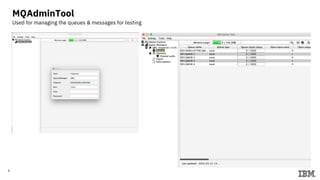
MQAdminTool
Used for managing the queues & messages for testing
9
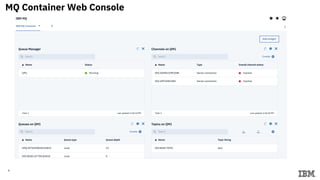
MQ Container Web Console
10
IBM Datapower
11
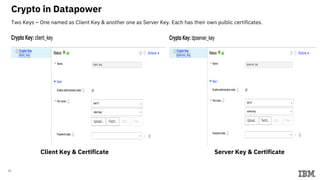
Crypto in Datapower
Two Keys – One named as Client Key & another one as Server Key. Each has their own public certificates.
Client Key & Certificate Server Key & Certificate
12
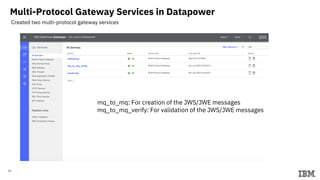
Multi-Protocol Gateway Services in Datapower
Created two multi-protocol gateway services
mq_to_mq: For creation of the JWS/JWE messages
mq_to_mq_verify: For validation of the JWS/JWE messages
13
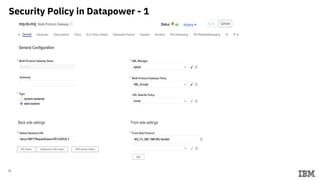
Security Policy in Datapower - 1
14
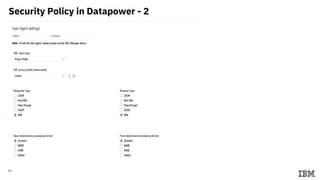
Security Policy in Datapower - 2
15
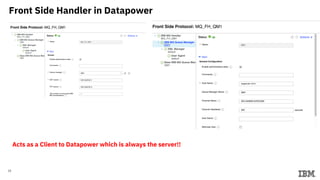
Front Side Handler in Datapower
Acts as a Client to Datapower which is always the server!!
16
JSON Web Encryption &
Decryption (JWE)
using IBM Datapower
17
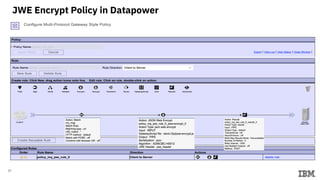
JWE Encrypt Policy in Datapower
18
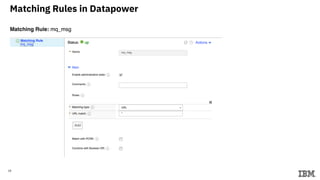
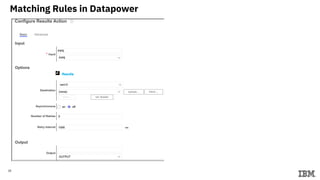
Matching Rules in Datapower
19
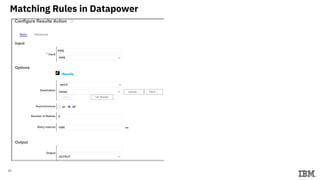
Matching Rules in Datapower
20
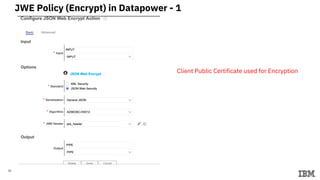
JWE Policy (Encrypt) in Datapower - 1
Client Public Certificate used for Encryption
21
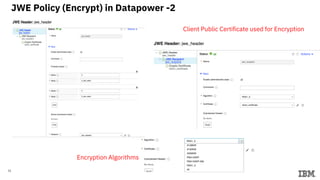
JWE Policy (Encrypt) in Datapower -2
Client Public Certificate used for Encryption
Encryption Algorithms
22
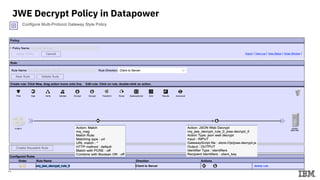
JWE Decrypt Policy in Datapower
23
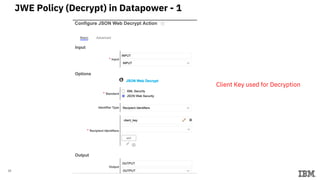
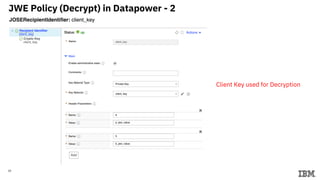
JWE Policy (Decrypt) in Datapower - 1
Client Key used for Decryption
24
JWE Policy (Decrypt) in Datapower - 2
Client Key used for Decryption
25
JSON Web Signing &
Verification (JWS)
using IBM Datapower
26
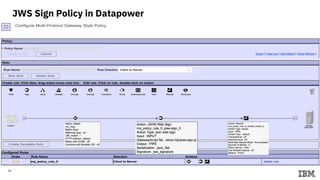
JWS Sign Policy in Datapower
27
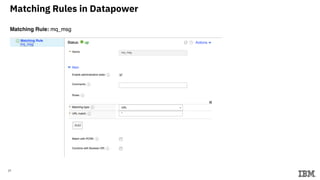
Matching Rules in Datapower
28
Matching Rules in Datapower
29
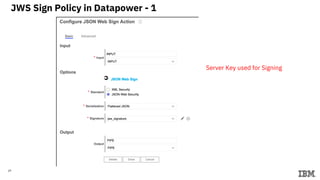
JWS Sign Policy in Datapower - 1
Server Key used for Signing
30
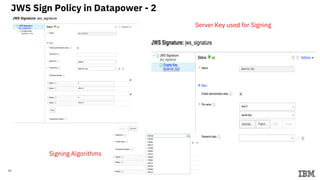
JWS Sign Policy in Datapower - 2
Server Key used for Signing
Signing Algorithms
31
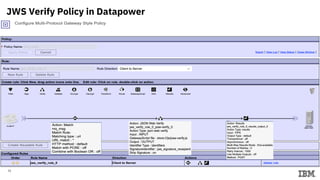
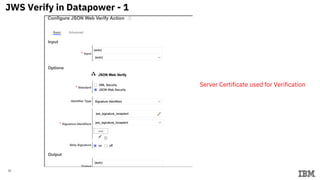
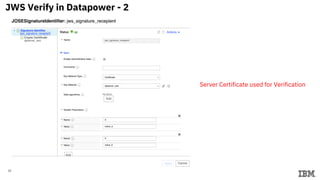
JWS Verify Policy in Datapower
32
JWS Verify in Datapower - 1
Server Certificate used for Verification
33
JWS Verify in Datapower - 2
Server Certificate used for Verification
34
Testing of the Policy
35
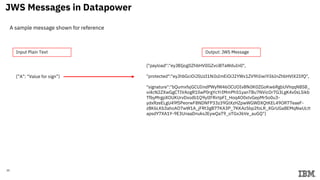
{”A”: “Value for sign”}
{"payload":"eyJBIjogIlZhbHVlIGZvciBTaWduIn0",
"protected":"eyJhbGciOiJSUzI1NiIsImEiOiJ2YWx1ZV9hIiwiYiI6InZhbHVlX2IifQ",
"signature":"bQumxfsjGCUIindPWyfW46OCUOIv8fk0K0ZGoKw6RgbUVhqqN8S8_
vi4cN2ZXwGgCTIVAogR1llwP0rgYcYrIMmPh51yanTBu7NVicOr7G3LgK4v0sLSikb
TfbyMrgpXOUKUrvDxsdb1Q9ylIFRirtpFI_Hoq4O0xtvGepMr5o0u3-
ydxRzeELgU49fSPeorwF8NDNFP33z39GtXzHZpwWGWDXQtKEL49OR77eaeF-
z8K6LKb3ahoAO7wW1A_jFRt3gB77KA3P_7KKAz5bp2foLR_XGrUGa8EMqNwULtt
apsdY7XA1Y-9E3UnaaDnuksJEywQaT9_oTGxJ6Ve_auGQ"}
JWS Messages in Datapower
Output: JWS MessageInput Plain Text
A sample message shown for reference
36
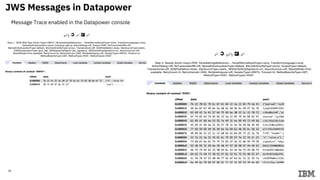
JWS Messages in Datapower
Message Trace enabled in the Datapower console
37
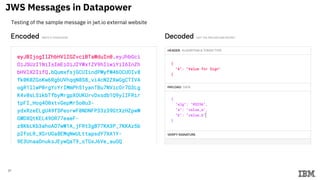
JWS Messages in Datapower
Testing of the sample message in jwt.io external website
38
JWE Messages in Datapower
Output: JWS MessageInput Plain Text
A sample message shown for reference
{"recipients":[{
"encrypted_key":"uk2TlCWTaEVsWViqV_jOp3rc5B8EaNBegM75WD
onYtnqdpmLwHdelqeqzThp1LcdJcl3h2nyx5jj222RMpuGMv9QFHcb
GzppwlDbYqETHUtoeGglHuZimni3TfIXbHybYaUEGRvAudks43KECby
WMmv84zHBdLwFRSeC9cojENzQpxTvl3_K5VT5SGi6t_0gHhSTy08U
EU7FmjmpXwe83UkirbUkPi5zhm51cqB_Yb2_00fnewyp2sOpJX3kM
V8VFelUS6po_C4ZTo7gteWu7foruxGMOxPJyIORYXiix6Ix2fliSKExcG
OEbX8iNdnqthspjR_miR_Y8GXiJGYDQw"}],
"protected":"eyJlbmMiOiJBMjU2Q0JDLUhTNTEyIiwiYSI6ImFfandlX
3ZhbHVlIiwiYiI6ImJfandlX3ZhbHVlIiwiYWxnIjoiUlNBMV81In0",
"ciphertext":"mMnBovrT5Vz6b1SS_zSoyVpZ6m9a-
TGzTdGaMzuHj9E",
"iv":"nyEFkTnDH9uAL9OkXhXAOQ",
"tag":"akoKNEY6MzL-XvwOx_0PFX5bg1hCHlJnasU5VK0KUo4"}
{”A”: “Value for Encrypt”}
39
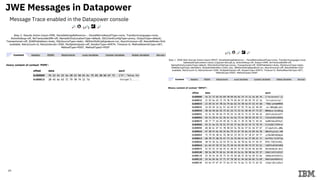
JWE Messages in Datapower
Message Trace enabled in the Datapower console
40
References
• Datapower Hello-World: https://developer.ibm.com/datapower/config/
• MQ: https://hub.docker.com/r/ibmcom/mq/
• MQ: https://github.com/ibm-messaging/mq-container
• MQ Admin Tool: https://sourceforge.net/projects/mqadmintool/
• ACE: https://github.com/ot4i/ace-docker
• JWT with X5C: https://github.com/pglezen/dpx5cjwt
• OAuth on DP: https://www.ibm.com/developerworks/websphere/library/techarticles/1208_rasmussen/1208_rasmussen.html
• OAuth on DP Git: https://github.com/pglezen/dp-article-oauth-clients
• SSKEY: http://rcbj.net/blog01/2012/03/17/generating-and-uploading-a-shared-key-symmetric-key-to-datapower-appliances/
• JOSE: https://jose.readthedocs.io/en/latest/

IBM Datapower Security Scenario with JWS & JWE

  • 1.
    An Architects Hands-onExperience in Securing Microservices with JSON Web Security using IBM Datapower Sandip Gupta Senior Client Architect Cloud & Cognitive BU, IBM India 31st Mar 2020
  • 2.
    Demonstration Topology 2 Datapower Multiprotocol Gateway FrontSide Handler (Client) Policy (Client-to-Server Backend (Server) MQ Server DEV.QUEUE.1 Datapower Multiprotocol Gateway Backend (Server) Policy (Client-to-Server Front Side Handler (Client) DEV.QUEUE.4 MQ Server DEV.QUEUE.3 Logical Layout of the components used
  • 3.
    Laptop Deployment Topology 3 Datapower Container MultiprotocolGateway Front Side Handler (Client) Policy (Client-to-Server Backend (Server) MQ Server Container DEV.QUEUE.1 https://mqserver:9443/ibmmq/console https://mqserver:9090/dp/login MQ Admin Tool Host: mqserver mqserver:1414 DEV.ADMIN.SVRCONN QM1 Client Key Client Certificate Server Key Server Certificate Physical Layout of the components used and their interactions
  • 4.
  • 5.
    5 Topology Setup –Commands used Component Versions Commands – First time Commands - Repeated Operating System Macos Mojave 10.14.5 Add an entry in /etc/hosts <laptop_ip> mqserver #mkdir $HOME/mq #mkdir $HOME/dp IP Address of the laptop #ifconfig | grep inet4 #ping mqserver Laptop’s IP address needs to be used instead of localhost or 127.0.0.1 between DP & MQ containers Docker Community Edition Docker CE 2.1.0.2 Kitematic 0.17.9 #docker ps #docker images # Start Docker Engine Openssl 2.6.5 #mkdir $HOME/mq/certs #cd $HOME/mq/certs #openssl genrsa -out server.key 2048 #openssl req -new -x509 -key server.key -out server.cert –days 365 #openssl genrsa -out client.key 2048 #openssl req -new -x509 -key client.key -out client.cert –days 365 <Server Key> Private key and Public Cert of Datapower Server <Client Key> Private key and Public Cert of MQ Server
  • 6.
    6 Topology Setup –Contd… Component Versions Commands – First time Commands - Repeated Datapower Developer Edition 2018.1.10 #docker pull ibmcom/datapower:latest #cd $HOME/dp #git clone https://github.com/ibm- datapower/datapower-tutorials.git #cd $HOME/dp/datapower-tutorials/getting- started # docker run -it -v $PWD/config:/drouter/config -v $PWD/local:/drouter/local -e DATAPOWER_ACCEPT_LICENSE=true -e DATAPOWER_INTERACTIVE=true -p 9090:9090 -p 9022:22 -p 5554:5554 -p 8000-8010:8000-8010 --name idg ibmcom/datapower configure; web-mgmt 0 9090 9090; Exit the container Start IDG container using Kitematic #docker run –it idg #docker ps #docker inspect <dp_container> | grep IPAddress <WebConsole> URL: https://mqserver:9090/dp/login User: admin:admin
  • 7.
    7 Topology Setup –Contd… Component Versions Commands – First time Commands - Repeated MQ Developer Edition 9.1.3 #docker pull ibmcom/mq:latest #cd $HOME/mq #docker volume create qm1data docker run --env LICENSE=accept --env MQ_QMGR_NAME=QM1 --env MQ_ENABLE_METRICS=true --publish 1414:1414 --publish 9443:9443 --detach --volume qm1data:/mnt/mqm --name qm1 ibmcom/mq Start MQ container using Kitematic #docker run –it qm1 #docker ps #docker inspect <mq_container> | grep IPAddress #docker exec –it <mq_container> /bin/bash #Inside the mq container shell #runmqsc #runmqsc> ALTER QMGR CONNAUTH(‘’) #runmqsc> REFRESH SECURITY TYPE(CONNAUTH) #runmqsc> exit #exit Logout of the mq container <WebConsole> https://mqserver:9443/ibmmq/console User: admin:passw0rd MQ Admin Utility 0.6.8 Requires Java 1.8 #Extract in $HOME/mq/mqadmintool <Config to connect to MQ Server> Queue Manager: QM1 (in capital) Channel: DEV.ADMIN.SVRCONN Host: mqserver Port: 1414 #cd $HOME/mq/mqadmintool #java –jar MQAdminTool Connect to QM1 and verify the existing queues Create one queue: DEV.QUEUE.4
  • 8.
    8 MQAdminTool Used for managingthe queues & messages for testing
  • 9.
  • 10.
  • 11.
    11 Crypto in Datapower TwoKeys – One named as Client Key & another one as Server Key. Each has their own public certificates. Client Key & Certificate Server Key & Certificate
  • 12.
    12 Multi-Protocol Gateway Servicesin Datapower Created two multi-protocol gateway services mq_to_mq: For creation of the JWS/JWE messages mq_to_mq_verify: For validation of the JWS/JWE messages
  • 13.
    13 Security Policy inDatapower - 1
  • 14.
    14 Security Policy inDatapower - 2
  • 15.
    15 Front Side Handlerin Datapower Acts as a Client to Datapower which is always the server!!
  • 16.
    16 JSON Web Encryption& Decryption (JWE) using IBM Datapower
  • 17.
  • 18.
  • 19.
  • 20.
    20 JWE Policy (Encrypt)in Datapower - 1 Client Public Certificate used for Encryption
  • 21.
    21 JWE Policy (Encrypt)in Datapower -2 Client Public Certificate used for Encryption Encryption Algorithms
  • 22.
  • 23.
    23 JWE Policy (Decrypt)in Datapower - 1 Client Key used for Decryption
  • 24.
    24 JWE Policy (Decrypt)in Datapower - 2 Client Key used for Decryption
  • 25.
    25 JSON Web Signing& Verification (JWS) using IBM Datapower
  • 26.
    26 JWS Sign Policyin Datapower
  • 27.
  • 28.
  • 29.
    29 JWS Sign Policyin Datapower - 1 Server Key used for Signing
  • 30.
    30 JWS Sign Policyin Datapower - 2 Server Key used for Signing Signing Algorithms
  • 31.
  • 32.
    32 JWS Verify inDatapower - 1 Server Certificate used for Verification
  • 33.
    33 JWS Verify inDatapower - 2 Server Certificate used for Verification
  • 34.
  • 35.
    35 {”A”: “Value forsign”} {"payload":"eyJBIjogIlZhbHVlIGZvciBTaWduIn0", "protected":"eyJhbGciOiJSUzI1NiIsImEiOiJ2YWx1ZV9hIiwiYiI6InZhbHVlX2IifQ", "signature":"bQumxfsjGCUIindPWyfW46OCUOIv8fk0K0ZGoKw6RgbUVhqqN8S8_ vi4cN2ZXwGgCTIVAogR1llwP0rgYcYrIMmPh51yanTBu7NVicOr7G3LgK4v0sLSikb TfbyMrgpXOUKUrvDxsdb1Q9ylIFRirtpFI_Hoq4O0xtvGepMr5o0u3- ydxRzeELgU49fSPeorwF8NDNFP33z39GtXzHZpwWGWDXQtKEL49OR77eaeF- z8K6LKb3ahoAO7wW1A_jFRt3gB77KA3P_7KKAz5bp2foLR_XGrUGa8EMqNwULtt apsdY7XA1Y-9E3UnaaDnuksJEywQaT9_oTGxJ6Ve_auGQ"} JWS Messages in Datapower Output: JWS MessageInput Plain Text A sample message shown for reference
  • 36.
    36 JWS Messages inDatapower Message Trace enabled in the Datapower console
  • 37.
    37 JWS Messages inDatapower Testing of the sample message in jwt.io external website
  • 38.
    38 JWE Messages inDatapower Output: JWS MessageInput Plain Text A sample message shown for reference {"recipients":[{ "encrypted_key":"uk2TlCWTaEVsWViqV_jOp3rc5B8EaNBegM75WD onYtnqdpmLwHdelqeqzThp1LcdJcl3h2nyx5jj222RMpuGMv9QFHcb GzppwlDbYqETHUtoeGglHuZimni3TfIXbHybYaUEGRvAudks43KECby WMmv84zHBdLwFRSeC9cojENzQpxTvl3_K5VT5SGi6t_0gHhSTy08U EU7FmjmpXwe83UkirbUkPi5zhm51cqB_Yb2_00fnewyp2sOpJX3kM V8VFelUS6po_C4ZTo7gteWu7foruxGMOxPJyIORYXiix6Ix2fliSKExcG OEbX8iNdnqthspjR_miR_Y8GXiJGYDQw"}], "protected":"eyJlbmMiOiJBMjU2Q0JDLUhTNTEyIiwiYSI6ImFfandlX 3ZhbHVlIiwiYiI6ImJfandlX3ZhbHVlIiwiYWxnIjoiUlNBMV81In0", "ciphertext":"mMnBovrT5Vz6b1SS_zSoyVpZ6m9a- TGzTdGaMzuHj9E", "iv":"nyEFkTnDH9uAL9OkXhXAOQ", "tag":"akoKNEY6MzL-XvwOx_0PFX5bg1hCHlJnasU5VK0KUo4"} {”A”: “Value for Encrypt”}
  • 39.
    39 JWE Messages inDatapower Message Trace enabled in the Datapower console
  • 40.
    40 References • Datapower Hello-World:https://developer.ibm.com/datapower/config/ • MQ: https://hub.docker.com/r/ibmcom/mq/ • MQ: https://github.com/ibm-messaging/mq-container • MQ Admin Tool: https://sourceforge.net/projects/mqadmintool/ • ACE: https://github.com/ot4i/ace-docker • JWT with X5C: https://github.com/pglezen/dpx5cjwt • OAuth on DP: https://www.ibm.com/developerworks/websphere/library/techarticles/1208_rasmussen/1208_rasmussen.html • OAuth on DP Git: https://github.com/pglezen/dp-article-oauth-clients • SSKEY: http://rcbj.net/blog01/2012/03/17/generating-and-uploading-a-shared-key-symmetric-key-to-datapower-appliances/ • JOSE: https://jose.readthedocs.io/en/latest/