Hyperledger Indy
Tutorial
• O
ffi
cial Documents: https://indy.readthedocs.io/en/latest/

• Indy node repo: https://github.com/hyperledger/indy-node

• Indy SDK repo: https://github.com/hyperledger/indy-sdk
Quick links
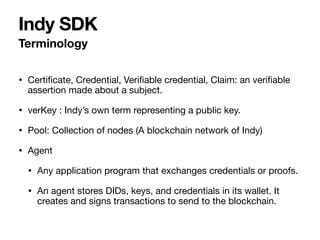
• Certi
fi
cate, Credential, Veri
fi
able credential, Claim: an veri
fi
able
assertion made about a subject.

• verKey : Indy’s own term representing a public key.

• Pool: Collection of nodes (A blockchain network of Indy)

• Agent

• Any application program that exchanges credentials or proofs.

• An agent stores DIDs, keys, and credentials in its wallet. It
creates and signs transactions to send to the blockchain.
Terminology
Indy SDK
Indy node
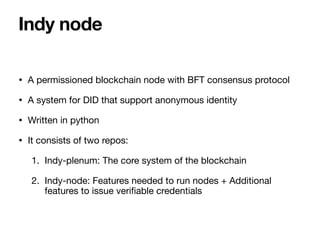
• A permissioned blockchain node with BFT consensus protocol

• A system for DID that support anonymous identity

• Written in python

• It consists of two repos:

1. Indy-plenum: The core system of the blockchain

2. Indy-node: Features needed to run nodes + Additional
features to issue veri
fi
able credentials
Indy node
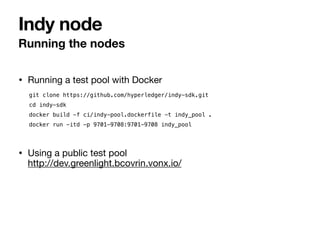
• Running a test pool with Docker
Running the nodes
Indy node
git clone https://github.com/hyperledger/indy-sdk.git


cd indy-sdk


docker build -f ci/indy-pool.dockerfile -t indy_pool .


docker run -itd -p 9701-9708:9701-9708 indy_pool
• Using a public test pool

http://dev.greenlight.bcovrin.vonx.io/
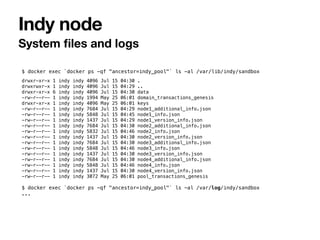
System
fi
les and logs
Indy node
$ docker exec `docker ps -qf "ancestor=indy_pool"` ls -al /var/lib/indy/sandbox


drwxr-xr-x 1 indy indy 4096 Jul 15 04:30 .


drwxrwxr-x 1 indy indy 4096 Jul 15 04:29 ..


drwxr-xr-x 6 indy indy 4096 Jul 15 04:30 data


-rw-r--r-- 1 indy indy 1994 May 25 06:01 domain_transactions_genesis


drwxr-xr-x 1 indy indy 4096 May 25 06:01 keys


-rw-r--r-- 1 indy indy 7684 Jul 15 04:29 node1_additional_info.json


-rw-r--r-- 1 indy indy 5848 Jul 15 04:45 node1_info.json


-rw-r--r-- 1 indy indy 1437 Jul 15 04:29 node1_version_info.json


-rw-r--r-- 1 indy indy 7684 Jul 15 04:30 node2_additional_info.json


-rw-r--r-- 1 indy indy 5832 Jul 15 04:46 node2_info.json


-rw-r--r-- 1 indy indy 1437 Jul 15 04:30 node2_version_info.json


-rw-r--r-- 1 indy indy 7684 Jul 15 04:30 node3_additional_info.json


-rw-r--r-- 1 indy indy 5848 Jul 15 04:46 node3_info.json


-rw-r--r-- 1 indy indy 1437 Jul 15 04:30 node3_version_info.json


-rw-r--r-- 1 indy indy 7684 Jul 15 04:30 node4_additional_info.json


-rw-r--r-- 1 indy indy 5848 Jul 15 04:46 node4_info.json


-rw-r--r-- 1 indy indy 1437 Jul 15 04:30 node4_version_info.json


-rw-r--r-- 1 indy indy 3072 May 25 06:01 pool_transactions_genesis


$ docker exec `docker ps -qf "ancestor=indy_pool"` ls -al /var/log/indy/sandbox


...
Pool genesis
fi
le
Indy node
{“reqSignature":{},"txn":{"data":{"data":
{"alias":"Node1","blskey":"4N8aUNHSgjQVgkpm8nhNEfDf6txHznoYREg9kirmJrkivgL4oSEimFF6nsQ6M41QvhM2Z3
3nves5vfSn9n1UwNFJBYtWVnHYMATn76vLuL3zU88KyeAYcHfsih3He6UHcXDxcaecHVz6jhCYz1P2UZn2bDVruL5wXpehgBf
BaLKm3Ba","blskey_pop":"RahHYiCvoNCtPTrVtP7nMC5eTYrsUA8WjXbdhNc8debh1agE9bGiJxWBXYNFbnJXoXhWFMvyq
hqhRoq737YQemH5ik9oL7R4NTTCz2LEZhkgLJzB3QRQqJyBNyv7acbdHrAT8nQ9UkLbaVL9NBpnWXBTw4LEMePaSHEw66RzPN
dAX1","client_ip":"127.0.0.1","client_port":9702,"node_ip":"127.0.0.1","node_port":9701,"services
":["VALIDATOR"]},"dest":"Gw6pDLhcBcoQesN72qfotTgFa7cbuqZpkX3Xo6pLhPhv"},"metadata":
{"from":"Th7MpTaRZVRYnPiabds81Y"},"type":"0"},"txnMetadata":
{"seqNo":1,"txnId":"fea82e10e894419fe2bea7d96296a6d46f50f93f9eeda954ec461b2ed2950b62"},"ver":"1"}


...
• It contains the IP addresses, ports, keys, etc of the nodes in the pool.

• It needs more than 4 nodes for BFT consensus.
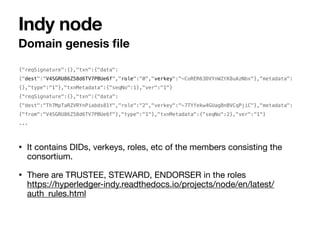
Domain genesis
fi
le
Indy node
{"reqSignature":{},"txn":{"data":
{"dest":"V4SGRU86Z58d6TV7PBUe6f","role":"0","verkey":"~CoRER63DVYnWZtK8uAzNbx"},"metadata":
{},"type":"1"},"txnMetadata":{"seqNo":1},"ver":"1"}


{“reqSignature":{},"txn":{"data":
{"dest":"Th7MpTaRZVRYnPiabds81Y","role":"2","verkey":"~7TYfekw4GUagBnBVCqPjiC"},"metadata":
{"from":"V4SGRU86Z58d6TV7PBUe6f"},"type":"1"},"txnMetadata":{"seqNo":2},"ver":"1"}


...
• It contains DIDs, verkeys, roles, etc of the members consisting the
consortium.

• There are TRUSTEE, STEWARD, ENDORSER in the roles

https://hyperledger-indy.readthedocs.io/projects/node/en/latest/
auth_rules.html
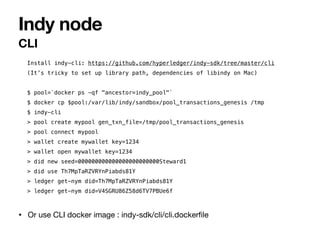
CLI
Indy node
Install indy-cli: https://github.com/hyperledger/indy-sdk/tree/master/cli


(It’s tricky to set up library path, dependencies of libindy on Mac)


$ pool=`docker ps -qf "ancestor=indy_pool"`


$ docker cp $pool:/var/lib/indy/sandbox/pool_transactions_genesis /tmp


$ indy-cli


> pool create mypool gen_txn_file=/tmp/pool_transactions_genesis


> pool connect mypool


> wallet create mywallet key=1234


> wallet open mywallet key=1234


> did new seed=000000000000000000000000Steward1


> did use Th7MpTaRZVRYnPiabds81Y


> ledger get-nym did=Th7MpTaRZVRYnPiabds81Y


> ledger get-nym did=V4SGRU86Z58d6TV7PBUe6f


• Or use CLI docker image : indy-sdk/cli/cli.docker
fi
le
• Adding a node to the pool:

https://hyperledger-indy.readthedocs.io/projects/node/en/latest/add-node.html

• You need a STEWARD role to add a node and a STEWARD can add only one node.

• “services=VALIDATOR” to add a node, “services=” to remove a node in the “ledger
node” cli command
Adding a node
Indy node
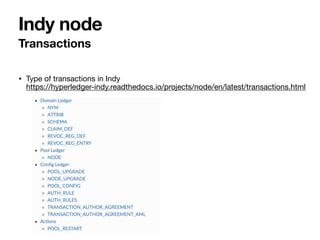
• Type of transactions in Indy

https://hyperledger-indy.readthedocs.io/projects/node/en/latest/transactions.html
Transactions
Indy node
• It’s not well documented yet.

• https://github.com/pSchlarb/indy-node/blob/newNetworkDoc/docs/
source/NewNetwork/NewNetwork.md
Construct a pool for production
Indy node
Indy SDK
• It’s an SDK for issuing and verifying credentials, managing DIDs and wallets.

• Libindy: C callable library written rust. It’s the core of Indy SDK.

• Libindy wrappers: java, python, iOS, nodejs, .Net, rust.

• Indy CLI: Command line tool for Indy.

• Libvcx: A library for exchanging credentials and proofs. It is migrating to
Aries.

• Hyperledger Aries

• Supports standard protocol for exchanging credentials between Indy agents.

• Provides high-level API for DID and credential management.

• Has limitations in supporting mobile apps for now.
Indy SDK
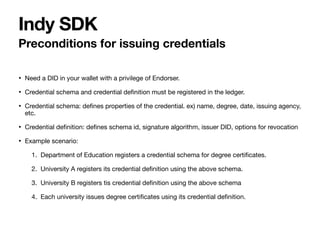
• Need a DID in your wallet with a privilege of Endorser.

• Credential schema and credential de
fi
nition must be registered in the ledger.

• Credential schema: de
fi
nes properties of the credential. ex) name, degree, date, issuing agency,
etc.

• Credential de
fi
nition: de
fi
nes schema id, signature algorithm, issuer DID, options for revocation

• Example scenario:

1. Department of Education registers a credential schema for degree certi
fi
cates.

2. University A registers its credential de
fi
nition using the above schema.

3. University B registers tis credential de
fi
nition using the above schema

4. Each university issues degree certi
fi
cates using its credential de
fi
nition.
Preconditions for issuing credentials
Indy SDK
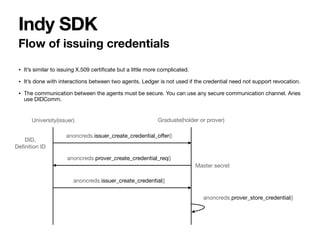
• It’s similar to issuing X.509 certi
fi
cate but a little more complicated.

• It’s done with interactions between two agents. Ledger is not used if the credential need not support revocation.

• The communication between the agents must be secure. You can use any secure communication channel. Aries
use DIDComm.
Flow of issuing credentials
Indy SDK
University(issuer) Graduate(holder or prover)
anoncreds.issuer_create_credential_o
ff
er()
anoncreds.prover_create_credential_req()
anoncreds.issuer_create_credential()
anoncreds.prover_store_credential()
DID,

De
fi
nition ID
Master secret
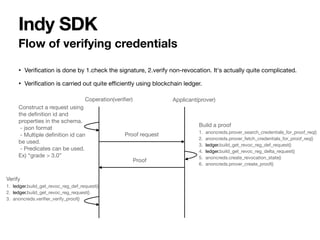
• Veri
fi
cation is done by 1.check the signature, 2.verify non-revocation. It's actually quite complicated.

• Veri
fi
cation is carried out quite e
ffi
ciently using blockchain ledger.
Flow of verifying credentials
Indy SDK
Coperation(veri
fi
er) Applicant(prover)
Proof request
Proof
Construct a request using
the de
fi
nition id and
properties in the schema.

- json format

- Multiple de
fi
nition id can
be used.

- Predicates can be used.
Ex) “grade > 3.0”
Build a proof

1. anoncreds.prover_search_credentials_for_proof_req()

2. anoncreds.prover_fetch_credentials_for_proof_req()

3. ledger.build_get_revoc_reg_def_request()

4. ledger.build_get_revoc_reg_delta_request()

5. anoncreds.create_revocation_state()

6. anoncreds.prover_create_proof()
Verify

1. ledger.build_get_revoc_reg_def_request()

2. ledger.build_get_revoc_reg_request()

3. anoncreds.veri
fi
er_verify_proof()
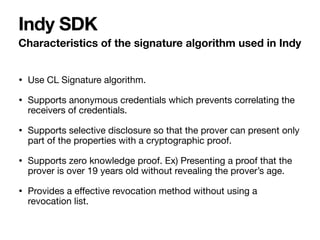
• Use CL Signature algorithm.

• Supports anonymous credentials which prevents correlating the
receivers of credentials.

• Supports selective disclosure so that the prover can present only
part of the properties with a cryptographic proof.

• Supports zero knowledge proof. Ex) Presenting a proof that the
prover is over 19 years old without revealing the prover’s age.

• Provides a e
ff
ective revocation method without using a
revocation list.
Characteristics of the signature algorithm used in Indy
Indy SDK
• DID, key, master secret and credentials are all stored in a wallet.

• It is encrypted with a password and use sqlite as a store.

• The default location of the wallet is ~/.indy_client/wallet/
<wallet_name>.

• You cannot retrieve secret keys in the wallet. So, you need to
backup your entire wallet. You also can use a seed phrase to
create a DID and then you can recreate the same DID later with
that seed.
Wallet
Indy SDK
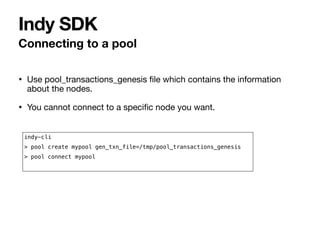
• Use pool_transactions_genesis
fi
le which contains the information
about the nodes.

• You cannot connect to a speci
fi
c node you want.
Connecting to a pool
Indy SDK
indy-cli


> pool create mypool gen_txn_file=/tmp/pool_transactions_genesis


> pool connect mypool
• Libindy API doc

C: https://github.com/hyperledger/indy-sdk/tree/master/libindy/include

nodejs: https://github.com/hyperledger/indy-sdk/tree/master/wrappers/nodejs

• Sample App: https://github.com/hyperledger/indy-sdk/tree/master/samples
Docs and samples
Indy SDK

Hyperledger Indy tutorial

  • 1.
  • 2.
    • O ffi cial Documents:https://indy.readthedocs.io/en/latest/ • Indy node repo: https://github.com/hyperledger/indy-node • Indy SDK repo: https://github.com/hyperledger/indy-sdk Quick links
  • 3.
    • Certi fi cate, Credential,Veri fi able credential, Claim: an veri fi able assertion made about a subject. • verKey : Indy’s own term representing a public key. • Pool: Collection of nodes (A blockchain network of Indy) • Agent • Any application program that exchanges credentials or proofs. • An agent stores DIDs, keys, and credentials in its wallet. It creates and signs transactions to send to the blockchain. Terminology Indy SDK
  • 4.
  • 5.
    • A permissionedblockchain node with BFT consensus protocol • A system for DID that support anonymous identity • Written in python • It consists of two repos: 1. Indy-plenum: The core system of the blockchain 2. Indy-node: Features needed to run nodes + Additional features to issue veri fi able credentials Indy node
  • 6.
    • Running atest pool with Docker Running the nodes Indy node git clone https://github.com/hyperledger/indy-sdk.git cd indy-sdk docker build -f ci/indy-pool.dockerfile -t indy_pool . docker run -itd -p 9701-9708:9701-9708 indy_pool • Using a public test pool
 http://dev.greenlight.bcovrin.vonx.io/
  • 7.
    System fi les and logs Indynode $ docker exec `docker ps -qf "ancestor=indy_pool"` ls -al /var/lib/indy/sandbox drwxr-xr-x 1 indy indy 4096 Jul 15 04:30 . drwxrwxr-x 1 indy indy 4096 Jul 15 04:29 .. drwxr-xr-x 6 indy indy 4096 Jul 15 04:30 data -rw-r--r-- 1 indy indy 1994 May 25 06:01 domain_transactions_genesis drwxr-xr-x 1 indy indy 4096 May 25 06:01 keys -rw-r--r-- 1 indy indy 7684 Jul 15 04:29 node1_additional_info.json -rw-r--r-- 1 indy indy 5848 Jul 15 04:45 node1_info.json -rw-r--r-- 1 indy indy 1437 Jul 15 04:29 node1_version_info.json -rw-r--r-- 1 indy indy 7684 Jul 15 04:30 node2_additional_info.json -rw-r--r-- 1 indy indy 5832 Jul 15 04:46 node2_info.json -rw-r--r-- 1 indy indy 1437 Jul 15 04:30 node2_version_info.json -rw-r--r-- 1 indy indy 7684 Jul 15 04:30 node3_additional_info.json -rw-r--r-- 1 indy indy 5848 Jul 15 04:46 node3_info.json -rw-r--r-- 1 indy indy 1437 Jul 15 04:30 node3_version_info.json -rw-r--r-- 1 indy indy 7684 Jul 15 04:30 node4_additional_info.json -rw-r--r-- 1 indy indy 5848 Jul 15 04:46 node4_info.json -rw-r--r-- 1 indy indy 1437 Jul 15 04:30 node4_version_info.json -rw-r--r-- 1 indy indy 3072 May 25 06:01 pool_transactions_genesis $ docker exec `docker ps -qf "ancestor=indy_pool"` ls -al /var/log/indy/sandbox ...
  • 8.
    Pool genesis fi le Indy node {“reqSignature":{},"txn":{"data":{"data": {"alias":"Node1","blskey":"4N8aUNHSgjQVgkpm8nhNEfDf6txHznoYREg9kirmJrkivgL4oSEimFF6nsQ6M41QvhM2Z3 3nves5vfSn9n1UwNFJBYtWVnHYMATn76vLuL3zU88KyeAYcHfsih3He6UHcXDxcaecHVz6jhCYz1P2UZn2bDVruL5wXpehgBf BaLKm3Ba","blskey_pop":"RahHYiCvoNCtPTrVtP7nMC5eTYrsUA8WjXbdhNc8debh1agE9bGiJxWBXYNFbnJXoXhWFMvyq hqhRoq737YQemH5ik9oL7R4NTTCz2LEZhkgLJzB3QRQqJyBNyv7acbdHrAT8nQ9UkLbaVL9NBpnWXBTw4LEMePaSHEw66RzPN dAX1","client_ip":"127.0.0.1","client_port":9702,"node_ip":"127.0.0.1","node_port":9701,"services ":["VALIDATOR"]},"dest":"Gw6pDLhcBcoQesN72qfotTgFa7cbuqZpkX3Xo6pLhPhv"},"metadata": {"from":"Th7MpTaRZVRYnPiabds81Y"},"type":"0"},"txnMetadata": {"seqNo":1,"txnId":"fea82e10e894419fe2bea7d96296a6d46f50f93f9eeda954ec461b2ed2950b62"},"ver":"1"} ... •It contains the IP addresses, ports, keys, etc of the nodes in the pool. • It needs more than 4 nodes for BFT consensus.
  • 9.
  • 10.
    CLI Indy node Install indy-cli:https://github.com/hyperledger/indy-sdk/tree/master/cli (It’s tricky to set up library path, dependencies of libindy on Mac) $ pool=`docker ps -qf "ancestor=indy_pool"` $ docker cp $pool:/var/lib/indy/sandbox/pool_transactions_genesis /tmp $ indy-cli > pool create mypool gen_txn_file=/tmp/pool_transactions_genesis > pool connect mypool > wallet create mywallet key=1234 > wallet open mywallet key=1234 > did new seed=000000000000000000000000Steward1 > did use Th7MpTaRZVRYnPiabds81Y > ledger get-nym did=Th7MpTaRZVRYnPiabds81Y > ledger get-nym did=V4SGRU86Z58d6TV7PBUe6f • Or use CLI docker image : indy-sdk/cli/cli.docker fi le
  • 11.
    • Adding anode to the pool:
 https://hyperledger-indy.readthedocs.io/projects/node/en/latest/add-node.html • You need a STEWARD role to add a node and a STEWARD can add only one node. • “services=VALIDATOR” to add a node, “services=” to remove a node in the “ledger node” cli command Adding a node Indy node
  • 12.
    • Type oftransactions in Indy
 https://hyperledger-indy.readthedocs.io/projects/node/en/latest/transactions.html Transactions Indy node
  • 13.
    • It’s notwell documented yet. • https://github.com/pSchlarb/indy-node/blob/newNetworkDoc/docs/ source/NewNetwork/NewNetwork.md Construct a pool for production Indy node
  • 14.
  • 15.
    • It’s anSDK for issuing and verifying credentials, managing DIDs and wallets. • Libindy: C callable library written rust. It’s the core of Indy SDK. • Libindy wrappers: java, python, iOS, nodejs, .Net, rust. • Indy CLI: Command line tool for Indy. • Libvcx: A library for exchanging credentials and proofs. It is migrating to Aries. • Hyperledger Aries • Supports standard protocol for exchanging credentials between Indy agents. • Provides high-level API for DID and credential management. • Has limitations in supporting mobile apps for now. Indy SDK
  • 16.
    • Need aDID in your wallet with a privilege of Endorser. • Credential schema and credential de fi nition must be registered in the ledger. • Credential schema: de fi nes properties of the credential. ex) name, degree, date, issuing agency, etc. • Credential de fi nition: de fi nes schema id, signature algorithm, issuer DID, options for revocation • Example scenario: 1. Department of Education registers a credential schema for degree certi fi cates. 2. University A registers its credential de fi nition using the above schema. 3. University B registers tis credential de fi nition using the above schema 4. Each university issues degree certi fi cates using its credential de fi nition. Preconditions for issuing credentials Indy SDK
  • 17.
    • It’s similarto issuing X.509 certi fi cate but a little more complicated. • It’s done with interactions between two agents. Ledger is not used if the credential need not support revocation. • The communication between the agents must be secure. You can use any secure communication channel. Aries use DIDComm. Flow of issuing credentials Indy SDK University(issuer) Graduate(holder or prover) anoncreds.issuer_create_credential_o ff er() anoncreds.prover_create_credential_req() anoncreds.issuer_create_credential() anoncreds.prover_store_credential() DID, De fi nition ID Master secret
  • 18.
    • Veri fi cation isdone by 1.check the signature, 2.verify non-revocation. It's actually quite complicated. • Veri fi cation is carried out quite e ffi ciently using blockchain ledger. Flow of verifying credentials Indy SDK Coperation(veri fi er) Applicant(prover) Proof request Proof Construct a request using the de fi nition id and properties in the schema. - json format - Multiple de fi nition id can be used. - Predicates can be used. Ex) “grade > 3.0” Build a proof 1. anoncreds.prover_search_credentials_for_proof_req() 2. anoncreds.prover_fetch_credentials_for_proof_req() 3. ledger.build_get_revoc_reg_def_request() 4. ledger.build_get_revoc_reg_delta_request() 5. anoncreds.create_revocation_state() 6. anoncreds.prover_create_proof() Verify 1. ledger.build_get_revoc_reg_def_request() 2. ledger.build_get_revoc_reg_request() 3. anoncreds.veri fi er_verify_proof()
  • 19.
    • Use CLSignature algorithm. • Supports anonymous credentials which prevents correlating the receivers of credentials. • Supports selective disclosure so that the prover can present only part of the properties with a cryptographic proof. • Supports zero knowledge proof. Ex) Presenting a proof that the prover is over 19 years old without revealing the prover’s age. • Provides a e ff ective revocation method without using a revocation list. Characteristics of the signature algorithm used in Indy Indy SDK
  • 20.
    • DID, key,master secret and credentials are all stored in a wallet. • It is encrypted with a password and use sqlite as a store. • The default location of the wallet is ~/.indy_client/wallet/ <wallet_name>. • You cannot retrieve secret keys in the wallet. So, you need to backup your entire wallet. You also can use a seed phrase to create a DID and then you can recreate the same DID later with that seed. Wallet Indy SDK
  • 21.
    • Use pool_transactions_genesis fi lewhich contains the information about the nodes. • You cannot connect to a speci fi c node you want. Connecting to a pool Indy SDK indy-cli > pool create mypool gen_txn_file=/tmp/pool_transactions_genesis > pool connect mypool
  • 22.
    • Libindy APIdoc
 C: https://github.com/hyperledger/indy-sdk/tree/master/libindy/include
 nodejs: https://github.com/hyperledger/indy-sdk/tree/master/wrappers/nodejs • Sample App: https://github.com/hyperledger/indy-sdk/tree/master/samples Docs and samples Indy SDK