http:// Hyper Text
Transfer Protocol
Souganthika S
18IT089
Upper Layer Protocol
▫ Protocol is a set of rules that enable two or more entities of a
communication system to transmit information
▫ The top 3 layers – Application, Presentation, Session – of the OSI
model are said to be the upper layer
▫ Any protocol residing in OSI layers five or above is called upper layer
protocol.
2
Hyper Text Transfer Protocol
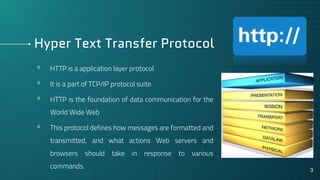
▫ HTTP is a application layer protocol
▫ It is a part of TCP/IP protocol suite.
▫ HTTP is the foundation of data communication for the
World Wide Web
▫ This protocol defines how messages are formatted and
transmitted, and what actions Web servers and
browsers should take in response to various
commands. 3
Cntd…
▫ It is a critical protocol for web developers to understand and because
of it widespread use it is also used in transferring data and commands
in IOT applications.
▫ The first version of the protocol had only one method, namely GET,
which would request a page from a server.
▫ The response from the server was always an HTML page.
4
Basic Features
▫ Connectionless Protocol
▫ Media Independent
▫ Stateless Protocol
5
Stateless Protocol
▫ A stateless protocol is a communications protocol in which no session
information is retained by the receiver, usually a server.
▫ HTTP is called as a stateless protocol because each request is
executed independently, without any knowledge of the requests that
were executed before it, which means once the transaction ends the
connection between the browser and the server is also lost.
6
Why stateless?
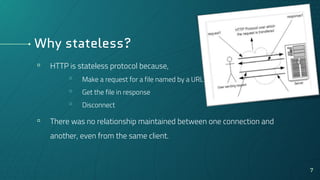
▫ HTTP is stateless protocol because,
▫ Make a request for a file named by a URL
▫ Get the file in response
▫ Disconnect
▫ There was no relationship maintained between one connection and
another, even from the same client.
7
Port Number
▫ Ports are identified for each protocol and address combination by 16-bit
unsigned numbers, commonly known as the port number.
▫ Any server machine makes its services available using numbered ports, one for
each service that is available on the server.
▫ By default, HTTP uses port 80.
▫ But a URL like http://www.example.com:8080/path/ specifies that the web
browser connects instead to port 8080 of the HTTP server.
8
HTTP Connections
There are two types of Connection :
▫ Persistent Connection
▫ Non-persistent Connection
The major criteria for the types is Round Trip Time(RTT)
RTT is the time taken for an object request and then its retrieval.
9
Non-persistent Connection
▫ The non-persistent connection takes the connection
time of 2RTT + file transmission time.
▫ It requires connection setup again and again for each
object to send.
▫ Connection type 1.0
10
Persistent Connection
▫ A persistent connection takes 2 RTT for the
connection and then transfers as many objects, as
wanted, over this single connection.
▫ Connection type 1.1
11
HTTP Request Methods
▫ GET Retrieve the identified document from the server
▫ HEAD Retrieve meta information about the URL
▫ POST Give information to the server
▫ OPTIONS Request Information about the available options
▫ PUT Store the document under the specified URL
▫ DELETE Delete the specified URL
▫ TRANCE Loopback request message
▫ CONNECT For use by proxies
12
HTTP Status Codes
▫ HTTP response status codes indicate whether a specific HTTP request
has been successfully completed. Responses are grouped in five
classes:
1xx Informational responses
2xx Successful responses
3xx Redirects
4xx Client errors
5xx Server errors 13
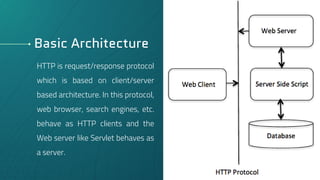
Basic Architecture
HTTP is request/response protocol
which is based on client/server
based architecture. In this protocol,
web browser, search engines, etc.
behave as HTTP clients and the
Web server like Servlet behaves as
a server.
14
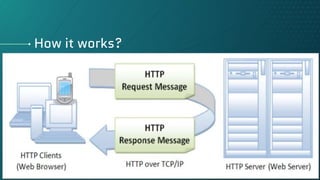
How it works?
15
Cntd…
Communication between clients and servers is done by requests and responses:
▫ A client (a browser) sends an HTTP request to the web
▫ An web server receives the request
▫ The server runs an application to process the request
▫ The server returns an HTTP response (output) to the browser
▫ The client (the browser) receives the response
16
Example
Whenever you enter a URL in the address box of the browser, the browser
translates the URL into a request message according to the specified protocol; and
sends the request message to the server.
For example, the browser translated the URL:
http://www.nowhere123.com/doc/index.html
into the following request message:
17
Cntd…
When this request message reaches the server, the server can take either one of these
actions:
▫ The server interprets the request received, maps the request into a file under the
server's document directory, and returns the file requested to the client.
▫ The server interprets the request received, maps the request into a program kept in
the server, executes the program, and returns the output of the program to the client.
▫ The request cannot be satisfied, the server returns an error message.
18
Cntd…
▫ The request cannot be satisfied, the server returns an error message.
▫ An example of the HTTP response message is as shown:
19
HTTP Conversation
I would like to open a connection
GET ……
Display response
Close connection
Connect
Process the request method and respond
Close
20
Client Server
References
i. http://www.xpode.com/ShowArticle.aspx?ArticleId=580
ii. https://www.slideshare.net/ChuongMai/http-protocol-basic
iii. https://www.webopedia.com/TERM/H/HTTP.html
iv. https://www.w3schools.com/whatis/whatis_http.asp
v. https://en.wikipedia.org/wiki/Hypertext_Transfer_Protocol#History
vi. https://www.slideshare.net/gsmanu007/hyper-text-transfer-protocol-http
vii. https://www.slideshare.net/limaniBhavik/http-hypertext-transfer-protocol
viii. http://www.steves-internet-guide.com/http-basics/
ix. https://www.ntu.edu.sg/home/ehchua/programming/webprogramming/http_basics.html
x. https://computer.howstuffworks.com/internet/basics/internet-infrastructure10.htm
xi. https://en.wikipedia.org/wiki/Port_(computer_networking)
xii. https://www.tutorialspoint.com/http/http_overview.htm
xiii. https://www.javatpoint.com/http
xiv. https://www.geeksforgeeks.org/http-non-persistent-persistent-connection-set-2/
xv. https://www.educative.io/edpresso/non-persistent-vs-persistent-http
xvi. https://www.rfwireless-world.com/Terminology/Advantages-and-Disadvantages-of-HTTP.html
xvii. https://developer.mozilla.org/en-US/docs/Web/HTTP/Status 21
22
Thanks!

Hyper Text Transfer Protocol

  • 1.
    http:// Hyper Text TransferProtocol Souganthika S 18IT089
  • 2.
    Upper Layer Protocol ▫Protocol is a set of rules that enable two or more entities of a communication system to transmit information ▫ The top 3 layers – Application, Presentation, Session – of the OSI model are said to be the upper layer ▫ Any protocol residing in OSI layers five or above is called upper layer protocol. 2
  • 3.
    Hyper Text TransferProtocol ▫ HTTP is a application layer protocol ▫ It is a part of TCP/IP protocol suite. ▫ HTTP is the foundation of data communication for the World Wide Web ▫ This protocol defines how messages are formatted and transmitted, and what actions Web servers and browsers should take in response to various commands. 3
  • 4.
    Cntd… ▫ It isa critical protocol for web developers to understand and because of it widespread use it is also used in transferring data and commands in IOT applications. ▫ The first version of the protocol had only one method, namely GET, which would request a page from a server. ▫ The response from the server was always an HTML page. 4
  • 5.
    Basic Features ▫ ConnectionlessProtocol ▫ Media Independent ▫ Stateless Protocol 5
  • 6.
    Stateless Protocol ▫ Astateless protocol is a communications protocol in which no session information is retained by the receiver, usually a server. ▫ HTTP is called as a stateless protocol because each request is executed independently, without any knowledge of the requests that were executed before it, which means once the transaction ends the connection between the browser and the server is also lost. 6
  • 7.
    Why stateless? ▫ HTTPis stateless protocol because, ▫ Make a request for a file named by a URL ▫ Get the file in response ▫ Disconnect ▫ There was no relationship maintained between one connection and another, even from the same client. 7
  • 8.
    Port Number ▫ Portsare identified for each protocol and address combination by 16-bit unsigned numbers, commonly known as the port number. ▫ Any server machine makes its services available using numbered ports, one for each service that is available on the server. ▫ By default, HTTP uses port 80. ▫ But a URL like http://www.example.com:8080/path/ specifies that the web browser connects instead to port 8080 of the HTTP server. 8
  • 9.
    HTTP Connections There aretwo types of Connection : ▫ Persistent Connection ▫ Non-persistent Connection The major criteria for the types is Round Trip Time(RTT) RTT is the time taken for an object request and then its retrieval. 9
  • 10.
    Non-persistent Connection ▫ Thenon-persistent connection takes the connection time of 2RTT + file transmission time. ▫ It requires connection setup again and again for each object to send. ▫ Connection type 1.0 10
  • 11.
    Persistent Connection ▫ Apersistent connection takes 2 RTT for the connection and then transfers as many objects, as wanted, over this single connection. ▫ Connection type 1.1 11
  • 12.
    HTTP Request Methods ▫GET Retrieve the identified document from the server ▫ HEAD Retrieve meta information about the URL ▫ POST Give information to the server ▫ OPTIONS Request Information about the available options ▫ PUT Store the document under the specified URL ▫ DELETE Delete the specified URL ▫ TRANCE Loopback request message ▫ CONNECT For use by proxies 12
  • 13.
    HTTP Status Codes ▫HTTP response status codes indicate whether a specific HTTP request has been successfully completed. Responses are grouped in five classes: 1xx Informational responses 2xx Successful responses 3xx Redirects 4xx Client errors 5xx Server errors 13
  • 14.
    Basic Architecture HTTP isrequest/response protocol which is based on client/server based architecture. In this protocol, web browser, search engines, etc. behave as HTTP clients and the Web server like Servlet behaves as a server. 14
  • 15.
  • 16.
    Cntd… Communication between clientsand servers is done by requests and responses: ▫ A client (a browser) sends an HTTP request to the web ▫ An web server receives the request ▫ The server runs an application to process the request ▫ The server returns an HTTP response (output) to the browser ▫ The client (the browser) receives the response 16
  • 17.
    Example Whenever you entera URL in the address box of the browser, the browser translates the URL into a request message according to the specified protocol; and sends the request message to the server. For example, the browser translated the URL: http://www.nowhere123.com/doc/index.html into the following request message: 17
  • 18.
    Cntd… When this requestmessage reaches the server, the server can take either one of these actions: ▫ The server interprets the request received, maps the request into a file under the server's document directory, and returns the file requested to the client. ▫ The server interprets the request received, maps the request into a program kept in the server, executes the program, and returns the output of the program to the client. ▫ The request cannot be satisfied, the server returns an error message. 18
  • 19.
    Cntd… ▫ The requestcannot be satisfied, the server returns an error message. ▫ An example of the HTTP response message is as shown: 19
  • 20.
    HTTP Conversation I wouldlike to open a connection GET …… Display response Close connection Connect Process the request method and respond Close 20 Client Server
  • 21.
    References i. http://www.xpode.com/ShowArticle.aspx?ArticleId=580 ii. https://www.slideshare.net/ChuongMai/http-protocol-basic iii.https://www.webopedia.com/TERM/H/HTTP.html iv. https://www.w3schools.com/whatis/whatis_http.asp v. https://en.wikipedia.org/wiki/Hypertext_Transfer_Protocol#History vi. https://www.slideshare.net/gsmanu007/hyper-text-transfer-protocol-http vii. https://www.slideshare.net/limaniBhavik/http-hypertext-transfer-protocol viii. http://www.steves-internet-guide.com/http-basics/ ix. https://www.ntu.edu.sg/home/ehchua/programming/webprogramming/http_basics.html x. https://computer.howstuffworks.com/internet/basics/internet-infrastructure10.htm xi. https://en.wikipedia.org/wiki/Port_(computer_networking) xii. https://www.tutorialspoint.com/http/http_overview.htm xiii. https://www.javatpoint.com/http xiv. https://www.geeksforgeeks.org/http-non-persistent-persistent-connection-set-2/ xv. https://www.educative.io/edpresso/non-persistent-vs-persistent-http xvi. https://www.rfwireless-world.com/Terminology/Advantages-and-Disadvantages-of-HTTP.html xvii. https://developer.mozilla.org/en-US/docs/Web/HTTP/Status 21
  • 22.

Editor's Notes

  • #6 The HTTP client, i.e., a browser initiates an HTTP request and after a request is made, the client waits for the response. The server processes the request and sends a response back after which client disconnect the connection. So client and server knows about each other during current request and response only. Further requests are made on new connection like client and server are new to each other. It means, any type of data can be sent by HTTP as long as both the client and the server know how to handle the data content. It is stateless means each request is considered as the new request. In other words, server doesn't recognize the user by default.
  • #10 In other words, it is the time taken to request the object from the client to the server and then retrieve it from the server back to the client.
  • #11 It takes the first RTT (round-trip time) to establish the connection between the server and the client. The second RTT is taken to request and return the object. This case stands for a single object transmission.
  • #12 It does not require connection setup again and again. Multiple objects can use connection.
  • #13 HTTP protocol defines a set of request methods. A client can use one of these methods to send a request to the HTTP server.
  • #14 Result of the request method 1xx that is 100 to 199 Common one 404 not found 502 Bad gateway
  • #18 1st line request line Until blank line request header Totally request message header Blank line separates header and body Below blank line request message body
  • #20 1st line status line 1.1 persistent connection. Response header Totally response message header Blank line to separate Response message body
  • #22 It offers reduced network congestion as there are fewer TCP connections. It reports errors without closing the TCP connection. It does not offer reliable exchange