Humanities Networked Infrastructure 
Humanities Networked Infrastructure (HuNI) 
- Facilitating Research - 
*Name of presenter 
staging.huni.net.au 
huni.net.au 
wiki.huni.net.au 
info@huni.net.au
HuNI 
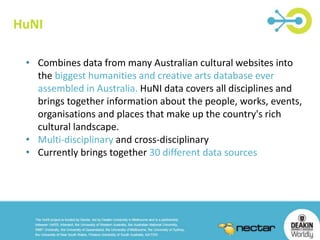
• Combines data from many Australian cultural websites into 
the biggest humanities and creative arts database ever 
assembled in Australia. HuNI data covers all disciplines and 
brings together information about the people, works, events, 
organisations and places that make up the country's rich 
cultural landscape. 
• Multi-disciplinary and cross-disciplinary 
• Currently brings together 30 different data sources
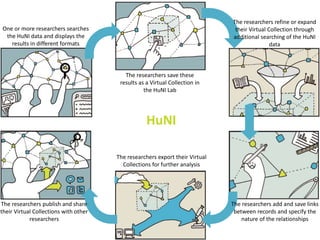
The researchers save these 
results as a Virtual Collection in 
the HuNI Lab 
One or more researchers searches 
the HuNI data and displays the 
results in different formats 
The researchers refine or expand 
their Virtual Collection through 
additional searching of the HuNI 
data 
The researchers add and save links 
between records and specify the 
nature of the relationships 
The researchers publish and share 
their Virtual Collections with other 
researchers 
HuNI 
The researchers export their Virtual 
Collections for further analysis
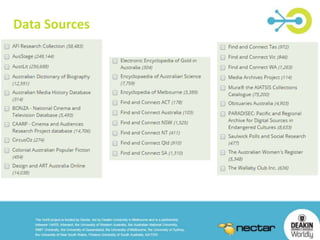
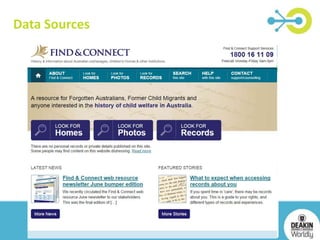
Data Sources
Data Sources
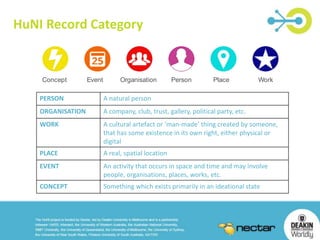
More icons = more PERSON A natural person 
ORGANISATION A company, club, trust, gallery, political party, etc. 
WORK A cultural artefact or ‘man-made’ thing created by someone, 
HuNI Record Category 
Concept 
HuNI Record Category 
Event Organisation Person Place Work 
that has some existence in its own right, either physical or 
digital 
PLACE A real, spatial location 
EVENT An activity that occurs in space and time and may involve 
people, organisations, places, works, etc. 
CONCEPT Something which exists primarily in an ideational state
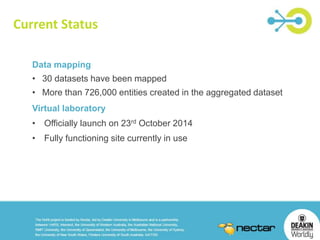
Current Status 
Data mapping 
• 30 datasets have been mapped 
• More than 726,000 entities created in the aggregated dataset 
Virtual laboratory 
• Officially launch on 23rd October 2014 
• Fully functioning site currently in use
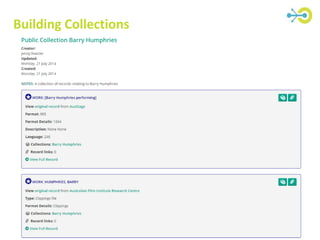
Building Collections
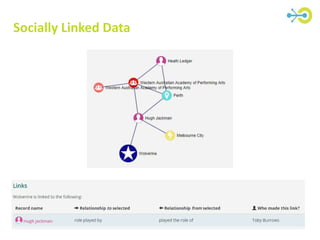
Socially Linked Data
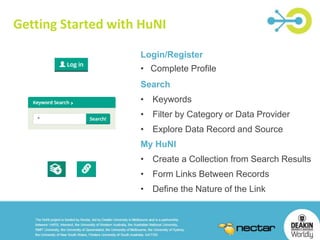
Getting Started with HuNI 
Login/Register 
• Complete Profile 
Search 
• Keywords 
• Filter by Category or Data Provider 
• Explore Data Record and Source 
My HuNI 
• Create a Collection from Search Results 
• Form Links Between Records 
• Define the Nature of the Link
HuNI - Tasks 
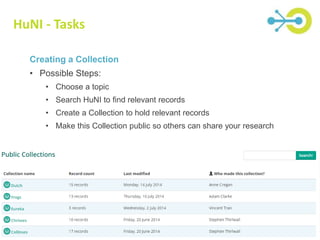
Creating a Collection 
• Possible Steps: 
• Choose a topic 
• Search HuNI to find relevant records 
• Create a Collection to hold relevant records 
• Make this Collection public so others can share your research
HuNI - Tasks 
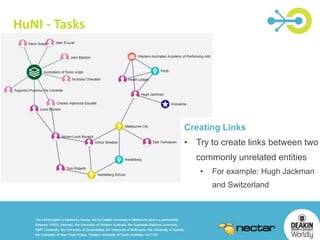
Creating Links 
• Try to create links between two 
commonly unrelated entities 
• For example: Hugh Jackman 
and Switzerland

HuNI presentation_workshop

  • 1.
    Humanities Networked Infrastructure Humanities Networked Infrastructure (HuNI) - Facilitating Research - *Name of presenter staging.huni.net.au huni.net.au wiki.huni.net.au info@huni.net.au
  • 2.
    HuNI • Combinesdata from many Australian cultural websites into the biggest humanities and creative arts database ever assembled in Australia. HuNI data covers all disciplines and brings together information about the people, works, events, organisations and places that make up the country's rich cultural landscape. • Multi-disciplinary and cross-disciplinary • Currently brings together 30 different data sources
  • 3.
    The researchers savethese results as a Virtual Collection in the HuNI Lab One or more researchers searches the HuNI data and displays the results in different formats The researchers refine or expand their Virtual Collection through additional searching of the HuNI data The researchers add and save links between records and specify the nature of the relationships The researchers publish and share their Virtual Collections with other researchers HuNI The researchers export their Virtual Collections for further analysis
  • 4.
  • 5.
  • 6.
    More icons =more PERSON A natural person ORGANISATION A company, club, trust, gallery, political party, etc. WORK A cultural artefact or ‘man-made’ thing created by someone, HuNI Record Category Concept HuNI Record Category Event Organisation Person Place Work that has some existence in its own right, either physical or digital PLACE A real, spatial location EVENT An activity that occurs in space and time and may involve people, organisations, places, works, etc. CONCEPT Something which exists primarily in an ideational state
  • 7.
    Current Status Datamapping • 30 datasets have been mapped • More than 726,000 entities created in the aggregated dataset Virtual laboratory • Officially launch on 23rd October 2014 • Fully functioning site currently in use
  • 8.
  • 9.
  • 10.
    Getting Started withHuNI Login/Register • Complete Profile Search • Keywords • Filter by Category or Data Provider • Explore Data Record and Source My HuNI • Create a Collection from Search Results • Form Links Between Records • Define the Nature of the Link
  • 11.
    HuNI - Tasks Creating a Collection • Possible Steps: • Choose a topic • Search HuNI to find relevant records • Create a Collection to hold relevant records • Make this Collection public so others can share your research
  • 12.
    HuNI - Tasks Creating Links • Try to create links between two commonly unrelated entities • For example: Hugh Jackman and Switzerland

Editor's Notes

  • #3 Fifteen data providers – 30 datasets in all All very different in their coverage, structure, functionality, audience, etc. Many researchers work across different datasets, e.g. for literature, media, art & biography related to a particular person Researcher- or user-centred – entity records, not library / museum / gallery catalogue records Data sources come from multiple disciplines – different vocabularies, different metadata schemas and database structures Data sharing is not the norm in the humanities – can decide whether and when to share data Collaboration at the heart of the virtual laboratory – shared collections, shared data, shared connections and links between entities Need to allow for the complex and unique nature of research in humanities and creative arts
  • #4 Discover and explore: any user (not logged in) Other functions: need an account. Will be open to general community, not just researchers Social linking: saying “this entity is related to that entity” Save and share: virtual collections
  • #5 Fifteen data providers – 30 datasets in all All very different in their coverage, structure, functionality, audience, etc.
  • #6 Example Data Sources 1 – AustLit 2 – CircusOz 3 – DAAO 4 – Encyclopedia of Melbourne 5 – MURA 6 – Find and Connect
  • #7 Data Model: Drawn from common elements in data sources, verified against user stories and requirements Six core entity classes: People, Organizations, Places, Events, Works, Concepts Data aggregation is the key to HuNI Our approach: develop a Data Model, map the incoming data, but retain its provenance Debates over categorization and definition are at the heart of humanities research It would be a mistake to impose a normalized vocabulary – humanities data should not be homogenized
  • #9 HuNI Collection: Groups of records assembled by HuNI users. Users are also able to add notes (metadata) to their collections, and can be either private or made public. Allows users to create their own collections or related information from any of the 30 data sources.
  • #10 This approach is a carefully considered one, based on our understanding of humanities research and humanities data. Users themselves provide and create the links between entities and define the nature of the relationship. Crowdsourcing the links. HuNI will continue to grow and expand based on user input. Keep the categorization of data entities to a minimum (using the simple Data Model) Allow users to express the relationships they see in the data Allow multiple relationships between the same entities (even if they are contradictory) The user-contributed links give meaning and add value Recognises that humanities research is all about different perspectives, dialogue and sharing Recognises that most of humanities research is about making connections and following trails of relationships
  • #11 How to use HuNI – best way is to get in there and play around. Login – use the login button to complete your registration and profile info Once this is completed you will notice a new tab at the top of the page called My HuNI – this stores all the collections and links you create – allowing you to edit and delete them if needed Use the search box to find data of interest to you. Try keywords, person or place names or the name of a film or other artwork. Collection: Once you are logged in you will notice the Add to Collection Icon sitting beside each record. Create a collection by searching and finding a record you would like to start a collection with. Click the Add to collection icon to initiate the collection process – create a new collection or add the record to an existing collection. Once completed you can easily add other records to your collection by clicking the add to collection button Links: User generated links between records are central to the HuNI project. Users can connect two records and specify the relationship between them. In some instances predefined relationships will suffice (for example parent, employer, author), however, in others the user will need to create custom relationships, including consideration of the relationship in both directions. Only users who are logged in to HuNI are able to create links, however, all visitors to the site can see links that have been made between records via the diagram and table in the record detail view. Once you are logged in you will notice the Create new link button sitting on the right hand side of each record – click this button to initiate a link from this record. This will open the link management pane at the top of the screen – this pane will step you through the linking process It is possible to manage your links and collections through My Huni – edit and delete
  • #12 Individually or as a group Build a collection and make it public Encourage them to create links between records either directly within their collection or linking to records outside their collection
  • #13 Think of 2 very unrelated entities in the database and get the participants to try and link them together – encourage useful and creative links *Note: don’t use the example provided as the links are already there!