The document provides instructions for configuring huge pages on a Linux server for an Oracle database:
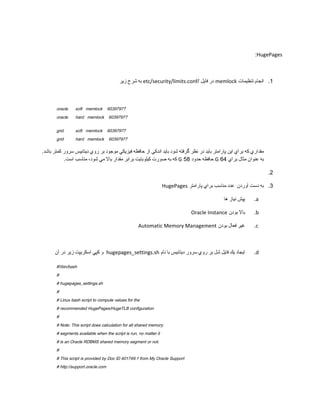
1. Set memory locking limits in /etc/security/limits.conf for the oracle and grid users.
2. Run a script called hugepages_settings.sh that will calculate the recommended number of huge pages based on the existing shared memory segments.
3. Take the number output from the script and set it for the vm.nr_hugepages parameter in /etc/sysctl.conf, reboot the server, and restart the Oracle database.
![# Welcome text
echo "
This script is provided by Doc ID 401749.1 from My Oracle Support
(http://support.oracle.com) where it is intended to compute values for
the recommended HugePages/HugeTLB configuration for the current shared
memory segments. Before proceeding with the execution please note following:
* For ASM instance, it needs to configure ASMM instead of AMM.
* The 'pga_aggregate_target' is outside the SGA and
you should accommodate this while calculating SGA size.
* In case you changes the DB SGA size,
as the new SGA will not fit in the previous HugePages configuration,
it had better disable the whole HugePages,
start the DB with new SGA size and run the script again.
And make sure that:
* Oracle Database instance(s) are up and running
* Oracle Database 11g Automatic Memory Management (AMM) is not setup
(See Doc ID 749851.1)
* The shared memory segments can be listed by command:
# ipcs -m
Press Enter to proceed..."
read
# Check for the kernel version
KERN=`uname -r | awk -F. '{ printf("%d.%dn",$1,$2); }'`
# Find out the HugePage size
HPG_SZ=`grep Hugepagesize /proc/meminfo | awk '{print $2}'`
if [ -z "$HPG_SZ" ];then
echo "The hugepages may not be supported in the system where the script is being executed."
exit 1
fi
# Initialize the counter
NUM_PG=0
# Cumulative number of pages required to handle the running shared memory segments](https://image.slidesharecdn.com/hugepages-131231232510-phpapp02/85/Huge-pages-2-320.jpg)
![for SEG_BYTES in `ipcs -m | cut -c44-300 | awk '{print $1}' | grep "[0-9][0-9]*"`
do
MIN_PG=`echo "$SEG_BYTES/($HPG_SZ*1024)" | bc -q`
if [ $MIN_PG -gt 0 ]; then
NUM_PG=`echo "$NUM_PG+$MIN_PG+1" | bc -q`
fi
done
RES_BYTES=`echo "$NUM_PG * $HPG_SZ * 1024" | bc -q`
# An SGA less than 100MB does not make sense
# Bail out if that is the case
if [ $RES_BYTES -lt 100000000 ]; then
echo "***********"
echo "** ERROR **"
echo "***********"
echo "Sorry! There are not enough total of shared memory segments allocated for
HugePages configuration. HugePages can only be used for shared memory segments
that you can list by command:
# ipcs -m
of a size that can match an Oracle Database SGA. Please make sure that:
* Oracle Database instance is up and running
* Oracle Database 11g Automatic Memory Management (AMM) is not configured"
exit 1
fi
# Finish with results
case $KERN in
'2.4') HUGETLB_POOL=`echo "$NUM_PG*$HPG_SZ/1024" | bc -q`;
echo "Recommended setting: vm.hugetlb_pool = $HUGETLB_POOL" ;;
'2.6') echo "Recommended setting: vm.nr_hugepages = $NUM_PG" ;;
*) echo "Unrecognized kernel version $KERN. Exiting." ;;
esac
# End
chmod +x hugepages_settings.sh تغيير سطح دسترسي فايل به
.e
hugepages_settings.sh/. اجراي فايل
.f](https://image.slidesharecdn.com/hugepages-131231232510-phpapp02/85/Huge-pages-3-320.jpg)


