CS142 Lecture Notes - HTTP
Hypertext Transport
Protocol (HTTP)
Mendel Rosenblum
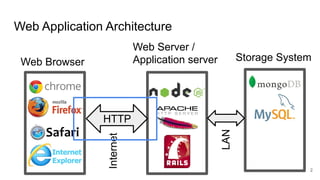
Web Application Architecture
Web Browser
Web Server /
Application server
HTTP
Storage System
Internet
LAN
2
CS142 Lecture Notes - HTTP
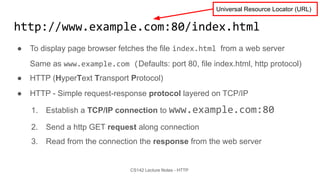
http://www.example.com:80/index.html
● To display page browser fetches the file index.html from a web server
Same as www.example.com (Defaults: port 80, file index.html, http protocol)
● HTTP (HyperText Transport Protocol)
● HTTP - Simple request-response protocol layered on TCP/IP
1. Establish a TCP/IP connection to www.example.com:80
2. Send a http GET request along connection
3. Read from the connection the response from the web server
Universal Resource Locator (URL)
CS142 Lecture Notes - HTTP
Send HTTP Request - Write lines to socket
GET /index.html HTTP/1.1
Host: www.example.com
User-Agent: Mozilla/5.0
Accept: text/html, */*
Accept-Language: en-us
Accept-Charset: ISO-8859-1,utf-8
Connection: keep-alive
blank line
Method URL Protocol Version
Header
Body
(optional)
CS142 Lecture Notes - HTTP
HTTP Methods (Verbs)
● GET - Fetch a URL
● HEAD - Fetch information about a URL
● PUT - Store to an URL
● POST - Send form data to a URL and get a response back
● DELETE - Delete a URL
GET and POST (forms) are commonly used.
REST APIs used GET, PUT, POST, and DELETE
CS142 Lecture Notes - HTTP
HTTP Response - Read lines from socket
HTTP/1.1 200 OK
Date: Thu, 24 Jul 2008 17:36:27 GMT
Server: Apache-Coyote/1.1
Content-Type: text/html;charset=UTF-8
Content-Length: 1846
blank line
<?xml ... >
<!DOCTYPE html ... >
<html ... >
...
</html>
Version Status Status Message
Header
Body
CS142 Lecture Notes - HTTP
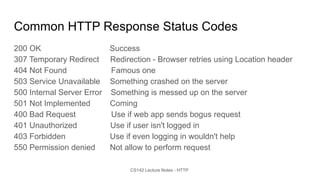
Common HTTP Response Status Codes
200 OK Success
307 Temporary Redirect Redirection - Browser retries using Location header
404 Not Found Famous one
503 Service Unavailable Something crashed on the server
500 Internal Server Error Something is messed up on the server
501 Not Implemented Coming
400 Bad Request Use if web app sends bogus request
401 Unauthorized Use if user isn't logged in
403 Forbidden Use if even logging in wouldn't help
550 Permission denied Not allow to perform request
CS142 Lecture Notes - HTTP
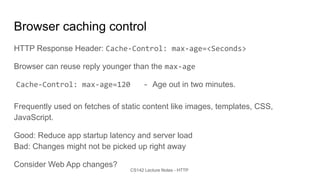
Browser caching control
HTTP Response Header: Cache-Control: max-age=<Seconds>
Browser can reuse reply younger than the max-age
Cache-Control: max-age=120 - Age out in two minutes.
Frequently used on fetches of static content like images, templates, CSS,
JavaScript.
Good: Reduce app startup latency and server load
Bad: Changes might not be picked up right away
Consider Web App changes?
CS142 Lecture Notes - HTTP
Browser spends its life fetching things using HTTP
● Some fetched immediately (processing paused while waiting for HTTP reply)
<link href="angular-material.css" rel="stylesheet" />
<script src="compiled/p2.bundle.js" type="text/javascript" />
window.location = "http://www.example.com";
● Some asynchronous and in parallel
<img src="smiley.gif">
<img src="foobar.jpg">
<img src="foobar2.jpg">
● Some can be in background
<a href="http://www.example.com"></a>
GET http://localhost:3000/favicon.ico 404 (Not Found)
CS142 Lecture Notes - HTTP
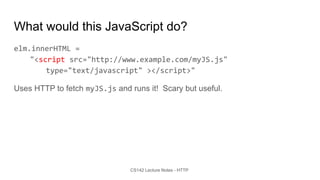
What would this JavaScript do?
elm.innerHTML =
"<script src="http://www.example.com/myJS.js"
type="text/javascript" ></script>"
Uses HTTP to fetch myJS.js and runs it! Scary but useful.

HTTP.pdf

  • 1.
    CS142 Lecture Notes- HTTP Hypertext Transport Protocol (HTTP) Mendel Rosenblum
  • 2.
    Web Application Architecture WebBrowser Web Server / Application server HTTP Storage System Internet LAN 2
  • 3.
    CS142 Lecture Notes- HTTP http://www.example.com:80/index.html ● To display page browser fetches the file index.html from a web server Same as www.example.com (Defaults: port 80, file index.html, http protocol) ● HTTP (HyperText Transport Protocol) ● HTTP - Simple request-response protocol layered on TCP/IP 1. Establish a TCP/IP connection to www.example.com:80 2. Send a http GET request along connection 3. Read from the connection the response from the web server Universal Resource Locator (URL)
  • 4.
    CS142 Lecture Notes- HTTP Send HTTP Request - Write lines to socket GET /index.html HTTP/1.1 Host: www.example.com User-Agent: Mozilla/5.0 Accept: text/html, */* Accept-Language: en-us Accept-Charset: ISO-8859-1,utf-8 Connection: keep-alive blank line Method URL Protocol Version Header Body (optional)
  • 5.
    CS142 Lecture Notes- HTTP HTTP Methods (Verbs) ● GET - Fetch a URL ● HEAD - Fetch information about a URL ● PUT - Store to an URL ● POST - Send form data to a URL and get a response back ● DELETE - Delete a URL GET and POST (forms) are commonly used. REST APIs used GET, PUT, POST, and DELETE
  • 6.
    CS142 Lecture Notes- HTTP HTTP Response - Read lines from socket HTTP/1.1 200 OK Date: Thu, 24 Jul 2008 17:36:27 GMT Server: Apache-Coyote/1.1 Content-Type: text/html;charset=UTF-8 Content-Length: 1846 blank line <?xml ... > <!DOCTYPE html ... > <html ... > ... </html> Version Status Status Message Header Body
  • 7.
    CS142 Lecture Notes- HTTP Common HTTP Response Status Codes 200 OK Success 307 Temporary Redirect Redirection - Browser retries using Location header 404 Not Found Famous one 503 Service Unavailable Something crashed on the server 500 Internal Server Error Something is messed up on the server 501 Not Implemented Coming 400 Bad Request Use if web app sends bogus request 401 Unauthorized Use if user isn't logged in 403 Forbidden Use if even logging in wouldn't help 550 Permission denied Not allow to perform request
  • 8.
  • 9.
    CS142 Lecture Notes- HTTP Browser caching control HTTP Response Header: Cache-Control: max-age=<Seconds> Browser can reuse reply younger than the max-age Cache-Control: max-age=120 - Age out in two minutes. Frequently used on fetches of static content like images, templates, CSS, JavaScript. Good: Reduce app startup latency and server load Bad: Changes might not be picked up right away Consider Web App changes?
  • 10.
    CS142 Lecture Notes- HTTP Browser spends its life fetching things using HTTP ● Some fetched immediately (processing paused while waiting for HTTP reply) <link href="angular-material.css" rel="stylesheet" /> <script src="compiled/p2.bundle.js" type="text/javascript" /> window.location = "http://www.example.com"; ● Some asynchronous and in parallel <img src="smiley.gif"> <img src="foobar.jpg"> <img src="foobar2.jpg"> ● Some can be in background <a href="http://www.example.com"></a> GET http://localhost:3000/favicon.ico 404 (Not Found)
  • 11.
    CS142 Lecture Notes- HTTP What would this JavaScript do? elm.innerHTML = "<script src="http://www.example.com/myJS.js" type="text/javascript" ></script>" Uses HTTP to fetch myJS.js and runs it! Scary but useful.