CS142 Lecture Notes - Database.js
Storage Tier
Mendel Rosenblum
CS142 Lecture Notes - Database
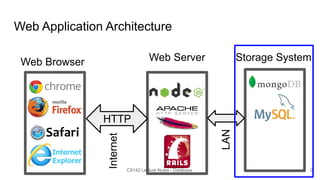
Web Application Architecture
Web Browser Web Server
HTTP
Storage System
Internet
LAN
2
CS142 Lecture Notes - Database
Web App Storage System Properties
● Always available - Fetch correct app data, store updates
○ Even if many request come in concurrently - Scalable
■ From all over the world
○ Even if pieces fail - Reliable / fault tolerant
● Provide a good organization of storing an application data
○ Quickly generate the model data of a view
○ Handle app evolving over time
● Good software engineering: Easy to use and reason about
CS142 Lecture Notes - Database
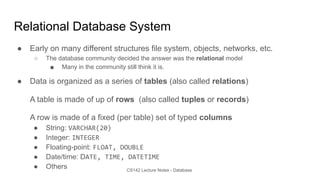
Relational Database System
● Early on many different structures file system, objects, networks, etc.
○ The database community decided the answer was the relational model
■ Many in the community still think it is.
● Data is organized as a series of tables (also called relations)
A table is made of up of rows (also called tuples or records)
A row is made of a fixed (per table) set of typed columns
● String: VARCHAR(20)
● Integer: INTEGER
● Floating-point: FLOAT, DOUBLE
● Date/time: DATE, TIME, DATETIME
● Others
CS142 Lecture Notes - Database
Database Schema
Schema: The structure of the database
● The table names (e.g. User, Photo, Comments)
● The names and types of table columns
● Various optional additional information (constraints, etc.)
CS142 Lecture Notes - Database
Example: User Table ID first_name last_name location
1 Ian Malcolm Austin, TX
2 Ellen Ripley Nostromo
3 Peregrin Took Gondor
4 Rey Kenobi D'Qar
5 April Ludgate Awnee, IN
6 John Ousterhout Stanford, CA
Column types
ID - INTEGER
first_name - VARCHAR(20)
last_name - VARCHAR(20)
location - VARCHAR(20)
CS142 Lecture Notes - Database
Structured Query Language (SQL)
● Standard for accessing relational data
○ Sweet theory behind it: relational algebra
● Queries: the strength of relational databases
○ Lots of ways to extract information
○ You specify what you want
○ The database system figures out how to get it efficiently
○ Refer to data by contents, not just name
CS142 Lecture Notes - Database
SQL Example Commands
CREATE TABLE Users (
id INT AUTO_INCREMENT,
first_name VARCHAR(20),
last_name VARCHAR(20),
location VARCHAR(20));
INSERT INTO Users (
first_name,
last_name,
location)
VALUES
('Ian',
'Malcolm',
'Austin, TX');
DELETE FROM Users WHERE
last_name='Malcolm';
UPDATE Users
SET location = 'New York, NY
WHERE id = 2;
SELECT * FROM Users;
SELECT * from Users WHERE id = 2;
CS142 Lecture Notes - Database
Keys and Indexes
Consider a model fetch: SELECT * FROM Users WHERE id = 2
Database could implement this by:
1. Scan the Users table and return all rows with id=2
2. Have built an index that maps id numbers to table rows. Lookup result from
index.
Uses keys to tell database that building an index would be a good idea
Primary key: Organize data around accesses
PRIMARY KEY(id) on a CREATE table command
Secondary key: Other indexes (UNIQUE)
CS142 Lecture Notes - Database
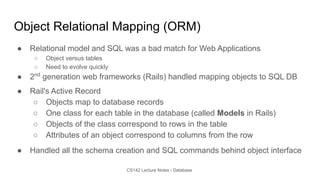
Object Relational Mapping (ORM)
● Relational model and SQL was a bad match for Web Applications
○ Object versus tables
○ Need to evolve quickly
● 2nd
generation web frameworks (Rails) handled mapping objects to SQL DB
● Rail's Active Record
○ Objects map to database records
○ One class for each table in the database (called Models in Rails)
○ Objects of the class correspond to rows in the table
○ Attributes of an object correspond to columns from the row
● Handled all the schema creation and SQL commands behind object interface
CS142 Lecture Notes - Database
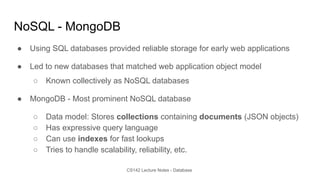
NoSQL - MongoDB
● Using SQL databases provided reliable storage for early web applications
● Led to new databases that matched web application object model
○ Known collectively as NoSQL databases
● MongoDB - Most prominent NoSQL database
○ Data model: Stores collections containing documents (JSON objects)
○ Has expressive query language
○ Can use indexes for fast lookups
○ Tries to handle scalability, reliability, etc.
CS142 Lecture Notes - Database
Schema enforcement
● JSON blobs provide super flexibility but not what is always wanted
○ Consider: <h1>Hello {person.informalName}</h1>
■ Good: typeof person.informalName == 'string' and length < something
■ Bad: Type is 1GB object, or undefined, or null, or …
● Would like to enforce a schema on the data
○ Can be implemented as validators on mutating operations
● Mongoose - Object Definition Language (ODL)
○ Take familiar usage from ORMs and map it onto MongoDB
○ Exports Persistent Object abstraction
○ Effectively masks the lower level interface to MongoDB with something that is friendlier
CS142 Lecture Notes - Database
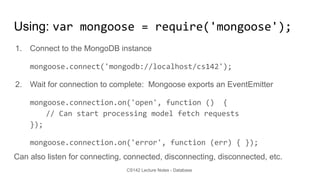
Using: var mongoose = require('mongoose');
1. Connect to the MongoDB instance
mongoose.connect('mongodb://localhost/cs142');
2. Wait for connection to complete: Mongoose exports an EventEmitter
mongoose.connection.on('open', function () {
// Can start processing model fetch requests
});
mongoose.connection.on('error', function (err) { });
Can also listen for connecting, connected, disconnecting, disconnected, etc.
CS142 Lecture Notes - Database
Mongoose: Schema define collections
Schema assign property names and their types to collections
String, Number, Date, Buffer, Boolean
Array - e.g. comments: [ObjectId]
ObjectId - Reference to another object
Mixed - Anything
var userSchema = new mongoose.Schema({
first_name: String,
last_name: String,
emailAddresses: [String],
location: String
});
CS142 Lecture Notes - Database
Schema allows secondary indexes and defaults
● Simple index
first_name: {type: 'String', index: true}
● Index with unique enforcement
user_name: {type: 'String', index: {unique: true} }
● Defaults
date: {type: Date, default: Date.now }
CS142 Lecture Notes - Database
Secondary indexes
● Performance and space trade-off
○ Faster queries: Eliminate scans - database just returns the matches from the index
○ Slower mutating operations: Add, delete, update must update indexes
○ Uses more space: Need to store indexes and indexes can get bigger than the data itself
● When to use
○ Common queries spending a lot of time scanning
○ Need to enforce uniqueness
CS142 Lecture Notes - Database
Mongoose: Make Model from Schema
● A Model in Mongoose is a constructor of objects - a collection
May or may not correspond to a model of the MVC
var User = mongoose.model('User', userSchema);
Exports a persistent object abstraction
● Create objects from Model
User.create({ first_name: 'Ian', last_name: 'Malcolm'}, doneCallback);
function doneCallback(err, newUser) {
assert (!err);
console.log('Created object with ID', newUser._id);
}
CS142 Lecture Notes - Database
Model used for querying collection
● Returning the entire User collection
User.find(function (err, users) {/*users is an array of objects*/ });
● Returning a single user object for user_id
User.findOne({_id: user_id}, function (err, user) { /* … */ });
● Updating a user object for user_id
User.findOne({_id: user_id}, function (err, user) {
// Update user object - (Note: Object is "special")
user.save();
});
CS142 Lecture Notes - Database
Other Mongoose query operations - query builder
var query = User.find({});
● Projections
query.select("first_name last_name").exec(doneCallback);
● Sorting
query.sort("first_name").exec(doneCallback);
● Limits
query.limit(50).exec(doneCallback);
query.sort("-location").select("first_name").exec(doneCallback);
CS142 Lecture Notes - Database
Deleting objects from collection
● Deleting a single user with id user_id
User.remove({_id: user_id}, function (err) { } );
● Deleting all the User objects
User.remove({}, function (err) { } );

Database.pdf

  • 1.
    CS142 Lecture Notes- Database.js Storage Tier Mendel Rosenblum
  • 2.
    CS142 Lecture Notes- Database Web Application Architecture Web Browser Web Server HTTP Storage System Internet LAN 2
  • 3.
    CS142 Lecture Notes- Database Web App Storage System Properties ● Always available - Fetch correct app data, store updates ○ Even if many request come in concurrently - Scalable ■ From all over the world ○ Even if pieces fail - Reliable / fault tolerant ● Provide a good organization of storing an application data ○ Quickly generate the model data of a view ○ Handle app evolving over time ● Good software engineering: Easy to use and reason about
  • 4.
    CS142 Lecture Notes- Database Relational Database System ● Early on many different structures file system, objects, networks, etc. ○ The database community decided the answer was the relational model ■ Many in the community still think it is. ● Data is organized as a series of tables (also called relations) A table is made of up of rows (also called tuples or records) A row is made of a fixed (per table) set of typed columns ● String: VARCHAR(20) ● Integer: INTEGER ● Floating-point: FLOAT, DOUBLE ● Date/time: DATE, TIME, DATETIME ● Others
  • 5.
    CS142 Lecture Notes- Database Database Schema Schema: The structure of the database ● The table names (e.g. User, Photo, Comments) ● The names and types of table columns ● Various optional additional information (constraints, etc.)
  • 6.
    CS142 Lecture Notes- Database Example: User Table ID first_name last_name location 1 Ian Malcolm Austin, TX 2 Ellen Ripley Nostromo 3 Peregrin Took Gondor 4 Rey Kenobi D'Qar 5 April Ludgate Awnee, IN 6 John Ousterhout Stanford, CA Column types ID - INTEGER first_name - VARCHAR(20) last_name - VARCHAR(20) location - VARCHAR(20)
  • 7.
    CS142 Lecture Notes- Database Structured Query Language (SQL) ● Standard for accessing relational data ○ Sweet theory behind it: relational algebra ● Queries: the strength of relational databases ○ Lots of ways to extract information ○ You specify what you want ○ The database system figures out how to get it efficiently ○ Refer to data by contents, not just name
  • 8.
    CS142 Lecture Notes- Database SQL Example Commands CREATE TABLE Users ( id INT AUTO_INCREMENT, first_name VARCHAR(20), last_name VARCHAR(20), location VARCHAR(20)); INSERT INTO Users ( first_name, last_name, location) VALUES ('Ian', 'Malcolm', 'Austin, TX'); DELETE FROM Users WHERE last_name='Malcolm'; UPDATE Users SET location = 'New York, NY WHERE id = 2; SELECT * FROM Users; SELECT * from Users WHERE id = 2;
  • 9.
    CS142 Lecture Notes- Database Keys and Indexes Consider a model fetch: SELECT * FROM Users WHERE id = 2 Database could implement this by: 1. Scan the Users table and return all rows with id=2 2. Have built an index that maps id numbers to table rows. Lookup result from index. Uses keys to tell database that building an index would be a good idea Primary key: Organize data around accesses PRIMARY KEY(id) on a CREATE table command Secondary key: Other indexes (UNIQUE)
  • 10.
    CS142 Lecture Notes- Database Object Relational Mapping (ORM) ● Relational model and SQL was a bad match for Web Applications ○ Object versus tables ○ Need to evolve quickly ● 2nd generation web frameworks (Rails) handled mapping objects to SQL DB ● Rail's Active Record ○ Objects map to database records ○ One class for each table in the database (called Models in Rails) ○ Objects of the class correspond to rows in the table ○ Attributes of an object correspond to columns from the row ● Handled all the schema creation and SQL commands behind object interface
  • 11.
    CS142 Lecture Notes- Database NoSQL - MongoDB ● Using SQL databases provided reliable storage for early web applications ● Led to new databases that matched web application object model ○ Known collectively as NoSQL databases ● MongoDB - Most prominent NoSQL database ○ Data model: Stores collections containing documents (JSON objects) ○ Has expressive query language ○ Can use indexes for fast lookups ○ Tries to handle scalability, reliability, etc.
  • 12.
    CS142 Lecture Notes- Database Schema enforcement ● JSON blobs provide super flexibility but not what is always wanted ○ Consider: <h1>Hello {person.informalName}</h1> ■ Good: typeof person.informalName == 'string' and length < something ■ Bad: Type is 1GB object, or undefined, or null, or … ● Would like to enforce a schema on the data ○ Can be implemented as validators on mutating operations ● Mongoose - Object Definition Language (ODL) ○ Take familiar usage from ORMs and map it onto MongoDB ○ Exports Persistent Object abstraction ○ Effectively masks the lower level interface to MongoDB with something that is friendlier
  • 13.
    CS142 Lecture Notes- Database Using: var mongoose = require('mongoose'); 1. Connect to the MongoDB instance mongoose.connect('mongodb://localhost/cs142'); 2. Wait for connection to complete: Mongoose exports an EventEmitter mongoose.connection.on('open', function () { // Can start processing model fetch requests }); mongoose.connection.on('error', function (err) { }); Can also listen for connecting, connected, disconnecting, disconnected, etc.
  • 14.
    CS142 Lecture Notes- Database Mongoose: Schema define collections Schema assign property names and their types to collections String, Number, Date, Buffer, Boolean Array - e.g. comments: [ObjectId] ObjectId - Reference to another object Mixed - Anything var userSchema = new mongoose.Schema({ first_name: String, last_name: String, emailAddresses: [String], location: String });
  • 15.
    CS142 Lecture Notes- Database Schema allows secondary indexes and defaults ● Simple index first_name: {type: 'String', index: true} ● Index with unique enforcement user_name: {type: 'String', index: {unique: true} } ● Defaults date: {type: Date, default: Date.now }
  • 16.
    CS142 Lecture Notes- Database Secondary indexes ● Performance and space trade-off ○ Faster queries: Eliminate scans - database just returns the matches from the index ○ Slower mutating operations: Add, delete, update must update indexes ○ Uses more space: Need to store indexes and indexes can get bigger than the data itself ● When to use ○ Common queries spending a lot of time scanning ○ Need to enforce uniqueness
  • 17.
    CS142 Lecture Notes- Database Mongoose: Make Model from Schema ● A Model in Mongoose is a constructor of objects - a collection May or may not correspond to a model of the MVC var User = mongoose.model('User', userSchema); Exports a persistent object abstraction ● Create objects from Model User.create({ first_name: 'Ian', last_name: 'Malcolm'}, doneCallback); function doneCallback(err, newUser) { assert (!err); console.log('Created object with ID', newUser._id); }
  • 18.
    CS142 Lecture Notes- Database Model used for querying collection ● Returning the entire User collection User.find(function (err, users) {/*users is an array of objects*/ }); ● Returning a single user object for user_id User.findOne({_id: user_id}, function (err, user) { /* … */ }); ● Updating a user object for user_id User.findOne({_id: user_id}, function (err, user) { // Update user object - (Note: Object is "special") user.save(); });
  • 19.
    CS142 Lecture Notes- Database Other Mongoose query operations - query builder var query = User.find({}); ● Projections query.select("first_name last_name").exec(doneCallback); ● Sorting query.sort("first_name").exec(doneCallback); ● Limits query.limit(50).exec(doneCallback); query.sort("-location").select("first_name").exec(doneCallback);
  • 20.
    CS142 Lecture Notes- Database Deleting objects from collection ● Deleting a single user with id user_id User.remove({_id: user_id}, function (err) { } ); ● Deleting all the User objects User.remove({}, function (err) { } );