HTML FORM
ELEMENTS
-Venu Regula
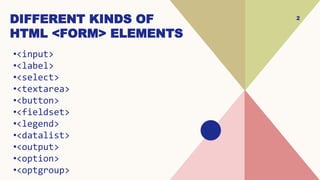
DIFFERENT KINDS OF
HTML <FORM> ELEMENTS
•<input>
•<label>
•<select>
•<textarea>
•<button>
•<fieldset>
•<legend>
•<datalist>
•<output>
•<option>
•<optgroup>
2
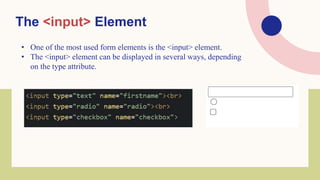
The <input> Element
• One of the most used form elements is the <input> element.
• The <input> element can be displayed in several ways, depending
on the type attribute.
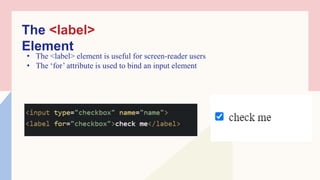
The <label>
Element
• The <label> element is useful for screen-reader users
• The ‘for’ attribute is used to bind an input element
5
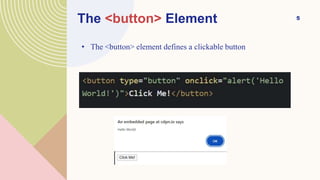
The <button> Element
• The <button> element defines a clickable button
6
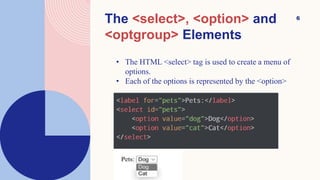
The <select>, <option> and
<optgroup> Elements
• The HTML <select> tag is used to create a menu of
options.
• Each of the options is represented by the <option>
7
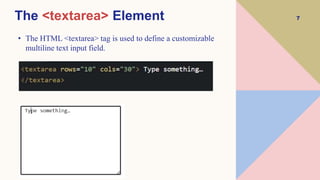
The <textarea> Element
• The HTML <textarea> tag is used to define a customizable
multiline text input field.
8
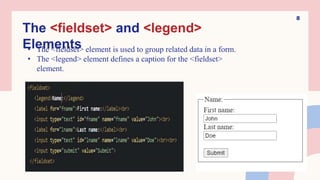
The <fieldset> and <legend>
Elements
• The <fieldset> element is used to group related data in a form.
• The <legend> element defines a caption for the <fieldset>
element.
9
The <datalist> Element
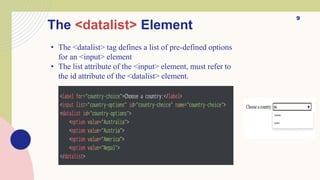
• The <datalist> tag defines a list of pre-defined options
for an <input> element
• The list attribute of the <input> element, must refer to
the id attribute of the <datalist> element.
10
The <output> Element
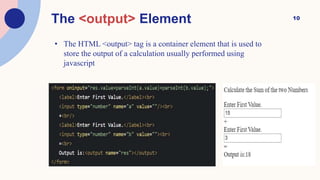
• The HTML <output> tag is a container element that is used to
store the output of a calculation usually performed using
javascript
THANK
YOU
Venu Regula
regulavenu985@gmail.com

HTML_FORM_ELEMENTS HTML_FORM_ELEMENTS.pptx