HTML5 new structural elements
this article done by:
odehtech.com
read the full one here :
http://odehtech.com/html5-new-structural-elements/
by : Mohammad odeh
Changes have been made to particular elements in HTML5 making it simpler
to use. In this post, we will look at some examples highlighting these
improvements, including :
•The new DOCTYPE definition;
•The new structural elements that have been added ;
•Some website layouts and how it builds in html5
Html5 Born :
On 28 October 2014, HTML5 was released as a stable W3C
Recommendation, bringing the specification process to completion.
According to the plan proposed by the W3C in September 2012, the
HTML 5.1 specification Recommendation will be targeted for the end of
2016.
A MINIMAL HTML5 DOCUMENT
:Minimal html5 document look like this
as you can see from the above code there’s some difference between
HTML4 document and HTML5 document
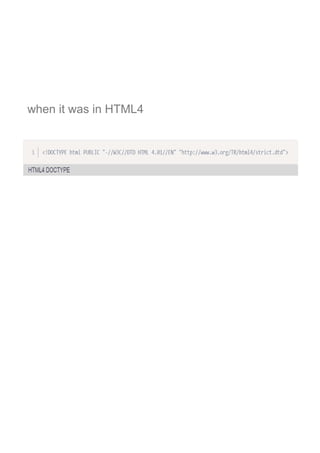
one of the difference is : DOCTYPE definition
So with HTML5, there is only one way to indicate the doctype, and it’s so
simple there is no reason to forget it:
when it was in HTML4
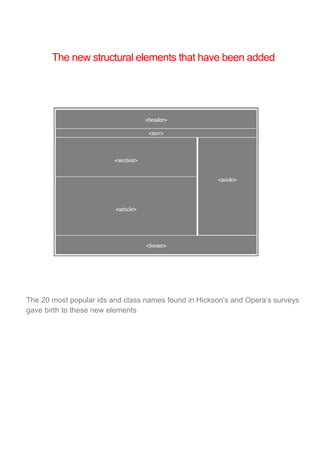
The new structural elements that have been added
The 20 most popular ids and class names found in Hickson’s and Opera’s surveys
gave birth to these new elements
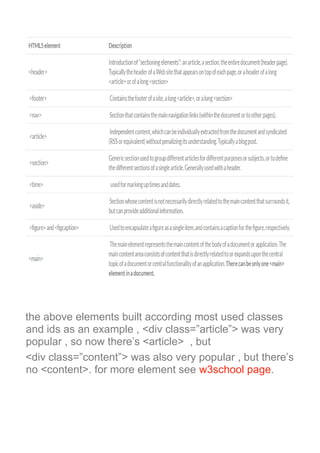
the above elements built according most used classes
and ids as an example , <div class=”article”> was very
popular , so now there’s <article> , but
<div class=”content”> was also very popular , but there’s
no <content>. for more element see w3school page.
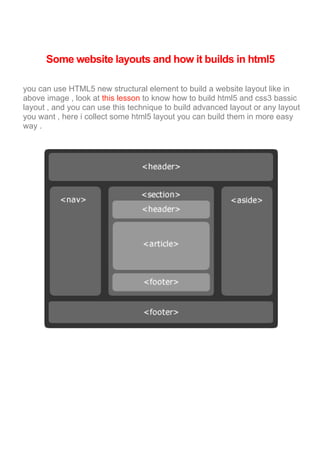
Some website layouts and how it builds in html5
you can use HTML5 new structural element to build a website layout like in
above image , look at this lesson to know how to build html5 and css3 bassic
layout , and you can use this technique to build advanced layout or any layout
you want , here i collect some html5 layout you can build them in more easy
way .
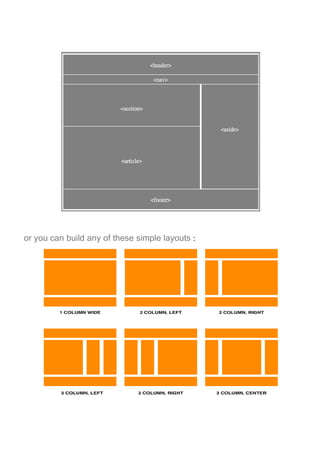
or you can build any of these simple layouts :
Thanks for reading
this article wrote for : odehtech.com
by :Mohammad odeh

html5 new structural elements

  • 1.
    HTML5 new structuralelements this article done by: odehtech.com read the full one here : http://odehtech.com/html5-new-structural-elements/ by : Mohammad odeh
  • 2.
    Changes have beenmade to particular elements in HTML5 making it simpler to use. In this post, we will look at some examples highlighting these improvements, including : •The new DOCTYPE definition; •The new structural elements that have been added ; •Some website layouts and how it builds in html5 Html5 Born : On 28 October 2014, HTML5 was released as a stable W3C Recommendation, bringing the specification process to completion. According to the plan proposed by the W3C in September 2012, the HTML 5.1 specification Recommendation will be targeted for the end of 2016.
  • 3.
    A MINIMAL HTML5DOCUMENT :Minimal html5 document look like this as you can see from the above code there’s some difference between HTML4 document and HTML5 document one of the difference is : DOCTYPE definition So with HTML5, there is only one way to indicate the doctype, and it’s so simple there is no reason to forget it:
  • 4.
    when it wasin HTML4
  • 5.
    The new structuralelements that have been added The 20 most popular ids and class names found in Hickson’s and Opera’s surveys gave birth to these new elements
  • 6.
    the above elementsbuilt according most used classes and ids as an example , <div class=”article”> was very popular , so now there’s <article> , but <div class=”content”> was also very popular , but there’s no <content>. for more element see w3school page.
  • 7.
    Some website layoutsand how it builds in html5 you can use HTML5 new structural element to build a website layout like in above image , look at this lesson to know how to build html5 and css3 bassic layout , and you can use this technique to build advanced layout or any layout you want , here i collect some html5 layout you can build them in more easy way .
  • 8.
    or you canbuild any of these simple layouts :
  • 9.
    Thanks for reading thisarticle wrote for : odehtech.com by :Mohammad odeh