Created and Copyright
Ariful Islam
arifsofg@gmail.com
www.twitter.com/arif98741
HTML5 Introduction
Page: 1
 What Is HTML ?
 HTML Version ?
 Where it is Used ?
 HTML Tag
 Simple Web Page
 Examples ?
What We Will Discuss!
Page: 2
What is HTML ?
HTML(Hypertext markup language) is simple
and easy language that is used in website
and other apps or software where it is need
to show on computer screen. That means
when enter into a website then you see
some text, photos, logo, videos on webpage.
Everything is showed there by this html
language
Page: 3
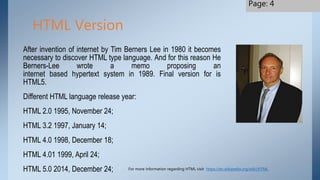
After invention of internet by Tim Berners Lee in 1980 it becomes
necessary to discover HTML type language. And for this reason He
Berners-Lee wrote a memo proposing an
internet based hypertext system in 1989. Final version for is
HTML5.
Different HTML language release year:
HTML 2.0 1995, November 24;
HTML 3.2 1997, January 14;
HTML 4.0 1998, December 18;
HTML 4.01 1999, April 24;
HTML 5.0 2014, December 24;
HTML Version
For more information regarding HTML visit https://en.wikipedia.org/wiki/HTML
Page: 4
HTML is most commonly used as the format of the online
documents we call web pages. When you create a set of
complete HTML documents having a similar look and feel and
linking to one another, this is referred to as a website
Where it is used ?
Page: 5
HTML is also used as the document format of offline (stored
on your computer) help and documentation bundled with the
applications installed on your computer.
HTML Tag!
Page: 6
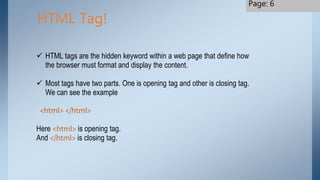
 HTML tags are the hidden keyword within a web page that define how
the browser must format and display the content.
 Most tags have two parts. One is opening tag and other is closing tag.
We can see the example
<html> </html>
Here <html> is opening tag.
And </html> is closing tag.
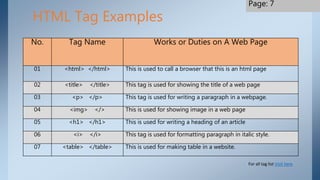
No. Tag Name Works or Duties on A Web Page
01 <html> </html> This is used to call a browser that this is an html page
02 <title> </title> This tag is used for showing the title of a web page
03 <p> </p> This tag is used for writing a paragraph in a webpage.
04 <img> </> This is used for showing image in a web page
05 <h1> </h1> This is used for writing a heading of an article
06 <i> </i> This tag is used for formatting paragraph in italic style.
07 <table> </table> This is used for making table in a website.
HTML Tag Examples
For all tag list Visit here
Page: 7
Simple Web Page
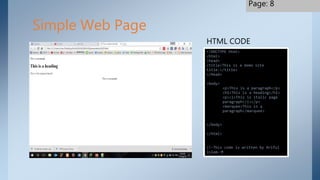
<!DOCTYPE html>
<html>
<head>
<title>This is a demo site
title.</title>
</head>
<body>
<p>This is a paragraph</p>
<h1>This is a heading</h1>
<p><i>This is italic page
paragraph</i></p>
<marquee>This is a
paragraph</marquee>
</body>
</html>
<!-This code is written by Ariful
Islam-
HTML CODE
Page: 8
Ariful Islam
Copyrighter
Web designer and wordpress
developer
Contact: arifsofg@gmail.com
Page: 10

Html5 Introduction For Beginners

  • 1.
    Created and Copyright ArifulIslam arifsofg@gmail.com www.twitter.com/arif98741 HTML5 Introduction Page: 1
  • 2.
     What IsHTML ?  HTML Version ?  Where it is Used ?  HTML Tag  Simple Web Page  Examples ? What We Will Discuss! Page: 2
  • 3.
    What is HTML? HTML(Hypertext markup language) is simple and easy language that is used in website and other apps or software where it is need to show on computer screen. That means when enter into a website then you see some text, photos, logo, videos on webpage. Everything is showed there by this html language Page: 3
  • 4.
    After invention ofinternet by Tim Berners Lee in 1980 it becomes necessary to discover HTML type language. And for this reason He Berners-Lee wrote a memo proposing an internet based hypertext system in 1989. Final version for is HTML5. Different HTML language release year: HTML 2.0 1995, November 24; HTML 3.2 1997, January 14; HTML 4.0 1998, December 18; HTML 4.01 1999, April 24; HTML 5.0 2014, December 24; HTML Version For more information regarding HTML visit https://en.wikipedia.org/wiki/HTML Page: 4
  • 5.
    HTML is mostcommonly used as the format of the online documents we call web pages. When you create a set of complete HTML documents having a similar look and feel and linking to one another, this is referred to as a website Where it is used ? Page: 5 HTML is also used as the document format of offline (stored on your computer) help and documentation bundled with the applications installed on your computer.
  • 6.
    HTML Tag! Page: 6 HTML tags are the hidden keyword within a web page that define how the browser must format and display the content.  Most tags have two parts. One is opening tag and other is closing tag. We can see the example <html> </html> Here <html> is opening tag. And </html> is closing tag.
  • 7.
    No. Tag NameWorks or Duties on A Web Page 01 <html> </html> This is used to call a browser that this is an html page 02 <title> </title> This tag is used for showing the title of a web page 03 <p> </p> This tag is used for writing a paragraph in a webpage. 04 <img> </> This is used for showing image in a web page 05 <h1> </h1> This is used for writing a heading of an article 06 <i> </i> This tag is used for formatting paragraph in italic style. 07 <table> </table> This is used for making table in a website. HTML Tag Examples For all tag list Visit here Page: 7
  • 8.
    Simple Web Page <!DOCTYPEhtml> <html> <head> <title>This is a demo site title.</title> </head> <body> <p>This is a paragraph</p> <h1>This is a heading</h1> <p><i>This is italic page paragraph</i></p> <marquee>This is a paragraph</marquee> </body> </html> <!-This code is written by Ariful Islam- HTML CODE Page: 8
  • 9.
    Ariful Islam Copyrighter Web designerand wordpress developer Contact: arifsofg@gmail.com Page: 10